

惯性聚合 高效追踪和阅读你感兴趣的博客、新闻、科技资讯
阅读原文 在惯性聚合中打开

推荐订阅源

H
Heimdal Security Blog
P
Privacy International News Feed
S
Schneier on Security
P
Proofpoint News Feed
L
Lohrmann on Cybersecurity
Spread Privacy
Spread Privacy
P
Privacy & Cybersecurity Law Blog
D
Darknet – Hacking Tools, Hacker News & Cyber Security
Scott Helme
Scott Helme
K
Kaspersky official blog
大猫的无限游戏
大猫的无限游戏
freeCodeCamp Programming Tutorials: Python, JavaScript, Git & More
aimingoo的专栏
aimingoo的专栏
Simon Willison's Weblog
S
Securelist
Help Net Security
Help Net Security
B
Blog
H
Hackread – Cybersecurity News, Data Breaches, AI and More
Security Archives - TechRepublic
云风的 BLOG
云风的 BLOG
The GitHub Blog
The GitHub Blog
N
News and Events Feed by Topic
Hacker News: Ask HN
Hacker News: Ask HN
cs.CV updates on arXiv.org
CTFtime.org: upcoming CTF events
M
MIT News - Artificial intelligence
雷峰网
雷峰网
博客园 - 司徒正美
V
V2EX
AWS News Blog
AWS News Blog
Know Your Adversary
Know Your Adversary
N
News | PayPal Newsroom
T
Tor Project blog
Cisco Talos Blog
Cisco Talos Blog
OSCHINA 社区最新新闻
OSCHINA 社区最新新闻
PCI Perspectives
PCI Perspectives
Google DeepMind News
Threat Intelligence Blog | Flashpoint
U
Unit 42
C
Cybersecurity and Infrastructure Security Agency CISA
P
Palo Alto Networks Blog
G
Google Developers Blog
T
Threat Research - Cisco Blogs
博客园 - Franky
I
InfoQ
D
DataBreaches.Net
爱范儿
爱范儿
Y
Y Combinator Blog
博客园 - 叶小钗
奇客Solidot–传递最新科技情报
奇客Solidot–传递最新科技情报

The Eclectic Light Company

Hero or hooligan: Theseus’ later years BSD flags are incompatible with iCloud Drive Apple has released macOS Tahoe 26.5.1 In memoriam Mary Cassatt: 1, 1868-1880 Solutions to Saturday Mac riddles 362 What Location Services do in macOS Eclectic paintings of Joseph Stella: 2 European myths Last Week on My Mac: Razzle and dazzle Eclectic paintings of Joseph Stella: 1 American landscapes Saturday Mac riddles 362 Protect files with the Locked or Immutable flag Reading Visual Art: 252 Dragonfly What happens in the log when an app crashes as it starts up? Portraits of trees: Introduction On Reflection: Conclusions and contents Which tasks require mains power? Medium and message: Vast canvases Online reference to external displays for Apple silicon Macs What’s in that phishing email? Hero or hooligan: Theseus and Ariadne Solutions to Saturday Mac riddles 361 How to search document versions Rubens’ Consequences of War Rubens’ Peace and War Saturday Mac riddles 361 How to search Time Machine backups? Naturalists: Contents and artists On Reflection: Extending the image Tackle QuickLook problems Medium and message: Pottery Hero or hooligan: Theseus and the sandals How QuickLook provides thumbnails and previews Last Week on My Mac: Syncing metadata in iCloud Drive Paintings of visits to India 1778-1877 Saturday Mac riddles 360 Naturalists: Sorolla and Zorn On Reflection: Pierre Bonnard 1909-1946 SpotTest 1.2 can display Spotlight metadata directly On Reflection: Pierre Bonnard 1899-1908 How to preserve versions, and how to create versioned PDFs Medium and message: Sculpture What gets synced in iCloud Drive? Hero or hooligan: Perseus 2 Solutions to Saturday Mac riddles 359 Last Week on My Mac: snapshots, the elephant in APFS Paintings of Beatrice Portinari: to 1862 Saturday Mac riddles 359 Naturalists: Into the 20th century How to check whether Spotlight is getting the right metadata On Reflection: Mirror play Hero or hooligan: Perseus 1 The bicentenary of Frederic Edwin Church: 1857-77 Solutions to Saturday Mac riddles 358 macOS virtual machines and audio-video syncing A walk in the parks of Rome, Vienna, Manhattan and Brooklyn Saturday Mac riddles 358 Naturalists: Photography Use Finder tags for categories Control what gets written to the log Medium and message: Tapestry Virtualisation on Apple silicon Macs is different Jerusalem Delivered: Overview and contents The bicentenary of Frederic Edwin Church: 1849-57 Solutions to Saturday Mac riddles 357 Painting Pandora and her box: 1883-1919 Painting Pandora and her box: 1550-1882 Saturday Mac riddles 357 Reading Visual Art: 250 Winged sandals The secret life of the xattr The macOS Natural Language framework and Nalaprop Medium and Message: Stained glass The MACL extended attribute Jerusalem Delivered: 13 Leading characters Solutions to Saturday Mac riddles 356 Privacy: How locations are protected Painting Spring blossom 2 Last Week on My Mac: Don’t be a victim of fraud Painting Spring blossom 1 Saturday Mac riddles 356 Explainer: Recovery Reading Visual Art: 249 Mask Naturalists: Urban poverty On Reflection: Cézanne Privacy: Which folders are protected in Tahoe? Medium and Message: Mosaic Jerusalem Delivered: 12 Delivery Solutions to Saturday Mac riddles 355 Centaurs 2: Revenge Centaurs 1: Fights Saturday Mac riddles 355 Explainer: sandboxes Naturalists: The modern meal Why you can’t trust Privacy & Security Apple has just released an update to macOS Tahoe, to version 26.4.1 On Reflection: Divisionism Please help update CPU frequencies for Apple silicon Macs Commemorating the centenary of the death of John Ferguson Weir Privacy: Files & Folders or Full Disk Access? Jerusalem Delivered: 11 Into Jerusalem Privacy: protected folders
Fix documents that won’t open as expected using Quarant2
hoakley · 2026-06-15 · via The Eclectic Light Company

Having discovered one reliable cause for some documents not being opened as expected when they’re double-clicked, I’ve been looking at how to work around that problem and restore expected behaviour. This article offers a solution.

I know from testing that removing or disabling the com.apple.quarantine extended attribute will immediately enable a document to be opened with a double click, in circumstances where it otherwise fails consistently. This provides two potential solutions: strip that xattr altogether, or change it to alter the behaviour of macOS.

When apps and executable code bearing quarantine xattrs clear quarantine successfully, one bit in that xattr is changed to indicate that. A status of 0082 becomes 00c2, for example, with the third block of four bits going from 1000 to 1100.

Although I have seen that occur in non-executable files, it appears unusual there. Another single-bit change that can achieve the same effect on document files is to change the first block of bits from 0000 to 0010, reflected in the leading digit changing from 0 to 2. I’ve not seen that used in the quarantine of executable code, so it may be confined to non-executable files.

While doing that on test PDF and other documents allows them to be opened from a double-click, it has the opposite effect on Zip archives, which then can’t be opened by Archive Utility either by a double-click or drag-and-drop. That’s encouraging, as setting the bit in the third block would be dangerous as it would then bypass Gatekeeper checks on downloaded apps and executables.

So my preferred strategy is to change the quarantine status digits from 0xxx to 2xxx.

If an app were to perform that, it needs safety checks. To ensure it doesn’t bypass Gatekeeper checks on executable code or scripts, it should refuse to change files whose UTI type contains script, package, archive, executable, java or application. It should also not meddle with bundles or their contents, which could contain malicious files, nor of course with apps. It should also be confined to changing only leading zeroes, in case other bits in that digit are used for other purposes.

This is exactly what my new app Quarant2 does.

To ensure you can only perform this change on files you explicitly select, it doesn’t work through the contents of folders, only separate files you drag and drop onto its window.
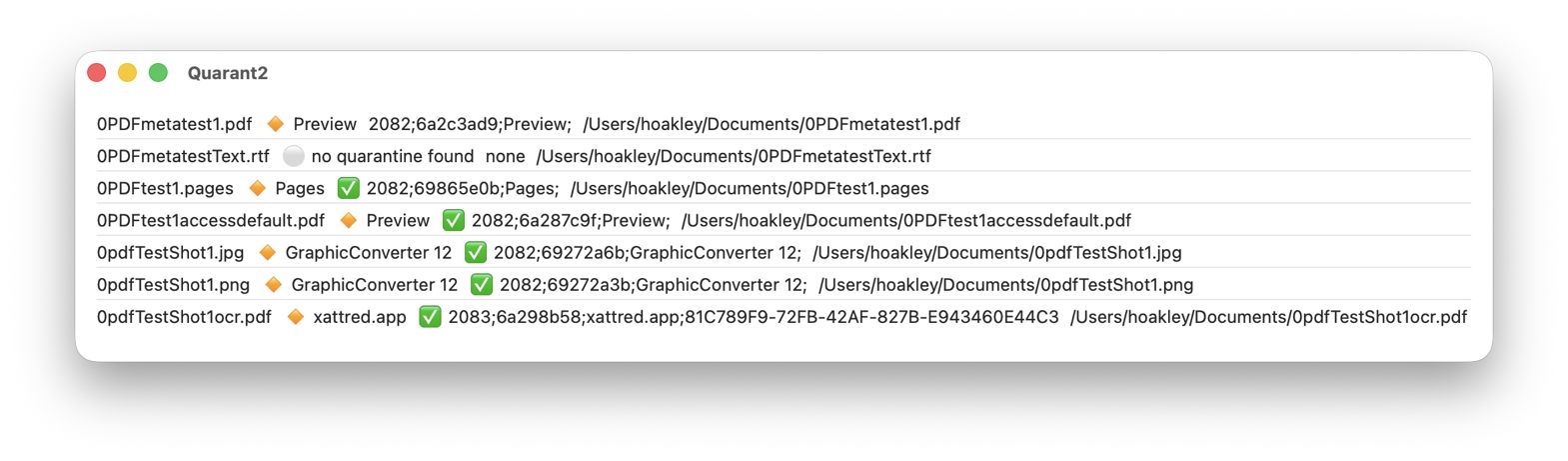
For each file that you drop onto the app’s window, Quarant2 provides the following information:

  • the full name of the file;
  • the name of the app that put it into quarantine, read from the quarantine xattr, prefaced by 🔸;
  • the full text of the quarantine xattr after any change made to it, prefaced by ✅ if Quarant2 has changed it;
  • the full path to the file.

When Quarant2 encounters a problem, can’t or won’t change the xattr, it shows ⚪️ instead of 🔸 and gives the reason. If you want to record any of those from its window, select and copy them, ready for pasting as text.

The first version of Quarant2 is now available for macOS 14.6 and later, including Golden Gate, from here: quarant21

Please let me know whether you think this is useful and a safe solution to the problem.