
惯性聚合 高效追踪和阅读你感兴趣的博客、新闻、科技资讯
阅读原文 在惯性聚合中打开

推荐订阅源

Google DeepMind News
S
Security Affairs
阮一峰的网络日志
阮一峰的网络日志
L
LangChain Blog
Microsoft Azure Blog
雷峰网
雷峰网
Recent Announcements
WordPress大学
WordPress大学
The GitHub Blog
The GitHub Blog
博客园_首页
The Cloudflare Blog
M
MIT News - Artificial intelligence
博客园 - 【当耐特】
MyScale Blog
MyScale Blog
S
SegmentFault 最新的问题
P
Proofpoint News Feed
Y
Y Combinator Blog
Jina AI
Jina AI
博客园 - 聂微东
A
About on SuperTechFans
Blog — PlanetScale
Blog — PlanetScale
博客园 - 司徒正美
G
Google Developers Blog
云风的 BLOG
云风的 BLOG
F
Full Disclosure
CTFtime.org: upcoming CTF events
Microsoft Security Blog
爱范儿
爱范儿
T
Tailwind CSS Blog
J
Java Code Geeks
Vercel News
Vercel News
钛媒体:引领未来商业与生活新知
钛媒体:引领未来商业与生活新知
Stack Overflow Blog
Stack Overflow Blog
罗磊的独立博客
小众软件
小众软件
酷 壳 – CoolShell
酷 壳 – CoolShell
T
The Blog of Author Tim Ferriss
cs.AI updates on arXiv.org
博客园 - 三生石上(FineUI控件)
W
WeLiveSecurity
PCI Perspectives
PCI Perspectives
Attack and Defense Labs
Exploit-DB.com RSS Feed
cs.CV updates on arXiv.org
宝玉的分享
宝玉的分享
IT之家
IT之家
Hacker News: Ask HN
Hacker News: Ask HN
The Register - Security
T
The Exploit Database - CXSecurity.com
T
Threat Research - Cisco Blogs

The Eclectic Light Company

Apple has released an update to XProtect for all macOS Hero or hooligan: Theseus’ later years BSD flags are incompatible with iCloud Drive Apple has released macOS Tahoe 26.5.1 In memoriam Mary Cassatt: 1, 1868-1880 Solutions to Saturday Mac riddles 362 What Location Services do in macOS Eclectic paintings of Joseph Stella: 2 European myths Last Week on My Mac: Razzle and dazzle Eclectic paintings of Joseph Stella: 1 American landscapes Saturday Mac riddles 362 Protect files with the Locked or Immutable flag Reading Visual Art: 252 Dragonfly What happens in the log when an app crashes as it starts up? Portraits of trees: Introduction On Reflection: Conclusions and contents Which tasks require mains power? Medium and message: Vast canvases Online reference to external displays for Apple silicon Macs What’s in that phishing email? Hero or hooligan: Theseus and Ariadne Solutions to Saturday Mac riddles 361 How to search document versions Rubens’ Consequences of War Rubens’ Peace and War Saturday Mac riddles 361 How to search Time Machine backups? Naturalists: Contents and artists On Reflection: Extending the image Tackle QuickLook problems Medium and message: Pottery Hero or hooligan: Theseus and the sandals How QuickLook provides thumbnails and previews Last Week on My Mac: Syncing metadata in iCloud Drive Paintings of visits to India 1778-1877 Saturday Mac riddles 360 Naturalists: Sorolla and Zorn On Reflection: Pierre Bonnard 1909-1946 SpotTest 1.2 can display Spotlight metadata directly On Reflection: Pierre Bonnard 1899-1908 How to preserve versions, and how to create versioned PDFs Medium and message: Sculpture What gets synced in iCloud Drive? Hero or hooligan: Perseus 2 Solutions to Saturday Mac riddles 359 Last Week on My Mac: snapshots, the elephant in APFS Paintings of Beatrice Portinari: to 1862 Saturday Mac riddles 359 Naturalists: Into the 20th century How to check whether Spotlight is getting the right metadata On Reflection: Mirror play Hero or hooligan: Perseus 1 The bicentenary of Frederic Edwin Church: 1857-77 Solutions to Saturday Mac riddles 358 macOS virtual machines and audio-video syncing A walk in the parks of Rome, Vienna, Manhattan and Brooklyn Saturday Mac riddles 358 Naturalists: Photography Use Finder tags for categories Control what gets written to the log Medium and message: Tapestry Virtualisation on Apple silicon Macs is different Jerusalem Delivered: Overview and contents The bicentenary of Frederic Edwin Church: 1849-57 Solutions to Saturday Mac riddles 357 Painting Pandora and her box: 1883-1919 Painting Pandora and her box: 1550-1882 Saturday Mac riddles 357 Reading Visual Art: 250 Winged sandals The secret life of the xattr Medium and Message: Stained glass The MACL extended attribute Jerusalem Delivered: 13 Leading characters Solutions to Saturday Mac riddles 356 Privacy: How locations are protected Painting Spring blossom 2 Last Week on My Mac: Don’t be a victim of fraud Painting Spring blossom 1 Saturday Mac riddles 356 Explainer: Recovery Reading Visual Art: 249 Mask Naturalists: Urban poverty On Reflection: Cézanne Privacy: Which folders are protected in Tahoe? Medium and Message: Mosaic Jerusalem Delivered: 12 Delivery Solutions to Saturday Mac riddles 355 Centaurs 2: Revenge Centaurs 1: Fights Saturday Mac riddles 355 Explainer: sandboxes Naturalists: The modern meal Why you can’t trust Privacy & Security Apple has just released an update to macOS Tahoe, to version 26.4.1 On Reflection: Divisionism Please help update CPU frequencies for Apple silicon Macs Commemorating the centenary of the death of John Ferguson Weir Privacy: Files & Folders or Full Disk Access? Jerusalem Delivered: 11 Into Jerusalem Privacy: protected folders
The macOS Natural Language framework and Nalaprop
hoakley · 2026-04-22 · via The Eclectic Light Company

One of the Mac’s great attractions has been its support for those whose first language isn’t English. That means many of you, as WordPress tells me that you speak German, Dutch, Chinese, Spanish, French, Italian, Japanese, Polish, Swedish, and more, although perhaps not all at once. While English is great as a lingua franca, our mother tongue is our culture and our literary tradition, and a multilingual world is far richer for all our languages.

What you may not realise is the deep support for your languages in macOS. I’m not here referring to Language & Region settings, or translation support, but to the features in the Natural Language framework, introduced in macOS 10.14. It provides support for apps to analyse text in many different natural languages and do useful things with those analyses. These days, that not only includes support provided by Apple, but enables apps to deploy custom natural language models using Machine Learning, or AI if you prefer the term.

AI seems a particular problem for non-English languages at present. In the headlong rush to be first with the most powerful Large Language Model, an industry dominated by monolingual US corporations has focussed its efforts almost entirely on English. Although most of the leading LLMs are claimed to be multilingual, and some include over 50 languages, their models are in reality overwhelmingly built on English, with less than 10% representing all other languages. And that small minority breaks down to even less when you consider individual languages: even major European languages like Italian barely get a look-in.

I’d be interested to hear of your experience accessing LLMs using non-English languages.

This is an area that Apple’s enthusiastic support for smaller, local models could make them more useful than hugely expensive LLMs built in all those US-run data centres.

When the Natural Language framework was first released for macOS, I built an app to demonstrate some of its powers, Nalaprop, and its current version still runs happily in Tahoe. Although it remains useful for some, I feel the time has come to make better use of this framework, or let Nalaprop slip away quietly with the arrival of macOS 27 this autumn/fall. Let me explain what it currently does.

Nalaprop relies on linguistic support modules loaded into macOS. As far as I can tell at present, those provide full support for English, French, Spanish, German, Italian, Portuguese, Russian and Turkish. It can also recognise many other languages, but support for those doesn’t extend to analysing them more fully.
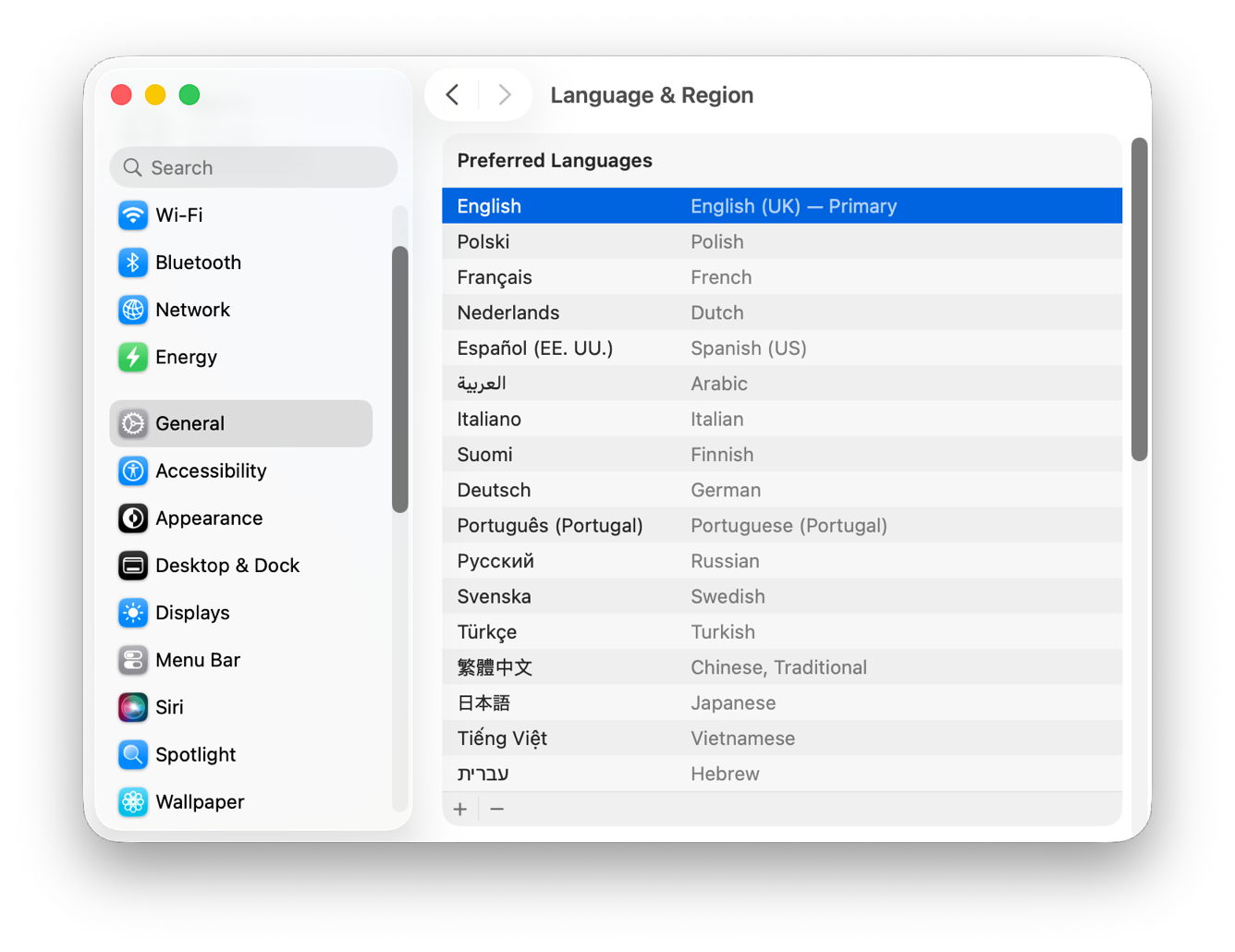
Load your Mac up with a good selection of those, some you’d like it to aspire to, and give it an hour or so to download and install additional language support. Then open Nalaprop’s bundled demonstration text file drawn from Wikipedia’s many languages.
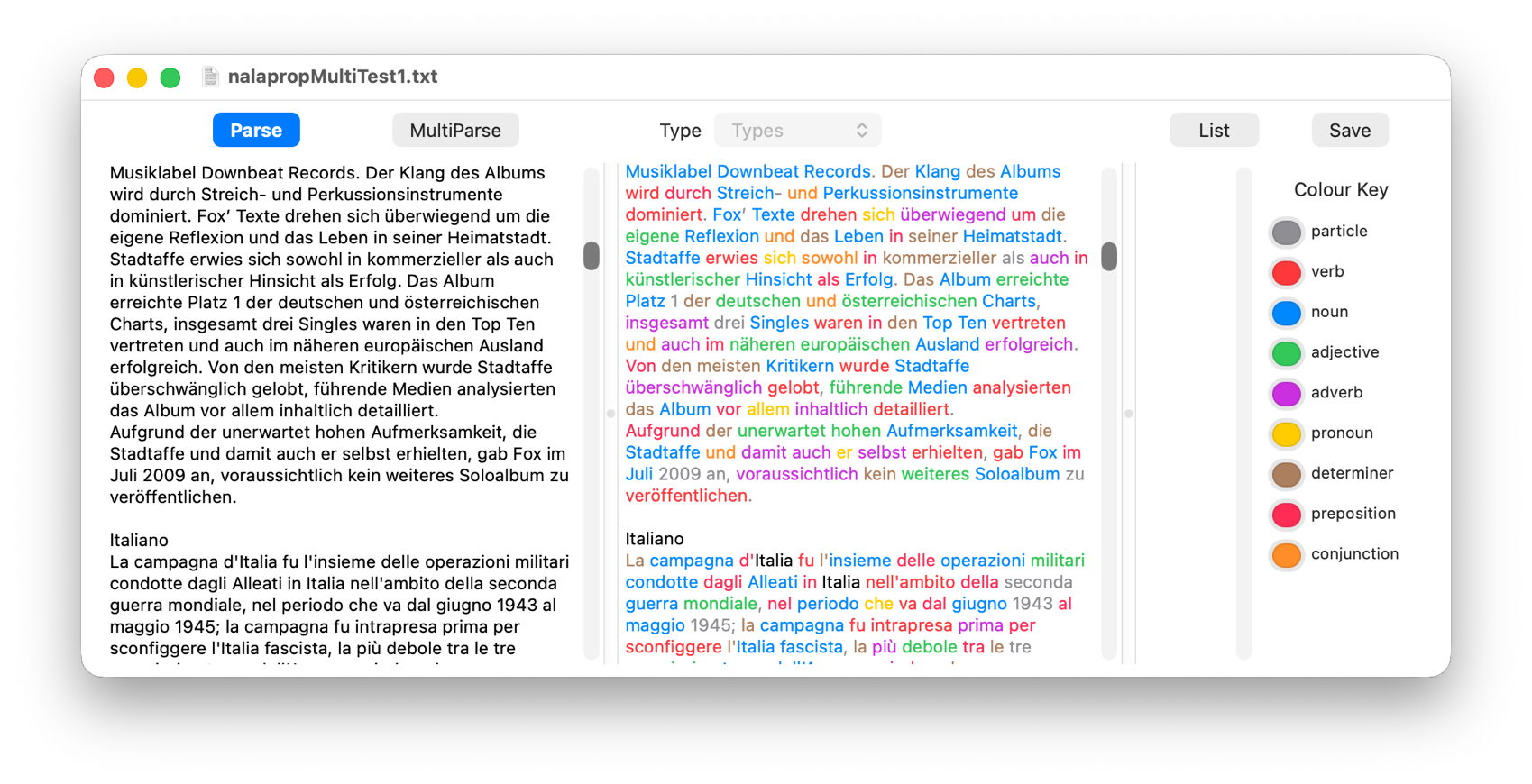
It then analyses the text (on the left) for the common parts of speech, such as nouns, verbs, adjectives, and colours all the words according to that classification (in the centre). As you can see here, it’s not afraid to do this on texts containing multiple languages, and appears to make a good job of all those its supports.

The next stage is initiated by clicking on the MultiParse button, which performs an even more thorough analysis, including lemmas, converting words into their ‘root’ form. For example, the English word is is a form of the verb to be, just as the French est is of être, so Nalaprop displays that root form of the word in the centre panel. As you can see, this doesn’t do much for English, which doesn’t decline words much, but for many languages it can be a great help when you’re trying to understand them.
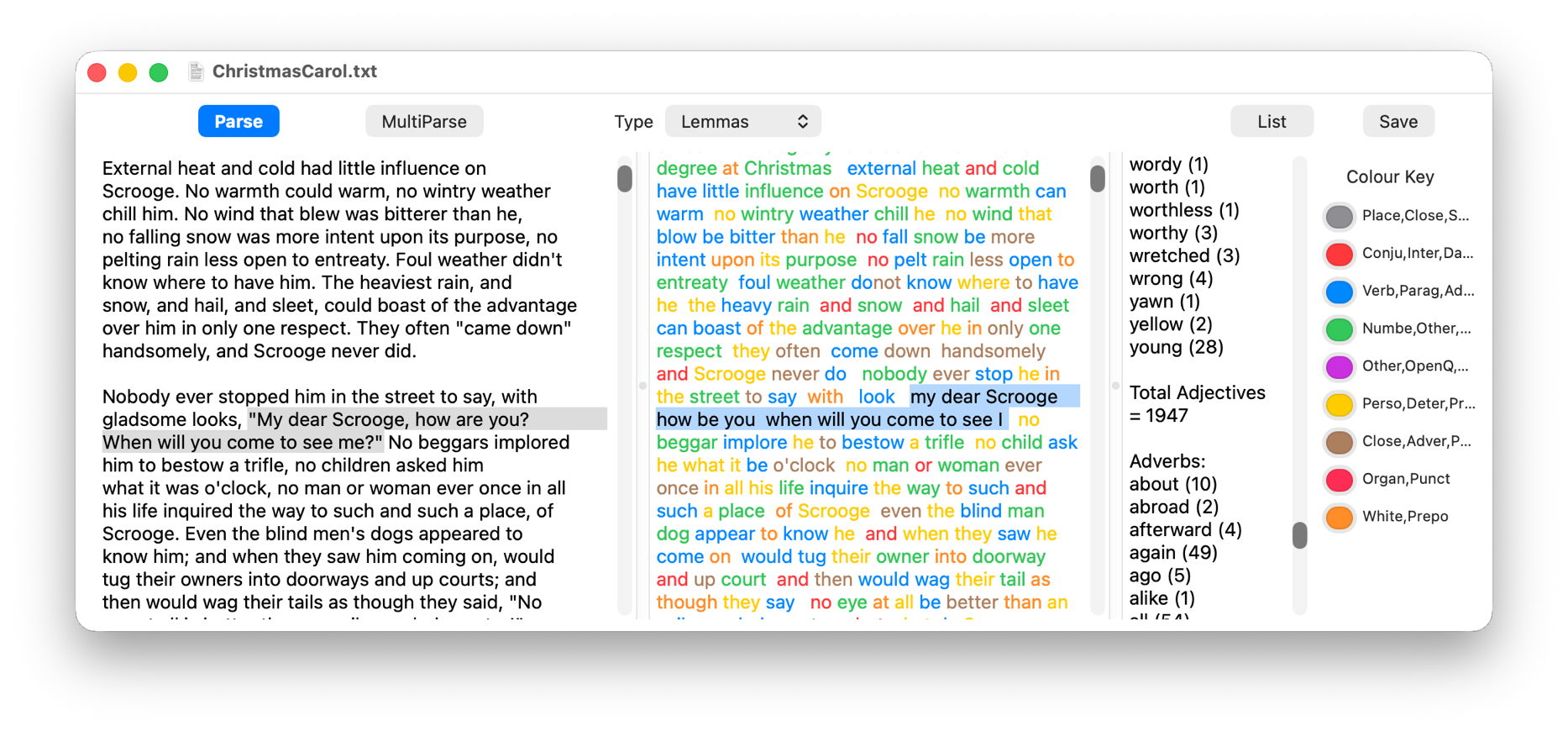
Given all those lemmatised forms, Nalaprop can then build word lists by parts of speech, classifying the word young as an adjective, and finding a total of 28 examples (on the right) in the text of Charles Dickens’ novella A Christmas Carol.

Since I wrote Nalaprop, the Natural Language framework has extended its capabilities, and there’s a great deal more that the app could do, even down to building gazetteers of place-names, exploring similarities between words and sentences using semantic distance, and of course integrating AI built into macOS.

Nalaprop is available from its Product Page.

Should I put it into retirement, or do something more useful with it, and if so, what would you find most useful?