


You need to give your AWS role a set of permissions, but you still want to feel warm and safe on the inside.
“Why not ReadOnlyAccess?” you ask.
“I can just deny the permissions I don’t like” you proclaim.
Let me show you how your faith in ReadOnly access will betray you and leave you with trust issues.
“It’s only ReadOnlyAccess, it’s not like they have privileged permissions or anything” — An actual thing that was typed at me once, 2021
I have about 30 hours left on my Macbook restore so I wanted to give a quick thought on a trend I have observed in some AWS environments regarding permissions management. According to AWS documentation, and virtually everyone else, users and roles are supposed to have the least amount of privileges assigned to them in order to successfully accomplish their task. This is nothing new. I’m sure you are all sick of hearing it. However, this is particularly true for AWS, as it’s a constantly changing environment where a role’s permissions can vary across policy versions. To demonstrate this, I’m going to walk through a fabricated scenario that borrows from a few AWS environments I have encountered.
L337 Thins, Inc is a multi-national baked goods conglomerate that uses a CI/CD pipeline to deploy infrastructure and applications to AWS. They are developing an app that lets cracker enthusiasts put virtual sunglasses on crackers or something, I dunno, I just wanted to use the pun.
Since the organization already uses Active Directory (AD) for on-premise workstations and identity management, they use AD to federate their logins to AWS. In this organization, all employees belonging to the Software Products group (engineers, testers, QA) belong to the “CloudGeneral” AD group. This group will map to an AWS CloudGeneral role, which will allow any user in the “CloudGeneral” group to assume the CloudGeneral role in AWS to do “cloud things”.
In addition, since L337 Thins, Inc is super cloud savvy, they are also using AWS configuration services (this will come into play in a minute).
Below is a screenshot with the attached policies for the CloudGeneral role.
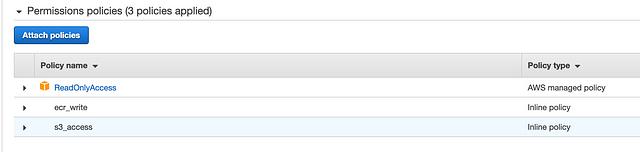
You can see that the organization gave the CloudGeneral role the AWS managed ReadOnlyAccess policy in addition to inline policies that allow write access to Elastic Container Registry (ECR) and the corporate general simple storage service (S3) bucket.
After a security pass, a cloud engineer notes that the ReadOnlyAccess policy gives the CloudGeneral role the ability to list out all users, groups, and policies in the account, and that’s probably not a good thing.
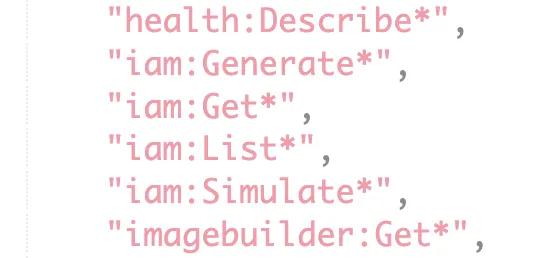
Being the forward thinking engineer they are, they suggest to deny the CloudGeneral role access to all Identity and Access Management (IAM) actions.
This is a really good suggestion.
However, instead of replacing the ReadOnlyAccess policy with a better scoped policy that omits access to IAM, the cloud engineering team adds an inline policy to the CloudGeneral role to explicitly deny access to anything IAM. The policy attached to the role now looks like this:
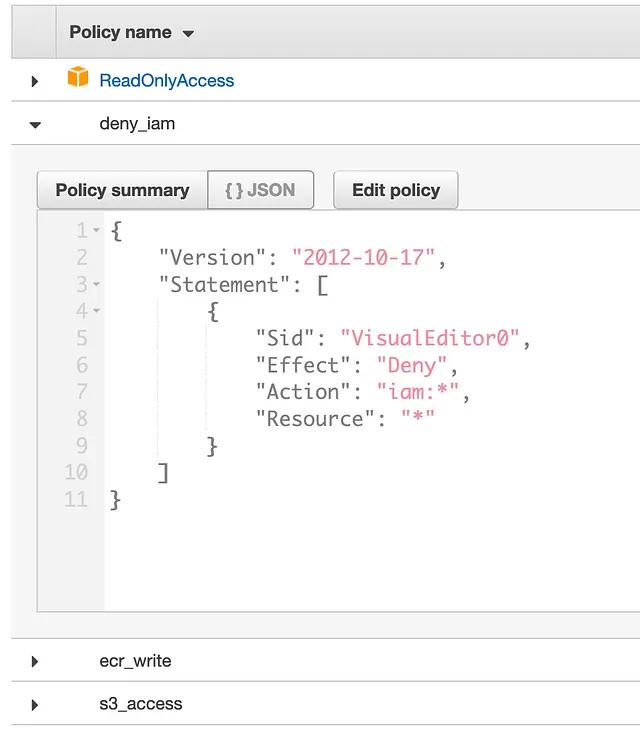
Let’s stop right here. It’s important to remember that all permissions in AWS are denied by default, and they must be explicitly allowed via policy. If there are conflicting statements regarding permissions, deny will take priority. In this example, the ReadOnlyAccess policy grants IAM access, but the inline policy denies it, so the inline policy wins and IAM access is denied. Order of entries do not matter, this is not a firewall.
Removing access to IAM, in and of itself, is a good thing. Users shouldn’t have access to enumerate the access control policies of an entire account. But note that they are now granting the CloudGeneral role a set of permissions, and then selectively taking some away.
If you are following and are a reasonable adult, this should sound silly. They are granting a role a set of permissions, and then denying them. In addition to being redundant and confusing, they are now starting to treat access as a “blacklist”, where they remove the dangerous actions, in contrast to the intended “whitelist” approach, where only intended permissions are granted.
Side Note: To be fair (to be faiiiirrrrr), there is a reasonable use case for granting a role a managed AWS policy with tons of permissions, and then blacklisting a few extra sensitive actions, but those roles should be treated as admin roles, not for large groups of users.
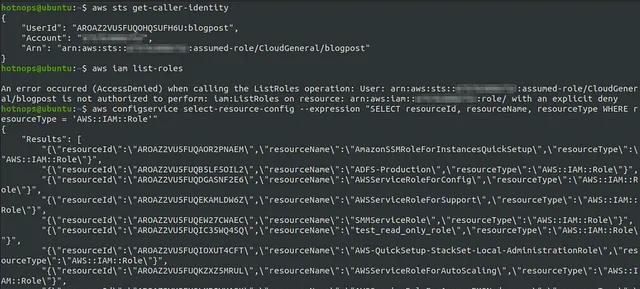
As of the policy version 78, the ReadOnlyAccess policy also grants awsconfig permissions, which means it’s granted to the CloudGeneral role. Of particular importance is the config:SelectResourceConfig action. (Note: config isn’t enabled by default, but we’ve seen it used in multiple environments, and it’s used at L337 Thins, Inc.).
Using this permission, we can query the configuration state and attached document of any entity in the account, effectively bypassing the IAM deny rule.
And here is the main point I want you to take away from this article:
When you model access control like a blacklist, the onus is now on you to understand every single permission granted in the policy.
ReadOnlyAccess contains permission entries for just about every AWS service offered. Even if you do understand every single one of the 100’s of AWS services (I certainly don’t. If you do, please teach me your ways), you need to stay up-to-date on every action introduced to the policy to ensure that any new permission doesn’t negatively impact the policy.
For example, lets say L337 Thins created this CloudGeneral policy with the additional “block IAM” inline policy before February 6th, 2020 (Version 61 of ReadOnlyAccess Policy). At the time of creation, it would not have been affected by the aws:config bypass. They would have been high and mighty knowing that all things IAM are kept secret from the lowly commoners of CloudGeneral.
And then, one fateful day in early February 2020, without warning or even accepting an update, AWS updates their ReadOnlyAccess policy to include config:select-resource-config. Just like that, any user with access to the CloudGeneral role can bypass their IAM blocking policy, making L773 Thins look 👏 like 👏 a 👏 chump.
So where did they go wrong? First, I would recommend staying away from overly-permissive policies like ReadOnlyAccess for generic access. It’s lazy, it’s prone to change, and if utilized, you are responsible for not only understanding the impact for each access granted; you are also responsible for keeping track of the changes. There are more granular policies, for example, AmazonEC2ReadOnlyAccess, which is only the EC2 related permissions. While these may have a bit more access than what is needed, they are also managed by Amazon and may change in the future, which may or may not be beneficial.
It’s important to be precise, especially in access control.
If you ever find yourself denying access in a policy, it may be beneficial to reconsider why it was granted in the first place and remove it from the original policy. Usually, it’s worth the time to hand craft policies that strictly limit users to the permissions they require. You can always add permissions to the list should users require them.
The fun doesn’t stop at awsconfig. ReadOnlyAccess is full of fun permissions that can provide an attacker with sensitive information.
As an example, we were recently able to use the AWS Systems Manager (SSM. I know…) permissions to elevate our privileges in an AWS account. As of Version 78, the ReadOnlyAccess policy allows ssm:Get*, ssm:Describe*, ssm:List*. This includes fun things like ssm:DescribeParameters.
What are SSM parameters?
Oh, it’s no big deal, it’s just where AWS recommends you store your sensitive variables, like application secrets. Also, let’s not forget about ssm:GetCommandInvocation, which allows the caller to view the output of SSM commands, like say, setting the local administrative password on EC2 deployments.
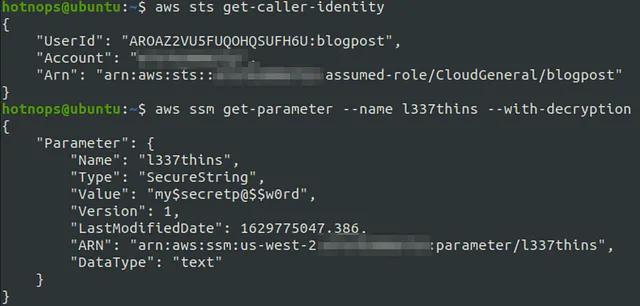
ReadOnlyAccess is not the harmless policy you’ve been led to believe. Think of it more like “Admin lite”™. If you are on the offensive side, I highly suggest sifting through AWS managed policies, like ReadOnlyAccess, and looking for more fun things to prove my point. There’s even a really nifty twitter bot that shoots out a tweet every time an AWS managed policy is changed:
If you are a cloud engineer responsible for IAM, remember that if you decide to treat AWS policies with a blacklist approach, you are signing yourself up for a lot of extra, unnecessary work. You are likely better off making bespoke policies that grant the exact permissions you need. So when someone offers you some ReadOnlyAccess, Just Say No =).
此内容由惯性聚合(RSS阅读器)自动聚合整理,仅供阅读参考。 原文来自 — 版权归原作者所有。