
惯性聚合 高效追踪和阅读你感兴趣的博客、新闻、科技资讯
阅读原文 在惯性聚合中打开

推荐订阅源

月光博客
月光博客
freeCodeCamp Programming Tutorials: Python, JavaScript, Git & More
N
Netflix TechBlog - Medium
大猫的无限游戏
大猫的无限游戏
爱范儿
爱范儿
Martin Fowler
Martin Fowler
OSCHINA 社区最新新闻
OSCHINA 社区最新新闻
The Register - Security
IT之家
IT之家
博客园_首页
Microsoft Security Blog
钛媒体:引领未来商业与生活新知
钛媒体:引领未来商业与生活新知
博客园 - 三生石上(FineUI控件)
I
InfoQ
CTFtime.org: upcoming CTF events
Jina AI
Jina AI
Apple Machine Learning Research
M
MIT News - Artificial intelligence
博客园 - Franky
C
Check Point Blog
T
The Blog of Author Tim Ferriss
V
Visual Studio Blog
Cyber Security Advisories - MS-ISAC
T
Tailwind CSS Blog
Recent Announcements
云风的 BLOG
云风的 BLOG
美团技术团队
The Cloudflare Blog
Y
Y Combinator Blog
H
Hackread – Cybersecurity News, Data Breaches, AI and More
MyScale Blog
MyScale Blog
The GitHub Blog
The GitHub Blog
D
DataBreaches.Net
Google DeepMind News
V
V2EX
aimingoo的专栏
aimingoo的专栏
GbyAI
GbyAI
G
Google Developers Blog
S
SegmentFault 最新的问题
Hugging Face - Blog
Hugging Face - Blog
奇客Solidot–传递最新科技情报
奇客Solidot–传递最新科技情报
U
Unit 42
罗磊的独立博客
量子位
MongoDB | Blog
MongoDB | Blog
Last Week in AI
Last Week in AI
Stack Overflow Blog
Stack Overflow Blog
小众软件
小众软件
D
Docker
人人都是产品经理
人人都是产品经理

GIMP

GIMP - GIMP 3.2.4 Released GIMP - GIMP @ Libre Graphics Meeting 2026 GIMP - New Color Mode Coming to GIMP GIMP - GIMP 3.2.2 Released GIMP - GIMP 3.2 Released GIMP - GIMP 3.2 RC3: Third Release Candidate for GIMP 3.2 GIMP - Interview with Øyvind Kolås, GIMP developer GIMP - GIMP @ FOSDEM 2026 GIMP - GIMP 3.0.8 Released GIMP - GIMP 3.2 RC2: Second Release Candidate for GIMP 3.2 GIMP - GIMP 3.2 RC1: First Release Candidate for GIMP 3.2 GIMP - Interview with Simon Budig, GIMP developer GIMP - New Official Snap package GIMP - GIMP 3.0.6 Released GIMP - GIMP 3.1.4: Second Development Release towards GIMP 3.2 GIMP - Interview with Sevenix (author of GIMP 3.0’s splash image) GIMP - GIMP 3.1.2: First Development Release towards GIMP 3.2 GIMP - GIMP 3.0.4 Released GIMP - New Priorities for GIMP GIMP - GIMP 3.0.2 Released GIMP - GIMP 3.0 Released GIMP - GIMP 3.0 RC3 Released GIMP - GIMP team at FOSDEM 2025 (talk and keynote) GIMP - GIMP 3.0 RC2 Released 🎁 GIMP - GIMP 3.0 RC1 Released GIMP - Development Update: Closing In on the 3.0 Release Candidate GIMP - Experiments with AppImage GIMP - GIMP at LGM 2024 (Rennes, France) GIMP - GIMP 2.10.38 Released GIMP - GIMP 2.99.18 Released: The Last Development Preview Before 3.0! GIMP - GIMP 2.10.36 Released GIMP - GIMP now on Windows for ARM (experimental) GIMP - GIMP 2.99.16 Released: Wilber Week 2023 edition! GIMP - Wilber Week 2023: report GIMP - GIMP in GSoC 2023 GIMP - GIMP Help Manual 2.10.34 Released GIMP - GIMP 2.10.34 Released GIMP - 2022 annual report GIMP - GIMP 2.10.32 on Apple Silicon GIMP - Happy 27! GIMP - Development version: GIMP 2.99.14 Released GIMP - Conference “GIMP and ZeMarmot” in Vandœuvre-lès-Nancy (France) GIMP - Revival of the GIMP developer website GIMP - Development version: GIMP 2.99.12 Released GIMP - GIMP 2.10.32 is on the Microsoft Store! GIMP - GIMP 2.10.32 Released GIMP - GSoC 2022 project announced: CMYK features GIMP - GIMP is a GSoC 2022 mentor organization GIMP - Development version: GIMP 2.99.10 Released GIMP - 2021 annual report GIMP - GIMP 2.10.30 Released GIMP - GIMP is not affected by the log4j vulnerability GIMP - GIMP 2.99.8 macOS package now available GIMP - Development version: GIMP 2.99.8 Released GIMP - GIMP’s official mirrors and mirror policy GIMP - GIMP 2.10.28 Released GIMP - Funding GIMP developers for sustainable development GIMP - Development version: GIMP 2.99.6 Released GIMP - GIMP 2.10.24 Released GIMP - 🎄 Development release GIMP 2.99.4 is out 🎁 GIMP - GIMP 2.10.22 Released for macOS GIMP - This is 25 GIMP - Development release GIMP 2.99.2 is out GIMP - GIMP 2.10.22 Released GIMP - GIMP 2.10.18 Released GIMP - GIMP and GEGL in 2019 GIMP - GIMP 2.10.14 Released GIMP - GIMP 2.10.12 Released GIMP - GIMP 2.10.10 Released GIMP - GIMP and GEGL in 2018 GIMP - GIMP 2.10.8 Released GIMP - GIMP receives a $100K donation GIMP - GIMP 2.10.6 Released GIMP - GIMP 2.10.4 Released GIMP - GIMP has moved to Gitlab GIMP - GIMP 2.10.2 Released GIMP - GIMP 2.10.0 Released GIMP - GIMP 2.10.0 Release Candidate 2 Released GIMP - Fun at SCaLE 2018 GIMP - GIMP 2.10.0 Release Candidate 1 Released GIMP - Libre Graphics Meeting + SCaLE 2018 GIMP - GIMP and GEGL in 2017 GIMP - Strings Freeze For GIMP 2.10 Is Now On GIMP - GIMP 2.9.8 Released GIMP - GIMP 2.9.6 Released GIMP - An Interview with Michael Schumacher, GIMP administrator GIMP - GIMP 2.8.22 Released GIMP - An Interview with Michael Natterer, GIMP maintainer GIMP - GIMP 2.8.20 Packages for macOS and Microsoft Windows are available GIMP - GIMP 2.10 blockers and the road to 3.0 GIMP - GIMP 2.8.20 Released GIMP - WilberWeek 2017 GIMP - Community-supported development of GEGL now live GIMP - 2016 in review GIMP - Making settings persistent in GIMP GIMP - GIMP 2.8.18 Released GIMP - GIMP 2.9.4 Released GIMP - GIMPers at Texas Linux Fest 2016 GIMP - GEGL 0.3.8 and babl 0.1.18 Released GIMP - Updated 2.8.16 Installer with a Major Bugfix Released
GIMP - GIMP 2.10.20 Released
by Wilber · 2020-06-11 · via GIMP

GIMP 2.10.20 comes with new features as well as important bugfixes.

Release highlights:

  • Tool-group menus can now expand on hover
  • Non-destructive cropping now available by cropping the canvas rather than actual pixels
  • Better PSD support: exporting of 16-bit files now available, reading/writing channels in the right order
  • On-canvas controls for the Vignette filter
  • New filters: Bloom, Focus Blur, Lens Blur, Variable Blur
  • Blending options now built into filter dialogs
  • Over 30 bugfixes
We wish you all the best health! - Wilber and co. comics strip
We wish you all the best health! by Aryeom, Creative Commons by-sa 4.0

We listened to users’ feedback on introducing tool groups in the toolbox in the previous release. A lot of people told us they appreciated the change in general but were quite averse to having to click to open the list of tools in a group. The new release adds the option to show the tool-group menu as soon as the mouse hovers over the toolbox button, without having to click it. This option is enabled by default when the toolbox is arranged in a single column, but it can be enabled for arbitrary toolbox layouts, or disabled entirely, through the Toolbox page of the Preferences dialog.

Additionally, when not using the new behavior, toolbox tooltips now list all the tools in a group, to improve their discoverability.
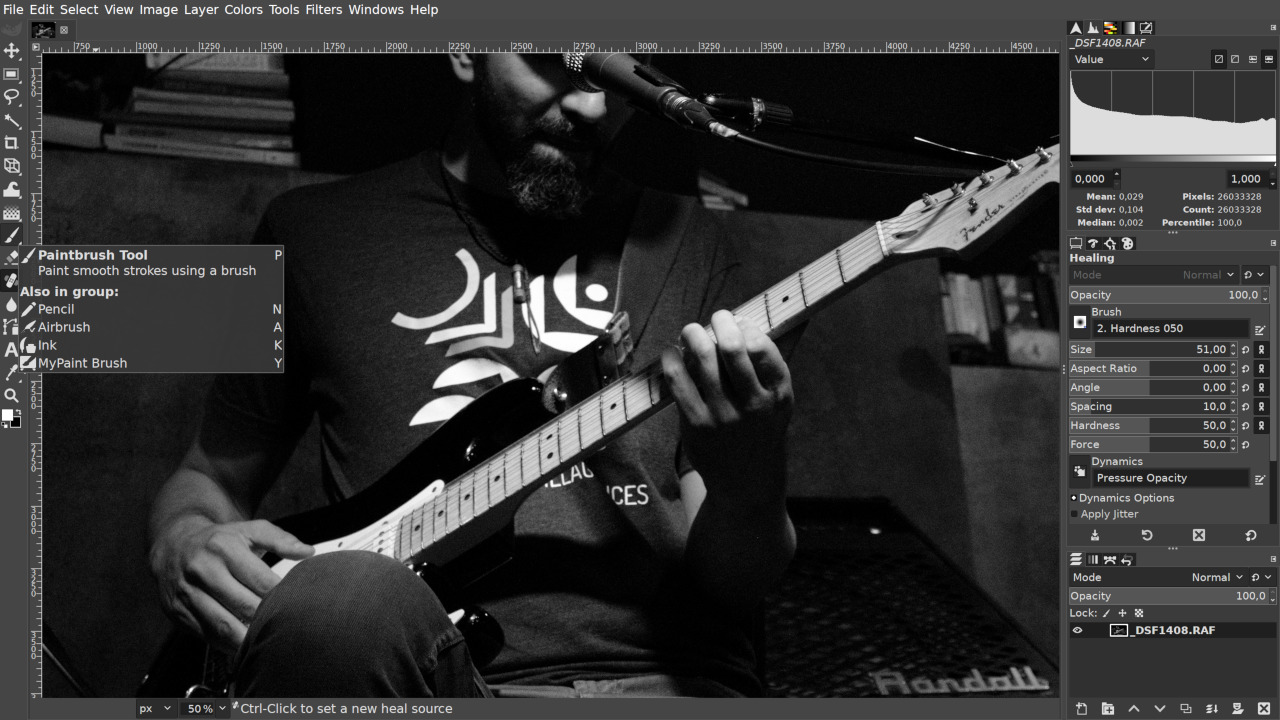
List of tools in a tool group

Basic non-destructive cropping

GIMP now provides a kind of a non-destructive cropping behavior by default. Instead of deleting pixels that you cropped out and thus changing both the layer and the canvas, it will simply resize the canvas. If you export such an image, the resulted file will only have what you see within canvas boundaries.
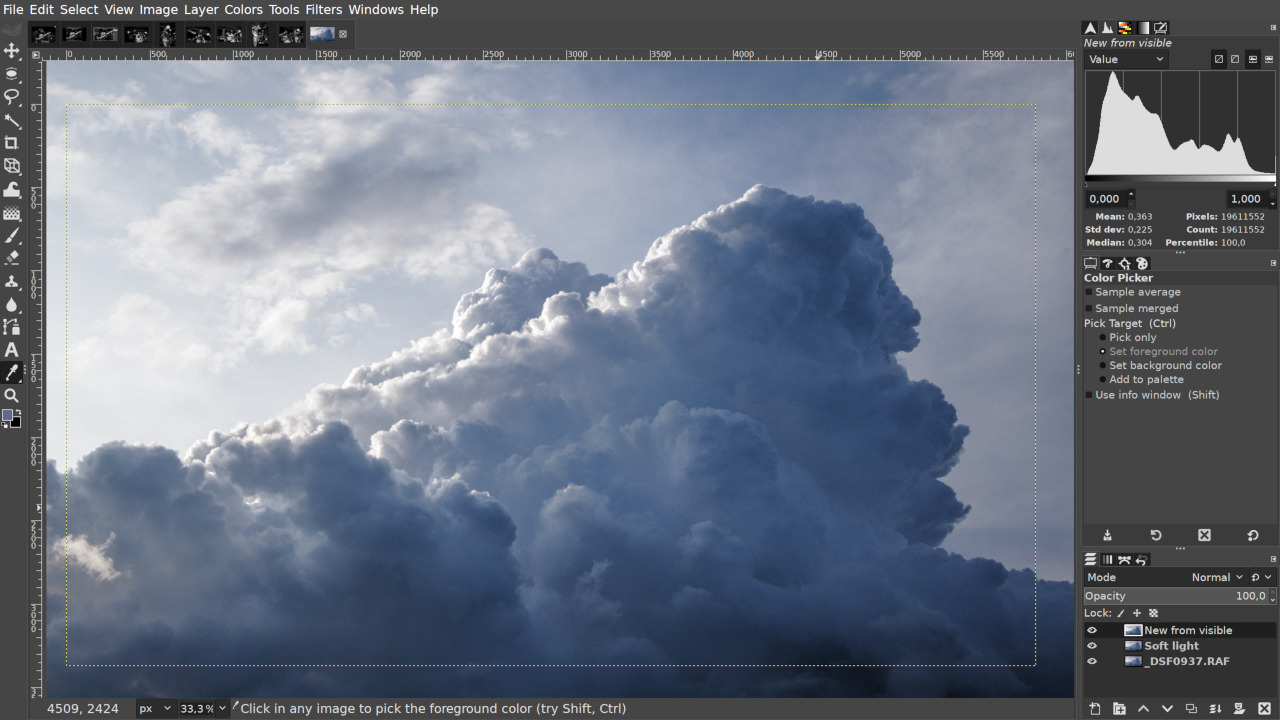
Non-destructive cropping

The benefit of that is (at least) threefold:

  • You can revert to the original uncropped version by going to Image -> Fit Canvas to Layers. None of your edits between cropping and uncropping will disappear.
  • If you save your project as an XCF file, you can close the file and even quit GIMP and still be able to remove cropping and then crop differently at any time later.
  • When you are on the fence about your cropping decision, you can view pixels that you cropped out by going to View -> Show All.

If you want the old “destructive” behavior back, simply tick the ‘Delete cropped pixels’ checkbox in Crop tool’s settings.

New and improved filters

The Vignette filter now has on-canvas controls to visually manipulate the geometry of the vignette rather than enter numeric values in a dialog.

Whichever vignette shape you pick, you will always have control for the inner area that stays unchanged, the border of the vignette where pixels stop changing, and the medium point between the two. Dragging the mouse pointer anywhere outside of the outer control will result in rotating the vignette shape.

In addition, there are two new shapes, ‘Horizontal’ and ‘Vertical’.
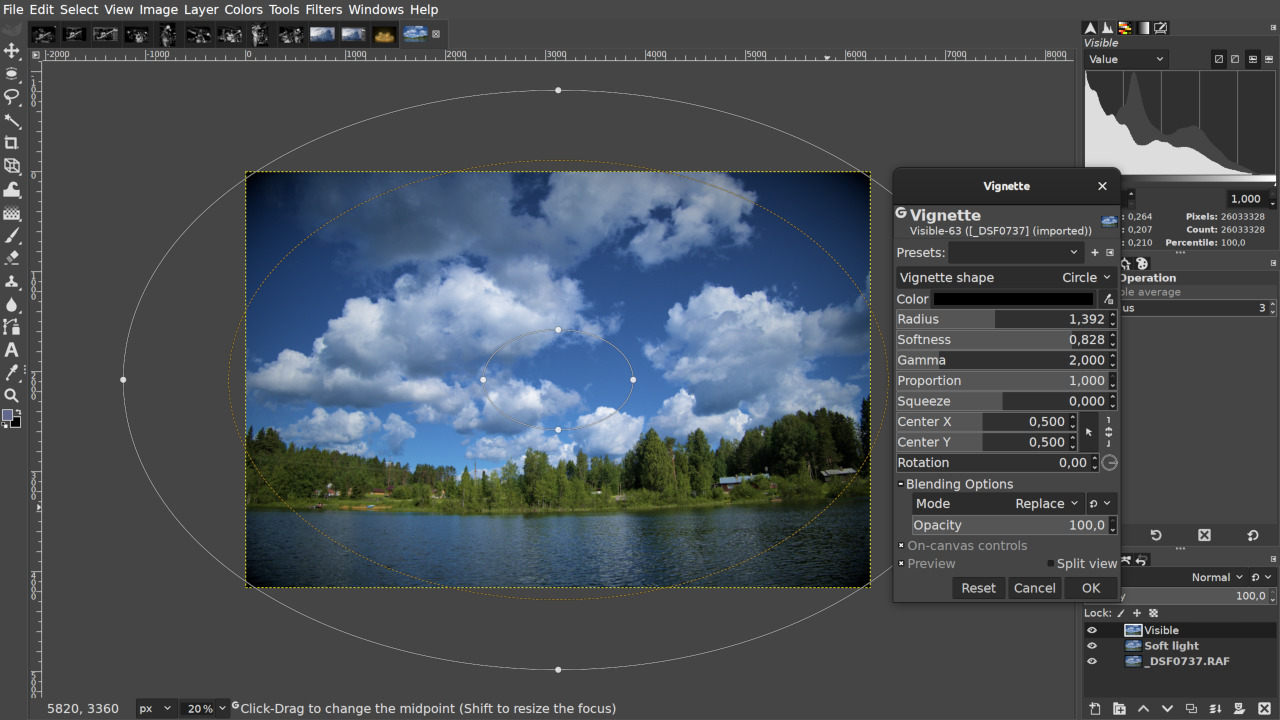
Vignette filter

There are three new filters all related to imitating out-of-focus blur.

Variable Blur takes a layer or channel as an input mask to decide which pixels should be blurred (at what percentage of user-defined maximum blur intensity) and what pixels should stay unchanged, and then blurs pixels with Gaussian Blur.
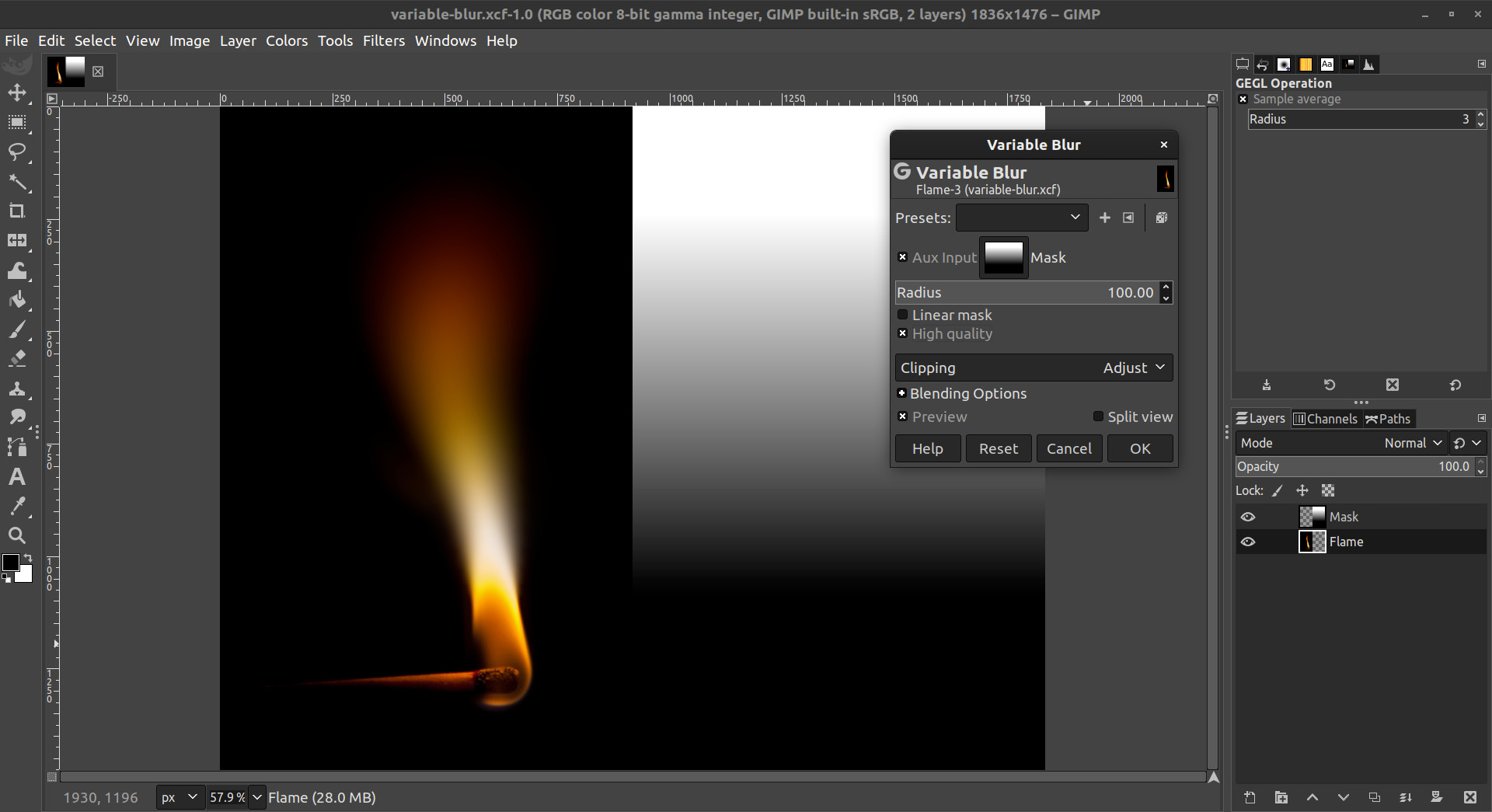
Variable Blur filter
Featured image by Raphaël Bacco.

Lens Blur does the same but provides a far more realistic imitation of the out-of-focus blur, including the partial occlusion of sharp foreground objects by highlights blurred in the background. You also have control of how much highlights are affected.
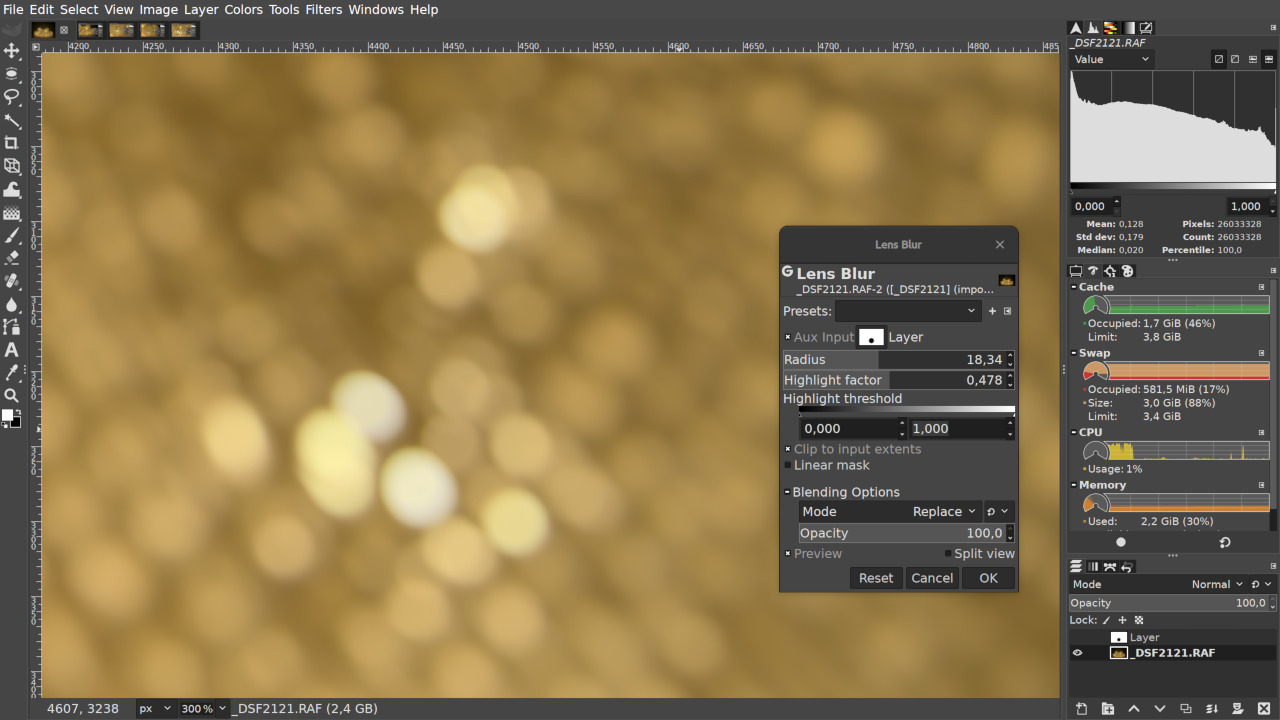
Lens Blur filter

Focus Blur provides a simple user interface to out-of-focus blurring using the same on-canvas controls that the updated Vignette filter has. You can choose between Gaussian Blur and Lens Blur as blurring methods. One of the uses for the filter is creating miniature fakes out of regular photos — the effect originally achieved by using a tilt-shift lens that changes the plane of focus.
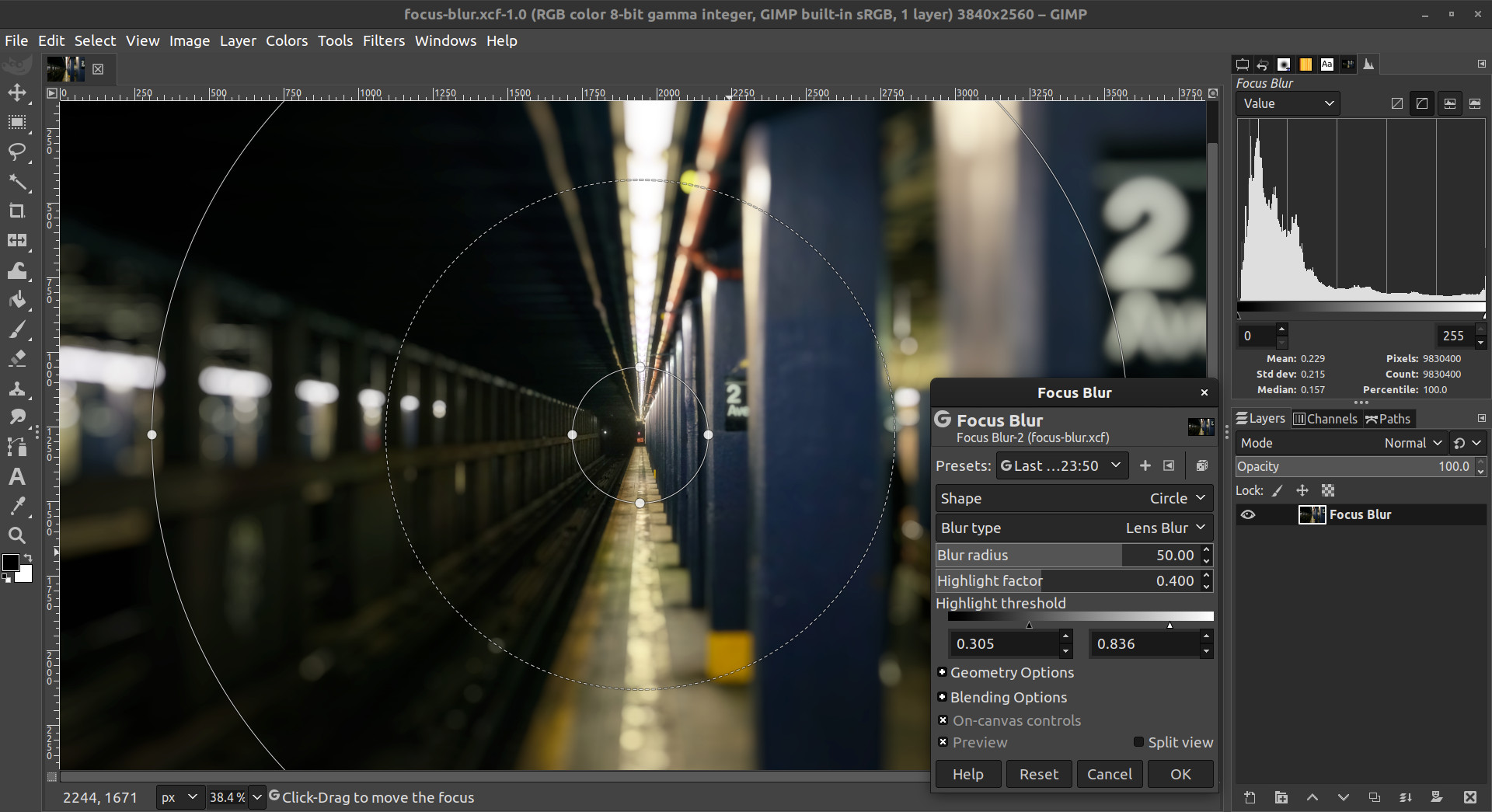
Focus Blur filter
Featured image by Matt McNulty.

New Bloom filter applies an effect that looks a lot like what you can get with the Soft Glow filter but, unlike, Soft Glow, it doesn’t decrease saturation. Technically, Bloom isolates the highlights region, feathers it, and then recombines it with the original image.
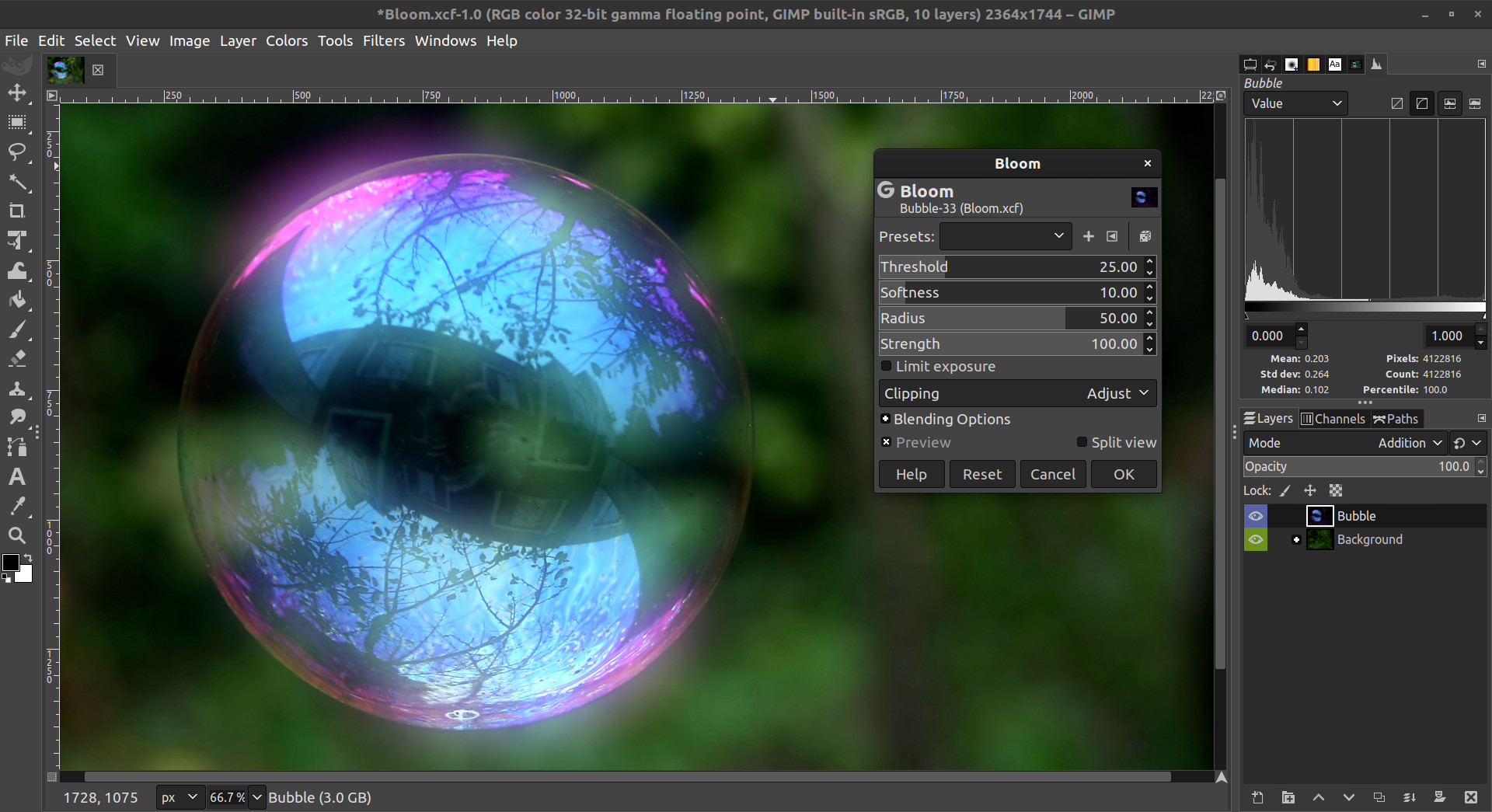
Bloom filter
Featured image by Brocken Inaglory.

Filter dialog improvements

The options dialog of GEGL filters now provides a new Blending Options section, which allows controlling the blending-mode and opacity with which the filter is applied. This replaces the Fade functionality, which was removed in version 2.10.10.

Filter previews now remain cached even when toggled off, allowing for quickly switching between the original and filtered views.

Better PSD support

While GIMP could already load 16-bits-per-channel PSD files, high-bit-depth images can now be exported using 16-bits per channel as well.

In addition, channels are now exported in the correct order, and with their original colors.

Other changes

  • Painting tools can now save and load opacity and blending mode to/from presets.
  • Canon CR3 files are now properly recognized by GIMP and sent to your raw developer software of choice.
  • The TWAIN plug-in used for acquiring images via scanners has been slightly refactored and now supports 16-bit RGB/grayscale images.
  • PNG and TIFF plug-ins now default to not saving color values when alpha channel is present and 0 itself. This is to address security concerns about using simple cutting to remove sensitive information.
  • The PDF plug-in now imports multi-page documents in bottom-first order, similar to animated formats, and also similar to defaults for PDF exporting. This brings consistency but breaks existing behavior in 3rd party scripts.

GEGL and babl

As usual, new GIMP release is accompanied by new releases of babl and GEGL libraries.

The new version of babl comes mostly with bug fixes and performance improvements like the use of AVX2 instructions to convert gamma u8 data to linear float (making those conversions between 1.25x and 2.2x faster). It also features VAPI file generation for Vala integration as the unstable branch of GIMP now supports creating new plug-ins with Vala.

The most important changes in GEGL are:

  • New meta-data API that permits handling non-Exif metadata in different file loaders and savers in a generic manner
  • Faster and softer cubic interpolation.
  • GEGL now gracefully fails when running out of swap space.
  • The hue-chroma operation has been fixed to avoid modifying hue/chroma of neutrals
  • The dropshadow operation now has an option to grow the shadow. This means, with zero shift and larger shadow, you can stroke a text or a bitmap layer.

On top of that, GEGL got several new operations, some of which we already described above. Others are:

  • border-align: places a buffer within the borders of another one.
  • pack: joins two buffers into one, with optional gap.
  • piecewise-blend: uses a grayscale map as index into array of buffers used as LUT (required by new blur filters)
  • reset-origin: moves upper left of extent to 0,0
  • band-tune: parametric band equalizer for tuning frequency bands of image.

Contributors

Contributors to this release are: Ell, Jehan, Jernej Simončič, lillolollo, luz.paz, Marco Ciampa, Michael Natterer, Michael Schumacher, Nikc, Øyvind Kolås, pesder, Sabri Ünal, Salamandar, Sergio Jiménez Herena, Simon Budig, T Collins, woob.

Translators: Alexandre Prokoudine, Anders Jonsson, Bruce Cowan, Cristian Secară, Daniel Korostil, Daniel Șerbănescu, Dimitris Spingos, Jiri Grönroos, Jordi Mas, Nathan Follens, Piotr Drąg, Rodrigo Lledó Milanca, Sabri Ünal, Seong-ho Cho, Tim Sabsch, Yuri Chornoivan, Georgy Timofeevsky.

We also thank lillolollo, nmat, and Michael Schumacher for triaging bug reports, and Julien Hardelin for updating the user manual.

What’s next

We are wrapping up the development in the master branch for v2.99.2, the first unstable release in the 2.99 series leading up to v3.0 some time in the future.

We know that this release is anticipated by various demographics of our users, from people doing digital painting (you can hotplug a graphic tablet now) to photographers using a 4K display (the icon size is right for them now) to people generally wishing to drop GTK2 and Python 2 from their operating systems.

Having said that, there is a warning to make as well.

While we are looking forward to feedback and bug reports, we do not recommend upcoming v2.99.2 for use in production. There are both improvements and regressions from the 2.10.x series. Full details will be published when the release is out (soon).

For the time being, don’t forget you can donate to the project and personally fund several GIMP developers, as a way to give back, and to accelerate the development of GIMP.