





GIMP continues strengthening its bases as this new version 2.10.32 is quite heavy on bug fixes and improves our support for many image file formats.
This news lists the most notable and visible changes. In particular, we do not list here the bug fixes. To get a more complete list of changes, you should refer to the NEWS file or look at the commit history.
GIMP now supports 8 and 16-bit CMYK(A) TIFF files on import. This is one of the first consequences (already!) of the GSoC project by NikcDC under mentorship of Jehan.
Moreover the BigTIFF format is now supported, both for import and export. BigTIFF is an evolution of the original TIFF format allowing files bigger than 4GiB by using 64-bit internal offsets.
The TIFF export dialog exposes a checkbox to enable this format variant.
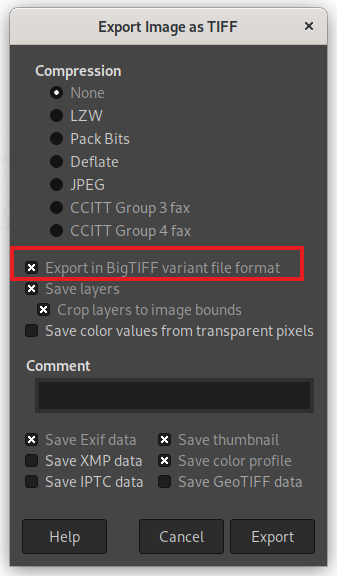
Moreover, if you try to export as a TIFF file and if it fails because of the maximum file size being exceeded, it will propose you to retry either as BigTIFF or with another compression algorithm.
Finally additional special cases in TIFF format are now taken into account, making loading TIFF files more robust.
JPEG XL file format has been supported in development code ever since GIMP 2.99.8.
Daniel Novomeský backported the import code to the stable branch.
We remind that a third-party
plug-in
already exists, by developers of the libjxl library. It is a different
codebase and should still work with GIMP 2.10.32. The main advantage of
the third-party plug-in is that it has also export capabilities (which
our stable plug-in doesn’t have yet), though with some unsolved issues
causing some images to fail to load or export correctly.
You are welcome to continue using the third-party plug-in if you prefer.
For instance the MSYS2 project now has it built-in within the libjxl
package. If you install it, it will take precedence over our new core plug-in.
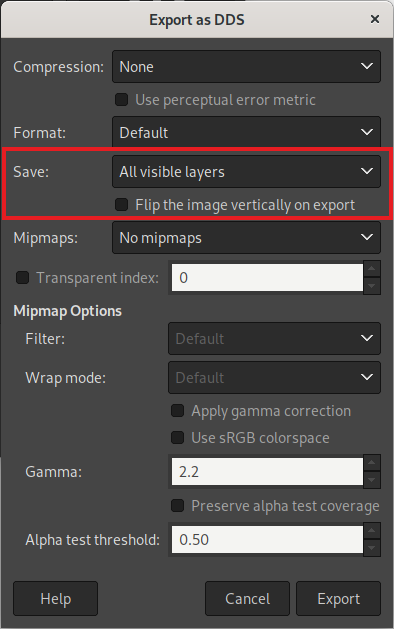
Some game engines require DDS images to be flipped vertically. Until now, asset creators had to flip the image in GIMP, export, then undo, which was not a very practical workflow.
This is why NikcDC added a new “Flip the image vertically on export” option allowing you to flip your image at export time.
Similarly, there is now a “Visible layers” option (additionally to “Selected layer”, “As cube map“…) allowing you to export the whole image render, not a single layer. So depending on your work usage, you won’t have to flatten your image (to later undo this action) anymore before export.
Several metadata handling improvements were made. One of the most
important changes is that GIMP will start dropping
Xmp.photoshop.DocumentAncestors tags if more than a thousand of them
are found.
This case is very likely due to a bug in some versions of Photoshop or
other software creating PSD files as we encountered over 100,000 such
tags in some files (it probably makes no sense that a document could
have that many ancestor documents), which was seriously slowing down
GIMP to the point it looked frozen.
XCF import code also received various improvements, making the software more robust to invalid files. In some cases, it allows to salvage more data from corrupted XCF files, hence protecting your work.
More format handling were improved:
PDB procedure file-bmp-save2 was added for plug-in
developers. It supports all the options available interactively.MONOCHROME1.The Text tool now supports localized glyphs (locl) depending on the
value of the “Language” tool option.
It is useful if you write in languages with regional variant forms (e.g. Serbian or Ukrainian use the same Cyrillic alphabet yet with 5 letters having regional variants).
If your chosen font supports several variants, you can now tell the internal formatting system through the “Language” settings which one needs to be used.
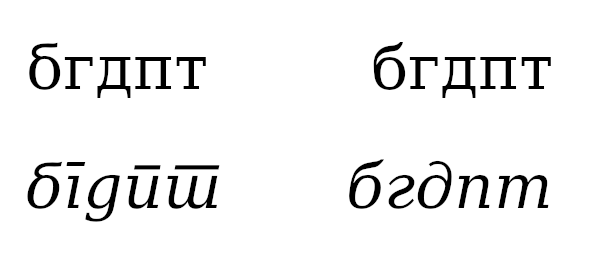
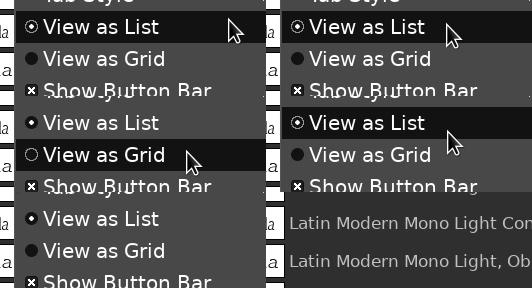

All these changes are works by Stanislav Grinkov.
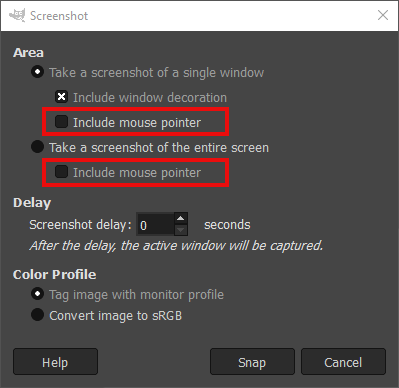
The Screenshot plug-in was missing the “Include mouse pointer” option on Windows.
This long missing feature, which was available on other platforms (such as Linux X11/Wayland, *BSD or macOS) is now implemented on Windows as well!
GIMP 2.10.32 is the first stable release with the nice optimizations
brought since babl 0.1.90 and GEGL
0.4.36,
now that they have been battle-tested and debugged within the
development release GIMP 2.99.10.
As a consequence, babl 0.1.92 has been released, fixing in particular
SIMD discovery ability, which was misbehaving on Windows.
These improvements are important enough that we felt their 2.99.10 description deserved to be copied on the stable news to make clear this applies to GIMP 2.10.32 now.
Citing Øyvind in a recent report:
babl works as a universal pixel encoding translator by having - a not necessarily fast reference conversion able to deal with everything - and a collection of conversions that can be chained together into what babl calls fishes. The fishes are raced against each other to find the best conversion babl is able to create.
In some situations, a LUT (Look-Up Table) will perform better, we now know what the performance will be of using a LUT for various combinations of input and output bits per pixel; and mark fishes that are better as LUTs on creation time. If such a fish is used more than a minimum, LUT population is triggered.
Right now one drawback is that it might actually slow down slightly the
first conversion happening in a given input > output conversion couple.
The solution which might come later would be to create the LUTs in the
background in a thread and continue doing non-LUT conversions until it
is ready.
Note that the created LUTs are also garbage-collected after a few minutes of non-usage, to avoid filling memory with single use LUTs.
All of babl, GEGL and ctx have gotten similar SIMD build and dispatch changes applied.
Image processing code written to be portable and performant caters well to the auto-vectorization support for SIMD in modern compilers. The way it is done is mostly by changes to the build system. For now the code remains the same for all targets but the approach can be extended with conditional intrinsics.
To see the impact this can have, here is a test of filling a circle with ctx and its different pixel encoding targets, on a Raspberry Pi with default compiler flags (without neon support). Note that the cairo reference comparison is the BGRA8 format (the only other format proposed by Cairo is A8):
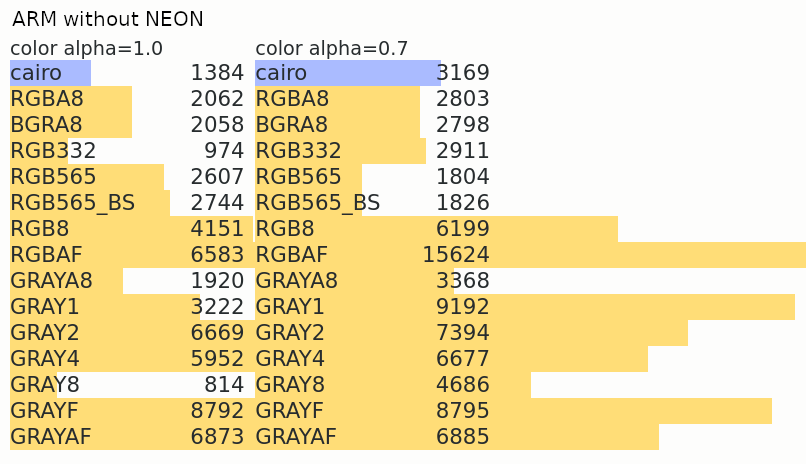
And the same test, with the compiler allowed to use Neon instructions:
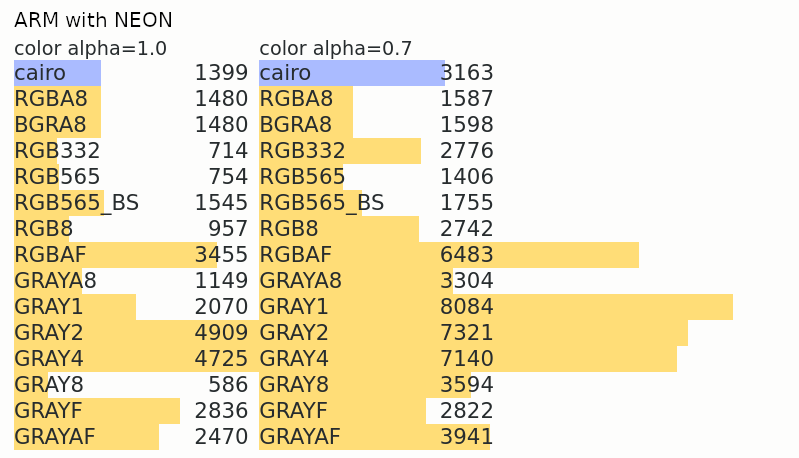
Note well that both the optimized and non-optimized cases are built-in, and availability of relevant instructions determined by runtime tests. This makes these optimizations very portable, despite being based on recent architecture instructions.
ℹ️ Note that these changes (both the automatic LUT generation and the SIMD dispatch) will apply to GIMP 2.10 versions later. For now they are available in 2.99 as a form of beta test. We welcome feedbacks if you encounter any misbehavior.
babl now also comes with pre-defined CIE Lab u8 and CIE Lab u16 formats.
lukaso was already considered co-maintainer of the macOS build
repository of GIMP (gimp-macos-build) since they have done most heavy
lifting on GIMP for macOS for many months. This has been made official
by changing their account to maintainer on this build repository.
Lloyd Konneker has been given developer git access to the main GIMP repository, in particular for their nice work so far on script-fu (which was in a state where dropping script-fu for GIMP 3.0 would have been considered otherwise).
Kevin Cozens, a long term GIMP contributor and script-fu maintainer got back recently and was given git access again to the repository. He will help co-maintain script-fu with Lloyd.
Ondřej Míchal has been given “Reporter” rights on the main GIMP repository (allowing to triage reports: labelling, closing, reopening, and moving reports…).
After being given “Reporter” rights initially, NikcDC has eventually been given developer git access in order to facilitate the work on feature branches for their GSoC project.
10 people contributed changes or fixes to GIMP 2.10.32 codebase:
About translations of GIMP itself:
Contributions on other repositories in the GIMPverse:
babl 0.1.92: Øyvind Kolås.babl 0.1.90: Øyvind Kolås, Mingye Wang, Jehan,
Tomasz Golinski and Andrzej Hunt.GEGL 0.4.36: Øyvind Kolås, Anders Jonsson, Jehan,
Alan Mortensen, Caleb Xu and zamfofex.ctx contributors in the same timeframe: Øyvind Kolås, and Jehan.gimp-macos-build (macOS build scripts): Lukas
Oberhuber and Jehan.org.gimp.GIMP (stable flatpak): Hubert Figuière,
Ondřej Míchal, Jehan and Rebecca Wallander.gimp-help (GIMP manual) since last
stats:gimp-web (website) since last stats: Jehan,
Alexandre Prokoudine, Anders Jonsson, Tom Gooding, Alberto Garcia
Briz, Babs Keeley.Then let’s not forget to thank all the people who help us triaging in Gitlab, report bugs and discuss evolutions with us. And of course, our community is deeply thankful to the internet warriors who manage our various discussion channels or social network accounts such as Ville Pätsi, Alexandre Prokoudine, Liam Quin, Michael Schumacher and Sevenix!
Note: considering the number of parts in GIMP and around, and how we
get statistics through git scripting, errors may slip inside these
stats. Feel free to tell us if we missed or mis-categorized some
contributors or contributions.
Ever since our new official mirror procedure, the following mirrors have been added to our rotation scripts:
One mirror from the previous list had to be removed because of performance issues, and a mirror acceptance is still on-hold because of the conflict and unstability in East Europe.
As a fun note, GIMP is now back to Berkeley through the Open Computing Facility (student organization for all University of California, Berkeley students, faculty, and staff). For anyone wondering why it’s fun, you may read with interest the birth story of the GNU Image Manipulation Program.
TLDR; GIMP was originally born in the University of California. I guess it’s good to be home, right?
Our books page was in a badly maintained state. 4 books in Spanish were added to the list recently:
We took the opportunity to restructure the page with per-language section.
This is also a good time to remind that it is up to everyone to help us keep this page updated. We know many more books have been published about GIMP across the years so the list is very incomplete. Therefore if you wrote or know of a book absent from the page, please feel free to report the same information as other books on the page so that we can add them. Thanks!
As usual, GIMP 2.10.32 is available on GIMP official website (gimp.org) in 3 package formats:
Other packages made by third-party are obviously expected to follow (Linux or *BSD distributions’ packages, etc.).
You may notice that stable releases are slowing down (GIMP 2.10.30 happened 6 months ago) as we are reaching a good stability overall on this branch, despite being held back by our very old toolkit. Nowadays most of our focus is on the development branch. Yet we will continue to provide updates and bug fixes to the 2.10 branch until GIMP 3.0 is out.
Don’t forget you can donate to the project and personally fund several GIMP developers, as a way to give back and accelerate the development of GIMP. As you know, the maintainers of GEGL and GIMP are crowdfunding to be able to work full-time on free software. 🥳
此内容由惯性聚合(RSS阅读器)自动聚合整理,仅供阅读参考。 原文来自 — 版权归原作者所有。