





Closer than ever to a release candidate for GIMP 3.0, we introduce the latest
development version: GIMP 2.99.16!
This news covers some of the more noteworthy or interesting parts of this update
and we are very happy to be able to showcase these.
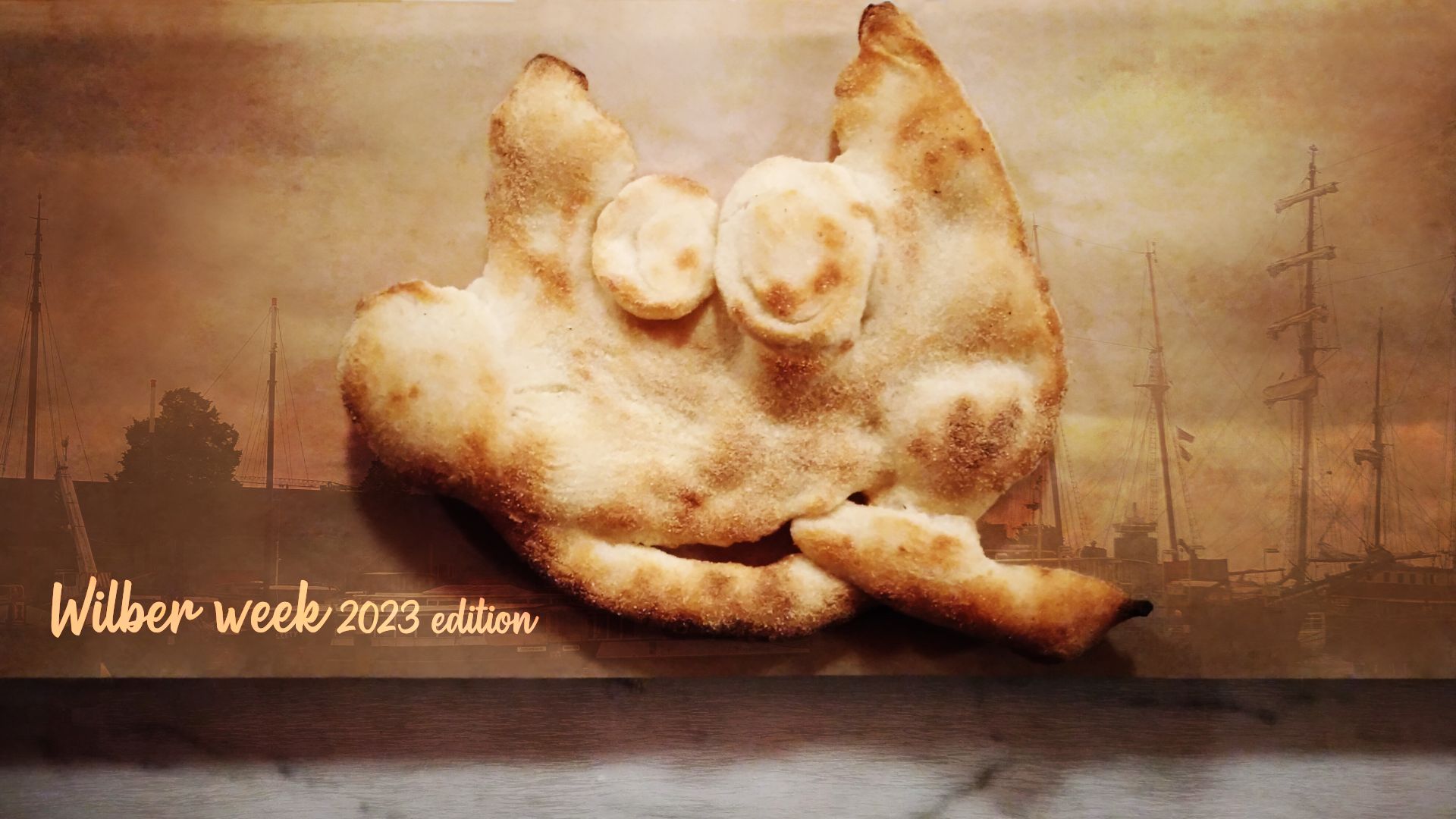
Note: the fun story behind this splash screen is Aryeom molding a pizza dough Wilber on the first evening at Wilber Week. The oven-cooked dough stayed with us during the whole stay. This release was dubbed the “Wilber Week 2023 edition” as a homage to our very successful contributor meetup.
This news lists the most notable and visible changes. In particular, we do not list here bug fixes or smaller improvements. To get a more complete list of changes, you should refer to the NEWS file or look at the commit history.
GIMP 3.0 has been known as the GTK+3 port version, so you will be happy to read that this port is finally over. To be fair, we still have a few minor deprecation warnings here and there, but nothing like the hundreds we used to have.
GimpAction infrastructure¶Our last big work was to port how “actions” are handled, which in GTK vocabulary
means shortcuts, their mechanism, but also how menus are handled and how generic
widgets can be quickly assigned shared action code. Starting from GTK+3, actions
moved to GLib (GtkAction became GAction) while losing a lot of features
(everything user-facing basically, i.e. labels, descriptions, icons, and so on)
or broken apart (the concept of shortcut itself stayed in GTK).
Therefore we had to reimplement the whole thing as a wrapper around GAction,
called obviously GimpAction, because for us, these user-facing features are
major parts of what makes an action (especially as we do a lot of GUI and code generation so things like
labels or icons are not to be associated to a widget — be it a button, a menu
item or anything else — but to the action assigned to this widget, for easy
and generic reuse).
We also had to wrap a bunch of other widgets, such as our own menus (mostly
because menus generated from menu models don’t have tooltips anymore in GTK+3,
yet we make extensive use of tooltips) and menu models (GimpMenu and
GimpMenuModel), our own toolbar and menu bar (GimpToolbar and GimpMenuBar)
and more.
It took me about 2 months to finish while also having to take care of other code, maintenance and usual bug fixes. Boring and exhausting, but this is now done! 😅
It also gives us a whole new world of possibilities as we added new concepts which we wanted for a long time, such as the ability to associate a short and long label to an action (e.g. when it’s used in a contextual interface such as a menu vs. when it’s used without context, such as the action search). It is also the path for planned future improvements (e.g. for a future customizable toolbar).
We still have a bit more work to do to get our new menu and action code exactly how we want it, but we are in a good enough state to showcase it. It won’t feel very different to most of you (and you may also find issues), but not feeling too different was the point too.
Now there are much more immediate improvements which are worth noting.
The new Glib/GTK+3 actions make it possible to assign several shortcuts for a
single action. For the time being, the shortcut dialog doesn’t allow you to do so,
yet we already use this ability internally for default shortcuts. For instance
number keypad keys are not the same as the ones from the number key row so we
used to create a duplicate action doing the same thing to support both (because
for most people Ctrl-1 should work the same whether from keypad or top row).
Now we can just assign both variants to a same action.
As another example, it is now possible to support the special semantic media key
(such as media key Copy, Cut and Paste which can be found on some keyboards).
An updated shortcut dialog allowing you to set your own multiple shortcuts might not come for GIMP 3.0, though hopefully not too long after.
Now that we have our own action wrapper, we made so that it also tracks its own menu position, so that we can show this menu path in the action search dialog. This will help people who prefer menus to better find their ways.
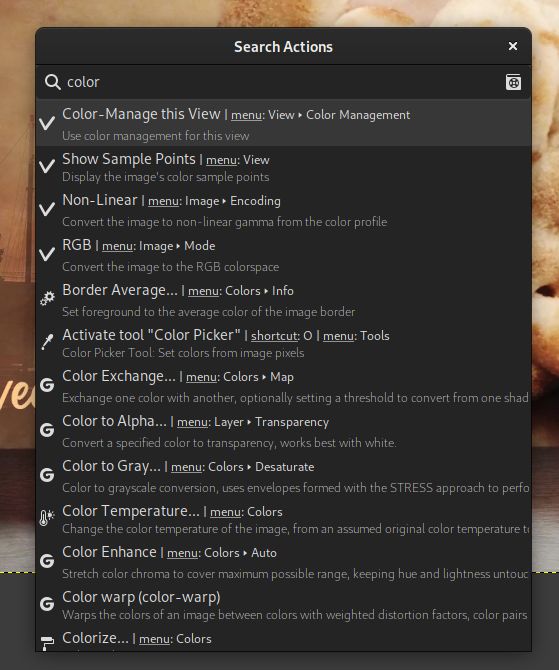
You may also notice a small “Manual” 📓 icon in this screenshot. Clicking it will open the manual page for a given action (if no help section exists for this specific action yet, you will be redirected to the action search help page).
Alternatively, hitting the F1 key will open the help page of the selected action.
GEGL is our image processing engine. Filters are implemented as separate modules, which we call “operations”. While it is released with a long list of default operations, third-party developers can implement their own filters, hence benefitting from automatic dialog generation, on-canvas live preview, curtain preview, preset saving, previous use settings history and more.
GEGL has been a major component since GIMP 2.10, yet we still needed specific
code to place GEGL operations in menus.
As for third-party filters developers, they had to either implement a bogus
plug-in to wrap their GEGL operation, or settle for being only visible in the
long list of filters shown inside the GEGL operation tool.
Well this has changed as GEGL filters now have easy access to menus in their own right, just like plug-ins do.
From now on, GIMP reads the GEGL key "gimp:menu-path" to add an operation in
menus. For instance, say that I wrote an artistic filter to stylize an image and
I want it to be under the submenu Filters > Artistic. So my operation code
could contain the following code:
  gegl_operation_class_set_keys (operation_class,
                                 "name",           "Jehan:my-style",
                                 "title",          _("My Super Cool Style"),
                                 "description",    _("Stylize an image the way I like it"),
                                 "gimp:menu-path", "<Image>/Filters/Artistic",
                                 NULL);
And here it is:
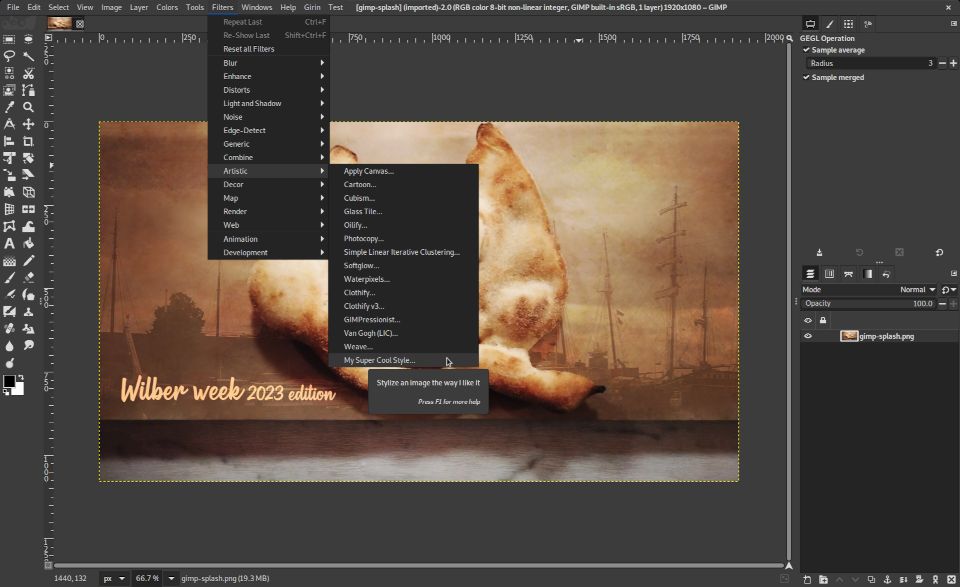
GIMP will generate automatically the GUI according to the properties declared in your operation.
Of course, you can also create your own menu folders. Say I create a bunch of
filters which we use specifically for our movie
project, I could create a submenu
"<Image>/Filters/ZeMarmot" (or even a top-level menu. You’ll notice the
“Girin” menu in my screenshot which is where we install our custom plug-ins already).
We will use this to simplify core GIMP code as well, even though for now, only two new GEGL filters use this feature.
ℹ️ About GEGL operation namespaces: you may notice that I prefixed my hypothetical filter name with “Jehan:”. This is a way to “namespace” your filters with a unique name and avoid clashes if someone were to implement a filter with the same name. Choose this namespace wisely, and in particular do not use “gegl:” or “svg:” namespaces which are reserved for GEGL core operations (and might even be forbidden some day to third-party operations).
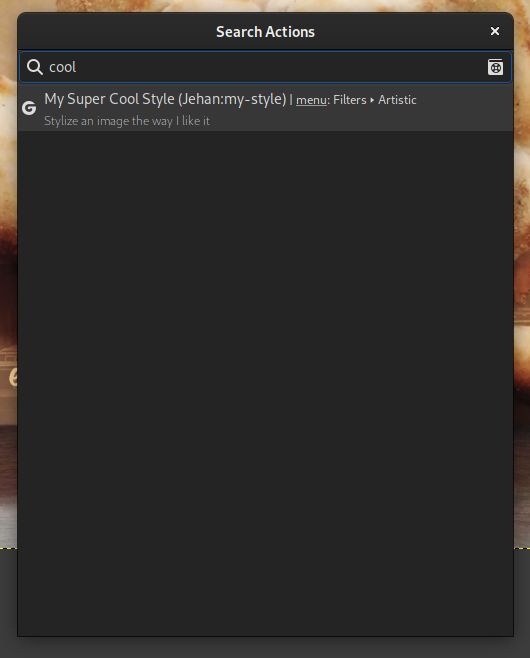
The second big improvement is that your custom filters will now appear in the
action search (/ key by default), whether or not you added them to a menu. It
allows searching and running them very easily!
While the on-canvas editor of the text tool is very practical, it was sometimes a bother as it is in your way. There are cases when you’d like to be able to see the bare canvas while editing text.
It is now possible thanks to the new option “Show on-canvas editor” to toggle its visibility.
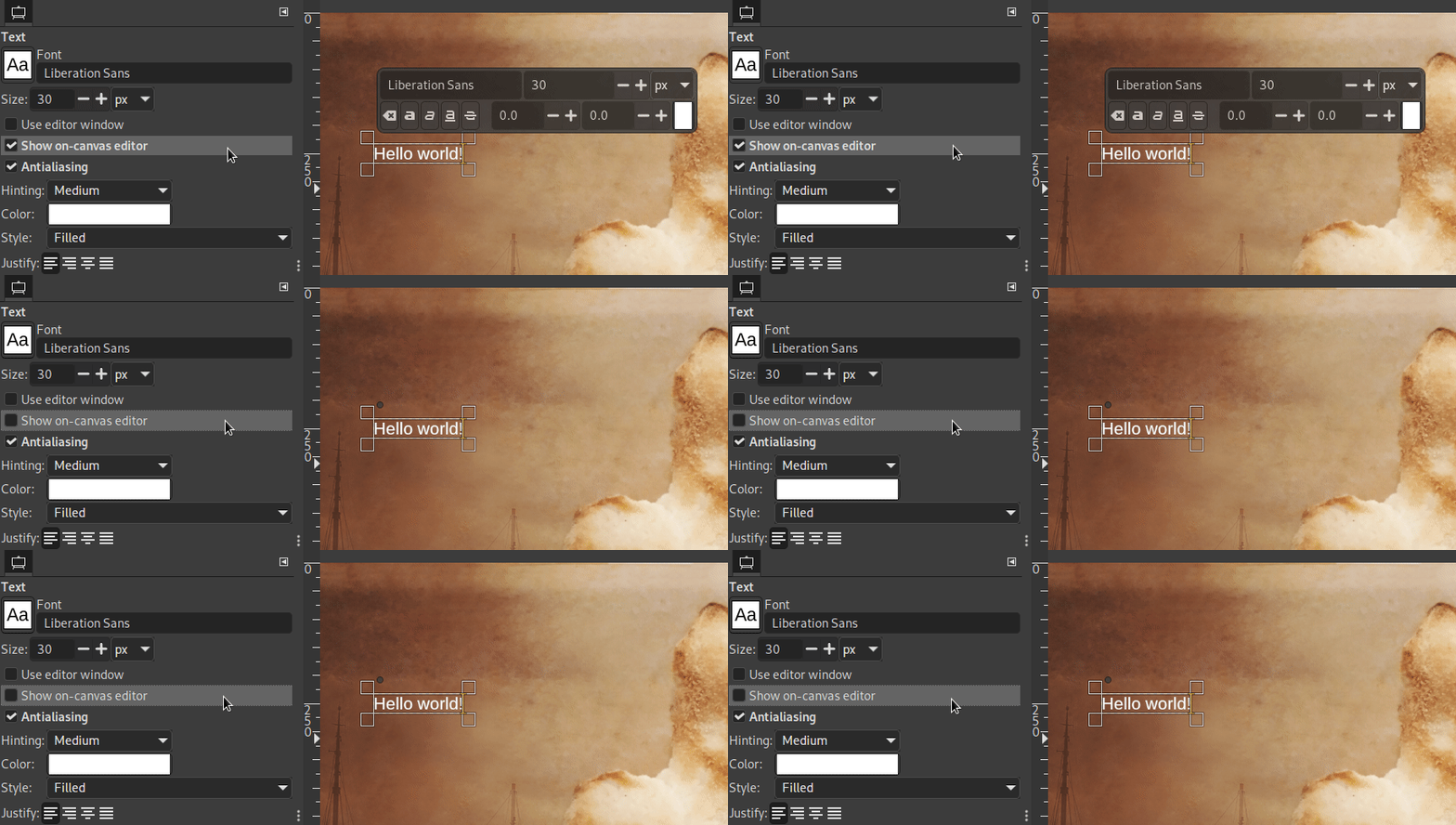
The tool had been fully reworked in GIMP 2.99.14.
In this version, we modified the option “Use extents of layer contents” so that it applies to the alignment reference as well (not only the target objects).
A patch was submitted to make the Transform Matrix selectable in the tool’s on-canvas dialog. This makes it easier to reuse the matrix in other software (while first testing in GIMP for immediate preview of the transformation, then copying and pasting the matrix).
Space Invasion is our project to ensure color correctness everywhere we show or use colors, choose proper color defaults, propose relevant color options…
In this version, some work was done in internal code which was still assuming sRGB input or output and was used in a few situations. It is now possible to choose more easily out-of-sRGB foreground and background colors, and the Color Picker tool shows color values from the proper image space.
Still in the Color Picker tool (and the Sample Points dockable), a new “Grayscale (%)” display mode was added, which shows the pixel’s Grayscale value if the picked image were converted to Grayscale mode.
There is still much more work-in-progress regarding these interfaces, such as ensuring the colors are correctly displayed in the various color boxes (not only on canvas), that we get reasonable behavior on shared color widgets when switching from an image’s color space to another, and so on.
Also we plan to become more explicit on the color space currently in use on all these shared interfaces where you can choose or show colors (Colors dockable, Foreground/Background colors, Color Picker tool, Sample Points dockable…). This is going to be one of the biggest parts of the next development release.
In the Preferences dialog, Image Windows settings, you will find a new
checkbox titled “Merge menu and title bar”. This is basically an option to
switch to Client Side Decoration for the image windows, which mostly means
that the menu will be merged inside the title bar, hence saving vertical space.

Note: this option doesn’t work for macOS which always has its own platform-specific menu style.
Since the header bar is set to be hidden when maximizing, if you checked “Show
menubar” for the “Default Appearance in Fullscreen Mode” in Preferences > Image
Windows > Appearance, the menu will be temporarily moved out of the title bar.
This makes the menu visible (if relevant option is checked, which is the
default) even in fullscreen mode.
Now we know that client-side decoration is quite a controversial feature. You find people who love this with all their might as much as the opposite (in particular because you lose window styling consistency since decorations are not handled by the window manager anymore). Moreover we are being told that in some specific cases, the system refuses to drop its own window decoration and you may end up with 2 title bars (one drawn by the system and one by GIMP).
For these reasons, this option is disabled by default.
The dark variant of the Default theme has been reworked because it was a bit
too dark. The older version has been moved temporarily as a new theme titled
Darker, though we aren’t sure if we will keep it.
During our last in-person developer meeting, where this work happened, the concept of a “High Contrast” theme was also evoked. At some point, we even discussed the possibility to implement settings for color customization of the theme.
Now we are not sure which will happen for GIMP 3.0. It will really depend on whether we get more theme contributions by the time we release.
The “Stroke/Fill Selection Outline” or “Stroke/Fill Path” dialogs used to propose to stroke (respectively fill) either with a “Solid color” (in fact the foreground color) or with a “Pattern”. We split the “Solid Color” into “Foreground color” and “Background color”, so that you don’t have to constantly switch their positions.
Furthermore the “Stroke Selection” and “Stroke Path” dialogs in particular
have been reorganized in a stack switcher making the 2 options “Line” and
“Paint tool” easier to use.
As a result of saving dialog space, we don’t hide anymore the “Line Style”
settings under an expander, in order to show more prominently the line rendering options.

When creating a new image or a new layer, there is this “Fill with” field
where you can choose the created layer color among the FG/BG colors, white,
black, transparency or a pattern. We added “Middle Gray (CIELAB)” which
corresponds to 50% of perceptual lightness (the L* of CIELAB or CIELCh),
or again 18.42% luminance.
Though the concept of “Middle Gray” may have different values depending on the chosen definition, this is one of the most common, considered as perceptually halfway between darkness and light to the average human observer’s eye.
A major chunk of the work on file formats is from Alx Sa (known as Nikc in previous news), who has a knack for adding support for various formats and improving the existing ones. And that’s awesome work so bravo Alx! 👍
FITS is an image format most commonly used in astronomy.
While we used to embed our own code for FITS support, we now ported it to cfitsio, a library maintained by the NASA.
This allows us to import compressed FITS files (GZIP, HCOMP, PLIO, RICE) in 8/16/32-bit and float/double precision. As a general rule, it will greatly improve our support level for this format.
Since we now use an external library, FITS support becomes optional (especially relevant to Linux distribution packages; on our own packages, it is always present).
Additionally we would like to thank Siril (the astronomical image processing tool) whose developers exchanged with us to improve the support in GIMP.
Clipping paths can now be imported from and exported to PSD files!
If your image has any path, a PSD export dialog will propose you to “Assign a Clipping Path”, and a combo menu will allow you to select the path to use.
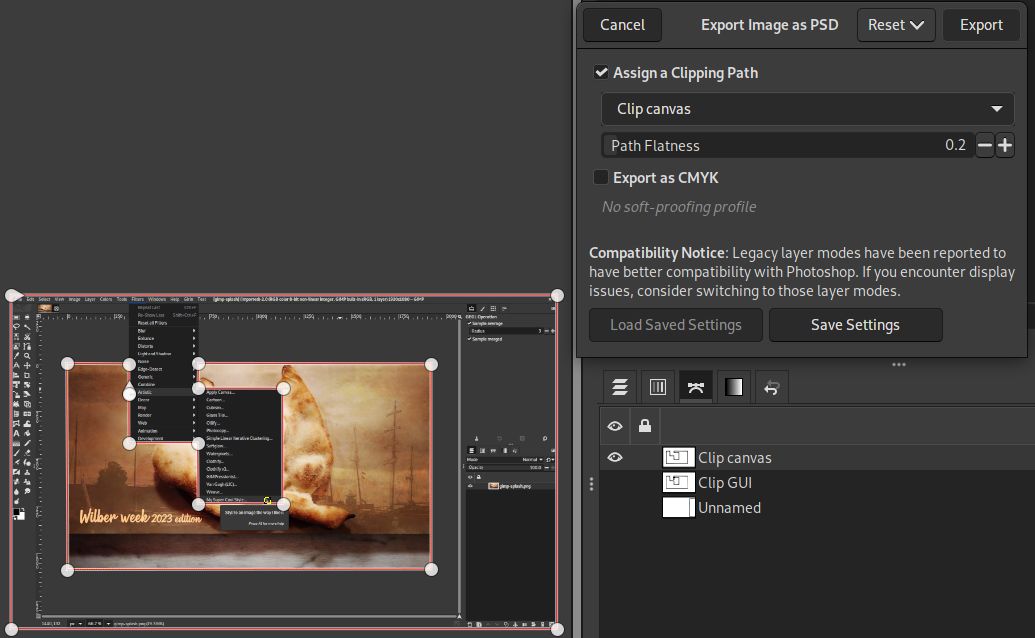
This clipping path can be used in programs which support clipping paths, e.g. Scribus (desktop publishing) already lists all the paths as usable as clipping path yet will highlight in green the selected clipping path hence allowing to better tag the path you want to use for this purpose.
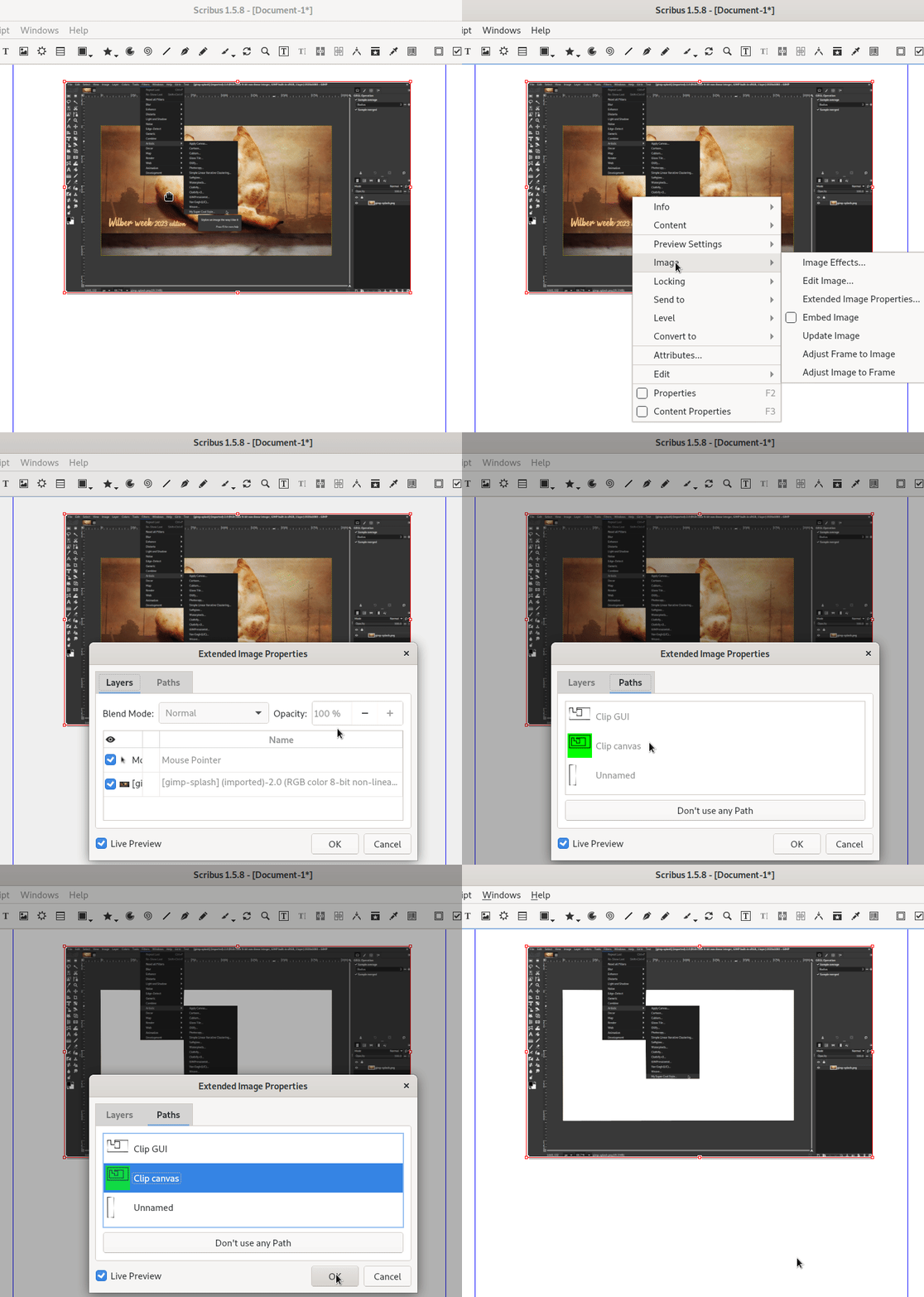
Similarly, on import, any clipping path information stored in the PSD will be reused as default for export.
Another interesting change is that on import, if some PSD features are not supported, a compatibility warning dialog will be displayed, listing all the missing features:
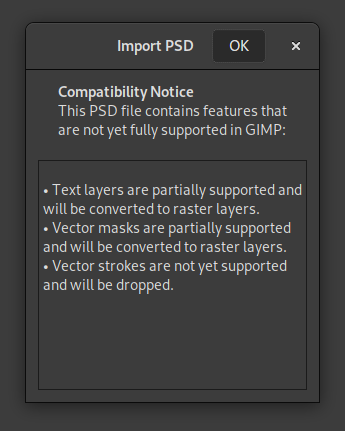
This way, you can make an informed decision when working with exchanged PSD files.
Note that the export dialog also has a new “Compatibility Notice” regarding legacy layer modes, as some people have noted that they have better compatibility when exporting PSDs and reopening them in Photoshop.
Last but not least, a new PDB procedure "file-psd-load-metadata" was created to allow other plug-ins to
delegate PSD metadata loading to the PSD plug-in. Indeed a common usage in
various file formats is to self-extend by storing custom metadata in Photoshop
proprietary metadata format. We already implemented 2 such usages:
TIFFTAG_PHOTOSHOP metadata, as well as layer-level resources (e.g. PSD
layers instead of TIFF pages) in the TIFFTAG_IMAGESOURCEDATA metadata. GIMP
now supports both of these and will load what it supports.Same as in the PSD plug-in itself, if some of these metadata are unsupported, a compatibility dialog will be raised.
These will enable a whole new world of support for JPEG and TIFF (relative to the specific proprietary PSD resources) as they will sync to the support level of the PSD plug-in instead of duplicating code.
Additionally to the various metadata-related improvements, the option “4:2:2 horizontal (chroma halved)” got renamed to “4:2:2 (chroma halved horizontally)” and the option “4:2:2 vertical (chroma halved)” to “4:4:0 (chroma halved vertically)”.
Research indicates these to be the most usual notations for these options these days.
We added initial support for CMYK(A) export: Key and Alpha data is saved in extra channels and the simulation profile is saved as well.
Per the specification developers, the format does not support ‘naive’ CMYK conversion, so a profile is required for export. The option “Export as CMYK” will be disabled if no CMYK simulation profile is set.
We enabled OpenMP support when available on the build machine. This means in particular that parallel processing is enabled, which should improve processing speed in some cases.
We recently added both import and export support for the following formats:
We added import-only support for the following formats:
Now it may seem useless to support weird, old if not sometimes forgotten formats but this is actually important (at least the import ability). This can be useful for archiving, being able to display old images one may have created years ago, reusing and work on existing data.
Ultimately GIMP aims at being able to load any format which has existed under the sun!
Note: some of these new supports might not be yet in our official packages (e.g. Amiga IFF/ILBM), though should be soon.
The development interface for plug-ins continues to evolve towards its final state, though it is still one of the last big worksites now that the GTK+3 port is over.
GIMP plug-ins used to refer to various resources (brushes, fonts, gradients,
palettes, patterns, etc.) by name. We moved into creating specific classes (GimpBrush, GimpFont, GimpGradient, GimpPalette and GimpPattern
respectively) in libgimp for these data, under a common parent class
GimpResource. This moves this part of the API to an object-oriented interface
(same as other existing types for images, layers…) which will be a lot nicer for bindings.
Moreover we move to unique IDs for each resource, which is not name-based. While
this part is still mostly libgimp-side, we plan on making names less of an
identifier in core code as well. This indeed creates name clashes much too
easily, especially if you exchange data with other people (it is very easy to
find custom brushes or fonts made by different people and using the same name).
We are working on making GIMP much more robust to these kind of real-life name clashes.
Some work was done on reviewing our plug-in localization rules. While we used to
have the menu strings localized by the core application itself, the rest was
localized by the plug-in process. This has always been confusing to third-party
developers (“Should I use _() or N_() to translate strings?”). Now it’s
very simple: the plug-ins takes care entirely of their own localization, hence
always send already translated strings to the core process. It also means that
changing GIMP’s language settings triggers a reload of all plug-in registrations
(to update strings).
Apart from simplifying the rule, it also prevents a possible clash for the
gettext catalog names (in case 2 plug-ins were to use the same catalog name,
it doesn’t matter anymore as each process handles their own).
And finally, even though we still recommend gettext (we also provide
infrastructure functions for plug-ins to easily set up plug-in localization with
gettext), it make third-party plug-in developers freer to choose their own
localization infrastructure if they prefer something else.
All these changes are also part of a longer term work to move plug-ins to self-contained extensions which will be easily sharable and installable.
While GStrv was added in GIMP
2.99.10,
it was not serialized into config files (our infrastructure to store plug-in
settings across runs), until this version.
A very cool first usage of this ability is for the Script-fu console which now
remembers the history of run commands.
Moreover plug-ins now have access to GBytes arguments for all the cases where
we were misusing arrays of unsigned integers on 8-bit instead, in order to
represent binary data (or more generally custom data, which can be anything,
from text to binary). The GimpUint8Array type has been removed as a possible
plug-in argument type and all its uses replaced.
More functions were added, for instance to enhance the capabilities of the GUI generation for plug-ins. Some encoding issues were handled and various functions’ annotations and usage have been clarified.
For a more exhaustive list of functions added, removed or changed, we advise to look at the NEWS file.
As usual, this version of GIMP is accompanied by new versions of babl and GEGL:
babl 0.1.104 and 0.1.106 improved the LUT code and provide faster startup by caching balanced RGB to XYZ matrices.
GEGL 0.4.44 and 0.4.46, in addition to the usual bug fixes, started to add the
"gimp:menu-path" key to some operations, improved gegl:ff-load,
gegl:ff-save to make them build with FFmpeg 6.0 (though gegl:ff-save still
doesn’t work properly with this version of FFmpeg), and added 2 new operations:

gegl:chamfergegl:distance-transform and
gegl:emboss, based on LinuxBeaver’s research into modeling different bevels
with combinations of blurs.
gegl:local-thresholdrgb⇒gray conversion,
then the additional parts of the UI would be options for threshold.
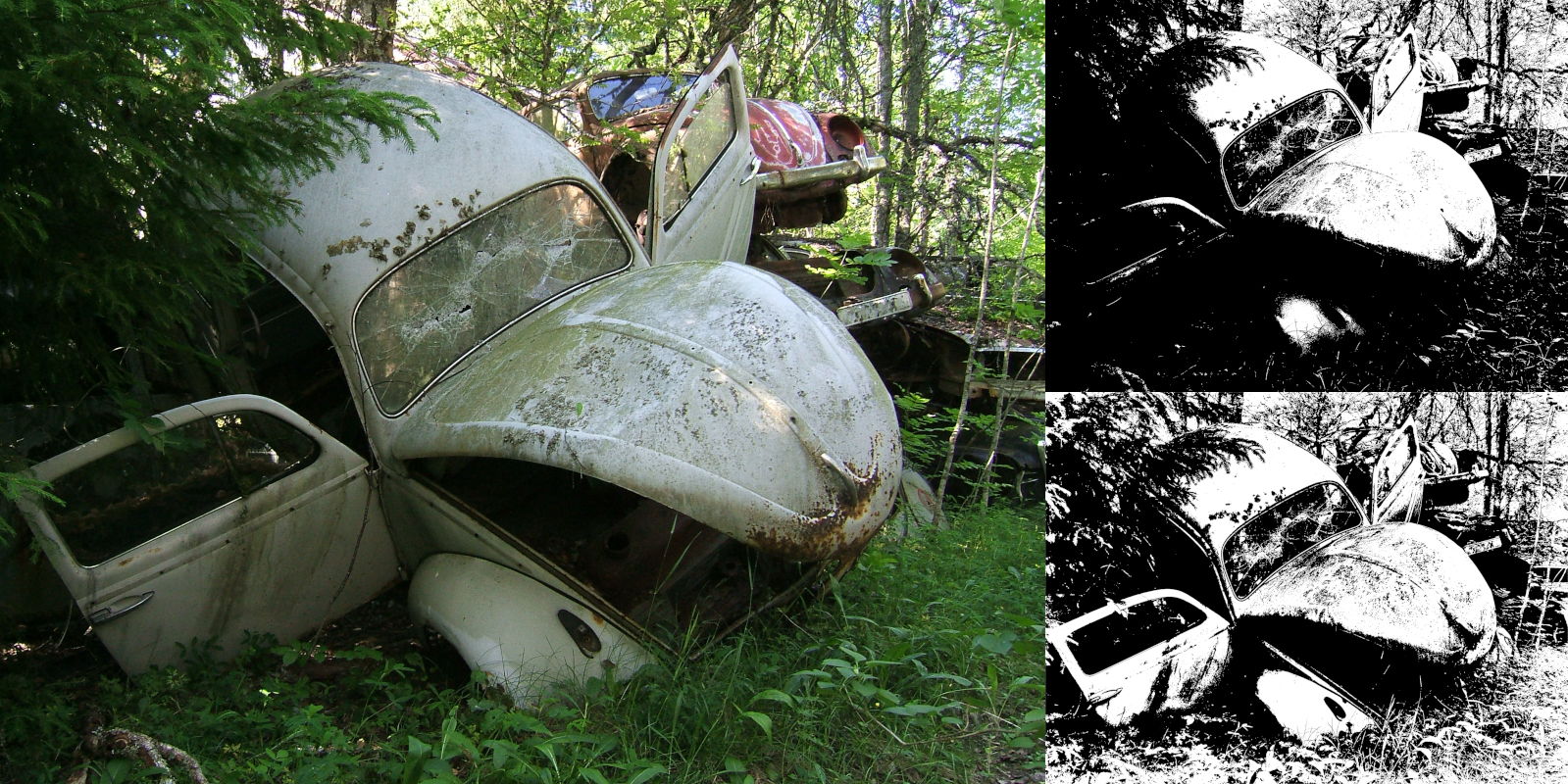
Since GIMP 2.99.14:
67 people contributed changes or fixes to GIMP 2.99.16 codebase (order is determined by number of commits):
Contributions on other repositories in the GIMPverse (order is determined by number of commits):
gimp-macos-build (macOS build scripts) since 2.99.14
release: Lukas Oberhuber, Kyungjoon Lee and Mingye Wang.Let’s not forget to thank all the people who help us triaging in Gitlab, report bugs and discuss possible improvements with us. Our community is deeply thankful as well to the internet warriors who manage our various discussion channels or social network accounts such as Ville Pätsi, Liam Quin, Michael Schumacher and Sevenix!
Note: considering the number of parts in GIMP and around, and how we
get statistics through git scripting, errors may slip inside these
stats. Feel free to tell us if we missed or mis-categorized some
contributors or contributions.
Our release procedure is getting much better at each new version. I would like to thank our testers who did an awesome job raising the few release-blockers we had for GIMP 2.99.16, as well as the people who followed up on these issues, handled technical responses, created or updated packages, and more.
In particular, a huge thank you to (by alphabetical order) Alx Sa, Anders Jonsson, Daniel Novomeský, Hubert Figuière, Jacob Boerema, Liam Quin, lillolollo, Luca Bacci, Lukas Oberhuber, Mark Sweeney, Sevenix, ShiroYuki_Mot and Uzugijin!
As a reminder, if anyone is willing to help us improve GIMP by participating to release testing, please open a report on the developer website tracker with the following information:
Then we will notify you in the next release testing phase (stable and development releases).
Our expectations from testers:
The Fremont Cabal Internet Exchange contributed a new download mirrors to distribute GIMP, based in Sheffield, South Yorkshire (United Kingdom). With 11 mirrors out of 41 in total, they are clearly our biggest mirror sponsor! Thanks FCIX!
Mirrors are important as they help the project by sharing the load for dozens of thousands of daily downloads. Moreover by having mirrors spread across the globe, we ensure that everyone can have fast download access to GIMP.
Sabri Ünal did an awesome bibliographic research, added 39 books and updated even more in our “Books About GIMP” page. We won’t list all the changes as there are just too many, though you can read the detailed merge request descriptions (!93 and !98).
We are starting to get a more up-to-date books page with recent publications. Nice! 📚🤓
We remind everyone that we welcome book additions. If you know of a not-listed yet book about GIMP, please report the same information as other books in the list. Thanks!
GIMP 2.99.16 is only available for Linux and Windows for now. Our macOS
packaging is currently blocked by our inability to notarize the packages until
the GNOME Foundation fixes their Apple account. We will keep you updated.
Update from July 11: GIMP 2.99.16 is now avalaible on Linux, Windows and macOS!
You will find all our official builds on GIMP official website (gimp.org):
Other packages made by third-parties are obviously expected to follow (Linux or *BSD distributions’ packages, etc.).
Though the roadmap shows a few more unfinished items, the 2 biggest workfields to come for the next release are the API redesign — which is well on its way but is important enough that we’ll need to really look into details —, and the Space Invasion project (making sure every existing color-related feature is reliable).
As we are really reaching the “stabilization” stage in our development, while
our requirement rule was based on “Debian testing” (whichever it was), we
recently froze our dependency bumps on the just released Debian 12 (bookworm).
It means that we won’t bump any minimum requirement over what is in Debian 12
(except for optional dependencies, and even only so as exceptional cases and
with very good reasons). This is because we plan to release soon enough that we
need to make sure GIMP can be packaged on all reasonably recent
distributions.
Of course, for our own packages (Windows, macOS and Flatpak), we will always
use the latest dependency versions anyway.
Don’t forget you can donate and personally fund GIMP developers, as a way to give back and accelerate the development of GIMP. Community commitment helps the project to grow stronger! 💪🥳
此内容由惯性聚合(RSS阅读器)自动聚合整理,仅供阅读参考。 原文来自 — 版权归原作者所有。