


GIMP 2.99.8 is our new development version, once again coming with a huge set of improvements.
To get a more complete list of changes, you should refer to the NEWS file or look at the commit history.
The Clone, Heal and Perspective Clone tools now work when multiple
layers are selected. There are 2 new modes in particular:
When sourcing from multiple selected drawables then cloning into a single drawable, the pixel source is the composited render of source layers. This is similar to “Sample Merged”, except that it is limited to a list of drawables and you don’t have to hide the layers that you don’t want to source from.
When cloning while multiple drawables are selected, each drawable clones from itself to itself, i.e. every drawable is both its source and target (the layers selected when sourcing do not matter in this case). This can be very useful in particular when you need to heal several layers exactly the same way, for instance when working on textures and various texture mappings.
Development of this feature was proposed and financially supported by Creative Shrimp: Gleb Alexandrov and Aidy Burrows, well-known Blender educators. Here’s an excerpt from a new course where multi-layer cloning is already used:
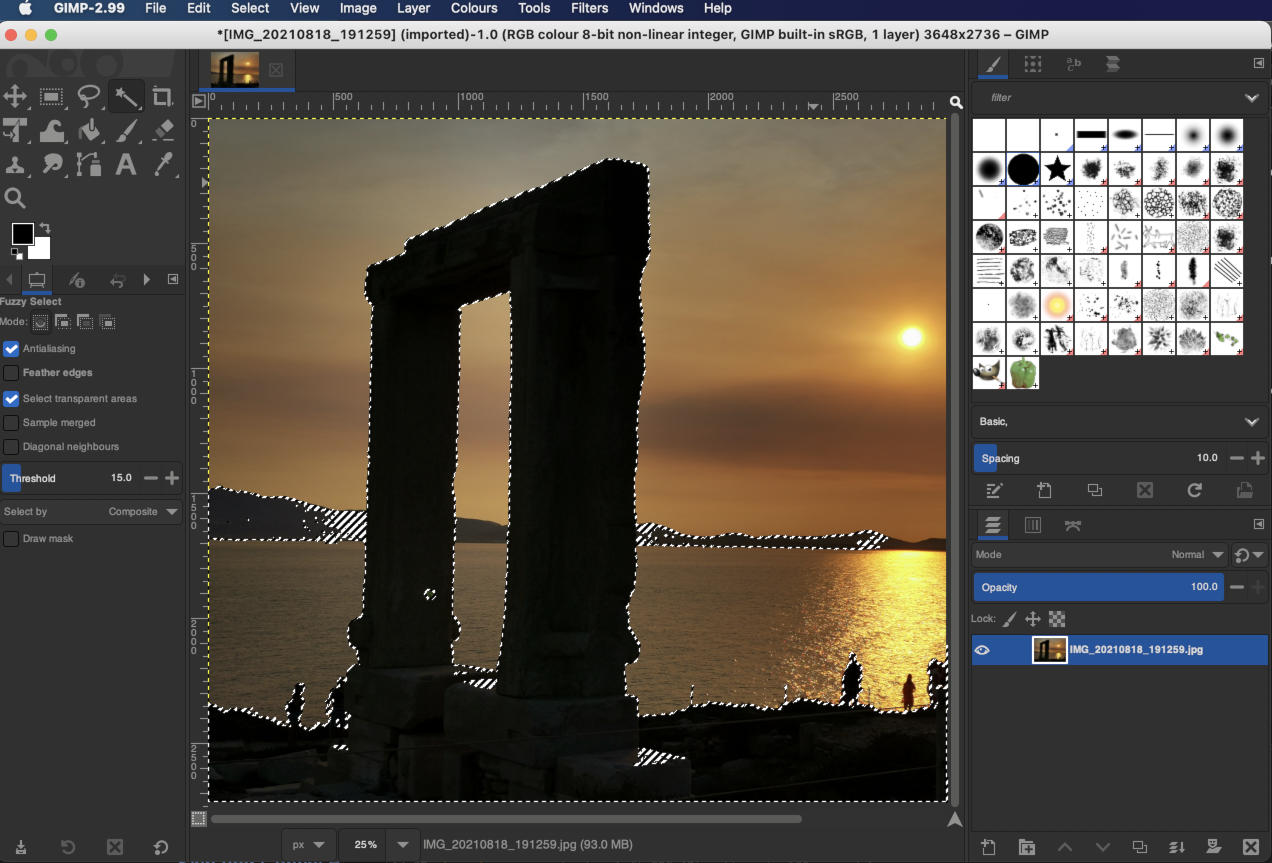
Windows drawing logics evolved in recent compositing window managers. In particular, the drawing of image selection (marching ants 🐜 representing your selection boundary) broke on Wayland, as well as on macOS since Big Sur release. The selection tools were still perfectly working but the outlines were simply not visible on the canvas anymore.
We fixed this by reimplementing part of how selections were being drawn over the image. We aimed to only fix this for Wayland, but our recent macOS contributor (see below in macOS package section) confirmed it also fixes the issue for Big Sur. Now the next step is to backport this fix to the stable branch (only for the sake of macOS, since the stable GTK2 version uses XWayland and thus doesn’t exhibit the bug).
There have been two more Wayland-specific changes. For our Flatpak builds,
we will now use the new fallback-x11 permission instead of x11
to prevent unnecessary X11 access while in Wayland, hence improving
security step by step.
Finally, some people reported huge memory leaks under Wayland only (it was fine on X11). We didn’t do much so we can’t take any credit for this, but this seems to have been fixed, probably in a dependency with Wayland-specific code.
Windows Pointer Input Stack (Windows Ink) support was recently added to GTK3 by Luca Bacci, who also made it available in GIMP and added a new option in the Preferences dialog to switch between Wintab (older API) and Windows Ink. You can find this option on the Input Devices page.
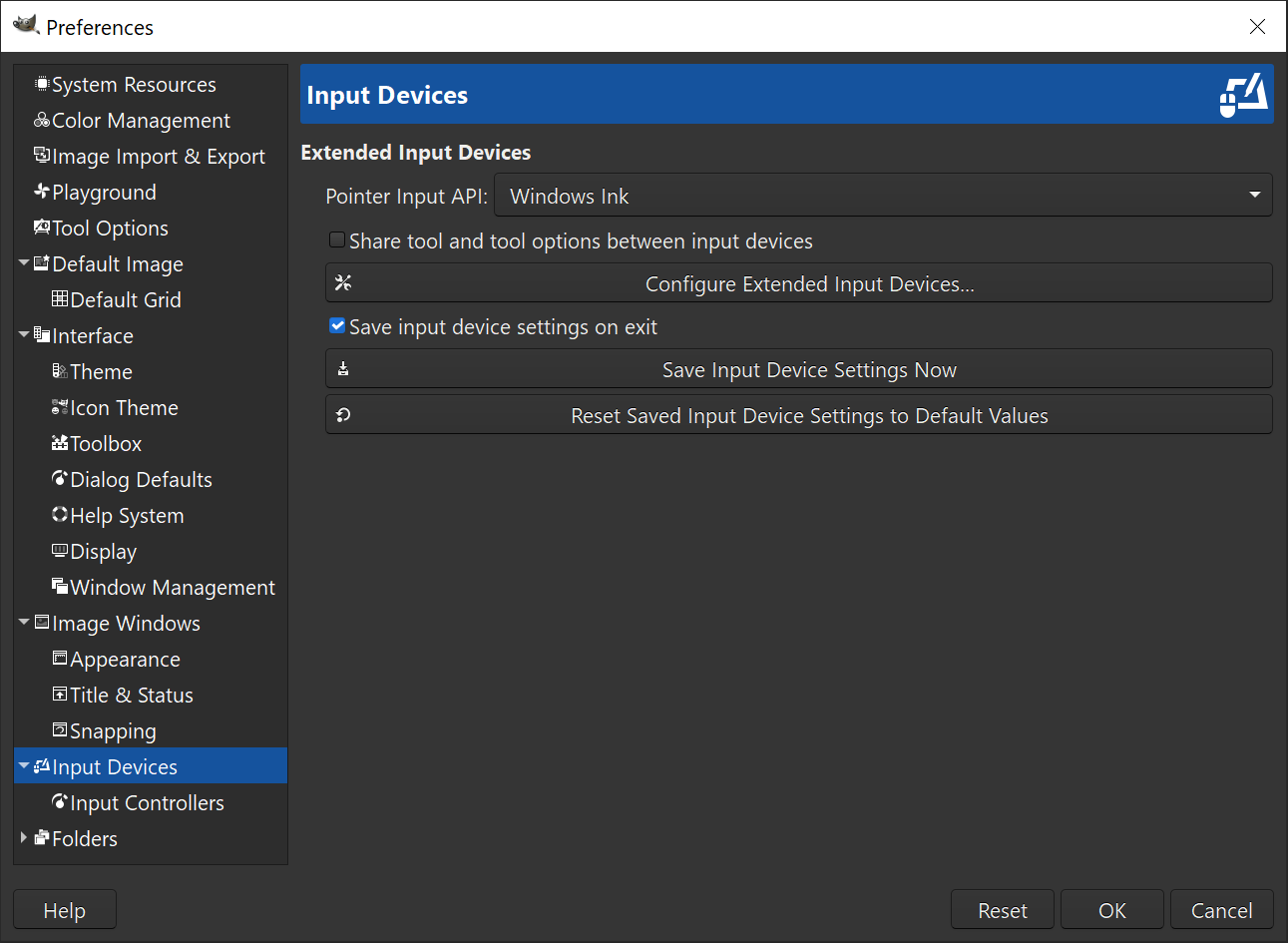
This is a huge milestone for artists using Windows since more graphics tablets or touch devices come with Ink support as a default whereas the legacy Wintab interface requires specific drivers.
This is even more the case with Windows 8 and newer, for which most tablets should work out-of-the-box with Windows Ink.
Clicking anywhere on the toolbox or on Wilber’s drop area now returns
the focus to the canvas (similarly to the Esc shortcut). This allows
you to work on canvas with shortcuts more efficiently.
For instance, you could pan directly with the Space bar without having
to click on canvas (hence activating a tool) when your keyboard focus was
previously on some text input widget, by clicking anywhere on toolbox
(buttons and dead area alike) first.
After years of discussions and bug reports, we dropped the thumbnail icon feature. Previously, when images were opened, the application icon in the taskbar would combine a preview of the active image and the actual application icon (Wilber). The icon would then change whenever the active image changed. For many people, this complicated locating GIMP’s window among windows of other running applications.
Moreover, due to recent changes in desktop environments’ behavior, this feature was actually working on less and less platforms. So depending on your OS and desktop environment, it either didn’t work at all or actively worked against you. This is why we decided to do away with it.
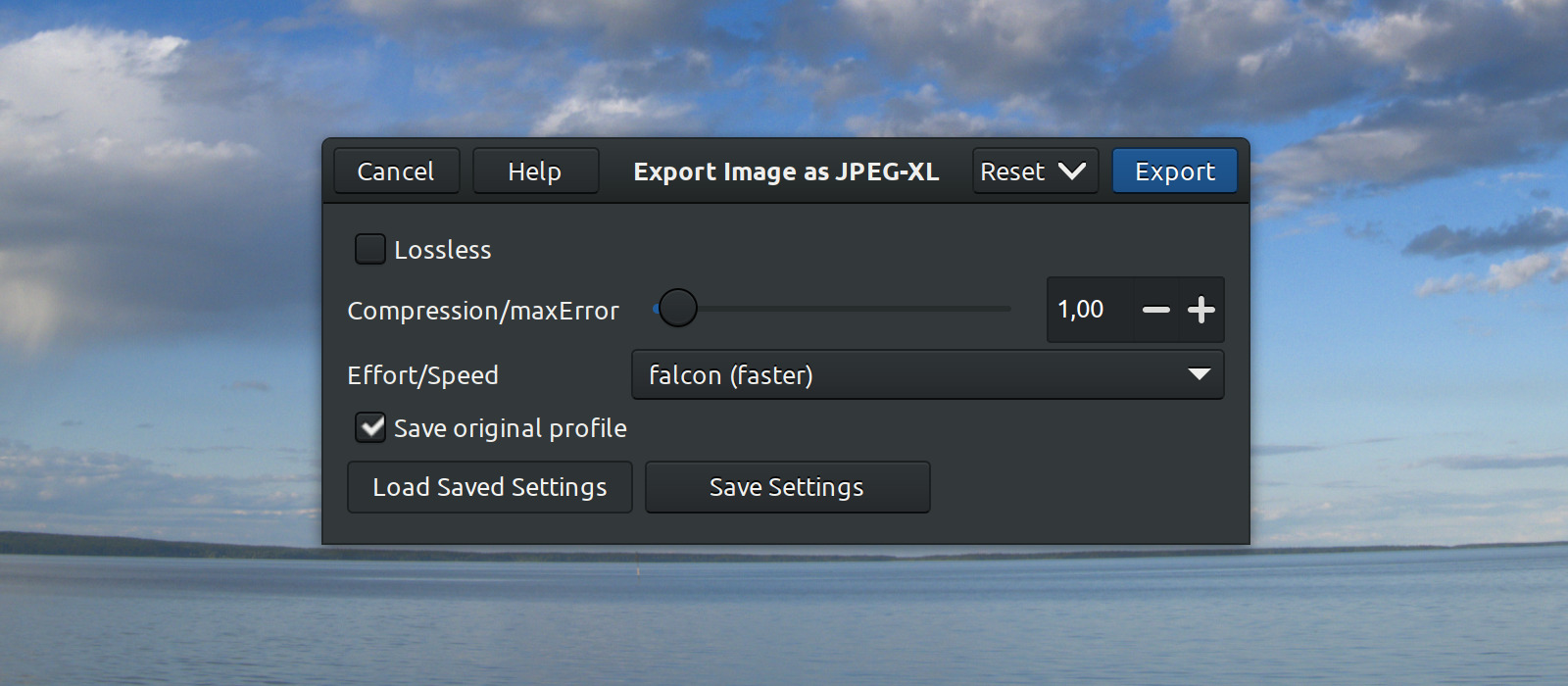
JPEG-XL is now optionally supported thanks to Daniel Novomeský who also previously contributed to HEIC/AVIF support.
GIMP can load and export JPEG-XL files (.jxl) in grayscale and
RGB, with color profiles support. Our exporting code also provides
a “lossless” option and several “Effort/Speed” encoding values.
This plug-in is different from the third-party plug-in that is part of the libjxl library
that we use too. It supports GIMP 3 plugin API, reads grayscale images
as grayscale, is written in C rather than C++, and exposes several presets
for speed/quality tradeoff. We also do not yet expose features that could be
considered experimental. If you are interested in JPEG-XL support
for GIMP 2.10.x, please use the plug-in from libjxl.
We also improved support for Adobe Photoshop project files. GIMP now supports larger-than-4GiB PSD files and loading up to 99 channels (specs say that 56 is the max but some sample PSD files have more channels).
Additionally, now you can also load PSB files which are essentially PSD files with support for width and height of up to 300,000 pixels.
There have been even more changes to file formats support and plug-ins:
GimpSaveProcedureDialog API.GFile and GimpObjectArray types.Our API for plug-in developers got the following improvements:
gimp_display_present() function to present a specific display at
the top of the image display stack.gimp_export_thumbnail() function to query the user settings
(added in “Image Import & Export” page of Preferences in this
version) on whether or not a file plug-in should export the image thumbnail.gimp_procedure_dialog_fill_expander() function to create a
GtkExpander in procedure dialogs.GimpProcedureDialog are added
to their own GtkSizeGroup for better aligned generated dialog, yet
only within their own level of widgets.Several contributors including Andrzej Hunt and Massimo Valentini started chasing small memory leaks with code analyzers, which is a very nice way to spend your downtime. We recommend! 👍
We wrote rules for the continuous integration platform to create installers. This is very useful for users who want to test new unreleased features and bug fixes. Installers are being created once a week because the full process takes ca. 2 hours and we didn’t want to trigger it too often.
If you want to test the latest installer for Windows, here is how you can do it:
build/windows/installer/_Output/ directorygimp-2.99.*-setup.exe file to download and install it.This procedure or any updated version of it is available in the “Automatic development builds” section of the download page.
⚠️ Be warned that a weekly installer is a purely automated build, there is no human verification. It is happening at a semi-random time during the development process, you may end up with very broken software at times, even though we try to never leave the repository in a dire state. It is even less safe than development releases. We are grateful for feedback and bug reports. Just please don’t expect these builds to be rock-solid or even usable. ☢️
Additionally to the weekly installers, our continuous integration platform will now also generate the installer when a new release is tagged. This should allow for much faster installer releases, within hours instead of days in the former fully manual process.
The only part of the installer creation process that is not automated is applying the digital signature. Digital signing will be done manually by our long-time Windows installer maintainer, Jernej Simončič. He will download and verify thoroughly the installer before signing it. So you are getting the best of both worlds: automation builds and human-verified software.
Note: this semi-automated release process is only for our development branch; it will be used in the stable branch when we will release GIMP 3.0.
We also added some additional tests for verifying installer script consistency. In particular, translations are handled by the GNOME translator teams, and we sometimes get translations into a new language that is not yet properly listed by the installer. A few times in the past, we did announce a new installer language which users could not find in the actual released installer! 😅
Our continuous integration platform will now warn us when such a case happens again, so that noone’s work would be wasted and all new translations would be properly used by the installer.
Similarly to the Windows installer nightlies, GIMP now gets a weekly flatpak, i.e. a flatpak built out of development code, entirely automated, a work initiated by Ondřej Míchal.
Install the “nightly” repository to get our weekly updates with this command:
flatpak install —user https://nightly.gnome.org/repo/appstream/org.gimp.GIMP.flatpakref
If you installed both the stable, beta (development releases) and
master (weeklies) repositories, your desktop will only see one of them
at any given time. You can select exactly which version it sees and start
with the following command (e.g. selecting stable as default):
flatpak make-current —user org.gimp.GIMP stable
Then if stable was made to be your default flavor of GIMP, you can run
the other versions with the following command (e.g. the weeklies):
flatpak run org.gimp.GIMP//master
This information is also available on the downloads page.
⚠️ Please keep in mind that a weekly build is purely automated, there is no human verification, it happens at semi-random time during the development process. Hence you may end up with very broken software at times even though we try to never leave the repository in a dire state. It is even less safe than development releases. People are welcome to test our weekly builds to help us with feedback and bug reports, but you should not expect these builds to be any close to stable software or even usable. ☢️
Finally, there’s some exciting news for macOS users: we were recently joined by a new contributor, Lukas Oberhuber, who started working on the development package. Lukas already has a working local build, he is currently tweaking the remote automated build. So we might finally have our first macOS development release (hopefully for GIMP 2.99.8) soon. Lukas also contributed fixes to GIMP source code to better support macOS.
While this is excellent news, it does not invalidate the call for more macOS contributors we have made many times before. A single contributor (furthermore for both packaging and development!) is a very low bus factor. The more contributors, the better, so if you want to help to ensure sustainability of macOS packaging, you are still very much welcome to join!
To facilitate in-review code testing, we now provide automatic builds
for merge requests. If you are planning to contribute a patch using
this Gitlab feature, please add the 5. Windows Installer and/or
5. Flatpak package label to a newly created merge request. This will
trigger building a Windows installer and/or a standalone flatpak.
We expect this to be helpful for testing new features and bug fixes.
GIMP source repository now provides a very nice first draft of Coding
style guide
written by Stanislav Grinkov. The new guide combines guidelines
formerly available in the HACKING file and information passed down
through discussion channels like IRC, patch reviews etc.
We expect this draft to receive further improvements as we do love very neat and organized code. In any case, this is a great start!
We did not request a new set of babl and GEGL releases for 2.99.8. All the changes we announced in v2.10.28 still apply here.
As usual, GIMP 2.99.8 is available on GIMP official website (gimp.org):
The Linux development flatpak has already been published so that
anyone who installed it previously should have an update proposed by
their software manager (or from terminal: flatpak update
org.gimp.GIMP//beta).
The Windows installer is already available too, very quickly thanks to the new installer release process.
The macOS DMG package will hopefully be published soonish.
Daniel Novomeský is now a core developer with git access, for their continuous contributions to the HEIF/HEIC/AVIF plug-in as well as the brand new JPEG XL plug-in.
Code contributors on GIMP 2.99.8: Andrzej Hunt, Daniel Novomeský, Des McGuinness, Ian Martins, Jacob Boerema, Jehan, Jordi Mas, lloyd konneker, Luca Bacci, Lukas Oberhuber, Marc Espie, Marie-P, Massimo Valentini, Mayank Suman, Michael Bazzinotti, Michael McLaughlin, Michael Schumacher, Niels De Graef, Øyvind Kolås, Pavel Artsishevsky, programmer-ceds and Stanislav Grinkov.
Build contributors on GIMP 2.99.8: Andre Klapper, Christopher Davis, Daniel Novomeský, Jehan, Jernej Simončič, lloyd konneker, Luca Bacci, Marco Spiess, Niels De Graef, Ondřej Míchal, Øyvind Kolås, Stanislav Grinkov and Trần Ngọc Quân.
Among the 84 languages for which GIMP 2.99.8 is available, 20 translations were updated: Basque, Brazilian Portuguese, Catalan, Chinese (China), Finnish, German, Greek, Hungarian, Icelandic, Indonesian, Italian, Lithuanian, Polish, Portuguese, Russian, Slovenian, Spanish, Swedish, Ukrainian and Vietnamese.
The development Windows installer now contains Portuguese and Lithuanian translations, making it available in 38 languages.
Translators on GIMP 2.99.8: Alexandre Prokoudine, Anders Jonsson, Asier Sarasua Garmendia, Aurimas Černius, Balázs Úr, Boyuan Yang, Bruno Lopes da Silva, dimspingos, Enrico Nicoletto, Hugo Carvalho, Jiri Grönroos, Jordi Mas, Luna Jernberg, Marco Ciampa, Matej Urbančič, Ngọc Quân Trần, Philipp Kiemle, Piotr Drąg, Rodrigo Lledó, rofiquzzaki, Sveinn í Felli and Yuri Chornoivan.
You might have noticed that a lot of effort has been done to improve the infrastructure these last few months (whether for continuous integration, testing, automating releases, mirrors…) and more has to be done as this was highly needed for the long run. As a consequence of these infrastructure improvements, this release news was published a single-day after actual source release, which is a new record for us (it usually takes days to generate the Windows installer then to have all mirrors synced)! Apart from infrastructure, this version is nonetheless a big one with more than 50 reports closed, 25 merge requests accepted and over 500 commits since 2.99.6.
We are still working hard to finalize the GTK3 port as well as the new plug-in API. Taking care of technology changes (Wayland on Linux and macOS in particular) these days is also taking quite a toll in our development efficiency as we spend a lot of time fixing things which just get broken because the underlining systems change. Nevertheless we are quite happy of how things evolve as future GIMP 3 is looking more and more awesome every day, right? 🤗
Don’t forget you can donate to the project and personally fund several GIMP developers, as a way to give back and accelerate the development of GIMP. As you know, the maintainers of GEGL and GIMP are crowdfunding to be able to work full-time on free software. 🥳
此内容由惯性聚合(RSS阅读器)自动聚合整理,仅供阅读参考。 原文来自 — 版权归原作者所有。