
惯性聚合 高效追踪和阅读你感兴趣的博客、新闻、科技资讯
阅读原文 在惯性聚合中打开

推荐订阅源

M
MIT News - Artificial intelligence
有赞技术团队
有赞技术团队
S
Schneier on Security
aimingoo的专栏
aimingoo的专栏
T
Troy Hunt's Blog
U
Unit 42
Hacker News - Newest:
Hacker News - Newest: "LLM"
V2EX - 技术
V2EX - 技术
T
The Blog of Author Tim Ferriss
V
Visual Studio Blog
H
Heimdal Security Blog
H
Hacker News: Front Page
Blog — PlanetScale
Blog — PlanetScale
博客园 - 司徒正美
Cloudbric
Cloudbric
Google DeepMind News
C
Cisco Blogs
The Cloudflare Blog
C
Cybersecurity and Infrastructure Security Agency CISA
Microsoft Security Blog
MyScale Blog
MyScale Blog
F
Fortinet All Blogs
N
News | PayPal Newsroom
Attack and Defense Labs
D
DataBreaches.Net
N
News and Events Feed by Topic
Security Archives - TechRepublic
Forbes - Security
Forbes - Security
Simon Willison's Weblog
F
Full Disclosure
The Register - Security
L
LINUX DO - 热门话题
Webroot Blog
Webroot Blog
Google Online Security Blog
AI
AI
奇客Solidot–传递最新科技情报
奇客Solidot–传递最新科技情报
I
Intezer
S
Security Affairs
阮一峰的网络日志
阮一峰的网络日志
K
Kaspersky official blog
云风的 BLOG
云风的 BLOG
博客园 - 叶小钗
T
Threatpost
Spread Privacy
Spread Privacy
小众软件
小众软件
AWS News Blog
AWS News Blog
S
Secure Thoughts
S
Security @ Cisco Blogs
钛媒体:引领未来商业与生活新知
钛媒体:引领未来商业与生活新知
J
Java Code Geeks

GIMP

GIMP - GIMP 3.2.4 Released GIMP - GIMP @ Libre Graphics Meeting 2026 GIMP - New Color Mode Coming to GIMP GIMP - GIMP 3.2.2 Released GIMP - GIMP 3.2 Released GIMP - GIMP 3.2 RC3: Third Release Candidate for GIMP 3.2 GIMP - Interview with Øyvind Kolås, GIMP developer GIMP - GIMP @ FOSDEM 2026 GIMP - GIMP 3.0.8 Released GIMP - GIMP 3.2 RC2: Second Release Candidate for GIMP 3.2 GIMP - GIMP 3.2 RC1: First Release Candidate for GIMP 3.2 GIMP - Interview with Simon Budig, GIMP developer GIMP - New Official Snap package GIMP - GIMP 3.0.6 Released GIMP - GIMP 3.1.4: Second Development Release towards GIMP 3.2 GIMP - Interview with Sevenix (author of GIMP 3.0’s splash image) GIMP - GIMP 3.1.2: First Development Release towards GIMP 3.2 GIMP - GIMP 3.0.4 Released GIMP - New Priorities for GIMP GIMP - GIMP 3.0.2 Released GIMP - GIMP 3.0 Released GIMP - GIMP 3.0 RC3 Released GIMP - GIMP team at FOSDEM 2025 (talk and keynote) GIMP - GIMP 3.0 RC2 Released 🎁 GIMP - GIMP 3.0 RC1 Released GIMP - Development Update: Closing In on the 3.0 Release Candidate GIMP - Experiments with AppImage GIMP - GIMP at LGM 2024 (Rennes, France) GIMP - GIMP 2.10.38 Released GIMP - GIMP 2.99.18 Released: The Last Development Preview Before 3.0! GIMP - GIMP 2.10.36 Released GIMP - GIMP now on Windows for ARM (experimental) GIMP - GIMP 2.99.16 Released: Wilber Week 2023 edition! GIMP - Wilber Week 2023: report GIMP - GIMP in GSoC 2023 GIMP - GIMP Help Manual 2.10.34 Released GIMP - GIMP 2.10.34 Released GIMP - 2022 annual report GIMP - GIMP 2.10.32 on Apple Silicon GIMP - Happy 27! GIMP - Development version: GIMP 2.99.14 Released GIMP - Conference “GIMP and ZeMarmot” in Vandœuvre-lès-Nancy (France) GIMP - Revival of the GIMP developer website GIMP - Development version: GIMP 2.99.12 Released GIMP - GIMP 2.10.32 is on the Microsoft Store! GIMP - GIMP 2.10.32 Released GIMP - GSoC 2022 project announced: CMYK features GIMP - GIMP is a GSoC 2022 mentor organization GIMP - Development version: GIMP 2.99.10 Released GIMP - 2021 annual report GIMP - GIMP 2.10.30 Released GIMP - GIMP is not affected by the log4j vulnerability GIMP - GIMP 2.99.8 macOS package now available GIMP - Development version: GIMP 2.99.8 Released GIMP - GIMP’s official mirrors and mirror policy GIMP - GIMP 2.10.28 Released GIMP - Funding GIMP developers for sustainable development GIMP - Development version: GIMP 2.99.6 Released GIMP - 🎄 Development release GIMP 2.99.4 is out 🎁 GIMP - GIMP 2.10.22 Released for macOS GIMP - This is 25 GIMP - Development release GIMP 2.99.2 is out GIMP - GIMP 2.10.22 Released GIMP - GIMP 2.10.20 Released GIMP - GIMP 2.10.18 Released GIMP - GIMP and GEGL in 2019 GIMP - GIMP 2.10.14 Released GIMP - GIMP 2.10.12 Released GIMP - GIMP 2.10.10 Released GIMP - GIMP and GEGL in 2018 GIMP - GIMP 2.10.8 Released GIMP - GIMP receives a $100K donation GIMP - GIMP 2.10.6 Released GIMP - GIMP 2.10.4 Released GIMP - GIMP has moved to Gitlab GIMP - GIMP 2.10.2 Released GIMP - GIMP 2.10.0 Released GIMP - GIMP 2.10.0 Release Candidate 2 Released GIMP - Fun at SCaLE 2018 GIMP - GIMP 2.10.0 Release Candidate 1 Released GIMP - Libre Graphics Meeting + SCaLE 2018 GIMP - GIMP and GEGL in 2017 GIMP - Strings Freeze For GIMP 2.10 Is Now On GIMP - GIMP 2.9.8 Released GIMP - GIMP 2.9.6 Released GIMP - An Interview with Michael Schumacher, GIMP administrator GIMP - GIMP 2.8.22 Released GIMP - An Interview with Michael Natterer, GIMP maintainer GIMP - GIMP 2.8.20 Packages for macOS and Microsoft Windows are available GIMP - GIMP 2.10 blockers and the road to 3.0 GIMP - GIMP 2.8.20 Released GIMP - WilberWeek 2017 GIMP - Community-supported development of GEGL now live GIMP - 2016 in review GIMP - Making settings persistent in GIMP GIMP - GIMP 2.8.18 Released GIMP - GIMP 2.9.4 Released GIMP - GIMPers at Texas Linux Fest 2016 GIMP - GEGL 0.3.8 and babl 0.1.18 Released GIMP - Updated 2.8.16 Installer with a Major Bugfix Released
GIMP - GIMP 2.10.24 Released
by Wilber · 2021-03-29 · via GIMP

GIMP 2.10.24 is mostly a bug fix release, which once again comes mostly with file format support improvements.

Release highlights:
  • Off-canvas point snapping
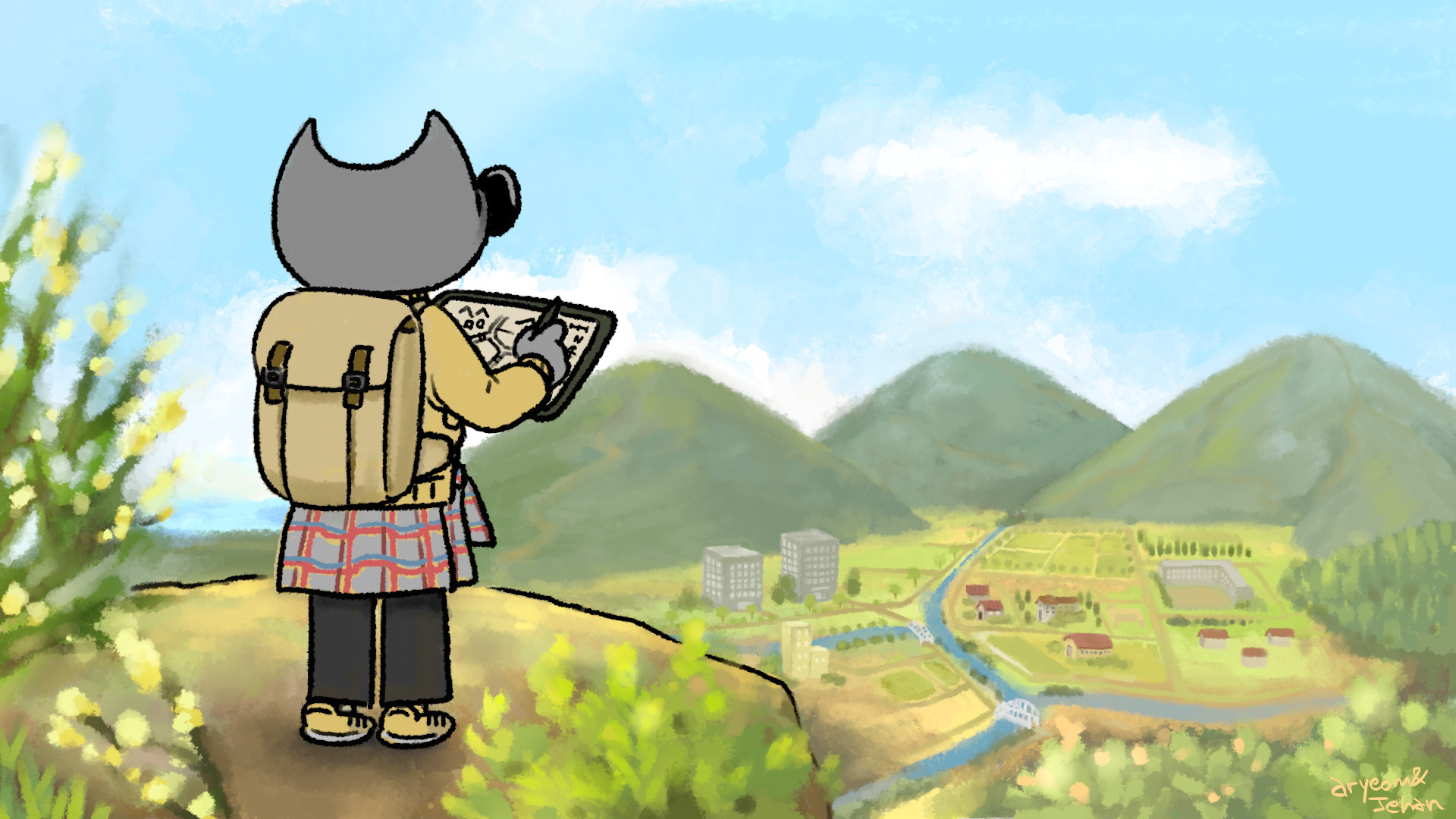
  • GeoTIFF metadata support (georeferencing information embedded within a TIFF file used by map makers)
  • Many improvements in the metadata viewer and editor
  • Many file format supports improved: HEIF, PSP, TIFF, JPEG, PNG, PDF, DDS, BMP, PSD
  • New “Negative Darkroom” operation to simulate enlargement prints from scans of photographic negatives.
  • The RAW image import now handles darktable 3.6 and over
  • New Kabyle translation
Wilber the geographer - Wilber and co. comics strip
“Wilber the geographer” by Aryeom, Creative Commons by-sa 4.0 - GIMP 2.10.24 gets GeoTIFF support

Core improvements

Off-canvas point snapping

Though there are various fixes in core code, this change is probably the most worth mentionning. Ever since GIMP 2.10.14, we are now able to see the out-of-canvas area. Consequently, many features can now work outside the canvas, yet not all features yet. This change is the continuation of this work, allowing you to snap various tools to guides, grids or vectors, even outside the canvas.
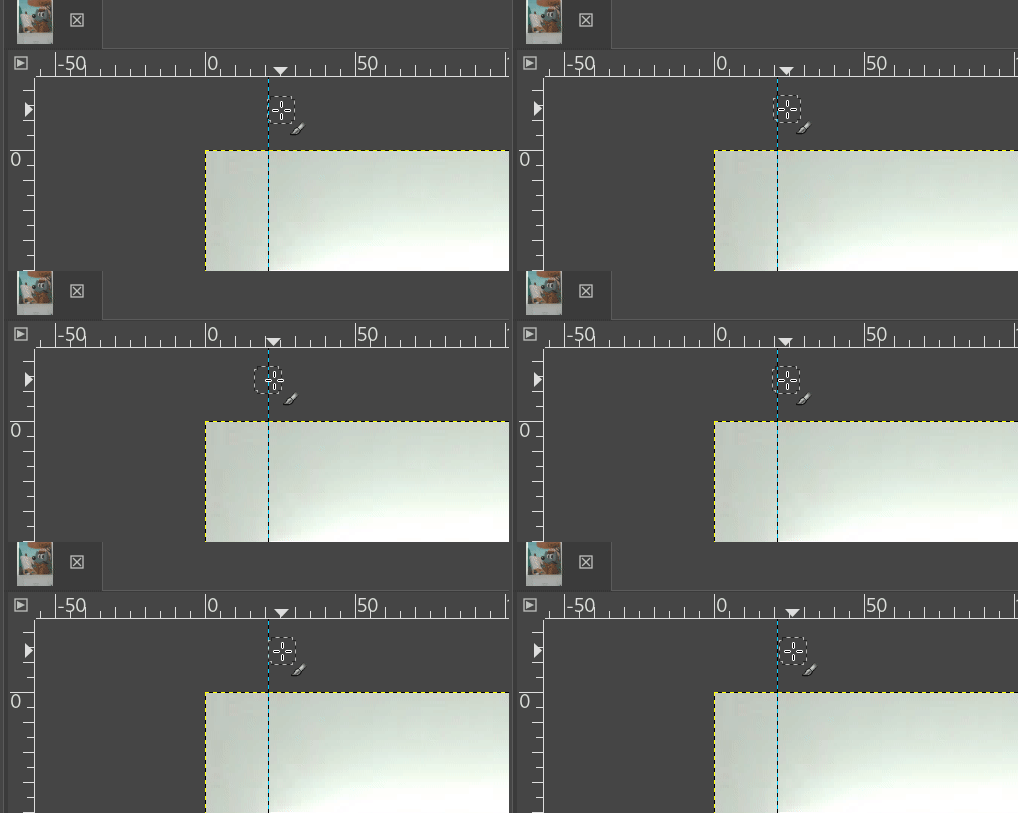
Snapping to guide off-canvas - GIMP 2.10.24
Snapping to guide/grid/vectors off-canvas made possible - GIMP 2.10.24

A lot of work has been going on in the metadata area, mostly consolidating our support and fixing many issues.

The metadata viewer and editor also received a lot of love, making them more robust to various edge cases, such as duplicate tags, but also mapping equivalency between similar IPTC and XMP tags, better encoding handling, and so on.

The GPS data is also handled a bit better with more precision, tooltips and better formatting.

There are still a lot of improvements to be made in the metadata area though we are probably on the right path. This part of the development is not as visible as other, yet this is very time-consuming and thankless groundwork while being useful to anyone who needs good metadata support so we’d like to thank Jacob Boerema who has worked tirelessly on this for months.

File formats

GeoTIFF

A fun story which started with a conference by Adam Cox of Louisiana State University about using GIMP for enhancing historic maps, with the issue that GeoTIFF metadata tags were lost and made the workflow a bit more cumbersome.

It prompted a bug report then later a patch by the passing contributor Ruthra Kumar and a review by the core team. All this within 2 months.

And now GIMP is able to import and export back the GeoTIFF tags. Note that no semantic logics is implemented, i.e. that GIMP can only export what it imported (the checkbox will only be sensitive on export if there was GeoTIFF metadata on import). It will not tweak the metadata contents for you. In particular since it contains georeferencing data, some type of image transform could make the data meaningless. This is up to you to know what the data references and how to keep its meaning.
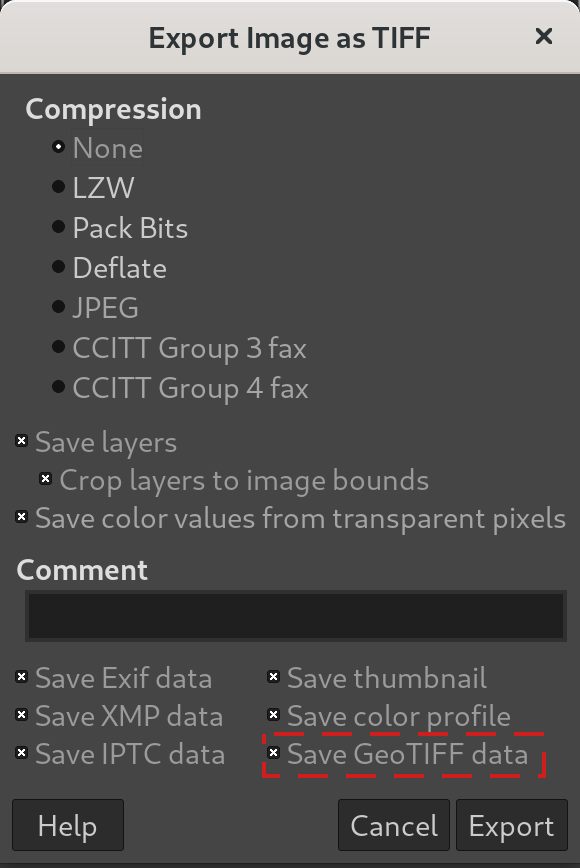
Save GeoTIFF metadata as imported - GIMP 2.10.24

This nice little story shows once again a power of Free Software, which is before all a software made by yourself. Anyone who contributes is part of the GIMP team! 🤗

Note: the sharpest mind may have realized the feature was available in the development release 2.99.4. Yet we add the description for 2.10.24 because this is the first stable release featuring GeoTIFF support.

Improved support for many image formats

Similarly to our previous stable release, our file format plug-ins received a lot of love.

  • TIFF got various improvements when handling multi-page files, but also many edge cases, such as 2 or 4-bit TIFF images, opening some types of non-conformant TIFF files and so on.
  • HEIF got some visually lossless export support when libheif 1.10 or later is used. We also detect separately HEIC and AVIF support at runtime, allowing to build the plug-in with only support of one encoding.
  • PNG now ignores useless layer offset of 0, a metadata which some third-party software are always storing, hence getting rid of unecessary dialog prompts.
  • JPEG will better warn the user when some metadata saving failed.
  • BMP in more bit depth can now be loaded, in particular 24bpp BMP images; moreover GIMP is now able to rescue some non-conformant BMP with wrong compression noted in header.
  • PDF import now proposes an option to reverse order of layers (same as we already had on export) and now support fractional DPI import.
  • DDS in BC5 format benefited from some fixes. Moreover as we are able to detect some images with errors previously created by GIMP, the software will also automatically fix these errors upon loading them.
  • Raw image formats are still forwarded through featureful raw developers such as darktable or RawTherapee. The former is undergoing some API changes, and while darktable 3.6 is not even out yet, GIMP already has support for this upcoming version. Therefore GIMP 2.10.24 will work with future darktable.

New translation

GIMP is now available in one more language: Kabyle. This is still an early translation as only 18% of the stable branch is translated so far (and 32% of the development branch!) yet we can already thank these new translators to bring GIMP to even more people.

This makes GIMP available to 82 languages other than default English!

Translators are also contributors doing an incredible work, even though their work doesn’t always get the visibility and acknowledgement they deserve. Thanks to all of them!

GEGL and babl

As usual, this release is supplemented with the releases of babl 0.1.86 and GEGL 0.4.30.

Changes in short

Our pixel encoding and color space conversion engine, babl 0.1.86, now supports creating babl space from input-class ICC profiles and improves thread safety.

On its side, GEGL 0.4.30 made improvements to its test suite and to the following operations: jpg-load, png-load, tiff-load, rgbe-load, color-reduction, fattal02 and paint-select. This later operation in particular was introduced for the new Paint Select tool so we will have the opportunity to talk about the improvements on the next development release news.

Negative Darkroom

Additionally to the other improvements, a new very interesting operation appears in GEGL, contributed by Jonny Robbie: negative-darkroom.

This operation is for artists who use hybrid workflow technique of analog photography. After scanning a developed negative, this operation is used to invert the scan to create a positive image by simulating the light behaviour of darkroom enlarger and common photographic papers.
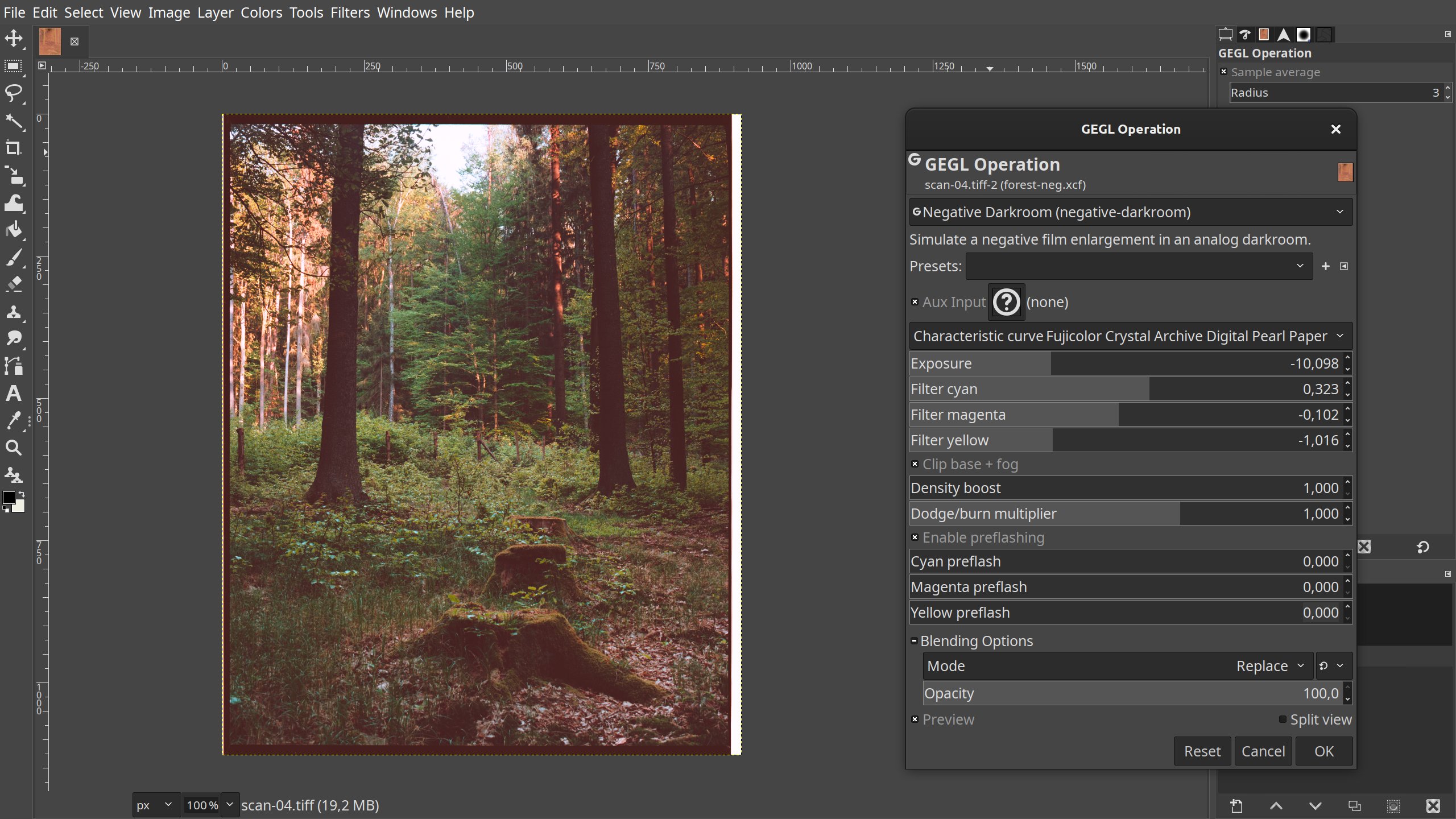
Negative Darkroom in GEGL 0.4.30 / GIMP 2.10.24
Negative Darkroom operation in GEGL 0.4.30 / GIMP 2.10.24

As all GEGL operations are automatically detected and made available by GIMP, this new operation can be used in GIMP 2.10.24 through the generic GEGL tool (menu Tools > GEGL Operation… then select “Negative Darkroom (negative-darkroom)” in the dropdown list).

Creating a custom dedicated dialog for this operation has been raised and may happen in an further version of GIMP to even more improve the usage and experience.

babl minimum requirement in GEGL and GIMP

Meanwhile babl minimum requirement in GEGL has been downgraded to 0.1.78 (same as in GIMP) because newer versions require too recent meson build tool, which is unfortunately still not available on some distributions. In order not to prevent people from benefiting from a newer version of GEGL and GIMP, we refrain on purpose to bump the minimum requirement for a bit even though we highly encourage every packager to use the last version of babl when possible. Many fixes and improvements were also made available in recent versions.

Downloading GIMP 2.10.24

As usual GIMP 2.10.24 is available on GIMP official website (gimp.org):

  • The Linux flatpak has already been published so that anyone who installed it previously should have an update proposed by their software manager (or from terminal: flatpak update org.gimp.GIMP).

Note: our flatpak now supports only x86-64 and AArch64 (i.e. the 64-bit variants of the x86 and ARM architectures). In particular i386 (32-bit x86) had been dropped quite some time ago by the Freedesktop runtime we depend on. This is now the ARM (32-bit) support which has been dropped (even though 32-bit hardware is still being released or often 64-bit board computers are sold with a 32-bit OS). We tried to hold back a bit, for more than 6 months even, but now that the older runtime we used is unsupported, updating is the only sane choice.

For the record, our i386 flatpak is therefore stuck at GIMP 2.10.14 and our ARM flatpak is stuck at GIMP 2.10.22 with a few thousands downloads for this last version of GIMP i386 and a bit more than 400 for the last version of GIMP ARM.

  • The Windows installer is already available. Most mirrors have picked it up, but some still haven’t. So if the download fails, just try to click the Download button again.

  • The macOS DMG package will be published in the next few days once our packager can make the time.

What’s next

The development continues very strong on the development branch and we can clearly see the shift towards more work on GIMP 3 as 2.10.x release become more about robustness and less about new features (though we still continue to backport features when it can be done without too much additional work). We will give more details on this side of development when we will release the upcoming 2.99.6 development version.

Finally, please don’t forget you can donate to the project and personally fund several GIMP developers, as a way to give back and accelerate the development of GIMP.