


GIMP 2.10.34 is finally out, with fixes and some improvements backported from our development codebase.
This news lists the most notable and visible changes. In particular, we do not list here the bug fixes. To get a more complete list of changes, you should refer to the NEWS file or look at the commit history.
Apart from various bug fixes, the TIFF import dialog now gets a new option labelled “Show reduced images”, which is backported from the development release GIMP 2.99.14.
Here is what we said about this option when initially announced:
The TIFF format has a concept of “reduced page”. Until now, we were assuming pages tagged as “reduced” to be thumbnails. Yet this is not always the case. For instance we had feedback from makers of medical devices which were using “reduced pages” as sub-sampled images generated by said devices. They needed GIMP to be able to load all the pages as layers (the main images and the sub-sampled ones).
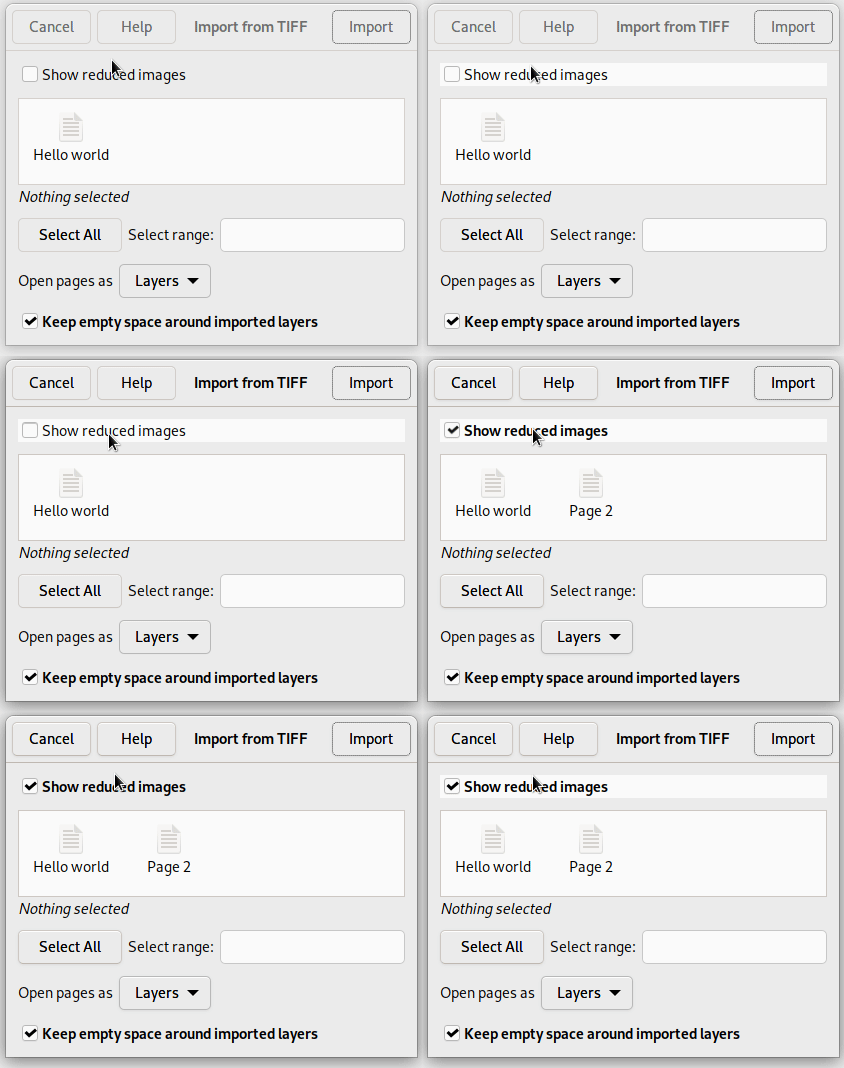
This is why we added a new option called “Show reduced images” which lets you decide whether you want to load these or not. The option will be checked by default through a small heuristic: if there is only 1 reduced page and it’s in the second position, then it’s probably a thumbnail (as per common usage across software); in which case we disable the checkbox by default. Still in the end, the choice is yours!
We also backported a bunch of features from the development branch to improve PSD support.
In particular:
While JPEG XL import has been possible in the stable branch since GIMP 2.10.32, export support has now been backported too in this version, though it is limited to 8-bit lossless.
Additionally, metadata support on import (only) has been backported, making this version of GIMP much more useful for anyone working with this format.
Note for packagers: metadata support in JPEG XL requires libjxl 0.7.0 or over.
Our code for PDF import and export was pretty oblivious of the ability to have transparency in PDF. This is now changing.
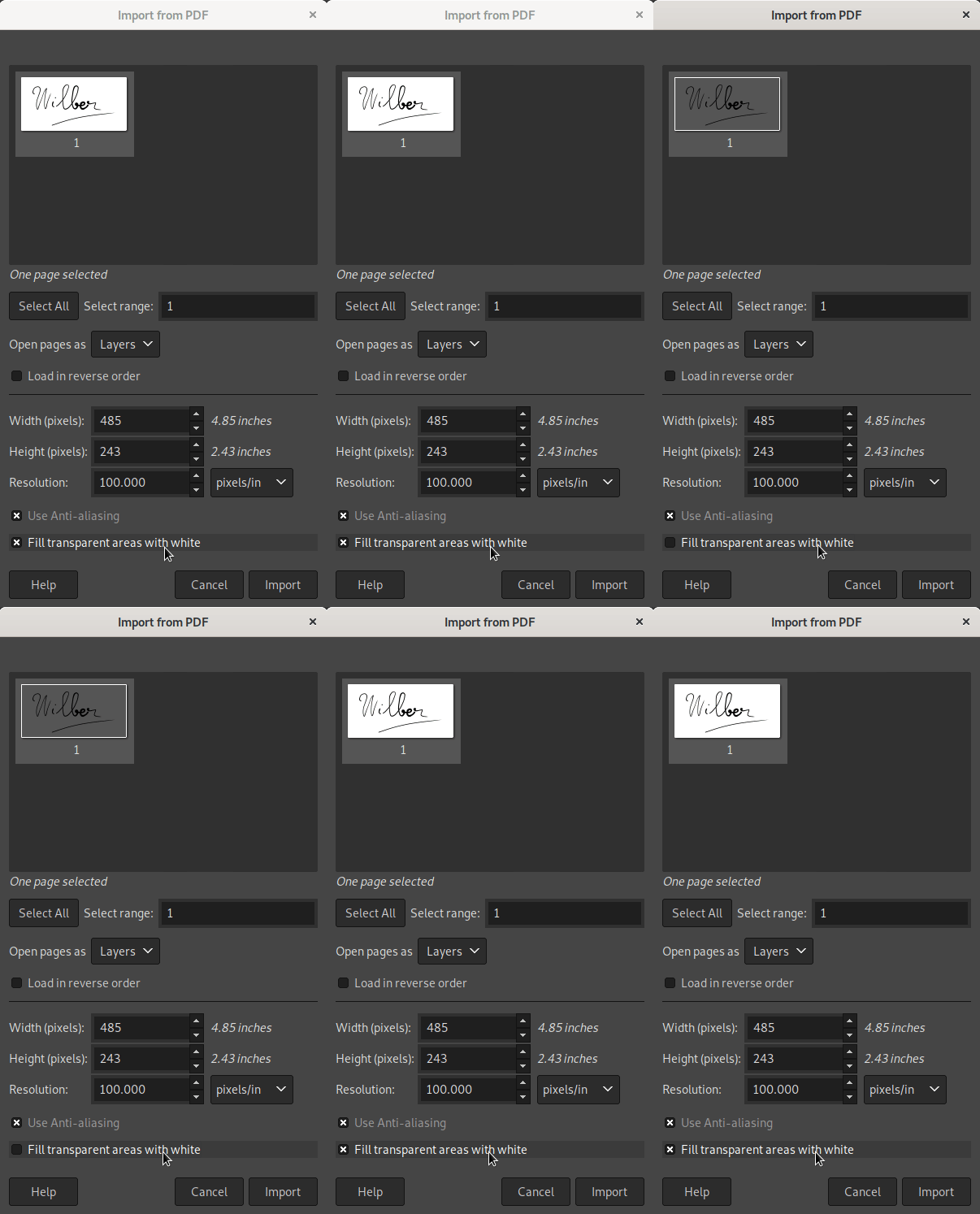
From GIMP 2.10.34 and onwards, the PDF import dialog will propose an option labelled “Fill transparent areas with white”. It will be checked by default (thus providing the old behavior) because most office software seem to create PDF files assuming reader software will fill the background with white. Unchecking the box would not render the expected result. This is likely why our code was historically doing the same as other reader software. Nevertheless for the cases where you were actually intending transparent background upon loading, it will now be possible.
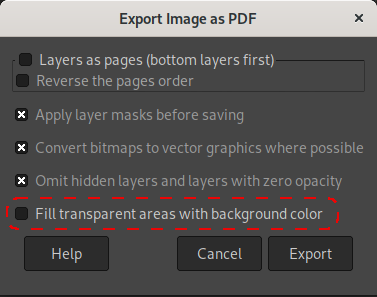
Symmetrically when exporting a PDF, we now propose an option labelled “Fill transparent areas with background color”, letting you decide whether or not you want to add an opaque background, hence getting rid of transparency, or leaving your image with transparency, exactly as you see it in GIMP canvas.
Of course note that, as said above, not all PDF readers handle transparency. Very often, many readers (including web browsers’ readers) will fill the background with white. Yet if you have a more compliant PDF reader or editor, this new usage can be of interest.
🛈 We are talking here of “raw data” where you export your pixels as contiguous or planar data directly, without following a specific file format, and not RAW file formats as are usually called formats used by digital cameras (for these, we still prefer to pass through good raw developer software, such as darktable or RawTherapee).
As a partial backport from GIMP 2.99.12, GIMP will now export your image to raw data at the precision used by your image backend. In other words, you can export high bit depth raw images.
Note though that improvements to this plug-in in the development version were not fully backported. In particular, you may not be able to load back the high bit depth images that you exported. The reason is that the changes required for this would modify considerably the PDB procedure tied to this plug-in, which would break third-party scripts relying on this procedure to load raw data as images.
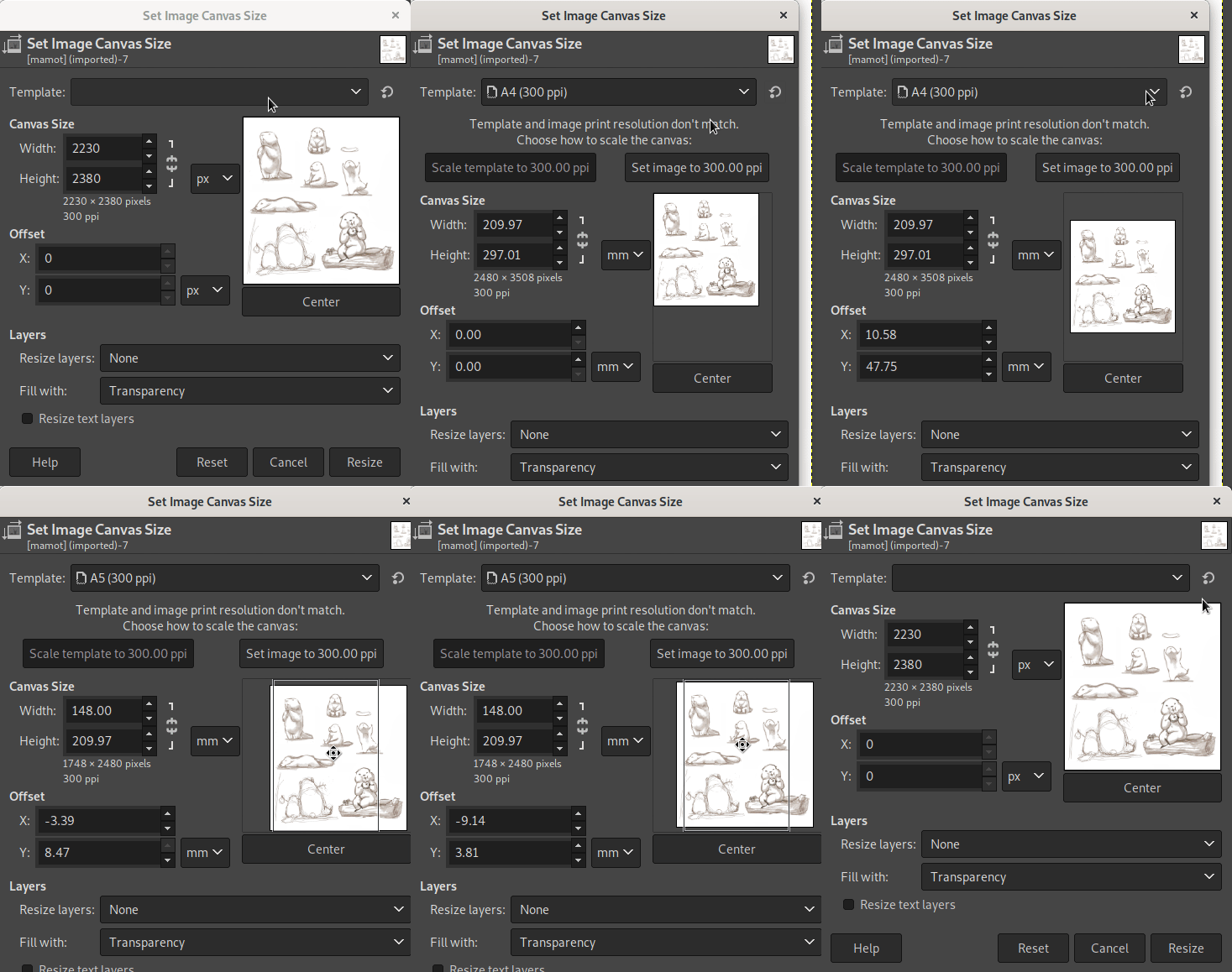
The template selector introduced in the development version GIMP 2.99.6 has now been backported, allowing you to resize your canvas more easily when using common image formats.
As a very partial backport of the many usability changes which happened in the development version 2.99.10, the Layers, Channels and Paths dockables now feature a small header above the items list, containing the “eye” and “chain” icon, hence making the columns more discoverable.
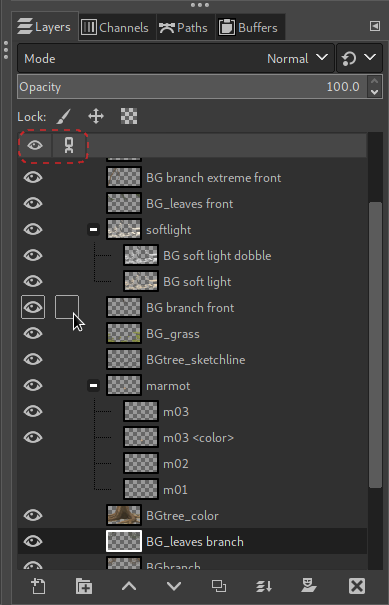
Note: the outline effect when hovering the visibility and link columns was already backported in GIMP 2.10.32.
GIMP has 2 color-picking features: the Color Picker tool which works only within the opened images yet with greater color management and the color picker button in the Colors dockable, which can color pick anywhere in the display and relies on the infrastructure allowed by the OS or desktop you are currently running on.
On Windows, the color-picking feature has been entirely rewritten with OS-dedicated code which works much better with multiple monitors, even when using different PPI scales, for instance when mixing high and low pixel density displays (this fixes some coordinates mistracking bug our previous implementation had).
On Linux/X11, we are backtracking to fix a regression in desktop color-picking. We used to follow recommendations for the new Wayland path, which is to favor color-picking “portals” when available. Unfortunately most (if not all?) these portals still don’t give any color-management information about the returned color. As graphics work requires accurate color management, we decided to get back using full old-style X11 code.
Note that since the stable branch of GIMP is still using GTK+2, even if you run on Wayland, GIMP itself would use XWayland. In other words, GIMP 2.10.34 now runs the X11 code path whatever windowing system is in use.
In “Change Foreground|Background Color” dialogs or in the Colors dockable, you have the option to view your colors in a 0..100 or 0..255 scales. You can also see your color in alternative LCh or HSV color models.
These 2 settings are now stored and remembered across sessions so that you don’t have click them again each time for your usual and preferred workflow.
This version comes with a few bug fixes dedicated to the macOS builds. The most noteworthy one is that we implemented HTTPS support (since our I/O backend library, GIO, is lacking proper macOS support for this protocol) for 2 features in particular:
Two new functions were added, wrapping basic color processing filters, making it easy to call them from third-party plug-ins:
gimp_drawable_shadows_highlights(): function performing the
“Shadows-Highligths” filter in the “Colors” menu.gimp_drawable_extract_component(): function performing the “Extract
Component” filter in the “Colors > Components” menu.As usual, this version of GIMP is accompanied by new versions of babl and GEGL:
BABL_LUT, leaving us some time to iron out a few more issues we
discovered at the last minute.libraw 0.21.0, while also improving
the following operations: rgb-clip, perlin, mosaic, c2g, long-shadow
and gif-load.Various build improvements also happened in both babl and GEGL.
35 people contributed changes or fixes to GIMP 2.10.34 codebase:
Contributions on other repositories in the GIMPverse:
gimp-macos-build (macOS build scripts) since 2.99.14
release: Lukas Oberhuber, Kyungjoon Lee and Mingye Wang.Then let’s not forget to thank all the people who help us triaging in Gitlab, report bugs and discuss possible improvements with us. And of course, our community is deeply thankful to the internet warriors who manage our various discussion channels or social network accounts such as Ville Pätsi, Liam Quin, Michael Schumacher and Sevenix!
Note: considering the number of parts in GIMP and around, and how we
get statistics through git scripting, errors may slip inside these
stats. Feel free to tell us if we missed or mis-categorized some
contributors or contributions.
As far as I remember, GIMP has had a very accurate release procedure, with step-by-step TODO items listed in a long file.
Lately I have been working on improving it further, making a public report, actually checkable bucket list items… and in particular, I would like the source and binaries to be thoroughly tested by as many people as possible. 👩🔬🧪👨🔬
This version is the first time we try this new release procedure (the procedure worked fine: the release was delayed by us finding some last-minute issues which is actually a good thing!).
We already have a few people testing GIMP on Windows, though the more the
better.
On the other hand, we have nearly nobody testing the macOS builds or the
flatpak (apart from developers and packagers of course). 😢
Note that we don’t have our own packages for every OS out there, but we definitely welcome people willing to test GIMP on *BSD, Haiku or whatnot, as long as you can build GIMP on your own on your system of choice.
For these reasons, if anyone is willing to help us improve GIMP by participating to release testing, please open a report on the developer website tracker with the following information:
Then we will include you in the next release testing (stable and development releases).
Our expectations from testers:
2 organizations contributed more download mirrors to distribute GIMP.
Thanks to Artfiles New Media GmbH (Hamburg, Germany), which has actually been a long-term mirror sponsor and recently came back by updating their settings to our new mirror system; and the Fremont Cabal Internet Exchange which added 2 more mirrors in the United States and one in Bogotà, Colombia (our second mirror in South America).
Mirrors are important as they help the project by sharing the load for dozens of thousands of daily downloads. Moreover by having mirrors spread across the globe, we ensure that everyone can have fast download access to GIMP.
A new “Czech” section was added to our books page, with 4 books which got reported to us. These books are a bit old and all seem to be targetting GIMP 2.8. So let’s hope for a lot of GIMP 2.10 (and soon 3.0) coverage in Czech in the future!
We remind everyone that we welcome book additions, especially newer books for latest versions of GIMP (which would be most useful to everyone). Whether you wrote it or just read it, if you know of a book about GIMP, just report the same information as other books in the list. Thanks!
As usual, GIMP 2.10.34 is available on GIMP official website (gimp.org) in 4 package formats:
Other packages made by third-parties are obviously expected to follow (Linux or *BSD distributions’ packages, etc.).
These days, we are mostly focusing on the development version, especially since we have big plans for 2023, as was outlined in our 2023 plans (2022 annual report). For anyone interested in the future of GIMP, I highly recommend reading this report.
Nevertheless bug fixes in particular, and maintenance in general, still need to get out for the stable branch. We will likely release at least one, possibly more, stable versions before GIMP 3.0 release.
Don’t forget you can donate and personally fund GIMP developers, as a way to give back and accelerate the development of GIMP. Community commitment helps the project to grow stronger! 💪🥳
此内容由惯性聚合(RSS阅读器)自动聚合整理,仅供阅读参考。 原文来自 — 版权归原作者所有。