惯性聚合 高效追踪和阅读你感兴趣的博客、新闻、科技资讯
阅读原文 在惯性聚合中打开

推荐订阅源

Forbes - Security
Forbes - Security
T
Tailwind CSS Blog
Hugging Face - Blog
Hugging Face - Blog
Blog — PlanetScale
Blog — PlanetScale
WordPress大学
WordPress大学
aimingoo的专栏
aimingoo的专栏
Y
Y Combinator Blog
U
Unit 42
I
InfoQ
CTFtime.org: upcoming CTF events
V
Visual Studio Blog
B
Blog RSS Feed
Vercel News
Vercel News
F
Fortinet All Blogs
Know Your Adversary
Know Your Adversary
T
Troy Hunt's Blog
博客园 - 【当耐特】
MongoDB | Blog
MongoDB | Blog
大猫的无限游戏
大猫的无限游戏
A
About on SuperTechFans
Jina AI
Jina AI
小众软件
小众软件
T
Threatpost
有赞技术团队
有赞技术团队
人人都是产品经理
人人都是产品经理
The Hacker News
The Hacker News
T
The Exploit Database - CXSecurity.com
C
CXSECURITY Database RSS Feed - CXSecurity.com
Exploit-DB.com RSS Feed
Microsoft Azure Blog
Recent Announcements
酷 壳 – CoolShell
酷 壳 – CoolShell
Scott Helme
Scott Helme
B
Blog
腾讯CDC
Last Week in AI
Last Week in AI
P
Proofpoint News Feed
S
Schneier on Security
N
News and Events Feed by Topic
Microsoft Security Blog
K
Kaspersky official blog
G
Google Developers Blog
T
Tor Project blog
PCI Perspectives
PCI Perspectives
S
Secure Thoughts
Google Online Security Blog
Latest news
Latest news
Google DeepMind News
MyScale Blog
MyScale Blog
罗磊的独立博客

铭心の博客

利用 Hysteria2 面板项目搭建VPN 关于留言评论的一些规则 基于 Aria2 RPC 的 P2P 客户端异常检测与 IP 封禁工具 宝塔面板使用问题记录【强制HTTPS】后网站无法访问 EMBY通过反代后视频加载缓慢解决 EMLOG友链状态实时更新 PHP IMAP SEARCH搜索关键字 golang pprof 实战 有什么问题的话可以博客留言 隐藏的网站
Docker代理搭建
铭心 · 2024-10-10 · via 铭心の博客

前言:

因为一些神秘原因,Docker国内所有镜像源于6月左右全部关闭,这将导致Docker使用受到影响所有镜像无法拉取,恰巧最近需要使用Docker镜像,所以有了这篇搭建文章

准备工作:

1. 已安装curl服务

2. 已安装宝塔面板,因为我有多个服务,所以本教程基于宝塔面板;

3. 搭建代理的服务器需要可以访问GitHub仓库中的Docker-Proxy项目

Docker代理搭建步骤:

1. 宝塔安装Docker环境,等待安装完成: 管理后台→Docker

2. shell终端执行如下命令将进入安装页面:

sudo bash -c "$(curl -fsSL https://raw.githubusercontent.com/dqzboy/Docker-Proxy/main/install/DockerProxy_Install.sh)"
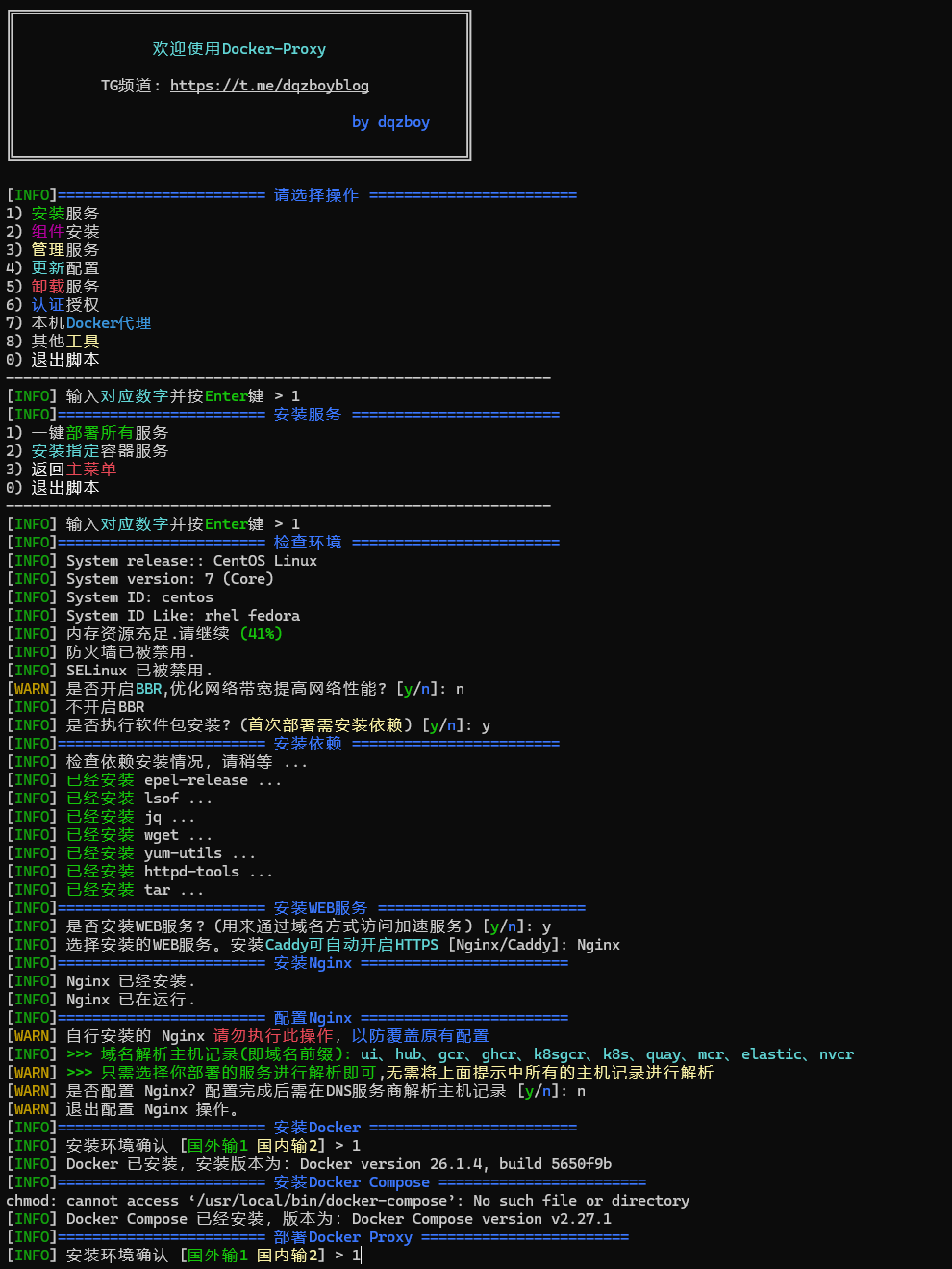


3. 按照提示等待安装完成

设置反向代理将服务及UI:

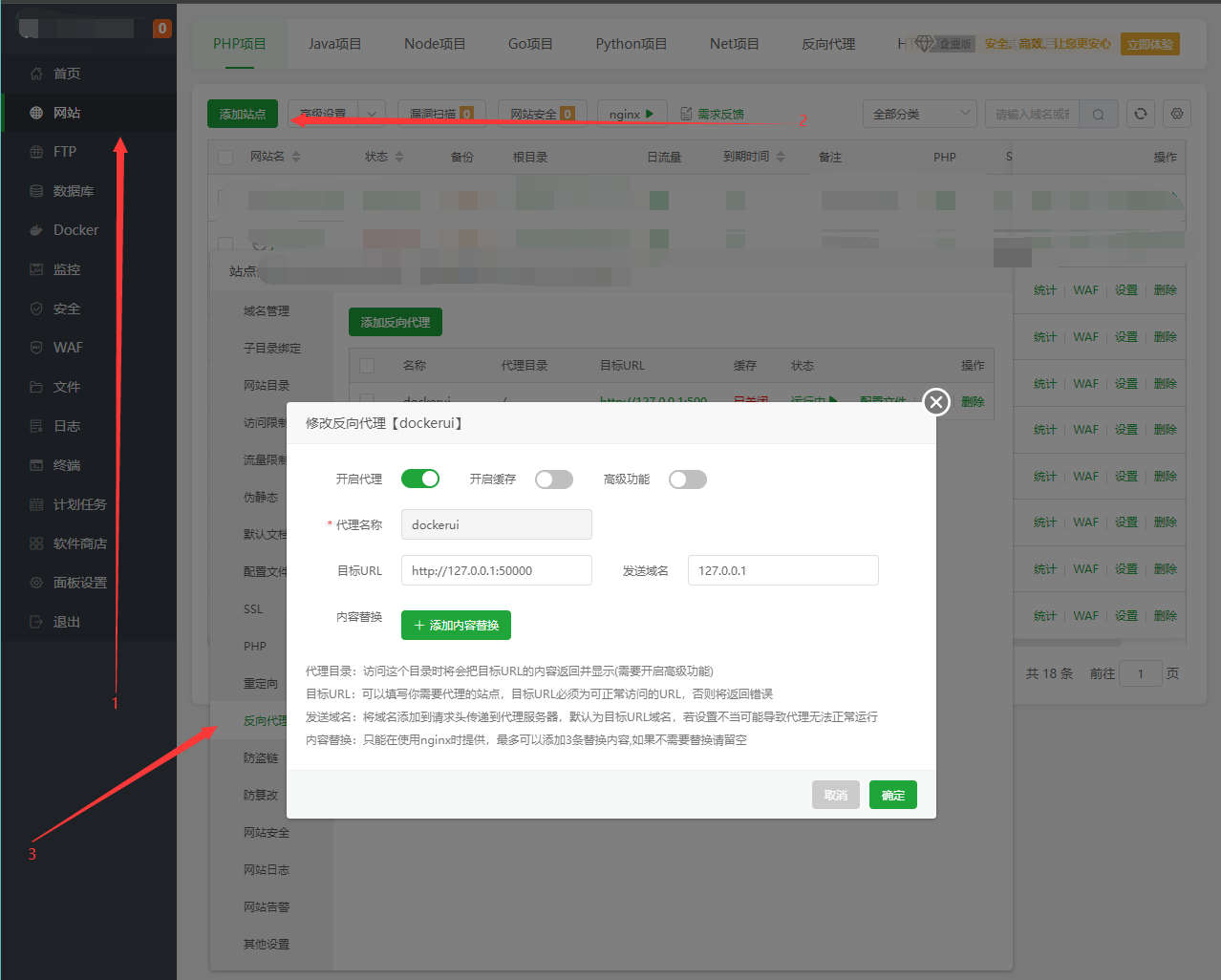
1. 宝塔管理后台-添加站点-反向代理-添加反向代理:

目标URL:http://127.0.0.1:50000,端口安装完成后会展示;


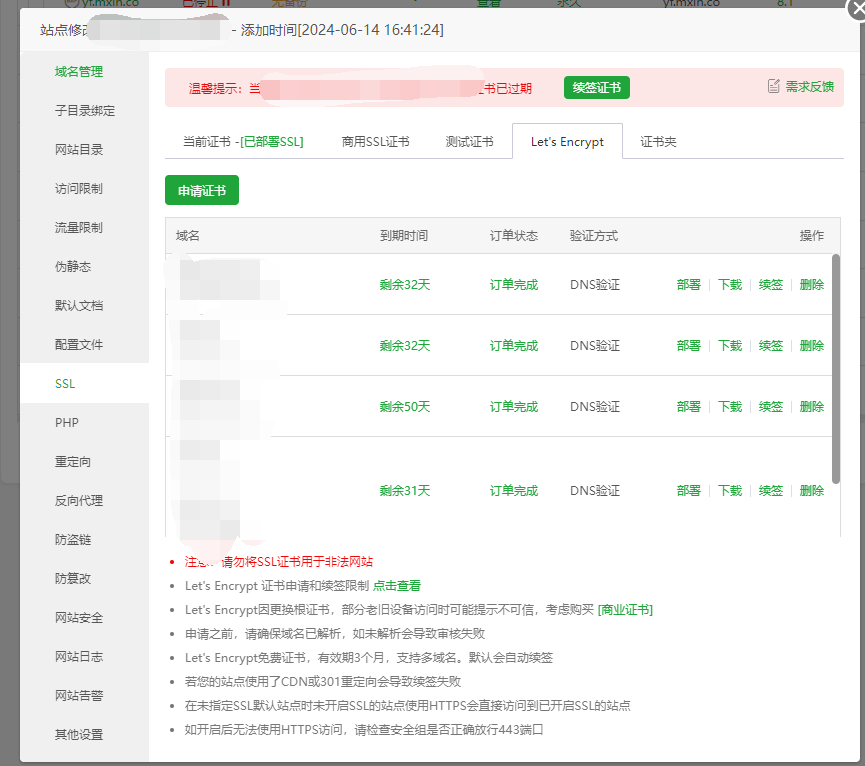
2. 申请SSL证书并部署,建议开启强制SSL


Docker镜像加速设置及手动拉取镜像

1. 编辑daemon.json,将链接配置为自己的URL,后续所有镜像拉取将自动加速

sudo vim /etc/docker/daemon.json
{"registry-mirrors": ["https://xxx.docker.com"]}
systemctl restart docker

2. 手动拉取镜像,适合不经常拉取镜像的Docker玩家

docker pull xxx.docker.com/library/nginx:latest

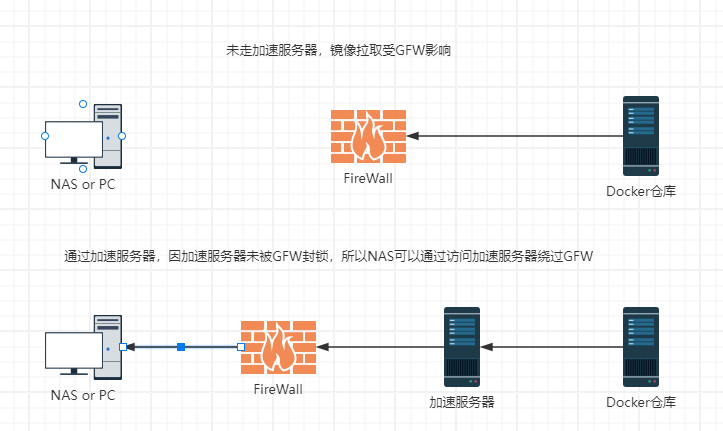
代理实现原理

如果担心加速服务器被GFW封锁,可以添加策略,加速服务器只放行指定IP的入流量;