











Preface
Java applications have to deal with JDK upgrades to stay up to date with the security and functional enhancements of Java. On the one hand, it is expected that Java applications can keep up with the latest JDK versions.
-
Oracle recommends reducing the release cycle of the long term supported (LTS) versions of the JDK from three years to two years. The latest technology will be used in a shorter period for applications that only use the LTS versions, but it also means version upgrades will be more frequent.
-
Spring Framework 6 supports only JDK 17. Spring is the underlying framework that many enterprise-level applications rely on, which means applications have to upgrade to JDK 17 to move to the this Spring version.
On the other hand, the JDK upgrade of Java applications is slow. It has been nearly four years since JDK 11 was released in 2018. Adoption of JDK 11 has not reached 50% (according to 2022-state-of-java-ecosystem). In contrast, JDK 8 reached 38% within one year of its release, 64.3% within two years, and nearly 80% by 2018 (according to java-8-adoption-march-2016, jvm-ecosystem-report-2018).
Why Is the JDK 11 Upgrade Slow?
There are many possible reasons. For example, JDK 8 introduces Lambda at the language level, which is attractive to developers. The JDK 11 update at the language level is optional. However, compared with upgrading from other versions to JDK 8 (upgrading from JDK 6/7 to JDK 8 is insensitive to applications), upgrading to JDK 11/17 will be much more difficult, and there will be many compatibility problems. For example:
-
Deletion of some packages such as
sun.misc.\*results inClassNotFoundExceptionin the running code. -
Changes in the schema of the Java Version cause an exception to the original logic for determining the Java version.
-
User code that calls private APIs, and the API is marked as obsolete.
-
The introduction of the Java Platform Module System (JPMS) has caused the failure of some reflection code.
-
J2EE-related packages have been deleted.
If the applications that need to be upgraded depend on hundreds of third-party JARs, these JARs may also have compatibility problems. If dozens or even hundreds of applications need to be upgraded, the additional workload can be huge.
Due to these difficulties, Alibaba has accumulated these upgrade experiences through tools to help Java applications upgrade to the latest version of JDK efficiently.
An Introduction to EMT4J
Currently, Eclipse Migration Toolkit for Java (EMT4J) is open source in the Eclipse community and has passed the Eclipse Adoptium PMC review. It is incubated as an Eclipse Adoptium sub-project. Alibaba Cloud is also a cornerstone member of the Eclipse Adoptium working group. It participates in the Eclipse Adoptium community governance and provides fully compatible, OpenJDK-based, high-quality JDK distributions for the Java Ecosystem.
EMT4J currently supports the analysis of upgrading from JDK 8 to JDK 11 & 17. It will continue to update the support for the latest LTS versions in the future.
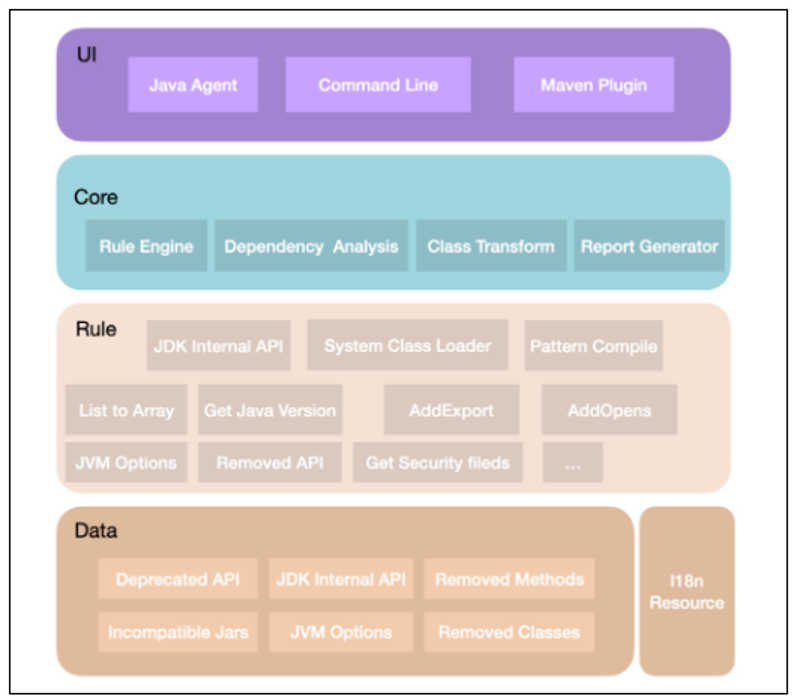
Currently, you can use the following three methods:
-
Java Agent
-
Command-line
-
Maven Plugin
The following is the EMT4J architecture diagram:
EMT4J – Usage (Scenario Demonstration)
Let’s take a common scenario to demonstrate the use of the tool:
Developer Tom needed to upgrade eight Java applications (app-service-1 to app-service-8) from JDK 8 to JDK 17. How did he upgrade with the help of EMT4J?
The specific upgrade operation is divided into the following seven steps:
-
Tom downloaded the EMT4J tool to the
/home/jdk17and installed the target version of JDK 17. -
He downloaded the
app-service-1~app-service-8application package to the machine where EMT4J is located and put it in/home/app/deploydirectory. He put the JVM optionsapp-service-1~app-service-8into the text file of.cfgin the/home/app/vmoptionsdirectory. -
He ran a tool check:
sh ${EMT4J_HOME}/bin/analysis.sh -f 8 -t 17 -j /home/jdk17 /home/app, where-f 8 -t 17indicates the upgrade from 8 to 17,-j /home/jdk17indicates the installation directory of the target version JDK, and/home/appindicates the application package and parameter file to be checked. After the command is executed, report.html is generated in the current directory by default. Open the check report report.html to view the following list of problems: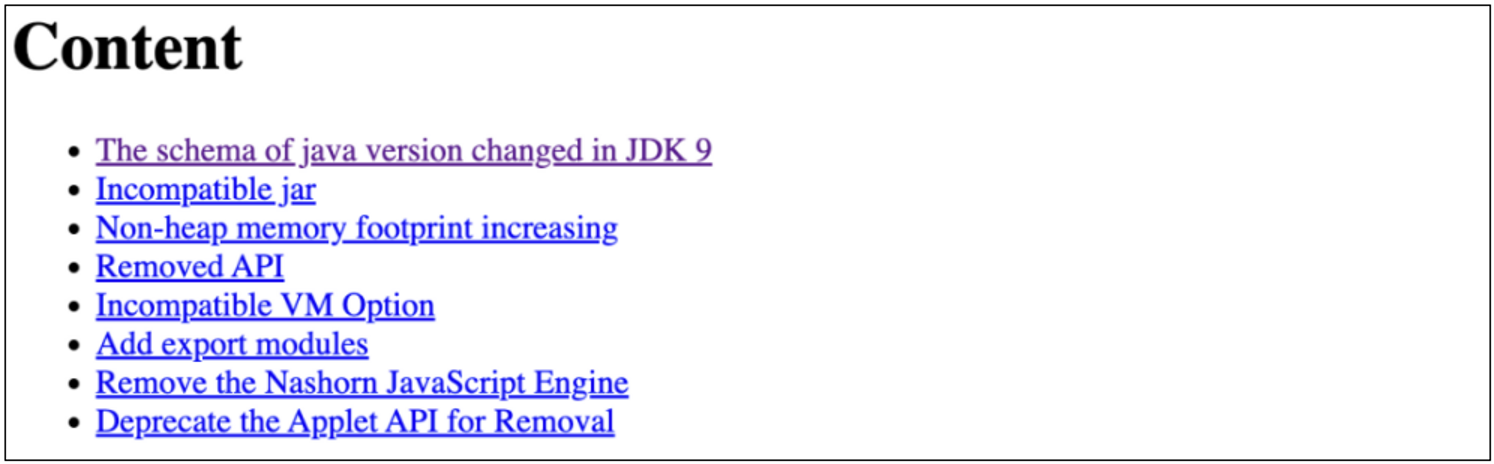
-
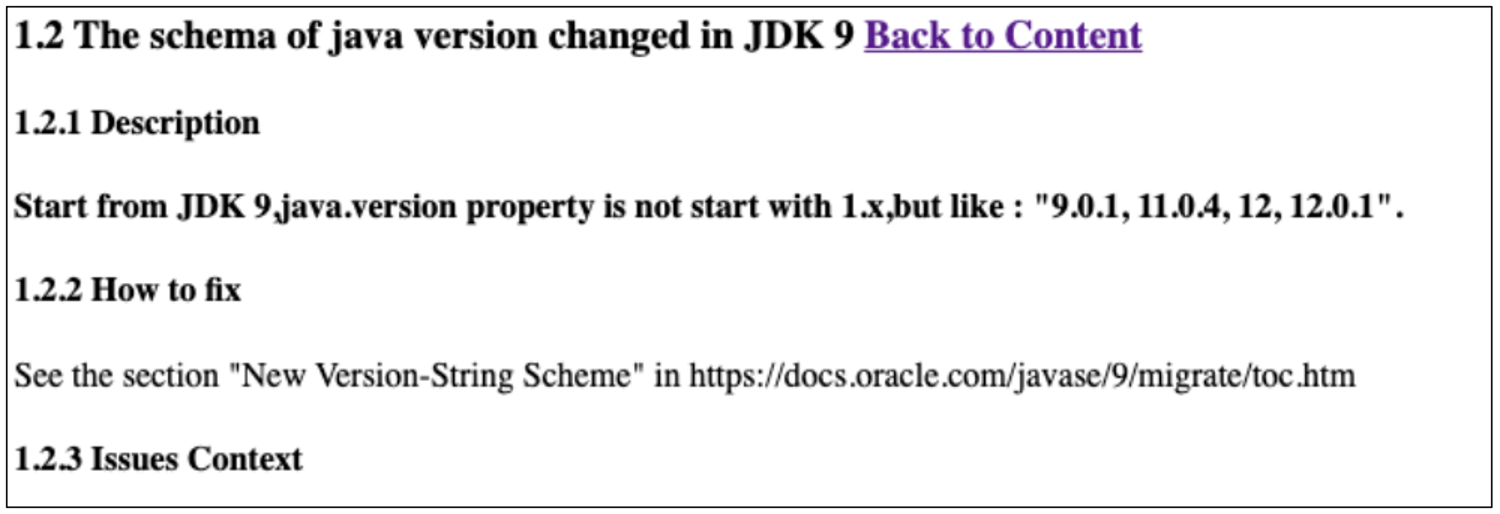
Tom clicked "The schema of java version changed in JDK9" to view the details of the problem and saw the following specific classes:
Location: file:/home/app/deploy/app-service-1/notify-utils-2.2.5.jar, Target: com.app.services1.utils.VersionInfo. -
Tom opened the
app-service-1project and saw the following code. The following code cannot handle a version number similar to 17.0.1.private final String JAVA_VERSION = System.getProperty("java.version"); private final int getJavaVersionAsInt() { if (this.JAVA_VERSION == null) return 0; String str = this.JAVA_VERSION.substring(0, 1); str = str + this.JAVA_VERSION.substring(2, 3); if (this.JAVA_VERSION.length() >= 5) { str = str + this.JAVA_VERSION.substring(4, 5); } else { str = str + "0"; } return Integer.parseInt(str); } -
Tom referred to how to fix it in the report and learned that the schema of Java Version has changed since JDK 9. He modified the code according to the new schema.
-
Tom revised other issues in the reference report in turn. After the modification is completed, he used the target version JDK startup on the development machine to verify the correctness of the function.
The preceding EMT4J tool helped Tom upgrade from JDK 8 to JDK 17. What are the features of the EMT4J tool?
1. Java Agent, Command-line Tools, and Maven Plugins Are Supported
-
Java Agent can obtain more runtime context information, provide an accurate call stack, and find more problems.
-
The command-line tool is easy to use and does not need to start the application, but there may be false positives.
-
The Maven plugin can be integrated into the build phase and find problems in the development phase.
2. It Supports Various Potential Incompatibility Issues Analysis
-
JDK 8 to JDK 11
- Use of JDK Internal API
- System ClassLoader is no longer a URLClassLoader subclass.
- Arrays.asList change in return type
- Schema of Java Version change
- JPMS needs to add add-exports and add-opens.
- Time zone data change to CLDR causes related incompatibilities.
- API changes for Pattern.compile.
- JVM option change.
-
JDK 11 to JDK 17
- Removed Nashorn
- Removed RMI and Java Applet
- Field cannot be obtained in some class
3. It Supports Output in HTML, TXT, and JSON Formats
How Can You Contribute?
If you encounter the following problems when using EMT4J:
-
The tool should find compatibility problems, but it did not find them.
-
The problem context reported by the tool is inaccurate, and it is inconvenient to find out where the problem is.
-
The problem description of the tool report is unclear. It is difficult to guide how to modify and add some new functions, such as the tool supporting other formats.
You can participate in the following ways:
-
Create an issue to describe the problem you are experiencing
-
Submit a PR that modifies the analysis and tests
Summary
Currently, there are many Java applications still running on JDK 8 that need help upgrading, and these applications are planning or upgrading to JDK. We hope to make the upgrade easier through EMT4J.
We have accumulated Alibaba's experience in upgrading JDK in the tool, but there are many compatibility problems that we have not encountered. In addition, new JDK versions will be released continuously, and new compatibility problems will continue to arise. We hope more developers can participate and enhance the functions of the tool through open-source, making it easier to upgrade Java applications. Please refer to this link for more details about how to use, contribute, etc.