


惯性聚合 高效追踪和阅读你感兴趣的博客、新闻、科技资讯
阅读原文 在惯性聚合中打开

推荐订阅源

雷峰网
雷峰网
L
Lohrmann on Cybersecurity
月光博客
月光博客
OSCHINA 社区最新新闻
OSCHINA 社区最新新闻
GbyAI
GbyAI
P
Privacy International News Feed
Microsoft Security Blog
D
Docker
V
Vulnerabilities – Threatpost
Google DeepMind News
美团技术团队
C
CERT Recently Published Vulnerability Notes
C
Check Point Blog
P
Palo Alto Networks Blog
WordPress大学
WordPress大学
小众软件
小众软件
Spread Privacy
Spread Privacy
P
Proofpoint News Feed
Last Week in AI
Last Week in AI
Simon Willison's Weblog
大猫的无限游戏
大猫的无限游戏
T
Threatpost
Cisco Talos Blog
Cisco Talos Blog
Y
Y Combinator Blog
V
V2EX
爱范儿
爱范儿
T
The Blog of Author Tim Ferriss
AWS News Blog
AWS News Blog
cs.AI updates on arXiv.org
P
Privacy & Cybersecurity Law Blog
D
DataBreaches.Net
CTFtime.org: upcoming CTF events
NISL@THU
NISL@THU
The GitHub Blog
The GitHub Blog
M
MIT News - Artificial intelligence
Latest news
Latest news
Vercel News
Vercel News
Recorded Future
Recorded Future
Martin Fowler
Martin Fowler
G
GRAHAM CLULEY
T
Threat Research - Cisco Blogs
The Register - Security
博客园 - 叶小钗
I
Intezer
Schneier on Security
Project Zero
Project Zero
PCI Perspectives
PCI Perspectives
K
Kaspersky official blog
Security Latest
Security Latest
AI
AI

Peter Steinberger

OpenClaw, OpenAI and the future | Peter Steinberger Shipping at Inference-Speed | Peter Steinberger The Signature Flicker | Peter Steinberger Just Talk To It - the no-bs Way of Agentic Engineering | Peter Steinberger Claude Code Anonymous | Peter Steinberger Live Coding Session: Building Arena | Peter Steinberger My Current AI Dev Workflow | Peter Steinberger Essential Reading for Agentic Engineers - August 2025 | Peter Steinberger Just One More Prompt | Peter Steinberger Poltergeist: The Ghost That Keeps Your Builds Fresh | Peter Steinberger Don't read this Startup Slop | Peter Steinberger Essential Reading for Agentic Engineers - July 2025 | Peter Steinberger Self-Hosting AI Models After Claude's Usage Limits | Peter Steinberger Logging Privacy Shenanigans | Peter Steinberger VibeTunnel's first AI-anniversary | Peter Steinberger Making AppleScript Work in macOS CLI Tools: The Undocumented Parts | Peter Steinberger Peekaboo 2.0 – Free the CLI from its MCP shackles | Peter Steinberger Command your Claude Code Army, Reloaded | Peter Steinberger Essential Reading for Agentic Engineers | Peter Steinberger Slot Machines for Programmers: How Peter Builds Apps 20x Faster with AI | Peter Steinberger My AI Workflow for Understanding Any Codebase | Peter Steinberger stats.store: Privacy-First Sparkle Analytics | Peter Steinberger Showing Settings from macOS Menu Bar Items: A 5-Hour Journey | Peter Steinberger VibeTunnel: Turn Any Browser into Your Mac's Terminal | Peter Steinberger Vibe Meter 2.0: Calculating Claude Code Usage with Token Counting | Peter Steinberger llm.codes: Make Apple Docs AI-Readable | Peter Steinberger Automatic Observation Tracking in UIKit and AppKit: The Feature Apple Forgot to Mention | Peter Steinberger Migrating 700+ Tests to Swift Testing: A Real-World Experience | Peter Steinberger Commanding Your Claude Code Army | Peter Steinberger Code Signing and Notarization: Sparkle and Tears | Peter Steinberger Vibe Meter: Monitor Your AI Costs | Peter Steinberger Claude Code is My Computer | Peter Steinberger Stop Over-thinking AI Subscriptions | Peter Steinberger Introducing Demark: HTML in. MD out. Blink-fast. | Peter Steinberger The Future of Vibe Coding: Building with AI, Live and Unfiltered | Peter Steinberger MCP Best Practices | Peter Steinberger Finding My Spark Again | Peter Steinberger Top-Level Menu Visibility in SwiftUI for macOS | Peter Steinberger Fixing keyboardShortcut in SwiftUI | Peter Steinberger Supporting Both Tap and Long Press on a Button in SwiftUI | Peter Steinberger On Using Apple Silicon Mac Mini for Continuous Integration | Peter Steinberger Apple Silicon M1: A Developer's Perspective | Peter Steinberger Gardening Your Twitter: Curating Your Timeline | Peter Steinberger Gardening Your Twitter: Growing Your Followers | Peter Steinberger Forbidden Controls in Catalyst: Optimize Interface for Mac | Peter Steinberger Disabling Keyboard Avoidance in SwiftUI's UIHostingController | Peter Steinberger The State of SwiftUI | Peter Steinberger Logging in Swift | Peter Steinberger Building with Swift Trunk Development Snapshots | Peter Steinberger Calling Super at Runtime in Swift | Peter Steinberger zld — A Faster Version of Apple's Linker | Peter Steinberger How to Fix LLDB: Couldn't IRGen Expression | Peter Steinberger Updating macOS on a Hackintosh | Peter Steinberger InterposeKit — Elegant Swizzling in Swift | Peter Steinberger The Great Mac Catalyst Text Input Crash Hunt | Peter Steinberger Jailbreaking for iOS Developers | Peter Steinberger Network Kernel Core Dump | Peter Steinberger How to macOS Core Dump | Peter Steinberger Kernel Panics and Surprise boot-args | Peter Steinberger The LG UltraFine 5K, kernel_task, and Me | Peter Steinberger Let's Try This Again | Peter Steinberger How We Work at PSPDFKit | Peter Steinberger Swizzling in Swift | Peter Steinberger WWDC for First-Timers, 2019 Edition | Peter Steinberger Challenges of Adopting Drag and Drop | Peter Steinberger Marzipan: Porting iOS Apps to the Mac | Peter Steinberger How to Use Slack and Not Go Crazy | Peter Steinberger Hardcore Debugging - Heavy Weapons for Hard Bugs | Peter Steinberger Binary Frameworks in Swift | Peter Steinberger Even Swiftier Objective-C | Peter Steinberger The Case for Deprecating UITableView | Peter Steinberger Running tests with Clang Address Sanitizer | Peter Steinberger UI testing on iOS, without busy waiting | Peter Steinberger Hiring a distributed team | Peter Steinberger Writing Good Bug Reports | Peter Steinberger Real-time collaboration, Apple, and you | Peter Steinberger Converting Xcode Test Runs to JUnit, the Fast Way | Peter Steinberger Efficient iOS Version Checking | Peter Steinberger Investigating Thread Safety of UIImage | Peter Steinberger Swifty Objective-C | Peter Steinberger Running UI Tests on iOS With Ludicrous Speed | Peter Steinberger A Pragmatic Approach to Cross-Platform | Peter Steinberger Surprises with Swift Extensions | Peter Steinberger Using ccache for Fun and Profit | Peter Steinberger UITableViewController designated initializer woes | Peter Steinberger Researching ResearchKit | Peter Steinberger The curious case of rotation with multiple windows on iOS 8 | Peter Steinberger UIKit Debug Mode | Peter Steinberger Retrofitting containsString: on iOS 7 | Peter Steinberger A Story About Swizzling "the Right Way™" and Touch Forwarding | Peter Steinberger Hacking with Aspects | Peter Steinberger Fixing UITextView On iOS 7 | Peter Steinberger Fixing What Apple Doesn't | Peter Steinberger How To Inspect The View Hierarchy Of Third-Party Apps | Peter Steinberger Fixing UISearchDisplayController On iOS 7 | Peter Steinberger Smart Proxy Delegation | Peter Steinberger Adding Keyboard Shortcuts To UIAlertView | Peter Steinberger How To Center Content Within UIScrollView | Peter Steinberger UIAppearance for Custom Views | Peter Steinberger Hacking Block Support Into UIMenuItem | Peter Steinberger
Peekaboo MCP – lightning-fast macOS screenshots for AI agents | Peter Steinberger
Peter Steinberger · 2025-06-07 · via Peter Steinberger

TL;DR: Peekaboo is a macOS-only MCP server that enables AI agents to capture screenshots of applications, or the entire system, with optional visual question answering through local or remote AI models.

Without screenshots, agents debug blind—Peekaboo gives them eyes.

What Peekaboo Can Do

Peekaboo provides three main tools that give AI agents visual capabilities:

  • image - Capture screenshots of screens or specific applications
  • analyze - Ask AI questions about captured images using vision models
  • list - Enumerate available screens and windows for targeted captures

Each tool is designed to be powerful and flexible. The most powerful feature is visual question answering - agents can ask questions about screenshots like “What do you see in this window?” or “Is the submit button visible?” and get accurate answers. This saves context space since asking specific questions is much more efficient than returning raw image data.

Peekaboo supports both cloud and local vision models, letting you choose between accuracy and privacy.


Install Peekaboo in Cursor IDE Install Peekaboo in Cursor IDE

Design Philosophy

Less is More

The most important rule when building MCPs: Keep the number of tools small. Most agents struggle once they encounter more than 40 different tools. My approach is to make every tool very powerful but keep the total count minimal to avoid cluttering the context.
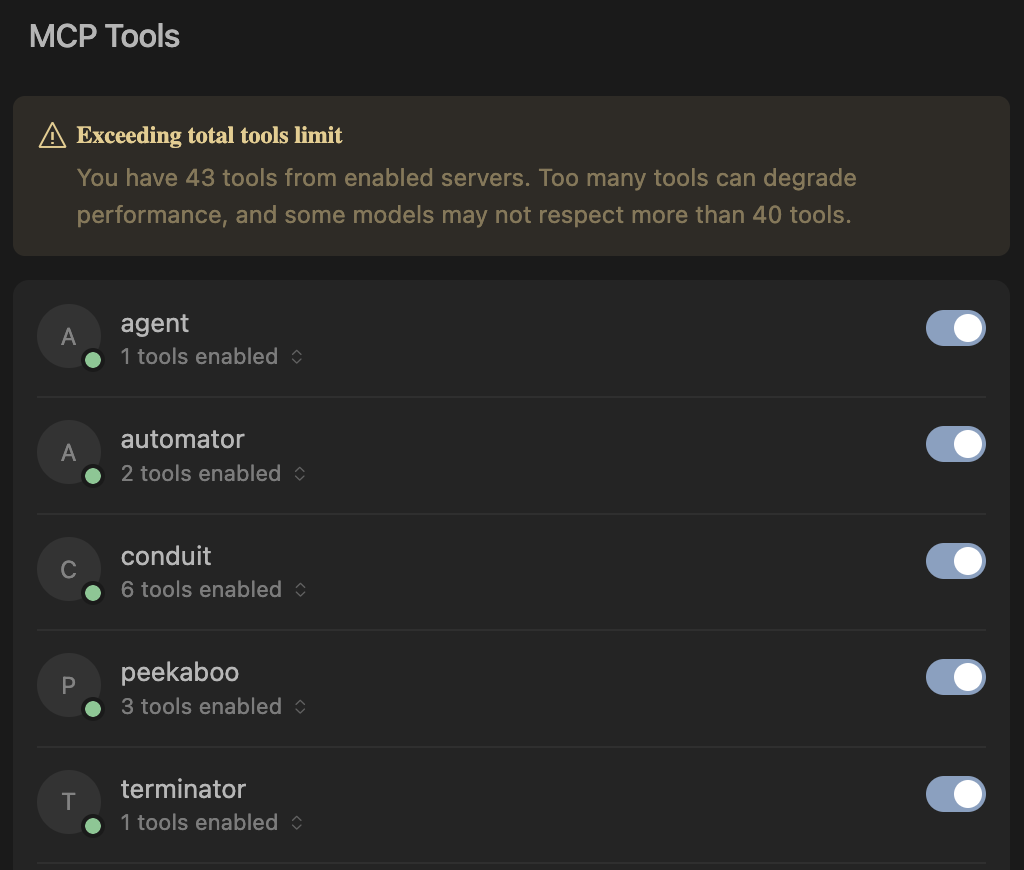
Cursor showing 40+ tools can become overwhelming

Lenient Tool Calling

Another crucial principle: tool calling should be lenient. Agents make mistakes with parameters, so rather than returning errors, Peekaboo tries to understand their intent. Being overly strict just forces unnecessary retry loops - MCPs should be forgiving since agents aren’t infallible.

Fuzzy Window Matching

Peekaboo implements fuzzy window matching because agents don’t always know exact window titles. If an agent asks for “Chrome” but the window is titled “Google Chrome - Peekaboo MCP”, we still match it. Partial matches work, case doesn’t matter, and common variations are understood.

For more insights on building robust MCP tools, check out my guide: MCP Best Practices.

Local vs Cloud Vision Models

Peekaboo supports both local and cloud vision models. While cloud models like GPT-4o offer superior accuracy, local models provide privacy, cost control, and offline operation.

For local inference, I recommend LLaVA as the default for its balance of accuracy and performance. For resource-constrained systems, Qwen2-VL provides excellent results with lower requirements.

Model specifications and requirements

LLaVA (Large Language and Vision Assistant)

  • llava:7b - ~4.5GB download, ~8GB RAM required
  • llava:13b - ~8GB download, ~16GB RAM required
  • llava:34b - ~20GB download, ~40GB RAM required
  • Best overall quality for vision tasks

Qwen2-VL

  • qwen2-vl:7b - ~4GB download, ~6GB RAM required
  • Excellent performance with lower resource requirements
  • Ideal for less powerful machines

Installation:

# Install your chosen model
ollama pull llava:latest        # or llava:7b, llava:13b, etc.
ollama pull qwen2-vl:7b        # for resource-constrained systems

My MCP Ecosystem

Peekaboo is part of a growing collection of MCP servers I’m building:

Each serves a specific purpose in building autonomous AI workflows.

Technical Architecture

Peekaboo combines TypeScript and Swift for the best of both worlds. TypeScript provides excellent MCP support and easy distribution via npm, while Swift enables direct access to Apple’s ScreenCaptureKit for capturing windows without focus changes.

My initial AppleScript prototype had a fatal flaw: it required focus changes to capture windows. The Swift rewrite uses ScreenCaptureKit to access the window manager directly - no focus changes, no user disruption.

The system uses a Swift CLI that communicates with a Node.js MCP server, supporting both local models and cloud providers with automatic fallback. Built with Swift 6 and the new Swift Testing framework (now that I have experience with it!), Peekaboo delivers fast, non-intrusive screenshot capture with intelligent window matching.

For detailed testing instructions using the MCP Inspector, see the Peekaboo README.

The Vision: Autonomous Agent Debugging

Peekaboo is like one puzzle piece in a larger set of MCPs I’m building to help agents stay in the loop. The goal is simple: if an agent can answer questions by itself, you don’t have to intervene and it can simply continue and debug itself. This is the holy grail for building applications with CI - you want to do everything so the agent can loop and work until what you want is done.

When your build fails, when your UI doesn’t look right, when something breaks - instead of stopping and asking you “what do you see?”, the agent can take a screenshot, analyze it, and continue fixing the problem autonomously. That’s the power of giving agents their eyes.

👻 Peekaboo MCP is available now - ⭐ the repo if this saves you a debug session!