








Apple released SwiftUI last year, and it’s been an exciting and wild ride. With iOS 14, a lot of the rough edges have been smoothed out — is SwiftUI finally ready for production?
Fruta Sample App
Let’s look at Apple’s Fruta example, a cross-platform feature-rich app that’s built completely in SwiftUI. It’s great that Apple is finally releasing a more complex application for this year’s cycle.
I took a look when Big Sur beta 1 came out, and it was pretty unpolished:
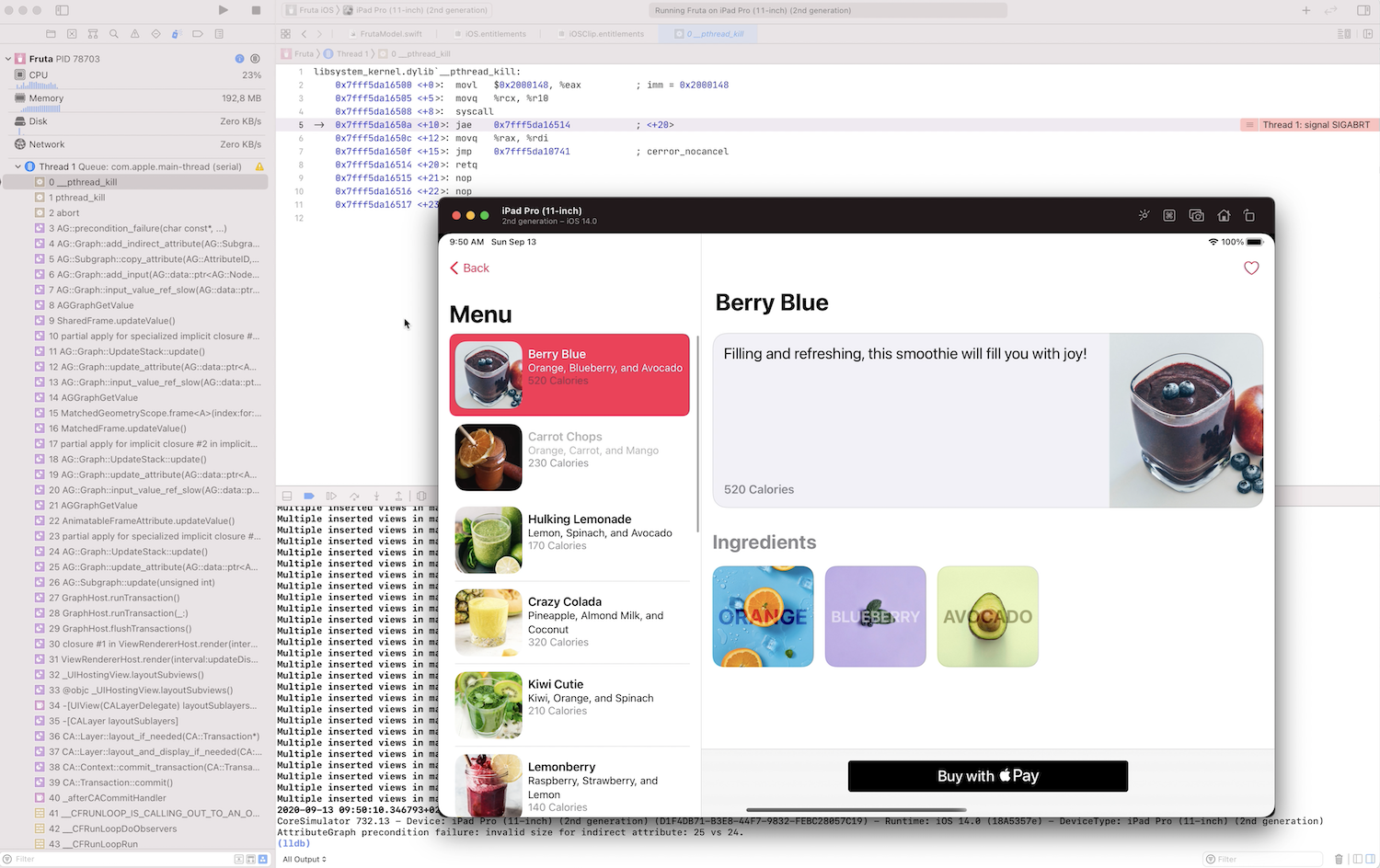
Since then, there have been many betas, and we’re nearing the end of the cycle, with the GM expected in October. So it’s time to look at Fruta again. And indeed, the SwiftUI team did a great job fixing the various issues: The toolbar is pretty reliable, the sidebar no longer jumps out, multiple windows works… however, views are still sometimes misaligned, and it’s still fairly easy to make it crash on both macOS (FB8682269) and iOS 14b8 (FB8682290).
SwiftUI AttributeGraph Crashes
Most SwiftUI crashes are a result of either a diffing issue in AttributeGraph, or a bug with one of the bindings to the platform controls (AppKit or UIKit). Whenever you see AG::Graph in the stack trace, that’s SwiftUI’s AttributeGraph (written in C++), which takes over representing the view hierarchy and diffing. Crashes there are usually in this form:
Fruta[3607:1466511] [error] precondition failure: invalid size for indirect attribute: 25 vs 24Googling for this error reveals that there are a lot of similar problems. People sometimes do find workarounds via wrapping views into other views or changing the hierarchy. But mostly, we’re powerless, and this is something Apple needs to fix in its framework. Since SwiftUI ships as part of the OS, end users need to update their devices to get these fixes.
Platform-Binding Crashes
SwiftUI uses many components from AppKit and UIKit, which is a much better strategy than reinventing the wheel. These components are stateful and are synced with custom manager classes that perform the state diffing. These wrappers can cause issues, and as they’re written in Swift, there aren’t many possibilities to fix issues from the outside (unlike with swizzling in the earlier days).
Example: Removing a favorited item while it’s selected crashes in the AppKit binding that syncs the SwiftUI state with NSTableView (FB8684522).
2020-09-13 10:31:25.483965+0200 Fruta[79371:2051792] [General] Row 0 out of row range [0--1] for rowViewAtRow:createIfNeeded:
2020-09-13 10:31:25.498144+0200 Fruta[79371:2051792] [General] (
	0   CoreFoundation                      0x00007fff20cdb0df __exceptionPreprocess + 242
	1   libobjc.A.dylib                     0x00007fff20b3d469 objc_exception_throw + 48
	2   AppKit                              0x00007fff237a7905 -[NSTableRowData rowViewAtRow:createIfNeeded:] + 675
	3   AppKit                              0x00007fff23813008 -[NSTableView viewAtColumn:row:makeIfNecessary:] + 29
	4   SwiftUI                             0x00007fff49565fc7 $s7SwiftUI19ListCoreCoordinatorC17selectionBehavior5atRow2inAA012PlatformItemC0V0L0V09SelectionG0VSgSi_So11NSTableViewCtF + 39
	5   SwiftUI                             0x00007fff49566b36 $s7SwiftUI19ListCoreCoordinatorC18selectionDidChange2inySo11NSTableViewC_tF + 2662
	6   SwiftUI                             0x00007fff49187850 $s7SwiftUI26NSTableViewListCoordinatorC05tableD19SelectionIsChangingyy10Foundation12NotificationVFTm + 112
	7   SwiftUI                             0x00007fff49187912 $s7SwiftUI26NSTableViewListCoordinatorC05tableD19SelectionIsChangingyy10Foundation12NotificationVFToTm + 114
	8   CoreFoundation                      0x00007fff20c56a6c __CFNOTIFICATIONCENTER_IS_CALLING_OUT_TO_AN_OBSERVER__ + 12
	9   CoreFoundation                      0x00007fff20cf23bb ___CFXRegistrationPost_block_invoke + 49
	10  CoreFoundation                      0x00007fff20cf232f _CFXRegistrationPost + 454
	11  CoreFoundation                      0x00007fff20c275ce _CFXNotificationPost + 723
	12  Foundation                          0x00007fff218ba5e2 -[NSNotificationCenter postNotificationName:object:userInfo:] + 59
	13  AppKit                              0x00007fff237ae588 -[NSTableView _sendSelectionChangedNotificationForRows:columns:] + 219
	14  AppKit                              0x00007fff2373b739 -[NSTableRowData _updateVisibleViewsBasedOnUpdateItems] + 4503
	15  AppKit                              0x00007fff2373a453 -[NSTableRowData _updateVisibleViewsBasedOnUpdateItemsAnimated] + 224
	16  AppKit                              0x00007fff2371a2dc -[NSTableRowData _doWorkAfterEndUpdates] + 95
	17  AppKit                              0x00007fff2371a19d -[NSTableView _endUpdateWithTile:] + 119
	18  SwiftUI                             0x00007fff49186759 $s7SwiftUI26NSTableViewListCoordinatorC011updateTableD0_4from2toySo0cD0C_xxtF + 1145
	19  SwiftUI                             0x00007fff4956c010 $s7SwiftUI19ListCoreCoordinatorC29updateTableViewAndVisibleRows_4from2toySo07NSTableH0C_xxtFyyXEfU_ + 304
	20  SwiftUI                             0x00007fff4956ccf5 $s7SwiftUI19ListCoreCoordinatorC24withSelectionUpdateGuardyyyyXEF + 53
	21  SwiftUI                             0x00007fff4956b2ff $s7SwiftUI19ListCoreCoordinatorC29updateTableViewAndVisibleRows_4from2toySo07NSTableH0C_xxtF + 79
It’s likely there are more bugs waiting to be discovered, but I only spent a few hours with Fruta and on writing up this article.
Performance
On my 2.4 GHz 8-Core Intel Core i9 MacBook Pro, it takes longer than a second to update the main view when changing the selection. This feels sluggish, not to mention it’s significantly longer than even most websites — that load data via the network — need. Fruta has everything local. What’s so slow here? Let’s look at Instruments!

- Of the 10 seconds captured, 30 percent of them are used for the various retain/release and malloc calls in Swift and Objective-C.
NSAttributedStringshows up often in stack traces, which hints that text layout seems especially expensive.- The AttributeGraph SwiftUI layout engine seems to create a lot of throwaway objects. These might mostly be Swift structs, but they’re still expensive.
- JPG decoding happens on the main thread, but it’s only responsible for less than 1 percent of the time spent here.
- When checking Hide System Libraries, there’s basically no work done in Fruta’s business logic.
- Sorting for Top Functions, we see that AppKit’s auto layout logic, combined with SwiftUI’s graph, is taking up a lot of time.
- There seems to be a lot of unnecessary invalidation. For example,
AppKitToolbarCoordinatoradds a toolbar item, which triggersNSHostingView.preferencesDidChange(), causing everything to lay itself out once again, even though the toolbar size doesn’t change.
The good news is there seem to be a lot of potential future optimizations possible to make this fast. Alternatively, there’s always the possibility of dropping out of SwiftUI for performance critical parts.
This isn’t unique to Fruta. I’ve been taking a look at @Dimillian’s RedditOS app, which is built with SwiftUI on macOS. He stopped development because it’s so slow that it’s not shippable. I did some debugging with an earlier version of Big Sur where the app still somewhat worked:
The general pattern here points to AppKit: The interaction between SwiftUI views and AppKit views seems to be poor. It’s important to understand that SwiftUI itself is fast — for many use cases it’s even faster than using CALayer, as
@cocoawithlove proved — and the UIKit port is by far faster and better than the AppKit port.
Update for iOS 14 GM
It’s still trivial to crash the SwiftUI C++ AttributeGraph in Apple’s Fruta example on iOS 14 GM.
Update for Big Sur b9
Apple seems to have fixed an issue and specifically mentioned the Fruta Sample app in the Big Sur Beta Release Notes. However, after testing, it’s still trivially to crash.
Update for Big Sur b10 and iOS 14.2b4
Apple got back to me, explaining that I should test this again:
They indeed fixed the easy-to-trigger bug (good job!) and it took me a minute to get it to crash again. To be fair, this is a different issue and seems related to Apple Pay. I also found another Attributed Graph crash.
iOS stabilized as well, however I found a race condition in the List Coordinator. Overall things are really improving fast, the team here is working hard.
Conclusion
If your target platform is iOS 14, you’re now good to go with hobby projects or individual screens in SwiftUI. I’m currently working on making our PDF SDK for iOS easier to use with SwiftUI, and we’ll replace the settings/about screen of PDF Viewer with a SwiftUI version.
I personally wouldn’t yet go all-in on SwiftUI for production apps, although the crash rate is likely manageable and Apple is actively improving things with every release. Remember that SwiftUI ships with the OS, not with your app, so any bug fixes will only help if your users update the OS.
Other ports are not so great. AppKit seems particularly troublesome, but I’ve also heard of big issues with tvOS. If you need to deploy your app to the Mac, use Catalyst, which is a much more stable binding and feels really good with Big Sur’s native mode, where content is no longer scaled.
If you’re curious about SwiftUI, please don’t let this dampen your enthusiasm. It’s extremely fun to write, it’s clearly the future at Apple, and all these issues will surely be resolved within a few years.