










I’ve been using Twitter for almost 12 years now. It can be challenging to navigate your timeline, so today I’m sharing some tips to keep it fun.
This is the first part of my Twitter series about Gardening Your Twitter. Don’t miss out on the second part, where you can learn how to best curate your timeline and manage who to follow and unfollow.
Your Online Persona
There are many strategies for online personas, but I can only share what works well for me. I follow people to cover specific areas/topics and also for their commentary/personality. In a way, Twitter is a newsfeed where the comments are presented before the content, and you pick people for both content and comments.
I’m known for talking about iOS and bootstrapping a company, and I have a pretty sharp tongue on tech news. I used to keep politics out of my feed, but since 2016, I do sprinkle in topics that are important to me — from US politics to climate change and LGBTQIA rights.
There will always be people who complain that XY topic shouldn’t be on Twitter, but in the end, it’s your choice what you talk about and it’s their choice to follow you.
I’m openly gay on Twitter, but only in the last few years have I also started talking about that. Being open does allow me to add a unique perspective to some content, and it adds more complexity to my persona. I almost never share pictures or private content though; that stuff is for Instagram.
Whatever you go with, be authentic. I don’t share everything on Twitter, but what I do share is honest and is usually done with passion. Additionally, it can be interesting or funny. I do not share content for money or for favors, rather I only share things if I find them interesting.
Your Avatar
Pick an avatar you like and stick with it. I recommend a real face and not a sketch or something more abstract, as it’ll help folks identify you at conferences or events. Make sure you use the same picture and use it everywhere (GitHub, Gravatar, email, etc.) so that you have one universal online identity. People will scan the picture much faster than your name — changing it is usually something folks dislike, and it’ll result in a temporary loss of engagement. You can change it, but I recommend not doing that, or at least doing so only every few years.
Or, you can be really sneaky and just remake your picture so it changes slightly every year.
Direct Messages
I highly recommend going into Settings and privacy > Privacy and safety > Direct Messages and enabling “Receive messages from anyone.” There’s a lot of great commentary from people that I received via DM since they’re not comfortable replying publicly. There are the occasional odd messages (and inappropriate offers), but if you’re a cis white male, you likely are good. Minority groups might want to reconsider this setting or at least enable the Quality filter.
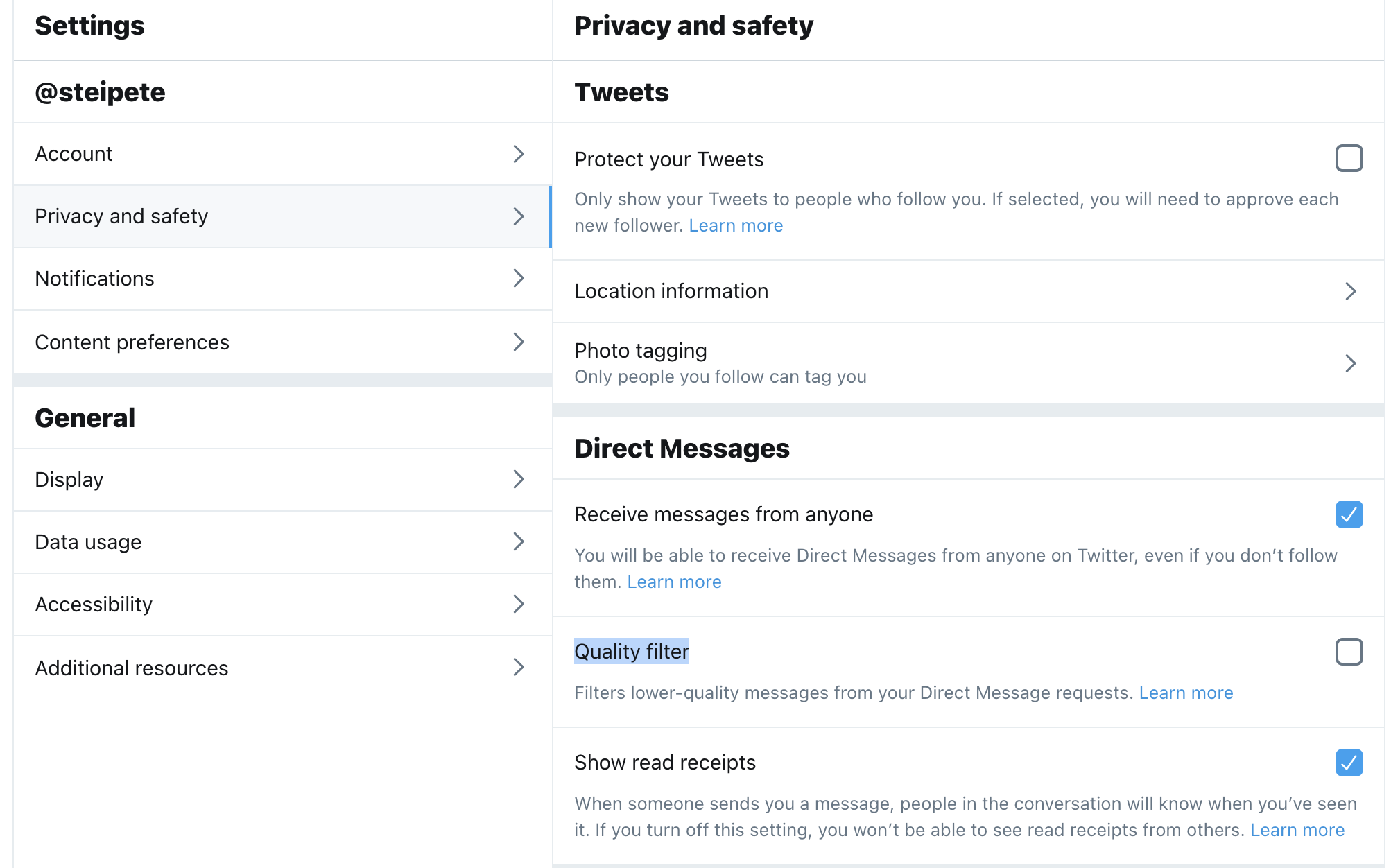
If in doubt, I suggest you experiment with this — the settings are easy to change if it turns out to be a bad idea.
Multiple Profiles
Quite a few of my friends have “alt” accounts for the hot takes or for talking with friends. If you work at a Big Corp, you might be required to filter what you say, and having an alt can be a solution. In general, I don’t recommend making an alt account, as it’s simply too much work to maintain multiple accounts. Just tweet out your hot takes and attract the right followers on your main account.
Extending Reach
The more active followers you have on Twitter, the more fun it becomes. There’s no hack or shortcut for gaining followers, but there are various things you can do that can help you steadily grow your audience.
Blog Posts
Twitter is a great indicator for topics that people find interesting — I often get my best ideas for blog posts out of Twitter conversations, and I also already have half the content there. Twitter is great for inspiration and to learn, but it’s often hard to read and follow conversations. Go the extra mile and convert some of these interactions to blog posts. This will greatly extend your reach, and in turn, it’ll attract new followers who find your content interesting.
Conference Talks
Speaking at conferences is a great way to meet new people and extend your social circle. I often meet folks at conferences, and either we connect on Twitter or we find out that we already know each other on there! Either way — this will increase the bond and will make it more likely that people reach out to you. Conferences are work, but they are so worth it.
Bonus: Convert your conference talk to a blog post. Very few people will actually watch a recording, so via recycling and reshaping content you already have, you can extend your reach again.
If you plan on starting to speak, create a website where you list what topics you can talk about and your bio. I’m using a simple GitHub repo that has been proven extremely useful for me to track past events, attract new speaking gigs, and help conference organizers with getting the information they need to announce me.
Engage with Your Audience
I try to reply to almost everyone who interacts with me on Twitter. This doesn’t take much time, and sometimes I just reply with an emoji, but taking time to engage shows your audience you care, and they’re much more likely to interact with your content again if they know that it’s not a one-way street. Same goes for your feed — don’t just read, reply. This can range from helping others with questions/problems to just posting a “me too” retweet. Sometimes I get content in my feed via a retweet, and by interacting with that, I get a new follower.
Tracking Statistics
Be consistent. You won’t grow an audience overnight. Make Twitter a daily thing. Share content. Be present — and you’ll grow your audience every day.
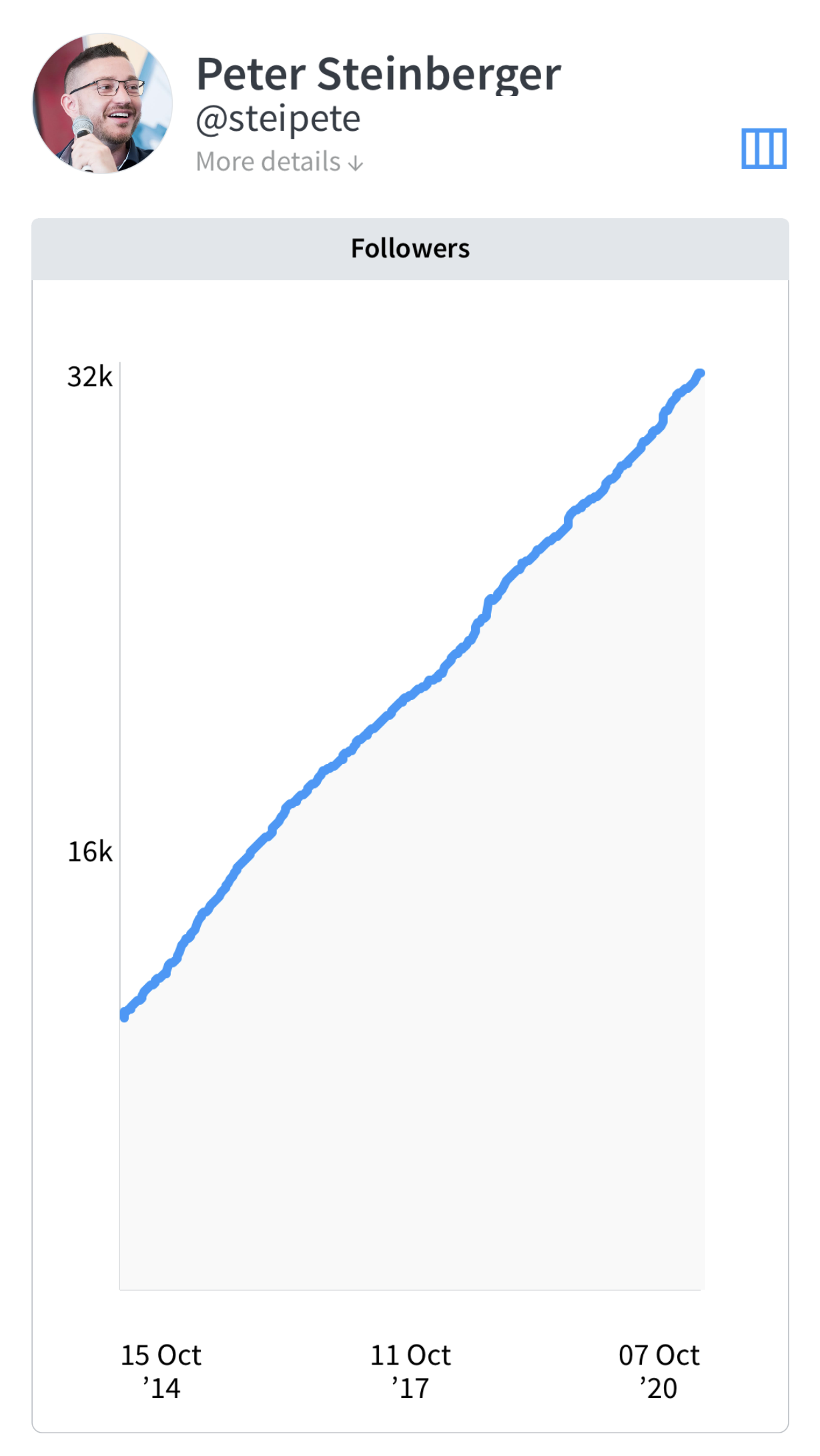
Twitter Analytics is great to understand which tweets work. To track long-term performance, I’m using Birdbrain. It’s one of the oldest apps on my phone, so I have data since 2014. Interestingly, my follower count has been growing pretty much linearly:
Tweets that Work
I do share a lot of news articles. I often just quote something interesting from the news if it doesn’t need strong commentary, but the inclusion of a pull quote helps show that it’s worth reading.
The tweets that are the most engaging, however, usually are original content, particularly in context with your audience and topics of interest. Here are some of my top performing tweets from the last few months, with about 80K–450K impressions each. Sometimes it’s the ridiculous tweets that explode, and sometimes you don’t need words. It also can be news commentary if the comment really nails it or just really fits.
{% twitter https://twitter.com/steipete/status/1313864628967964672?s=21 %}
{% twitter https://twitter.com/steipete/status/1317061856901570560?s=20 %}
Using Threads
Lately I’ve been using more and more threads to connect tweets over time — this has been proven to be really great, as it immediately gives people context, they can read more, and the official Twitter client also usually shows 2–3 tweets in a thread, giving you more “space” in the timeline. Here’s an example:
{% twitter https://twitter.com/steipete/status/1277623561604214784 %}
Curating Your Timeline
Who you follow defines your Twitter experience. Learn how you can curate your Twitter timeline to keep it fun and interesting by reading the second part of this series.
Addendum: Building Personal Brands for Introverts
I gave a talk at UIKonf in Berlin in 2018 about Building Personal Brands for Introverts. This talk is still highly relevant and goes even deeper into defining your online identity. Check it out if you want to know more.
{% youtube https://www.youtube.com/watch?v=0c6izSzP-KQ %}