



惯性聚合 高效追踪和阅读你感兴趣的博客、新闻、科技资讯
阅读原文 在惯性聚合中打开

推荐订阅源

B
Blog RSS Feed
Google DeepMind News
罗磊的独立博客
Martin Fowler
Martin Fowler
博客园_首页
Stack Overflow Blog
Stack Overflow Blog
Last Week in AI
Last Week in AI
The GitHub Blog
The GitHub Blog
B
Blog
C
Check Point Blog
WordPress大学
WordPress大学
G
Google Developers Blog
CTFtime.org: upcoming CTF events
量子位
月光博客
月光博客
U
Unit 42
Engineering at Meta
Engineering at Meta
有赞技术团队
有赞技术团队
钛媒体:引领未来商业与生活新知
钛媒体:引领未来商业与生活新知
奇客Solidot–传递最新科技情报
奇客Solidot–传递最新科技情报
大猫的无限游戏
大猫的无限游戏
博客园 - 聂微东
让小产品的独立变现更简单 - ezindie.com
OSCHINA 社区最新新闻
OSCHINA 社区最新新闻
Y
Y Combinator Blog
freeCodeCamp Programming Tutorials: Python, JavaScript, Git & More
Cyber Security Advisories - MS-ISAC
Vercel News
Vercel News
Application and Cybersecurity Blog
博客园 - 【当耐特】
cs.CV updates on arXiv.org
cs.AI updates on arXiv.org
Jina AI
Jina AI
S
Secure Thoughts
aimingoo的专栏
aimingoo的专栏
D
Darknet – Hacking Tools, Hacker News & Cyber Security
I
Intezer
Latest news
Latest news
V
Vulnerabilities – Threatpost
D
Docker
Attack and Defense Labs
Help Net Security
Help Net Security
S
Security @ Cisco Blogs
Forbes - Security
Forbes - Security
MongoDB | Blog
MongoDB | Blog
云风的 BLOG
云风的 BLOG
L
LINUX DO - 热门话题
P
Palo Alto Networks Blog
Cloudbric
Cloudbric
Spread Privacy
Spread Privacy

Peter Steinberger

OpenClaw, OpenAI and the future | Peter Steinberger Shipping at Inference-Speed | Peter Steinberger The Signature Flicker | Peter Steinberger Just Talk To It - the no-bs Way of Agentic Engineering | Peter Steinberger Claude Code Anonymous | Peter Steinberger Live Coding Session: Building Arena | Peter Steinberger My Current AI Dev Workflow | Peter Steinberger Essential Reading for Agentic Engineers - August 2025 | Peter Steinberger Just One More Prompt | Peter Steinberger Poltergeist: The Ghost That Keeps Your Builds Fresh | Peter Steinberger Don't read this Startup Slop | Peter Steinberger Essential Reading for Agentic Engineers - July 2025 | Peter Steinberger Self-Hosting AI Models After Claude's Usage Limits | Peter Steinberger Logging Privacy Shenanigans | Peter Steinberger VibeTunnel's first AI-anniversary | Peter Steinberger Making AppleScript Work in macOS CLI Tools: The Undocumented Parts | Peter Steinberger Peekaboo 2.0 – Free the CLI from its MCP shackles | Peter Steinberger Command your Claude Code Army, Reloaded | Peter Steinberger Essential Reading for Agentic Engineers | Peter Steinberger Slot Machines for Programmers: How Peter Builds Apps 20x Faster with AI | Peter Steinberger My AI Workflow for Understanding Any Codebase | Peter Steinberger stats.store: Privacy-First Sparkle Analytics | Peter Steinberger Showing Settings from macOS Menu Bar Items: A 5-Hour Journey | Peter Steinberger VibeTunnel: Turn Any Browser into Your Mac's Terminal | Peter Steinberger Vibe Meter 2.0: Calculating Claude Code Usage with Token Counting | Peter Steinberger llm.codes: Make Apple Docs AI-Readable | Peter Steinberger Automatic Observation Tracking in UIKit and AppKit: The Feature Apple Forgot to Mention | Peter Steinberger Peekaboo MCP – lightning-fast macOS screenshots for AI agents | Peter Steinberger Migrating 700+ Tests to Swift Testing: A Real-World Experience | Peter Steinberger Commanding Your Claude Code Army | Peter Steinberger Code Signing and Notarization: Sparkle and Tears | Peter Steinberger Vibe Meter: Monitor Your AI Costs | Peter Steinberger Claude Code is My Computer | Peter Steinberger Stop Over-thinking AI Subscriptions | Peter Steinberger Introducing Demark: HTML in. MD out. Blink-fast. | Peter Steinberger The Future of Vibe Coding: Building with AI, Live and Unfiltered | Peter Steinberger MCP Best Practices | Peter Steinberger Finding My Spark Again | Peter Steinberger Top-Level Menu Visibility in SwiftUI for macOS | Peter Steinberger Fixing keyboardShortcut in SwiftUI | Peter Steinberger Supporting Both Tap and Long Press on a Button in SwiftUI | Peter Steinberger On Using Apple Silicon Mac Mini for Continuous Integration | Peter Steinberger Apple Silicon M1: A Developer's Perspective | Peter Steinberger Gardening Your Twitter: Curating Your Timeline | Peter Steinberger Gardening Your Twitter: Growing Your Followers | Peter Steinberger Forbidden Controls in Catalyst: Optimize Interface for Mac | Peter Steinberger Disabling Keyboard Avoidance in SwiftUI's UIHostingController | Peter Steinberger The State of SwiftUI | Peter Steinberger Logging in Swift | Peter Steinberger Building with Swift Trunk Development Snapshots | Peter Steinberger Calling Super at Runtime in Swift | Peter Steinberger zld — A Faster Version of Apple's Linker | Peter Steinberger How to Fix LLDB: Couldn't IRGen Expression | Peter Steinberger InterposeKit — Elegant Swizzling in Swift | Peter Steinberger The Great Mac Catalyst Text Input Crash Hunt | Peter Steinberger Jailbreaking for iOS Developers | Peter Steinberger Network Kernel Core Dump | Peter Steinberger How to macOS Core Dump | Peter Steinberger Kernel Panics and Surprise boot-args | Peter Steinberger The LG UltraFine 5K, kernel_task, and Me | Peter Steinberger Let's Try This Again | Peter Steinberger How We Work at PSPDFKit | Peter Steinberger Swizzling in Swift | Peter Steinberger WWDC for First-Timers, 2019 Edition | Peter Steinberger Challenges of Adopting Drag and Drop | Peter Steinberger Marzipan: Porting iOS Apps to the Mac | Peter Steinberger How to Use Slack and Not Go Crazy | Peter Steinberger Hardcore Debugging - Heavy Weapons for Hard Bugs | Peter Steinberger Binary Frameworks in Swift | Peter Steinberger Even Swiftier Objective-C | Peter Steinberger The Case for Deprecating UITableView | Peter Steinberger Running tests with Clang Address Sanitizer | Peter Steinberger UI testing on iOS, without busy waiting | Peter Steinberger Hiring a distributed team | Peter Steinberger Writing Good Bug Reports | Peter Steinberger Real-time collaboration, Apple, and you | Peter Steinberger Converting Xcode Test Runs to JUnit, the Fast Way | Peter Steinberger Efficient iOS Version Checking | Peter Steinberger Investigating Thread Safety of UIImage | Peter Steinberger Swifty Objective-C | Peter Steinberger Running UI Tests on iOS With Ludicrous Speed | Peter Steinberger A Pragmatic Approach to Cross-Platform | Peter Steinberger Surprises with Swift Extensions | Peter Steinberger Using ccache for Fun and Profit | Peter Steinberger UITableViewController designated initializer woes | Peter Steinberger Researching ResearchKit | Peter Steinberger The curious case of rotation with multiple windows on iOS 8 | Peter Steinberger UIKit Debug Mode | Peter Steinberger Retrofitting containsString: on iOS 7 | Peter Steinberger A Story About Swizzling "the Right Way™" and Touch Forwarding | Peter Steinberger Hacking with Aspects | Peter Steinberger Fixing UITextView On iOS 7 | Peter Steinberger Fixing What Apple Doesn't | Peter Steinberger How To Inspect The View Hierarchy Of Third-Party Apps | Peter Steinberger Fixing UISearchDisplayController On iOS 7 | Peter Steinberger Smart Proxy Delegation | Peter Steinberger Adding Keyboard Shortcuts To UIAlertView | Peter Steinberger How To Center Content Within UIScrollView | Peter Steinberger UIAppearance for Custom Views | Peter Steinberger Hacking Block Support Into UIMenuItem | Peter Steinberger
Updating macOS on a Hackintosh | Peter Steinberger
Peter Steinberger · 2020-06-01 · via Peter Steinberger

With macOS 10.15.5 out, it was time to update my Hackintosh again. This does take a bit more preparation than updating genuine Mac hardware. Since a few folks on Twitter were curious, here’s how this works.

Background

Earlier this year, I built myself a Hackintosh, similar to this setup (picture porn here). I still work 95 percent of my time on my 16-inch MacBook Pro, but it’s convenient to have a really powerful machine to compile large projects (like Swift). I’m impressed with the overall stability — I had considerably fewer kernel panics here than with my MacBook Pro, and I’m using the LG 5K in full resolution on the Hackintosh, thanks to the Gigabyte GC-Titan Ridge.

To run macOS on non-Apple hardware, you need a bootloader. I chose OpenCore, as it’s fast, modern, and open source. Legacy setups might still use Clover, but OpenCore is much better on a long-term basis, and you don’t have to disable security features such as SIP. If you’re curious about building a Hackintosh, check out the OpenCore Vanilla Guide.

Bootable USB Drive

Before updating macOS, you want to update OpenCore and the needed kexts. You can do this on your machine directly, but it might not boot anymore if you make a mistake. It’s better to first test drive the new boot loader on a removable drive:

  • Get a USB drive and GUID format it to HFS+ Journaled.
  • Mount both your boot disk EFI and your USB drive EFI partitions via MountEFI.
  • Copy the EFI folder from your boot drive EFI partition to your USB drive EFI partition.
    (I know, so much EFI!)
  • Reboot and select the USB drive as the source in your BIOS to verify that you can boot from the disk.

Updating OpenCore

Did it work? Great, now it’s time to update OpenCore! There’s a monthly release cycle not only for OpenCore but also the core kexts, so it’s smart to wait a few days to update.

  • Get the latest OpenCore release. I cheated a bit and got myself a nightly build of 0.5.9-pre, since the release is just a few days away and it seemed worth the risk.
  • Replace EFI/BOOT/BOOTx64.efi, EFI/OC/OpenCore.efi, and EFI/OC/Drivers/OpenRuntime.

If you’ve never done this before, I recommend reading Updating OpenCore and macOS, which explains the steps in far more detail.

Updating config.plist

Now the fun part starts! OpenCore is configured with one giant config.plist and is really picky about it. You want to be sure to get this right, and keep in mind the format changes slightly with every release.

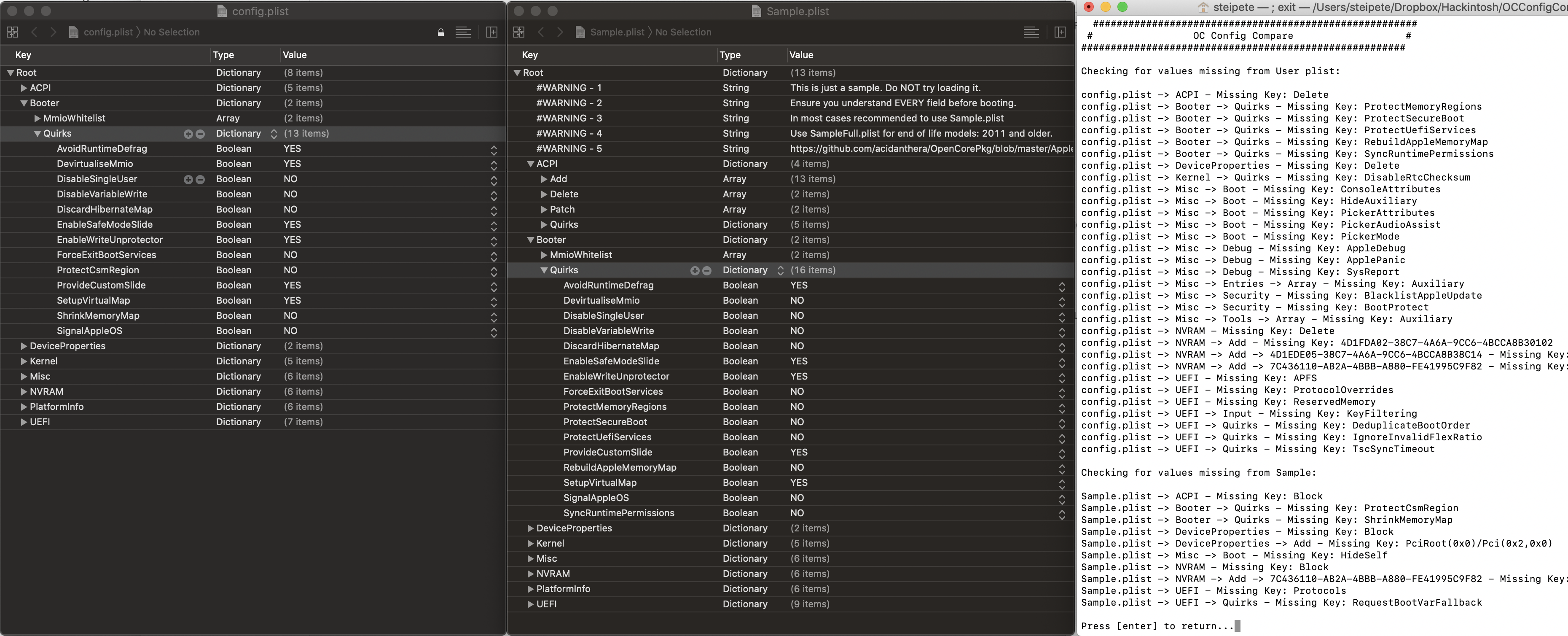
Use OCConfigCompare to compare between the sample.plist and your config.plist The script has an auto-download feature, but since I used a nightly here, I set a manual folder.

Use Xcode to edit the plist files, and be meticulous. Don’t forget that your configuration contains different settings, so be on the lookout for if a key has to simply be renamed and migrate your values.

Done? Good. Upload the file here for a quick check and go back and fix the parts you missed. :)

Updating Kexts

You will have a variety of kexts to support your Hackintosh hardware. Here are mine:

Update as needed, and then boot from the updated EFI on your USB drive. If everything works, copy the new EFI folder back to your boot drive EFI partition. You can unplug the drive now, as it’s no longer needed.

OpenCore also comes with EFI drivers and tools, and you can see if there’s anything new or interesting. Make sure to delete outdated drivers. I updated from 0.5.6 to 0.5.9, so a few drivers were merged into OpenRuntime.

I used VBoxHfs-64.efi and replaced it with HFSPlus.efi. The former is the HFS+ driver from VirtualBox, while the latter is Apple’s original driver, which is supposedly faster.

Update Time 🥁

Now it’s time to update! I don’t use my Hackintosh as my primary system, and I do not recommend doing so, but if you do, please make a backup (I recommend SuperDuper! and Arq).

There’s no guarantee your system will come back up again, however, it did in my case, and the whole update procedure — including writing this post — took me about 1.5 hours. Not too bad, eh?

Update: Big Sur Beta 10

Big Sur required a few OpenCore updates over the beta period, and at some point it wouldn’t download the updater anymore. I worked around this by downloading the full Big Sur updater on Catalina and running it manually.

You need to disable Apple Secure Boot to make it work: Misc -> Security -> SecureBootModel -> Disabled

Currently running OpenCore 0.6.3pre from Oct 27, 2020 and everything is running great.