


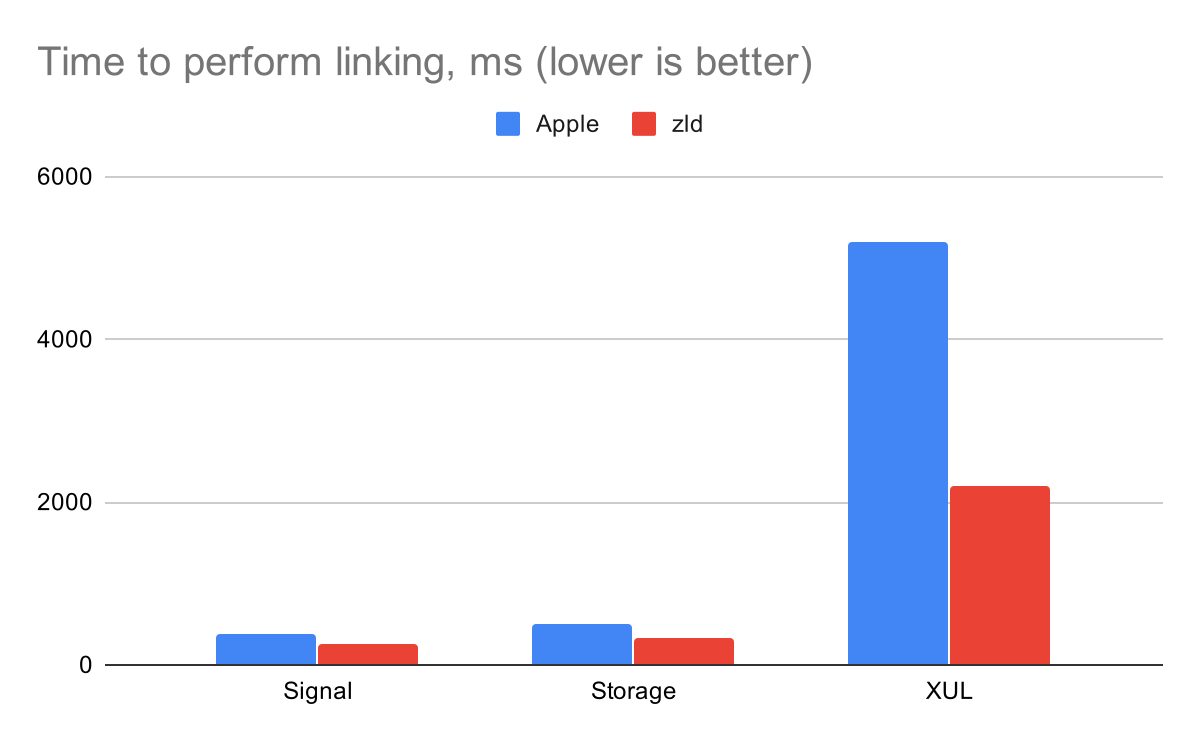
zld is a drop-in replacement of Apple’s linker that uses optimized data structures and parallelizing to speed things up. It comes with a great promise:
“Feel free to file an issue if you find it’s not at least 40% faster for your case” — Michael Eisel, Maintainer
In our setup, zld indeed improves overall build time by approximately 25 percent, measured from a clean build to the running application. Building PSPDFCatalog in debug mode with ccache enabled and everything precached takes roughly:
- ld — 4:40min
- zld — 3:30min
If you’re asking yourself, is this safe? Well, Instagram uses it too.
Heads up: zld seems to cause issues when using the Swift trunk toolchain.
Installation
zld is easy to enable for your project:
brew install michaeleisel/zld/zldOTHER_LDFLAGS = -fuse-ld=/usr/local/bin/zld
In our setup, things aren’t quite so easy, as we have a few additional requirements:
- The build should work independently of
zldinstalled, so people can opt in on their own and don’t have a surprising build failure after pulling master. This is even truer for CI. - We have a large monorepo with different projects in different folders, which is managed by shared
xcconfigfiles.
I wrote a zld-detect wrapper that conditionally forwards to zld if found. Otherwise, it uses Apple’s default linker:
#!/bin/sh

# /usr/local/bin is not always included in the Xcode context.
export PATH="$PATH:/usr/local/bin"

# Detect if zld is available.
if type -p zld >/dev/null 2>&1; then
  exec zld "$@"
else
  exec ld "$@"
fi
The second problem (different paths) was solved by defining a REPOROOT = "$(SRCROOT)/../.."; in each project, so that we could build a path from the root of the monorepo and only have one location for the zld-detect script:
OTHER_LDFLAGS = -ObjC -Wl,-no_uuid -fuse-ld=$(REPOROOT)/iOS/Resources/zld-detectMac Catalyst
After implementing the above, our Mac Catalyst builds started failing:
Building for Mac Catalyst, but linking in .tbd built for , file '/Applications/Xcode.app/Contents/Developer/Platforms/MacOSX.platform/Developer/SDKs/MacOSX10.15.sdk/System/Library/Frameworks//CoreImage.framework/CoreImage.tbd' for architecture x86_64It seems there’s some special code in the linker that helps with linking the correct framework for Mac Catalyst, which isn’t yet part of the v510 release. Apple released v520 and v530 of the ld64 project, so there’s a good chance this will be fixed once zld merges with upstream (Issue #43).
Writing this conditionally in xcconfig is tricky, as there’s no support for a separate architecture like [sdk=maccatalyst] (Apple folks: FB6822740).
Here’s how things look if we put everything together:
// Settings to improve link time performance for debug/test builds
// https://github.com/michaeleisel/zld#a-faster-version-of-apples-linker
// Linker fails for Mac Catalyst — maybe try once it's updated to v530.
// This is always defined as YES or NO.
PSPDF_ZLD = -fuse-ld=$(REPOROOT)/iOS/Resources/zld-detect
PSPDF_LINKER_MACCATALYST_YES = ""
PSPDF_LINKER_MACCATALYST_NO = $(PSPDF_ZLD)
// This will be the case on iOS.
PSPDF_LINKER_MACCATALYST_ = $(PSPDF_ZLD)
PSPDF_LINKER_IF_NOT_CATALYST = $(PSPDF_LINKER_MACCATALYST_$(IS_MACCATALYST))
PSPDF_NORELEASE_LDFLAGS = -ObjC -Wl,-no_uuid $(PSPDF_LINKER_IF_NOT_CATALYST)
In Defaults-Debug.xcconfig and Defaults-testing.xcconfig
// Use fast linker if available.
OTHER_LDFLAGS = $(inherited) $(PSPDF_NORELEASE_LDFLAGS)
Update: Xcode also supports the LD xcconfig key to make this even easier to configure.
That’s it! Let me know on Twitter if this was helpful.