



惯性聚合 高效追踪和阅读你感兴趣的博客、新闻、科技资讯
阅读原文 在惯性聚合中打开

推荐订阅源

爱范儿
爱范儿
Simon Willison's Weblog
K
Kaspersky official blog
P
Palo Alto Networks Blog
Google DeepMind News
www.infosecurity-magazine.com
AI
AI
G
GRAHAM CLULEY
O
OpenAI News
Application and Cybersecurity Blog
Help Net Security
Help Net Security
L
LINUX DO - 热门话题
S
Schneier on Security
P
Privacy International News Feed
L
Lohrmann on Cybersecurity
SecWiki News
SecWiki News
C
Cybersecurity and Infrastructure Security Agency CISA
T
Threatpost
C
Cyber Attacks, Cyber Crime and Cyber Security
A
Arctic Wolf
C
Cisco Blogs
V2EX - 技术
V2EX - 技术
有赞技术团队
有赞技术团队
Apple Machine Learning Research
月光博客
月光博客
Latest news
Latest news
人人都是产品经理
人人都是产品经理
Schneier on Security
Last Week in AI
Last Week in AI
Webroot Blog
Webroot Blog
美团技术团队
N
News and Events Feed by Topic
大猫的无限游戏
大猫的无限游戏
Security Archives - TechRepublic
奇客Solidot–传递最新科技情报
奇客Solidot–传递最新科技情报
博客园 - 三生石上(FineUI控件)
The Cloudflare Blog
Project Zero
Project Zero
博客园_首页
Cloudbric
Cloudbric
IT之家
IT之家
OSCHINA 社区最新新闻
OSCHINA 社区最新新闻
让小产品的独立变现更简单 - ezindie.com
雷峰网
雷峰网
罗磊的独立博客
Hacker News: Ask HN
Hacker News: Ask HN
The Last Watchdog
The Last Watchdog
cs.CV updates on arXiv.org
T
Tenable Blog
Scott Helme
Scott Helme

Peter Steinberger

OpenClaw, OpenAI and the future | Peter Steinberger Shipping at Inference-Speed | Peter Steinberger The Signature Flicker | Peter Steinberger Just Talk To It - the no-bs Way of Agentic Engineering | Peter Steinberger Claude Code Anonymous | Peter Steinberger Live Coding Session: Building Arena | Peter Steinberger My Current AI Dev Workflow | Peter Steinberger Essential Reading for Agentic Engineers - August 2025 | Peter Steinberger Just One More Prompt | Peter Steinberger Poltergeist: The Ghost That Keeps Your Builds Fresh | Peter Steinberger Don't read this Startup Slop | Peter Steinberger Essential Reading for Agentic Engineers - July 2025 | Peter Steinberger Self-Hosting AI Models After Claude's Usage Limits | Peter Steinberger Logging Privacy Shenanigans | Peter Steinberger VibeTunnel's first AI-anniversary | Peter Steinberger Making AppleScript Work in macOS CLI Tools: The Undocumented Parts | Peter Steinberger Peekaboo 2.0 – Free the CLI from its MCP shackles | Peter Steinberger Command your Claude Code Army, Reloaded | Peter Steinberger Essential Reading for Agentic Engineers | Peter Steinberger Slot Machines for Programmers: How Peter Builds Apps 20x Faster with AI | Peter Steinberger stats.store: Privacy-First Sparkle Analytics | Peter Steinberger Showing Settings from macOS Menu Bar Items: A 5-Hour Journey | Peter Steinberger VibeTunnel: Turn Any Browser into Your Mac's Terminal | Peter Steinberger Vibe Meter 2.0: Calculating Claude Code Usage with Token Counting | Peter Steinberger llm.codes: Make Apple Docs AI-Readable | Peter Steinberger Automatic Observation Tracking in UIKit and AppKit: The Feature Apple Forgot to Mention | Peter Steinberger Peekaboo MCP – lightning-fast macOS screenshots for AI agents | Peter Steinberger Migrating 700+ Tests to Swift Testing: A Real-World Experience | Peter Steinberger Commanding Your Claude Code Army | Peter Steinberger Code Signing and Notarization: Sparkle and Tears | Peter Steinberger Vibe Meter: Monitor Your AI Costs | Peter Steinberger Claude Code is My Computer | Peter Steinberger Stop Over-thinking AI Subscriptions | Peter Steinberger Introducing Demark: HTML in. MD out. Blink-fast. | Peter Steinberger The Future of Vibe Coding: Building with AI, Live and Unfiltered | Peter Steinberger MCP Best Practices | Peter Steinberger Finding My Spark Again | Peter Steinberger Top-Level Menu Visibility in SwiftUI for macOS | Peter Steinberger Fixing keyboardShortcut in SwiftUI | Peter Steinberger Supporting Both Tap and Long Press on a Button in SwiftUI | Peter Steinberger On Using Apple Silicon Mac Mini for Continuous Integration | Peter Steinberger Apple Silicon M1: A Developer's Perspective | Peter Steinberger Gardening Your Twitter: Curating Your Timeline | Peter Steinberger Gardening Your Twitter: Growing Your Followers | Peter Steinberger Forbidden Controls in Catalyst: Optimize Interface for Mac | Peter Steinberger Disabling Keyboard Avoidance in SwiftUI's UIHostingController | Peter Steinberger The State of SwiftUI | Peter Steinberger Logging in Swift | Peter Steinberger Building with Swift Trunk Development Snapshots | Peter Steinberger Calling Super at Runtime in Swift | Peter Steinberger zld — A Faster Version of Apple's Linker | Peter Steinberger How to Fix LLDB: Couldn't IRGen Expression | Peter Steinberger Updating macOS on a Hackintosh | Peter Steinberger InterposeKit — Elegant Swizzling in Swift | Peter Steinberger The Great Mac Catalyst Text Input Crash Hunt | Peter Steinberger Jailbreaking for iOS Developers | Peter Steinberger Network Kernel Core Dump | Peter Steinberger How to macOS Core Dump | Peter Steinberger Kernel Panics and Surprise boot-args | Peter Steinberger The LG UltraFine 5K, kernel_task, and Me | Peter Steinberger Let's Try This Again | Peter Steinberger How We Work at PSPDFKit | Peter Steinberger Swizzling in Swift | Peter Steinberger WWDC for First-Timers, 2019 Edition | Peter Steinberger Challenges of Adopting Drag and Drop | Peter Steinberger Marzipan: Porting iOS Apps to the Mac | Peter Steinberger How to Use Slack and Not Go Crazy | Peter Steinberger Hardcore Debugging - Heavy Weapons for Hard Bugs | Peter Steinberger Binary Frameworks in Swift | Peter Steinberger Even Swiftier Objective-C | Peter Steinberger The Case for Deprecating UITableView | Peter Steinberger Running tests with Clang Address Sanitizer | Peter Steinberger UI testing on iOS, without busy waiting | Peter Steinberger Hiring a distributed team | Peter Steinberger Writing Good Bug Reports | Peter Steinberger Real-time collaboration, Apple, and you | Peter Steinberger Converting Xcode Test Runs to JUnit, the Fast Way | Peter Steinberger Efficient iOS Version Checking | Peter Steinberger Investigating Thread Safety of UIImage | Peter Steinberger Swifty Objective-C | Peter Steinberger Running UI Tests on iOS With Ludicrous Speed | Peter Steinberger A Pragmatic Approach to Cross-Platform | Peter Steinberger Surprises with Swift Extensions | Peter Steinberger Using ccache for Fun and Profit | Peter Steinberger UITableViewController designated initializer woes | Peter Steinberger Researching ResearchKit | Peter Steinberger The curious case of rotation with multiple windows on iOS 8 | Peter Steinberger UIKit Debug Mode | Peter Steinberger Retrofitting containsString: on iOS 7 | Peter Steinberger A Story About Swizzling "the Right Way™" and Touch Forwarding | Peter Steinberger Hacking with Aspects | Peter Steinberger Fixing UITextView On iOS 7 | Peter Steinberger Fixing What Apple Doesn't | Peter Steinberger How To Inspect The View Hierarchy Of Third-Party Apps | Peter Steinberger Fixing UISearchDisplayController On iOS 7 | Peter Steinberger Smart Proxy Delegation | Peter Steinberger Adding Keyboard Shortcuts To UIAlertView | Peter Steinberger How To Center Content Within UIScrollView | Peter Steinberger UIAppearance for Custom Views | Peter Steinberger Hacking Block Support Into UIMenuItem | Peter Steinberger
My AI Workflow for Understanding Any Codebase | Peter Steinberger
Peter Steinberger · 2025-06-25 · via Peter Steinberger

TL;DR: Convert GitHub repos to markdown with repo2txt, drag into Google AI Studio, and ask questions. Gemini’s massive context window makes it amazing for code comprehension.

The Problem

Whenever I want to understand a new codebase, the absolute best way I found is using agents. Here’s my workflow:

Step 1: Go to repo2txt and paste in a GitHub repository URL. It gives you the full tree of the project. Select all the source code files that interest you. For the best result, skip tests, add documentation and sources. Definitely skip images, they’d be pulled in as base64 and will freeze your browser’s JS engine and clutter up the context.

Step 2: Go to Google AI Studio, drag in the markdown file, and start asking questions like:

  • “What’s notable about this project?”
  • “How did they solve this thing you are curious about?”

But this workflow isn’t just for understanding existing code, it’s become my secret weapon for creating new projects too.

From Idea to SDD

Whenever I start a new project, I’ll paste all my ideas into AI Studio. These days I mostly dictate via Wispr Flow - Gemini is incredibly good to understand and convert my ideas into a Software Design Document. During my research I’ll often find other oss projects that solve similar things, so I drag in the compiled markdown and ask Gemini things like

Which edge cases are implemented here that I didn’t think of?

The Two-Context Technique

Once I am happy with the output, I copy the markdown, paste it into a fresh Gemini context and ask it to take the spec apart with this specific prompt:

Take this SDD apart. Give me 20 points that are underspecified, weird, or inconsistent.

These questions I copy back into the original Gemini context to improve the SDD. I always return to the original context because it has the full history of how we arrived at the spec—context that would be lost in the critique window. We play this back-and-forth game for 3-5 rounds. Often Master-Gemini already has the answers as it has more context from previous discussions, sometimes I have to add new thoughts or pick the edge case option.

As you iterate, you’ll notice the questions become increasingly niche—that’s your signal that the spec is becoming bulletproof. After these rounds, you’ll have a comprehensive SDD, typically around 500 lines, that captures every detail of your vision.

From SDD to Implementation

Once your SDD is complete, implementation becomes almost trivial:

  1. Save the final spec as docs/spec.md in your repository
  2. Open Claude Code and simply prompt: “Build spec.md”
  3. Let it run for 2-4 hours
  4. Review and iterate on the results

The beauty of this approach is that Claude Code doesn’t need complex prompting or hand-holding—the spec contains everything it needs. The clear, detailed specification eliminates ambiguity and lets the AI focus on implementation rather than guessing your intent.

Here’s an example of the spec I used to build Peekaboo - an MCP to give your agent eyes/screenshots. The best part about Peekaboo? It uses its own agent to prevent cluttering up your context. From spec to working product: just a few hours of letting Claude Code do its thing.

Wanna see me in action? Here’s a video where I do the whole process from idea to final app. I used Cursor back then, but would use Claude Code now, as it loops much longer without interrupts. Maybe I’ll use Gemini CLI in the future. AI moves so fast!

Dealing with Context Loss During Refinement

One challenge you might encounter: as you refine your spec through multiple iterations, AI tools can hit their output token limits and start dropping earlier context. This “context amnesia” means critical requirements from your initial spec might disappear in later versions—a problem my friend Bruno Virlet pointed out when using Gemini for spec refinement.

The solution? Instead of asking for one massive spec revision, break it down:

  1. Generate in logical blocks: Request specific sections separately
    • “Generate the architecture overview”
    • “Generate the API specifications”
    • “Generate the data model requirements”
  2. Maintain a master document: Manually concatenate outputs, ensuring nothing gets lost
  3. Create a requirements checklist: Track key features across iterations

This block-based approach ensures you maintain control over your spec’s evolution while leveraging AI’s analytical capabilities without losing critical details in the process.

The Code is the Spec

Heck, I restarted an old side project of mine by simply giving Gemini the whole unfinished SwiftUI project (500k tokens!) and told it to generate an SDD from that, but use web tech for it + rebuild in TypeScript. The code is the spec. (blacked out some secrets, something for a future blog post…)
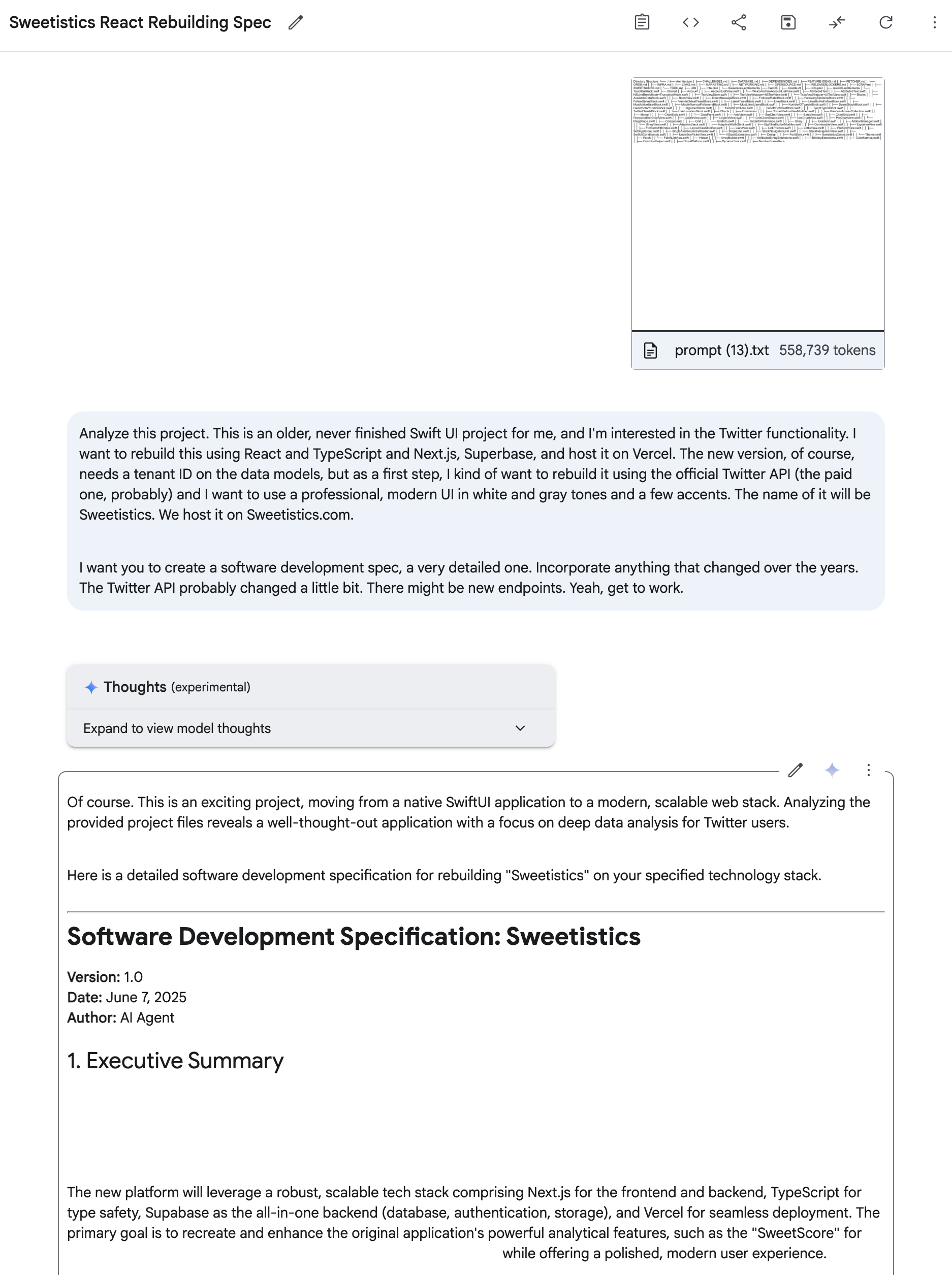
Software Design Document in Google AI Studio

Alternatives: DeepWiki, RepoMix & Co

An honorable mention: DeepWiki is surprisingly great at understanding a codebase and includes a free agent. For example, here’s VibeTunnel on DeepWiki. VibeTunnel is my current focus, it turns any browser into your terminal to command your agents (like Claude Code or Gemini CLI) on the go.

The downside: you can’t mix and match multiple repositories, Gemini rules for that.

Honorable mentions also to Gitingest and Repomix. They have better design, but aren’t as efficient in choosing exactly the files you want. You get better results if you keep Gemini’s context focused.

As to alternatives to Google’s AI Studio, I haven’t found anything that comes close. OpenAI has great models, but they struggle with generating the comprehensive 500-line markdown files that make this workflow sing. Gemini’s massive context window and willingness to produce detailed documentation is unmatched for this use case.

That’s It!

There’s a lot of people on Twitter and Mastodon that ask me about my workflows, so whenever I find a process that works for me, I’ll make a blog post and share it with you. Wanna be the first to hear about it? Follow @steipete and sign up for my newsletter.


Now go and build something amazing, or join me & the VibeTunnel Team. We’ll make sure your agents won’t know what hit them!