
惯性聚合 高效追踪和阅读你感兴趣的博客、新闻、科技资讯
阅读原文 在惯性聚合中打开

推荐订阅源

Vercel News
Vercel News
The GitHub Blog
The GitHub Blog
博客园 - 【当耐特】
Cyber Security Advisories - MS-ISAC
Recent Announcements
D
Docker
GbyAI
GbyAI
酷 壳 – CoolShell
酷 壳 – CoolShell
WordPress大学
WordPress大学
The Cloudflare Blog
雷峰网
雷峰网
A
About on SuperTechFans
小众软件
小众软件
博客园 - Franky
博客园 - 聂微东
F
Full Disclosure
大猫的无限游戏
大猫的无限游戏
C
Check Point Blog
MongoDB | Blog
MongoDB | Blog
G
Google Developers Blog
Microsoft Azure Blog
U
Unit 42
freeCodeCamp Programming Tutorials: Python, JavaScript, Git & More
V
V2EX
Engineering at Meta
Engineering at Meta
宝玉的分享
宝玉的分享
aimingoo的专栏
aimingoo的专栏
量子位
P
Proofpoint News Feed
Hugging Face - Blog
Hugging Face - Blog
博客园_首页
罗磊的独立博客
Martin Fowler
Martin Fowler
D
DataBreaches.Net
cs.CL updates on arXiv.org
S
Secure Thoughts
Project Zero
Project Zero
L
LangChain Blog
阮一峰的网络日志
阮一峰的网络日志
C
Cybersecurity and Infrastructure Security Agency CISA
T
Tailwind CSS Blog
S
Schneier on Security
Blog — PlanetScale
Blog — PlanetScale
The Hacker News
The Hacker News
Spread Privacy
Spread Privacy
Security Latest
Security Latest
NISL@THU
NISL@THU
奇客Solidot–传递最新科技情报
奇客Solidot–传递最新科技情报
C
CXSECURITY Database RSS Feed - CXSecurity.com
J
Java Code Geeks

developer.chrome.com: Blog

A developer toolkit to make your website agent-ready  |  Blog  |  Chrome for Developers Unlock runtime insights: Introducing third-party developer tools for Chrome DevTools for agents  |  Blog  |  Chrome for Developers What's New in WebGPU (Chrome 149-150)  |  Blog  |  Chrome for Developers Join the WebMCP origin trial  |  Blog  |  Chrome for Developers Chrome 150 beta  |  Blog  |  Chrome for Developers New in Chrome 149  |  Blog  |  Chrome for Developers What's new in DevTools (Chrome 149)  |  Blog  |  Chrome for Developers Build new features using built-in AI in Chrome  |  Blog  |  Chrome for Developers What's new in web extensions: I/O 2026 recap  |  Blog  |  Chrome for Developers New in Chrome at Google I/O 2026  |  Blog  |  Chrome for Developers Modernize authentication with passkeys, digital credentials, and more  |  Blog  |  Chrome for Developers 15 updates from Google I/O 2026: Powering the agentic web with new capabilities, tools, and features in Chrome  |  Blog  |  Chrome for Developers Streamline your AI coding workflow with Chrome DevTools for agents 1.0  |  Blog  |  Chrome for Developers Declarative partial updates  |  Blog  |  Chrome for Developers Introducing the HTML-in-Canvas API origin trial  |  Blog  |  Chrome for Developers Gap decorations: Now available in Chromium  |  Blog  |  Chrome for Developers Streamlined sign-in: Immediate UI mode is now available  |  Blog  |  Chrome for Developers Install web apps with the new HTML install element | Blog | Chrome for Developers Chrome 149 beta | Blog | Chrome for Developers New in Chrome 148 | Blog | Chrome for Developers What's new in DevTools (Chrome 148) | Blog | Chrome for Developers Container Timing origin trial | Blog | Chrome for Developers Empower your team with expanded roles in the Developer Dashboard | Blog | Chrome for Developers Localization support for web app manifests | Blog | Chrome for Developers Unlock Structured Clone for Chrome Extension Messaging | Blog | Chrome for Developers What's New in WebGPU (Chrome 147-148) | Blog | Chrome for Developers Final Soft Navigations origin trial starting in Chrome 147 | Blog | Chrome for Developers Connection Allowlists origin trial: Secure your web application's network  |  Blog  |  Chrome for Developers Improved Japanese phonetic name support in Chrome autofill  |  Blog  |  Chrome for Developers Take our course about AI evaluations  |  Blog  |  Chrome for Developers Chrome 148 beta | Blog | Chrome for Developers Chrome Web Store: A smarter, faster appeals process | Blog | Chrome for Developers New in Chrome 147 | Blog | Chrome for Developers What's new in DevTools (Chrome 147) | Blog | Chrome for Developers Chrome 147 enables concurrent and nested view transitions with element-scoped view transitions | Blog | Chrome for Developers Enter video Picture-in-Picture automatically on more sites | Blog | Chrome for Developers When to use WebMCP and MCP | Blog | Chrome for Developers Chrome 147 beta | Blog | Chrome for Developers New in Chrome 146 | Blog | Chrome for Developers What's new in DevTools (Chrome 146) | Blog | Chrome for Developers
Seamless PWA origin migration: Change domains without losing users  |  Blog  |  Chrome for Developers
LinkedIn · 2026-06-03 · via developer.chrome.com: Blog
Skip to main content

Seamless PWA origin migration: Change domains without losing users

Published: June 3, 2026

Progressive Web Apps (PWAs) have revolutionized the web by offering app-like experiences. However, one of their greatest strengths has also been a persistent challenge: app identity is tightly coupled to the web origin.

To rebrand or restructure your architecture (for example, moving from www.example.com/social to social.example.com), you faced a painful dilemma. There was no way to "move" an installed PWA. Users were forced to manually uninstall the old app and find the install button for the new one.

The PWA team is excited to introduce PWA Origin Migration in Chrome 150. This new platform feature lets you seamlessly transition installed PWAs to a new, same-site origin with minimal user interruption, while still keeping the user sufficiently informed.

What origin migration enables

You can modify your site architecture without breaking user experience:

  • Technical architecture freedom: Change the subdomain or path of your application.
  • Fix split app states: Resolve the issue where changing a start_url without a stable ID accidentally created duplicate app installations.

Users can migrate their apps with a simple update dialog. They are informed of the migration in a similar way to a standard app update. With a single click the old app is uninstalled and the new app is installed and launched.

How to migrate a PWA

To migrate a PWA, follow these steps. The rest of the post goes into more detail:

  1. Deploy the handshake:
    • Add migrate_from to the new app.
    • Add the allow_migration field to the /.well-known/web-app-origin-association file on the old origin.
  2. Choose behavior: suggest (or empty) avoids interrupting the user, likely helpful during an initial rollout. force blocks the user and requires the migration, if the user can't continue using the old URLs.
  3. Keep the old app up-to-date: If the old site redirects to the new site, use the install_url property in the migrate_from block to ensure the browser can still find the old manifest for potential updates.
  4. Implement id in the destination manifest: Chrome requires the destination app manifest to include an id field. This ensures the app cannot hit the common mistake of creating split apps by changing the start_url without having an id set.

The two-way handshake: How it works

To ensure security and prevent hostile takeovers, the migration requires a secure handshake between the old and new origins. This handshake ensures that both sites are controlled by the same entity.

Step 1: The new app declares the predecessor (required)

Add a migrate_from field to the web app manifest of the new application.

// Manifest at https://fileman.google.com/manifest.json
{
  "name": "File Manager",
  "id": "/files/",
  "start_url": "/files/index.html",
  ....
  "migrate_from": [
    "https://drive.google.com/"
  ]
}

Step 2: The old origin confirms the migration (required)

To prevent a new site from unilaterally hijacking an old app, the old origin must explicitly authorize the migration. It does this with a .well-known configuration file.

// File at https://drive.google.com/.well-known/web-app-origin-association
{
  "https://fileman.google.com/files/": {
    "allow_migration": true
  }
}

Step 3: Proactive signaling (optional)

To trigger the update without waiting for the user to visit the new site, update the old app's manifest to point to the new one.

// Manifest at https://drive.google.com/manifest.json
{
  "name": "Drive",
  "start_url": "/",
  "migrate_to": {
    "id": "https://fileman.google.com/files/",
    "install_url": "https://fileman.google.com/drive/installwebapp?usp=migrate"
  }
}

Step 4: Handle redirects (optional)

As an alternative to using the migrate_to field, you can signal the migration by redirecting the old app URLs to new app, and relying on the scope_extensions to have the out of scope banner not display in the old app. This means the old app's manifest will never be seen, and thus it can never be updated. To allow the old app to continue to update before the app migration occurs, set the install_url inside migrate_from to inform the browser of a URL to fetch that still has the old manifest attached without redirection.

// Manifest at https://fileman.google.com/manifest.json
{
  "name": "File Manager",
  "id": "/files/",
  "start_url": "/files/index.html",
  ....
  "migrate_from": [
    {
      "id": "https://drive.google.com/",
      "install_url": "https://drive.google.com/drive/installwebapp?usp=migrate"
    }
  ]
}

That's it! The UX is similar to the one used for app updating, where the user is notified on the top right corner of the app window:
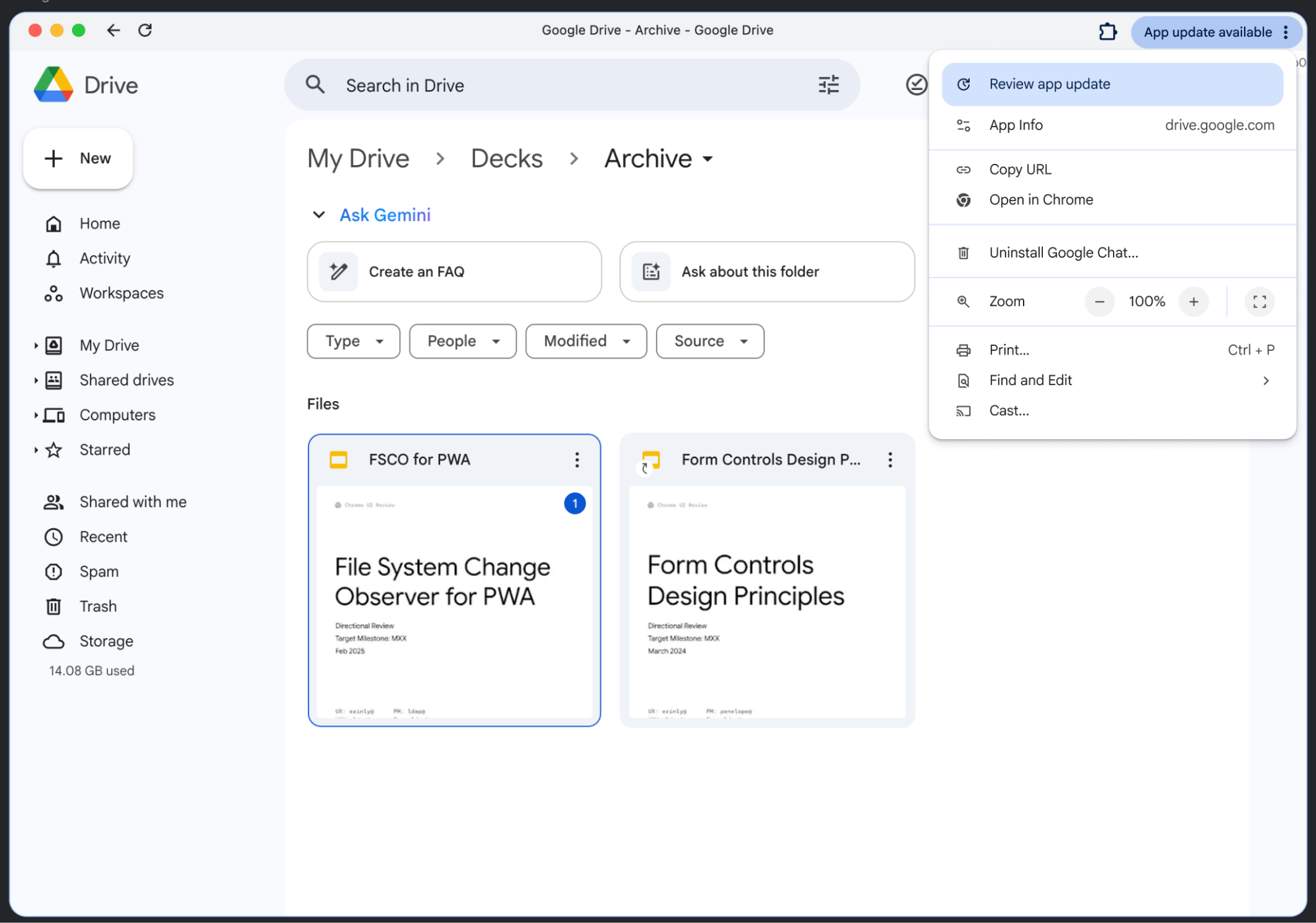
The app window shows that an App update is available. The dropdown includes a link to Review app update.

Clicking Review app update shows the following UX (depending on what has changed in the manifest):
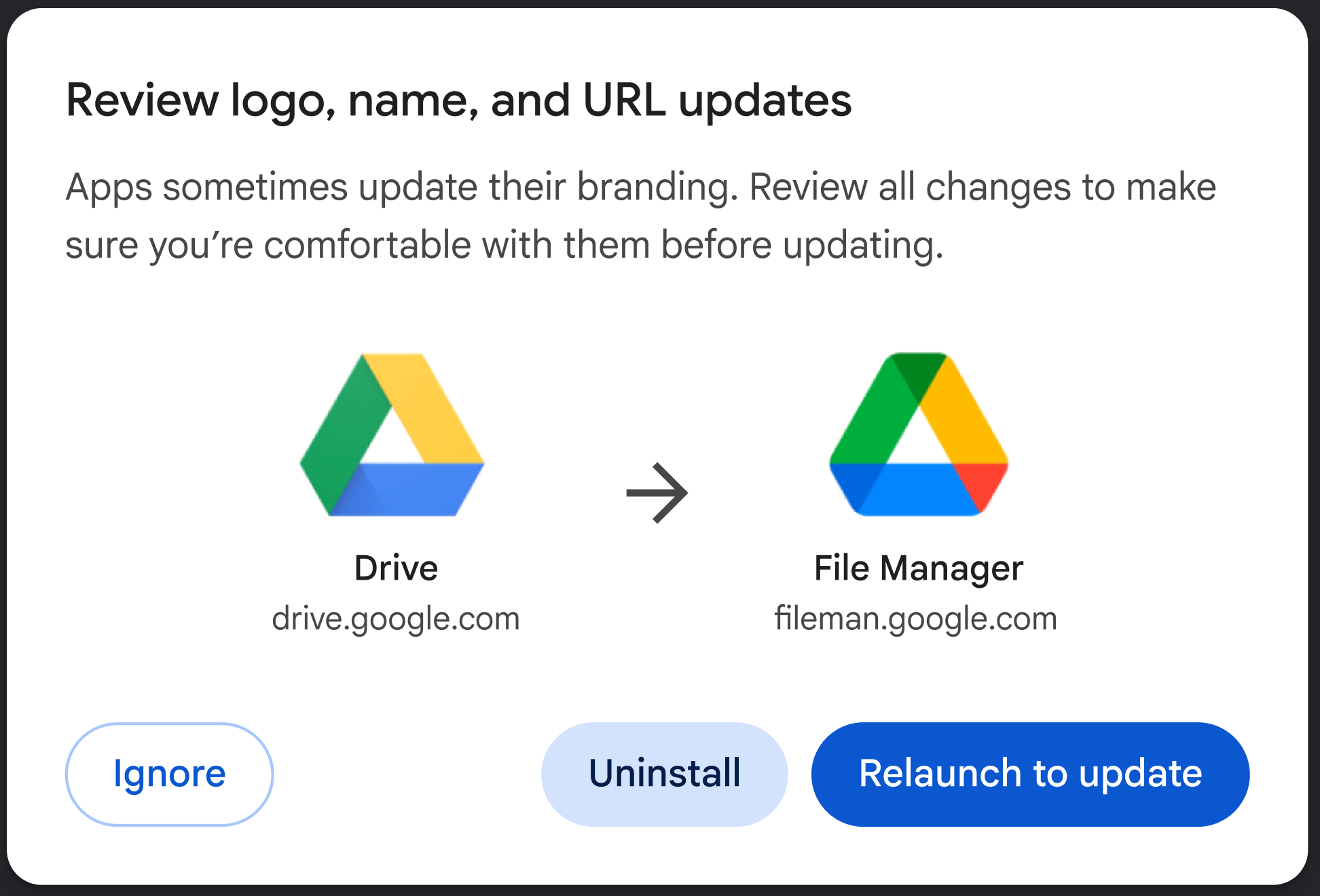
The dialog asks the user to review the logo, name, and URL updates.

Control the user experience

You can choose how aggressive the migration should be using the behavior flag:

  1. Suggest (default): The user receives a passive notification (for example, in the app menu). They can choose to update, uninstall their app or ignore the migration by launching the dialog.
  2. Force: On the next app launch, the user is presented with a blocking dialog. They must either update to the new origin or uninstall the app (please see the following screenshot).

The following example shows how to set this choice,

"migrate_from": [
  { 
    "id": "https://example.com/social/",
    "behavior": "force" // or suggest
  }
]
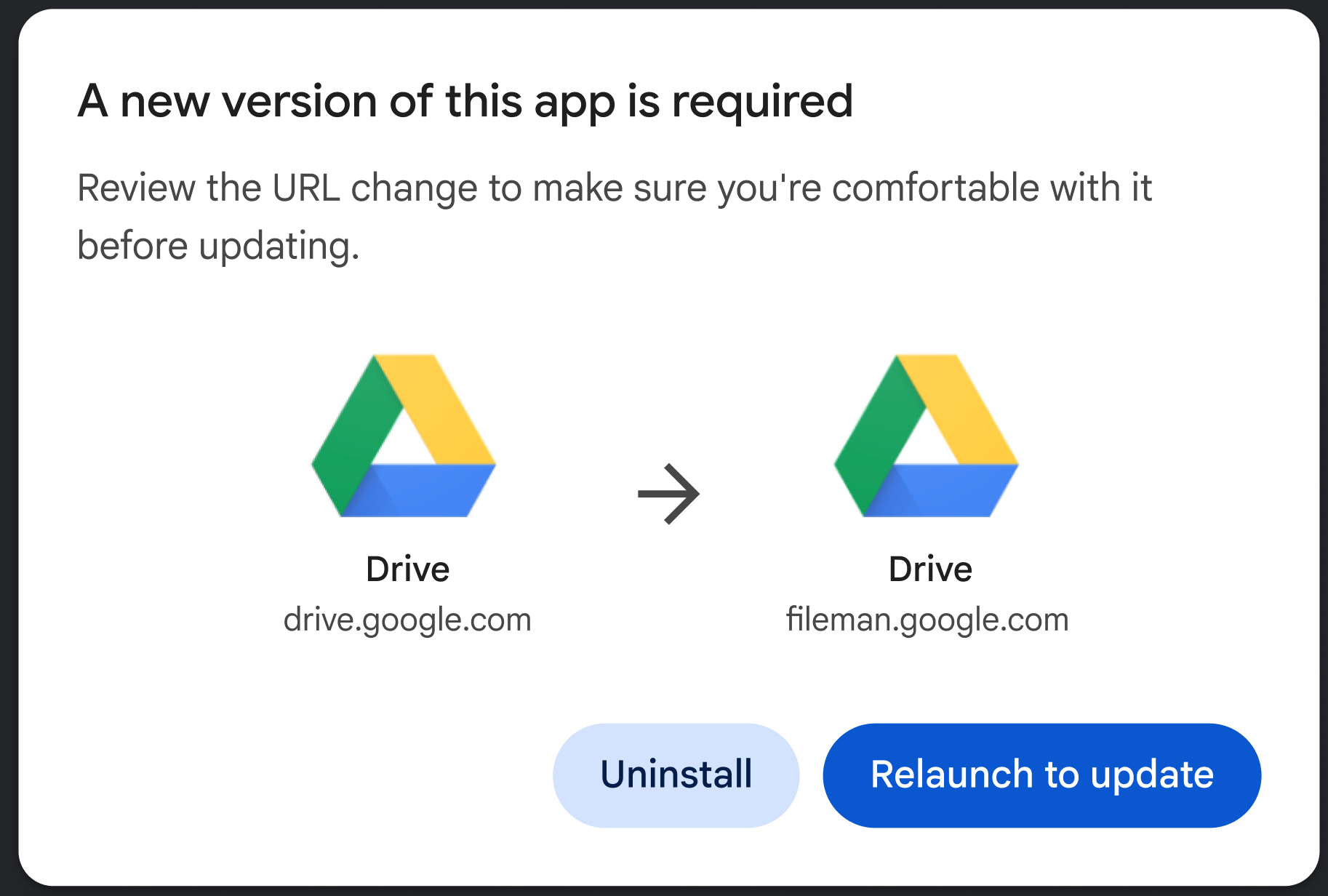
The dialog tells the user that a new version of the app is required.

Conclusion

The PWA Migration feature empowers developers to keep building modern, flexible web architectures without leaving users behind.

Except as otherwise noted, the content of this page is licensed under the Creative Commons Attribution 4.0 License, and code samples are licensed under the Apache 2.0 License. For details, see the Google Developers Site Policies. Java is a registered trademark of Oracle and/or its affiliates.

Last updated 2026-06-03 UTC.

[[["Easy to understand","easyToUnderstand","thumb-up"],["Solved my problem","solvedMyProblem","thumb-up"],["Other","otherUp","thumb-up"]],[["Missing the information I need","missingTheInformationINeed","thumb-down"],["Too complicated / too many steps","tooComplicatedTooManySteps","thumb-down"],["Out of date","outOfDate","thumb-down"],["Samples / code issue","samplesCodeIssue","thumb-down"],["Other","otherDown","thumb-down"]],["Last updated 2026-06-03 UTC."],[],[]]