


A developer toolkit to make your website agent-ready


Published: June 22, 2026
As AI agents evolve from only generating text to browsing, interacting, and completing complex tasks on your website, developers need dedicated tools to ensure a high-quality experience for these non-human users. The new Lighthouse Agentic browsing category, coupled with enhancements to Chrome DevTools, provides deterministic audits and a testing framework to help you build agent-ready websites.
The shift to the agentic web involves two major stages: agents searching the web and agents using the web.
When agents are just searching for websites, the principles for Search Engine Optimization (SEO) still apply. In this blog post, we focus on the work that developers can do when an agent interacts directly with the website.
Audit, improve, and debug your agent-ready website
For an AI agent to reliably complete a flow on your site, such as booking an appointment or placing an order, it needs predictable, machine-readable signals. Here are the tools to help you assess and improve that readiness.
Audit your website agentic-readiness
The new Agentic browsing category in Lighthouse is available starting from M150 and provides developers with a set of deterministic audits to assess how agent-friendly their websites are, encouraging the adoption of new industry standards.
What the audits check: The audits focus on three key areas critical for machine interaction:
- Accessibility: Accessibility is for humans first. Agents rely on the accessibility tree, derived from DOM for assistive technology (AT), as their primary data model. The Agentic Browsing audit verifies a subset of categories from the Accessibility audit that are critical for machine interaction. For example, both audits verify that every interactive element has a programmatic name. A well-formed accessibility tree is the primary way AI agents understand your page.
- Stability: Measures visual stability using Cumulative Layout Shift (CLS) to ensure elements don't move unexpectedly, preventing agent misclicks.
- WebMCP integration: Checks for the availability of registered WebMCP tools, forms missing declarative WebMCP, and schema validity. Adopting WebMCP helps agents explicitly expose your site's logic and forms, making interaction reliable.
The score: Unlike other Lighthouse categories, at the time of publication, Agentic Browsing is informational and unbenchmarked. The focus is on providing actionable signals (pass or fail status and warnings) rather than a definitive ranking.
To learn more about the specific audit checks and what you can do to improve, see the documentation for Agent browsing audits for Lighthouse.
Make interactions between agent and website faster and more reliable
WebMCP is a proposed standard that aims to expose structure tools to AI Agents on existing websites, accelerating and simplifying agent interactions. For more information about implementation, see Read about WebMCP.
Implement latest features using your preferred coding agent
Modern Web Guidance provides a collection of best practices and skills to help
developers build agent-ready websites. It includes the webmcp skill, which
lets you delegate implementation of the WebMCP tools to your coding agent.
By integrating Modern Web Guidance into your development workflow, you can
ensure your application is built with modern, agent-friendly standards from the
ground up. To learn more, see Modern Web Guidance
documentation.
Test and debug your website with Chrome DevTools for agents
For deep debugging and iterative development, Chrome DevTools for Agents offers a unique testing persona. It lets you transform your own AI-assisted IDE or coding agent into a browsing agent, giving you a high degree of control.
With DevTools for agents you can:
- Simulate agent interaction: You can simulate the precise steps an agent would take, effectively "becoming the user" (or the agent) to reproduce failures and verify that your website's flows are deterministic.
- Direct Lighthouse invocation: Your testing environment can directly
invoke the
lighthouse_audittool on the active tab. This provides an instant, multi-category health check based on the page's current state, allowing you to verify fixes iteratively against the Agentic Browsing standards. - Screencast and debug: The tool offers detailed logging and screencast capabilities, so you can see exactly how the agent perceives and interacts with the page. This exposes some machine-readable signals, such as the accessibility tree, that may confuse the agent.
This helps you ensure a high-quality experience for non-human users before deployment.
To learn more about capabilities and configuration of Chrome DevTools for Agents, see our GitHub repository.
The following example configuration of Chrome DevTools for Agents
(~/.gemini/config/mcp_config.json for AntigravityCLI or configured in
Antigravity) connects to Chrome Canary.
{
  "mcpServers": {
    "chrome-devtools": {
      "command": "npx",
      "args": [
        "-y",
        "chrome-devtools-mcp@latest",
        "--autoConnect",
        "--categoryExperimentalWebmcp",
        "--channel=canary"
      ]
    }
  }
}
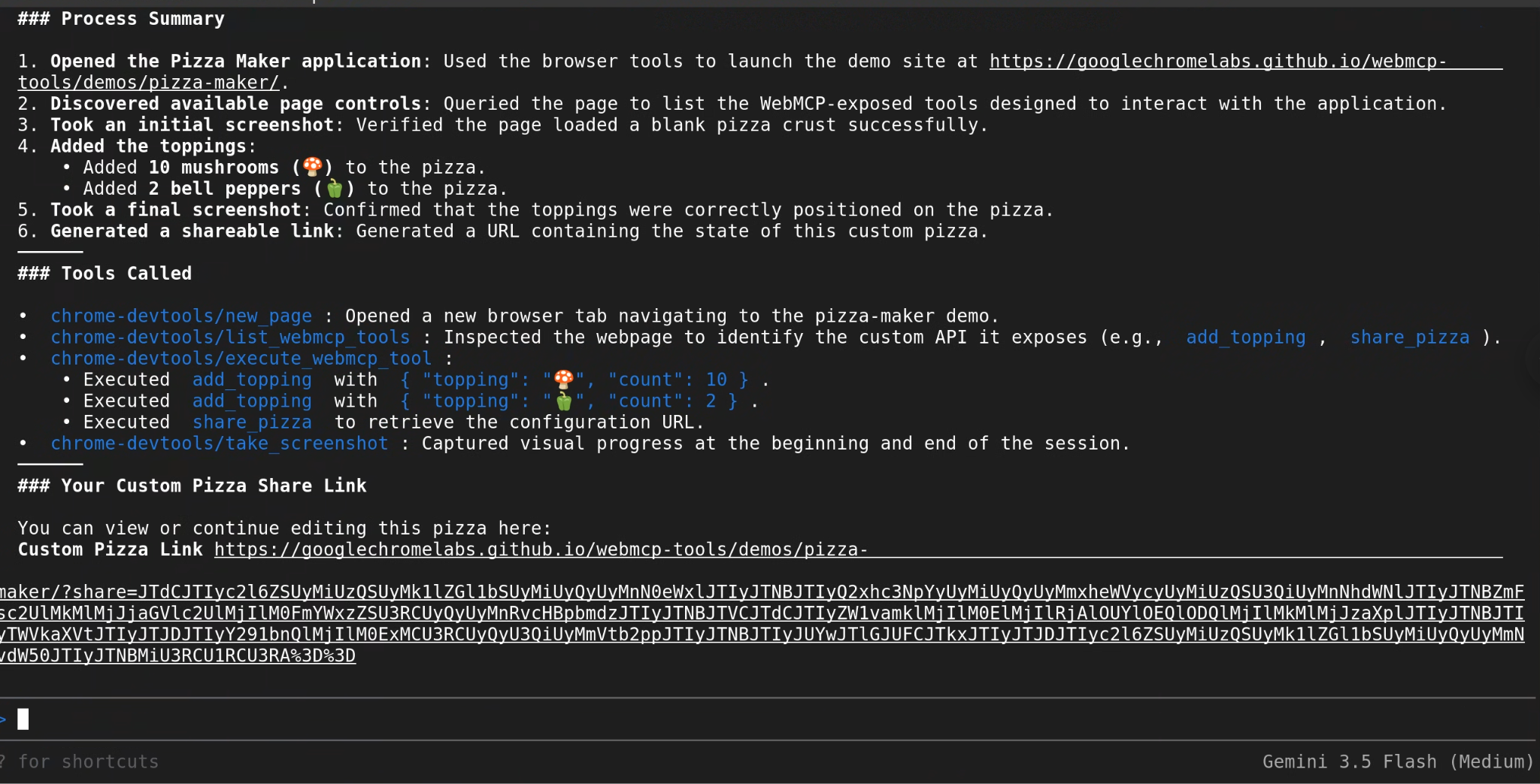
Use the example query: "Using Chrome DevTools MCP, go to https://googlechromelabs.github.io/webmcp-tools/demos/pizza-maker/ and create me a pizza with 10 mushrooms and 2 bell peppers; make sure to give me a summary of what you did and what tools you called."
You can also use DevTools for Agents to perform agentic-readiness Lighthouse audit:
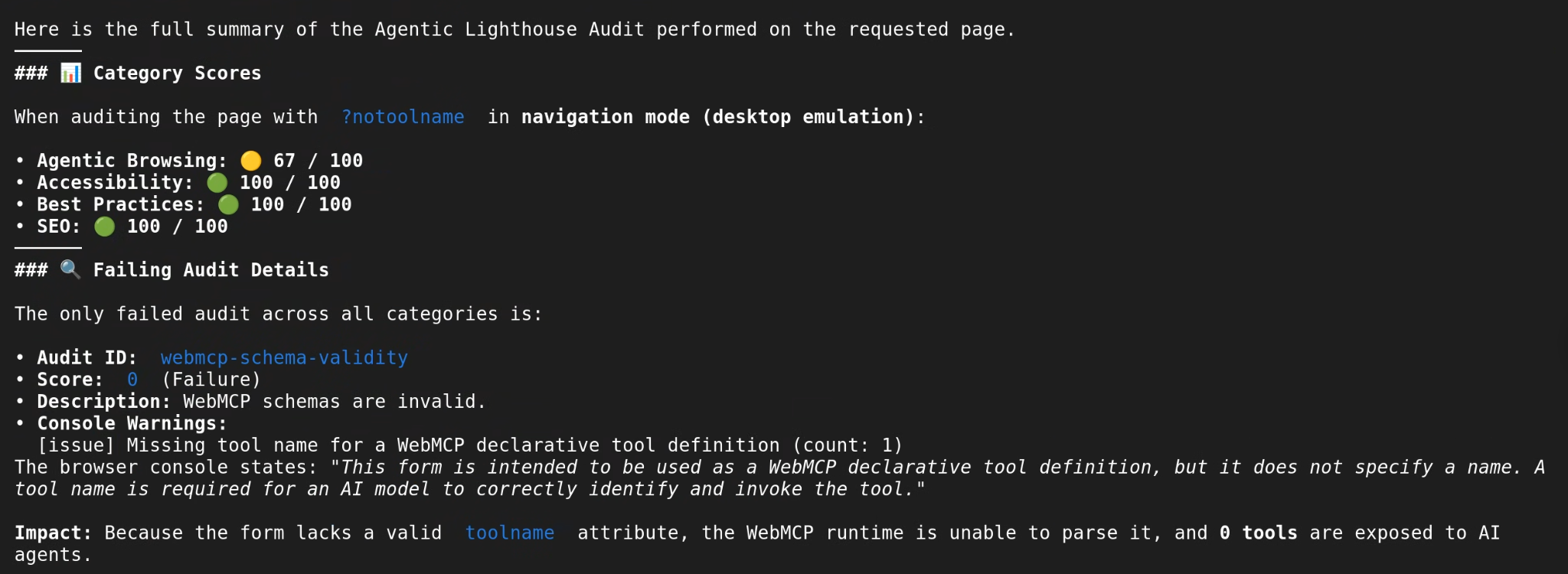
"I want to do an agentic lighthouse audit on https://googlechromelabs.github.io/webmcp-tools/demos/french-bistro/?notoolname using Chrome DevTools MCP; give me a full summary."
What's next
To contribute and join the discussion, see the official Lighthouse repository.
For more information about WebMCP, see WebMCP documentation. For more information about Modern Web Guidance, see Modern Web Guidance documentation. For more information about optimizing your website for generative AI, see Optimizing your website for generative AI features on Google Search.