


Sanity Functions is a fully managed serverless environment that lets you create custom content workflows without managing infrastructure.
Automate events that react to content changes. You may validate content, trigger external services, or transform content with AI Agent Actions—all while Sanity handles the scaling, security, and reliability.
Functions integrate seamlessly with your content operations, letting you focus on building what matters to your authors and business.
Content is never truly finished, and its life cycle doesn't end when you paste it into a browser and press publish. It may need to be translated to appear in other markets, update a search index, or revalidate a cache to appear on a website at all. These actions directly respond to pressing publish and are the next step in any content lifecycle.
Without Sanity Functions, developers must string together a series of external services that they are responsible for documenting and maintaining. This creates logic related to content that exists outside the rest of your content operations.
This complexity compounds as developers spend more time building infrastructure while authors wait.
Organizations struggle to maintain consistent workflows and reliable content delivery at scale without a unified system for extending content operations.
Co-locating "what happens next" with the rest of your content infrastructure keeps everything organized and streamlined.
Sanity Functions are authored in TypeScript and deployed to the Content Lake. Deploying them requires the first use of the next evolution of Sanity configuration, which we call "Blueprints."
Blueprints represent the best-in-class developer experience for developing and deploying content operations.
The Sanity Content Operating System comprises of deployable infrastructure components for content creation, maintenance, and the post-event lifecycle. It is backed by the Content Lake, a content-optimized, real-time datastore for documents and assets.
The future of Blueprints is infrastructure-as-code to configure all your content operations.
Sanity Functions allow you to respond to changes in your content. When a document is created, updated, or deleted, your function can execute custom logic to maintain data consistency, trigger workflows, or perform automated tasks. This event-driven approach ensures your content stays synchronized and follows business rules in real-time.
Sanity Functions can read and write to your dataset, access other documents, and utilize the full Sanity API capabilities. Functions run with the same permissions as your applications, allowing them to perform complex operations while maintaining security. They can query related documents, traverse references, and make informed decisions based on the broader content context.
You can create reusable functions to maintain consistency across your content model and extend functionality across projects. Functions can be packaged as reusable modules and shared between different Sanity projects, making it easier to maintain consistent behavior and reduce code duplication. This modular approach allows you to build a library of tested, reliable functions that can be applied wherever needed.
Functions can now run on a recurring schedule, not just in response to content changes. Define a cron expression in your Blueprint to automate nightly syncs, periodic cache invalidation, scheduled notifications, and more. Get started with Scheduled Functions.
Let's create a Sanity Function that adds the date and time to a "Post" type document the first time it is published.
This guide assumes you have a Sanity Studio with "Post" type documents and a dateTime field named firstPublished. If not, create a new free Sanity Studio project with the command below and choose the "blog" template.
Functions can be initialized with the Sanity CLI. As they are configured and deployed as part of a Blueprint, you'll need to create one of those first.
Run the following inside of your Sanity Studio project to initialize a new Blueprint:
You should now have two new files:
blueprint.json at the root of your project, which contains configuration for the functions you'll create. It deliberately contains no project-specific details such as your Sanity Project ID, so that the configuration is portable between projects..sanity/blueprint.config.json with project-specific configuration. This file shouldn't be checked into version control.Run the following to add your first function to the project:
Name the function first-published
You'll now have a functions folder in your project, which are referenced inside the blueprint.json configuration file.
Along with all your other project files, you should now have these in your project:
Update the blueprint.json file to include a filter and projection
firstPublished field. projection will pass along only the _id attribute from the document to the function.Run the following to test the Function locally using the CLI
You should receive a response like the below:
Take a look in functions/first-published/index.ts to see the code that generated this response.
To patch documents, you'll need to install Sanity Client to the Function's dependencies. We'll also now install a package that contains helper functions to improve the TypeScript support of our function.
Run the following command from inside the first-published folder:
Update the function to create a new client instance using options provided from the handler's context.
Run the following command to deploy your Blueprint from the root of your project
In your Studio, create and publish a new "post" type document. Almost immediately after publishing you should see a firstPublished value written to the document.
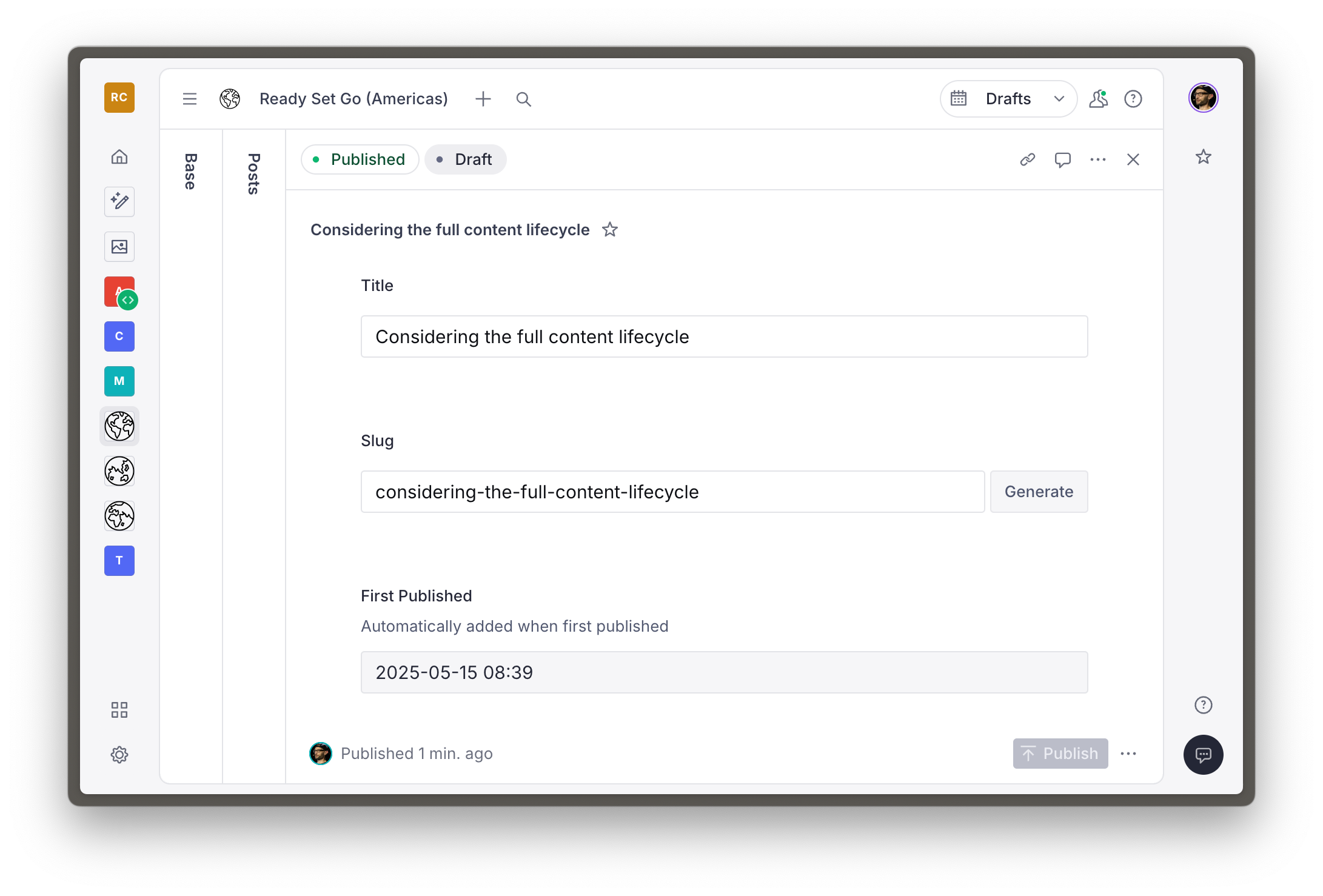
Run the following to view production activity from the first-published function.
You should see logs like below to confirm what you saw in your Sanity Studio.
And that's it! You can now continue to modify your Sanity Function to perform other tasks, add more functions to your project and redeploy the Blueprint at any time.
Updating documents isn't all you can do to support the content lifecycle with Sanity Functions. Consider what other functionality you could build. Here are some powerful use case ideas:
We can't wait to see what you'll wire up with Functions. If you'd love to show it off, tag us on social media or join our community on Discord and post up in the Showcase channel.
此内容由惯性聚合(RSS阅读器)自动聚合整理,仅供阅读参考。 原文来自 — 版权归原作者所有。