Mixpanel has been a go-to product analytics platform for over a decade, and it's evolved significantly – adding session replay, heatmaps, A/B testing, and feature flags in recent years.
But Mixpanel isn't the only option. Whether you're looking for an all-in-one platform that includes error tracking and LLM observability, transparent usage-based pricing, or a tool built specifically for engineering teams, there are alternatives worth considering.
In this guide, we compare the best Mixpanel alternatives – whether you need a focused analytics tool or an all-in-one platform for building better products.
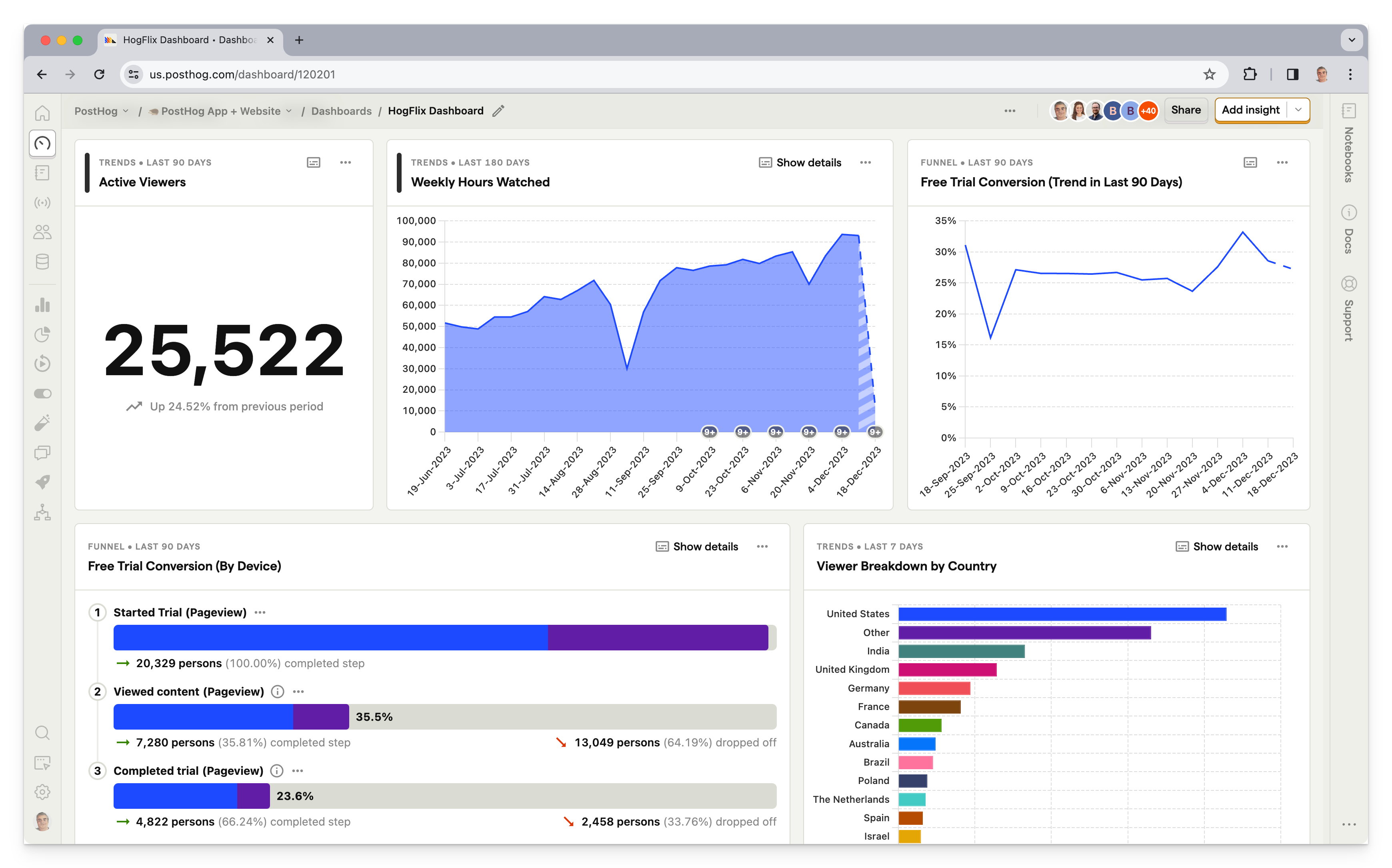
PostHog is an open-source developer platform that combines product analytics, session replay, feature flags, A/B testing, user surveys, error tracking, and more into one platform. This means it's not just an alternative to Mixpanel, but also Hotjar, Optimizely, and Split
Product analytics, including funnels, user paths, retention analysis, custom trends, and dynamic user cohorts. Power users can create custom insights using SQL.
Web analytics for tracking your marketing website – pageviews, bounce rate, traffic sources, UTM campaigns, and web vitals in a simple dashboard.
Session replays with event timelines, console logs, network activity, DOM explorer, and performance metrics. 90-day retention with the ability to save individual replays offline indefinitely.
Heatmaps showing clicks, scroll depth, and mouse movement overlaid on your actual site – viewable directly via the PostHog toolbar.
A/B tests with up to 10 test variations, primary and secondary metrics. Automatically calculates recommended duration, sample size, and statistical significance.
Surveys, including open text, link with custom CTA, ratings (for NPS, CSAT, and CES surveys), single and multiple choice. Target users based on person properties, URL, or using existing feature flags.
Error tracking to monitor exceptions, stack traces, and crashes – connected directly to session replays, user behavior, and feature flag changes.
Data warehouse to import and query data from external sources like Stripe, Zendesk, Hubspot, or your existing warehouse – analyze business and product data together.
Typical PostHog users are:
Customers include Supabase, Lovable, ElevenLabs, and see all customers.
PostHog is the best choice if you like the idea of consolidating around one platform. Mixpanel offers third-party integrations for features it doesn't have, but this creates a messy workflow for teams.
PostHog also supports autocapture. This means you don't have to manually instrument events. Instead, PostHog starts collecting data from the moment you implement its tracking snippet.
According to reviews on G2, companies use PostHog because:
It replaces multiple tools: PostHog can replace Mixpanel (product analytics), LaunchDarkly (feature flags and A/B testing), and Hotjar (session replay and surveys). This simplifies workflows and ensures all their data is in one place.
Pricing is transparent and scalable: Reviewers appreciate how PostHog's pricing scales as they grow. There's a generous free tier. Companies eligible for PostHog for Startups also get $50k in additional free credits.
They need a complete picture of users: PostHog includes every tool necessary to understand users and improve products. This means creating funnels to track conversion, watching replays to see where users get stuck, testing solutions with A/B tests, and gathering feedback with user surveys.
Bottom line
PostHog is the best Mixpanel alternative for startups and mid-size companies. It replaces Mixpanel and numerous other tools, saving money and time. Power user features, like an SQL insight builder and session replay logs, make it a good choice for engineering-led teams, too.
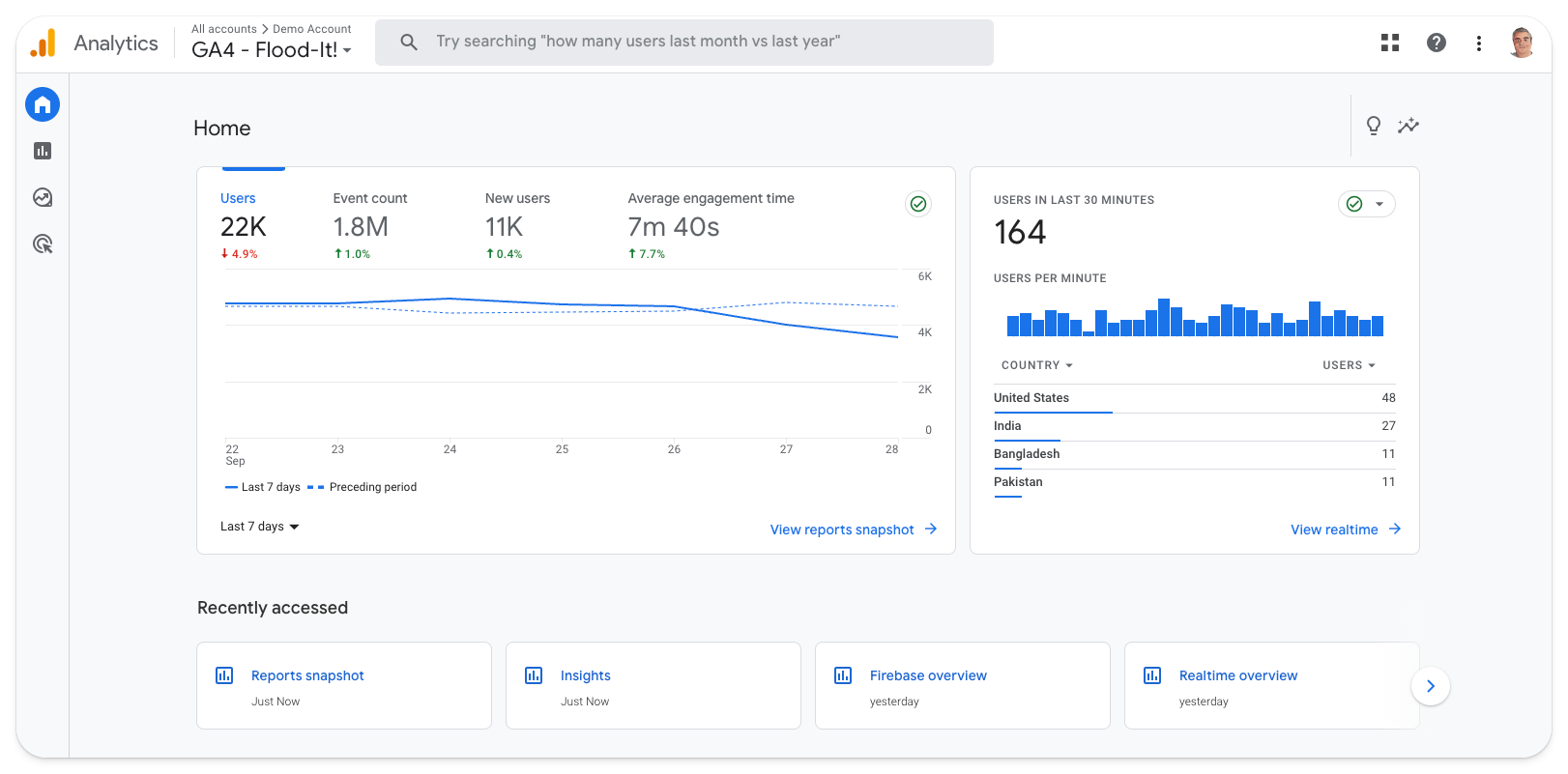
Google Analytics 4 (GA4) is a marketing and product analytics tool that's tightly integrated with other Google products, such as Ads, BigQuery, Looker Studio, and Firebase.
Unlike its predecessor, Universal Analytics (GA3), it's event-based. It also introduces new report types, such as conversion funnels and retention tables. This makes it more useful to product teams than before.
Web and app analytics with event-based tracking, conversion funnels, retention tables, and user paths across websites and mobile apps.
Advertising analytics with native Google Ads integration, campaign attribution, and ROI tracking across paid channels.
Predictive insights powered by Google's machine learning – alerts you to trends, anomalies, and predicts churn and purchase probability.
Google ecosystem integration with BigQuery for raw data access, Looker Studio for dashboards, Firebase for mobile, and Google Ads for attribution.
Natural language search lets you ask specific questions like "MoM growth in users on iOS" rather than building reports manually.
Typical GA4 users are:
Google's huge scale means GA4 is used by both the biggest global corporations to SMBs of every kind. It is ubiquitous.
GA4 and Mixpanel are only superficially similar. They cover the same basics, but GA4 is better-suited to content and marketing teams, while Mixpanel is designed for product teams.
Note, GA4 doesn't support group analytics. This makes it easy to track aggregated usage at an account level, rather than at a user level – useful for tracking behavior in B2B products.
Because it's Google: It's not an original reason, but it holds true. Using Google Analytics makes a lot of sense for teams who rely on other Google platforms, like Google Ads and BigQuery.
It's powerful and free: Likewise, Google's scale means GA4 is completely free to most small and medium-sized businesses. This, combined with strong analytical tools and the large ecosystem of GA experts to call upon, makes it a safe choice.
To track marketing ROI: GA4 is predominantly used by marketing and e-commerce teams to track campaign ROI. It's also popular among large content publishers for its scalability.
Bottom line
GA4 is the best Mixpanel alternative for marketing teams who want to track ROI on campaigns, and a good option for B2C and e-commerce platforms. Product teams, especially those working on B2B products, should look elsewhere.
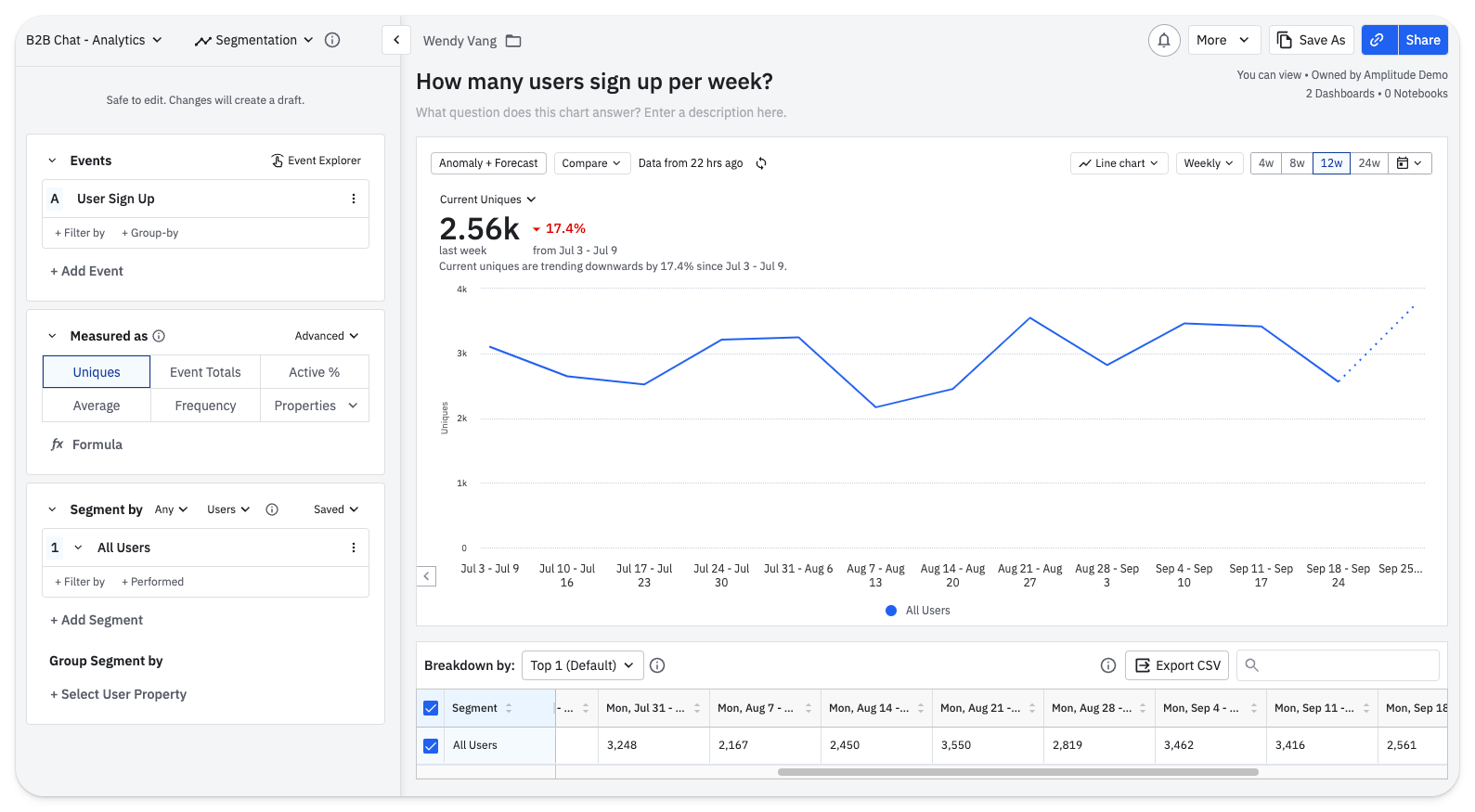
Amplitude is an analytics and testing tool with a particular focus on large enterprise customers, like Zoom, NBCUniversal, and Walmart.
Product analytics with funnel and retention analysis, user paths, behavioral cohorts, custom dashboards, and SQL access for power users.
Session replay to watch real user sessions and understand behavior qualitatively – includes heatmaps on Growth/Enterprise plans.
A/B testing with support for JSON payloads, primary, secondary, and guardrail metrics. Web Experimentation includes a visual editor.
Feature flags for controlled rollouts and targeting specific user segments based on behavioral cohorts.
Warehouse-native analytics that queries data directly from Snowflake, BigQuery, or Databricks without moving it.
AI insight builder that generates insights based on natural language requests, like "What is my purchase conversion rate?".
Customer data platform that combines analytics data with third-party tools for data governance, identity resolution, and audience syncing.
Typical Amplitude users are:
While it offers a limited free tier for startups, high prices are a barrier. As one reviewer points out: "The high price tag poses a challenge for small businesses, early-stage, and even medium-sized startups."
On paper, Amplitude and Mixpanel are very similar, but they differ in focus and approach. While both products serve large enterprise customers, Amplitude is more focused on these users.
Reducing load on data teams: Amplitude is designed to enable non-technical to self-serve analytics. Amplitude cites NBCUniversal as a company that's benefited from its data team spending less time responding to requests for analysis.
Large-scale experimentation: Unlike Mixpanel, Amplitude offers a built-in experimentation add-on. This enables companies to run experiments on users using existing cohorts created in Amplitude.
Resolving data quality problems: Companies that use Amplitude, particularly large ones, often migrate from outdated, or self-built, tools that generate poor quality data. Amplitude helps them fix that, while also making analytics more accessible.
Bottom line
Amplitude is the best Mixpanel alternative for large enterprise companies who want to reduce the load on expensive, overworked data science teams. Startups and mid-size companies might find there are better-value alternatives
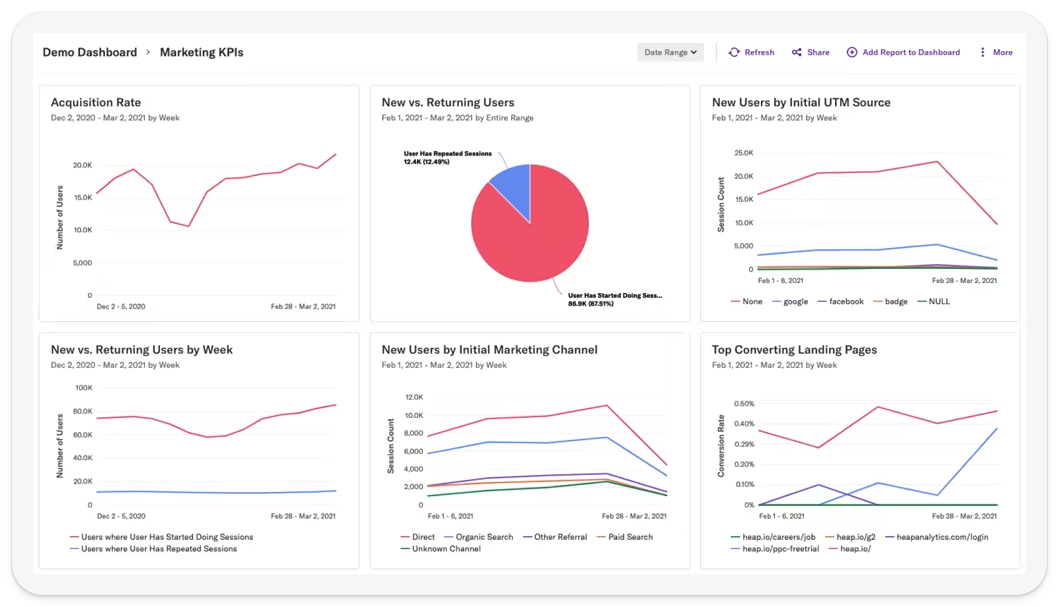
Heap describes itself as a Digital Insights Platform. Unpacking that a bit, it means Heap offers both product analytics and session replay, and supports marketing use cases with multitouch attribution.
Heap was acquired in September 2023 by Contentsquare, a marketing and e-commerce analytics firm, and announced plans to integrate the two products.
Event autocapture captures clicks, form submissions, and pageviews automatically without manual instrumentation. A visual editor lets teams tag and define events retroactively.
Product analytics with funnels, retention, user paths, and behavioral cohorts for understanding how users move through your product.
Session replay and heatmaps for qualitative insights into user behavior, though it lacks developer-focused debugging tools like console logs and network monitoring.
Analysis suggestions use data science to automatically surface hidden interactions, friction points, and opportunities in user journeys.
Multi-touch attribution for marketing teams to understand which channels and campaigns drive conversions.
Managed ETL to export analytics data to Snowflake, BigQuery, and other warehouses for broader analysis.
Typical Heap users are:
Heap puts a strong focus on supporting non-technical product managers via autocapture.
Customers include Amway, Eventbrite, and Nielsen.
Heap has a healthy integration library for A/B testing and marketing automation. For surveys, Heap supports Appcues, Delighted, and Chameleon (microsurveys). Mixpanel also has a large catalog and lists at least eight survey/microsurvey integrations (including Appcues, Survicate, Wootric/InMoment, Hotjar, Sprig, 1Flow, Userflow, and UserGuiding).
Mixpanel also offers a more generous free tier of up to 1 million events; Heap is limited to 10,000 monthly sessions.
Conversion rate optimization: Combining product analytics and session replay makes Heap useful for growth and marketing teams looking to improve conversion.
To improve data collection Companies with limited engineering resources find Heap's autocapture ensures important events aren't missed.
Low information density Reviewers on G2 appreciate Heap's user-friendly interface, which tends toward lower information density than competing tools.
Bottom line
Heap is basically Mixpanel with autocapture. This makes it a decent choice for non-technical product teams, but it's not radically different.
This guide focuses on the most popular Mixpanel alternatives, but these aren't the only ones. Here are some other tools worth considering:
Pendo describes itself as a product experience platform. It combines analytics with in-app guides, user feedback widgets, roadmap planning, and product discovery tools. Best for product teams who want onboarding and adoption tools alongside analytics.
Kissmetrics is more focused on marketing and e-commerce use cases than Mixpanel. It's worth considering if you want to focus on channel attribution and revenue tracking, but don't want to use GA4.
Snowplow is a powerful, open-source behavioral data platform. It can replace tools like Mixpanel, but requires significant data engineering resources to set up and maintain. Best for large enterprises with well-staffed data teams who want full control over their data pipeline.
Countly is an open-source analytics platform with strong mobile app support, push notifications, and crash analytics. It offers both self-hosted and cloud options, making it a good choice for teams who need data sovereignty.
Plausible and Fathom are privacy-first, lightweight analytics tools. They're not direct Mixpanel replacements – they focus on simple website metrics rather than product analytics – but they're worth considering if GDPR compliance and minimal data collection are priorities.
For more options, see our guide to the best open-source product analytics tools and best product analytics tools for startups.
Here's the (short) sales pitch.
We're biased, obviously, but we think PostHog is the perfect Mixpanel replacement if:
It's completely free to get started – no credit card required. Our setup wizard handles configuration in minutes, or you can check out our docs to do it yourself.
Mixpanel is a product analytics platform used to track user behavior, analyze conversion funnels, measure retention, and run A/B tests. Product, growth, and marketing teams use it to understand how users interact with their products and make data-driven decisions. Mixpanel has expanded significantly in recent years, adding session replay, heatmaps, feature flags, and experimentation.
Common reasons include: needing features Mixpanel doesn't offer (like error tracking or LLM observability), wanting a more generous free tier to get you started, preferring an open-source or self-hostable platform, wanting SQL access for custom queries, or consolidating multiple tools into one platform.
For most teams, PostHog is the best alternative. It includes everything Mixpanel offers (product analytics, session replay, A/B testing, feature flags) plus error tracking, LLM observability, surveys, and a built-in data warehouse – all with transparent pricing and a generous free tier.
PostHog is the only major open-source alternative on this list (it's open core under the MIT license). Snowplow is also open source but requires significant data engineering resources. See our guide to the best open-source product analytics tools for more options.
PostHog offers the most generous free tier: 1 million events, 5,000 session replays, 1 million feature flag requests, and 1,500 survey responses per month. GA4 is free for up to 10M events/month but lacks session replay and experimentation. Mixpanel's free tier includes 1M events with a credit card on file.
GA4 is the best choice for marketing teams. It offers native Google Ads integration, campaign attribution, predictive insights, and is free for most businesses. It's tightly integrated with the Google ecosystem (BigQuery, Looker Studio, Firebase), making it ideal for teams already using Google tools.
Amplitude is purpose-built for large enterprises. It offers warehouse-native analytics, mature experimentation, advanced data governance, and is designed to help non-technical teams self-serve analytics without overloading data teams. However, pricing requires contacting sales and can be expensive.
Heap is designed for teams with limited engineering resources. Its comprehensive autocapture starts collecting clicks, form submissions, and pageviews automatically, and a visual editor lets you define events retroactively without writing code.
No. Mixpanel does not offer error tracking or crash reporting. If you need to monitor exceptions alongside your analytics, consider PostHog (which ties errors to user sessions and feature flags) or pair Mixpanel with a dedicated tool like Sentry.
No. Mixpanel doesn't offer LLM observability or AI analytics features. PostHog is currently the only analytics platform on this list that includes LLM observability for tracking AI product usage, monitoring model performance, analyzing token costs, and debugging LLM interactions.
No. Mixpanel doesn't offer native survey functionality. If you need to collect user feedback, NPS scores, or run product-market fit surveys, you'll need a separate tool like Sprig or Survicate – or use PostHog, which includes surveys with targeting based on user properties, URLs, and feature flags.
Yes. Mixpanel offers warehouse-native analytics that can query data directly from Snowflake, BigQuery, and Databricks. Statsig and Amplitude also offer strong data warehouse integrations.
PostHog offers two approaches to using warehouse data:
PostHog is better if:
The managed warehouse approach PostHog offers is better if you want a single platform for analyzing data and using other features, such as surveys and feature flags, as you don't need to maintain an external warehouse in addition to other tools.
Yes. PostHog has a managed migration tool for Mixpanel that makes importing your data, historical events, and user properties easy. It also has dedicated Mixpanel to PostHog migration guide
Beyond the tools in this guide, there are many other options worth considering. See our guides to Amplitude alternatives, Heap alternatives, Google Analytics alternatives, and open-source product analytics tools for broader comparisons.
Subscribe to our newsletter
Read by 100,000+ founders and builders
We'll share your email with Substack
此内容由惯性聚合(RSS阅读器)自动聚合整理,仅供阅读参考。 原文来自 — 版权归原作者所有。