


Table of contents
Office templating allows you to generate documents automatically by merging DOCX templates with dynamic data. Nutrient offers multiple ways to implement this — whether you’re a backend developer using the Document Engine API, a .NET developer using our Web SDK, or a business user leveraging Workflow Automation. You can create contracts, invoices, reports, and more, and then output them to PDF or DOCX. For the most powerful implementation, combine the Web SDK with Document Engine for client-side editing and server-side generation.
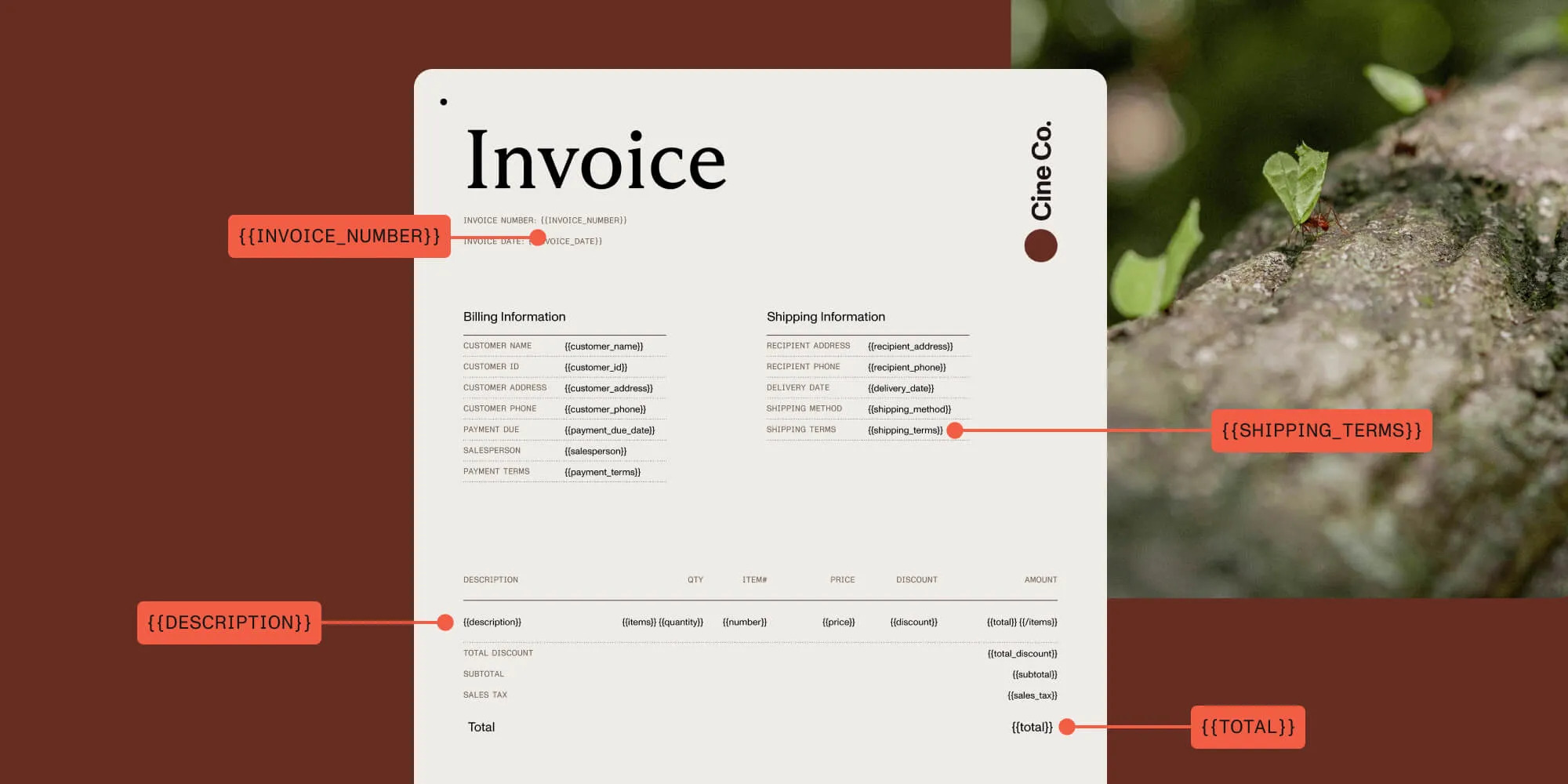
Generating customized documents at scale — like contracts, invoices, reports, and HR forms — has long been a tedious and error-prone process. But with document generation via Office templating, organizations can automatically produce high-quality documents using familiar Office formats and structured data.
In this post, we’ll show how Nutrient’s Office templating solutions make it easy to automate document workflows across a range of use cases, and why it’s a powerful tool for any team that regularly produces business-critical documentation.
What is document generation via Office templating?
Office templating is a modern approach to document generation that uses editable Microsoft Office files (like DOCX) as templates. These templates contain placeholders (e.g. {{ClientName}}, {{InvoiceTotal}}) that can automatically be filled with dynamic data — typically from a CRM, form, database, or spreadsheet.
The result: Instant, standardized, and personalized documents that can be exported as PDFs or sent directly to customers and colleagues.
Common use cases include:
- Generating contracts or agreements from HR or legal systems
- Auto-creating invoices or financial reports from transactional data
- Populating marketing collateral with customer-specific content
- Generating performance reviews and internal IT reports
How Office templating works in Nutrient
Nutrient provides flexible tools for Office templating that support everything from one-off DOCX generation to enterprise-scale document pipelines.
The process
- To create a DOCX template, use Microsoft Word to design your template with text placeholders such as
{{EmployeeName}}or{{MonthlySummary}}. - Structure your input data in JSON format to match the placeholders.
- Optionally, define custom delimiters or logic (like loops or conditional sections).
You can output a formatted Word file or convert it directly to PDF using Nutrient’s rendering engine.
Which Nutrient products support Office templating?
Depending on your use case, you can use Nutrient’s Office templating functionality in different ways across your ecosystem.
1. Document Engine
Document Engine provides a dedicated Office Templating API, which is ideal for server-side, high-volume DOCX and PDF generation.
Best for: Backend developers building scalable, high-volume systems.
How it works: Leverages the dedicated Office Templating API, allowing DOCX templates to be populated with JSON data and returned as DOCX or PDF.
Setup and flow
- Prepare a DOCX file with placeholders like
{FirstName},{Total}, etc. The default delimiters are{and}. - Use the Document Engine API to:
- Upload the template.
- Provide a template model (JSON data).
- Request output as DOCX or PDF.
- Receive a downloadable document in response.
Example API request
curl -X POST http://localhost:5000/api/process_office_template \
-H 'Authorization: Token token=<API token>' \
-H 'content-type: multipart/form-data' \
-F 'document=@/path/to/template.docx'
-F 'model={
"config": {
"delimiter": {
"start": "{{",
"end": "}}"
}
},
"model": {
"CustomerName": "Alice Johnson",
"InvoiceNumber": "INV-1001",
"Total": "$1,200.00"
}
}' \
--output result.docx
The API supports:
- Text replacement for placeholders
- Loops for repetitive content (e.g. invoice line items)
- Custom delimiters (default:
{and}) - Automatic document reflow as content changes
2. Web SDK + Document Engine (combined)
Nutrient Web SDK with Document Engine delivers the most comprehensive document solution, merging browser-based document handling with robust server-side processing capabilities.
Best for: Enterprise applications requiring both interactive user interfaces and high-performance document generation.
How it works: Leverage Web SDK for client-side document viewing/editing, while utilizing Document Engine’s powerful server-side templating and processing.
Key benefits
- Create rich document experiences with Web SDK’s UI components
- Offload resource-intensive processing to Document Engine
- Enable real-time collaboration on documents with Instant Collaboration
- Support large documents with optimized streaming from server to client
This combined approach provides superior performance for document-heavy applications while maintaining an excellent user experience.
3. Web SDK (standalone)
Nutrient Web SDK supports templating in JavaScript using NutrientViewer.populateDocumentTemplate() and NutrientViewer.convertToPDF(). This enables direct template merging and PDF generation in the browser or headless environments
Best for: Web developers using JavaScript.
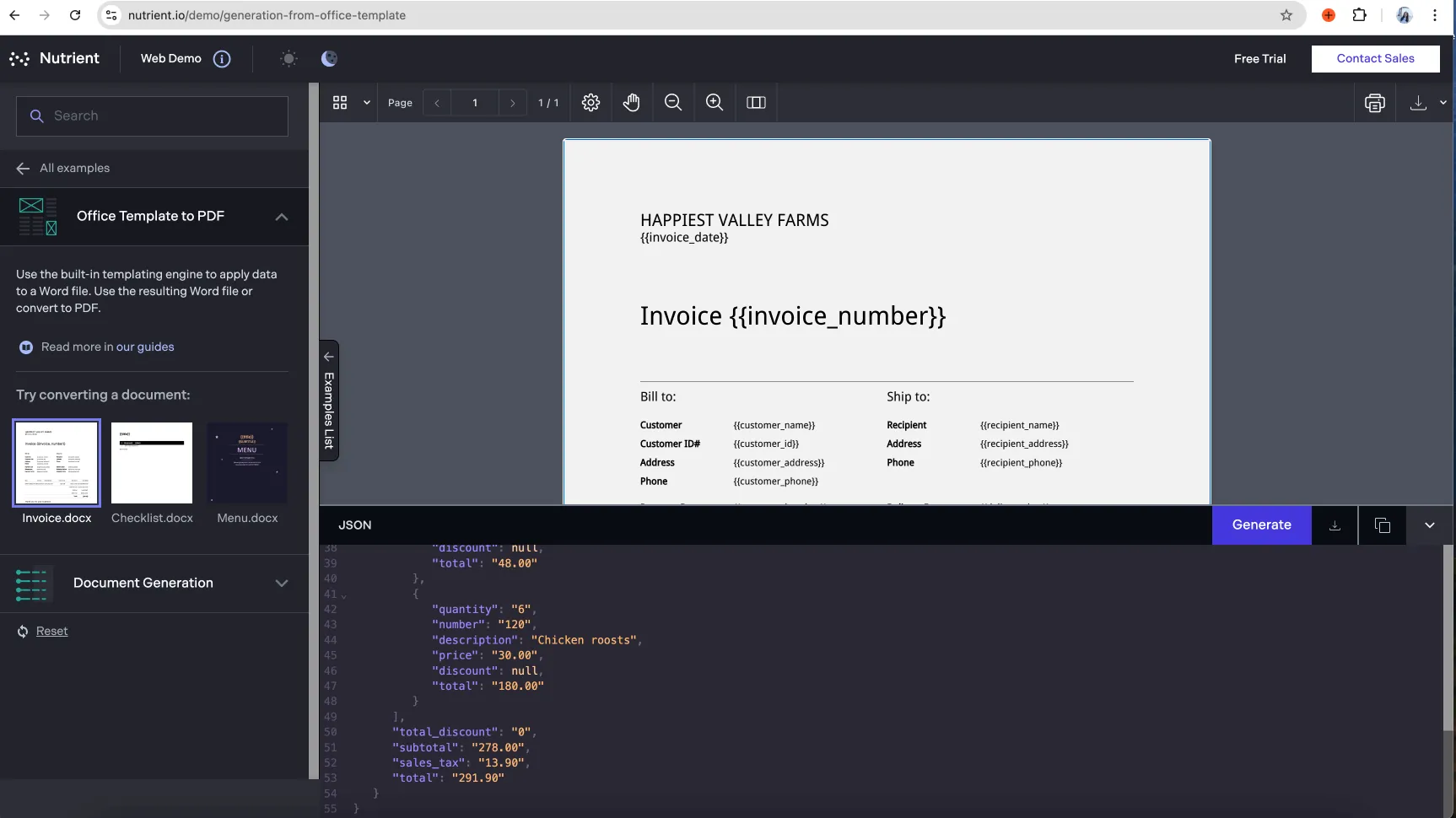
In Nutrient Web SDK, templating is handled via the Office Conversion license. In Document Engine, it’s implemented with a standalone Office Templating API.
Sample workflow
- Load the Word
.docxdocument into the Web SDK. - Optionally, allow users to review or edit.
- Use
exportPDF()to convert the template. - Trigger a download or save the PDF result.
Example: Generating a PDF from a Word template in JavaScript
const data = {
config: {
delimiter: {
start: '{{',
end: '}}',
},
},
model: {
name: 'Alex Smith',
text: 'Hello World!',
amount: '$249.99',
},
};
const buffer = await NutrientViewer.populateDocumentTemplate(
{
document: 'template.docx',
},
data,
);
const pdfBuffer = await NutrientViewer.convertToPDF(
{
document: buffer,
},
NutrientViewer.Conformance.PDFA_1A,
);
Using loops
const data = {
config: {
delimiter: {
start: '{{',
end: '}}',
},
},
model: {
loop1: [
{ loopDesc1: 'Monday', loopDesc2: 'Tuesday' },
{ loopDesc1: 'Wednesday', loopDesc2: 'Thursday' },
{ loopDesc1: 'Friday', loopDesc2: 'Saturday' },
],
loop2: [
{ loopDesc: 'Red' },
{ loopDesc: 'Orange' },
{ loopDesc: 'Green' },
],
},
};
This templating engine supports full logic-based content control, including nested loops and dynamic reflow based on template design.
4. Workflow Automation Platform
Nutrient Workflow Automation Platform provides a no-code solution for generating DOCX or PDF documents directly from form submissions, process variables, or external integrations.
Best for: Non-technical users or teams building automated workflows.
How it works: Office Templating is available as a premium add-on task. Users can add this task into any automation process — for example, form submission triggers document creation.
Configuration steps
- Upload a
.docxtemplate via the Workflow Automation process designer. - Map template placeholders to form inputs, database fields, or API variables.
- Add the Office Templating task to your process.
- Choose the output format (DOCX or PDF) and delivery step:
- Email attachments
- Cloud storage destinations
- In-app document viewers
Check out the Workflow Automation documentation for detailed steps on setting up Office templating.
Benefits for business teams
- Auto-generate contracts, evaluations, reports, and more
- Link templates to form submissions or internal systems
- Standardize your document output with minimal user intervention
- Ensure compliance with pre-approved formats and wording
Use cases
- HR: Generate offer letters or performance reviews
- Sales: Auto-generate proposals from CRM entries
- IT: Create incident reports or compliance records
Learn more industry use cases:
5. Document Converter Services (DCS)
New in v12.3.0 (Ref: PCOP-538), DCS adds support for DOCX templating. This allows you to populate Word templates with structured data models (e.g. JSON) and generate completed documents such as contracts, invoices, or reports at scale.
- Best for: Server-side automation, batch generation, and enterprise workflows.
- How it works: You provide a
.docxtemplate with placeholders (e.g.{{name}},{{invoicenumber}}) and a JSON model defining the data values. DCS merges them into a new Word document. - Learn more: Guide to filling Word documents with DCS
Summary table
| Product | Office templating support | Ideal for | Output options |
|---|---|---|---|
| Document Engine | ✅ Dedicated API for server-side templating | Backend developers, high-volume systems | DOCX, PDF |
| Web SDK + Document Engine | ✅ Client-side + server-side templating and rendering | Full-stack apps, collaborative platforms | DOCX, PDF, Web UI |
| Web SDK (JavaScript) | ✅ Client-side templating via populateDocumentTemplate() | JavaScript/web developers | DOCX, PDF |
| Workflow Automation Platform | ✅ Built-in no-code task (premium add-on) | Business users, ops teams | DOCX, PDF, email |
| Document Converter Services | ✅ New in v12.3.0 — FillWordTemplate method | Server-side automation, batch generation | DOCX |
Office templating features
Nutrient’s Office templating engine supports:
- Text replacement — Replace any placeholder with dynamic data
- Loops – Generate repeated blocks (e.g. product tables, itemized lists)
- Custom delimiters — Use
{}by default or define your own - Multi-output support — Export to DOCX, PDF, or both
- Batch processing — Generate hundreds or thousands of documents at once
- Integration-ready — Works with Zapier, REST APIs, and custom code
Why choose Nutrient for Office templating?
- Powerful API and SDKs — Ideal for developers and automation pros
- User-friendly workflows — Designed for business users too
- Scalable — Supports high-volume and multi-user environments
- Secure — Cloud or on-premises deployments, with full data compliance
Start streamlining document generation today
Whether you’re automating employee contracts or generating thousands of invoices, Office templating with Nutrient makes document generation fast, scalable, and effortless.
Start your free trial or explore our documentation to see how Nutrient fits into your document automation strategy.
Get started with document generation
FAQ
Nutrient supports DOCX as the input template format and allows you to output the final document as either DOCX or PDF.
You can insert placeholders using curly-brace syntax, like {{Name}} or {{InvoiceTotal}}. These are automatically replaced with values from a JSON model during generation.
The Web SDK uses the Office Conversion feature in .NET for templating, while the Document Engine has a dedicated Office Templating API for server-side processing. Web SDK is great for client-side or embedded use, while Document Engine is optimized for high-volume, backend scenarios.
Yes, both the Web SDK and Document Engine support batch processing. You can loop through multiple data models to generate and export large sets of documents automatically.
Yes, Office Templating is available as a premium task in Nutrient Workflow Automation Platform. It lets you automate document generation using forms and integrations without any code.