






TL;DR
Software is increasingly written by AI. AI coding agents like Claude Code, Codex, and Gemini CLI are generating production code, wiring up integrations, and consuming SDKs on behalf of human developers. When a developer tells an agent “add PDF annotations to my app,” that agent becomes the real user of your SDK.
But how do you know if an AI agent can actually use your API? Most SDK providers haven’t measured this.
At Nutrient(opens in a new tab) (formerly PSPDFKit), we’ve spent more than a decade building document SDKs used by thousands of organizations. We’ve always optimized for developer experience — clear documentation, intuitive APIs, working examples. But as AI agents become the ones reading that documentation and calling those APIs, we realized we needed to measure how well AI agents — not humans — can use an API.
Today, we’re open sourcing agentic-usability(opens in a new tab), a CLI tool that benchmarks how effectively AI coding agents can use any SDK.
SDK integration has four phases: discovery, learning, implementation, and troubleshooting. AI agents now handle most of them.
Pre-agentic engineering
Post-agentic engineering
In this workflow, the agent is the primary consumer of your SDK documentation and API surface. The developer still directs, but the agent parses your documentation, calls your methods, and interprets your error messages.
The relevant question is no longer whether developers find your SDK easy to use, but whether AI agents do.
AI agents interact with SDKs differently from humans. Four areas stand out:
| Dimension | Humans | AI agents |
|---|---|---|
| Documentation format | Prefer interactive documentation (think Stripe). Visual hierarchy, collapsible sections, and live examples help. | Prefer plain text — OpenAPI specs, Markdown, llms.txt. Exception: AI-native tools like Model Context Protocol (MCP) servers. |
| Documentation verbosity | Dislike verbosity. Reading fatigue sets in fast. | Perform better with verbose documentation. Within context window limits, more detail produces better output. |
| Type systems | Preferences vary by developer and project. | Strongly typed languages and APIs produce measurably better agent output. Type signatures act as documentation. |
| Tooling and harnesses | Manual setup is acceptable if documentation is clear. | Setup friction is a blocker — CLAUDE.md files, MCP servers, and tooling that automatically feeds documentation context into the agent all reduce it. |
These differences have real consequences for API design. An SDK designed for human readers can produce broken code when an agent parses it.
When an agent fails to use your SDK correctly, the root cause is often not a bug in the agent. It’s a gap in your API surface.
These problems only became visible once AI agents started hitting them.
The tool runs a four-stage pipeline that replicates how a real AI agent encounters your SDK for the first time.
A generator agent reads your SDK source code (the private information) and produces a set of programming challenges. Each challenge has a problem statement, a reference solution, and a difficulty rating:
This tiered approach reveals where an agent’s understanding breaks down — from copying examples through extrapolation to multistep composition.
Each test case is handed to an executor agent running inside an isolated microsandbox(opens in a new tab) microVM. The executor only sees what a real-world agent would see: the public package name, documentation URLs, and an install command. It has no access to private source code.
This separation matters. The generator and judge see everything. The executor sees only what’s public. This prevents the benchmark from inflating scores by leaking internal implementation details to the agent under test.
A judge agent, also sandboxed, restores the executor’s workspace snapshot and compares the generated solution against the reference implementation. It scores across four dimensions:
| Metric | What it measures |
|---|---|
| API discovery | Did the agent find and use the correct SDK endpoints? |
| Call correctness | Are API calls constructed with correct parameters? |
| Completeness | Does the solution handle all requirements and edge cases? |
| Functional correctness | Does the code run and produce the right output? |
The judge doesn’t only read the solution — it can execute it to verify the output.
An insights agent loads all results and helps you interpret patterns. You can ask it about failure clusters, documentation gaps, API design problems, or prioritized improvement recommendations. It has access to your source code, so it can correlate agent failures with specific parts of your API surface.
The pipeline isn’t a one-shot assessment. The real value comes from iteration: Run the benchmark, identify where agents struggle, update your source code or documentation, and run it again to measure the improvement. Each evaluation run is preserved, so you can compare scores across runs and track progress over time.
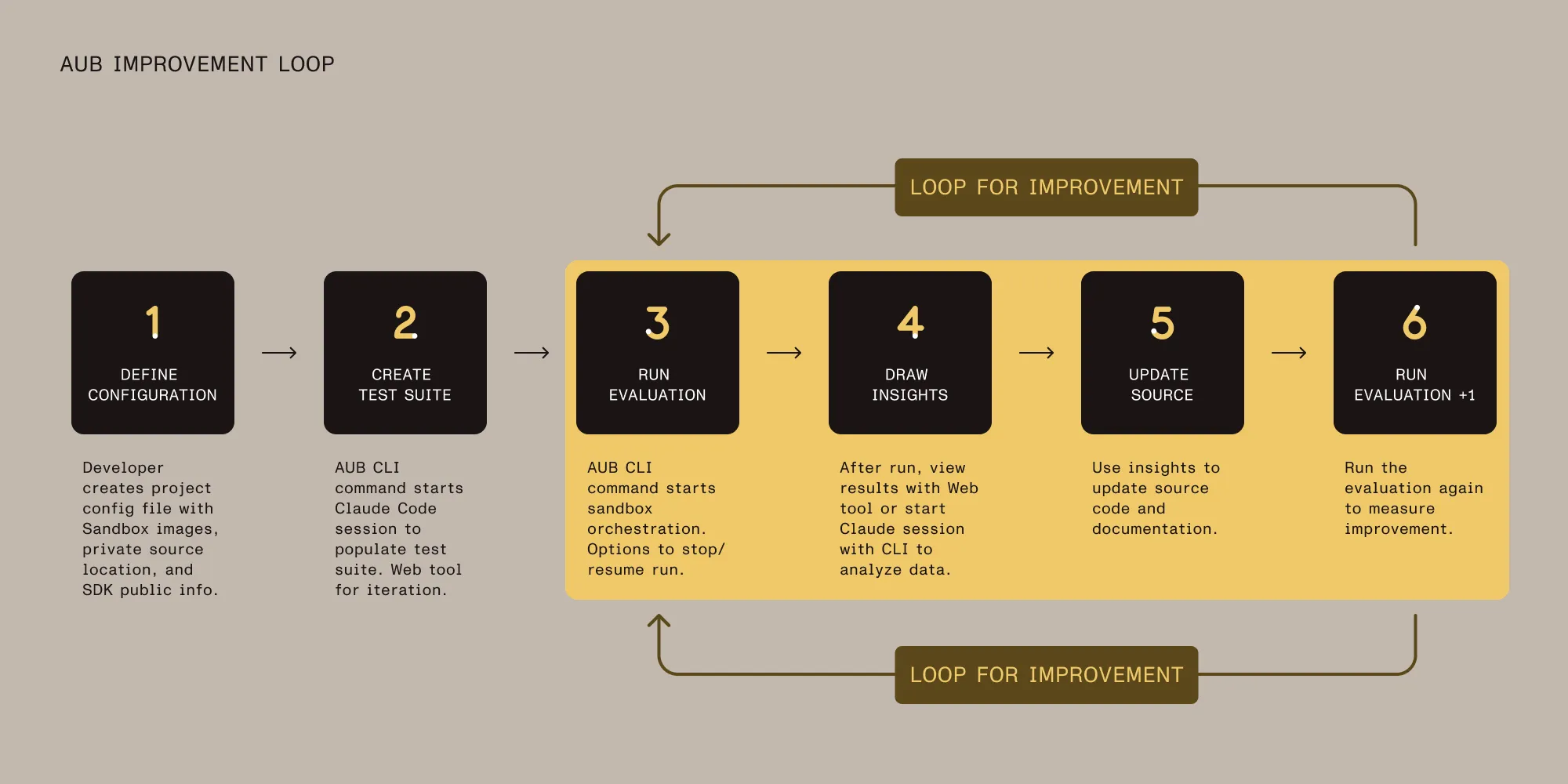
This makes agentic usability measurable and trackable across releases.
We built agentic-usability because we needed it ourselves. As an SDK company powering document workflows for more than 15 percent of Global 500 brands, we wanted to understand how well AI agents could integrate our products without human intervention.
Internally, each SDK team is adopting agentic-usability into its workflow — setting up configurations for its SDK, running initial evaluations, and producing before/after benchmark reports. We’re also comparing how different LLMs and coding CLI harnesses affect scores, which helps us understand whether a failure is an SDK problem or a model-specific limitation.
Some results confirmed what we expected — agents handled well-documented happy paths without difficulty. Others surprised us:
.d.ts, Java interfaces, Swift protocols) often outperform prose documentation. For SDKs without rich types, bundling instruction files like CLAUDE.md or MCP documentation tools fills the gap.llms.txt, documentation exports) significantly improves agent performance. JavaScript-heavy documentation sites are the worst offenders — navigation scripts, interactive widgets, and header tags add noise to the context window, and client-side rendered pages may return no content at all when an agent fetches them.Each of these findings maps to a concrete improvement we can make — not only for AI agents, but for human developers too. Consistent documentation, consolidated workflows, and better error messages benefit human developers just as much.
This is the real insight: Optimizing for agentic usability is optimizing for usability, period. AI agents surface usability problems that human developers work around without reporting.
Install from npm:
npm install -g @pspdfkit-labs/agentic-usability
Initialize a pipeline project:
agentic-usability init -p pipelines/my-sdk-eval
The interactive wizard walks you through configuring your private and public information sources, selecting agents for each pipeline stage, and setting up Docker targets for sandboxed execution.
Run the full evaluation pipeline:
agentic-usability eval -p pipelines/my-sdk-eval
Or run stages individually:
agentic-usability generate -p pipelines/my-sdk-eval
agentic-usability execute -p pipelines/my-sdk-eval
agentic-usability judge -p pipelines/my-sdk-eval
agentic-usability report -p pipelines/my-sdk-eval
The tool also ships with a web UI for browsing results, editing test suites, and comparing runs over time:
agentic-usability inspect -p pipelines/my-sdk-eval
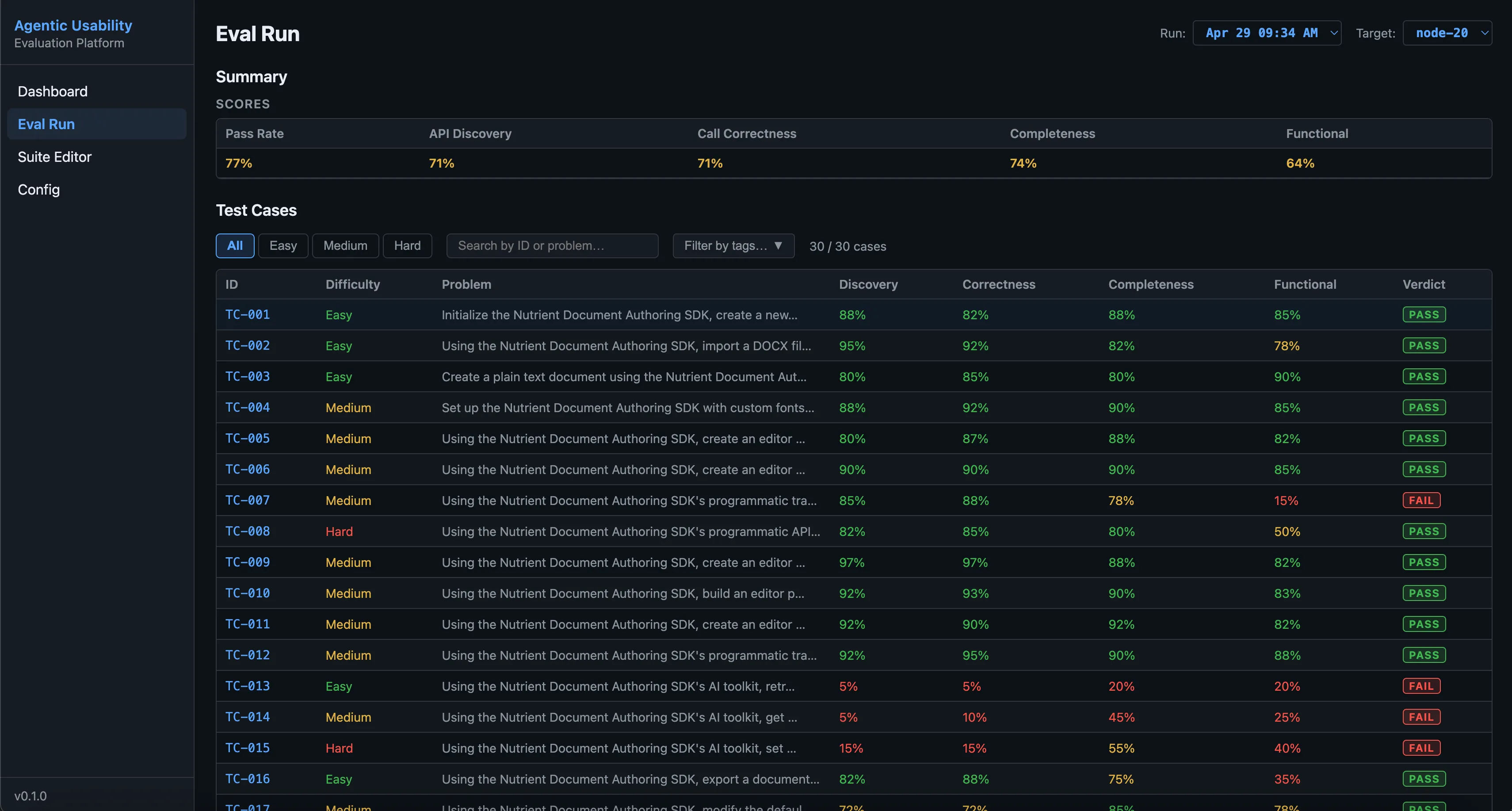
If you use Claude Code, agentic-usability includes a plugin with skills for every CLI command. Install it directly from within Claude Code:
/plugin marketplace add PSPDFKit-labs/agentic-usability
/plugin install agentic-usability@agentic-usability-marketplace
/reload-plugins
Then run pipeline stages as skills — for example, /agentic-usability:eval to execute the full pipeline.
We’re releasing agentic-usability under the Apache 2.0 license because this problem isn’t specific to document SDKs. Whatever you ship — a payments API, a database driver, or anything else — you’ll need to understand how AI agents interact with your product.
The developers using your SDK today are already delegating integration work to AI agents. Whether your API handles that delegation well is now a competitive concern.
We’d love contributions, feedback, and benchmarks from other SDK teams. If you run it against your own SDK and find something useful, we’d welcome issues and pull requests on GitHub(opens in a new tab).
Check out agentic-usability on GitHub(opens in a new tab) and the npm package(opens in a new tab) to get started. If you’re interested in how Nutrient is building for an AI-native development world, explore our SDK documentation.
此内容由惯性聚合(RSS阅读器)自动聚合整理,仅供阅读参考。 原文来自 — 版权归原作者所有。