





TL;DR
Handwriting appears in millions of documents processed every day — annotations on contracts, notes on medical records, remarks on inspection reports. Yet most document extraction tools either ignore it entirely or handle it partially.
The gap between how well machines read printed text and how well they read handwriting is enormous. Clean printed-text OCR is mature. Handwriting extraction is not, and many systems still treat it as a special case rather than a core capability.
Clean printed-text OCR is mature because the problem is constrained: Fonts are finite, each character has a consistent shape, and spacing is predictable. Handwriting breaks every one of those assumptions.
The first issue is variation. There’s no fixed set of shapes to match against — every person writes differently, and the same person writes differently depending on whether they’re standing at a counter or rushing through the last page of a form. The letter “a” alone can look like a circle with a tail, an inverted “e,” or a “u” with a hat. Multiply that across an alphabet, and pattern-matching collapses.
The second issue is stroke ambiguity. In printed text, each character is isolated. In handwriting — especially cursive — strokes connect, overlap, and bleed into each other. The sequence “rn” looks identical to “m”; “cl” becomes indistinguishable from “d”; “burn” and “bum” are one pixel apart, and only context can disambiguate them. This is the norm for handwritten text, not an edge case.
The third issue is layout and input quality. Characters vary in size within the same word. Spacing is inconsistent — sometimes a gap inside a word is wider than the gap between two separate words. Line detection algorithms tuned for printed text split single words in half or merge two lines into one. On top of that, handwriting often arrives from the worst possible source: photocopies, faxes, smudged pen ink, faded pencil, ballpoint that skipped, plus scanning artifacts, skew, and low DPI. The signal-to-noise ratio drops to levels where printed-text OCR engines produce nonsense.
Even if a model reads handwriting correctly, the output isn’t useful in production unless you can also point to where on the page each word came from. Production systems need both: what was written and where it came from.
This is spatial grounding, and it’s where almost every solution falls short. Some tools skip handwriting entirely. Others return ungrounded text — a string of words with no coordinates. The few that do attach spatial information typically stop at the line level, which is too coarse for the workflows that depend on grounded extraction.
The rest of this post looks at where many of the current approaches break, why grounding matters as much as accuracy, and what production-ready handwriting extraction needs to provide.
The document extraction market offers three approaches for handling handwriting, each with a different tradeoff.
Engines like Tesseract are fast and cheap, and they run locally — but they were tuned for printed text. Tesseract 4+ added a long short-term memory (LSTM) line-recognition engine(opens in a new tab) (now the default) alongside the legacy character-pattern engine, which improves connected scripts. Even so, training data and tuning remain print-centered, and accuracy on general handwriting — especially cursive or degraded scans — drops sharply. That makes it rarely sufficient on its own for handwriting-heavy workflows.
Sequence-to-sequence architectures like convolutional recurrent neural networks (CRNN(opens in a new tab)), now a standard backbone for handwritten text recognition (HTR), treat a line of handwriting as a continuous signal rather than segmenting individual characters, which handles connected strokes and variable spacing well. The tradeoff is data: These models perform well on the styles they were trained on and degrade on everything else. A model trained on neat English samples will struggle with a hastily filled prescription pad, and fine-tuning requires domain-specific data that most organizations don’t have.
This is where the industry is placing its bets. Models like Claude or Gemini can process document images directly and return text. They handle handwriting better than traditional OCR because they bring language understanding to the problem — they can use context to disambiguate characters the same way a human reader does.
But VLMs come with three production-blocking tradeoffs:
No spatial grounding. Most VLMs return plain text — what was written, but not where on the page. You can ask for coordinates, but the result is closer to an estimate than a measurement.
Hallucination. VLMs are built to output the most probable token in a sequence(opens in a new tab) — in zero-shot document extraction, that means they default to a confident-sounding answer rather than a flagged uncertainty. When a handwritten word is ambiguous, the model picks the most likely completion and moves on. On a financial document, a handwritten “1” that could be a “7” gets resolved silently.
Non-determinism. Run the same document through the same VLM twice and you may get different results(opens in a new tab), even at temperature zero. For audit-sensitive workflows — healthcare, legal, financial compliance — this is disqualifying.
Neither traditional OCR nor VLMs alone solve the handwriting extraction problem. Here’s where each approach stands today, specifically for handwritten content:
| Capability | Traditional OCR | VLMs |
|---|---|---|
| Printed text | Excellent | Strong |
| Handwriting | Poor — especially cursive | Significantly better — uses language context |
| Spatial grounding | Character/word-level boxes | Prompted or estimated |
| Context disambiguation | Limited — varies by engine | Strong — uses surrounding text and semantics |
| Consistency | Deterministic | Non-deterministic |
| Confidence scores | Yes | Typically no |
| Runs locally | Yes | Cloud-dependent (mostly) |
OCR has the spatial precision but can’t read handwriting well. VLMs can read handwriting but can’t reliably tell you where on the page they read it.
Spatial grounding comes in two granularities. Line-level bounding boxes give you a rectangle around an entire line of handwritten text — useful for navigation and for showing a reviewer roughly where text was found. Word-level bounding boxes give each individual word its own rectangle, so each extracted token maps back to the specific pixels it came from.
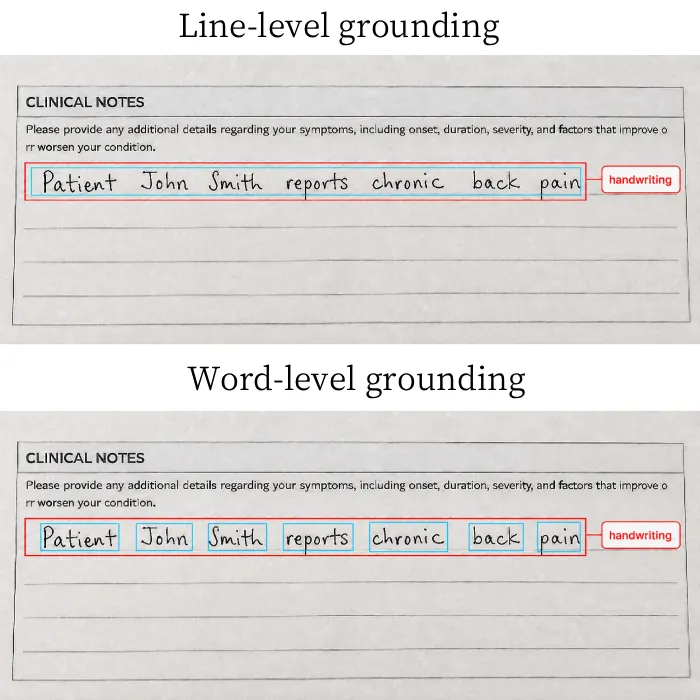
For basic text extraction, line-level grounding may be enough. But once the output drives real workflows, the limits show up quickly. Redaction, field extraction, and audit review all depend on isolating specific words or values, not just locating the line they appeared on.
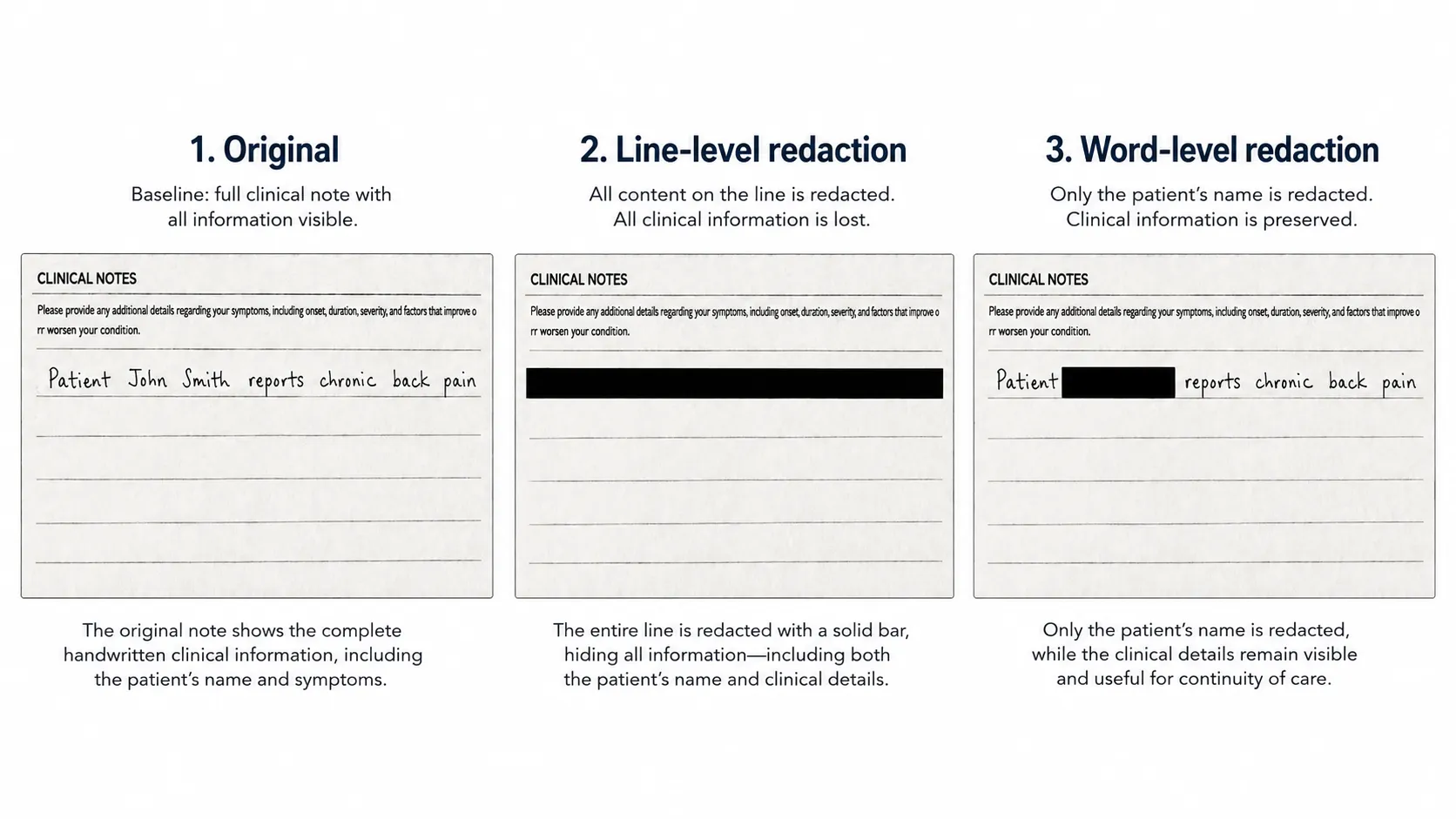
A handwritten line on a medical form reads: “Patient John Smith reports chronic back pain.” You need to redact the patient name. With line-level bounding boxes, you can identify the line, but you can’t isolate “John Smith” without manual intervention. You either redact the entire line — removing clinical information along with the name — or you hand it to a human to draw the redaction box manually.
Word-level bounding boxes solve this. Each word gets its own coordinate rectangle, so automated redaction can target exactly “John” and “Smith” and leave the rest intact.
Forms often have multiple handwritten entries on the same line or in adjacent fields. A line-level bounding box that spans “Date: 04/15/2026 Signature: J. Smith” gives you no way to programmatically separate the date from the signature. Field extraction becomes a string-parsing exercise on text that may not have consistent delimiters.
In regulated industries, it’s not enough to extract the right text. You need to prove which specific marks on which specific page produced each data point. A line-level bounding box is too coarse for this. If an auditor asks where a specific dosage number came from, you need to point to the exact word region, not a line that also contains four other handwritten entries.
Even the best handwriting extraction needs a review path for the cases the model gets wrong. Without spatial grounding, a reviewer has to read the entire source document alongside the extracted text and compare them line by line. With word-level bounding boxes, review becomes targeted: Highlight each extracted word on the source image, and let the reviewer confirm or correct only the flagged items. For complex documents, the difference in review time is substantial.
A handwriting extraction system that survives contact with production documents has to meet a specific bar. Marketing pages focus on accuracy benchmarks, but the questions below are the ones that separate a demo from a tool you can build a workflow on:
This is the direction intelligent content recognition (ICR) is heading — systems that combine specialized local AI models for structural analysis and spatial grounding, with optional VLM enhancement for the hardest cases. The key distinction from pure VLM approaches is that grounding isn’t bolted on as an afterthought; it’s the foundation of the extraction pipeline.
Nutrient’s Vision API takes this approach: OCR, ICR, and VLM-enhanced ICR as three operation modes through a single API, each producing structured output with word-level bounding boxes. The choice of when to involve a cloud model — and when local processing is sufficient — stays with the organization, not the vendor.
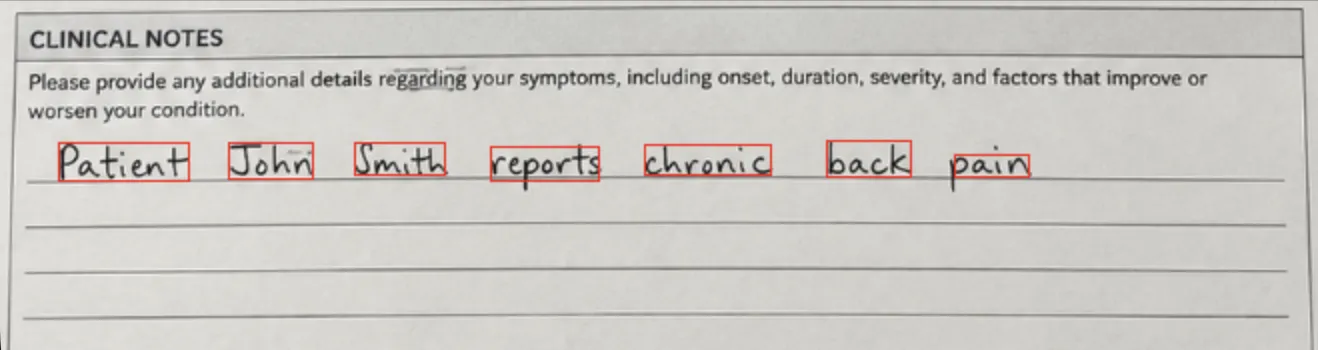
Here’s what that actually looks like on the medical form line we’ve been using throughout this post — handwritten input above, raw API response below.
{
"type": "handwriting",
"text": "Patient John Smith reports chronic back pain",
"words": [
{ "text": "Patient", "bounds": { "x": 29, "y": 71, "width": 65, "height": 19 }, "confidence": 0.99999493 },
{ "text": "John", "bounds": { "x": 114, "y": 71, "width": 42, "height": 18 }, "confidence": 0.9086269 },
{ "text": "Smith", "bounds": { "x": 177, "y": 71, "width": 45, "height": 16 }, "confidence": 0.99963254 },
{ "text": "reports", "bounds": { "x": 245, "y": 73, "width": 54, "height": 17 }, "confidence": 0.9999859 },
{ "text": "chronic", "bounds": { "x": 322, "y": 72, "width": 63, "height": 15 }, "confidence": 0.99995863 },
{ "text": "back", "bounds": { "x": 413, "y": 70, "width": 42, "height": 18 }, "confidence": 0.9999906 },
{ "text": "pain", "bounds": { "x": 477, "y": 77, "width": 37, "height": 11 }, "confidence": 0.9347284 }
],
"readingOrder": 2,
"pageNumber": 1,
"bounds": { "x": 28.58, "y": 69.81, "width": 488.38, "height": 26.75 },
"confidence": 0.7569149
}
Nutrient Vision API combines OCR, ICR, and VLM-enhanced ICR so teams can extract handwritten content with coordinates, confidence signals, and local-first processing options.
Handwriting recognition has been a hard problem for decades, and it remains one. No single approach handles every real-world handwriting workflow. The variation is too wide for template matching, the ambiguity is too deep for character-level segmentation, and the stakes in production environments are too high for solutions that guess without telling you.
VLMs brought a real leap in reading accuracy. But accuracy without grounding is a half-solution. If you can’t point to where on the page a word was extracted from, you can’t redact it, you can’t audit it, and you can’t build reliable automation on top of it.
The tools that will narrow this gap are the ones that treat recognition, grounding, confidence, and human review as a single system — each one a core requirement.
此内容由惯性聚合(RSS阅读器)自动聚合整理,仅供阅读参考。 原文来自 — 版权归原作者所有。