


惯性聚合 高效追踪和阅读你感兴趣的博客、新闻、科技资讯
阅读原文 在惯性聚合中打开

推荐订阅源

Microsoft Security Blog
WordPress大学
WordPress大学
S
SegmentFault 最新的问题
爱范儿
爱范儿
B
Blog RSS Feed
Last Week in AI
Last Week in AI
OSCHINA 社区最新新闻
OSCHINA 社区最新新闻
Blog — PlanetScale
Blog — PlanetScale
Vercel News
Vercel News
Jina AI
Jina AI
aimingoo的专栏
aimingoo的专栏
I
Intezer
Cyber Security Advisories - MS-ISAC
Attack and Defense Labs
The GitHub Blog
The GitHub Blog
小众软件
小众软件
AI
AI
cs.AI updates on arXiv.org
N
News and Events Feed by Topic
腾讯CDC
D
Docker
CTFtime.org: upcoming CTF events
罗磊的独立博客
人人都是产品经理
人人都是产品经理
W
WeLiveSecurity
N
News and Events Feed by Topic
Security Archives - TechRepublic
C
Check Point Blog
Webroot Blog
Webroot Blog
奇客Solidot–传递最新科技情报
奇客Solidot–传递最新科技情报
H
Help Net Security
Recorded Future
Recorded Future
H
Hacker News: Front Page
T
Troy Hunt's Blog
V
V2EX
Forbes - Security
Forbes - Security
Stack Overflow Blog
Stack Overflow Blog
The Register - Security
P
Palo Alto Networks Blog
K
KPMG report finds enterprise disconnect between AI and its ROI | CIO
博客园 - 叶小钗
Threat Intelligence Blog | Flashpoint
S
Security Affairs
The Hacker News
The Hacker News
Simon Willison's Weblog
博客园 - 三生石上(FineUI控件)
B
Blog
Apple Machine Learning Research
C
Cyber Attacks, Cyber Crime and Cyber Security
D
DataBreaches.Net

Inside Nutrient

A guide to the invisible work behind documents Introducing Nutrient Documents for Salesforce: Native document generation and signing Document AI vs. traditional OCR: Choosing between OCR, AI, and hybrid pipelines PDF SDK compliance and security evaluation checklist for enterprise teams (2026) Invariant Corp replaces paper processes with Nutrient Workflow and scales without limits What is process mapping? A complete guide Nutrient vs. Conga Composer for Salesforce document generation (2026) Document routing: How to automate document distribution The CTO’s AI playbook: Why accountability architecture beats orchestration Compliance workflow automation: Why built-in compliance is table stakes Workflow diagrams: Examples, symbols, and how to build one that actually runs Digital forms: Replace paper forms with automated workflows Approval workflow software: How to automate approvals Why document-centric automation is different The CEO’s AI playbook: Why decision architecture beats model selection Nutrient SDK product updates for Q1 2026 PDF redaction verification: How to prove sensitive data is permanently removed What is a VPAT? The complete guide to accessibility conformance reports What is PDF/UA? The accessible PDF standard explained Salesforce eSignatures: Generate, sign, and track documents in one flow Online document viewer: Options, tradeoffs, and how to embed one Document viewer for web apps: React, Vue, Angular (2026) Best document viewers in 2026: A buyer’s guide How to edit a PDF in Python: Add text, images, and annotations Nutrient advances Workflow platform with agentic AI for enterprise-grade speed and consistency in document-heavy operations How to create a Salesforce quote template from opportunity data The business case for accessibility: Five ways it drives enterprise value Python PDF library comparison (2026): 7 libraries for developers Why your AI agent hallucinates PDF table data PDF.js limitations: When to upgrade to a commercial PDF SDK How Subject scaled 5× with Nutrient’s PDF SDK without rebuilding its document layer I replaced our sales training with an AI coach that runs in Slack — here’s what broke Redirecting to: https://securitybuzz.com/cybersecurity-news/why-enterprise-permissions-are-ais-most-dangerous-inheritance/ Nutrient .NET SDK vs. iText Core: Complete comparison for .NET developers DocuVieware: Support’s most frequently asked setup questions Introducing Nutrient Workflow How to convert PDF to Word in C# (.NET) When email and spreadsheets stop working: Work order approval workflows for field teams on the move Compliance with confidence: Why document-centric automation is the foundation of your mission Nutrient expands AI Assistant, automating multistep document workflows inside any application What is document generation? A developer’s guide to PDF generation Document Converter data flow and how real-time watermarks skip the queue PDF/UA compliance guide: Requirements, standards, and best practices Computers still can’t understand you How Athena Intelligence built AI agents for regulated enterprises with Nutrient’s document infrastructure How to convert HTML to PDF (2026): 4 methods from browser print to SDK How to build a document extraction pipeline with Nutrient Vision API Beyond OCR: How document intelligence eliminates manual processing in regulated industries Nutrient vs. IronPDF: Complete comparison for .NET developers Nutrient vs. Aspose.PDF: Complete comparison for .NET developers Redirecting to: https://fortune.com/2026/02/19/openclaw-who-is-peter-steinberger-openai-sam-altman-anthropic-moltbook/ Lufthansa Systems uses Nutrient to deliver reliable, scalable PDF rendering for pilots worldwide Nutrient vs. Syncfusion: Complete comparison for .NET developers React’s useTransition: The hook you’re probably using wrong First City Monument Bank streamlines banking processes with Nutrient Workflow Redirecting to: https://www.sdcexec.com/warehousing/automation/article/22957364/nutrient-workflow-automation-the-missing-link-in-supply-chain-efficiency The complete guide to digital signatures: PAdES, CAdES, and XAdES explained Nutrient Python SDK: Production-grade document processing for Python Introducing agentic document editing for web applications with AI Assistant Nutrient vs. QuestPDF: Complete comparison for .NET developers How we fixed the GdPicture license expiration (and what to do if you’re affected) Red team security testing with agentic AI The future of healthcare document automation Best healthcare workflow software compared Nutrient SDK product updates for Q4 2025 How Harvey scaled legal document workflows 50 percent MoM without rebuilding infrastructure HIPAA-compliant document management in hospitals How we optimized rendering performance while handling thousands of annotations in React — Part 2 Automated PII removal with Nutrient API Redirecting to: https://www.devopsdigest.com/2026-low-code-no-code-predictions Redirecting to: https://www.kmworld.com/Articles/Editorial/ViewPoints/Leaders-predict-AI-to-continue-permeating-all-aspects-of-KM-in-2026-172594.aspx What are deep agents and how do they solve complex problems? Whipping up document magic: Your easy-bake recipe for Vue and Nutrient Web SDK 🧁 What I’ve learned about product iteration planning while building SDKs Passwordless document signing: Three-layer security guide New zip folder functionality streamlines file management in Document Automation Server The keyboard shortcuts playbook: Taking control of keyboard events in Nutrient Web SDK From experienced engineer to AI beginner: My unexpected journey AI-assisted manual testing: Handling Safari’s PDF rendering and UI quirks How to keep a 20-year-old SDK up to date How we optimized rendering performance while handling thousands of annotations in React — Part 1 Nutrient announces new executive hires to accelerate next phase of growth High performance UI using web workers Automate document conversion at scale with Python and Nutrient DCS From curiosity to PLG (and AI): My journey to understanding product-led growth Prost to progress: One year as Nutrient Pigeon usage at Nutrient: Bridging native SDKs to Flutter Modernizing CI build servers: How to migrate from Chef to Ansible Unix man pages: AI-friendly documentation since 1971 Consistent hashing for even load distribution Best AI redaction APIs: Complete comparison guide for 2025 Why AI document redaction matters for modern security From coding to coordinating: How AI transformed my workflow What is intelligent document processing (IDP)? A complete guide Enterprise PDF SDKs: Best PSPDFKit (now Nutrient) alternatives Nutrient SDK product updates for Q3 2025 GdPicture support best practices Redacting sensitive data with Nutrient AI redaction API How AI is transforming the customer experience at Nutrient: From instant answers to intelligent support How manual QA uses PR testing between releases
OCR vs. intelligent document processing: Choosing the right document extraction engine
Pavel Bogachevskyi · 2026-03-04 · via Inside Nutrient

Your team is building a product that processes documents. Maybe it’s a claims management system, a contract analysis tool, or a patient intake platform. Somewhere in the roadmap, there’s a line item that says “extract data from scanned documents,” and now you need to figure out what that actually takes.

The market gives you two categories: optical character recognition (OCR) and intelligent document processing (IDP). Most comparison content treats this as a binary choice. But when you dig into the requirements — table structures that need to stay intact, handwritten fields mixed with printed text, multicolumn layouts where reading order matters — the binary framing breaks down. Different documents need different levels of analysis, and the right solution often involves more than one engine.

This post lays out a practical framework for evaluating document extraction capabilities, matching engines to document types, and scoping the integration for your engineering team.

The OCR vs. IDP framing is too simple

Traditional OCR reads characters. It turns an image into a string of text. That’s useful when your documents are simple: single-column layouts, typed text, predictable structure. Receipt scanning, search indexing, digitizing printed archives. OCR handles these well and handles them fast.

But the moment your documents get more complex, OCR output falls apart. A two-column research paper comes back as one mangled paragraph. An invoice table loses its row and column structure. Handwritten notes at the bottom of a form are either garbled or missing. You get text, but you lose the structure that gives that text meaning.

Intelligent document processing goes further. IDP systems use AI models to analyze document layout, detect tables, recognize handwriting, and determine reading order. The output isn’t just text. It’s structured data with positional context: which value came from which cell, which paragraph was read before which, where on the page each element sits.

Here’s the problem with treating this as a binary: Not every document in your pipeline needs the same level of analysis. Running full layout analysis on a simple text page wastes compute. Running basic OCR on a complex multicolumn form wastes your team’s time fixing the output. The more useful question isn’t “OCR or IDP?” but “which engine for which document?”

Nutrient Vision API takes this approach directly. Instead of offering one engine that tries to handle everything, it ships three extraction tiers through a single API. Each tier adds capability and cost. You pick the tier that matches the document.

Tier 1 — OCR

Character recognition with word-level bounding boxes and language detection. Fast, lightweight, runs locally. Use it for documents where you need raw text and don’t care about layout. This is your high-throughput path for simple documents.

Tier 2 — Intelligent content recognition (ICR)

This is the core of the structured extraction pipeline. ICR runs local AI models that analyze document layout, extract tables with cell-level coordinates, recognize equations (output as LaTeX), parse hierarchical content like nested lists and captions, identify handwriting, and determine reading order. Everything runs on your infrastructure. No cloud calls, no data leaving your environment.

Tier 3 — VLM-enhanced ICR

Adds a cloud AI layer on top of ICR. It sends layout data to Claude or OpenAI for improved accuracy on tricky table boundaries and irregular layouts. You control when this activates and which provider it uses. This is the highest-accuracy option, but it introduces cloud API costs and higher latency.

All three tiers return JSON with bounding boxes for every extracted element. That means your application can trace any value back to the exact pixel region in the source document. For audit trails, review user interfaces (UIs), and compliance reporting, this is the foundation.
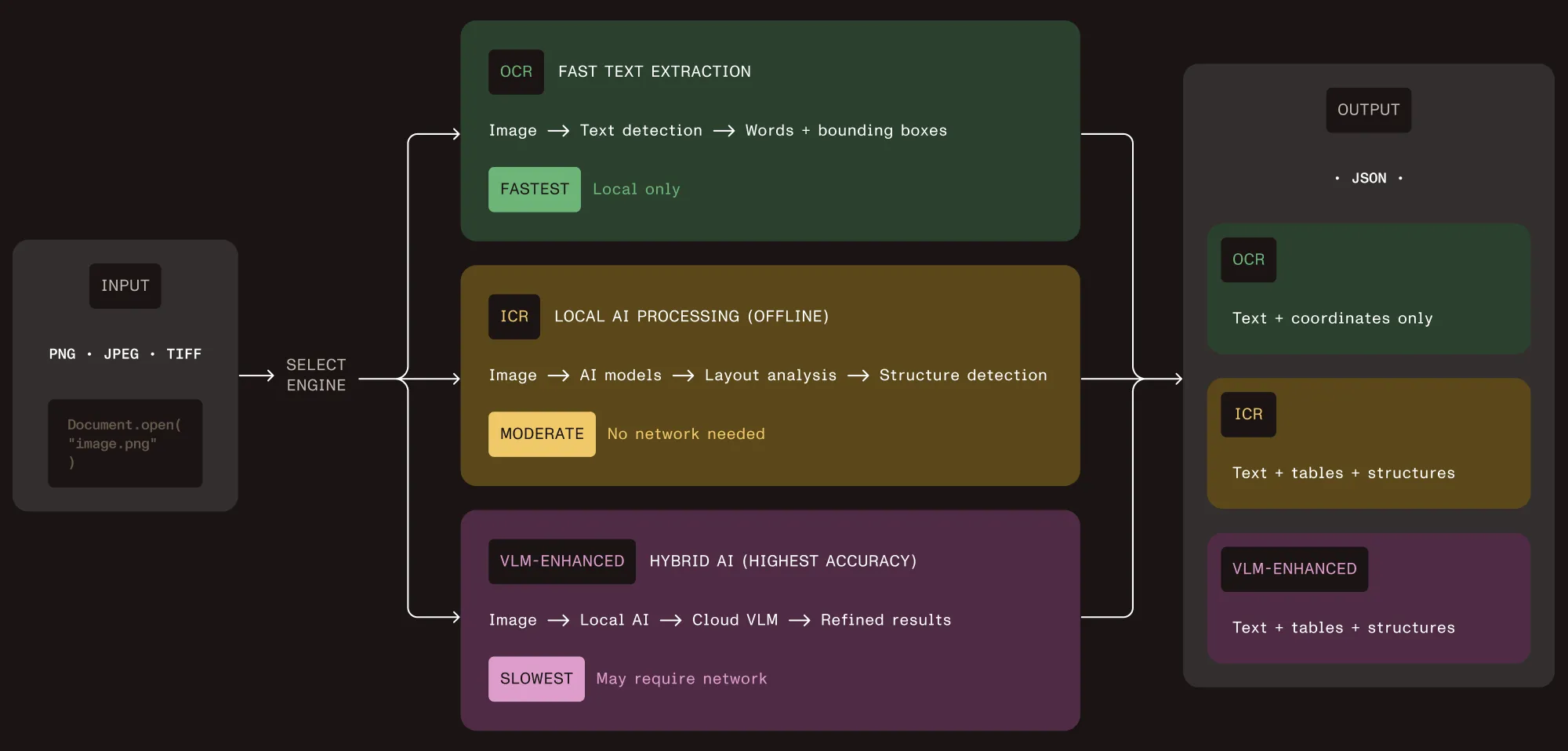
Diagram showing Vision API engine selection: OCR for fast text extraction, ICR for local AI processing with layout analysis, and VLM-enhanced ICR for hybrid AI with highest accuracy — all accepting PNG, JPEG, or TIFF input and returning structured JSON output

Matching engines to document types

The decision framework comes down to three questions about each document type in your pipeline.

1. Does layout matter?

If you only need raw text for search indexing or basic data capture from simple, single-column documents, OCR (tier 1) is enough. It’s the fastest option and uses the least computation.

If your documents have tables, multicolumn layouts, nested lists, or any structure that carries meaning beyond the text itself, you need ICR (tier 2) at minimum.

2. How complex are the layouts?

ICR handles the vast majority of document layouts well: standard tables, two-column documents, mixed print and handwriting, forms with labeled fields. For most products, this tier covers 90 percent or more of the documents in the pipeline.

VLM-enhanced ICR (tier 3) becomes valuable for irregular table structures (merged cells, misaligned borders), complex scientific documents, or layouts where the highest possible accuracy justifies the added cost and latency.

3. Where does the data live?

Tiers 1 and 2 run entirely on your infrastructure. No data leaves your environment. This matters for healthcare (HIPAA), financial services (data sovereignty), government (air-gapped deployments), and any product where your customers’ compliance requirements restrict where documents are processed.

Tier 3 sends layout data to a cloud API. The raw document stays local, but extracted layout information goes to the VLM provider for enhanced analysis. Whether this is acceptable depends on your compliance requirements and your customers’ expectations.

Here’s how the capabilities break down:

CapabilityOCR (tier 1)ICR (tier 2)VLM-enhanced (tier 3)
Text extractionYesYesYes
Table structureNoYes, with cell coordinatesYes, with confidence scores
EquationsNoYes, as LaTeXYes, as LaTeX
HandwritingLimitedYesYes
Reading orderBasic left-to-rightLayout-awareLayout-aware, improved
Bounding boxesWord-levelElement-levelElement-level
Runs locallyYesYesLocal + cloud API call
Relative speedFastestModerateSlowest
Image descriptionsNoNoYes, via cloud VLM

The deployment decision: Local vs. cloud

Most document extraction products on the market are cloud-only. AWS Textract, Google Document AI, and Azure Document Intelligence are capable platforms, but every document you process leaves your infrastructure. For many products, that’s fine. For regulated industries, it’s a blocker.

Vision API defaults to local processing. Tiers 1 and 2 run entirely on your hardware. The AI models download once and cache locally. After that, no network requests. This works in air-gapped environments, on-premises data centers, and anywhere your compliance team says “nothing leaves the building.”

Tier 3 (VLM-enhanced) is the opt-in cloud path. You decide which documents route to cloud processing and which stay local. You pick the provider (Claude or OpenAI) or point it at a local VLM server for fully offline operation.

For product planning, this means you aren’t making a single deployment decision. You’re defining a routing policy: which document types go to which tier, and under what conditions. A common pattern is to run ICR as the default and selectively route documents with low-confidence table extractions to VLM-enhanced mode.

SDK, not platform: What this means for your backlog

Most build vs. buy comparisons for intelligent document processing frame it as “build from scratch” vs. “buy a full platform.” But there’s a third option: Embed a document extraction SDK into your existing product.

Vision API is a library, not a platform. Your engineers import it like any other dependency in Python or Java, call a few functions, and get JSON back. There’s no separate infrastructure to manage, no vendor portal to log in to, and no platform-specific data pipeline to maintain.

Here’s what the integration scope looks like:

One API, three engines — Switching between OCR, ICR, and VLM-enhanced ICR is a configuration change, not a code change. Your team writes the extraction pipeline once and selects the engine at runtime based on document type, customer requirements, or processing rules you define.

Model management — ICR downloads several gigabytes of AI models on first use. For production deployments, there’s a warmup function that predownloads models during application startup. For containerized environments, mount a persistent volume so models persist across restarts.

Supported formats — Vision API works with PNG, JPEG, GIF, BMP, and TIFF (including multipage). For scanned PDFs, convert pages to images first using the same SDK’s rendering capabilities.

Output structure — Every extracted element comes with its type (paragraph, table, table cell, equation), text content, bounding box coordinates, and position in the reading order. Tables include row and column indices for each cell. This is the structured data your application logic works with.

Licensing — Flat SDK licensing, not per-page pricing. Your cost doesn’t scale linearly with document volume. At high volumes, this is the difference between a predictable line item and an open-ended cloud bill.

How to evaluate

Before committing to any document extraction approach, run your own documents through it. Not sample documents from a vendor’s demo — your actual production documents, including the messy ones.

Here’s a practical evaluation checklist:

  • Gather 20–30 representative documents. Ensure they span your use cases, and include the worst-case layouts: merged table cells, handwritten fields, multicolumn pages, low-quality scans.
  • Define success criteria per document type. For tables, it’s row/column structure preserved. For forms, it’s field labels correctly associated with values. For mixed layouts, it’s correct reading order.
  • Test each tier separately. Run OCR on everything first. Identify which documents need more than raw text. Run ICR on those. Identify which still need improvement. Run VLM-enhanced on the remainder. This gives you the tier distribution for your pipeline.
  • Measure what matters to your product. Extraction accuracy is table stakes. Also evaluate processing time per page, memory footprint, model download size, and output format compatibility with your downstream systems.
  • Check the compliance path. Confirm that local-only processing (tiers 1 and 2) meets your data residency requirements. If you plan to use tier 3, verify that your compliance team approves sending layout data to a cloud VLM provider.

Next steps

The guides below walk through the technical implementation your engineering team needs to get started:

For a hands-on evaluation with your own documents, reach out to our team.