
惯性聚合 高效追踪和阅读你感兴趣的博客、新闻、科技资讯
阅读原文 在惯性聚合中打开

推荐订阅源

T
Threat Research - Cisco Blogs
博客园 - 聂微东
小众软件
小众软件
P
Proofpoint News Feed
Security Archives - TechRepublic
OSCHINA 社区最新新闻
OSCHINA 社区最新新闻
TaoSecurity Blog
TaoSecurity Blog
博客园 - 司徒正美
罗磊的独立博客
N
News and Events Feed by Topic
cs.AI updates on arXiv.org
S
Security Affairs
S
Security @ Cisco Blogs
freeCodeCamp Programming Tutorials: Python, JavaScript, Git & More
The GitHub Blog
The GitHub Blog
月光博客
月光博客
S
Secure Thoughts
P
Proofpoint News Feed
cs.CV updates on arXiv.org
Forbes - Security
Forbes - Security
H
Heimdal Security Blog
W
WeLiveSecurity
K
KPMG report finds enterprise disconnect between AI and its ROI | CIO
L
LangChain Blog
T
The Blog of Author Tim Ferriss
NISL@THU
NISL@THU
Google DeepMind News
Cloudbric
Cloudbric
H
Hacker News: Front Page
The Last Watchdog
The Last Watchdog
Hacker News - Newest:
Hacker News - Newest: "LLM"
C
Cisco Blogs
博客园 - 三生石上(FineUI控件)
博客园_首页
Exploit-DB.com RSS Feed
S
Schneier on Security
Project Zero
Project Zero
SecWiki News
SecWiki News
爱范儿
爱范儿
The Register - Security
AI
AI
H
Hackread – Cybersecurity News, Data Breaches, AI and More
Y
Y Combinator Blog
L
Lohrmann on Cybersecurity
Application and Cybersecurity Blog
P
Privacy International News Feed
J
Java Code Geeks
S
Securelist
C
Cyber Attacks, Cyber Crime and Cyber Security
V
Visual Studio Blog

Inside Nutrient

A guide to the invisible work behind documents Introducing Nutrient Documents for Salesforce: Native document generation and signing Document AI vs. traditional OCR: Choosing between OCR, AI, and hybrid pipelines PDF SDK compliance and security evaluation checklist for enterprise teams (2026) Invariant Corp replaces paper processes with Nutrient Workflow and scales without limits What is process mapping? A complete guide Nutrient vs. Conga Composer for Salesforce document generation (2026) Document routing: How to automate document distribution The CTO’s AI playbook: Why accountability architecture beats orchestration Compliance workflow automation: Why built-in compliance is table stakes Workflow diagrams: Examples, symbols, and how to build one that actually runs Digital forms: Replace paper forms with automated workflows Approval workflow software: How to automate approvals Why document-centric automation is different The CEO’s AI playbook: Why decision architecture beats model selection Nutrient SDK product updates for Q1 2026 PDF redaction verification: How to prove sensitive data is permanently removed What is a VPAT? The complete guide to accessibility conformance reports What is PDF/UA? The accessible PDF standard explained Salesforce eSignatures: Generate, sign, and track documents in one flow Online document viewer: Options, tradeoffs, and how to embed one Document viewer for web apps: React, Vue, Angular (2026) Best document viewers in 2026: A buyer’s guide How to edit a PDF in Python: Add text, images, and annotations Nutrient advances Workflow platform with agentic AI for enterprise-grade speed and consistency in document-heavy operations How to create a Salesforce quote template from opportunity data The business case for accessibility: Five ways it drives enterprise value Python PDF library comparison (2026): 7 libraries for developers Why your AI agent hallucinates PDF table data PDF.js limitations: When to upgrade to a commercial PDF SDK How Subject scaled 5× with Nutrient’s PDF SDK without rebuilding its document layer I replaced our sales training with an AI coach that runs in Slack — here’s what broke Redirecting to: https://securitybuzz.com/cybersecurity-news/why-enterprise-permissions-are-ais-most-dangerous-inheritance/ Nutrient .NET SDK vs. iText Core: Complete comparison for .NET developers DocuVieware: Support’s most frequently asked setup questions Introducing Nutrient Workflow How to convert PDF to Word in C# (.NET) When email and spreadsheets stop working: Work order approval workflows for field teams on the move Compliance with confidence: Why document-centric automation is the foundation of your mission Nutrient expands AI Assistant, automating multistep document workflows inside any application What is document generation? A developer’s guide to PDF generation Document Converter data flow and how real-time watermarks skip the queue PDF/UA compliance guide: Requirements, standards, and best practices Computers still can’t understand you How Athena Intelligence built AI agents for regulated enterprises with Nutrient’s document infrastructure How to convert HTML to PDF (2026): 4 methods from browser print to SDK How to build a document extraction pipeline with Nutrient Vision API OCR vs. intelligent document processing: Choosing the right document extraction engine Beyond OCR: How document intelligence eliminates manual processing in regulated industries Nutrient vs. IronPDF: Complete comparison for .NET developers Nutrient vs. Aspose.PDF: Complete comparison for .NET developers Redirecting to: https://fortune.com/2026/02/19/openclaw-who-is-peter-steinberger-openai-sam-altman-anthropic-moltbook/ Lufthansa Systems uses Nutrient to deliver reliable, scalable PDF rendering for pilots worldwide Nutrient vs. Syncfusion: Complete comparison for .NET developers React’s useTransition: The hook you’re probably using wrong First City Monument Bank streamlines banking processes with Nutrient Workflow Redirecting to: https://www.sdcexec.com/warehousing/automation/article/22957364/nutrient-workflow-automation-the-missing-link-in-supply-chain-efficiency The complete guide to digital signatures: PAdES, CAdES, and XAdES explained Nutrient Python SDK: Production-grade document processing for Python Introducing agentic document editing for web applications with AI Assistant Nutrient vs. QuestPDF: Complete comparison for .NET developers How we fixed the GdPicture license expiration (and what to do if you’re affected) Red team security testing with agentic AI The future of healthcare document automation Best healthcare workflow software compared Nutrient SDK product updates for Q4 2025 How Harvey scaled legal document workflows 50 percent MoM without rebuilding infrastructure HIPAA-compliant document management in hospitals How we optimized rendering performance while handling thousands of annotations in React — Part 2 Automated PII removal with Nutrient API Redirecting to: https://www.devopsdigest.com/2026-low-code-no-code-predictions Redirecting to: https://www.kmworld.com/Articles/Editorial/ViewPoints/Leaders-predict-AI-to-continue-permeating-all-aspects-of-KM-in-2026-172594.aspx What are deep agents and how do they solve complex problems? Whipping up document magic: Your easy-bake recipe for Vue and Nutrient Web SDK 🧁 What I’ve learned about product iteration planning while building SDKs Passwordless document signing: Three-layer security guide New zip folder functionality streamlines file management in Document Automation Server The keyboard shortcuts playbook: Taking control of keyboard events in Nutrient Web SDK From experienced engineer to AI beginner: My unexpected journey AI-assisted manual testing: Handling Safari’s PDF rendering and UI quirks How to keep a 20-year-old SDK up to date How we optimized rendering performance while handling thousands of annotations in React — Part 1 Nutrient announces new executive hires to accelerate next phase of growth High performance UI using web workers Automate document conversion at scale with Python and Nutrient DCS From curiosity to PLG (and AI): My journey to understanding product-led growth Prost to progress: One year as Nutrient Pigeon usage at Nutrient: Bridging native SDKs to Flutter Modernizing CI build servers: How to migrate from Chef to Ansible Unix man pages: AI-friendly documentation since 1971 Consistent hashing for even load distribution Best AI redaction APIs: Complete comparison guide for 2025 Why AI document redaction matters for modern security From coding to coordinating: How AI transformed my workflow What is intelligent document processing (IDP)? A complete guide Enterprise PDF SDKs: Best PSPDFKit (now Nutrient) alternatives Nutrient SDK product updates for Q3 2025 GdPicture support best practices Redacting sensitive data with Nutrient AI redaction API How AI is transforming the customer experience at Nutrient: From instant answers to intelligent support
PDFium and open source: Why it’s a solid foundation for PDF apps
Claudio Ortolina · 2023-12-13 · via Inside Nutrient

Hi everyone. I’m Claudio, the CTO at PSPDFKit. Earlier in this series, Jonathan, our CEO, did a fantastic job addressing some of the myths about open source and PDFium, which is the open source PDF engine our products are built upon. However, I want to provide a different perspective when clearing up common misconceptions about open source technology. So in this third installment of the Fact vs. fiction series, I’ll explore the tremendous assets available using open source.

Myth — Open source technology is too disorganized to maintain

We understand that to some people, open source projects might appear to be too convoluted because of the sheer number of developers that can contribute to the codebase. The very concept could seem inherently unstructured, like an invitation to utter chaos. But that’s just not the case. This post will look at how open source can be run successfully by larger companies, but it’s also maintained quite well by smaller organizations.

Fact #1 — Open source brings clear visibility and open accountability to the table

Successful open source projects that have a strong community are paired with visible issue trackers, open discussion forums, and clear collaboration guidelines. PDFium, the open source project that we forked and support, follows this formula.

Quick explainer: Wrapping vs. forking — What’s the difference?

When working with open source projects, contributors have two options for how to leverage the source code: wrapping or forking. If you decide to wrap an open source library, you take the software as-is and embed it within your own product or service. It’s a short path to success; however, you don’t benefit from being an active participant within that community.

This approach has two major downsides: You limit yourself from helping to shape the future of the project, and you have no idea how to provide adequate technical support to your users, since you’re not a contributor to the project. This isn’t our approach.

In contrast, when forking a project, you take on the full responsibility of the project and how it operates within your software or service. By forking PDFium, we ensure it’s safe and secure for our clients and that it’s compatible with our suite of products and services. Over the years, we’ve enjoyed contributing bug fixes back to the project to the benefit of everyone (and not just our customers). This is why our code commits to PDFium are running in Google Chrome, Microsoft Edge, Brave, the Android operating system, and other products and services that you use throughout your day.

We’re fully able to support our users because we’re committers to the PDFium project itself — along with Google, Microsoft, and Dropbox.

PDFium: The beauty of open accountability

Take a look at the image below for an overview of the open issues (comprised of new features, tasks, enhancements, and bugs) for PDFium.
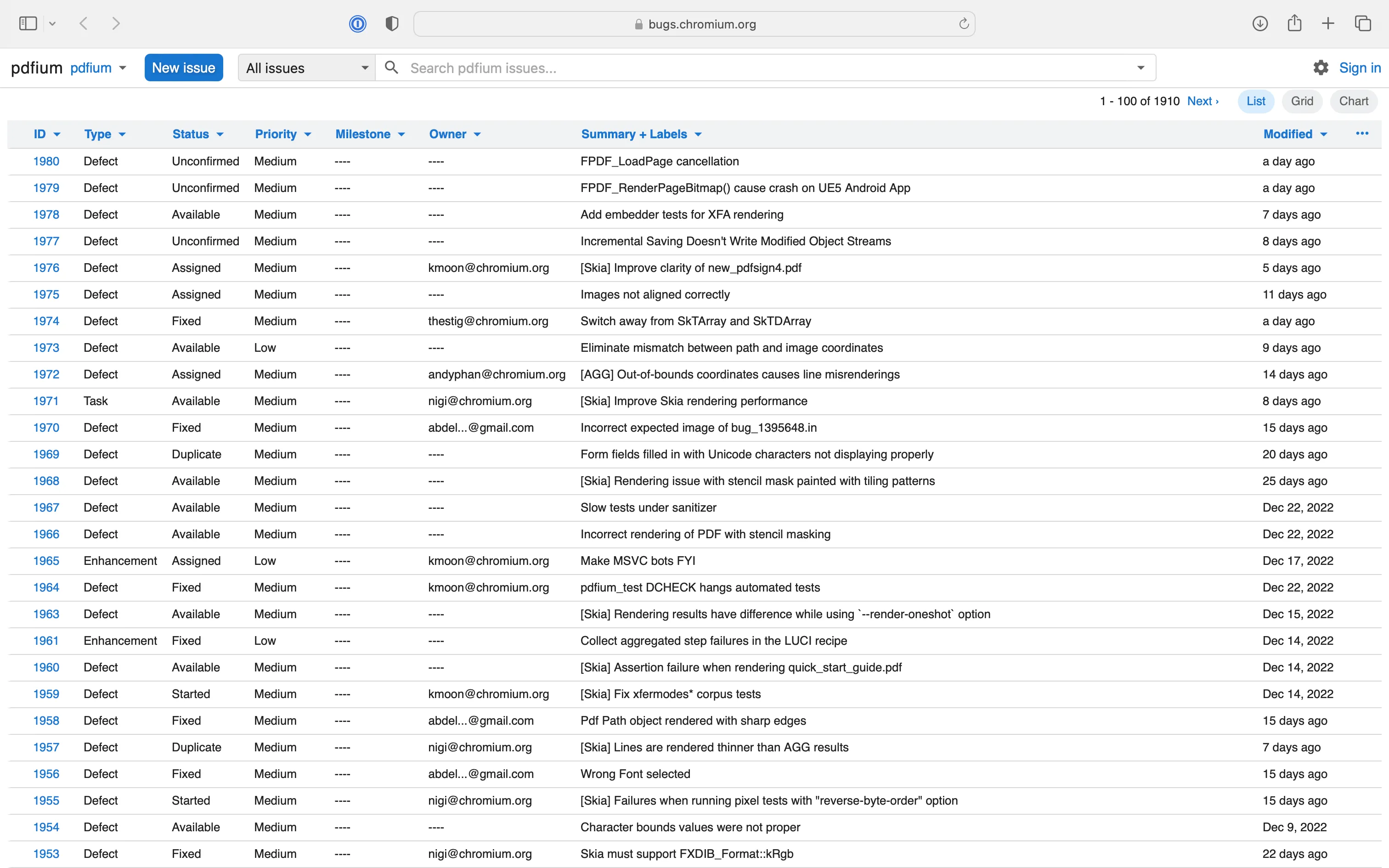
PDFium chart showing a list of issues organized by ID, type, status, priority, milestone, owner, summary and labels, and last date of modification

This is a great example of what I mean by visibility! Issues are open to the public, with distinct accountability and ownership of tasks. This type of visibility helps drive the success of the project, and it fosters trust among the contributors and users of PDFium (of which there are many).

I strongly encourage you to look at the stats for yourself(opens in a new tab). Since PDFium started as an open source project, and as of the date of writing, more than 1,900 issues have been created, and more than 75 percent are already closed.

So why are we supporting PDFium? It’s a mature open source project used by large companies (like Google, Microsoft, Amazon, and Dropbox), and it has code contributions from startups and individuals. As a result, PDFium has a healthy mix of participants contributing to the codebase, and each stakeholder benefits from shared research, security audits, bug fixes, and performance enhancements.

Any of the developers working at the companies that are working on (or with) the PDFium project can audit and improve the source code when it’s needed. Not only that, but because open source is a critical component of several pieces of high-volume software, it receives constant maintenance and updates — which brings me to my second point.

Fact #2 — We’re not alone; the business world functions on the back of open source technology

In the last Fact vs. fiction article, Jonathan covered some household names that incorporate open source software. This time around, let’s talk about more technical aspects of the benefits of open source and the many different places it shows up in the business world. In fact, I’d venture to say that the business world depends on open source technology on a regular basis.

Programming languages

At the end of the day, software needs to be written in some sort of programming language. Here’s an array (no pun intended) of languages, compilers, and runtimes that are open source:

  • Java/JVM
  • Many JavaScript runtimes
  • .NET runtime (C#, VB.NET)
  • Many C++ compilers
  • Python
  • PHP
  • Ruby
  • Swift
  • Kotlin
  • Rust

Web/UI frameworks

When you want to make an interactive website, you’re going to need to use a web/UI framework. In fact, almost every major web/UI framework is open sourced, but here’s a small sample you’re likely familiar with:

  • React
  • Next.js
  • Ruby on Rails
  • Django
  • Vue.js
  • jQuery
  • Angular

Databases

At some point, after you’ve received some data from a user (or a system), that data needs to be stored somewhere. Here are some popular open source databases:

  • MySQL
  • PostgreSQL
  • SQLite
  • MongoDB
  • MariaDB

Code editors, IDEs, and developer tooling

When a developer needs to write code quickly and efficiently, the tool of the trade is a code editor. And after the code is compiled or tested, it needs to be deployed somewhere. Here are some code editors and development operations tools that are open source:

  • VS Code
  • Eclipse IDE
  • Atom
  • The IntelliJ platform
  • Vim
  • Emacs
  • Kubernetes
  • Git
  • Docker

As you can see, in the business world, open source technology is not only unavoidable, but it’s literally the foundation. The world today wouldn’t be where it is without the cumulative contributions of open source software.

Summary: The benefits of PDFium

So now you’ve seen how pervasive open source technology is in the business world. However, let’s narrow things down a bit to focus on the direct benefits of PDFium.

  • The PDFium project has been stress tested by more than a trillion different documents, and it’s used in server, desktop, and mobile environments.
  • Anyone can audit and improve the PDFium source code wherever needed. Anyone!
  • By being a critical component of several pieces of high-volume software, it receives constant maintenance and updates.
  • It has a transparent vulnerability management process, with standardized escalation paths and publicly documented CVEs.

In other words, shared effort by all participants results in significant gains for everyone involved. In contrast, a closed-source engine can only be as safe or robust as the effort put in by the company that produces it. And unless the company has a public disclosure policy, there’s no way to determine how secure the technology is.

FAQ

PDFium is an open source PDF rendering engine that Nutrient uses to ensure high-quality, secure, and compatible PDF processing. Nutrient is committed to PDFium because it provides clear visibility, open accountability, and benefits from a large community of contributors including Google, Microsoft, and Dropbox.

Open source technology like PDFium offers transparency, continuous updates, and collective security improvements. It allows multiple organizations and individual contributors to audit, enhance, and maintain the code, resulting in a robust and reliable platform.

Nutrient contributes to the PDFium project by forking the code, ensuring it’s secure and compatible with its suite of products, and actively submitting bug fixes and improvements. These contributions benefit the entire community by enhancing the overall quality and security of the PDFium engine.

Wrapping an open source project involves using the software as-is without active participation in its development, while forking involves taking responsibility for the project’s maintenance and contributing back to its development. Nutrient prefers forking PDFium to ensure direct involvement in its evolution and support.

Open source technology is crucial for the business world because it underpins many foundational software components, from programming languages to databases and development tools. It promotes collaboration, innovation, and transparency, making it a reliable choice for building and maintaining critical business applications.