


惯性聚合 高效追踪和阅读你感兴趣的博客、新闻、科技资讯
阅读原文 在惯性聚合中打开

推荐订阅源

T
Threatpost
OSCHINA 社区最新新闻
OSCHINA 社区最新新闻
Engineering at Meta
Engineering at Meta
T
The Blog of Author Tim Ferriss
Recent Announcements
G
Google Developers Blog
Google DeepMind News
The Register - Security
MongoDB | Blog
MongoDB | Blog
U
Unit 42
B
Blog
H
Hackread – Cybersecurity News, Data Breaches, AI and More
L
LangChain Blog
Stack Overflow Blog
Stack Overflow Blog
P
Privacy International News Feed
L
LINUX DO - 最新话题
博客园_首页
博客园 - Franky
大猫的无限游戏
大猫的无限游戏
小众软件
小众软件
Threat Intelligence Blog | Flashpoint
T
Tor Project blog
V
Visual Studio Blog
让小产品的独立变现更简单 - ezindie.com
P
Privacy & Cybersecurity Law Blog
C
Cyber Attacks, Cyber Crime and Cyber Security
K
Kaspersky official blog
C
Cisco Blogs
博客园 - 【当耐特】
阮一峰的网络日志
阮一峰的网络日志
I
Intezer
罗磊的独立博客
MyScale Blog
MyScale Blog
Last Week in AI
Last Week in AI
A
About on SuperTechFans
G
GRAHAM CLULEY
Y
Y Combinator Blog
Microsoft Security Blog
GbyAI
GbyAI
T
Threat Research - Cisco Blogs
P
Proofpoint News Feed
D
DataBreaches.Net
The Hacker News
The Hacker News
Spread Privacy
Spread Privacy
AWS News Blog
AWS News Blog
I
InfoQ
T
The Exploit Database - CXSecurity.com
Simon Willison's Weblog
博客园 - 叶小钗
Project Zero
Project Zero

Inside Nutrient

A guide to the invisible work behind documents Introducing Nutrient Documents for Salesforce: Native document generation and signing Document AI vs. traditional OCR: Choosing between OCR, AI, and hybrid pipelines PDF SDK compliance and security evaluation checklist for enterprise teams (2026) Invariant Corp replaces paper processes with Nutrient Workflow and scales without limits What is process mapping? A complete guide Nutrient vs. Conga Composer for Salesforce document generation (2026) Document routing: How to automate document distribution The CTO’s AI playbook: Why accountability architecture beats orchestration Compliance workflow automation: Why built-in compliance is table stakes Workflow diagrams: Examples, symbols, and how to build one that actually runs Digital forms: Replace paper forms with automated workflows Approval workflow software: How to automate approvals Why document-centric automation is different The CEO’s AI playbook: Why decision architecture beats model selection Nutrient SDK product updates for Q1 2026 PDF redaction verification: How to prove sensitive data is permanently removed What is a VPAT? The complete guide to accessibility conformance reports What is PDF/UA? The accessible PDF standard explained Salesforce eSignatures: Generate, sign, and track documents in one flow Online document viewer: Options, tradeoffs, and how to embed one Document viewer for web apps: React, Vue, Angular (2026) Best document viewers in 2026: A buyer’s guide How to edit a PDF in Python: Add text, images, and annotations Nutrient advances Workflow platform with agentic AI for enterprise-grade speed and consistency in document-heavy operations How to create a Salesforce quote template from opportunity data The business case for accessibility: Five ways it drives enterprise value Python PDF library comparison (2026): 7 libraries for developers Why your AI agent hallucinates PDF table data PDF.js limitations: When to upgrade to a commercial PDF SDK How Subject scaled 5× with Nutrient’s PDF SDK without rebuilding its document layer I replaced our sales training with an AI coach that runs in Slack — here’s what broke Redirecting to: https://securitybuzz.com/cybersecurity-news/why-enterprise-permissions-are-ais-most-dangerous-inheritance/ Nutrient .NET SDK vs. iText Core: Complete comparison for .NET developers DocuVieware: Support’s most frequently asked setup questions Introducing Nutrient Workflow How to convert PDF to Word in C# (.NET) When email and spreadsheets stop working: Work order approval workflows for field teams on the move Compliance with confidence: Why document-centric automation is the foundation of your mission Nutrient expands AI Assistant, automating multistep document workflows inside any application What is document generation? A developer’s guide to PDF generation Document Converter data flow and how real-time watermarks skip the queue PDF/UA compliance guide: Requirements, standards, and best practices Computers still can’t understand you How Athena Intelligence built AI agents for regulated enterprises with Nutrient’s document infrastructure How to convert HTML to PDF (2026): 4 methods from browser print to SDK How to build a document extraction pipeline with Nutrient Vision API OCR vs. intelligent document processing: Choosing the right document extraction engine Beyond OCR: How document intelligence eliminates manual processing in regulated industries Nutrient vs. IronPDF: Complete comparison for .NET developers Nutrient vs. Aspose.PDF: Complete comparison for .NET developers Redirecting to: https://fortune.com/2026/02/19/openclaw-who-is-peter-steinberger-openai-sam-altman-anthropic-moltbook/ Lufthansa Systems uses Nutrient to deliver reliable, scalable PDF rendering for pilots worldwide Nutrient vs. Syncfusion: Complete comparison for .NET developers React’s useTransition: The hook you’re probably using wrong First City Monument Bank streamlines banking processes with Nutrient Workflow Redirecting to: https://www.sdcexec.com/warehousing/automation/article/22957364/nutrient-workflow-automation-the-missing-link-in-supply-chain-efficiency The complete guide to digital signatures: PAdES, CAdES, and XAdES explained Nutrient Python SDK: Production-grade document processing for Python Introducing agentic document editing for web applications with AI Assistant Nutrient vs. QuestPDF: Complete comparison for .NET developers How we fixed the GdPicture license expiration (and what to do if you’re affected) Red team security testing with agentic AI The future of healthcare document automation Best healthcare workflow software compared Nutrient SDK product updates for Q4 2025 How Harvey scaled legal document workflows 50 percent MoM without rebuilding infrastructure HIPAA-compliant document management in hospitals How we optimized rendering performance while handling thousands of annotations in React — Part 2 Automated PII removal with Nutrient API Redirecting to: https://www.devopsdigest.com/2026-low-code-no-code-predictions Redirecting to: https://www.kmworld.com/Articles/Editorial/ViewPoints/Leaders-predict-AI-to-continue-permeating-all-aspects-of-KM-in-2026-172594.aspx What are deep agents and how do they solve complex problems? Whipping up document magic: Your easy-bake recipe for Vue and Nutrient Web SDK 🧁 What I’ve learned about product iteration planning while building SDKs New zip folder functionality streamlines file management in Document Automation Server The keyboard shortcuts playbook: Taking control of keyboard events in Nutrient Web SDK From experienced engineer to AI beginner: My unexpected journey AI-assisted manual testing: Handling Safari’s PDF rendering and UI quirks How to keep a 20-year-old SDK up to date How we optimized rendering performance while handling thousands of annotations in React — Part 1 Nutrient announces new executive hires to accelerate next phase of growth High performance UI using web workers Automate document conversion at scale with Python and Nutrient DCS From curiosity to PLG (and AI): My journey to understanding product-led growth Prost to progress: One year as Nutrient Pigeon usage at Nutrient: Bridging native SDKs to Flutter Modernizing CI build servers: How to migrate from Chef to Ansible Unix man pages: AI-friendly documentation since 1971 Consistent hashing for even load distribution Best AI redaction APIs: Complete comparison guide for 2025 Why AI document redaction matters for modern security From coding to coordinating: How AI transformed my workflow What is intelligent document processing (IDP)? A complete guide Enterprise PDF SDKs: Best PSPDFKit (now Nutrient) alternatives Nutrient SDK product updates for Q3 2025 GdPicture support best practices Redacting sensitive data with Nutrient AI redaction API How AI is transforming the customer experience at Nutrient: From instant answers to intelligent support How manual QA uses PR testing between releases
Passwordless document signing: Three-layer security guide
Omar Padilla · 2025-12-17 · via Inside Nutrient

TL;DR

  • External signers can access secure document workflows without creating accounts or remembering passwords.
  • Three-layer security architecture combines encrypted tokens, secure email distribution, and multi-factor authentication (MFA).
  • MFA verification provides additional security while maintaining seamless user experience.
  • The system eliminates password-related security vulnerabilities while improving completion rates.

Start your free 14-day trial — no credit card required.

In today’s digital-first world, document signing workflows must balance security with user experience. The challenge becomes even more complex when external signers — people outside your organization who don’t have system accounts — need to access and sign documents securely.

We recently tackled this challenge by developing a sophisticated authentication system that enables external users to securely access our workflow signer interface without requiring login credentials, using a combination of encrypted tokens and multi-factor authentication (MFA).

The challenge: Security meets usability

Traditional document signing workflows face a fundamental tension:

  • Security requirements — Documents often contain sensitive information requiring strong authentication.
  • User experience needs — External signers shouldn’t need to create accounts or remember passwords.
  • Compliance concerns — Organizations need audit trails and verification that the correct person signed.

Our solution needed to satisfy all three requirements while maintaining the seamless experience users expect from modern digital tools.

Prerequisites

Before implementing this authentication system, you’ll need:

  • Basic understanding of token-based authentication and encryption
  • Experience with Redis for session management
  • Familiarity with MFA implementation patterns
  • Access to secure email delivery service

Our approach: Layered security architecture

We designed a three-layer security system that maintains both security and usability.

Layer 1: Encrypted token generation

When an administrator configures a signing task, our system generates cryptographically secure tokens for each external signer. Here’s how it works:

// Generate unique file access token for the signer.

string tokenGuid = Guid.NewGuid().ToString();

// Store token with context in secure database table.

string sql = @"INSERT INTO ACCESS_TOKENS

(TOKEN_ID, DOCUMENT_ID, OWNER_TYPE,

OWNER_ID, CONTEXT, CREATED_DATE, CREATED_BY)

VALUES (@token_id, @document_id, @owner_type,

@owner_id, @context, @created_date, @created_by)";

The system then encrypts this token, along with tenant and document information, using AES-256 encryption:

// Create data object with all necessary context.

var dataObject = new { fileAccessToken, tenant, documentId = deKey };

string data = JsonConvert.SerializeObject(dataObject);

// Encrypt using environment-specific key.

using (var aes = Aes.Create())

{

aes.Key = encryptionKey;

aes.IV = iv;

aes.Mode = CipherMode.CBC;

aes.Padding = PaddingMode.PKCS7;

// ... encryption logic

}

Layer 2: Secure email distribution

Each signer receives an email containing a unique, encrypted link. The link structure ensures:

  • Uniqueness — Each token is valid for only one signer and one document.
  • Time sensitivity — Tokens can be configured with expiration times.
  • Context isolation — Tokens contain only the minimum necessary information.

The email link follows this pattern:

https://domain.com/app/external-signature/{encryptedToken}?standalone=true

Layer 3: Multi-factor authentication (MFA)

When a signer clicks the email link, they don’t immediately access the document. Instead, our React-based MFA component intercepts the request:

// MFA verification component handles the security checkpoint.

export function ExternalSignerMFAVerification() {

const { state, setVerified, setFailed } = useSignatureMFA();

const [code, setCode] = useState('');

const [attempts, setAttempts] = useState(0);

// Handle verification with attempt limiting.

const handleSubmit = useCallback(async (e: FormEvent) => {

if (attempts >= MAX_ATTEMPTS || !isValidCode(code)) return;

const result = await SignatureMFA.verifyMFA({

sessionId: state.accessToken,

code: code.trim(),

});

// ... verification logic

}, [code, attempts]);

}

The backend generates and validates MFA codes using Redis for secure, temporary storage:

// Generate secure MFA code.

const mfaCode = Math.floor(100000 + Math.random() * 900000).toString();

const mfaRedisKey = `signerMfa:${accessToken}`;

// Store with expiration and attempt tracking.

await redisClient.setEx(mfaRedisKey, CODE_EXPIRATION_TIME, JSON.stringify({

attempts: 0,

requestCount: 0,

requests: [{ timestamp: Date.now(), code: mfaCode }]

}));

Complete authentication flow

The following diagram shows how these three security layers work together to provide secure, passwordless access for external signers.
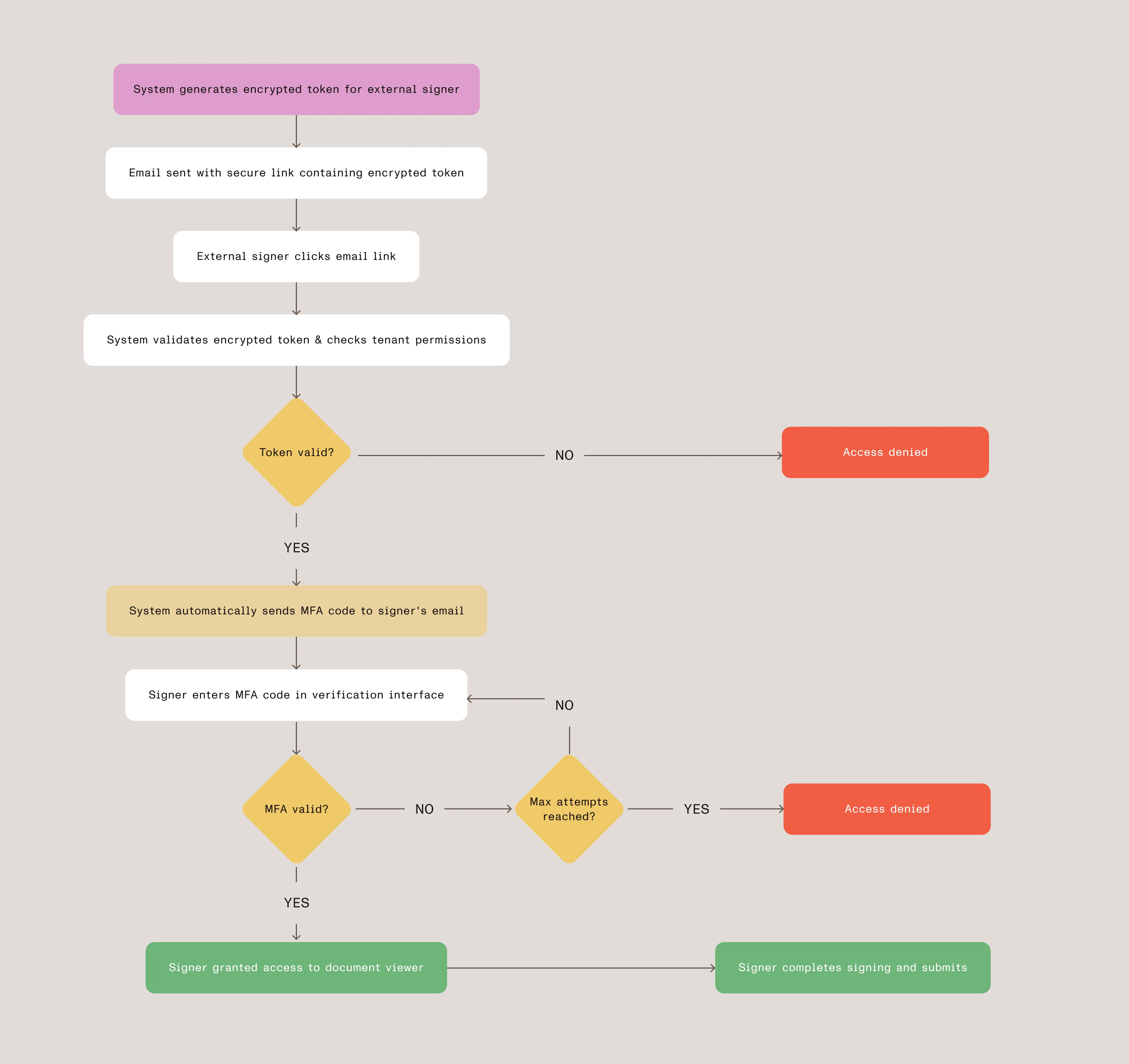
External signer authentication flow

Security features in detail

Behind each layer of our authentication system are carefully designed security mechanisms that work together to protect document access. The following sections will examine the specific features that make this system both secure and maintainable, from cryptographic validation to session management.

Token encryption and validation

Our token system uses multiple layers of validation:

Cryptographic integrity

  • AES-256 encryption ensures tokens cannot be tampered with
  • Environment-specific encryption keys
  • Unique initialization vectors for each token

Context validation

  • Each token contains specific tenant and document information
  • File access tokens are linked to specific signer identities
  • License verification ensures the tenant has appropriate permissions

MFA implementation highlights

The MFA system includes several security best practices:

  • Rate limiting — Configurable maximum verification attempts per token
  • Time expiration — Codes expire after a configurable time period
  • Request throttling — Cooldown period between code requests
  • Attempt tracking — System tracks all verification attempts for audit purposes

Session management

When a signer accesses the system, we validate their encrypted token and verify tenant permissions before granting access. This ensures that only authorized signers with proper licensing can view and sign documents:

async function validateEncryptedToken(encryptedToken) {

// Decrypt and validate token structure.

const parsed = await this.decryptSigningData(encryptedToken);

// Verify tenant permissions.

const hasSignaturePermission = await config.checkModule(

parsed.tenant, 'DigitalSignature'

);

const hasBasicPermission = await config.checkModule(

parsed.tenant, 'DocumentSigning'

);

if (!hasSignaturePermission && !hasBasicPermission) {

throw new Error('Insufficient permissions');

}

return parsed;

}

User experience flow

From the signer’s perspective, the process is straightforward:

    1. Receive email — Signer gets notification with signing link
    2. Click link — Browser opens to verification page (no login required)
    3. Enter MFA code — System automatically sends verification code to their email
    4. Access document — After verification, signer sees the document in our web viewer
    5. Complete signing — Signer adds their signature and submits
    6. Confirmation — System shows completion message and can close the window

Technical benefits

This architecture provides several technical advantages, outlined below.

Scalability

  • Stateless design — No server-side sessions to manage
  • Redis caching — MFA codes stored in fast, distributed cache
  • Token-based access — Eliminates need for user account management

Security

  • Zero knowledge — External signers never see system credentials
  • Audit trail — Every access attempt and signature action is logged
  • Isolation — Each signing session is completely independent

Maintainability

  • Modular design — MFA, encryption, and signing logic are separate concerns
  • Configuration-driven — Administrators can adjust security parameters
  • License integration — Respects existing permission systems

Real-world impact

Since implementing this system, we’ve seen a positive impact in the following areas:

User experience

  • Eliminates account creation friction for external signers
  • Reduced support burden with fewer password reset requests
  • Better mobile experience with streamlined authentication

Security and compliance

  • Enhanced security posture with MFA verification layer
  • Strong audit trails for regulatory requirements
  • Elimination of password-related vulnerabilities

Key insight — Security doesn’t have to come at the expense of usability. With careful architecture and implementation, you can create systems that are both more secure and more user-friendly than traditional approaches.

Implementation considerations

For organizations implementing similar systems, focus on these key areas. Success requires balancing strong security foundations with thoughtful user experience design, while maintaining flexibility to adapt to different document sensitivity levels and use cases.

Layered approach

  • Strong cryptographic foundations with proper key management
  • Well-designed user interfaces that guide users through the process
  • Continuous monitoring and improvement based on usage patterns

Security balance

  • Rate limiting and attempt tracking to prevent abuse
  • Configurable security parameters based on document sensitivity
  • Fallback mechanisms for accessibility and edge cases

User experience

  • Clear communication about the authentication process
  • Mobile-optimized interfaces for various device types
  • Helpful error messages and recovery options

Find out about custom authentication and MFA for your organization.

Conclusion

Passwordless authentication for external signers addresses the challenge of balancing security with user experience. This layered approach — encrypted tokens, multi-factor authentication, and thoughtful interface design — provides secure access without requiring account creation.

The key insight is that security doesn’t have to come at the expense of usability. With careful architecture and implementation, you can create systems that are both more secure and more user-friendly than traditional approaches.

For organizations implementing similar systems, focus on the layered approach: strong cryptographic foundations, well-designed user interfaces, and continuous monitoring and improvement. The result is a system that users trust and administrators can confidently deploy for sensitive business processes.

Ready to modernize your external signer authentication? Explore how Nutrient Workflow Automation Platform can help you implement secure, passwordless authentication for enhanced document security.