


This article is essential for anyone tasked with documenting in-person or virtual meetings. By getting into the nuances of mastering meeting minutes, readers will gain invaluable insights into fostering efficient communication, driving actionable outcomes, and ultimately enhancing team collaboration and success.
Meetings help keep teams in sync. With remote and hybrid work covering more than half(opens in a new tab) of the US workforce, staying in touch with team members is now more critical than ever. So, effective communication is vital for staying in sync before, during, and after meetings. A task often overlooked yet crucial for success is documenting meeting minutes. These are the official records of discussions, decisions, and action items.
In this blog, we will explore the art of mastering meeting minutes. We will cover everything from the moments before to the post-meeting follow-up. We will also learn to turn these notes into actionable documents to propel productivity. So, if you have been tasked with writing the minutes for your next meeting, this article is for you!
Join us as we navigate the fundamentals, best practices, and tools necessary to excel in meeting minutes, ultimately empowering you to turn discussions into decisive actions. Let’s embark on this journey together towards greater meeting efficiency and organizational success.
Meeting minutes(opens in a new tab) are the instant written record of a meeting or hearing. They typically describe the events of the meeting. They may include a list of attendees, activities considered by the participants, and related responses or decisions for the activities.
The purpose of these records should not be to keep a transcript of the discussion. Minutes should not include what was said at the meeting but what was done. “The primary function(opens in a new tab) of minutes is to record the decisions made; all official decisions must be included.”
The format of minutes can vary depending on the formality of the meeting, but for this example, let’s review the general guidelines.
1. Record the date, time, and attendees
Before starting the meeting minutes, note the time and date of the meeting. Add the names of all participants and those who could not attend. You can check the calendar event beforehand, note who is invited, and mark who is or isn’t there as they join.
2. Agenda items
An agenda should be sent out before maximizing your meetings. Note directly from the agenda what decisions have been made regarding each item. Use this agenda as an outline of the decisions made during the conference.
You can also include action items from the previous meeting in the agenda items section to note what was completed in the last session. You can copy and paste these from the previous meeting’s “action items” section.
3. Decisions made
Take note of the outcomes of the meeting. Include decisions, agreements, and results of any votes that were taken. Any finalized decisions from the agenda or made separately from the discussion should be noted.
4. Action items assigned
Based on the decisions made, note action items to complete these tasks. Note who the action item is assigned to as well. It’s helpful to write these in checkbox format.
5. Deadlines
If any deadlines are given, make sure to note them with the assigned date.
The hardest part of documenting meeting minutes is creating the initial template. After that, you can copy and paste this format for all following meetings. If you are handwriting meeting minutes, ensure your handwriting is legible enough to take back and type out afterward. I recommend meeting minutes via Word or Google Docs, as it’s easier and quicker. You can take your notes from the meeting and turn them into a cleaned-up version that is concise to send out to all participants.
Here is an example of how to turn your notes into an actionable document:
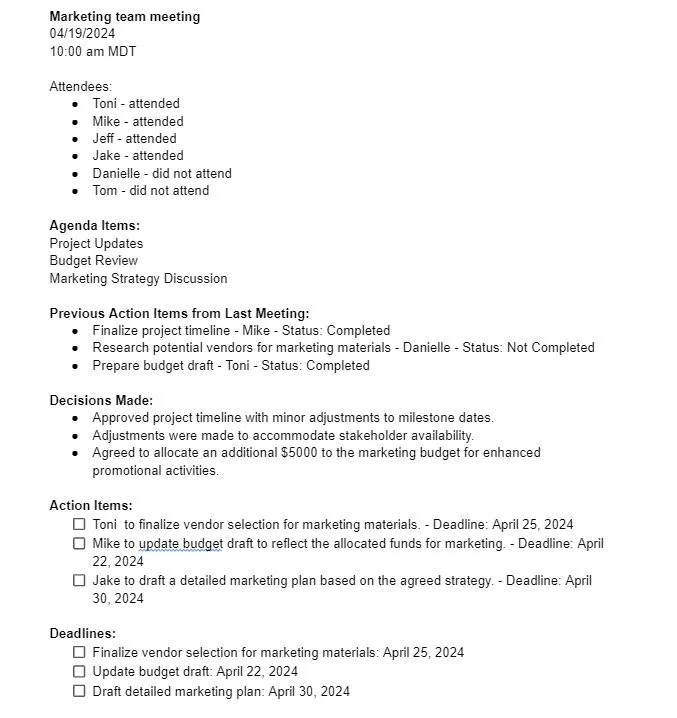
As mentioned above, having a consistent template will be the easiest way to keep track of minutes and complete the meetings as prepared as possible. You’ll know exactly what you are listening for, where to take notes, and in what sections. Be sure to save these meeting minutes in a secure location with an easy-to-locate file name. Use a standardized naming system for easy retrieval when returning and finding these files.
**An example of a standardized naming system would be: **
[YYYY-MM-DD]_[Meeting Type/Topic]_Minutes
So that would look like this: 2024-04-19_Budget_Review_Minutes
Again, having a standardized naming system for saving meeting minutes will help maintain consistency, organization, and ease of retrieval.
In conclusion, mastering the art of meeting minutes is a fundamental skill for anyone tasked with ensuring effective communication and productivity within their team or organization. By implementing the guidelines and strategies outlined in this article, individuals can enhance their ability to capture essential information, facilitate meaningful discussions, and drive positive outcomes from meetings. Each step is vital in fostering greater meeting efficiency and organizational success, from recording attendees and agenda items to documenting decisions and deadlines.
此内容由惯性聚合(RSS阅读器)自动聚合整理,仅供阅读参考。 原文来自 — 版权归原作者所有。