


惯性聚合 高效追踪和阅读你感兴趣的博客、新闻、科技资讯
阅读原文 在惯性聚合中打开

推荐订阅源

U
Unit 42
N
News and Events Feed by Topic
S
Schneier on Security
G
GRAHAM CLULEY
Scott Helme
Scott Helme
钛媒体:引领未来商业与生活新知
钛媒体:引领未来商业与生活新知
让小产品的独立变现更简单 - ezindie.com
GbyAI
GbyAI
OSCHINA 社区最新新闻
OSCHINA 社区最新新闻
C
CERT Recently Published Vulnerability Notes
T
The Exploit Database - CXSecurity.com
C
Cisco Blogs
T
The Blog of Author Tim Ferriss
Cisco Talos Blog
Cisco Talos Blog
P
Privacy & Cybersecurity Law Blog
K
KPMG report finds enterprise disconnect between AI and its ROI | CIO
博客园 - 司徒正美
Blog — PlanetScale
Blog — PlanetScale
Project Zero
Project Zero
MyScale Blog
MyScale Blog
Recent Commits to openclaw:main
Apple Machine Learning Research
小众软件
小众软件
The Last Watchdog
The Last Watchdog
Vercel News
Vercel News
The Cloudflare Blog
C
Check Point Blog
Help Net Security
Help Net Security
Microsoft Security Blog
AI
AI
Simon Willison's Weblog
云风的 BLOG
云风的 BLOG
M
MIT News - Artificial intelligence
Stack Overflow Blog
Stack Overflow Blog
腾讯CDC
NISL@THU
NISL@THU
S
Security @ Cisco Blogs
CTFtime.org: upcoming CTF events
S
SegmentFault 最新的问题
MongoDB | Blog
MongoDB | Blog
C
CXSECURITY Database RSS Feed - CXSecurity.com
T
Threatpost
AWS News Blog
AWS News Blog
Cloudbric
Cloudbric
N
News and Events Feed by Topic
PCI Perspectives
PCI Perspectives
S
Securelist
Cyber Security Advisories - MS-ISAC
V
Vulnerabilities – Threatpost
S
Secure Thoughts

Inside Nutrient

A guide to the invisible work behind documents Introducing Nutrient Documents for Salesforce: Native document generation and signing Document AI vs. traditional OCR: Choosing between OCR, AI, and hybrid pipelines PDF SDK compliance and security evaluation checklist for enterprise teams (2026) Invariant Corp replaces paper processes with Nutrient Workflow and scales without limits What is process mapping? A complete guide Nutrient vs. Conga Composer for Salesforce document generation (2026) Document routing: How to automate document distribution The CTO’s AI playbook: Why accountability architecture beats orchestration Compliance workflow automation: Why built-in compliance is table stakes Workflow diagrams: Examples, symbols, and how to build one that actually runs Digital forms: Replace paper forms with automated workflows Approval workflow software: How to automate approvals Why document-centric automation is different The CEO’s AI playbook: Why decision architecture beats model selection Nutrient SDK product updates for Q1 2026 PDF redaction verification: How to prove sensitive data is permanently removed What is a VPAT? The complete guide to accessibility conformance reports What is PDF/UA? The accessible PDF standard explained Salesforce eSignatures: Generate, sign, and track documents in one flow Online document viewer: Options, tradeoffs, and how to embed one Document viewer for web apps: React, Vue, Angular (2026) Best document viewers in 2026: A buyer’s guide How to edit a PDF in Python: Add text, images, and annotations Nutrient advances Workflow platform with agentic AI for enterprise-grade speed and consistency in document-heavy operations How to create a Salesforce quote template from opportunity data The business case for accessibility: Five ways it drives enterprise value Python PDF library comparison (2026): 7 libraries for developers Why your AI agent hallucinates PDF table data PDF.js limitations: When to upgrade to a commercial PDF SDK How Subject scaled 5× with Nutrient’s PDF SDK without rebuilding its document layer I replaced our sales training with an AI coach that runs in Slack — here’s what broke Redirecting to: https://securitybuzz.com/cybersecurity-news/why-enterprise-permissions-are-ais-most-dangerous-inheritance/ Nutrient .NET SDK vs. iText Core: Complete comparison for .NET developers DocuVieware: Support’s most frequently asked setup questions Introducing Nutrient Workflow How to convert PDF to Word in C# (.NET) When email and spreadsheets stop working: Work order approval workflows for field teams on the move Compliance with confidence: Why document-centric automation is the foundation of your mission Nutrient expands AI Assistant, automating multistep document workflows inside any application What is document generation? A developer’s guide to PDF generation Document Converter data flow and how real-time watermarks skip the queue PDF/UA compliance guide: Requirements, standards, and best practices Computers still can’t understand you How Athena Intelligence built AI agents for regulated enterprises with Nutrient’s document infrastructure How to convert HTML to PDF (2026): 4 methods from browser print to SDK How to build a document extraction pipeline with Nutrient Vision API OCR vs. intelligent document processing: Choosing the right document extraction engine Beyond OCR: How document intelligence eliminates manual processing in regulated industries Nutrient vs. IronPDF: Complete comparison for .NET developers Nutrient vs. Aspose.PDF: Complete comparison for .NET developers Redirecting to: https://fortune.com/2026/02/19/openclaw-who-is-peter-steinberger-openai-sam-altman-anthropic-moltbook/ Lufthansa Systems uses Nutrient to deliver reliable, scalable PDF rendering for pilots worldwide Nutrient vs. Syncfusion: Complete comparison for .NET developers React’s useTransition: The hook you’re probably using wrong First City Monument Bank streamlines banking processes with Nutrient Workflow Redirecting to: https://www.sdcexec.com/warehousing/automation/article/22957364/nutrient-workflow-automation-the-missing-link-in-supply-chain-efficiency The complete guide to digital signatures: PAdES, CAdES, and XAdES explained Nutrient Python SDK: Production-grade document processing for Python Introducing agentic document editing for web applications with AI Assistant Nutrient vs. QuestPDF: Complete comparison for .NET developers How we fixed the GdPicture license expiration (and what to do if you’re affected) Red team security testing with agentic AI The future of healthcare document automation Best healthcare workflow software compared Nutrient SDK product updates for Q4 2025 How Harvey scaled legal document workflows 50 percent MoM without rebuilding infrastructure HIPAA-compliant document management in hospitals How we optimized rendering performance while handling thousands of annotations in React — Part 2 Automated PII removal with Nutrient API Redirecting to: https://www.devopsdigest.com/2026-low-code-no-code-predictions Redirecting to: https://www.kmworld.com/Articles/Editorial/ViewPoints/Leaders-predict-AI-to-continue-permeating-all-aspects-of-KM-in-2026-172594.aspx What are deep agents and how do they solve complex problems? Whipping up document magic: Your easy-bake recipe for Vue and Nutrient Web SDK 🧁 What I’ve learned about product iteration planning while building SDKs Passwordless document signing: Three-layer security guide New zip folder functionality streamlines file management in Document Automation Server The keyboard shortcuts playbook: Taking control of keyboard events in Nutrient Web SDK From experienced engineer to AI beginner: My unexpected journey AI-assisted manual testing: Handling Safari’s PDF rendering and UI quirks How to keep a 20-year-old SDK up to date How we optimized rendering performance while handling thousands of annotations in React — Part 1 Nutrient announces new executive hires to accelerate next phase of growth High performance UI using web workers Automate document conversion at scale with Python and Nutrient DCS From curiosity to PLG (and AI): My journey to understanding product-led growth Prost to progress: One year as Nutrient Pigeon usage at Nutrient: Bridging native SDKs to Flutter Modernizing CI build servers: How to migrate from Chef to Ansible Unix man pages: AI-friendly documentation since 1971 Consistent hashing for even load distribution Best AI redaction APIs: Complete comparison guide for 2025 Why AI document redaction matters for modern security From coding to coordinating: How AI transformed my workflow What is intelligent document processing (IDP)? A complete guide Enterprise PDF SDKs: Best PSPDFKit (now Nutrient) alternatives Nutrient SDK product updates for Q3 2025 GdPicture support best practices Redacting sensitive data with Nutrient AI redaction API How manual QA uses PR testing between releases
How AI is transforming the customer experience at Nutrient: From instant answers to intelligent support
Christoph Mantler · 2025-10-30 · via Inside Nutrient

We’ve all encountered chatbots in our day-to-day lives when looking up documentation or contacting customer support for tools we want to use, and most of the time, it’s not a great experience. But at Nutrient, we believe that great technology should make complex tasks simple, and that philosophy extends beyond our core products to how we support our customers. Over the past year, we’ve integrated AI-powered solutions into our customer-facing operations, fundamentally transforming how our users find answers and get help.

This post will cover how Nutrient leverages AI to deliver better, faster, and smarter customer support that keeps developers building instead of searching.

The challenge: Information overload in a complex product ecosystem

As our product suite has grown over the past years, so too has our documentation: We maintain extensive resources across multiple information sources, integration guides, troubleshooting documentation, and product-specific tutorials.

However, while comprehensive documentation is essential, it can lead to a problem: The more complete your documentation is, the harder it becomes for users to find exactly what they need. Our customers were spending valuable time navigating through documentation, and our Support team was fielding tickets that could often be resolved through existing resources, if only information could be found efficiently.

The technology behind the magic: Kapa AI

Our AI implementation is powered by Kapa AI(opens in a new tab), a platform specifically designed for technical documentation and customer support use cases. What makes Kapa particularly valuable for us is its ability to:

  • Ingest multiple information sources — You can feed Kapa AI specific information sources, which, in our case, mainly consists of our guides and API documentation, public examples(opens in a new tab), and internal documentation.
  • Maintain context accuracy — Unlike general-purpose AI, Kapa is trained specifically on our documentation, ensuring responses are accurate and up to date.
  • Understand technical nuance — The system grasps the technical context of customer queries, distinguishing between different products, versions, and implementation scenarios.

Diversifying our implementation strategy

When implementing AI tooling into your product ecosystem, it’s important to target the areas where it’ll see the most impact and usage. Since our usage with the tool focuses on the customer-facing side, we’ve identified a few key customer touchpoints.

Intelligent documentation navigation

Our customer guides now feature AI-powered assistance that goes beyond traditional search functionality. Instead of requiring users to know exactly what to search for, our AI system:

  • Understands intent — Customers can describe their goals, challenges, and questions in natural language.
  • Provides contextual links — The AI analyzes the request and surfaces the most relevant guide pages.
  • Generates smart summaries — Rather than overwhelming users with multiple lengthy articles, it creates concise summaries that highlight the key information needed.

This means a developer looking to “add a custom button to the toolbar in my JavaScript app” gets direct links to our Web SDK documentation, relevant code examples, and a summary of the key implementation steps — all without having to navigate through our entire documentation hierarchy.

The video below shows this in action!
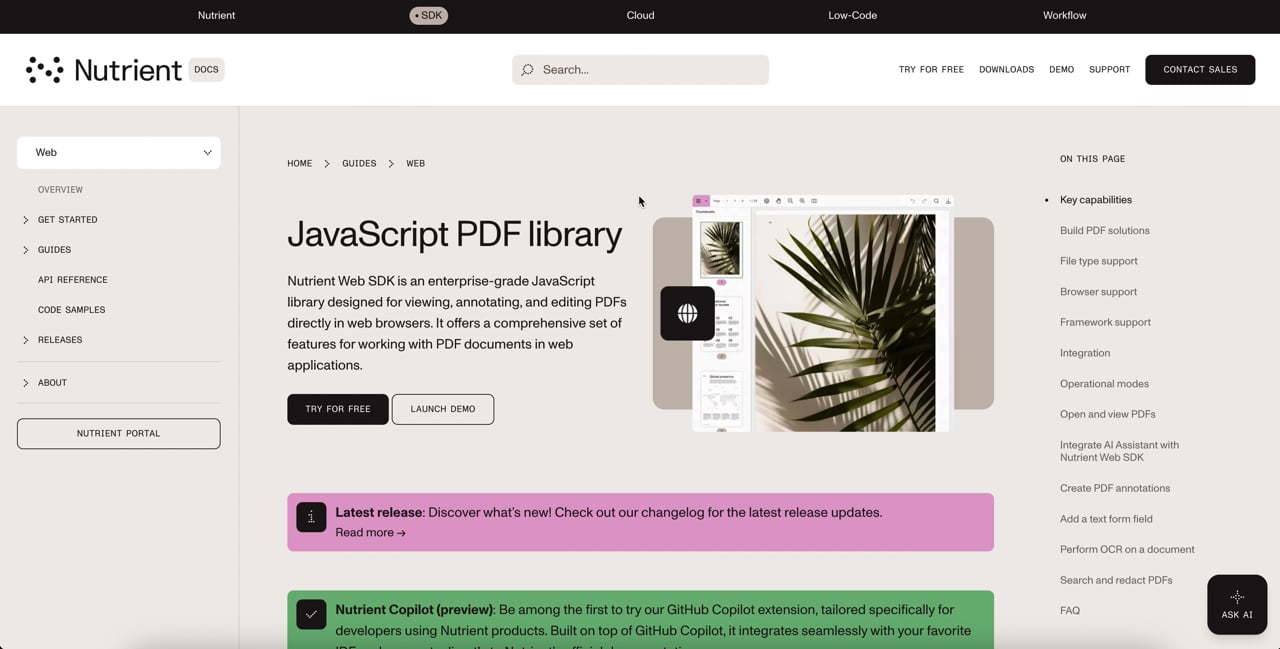
Nutrient AI guides example

Proactive support ticket resolution

Perhaps our most impactful implementation is in our support flow. Some say that the best support is the one where you don’t even need to contact the support team and wait for a response, but instead get a resolution to your question right away with zero wait time. When customers submit support tickets, our AI system now acts as a first line of intelligent assistance, which follows this process:

  1. A customer fills out our support form with their issue description, product details, version information, and other context.
  2. Before the ticket reaches our human support team, our AI system analyzes all the provided information.
  3. The AI searches through our comprehensive knowledge base — including internal documentation, customer-facing guides, and API references.
  4. If a solution is found, the customer receives an immediate response with relevant documentation and step-by-step guidance.
  5. If the solution isn’t satisfactory, a single click on the Submit button will send the ticket as-is to our Support team.

In contrast to wasting minutes typing long messages to a chatbot that oftentimes has limited knowledge before getting the option to even contact a real person, our approach requires only one extra button click, which could save you hours, while still ensuring you get accurate, documentation-backed solutions.
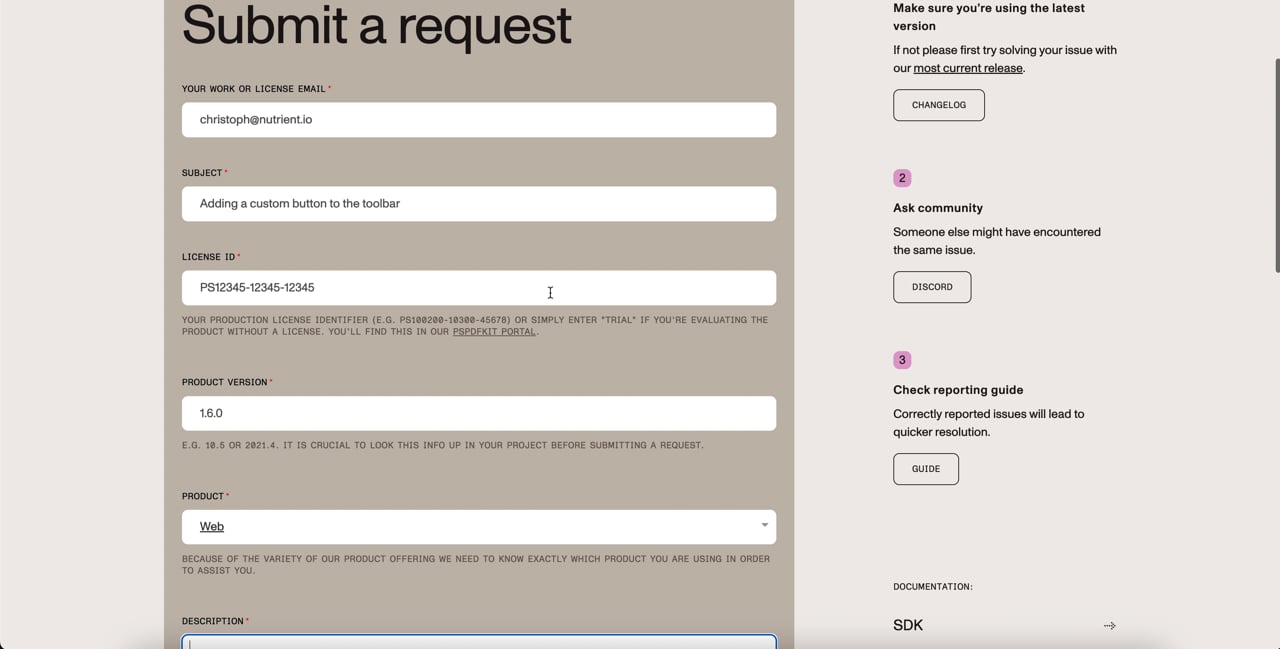
Nutrient AI support form deflector ai example

AI agents assisting agents

The eternal struggle of having internal documentation so vast that it could rival the knowledge of the library of Alexandria is the same as with external documentation. If there’s too much of it, it’s hard to find what you’re looking for. With the more than 100,000 support tickets we’ve received over the past years, it’s nearly impossible to find relevant tickets by utilizing conventional search engines. Instead, why not let AI take over this tiresome job? This allows us to:

  • Easily find relevant historical tickets when dealing with similar requests.
  • Leverage insights from past resolutions to provide more comprehensive solutions.
  • Connect support tickets easily to existing internal bug tickets or feature requests, reducing duplicated work.
  • Utilize internal information sources and documentation to more quickly provide accurate, documentation-based responses.

The impact

While there’s always a healthy amount of skepticism in connection with AI tools in customer-facing areas, the results speak for themselves. Around 15 percent of tickets that would typically go directly to a support engineer are now resolved immediately via the impact of AI in our support ticket form, purely as self-service for the customer. While we pride ourselves on good reply times, a 30-second reply time is pretty hard to beat.

Furthermore, the 15 percent is measured across all tickets, so purely looking at ticket categories the AI can realistically handle (it can’t fix bugs or implement features… yet), this number is much higher in that context.

Beyond the self-service part of it also lies the advantage of getting assistance regarding the context of tickets and connectivity to internal tickets. This avoids duplicating work and results in a faster turnaround time and an overall better experience for our customers and the Support team.

Conclusion

AI isn’t just changing how we build products; it’s transforming how we support the people who use them. At Nutrient, our AI-powered customer experience initiatives have created a win-win scenario: Customers get faster, more accurate assistance, while our team can focus on delivering exceptional support for complex challenges.

The future of customer support isn’t about replacing human expertise with artificial intelligence. Rather, it’s about using AI to amplify human capabilities and create experiences that are both efficient and actually helpful.

As we continue to evolve our AI implementations, one thing remains constant: our commitment to making powerful technology accessible and ensuring our customers can achieve their goals with minimal friction.