


Table of contents
This guide surveys the most effective JavaScript PDF generation options in 2025. If you need a fast, reliable path to production, start with Nutrient (Web SDK for client-side; DWS Processor API and Document Engine for server-side and enterprise). This guide also compares popular open source libraries and browser-driven renderers so you can pick the right tool for your constraints.
TL;DR
This comprehensive guide compares JavaScript PDF generation approaches and helps you choose the right solution:
- Need production-ready features fast? Use Nutrient Web SDK for in-browser viewing/editing/export, or DWS Processor API for HTML-to-PDF and large-scale workflows. For strict data residency, use Document Engine (self-hosted).
- Prefer open source? We compare jsPDF(opens in a new tab), PDFKit(opens in a new tab), and pdf-lib(opens in a new tab) and when they shine.
- Need pixel-perfect HTML rendering? Use Puppeteer(opens in a new tab) or Playwright(opens in a new tab) (Chromium PDF).
- We cover performance, security/compliance, and integration tradeoffs so you can choose confidently.
Creating PDFs from JavaScript is now common — from invoices and reports, to contracts and certificates. The best approach depends on document complexity, volume, security, and where the work happens (browser vs. server). As a default, teams that want to ship quickly with fewer moving parts typically pick Nutrient (client or server), and then reach for open source or headless-browser options when they have niche needs or strict constraints.
Quick pick: Sensible defaults
- Client-side UX plus collaboration — Nutrient Web SDK (viewer, editing, forms, signatures, export).
- Backends and automation (HTML to PDF, OCR, merging) — DWS Processor API — REST (best via server or secure proxy).
- On-premises / regulated — Document Engine (self-hosted).
- Open source generators — jsPDF(opens in a new tab), PDFKit(opens in a new tab), or pdf-lib(opens in a new tab) for specific, code-driven tasks.
- Pixel-perfect HTML/CSS to PDF — Puppeteer(opens in a new tab) or Playwright(opens in a new tab) (Chromium print pipeline).
If you’re deciding today, start with Nutrient for production needs (Web SDK in the browser; DWS Processor API/Document Engine on the server). Reach for OSS libraries or headless browsers when you have niche constraints or want full DIY control.
Why generate PDFs with JavaScript?
JavaScript PDF generation offers several compelling advantages over traditional server-based approaches:
- Reduced server load — Client-side generation eliminates server processing overhead
- Real-time document creation — Users can generate and preview documents instantly
- Offline capabilities — Generate PDFs even without internet connectivity
- Enhanced user experience — No waiting for server roundtrips
- Cost efficiency — Lower infrastructure costs for high-volume applications
The right choice (client-side vs. server-side) ultimately depends on your document complexity, volume, and security requirements, as well as where you want the work to run.
Nutrient’s enterprise-grade PDF solutions
When you need advanced features, high-volume processing, or enterprise controls, Nutrient provides end-to-end options that go beyond what open source libraries typically offer.
Nutrient Web SDK: Advanced client-side capabilities
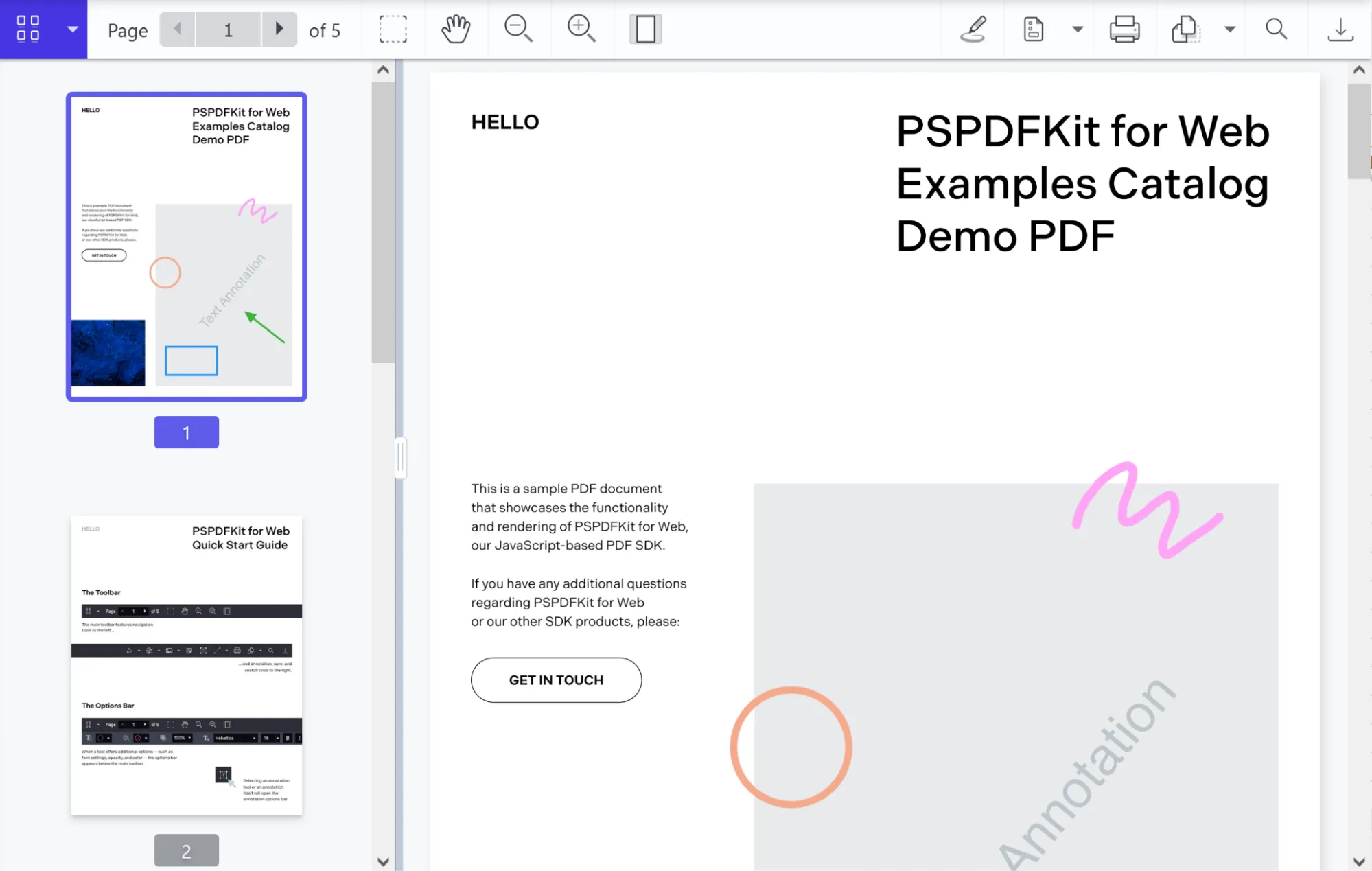
Nutrient Web SDK enables interactive PDF viewing, editing, annotation, form handling, and digital signatures, all directly in the browser. It works with all major JavaScript frameworks and supports offline workflows, making it ideal for collaborative and form-based applications. No server is required for core features, and the UI is fully customizable
PDF generation capabilities
- Create from template — Insert text or images and prefill forms using existing PDF or Word templates.
- Generate from images — Convert JPG, PNG, or TIFF files into PDF documents.
- Thumbnail previews — Render PDF pages as thumbnail images for gallery or navigation UIs.
- Saving options — Export your generated PDFs to an
ArrayBufferor browser storage, or upload to a remote server. - Headless operation — Produce PDFs without displaying any UI components — ideal for automated backend workflows.
Best suited for
- Applications requiring interactive PDF editing
- Complex form-based documents
- Collaborative document workflows
- Real-time document preview and editing
Getting started
Install the SDK
Installs Nutrient Web SDK so you can embed a PDF viewer directly in the browser.
Copy runtime assets
cp -R ./node_modules/@nutrient-sdk/viewer/dist/ ./assets/
Copies the viewer script (
nutrient-viewer.js) and its runtime assets into your project so they can be loaded in the browser.Your
assets/folder should now contain:nutrient-viewer.jsnutrient-viewer-lib/(required runtime files)
Add your PDF document
Place your PDF (e.g.
example.pdf) in your project’s root or public folder so it can be loaded by the viewer.Create
index.html<!DOCTYPE html>
<html lang="en">
<head>
<meta charset="UTF-8" />
<title>Nutrient PDF Viewer Example</title>
<script src="assets/nutrient-viewer.js"></script>
</head>
<body>
<button id="download-btn">Download PDF</button>
<div id="nutrient" style="width:100%; height:80vh;"></div>
<script src="index.js"></script>
</body>
</html>
Loads the SDK, adds a Download PDF button, and provides a container for the viewer.
Create
index.jslet instance;
// Load the viewer.
window.NutrientViewer.load({
container: "#nutrient",
document: "example.pdf",
}).then((inst) => {
instance = inst;
});
// Handle download.
document
.getElementById("download-btn")
.addEventListener("click", async () => {
if (!instance) return console.warn("Viewer not ready");
const buffer = await instance.exportPDF();
const blob = new Blob([buffer], { type: "application/pdf" });
const url = URL.createObjectURL(blob);
const a = document.createElement("a");
a.href = url;
a.download = "download.pdf";
document.body.appendChild(a);
a.click();
document.body.removeChild(a);
URL.revokeObjectURL(url);
});
Loads a PDF, lets users edit, and exports the current state (annotations and form data) for download.
Run locally
Open the served URL in your browser to avoid CORS issues when loading assets.
Nutrient API: Server-side processing at scale
Nutrient DWS Processor API is an enterprise-grade REST API for high-volume, server-side document processing. It supports HTML-to-PDF conversion, OCR, merging, and more, with strong security and compliance. The API is ideal for automated workflows and complex document needs, offering predictable performance and a credit-based pricing model. You can combine multiple processing steps in a single call and start with a free trial(opens in a new tab) that includes 50 credits.
Best suited for
- High-volume document generation
- Server-side automation workflows
- Complex HTML-to-PDF conversion requirements
- Applications requiring advanced document processing
Example: Generate PDF from HTML
curl -X POST https://api.nutrient.io/build \
-H "Authorization: Bearer your_api_key_here" \
-o result.pdf \
--fail \
-F index.html=@index.html \
-F instructions='{
"parts": [
{
"html": "index.html"
}
]
}'
In this code, you upload your HTML and assets, specify instructions, and receive a PDF in response. This approach is ideal for automated, high-volume document generation.
Nutrient Document Engine: On-premises control
Nutrient Document Engine is designed for organizations that require full control over their data and infrastructure. It can be self-hosted within your own environment, providing complete data control, security, and compliance with industry regulations. This makes it ideal for organizations with strict data residency requirements, complex integrations, or high-security needs. The platform is scalable, supports custom integrations, and offers enterprise support and SLAs.
Key advantages
- Complete data control and security (Nutrient has no access to your data in self-hosted deployments)
- Custom integrations with existing systems
- Scalable self-hosted architecture
- Enterprise support and SLAs
- Compliance with industry regulations
Best suited for
- Organizations with data residency requirements
- Complex enterprise integrations
- High-security environments
- Custom workflow implementations
How it works
- Prepare your HTML (e.g.
page.html) and any assets (CSS, images, fonts). - POST to
/api/buildwith a multipart request. YourinstructionsJSON should reference the uploaded file(s).
cURL example
curl -X POST http://localhost:5000/api/build \
-H "Authorization: Token token=<API token>" \
-F page.html=@/path/to/page.html \
-F instructions='{ "parts": [{ "html": "page.html" }] }' \
-o result.pdf
- Replace
<API token>with your actual token. - The response is a generated PDF saved as
result.pdf.
This method is directly supported and documented for Nutrient Document Engine self-hosted deployments.
If you need to customize the layout and margins or add assets, you can expand the instructions JSON as described in the HTML-to-PDF schema guide.
If you need more advanced integration (e.g. with Node.js or other languages), the API can be accessed programmatically as well. For more details, see the Document Engine getting started guide.
Prefer open source for lightweight or browser-only needs?
Client-side libraries offer the advantage of generating PDFs directly in the browser without server dependencies, making them ideal for certain use cases.
jsPDF: Lightweight and straightforward
jsPDF(opens in a new tab) is a popular, browser-first library for generating PDFs on the client. It focuses on a simple API and quick results: you create a document, draw text/shapes/images, and save. Because it doesn’t require a server, it’s great for lightweight export buttons in web apps (think receipts, tickets, or short reports).
Best suited for
- Simple, text-centric documents (receipts, confirmations, invoices with minimal layout)
- Quick prototypes and proofs of concept
- Apps that need a small, self-contained client-side export
- Cases where you control the layout and don’t need pixel-perfect HTML/CSS rendering
Considerations
- Complex layouts require manual positioning (you place text/graphics using coordinates)
- Styling is limited compared to a real HTML/CSS layout engine
- The built-in
html()(opens in a new tab) helper exists, but CSS fidelity is limited (good for basics, but not for full pages with intricate styles) - Very large or image-heavy documents can strain browser memory/performance
Context vs. alternatives
- If you need to edit existing PDFs, add annotations, fill forms, or support collaboration, you’ll want a viewer/editor SDK (e.g. Nutrient Web SDK) instead of a generator.
- If you need high-fidelity HTML-to-PDF, consider tools that use a browser engine (e.g. headless Chrome via Puppeteer) or a server/API workflow.
- If you need a code-driven document model with layout primitives (rather than freehand coordinates), libraries like
pdf-lib(client) or a server-side renderer might fit better.
Quick start
import { jsPDF } from "jspdf";
const doc = new jsPDF();
doc.text("Hello from jsPDF!", 20, 20);
doc.save("example.pdf");
Creates a new PDF in the browser, writes a line of text at coordinates (20, 20), and prompts the user to download the file.
Check out Generate PDFs from HTML in React with jsPDF for a detailed guide on using jsPDF in React applications.
PDFKit: Programmatic document creation (Node-first)
PDFKit(opens in a new tab) is a mature, code-driven library for generating PDFs with fine-grained control over layout, typography, and vector graphics. It excels when you need to draw shapes, paths, and charts or place content with precision. It’s Node-first (ideal for server-side rendering) and can run in the browser via bundlers, though payload size is larger and you’ll typically stream via blob-stream.
Best suited for
- Custom layouts and brand-tight documents
- Charts, diagrams, and vector graphics
- Programmatic, data-driven document pipelines
- Server-side PDF generation in Node.js (browser use possible with bundling)
Considerations
- Steeper learning curve than “simple export” libraries
- Coordinate-based layout; complex flows may require manual positioning
- Text wrapping and page breaks are supported, but advanced flows still need layout logic
- Browser builds increase bundle size; Node.js is the most straightforward environment
import PDFDocument from "pdfkit";
import fs from "fs";
const doc = new PDFDocument({ margin: 50 });
// 1) Pipe before writing.
doc.pipe(fs.createWriteStream("output.pdf"));
// 2) Write content.
doc
.fontSize(24)
.text("Professional Report", { align: "left" })
.moveDown()
.fontSize(12)
.text("This document demonstrates PDFKit’s layout and vector capabilities.");
// Vector graphics example (simple framed area).
doc.moveDown();
const y = doc.y;
doc.rect(50, y, 500, 150).stroke();
// 3) Finalize the PDF.
doc.end();
The code above pipes the PDF stream to disk, writes text with automatic wrapping, draws a vector rectangle, and finalizes the file with doc.end().
pdf-lib — Modern, TypeScript-friendly PDF manipulation (browser + Node)
pdf-lib(opens in a new tab) is a clean, dependency-light library for creating and modifying PDFs in code. It works in both the browser and Node.js, ships with excellent TypeScript types, and shines when you need to edit existing PDFs by filling forms, stamping text, inserting pages, or merging documents. It’s not an HTML renderer — think drawing text/images/shapes and manipulating pages rather than converting complex web layouts.
Best suited for
- Editing existing PDFs (stamp, watermark, add text/images)
- Form filling (AcroForm text fields, checkboxes, radios)
- Merging/splitting documents (
copyPages) - TypeScript projects that value strong typings
Considerations
- Creation from scratch is fine, but there’s no HTML-to-PDF engine
- Layout is manual (coordinate-based); no CSS or automatic pagination
- Very large or image-heavy files can increase memory/time usage
- No built-in “viewer” UI (pair with a viewer if you need one)
import { PDFDocument, StandardFonts } from "pdf-lib";
import { writeFile } from "node:fs/promises";
const pdf = await PDFDocument.create();
const page = pdf.addPage([595.28, 841.89]); // A4
const font = await pdf.embedFont(StandardFonts.Helvetica);
page.drawText("Hello from pdf-lib!", { x: 50, y: 780, size: 24, font });
await writeFile("output.pdf", await pdf.save());
The code above creates a new A4 PDF, embeds Helvetica, draws text at (50, 780), and writes the file to disk. With Node ESM, ensure package.json has { "type": "module" }, or wrap in an async function.
Server-side JavaScript solutions
Server-side solutions excel at HTML-to-PDF conversion and can handle complex layouts that are difficult to achieve with client-side libraries.
Puppeteer: Browser-powered HTML rendering
Puppeteer uses a headless Chrome browser to convert HTML to PDF, providing excellent fidelity for web content.
Best suited for
- Converting existing HTML/CSS layouts to PDF
- Complex documents with modern CSS features
- Scenarios where pixel-perfect HTML rendering is required
- Applications that can manage server resources effectively
Considerations
- Requires significant server resources (memory and CPU)
- Chrome browser dependency increases deployment complexity
- Performance varies with document complexity
- Resource management is crucial for high-volume applications
import puppeteer from "puppeteer";
async function generatePDF(htmlContent, outPath = "example.pdf") {
const browser = await puppeteer.launch({ headless: "new" });
try {
const page = await browser.newPage();
await page.setContent(htmlContent, { waitUntil: "networkidle0" });
await page.emulateMediaType("screen");
const pdf = await page.pdf({
path: outPath, // writes to disk AND returns the buffer
format: "A4",
printBackground: true,
margin: { top: "1cm", right: "1cm", bottom: "1cm", left: "1cm" },
});
return pdf; // Buffer<Uint8Array>
} finally {
await browser.close();
}
}
// Top-level await (Node ESM).
await generatePDF(
"<!doctype html><h1>Hello, World!</h1><p>Rendered with Puppeteer.</p>",
);
Playwright: Chromium-powered HTML→PDF generation
Playwright(opens in a new tab) offers Puppeteer-like HTML-to-PDF capabilities backed by Chromium’s rendering engine, plus a modern API and tooling (tracing, robust selectors, parallelization). While Playwright automates Chromium, Firefox, and WebKit for testing, PDF export itself uses Chromium only, which gives you Chrome-accurate print fidelity but not cross-engine PDF parity.
Best suited for
- Apps that need high-fidelity HTML/CSS to PDF using Chrome’s print engine
- Teams already using Playwright for E2E/testing and wanting a unified toolchain
- Services that can control print CSS (
@media print,@page) for pagination/margins - Workloads where Node server resources are acceptable
Considerations
- Chromium-only PDF —
page.pdf()doesn’t work in Firefox/WebKit. - Requires notable CPU/RAM; throughput depends on document complexity.
- Adds deployment complexity (Chromium binary, fonts, sandbox flags in some environments).
- For true cross-engine visual checks, you can test pages in all engines, but the PDF output will still be from Chromium.
// package.json: { "type": "module" }
import { chromium } from "playwright";
async function htmlToPdf(html, outPath = "example.pdf") {
const browser = await chromium.launch(); // headless by default
const page = await browser.newPage();
try {
await page.setContent(html, { waitUntil: "networkidle" });
await page.emulateMedia({ media: "screen" }); // apply screen/print CSS as needed
await page.pdf({
path: outPath, // writes to disk; also returns the Buffer
format: "A4",
printBackground: true,
margin: { top: "1cm", right: "1cm", bottom: "1cm", left: "1cm" },
});
} finally {
await browser.close();
}
}
// Top-level await (Node ESM).
await htmlToPdf(`<!doctype html>
<html><head><meta charset="utf-8"/>
<style>body{font-family:system-ui;margin:40px}</style></head>
<body><h1>Hello, Playwright</h1><p>Rendered by Chromium.</p></body></html>`);
The code above creates a Chromium instance, renders your HTML exactly like Chrome would, and writes an A4 PDF with backgrounds and margins.
HTML-to-PDF conversion methods
Browser printing API
The simplest approach leverages the browser’s built-in printing capabilities.
// Trigger the browser print dialog.
window.print();
// Open a new window, write HTML, then print.
const htmlContent = "<!doctype html><h1>Invoice</h1><p>...</p>";
const w = window.open("", "_blank");
w.document.open();
w.document.write(htmlContent);
w.document.close();
w.onload = () => {
w.focus();
w.print();
w.close();
};
Pros — Simple implementation with no dependencies.
Cons — Requires user interaction; limited layout control; headers/margins differ by browser; colors/backgrounds may be suppressed unless styled for print (@media print, @page, print-color-adjust: exact).
Choosing the right approach for your project
The best method depends on document complexity, volume, security, and where the work runs (browser vs. backend).
Decision framework
- Simple, occasional PDFs (browser)
- jsPDF — Basic text/graphics, prototypes
- Browser print API — Quick for simple HTML
- Programmatic layouts (code-driven)
- PDFKit — Precise control, vectors/graphics (Node-first)
- Work with existing PDFs
- pdf-lib — Form fill, stamping, merge/split, TypeScript-friendly
- High-fidelity HTML to PDF
- Puppeteer / Playwright — Chromium print pipeline (Playwright PDF = Chromium-only)
- Production scale and automation
- Processor API — REST; run via server/serverless/secure proxy
- Document Engine — Self-hosted/on-premises control
- Nutrient Web SDK — Rich client UI (viewer, editing, forms, signatures) with export
Performance considerations
| Approach | Best performance scenario | Scaling considerations |
|---|---|---|
| Client-side libraries | Low-volume, simple documents | Limited by user device capabilities |
| Puppeteer/Playwright | Complex HTML rendering | Resource-intensive; careful pooling needed |
| Nutrient solutions | High-volume, complex workflows | Built for enterprise scaling |
Integration complexity
- Low — jsPDF, browser print API
- Moderate — PDFKit, pdf-lib; Puppeteer/Playwright (adds deploy/runtime management)
- Enterprise — Processor API/Document Engine/Web SDK (more capability; plan licensing/integration)
Security considerations
Client-side
Pros — No server roundtrip; data stays local.
Tradeoffs — Source is visible; limited validation/sanitization; user-side manipulation possible.
Server-side
- Input validation — Sanitize HTML to prevent XSS
- Resource limits — Timeouts, memory, concurrency caps
- Access controls — Authenticated endpoints, key management
- Isolation — Sandbox untrusted content
Nutrient — SOC 2 Type 2 posture, enterprise-grade encryption, secure processing environments.
Use case recommendations
Choose client-side for simple documents, offline use, or real-time UX.
Tools: jsPDF (basic generation), Nutrient Web SDK (viewer/editing/forms/signatures), pdf-lib (manipulation).
Choose server-side for complex HTML, templates at scale, or compliance.
Tools: Processor API (scalable REST), Puppeteer/Playwright (HTML fidelity), Document Engine (on-premises).
Future trends in JavaScript PDF generation
AI-assisted authoring and review (Nutrient AI Assistant)
AI is increasingly used to prepare and improve content before it’s turned into a PDF. Nutrient AI Assistant helps teams work faster by:
- Summarizing long drafts and source documents
- Rewriting for tone/clarity and fixing style issues
- Translating/localizing content for different regions
- Extracting key fields and facts to populate templates
- Outlining sections, titles, and checklists for structured documents
- Answering questions about your materials to speed up editing
Note: AI Assistant isn’t a rendering engine. For HTML to PDF or high-volume generation, pair your AI-prepared content with Document Engine (self-hosted) or Processor API (REST), and use Web SDK for in-browser viewing/editing.
WebAssembly integration
WebAssembly (WASM) enables heavier PDF operations to run client-side with near-native performance (e.g. parsing, rendering, manipulation) while keeping data on device. Nutrient Web SDK compiles performance-critical components to WASM (running in a Web Worker), delivering fast in-browser rendering and editing with on-device privacy; actual speed depends on document complexity and the user’s hardware.
Progressive web apps
Progressive web apps (PWAs) make offline PDF workflows seamless. Nutrient Web SDK is PWA-ready: Use a service worker to cache the app shell, SDK assets, and PDFs; persist edits/annotations in IndexedDB; and queue work offline (e.g. exports or uploads) to sync when the network returns. Refer to add PDF functionality with PWA and the progressive web apps PDF library for step-by-step guides and example implementations.
- Cache viewer/runtime assets and documents for instant reloads.
- Enable offline viewing, annotation, and editing.
- Store state locally; auto-sync changes when online again.
Generative helpers for templates
LLM prompts can draft boilerplate sections (cover letters, summaries, disclaimers) and suggest document structures that you then finalize and render via your chosen PDF tool.
Making the right choice for your application
JavaScript PDF generation offers multiple viable approaches, each with distinct advantages. The key is matching your chosen solution to your specific requirements and constraints.
Start simple, scale smart
Most successful applications begin with simpler solutions and evolve as requirements grow:
Phase 1 — Proof of concept
- Start with jsPDF or browser print API for basic functionality
- Validate core use cases and user workflows
- Understand performance and feature requirements
Phase 2 — Production deployment
- Evaluate Puppeteer/Playwright for HTML-to-PDF needs
- Consider PDFKit or pdf-lib for complex document generation
- Plan for scaling and resource management
Phase 3 — Enterprise scaling
- Assess enterprise requirements (compliance, security, volume)
- Consider Nutrient solutions for advanced features and support
- Plan integration with existing business systems
When to consider enterprise solutions
Certain scenarios naturally point toward enterprise-grade PDF solutions:
- High-volume processing — Consistent performance at scale
- Complex workflows — Integration with existing business systems
- Regulatory compliance — Built-in security and audit capabilities
- Advanced features — Digital signatures, collaboration, annotation tools
- Professional support — Dedicated support for mission-critical applications
Getting started
The JavaScript PDF generation ecosystem offers solutions for every need and budget. Whether you’re building a simple invoice generator or a complex document workflow system, there’s an approach that fits your requirements.
Ready to implement PDF generation in your JavaScript application?
For open source solutions, the libraries discussed in this guide offer great starting points. For enterprise requirements, explore Nutrient’s comprehensive PDF solutions and see how they can streamline your document workflows with professional features, enterprise security, and dedicated support.
Start with a free trial(opens in a new tab) to experience the full range of capabilities available for modern JavaScript applications.
FAQ
For simple documents, jsPDF offers the quickest client-side solution with minimal setup. For complex HTML layouts, Puppeteer provides the fastest HTML-to-PDF conversion. For production applications needing advanced features, Nutrient Web SDK combines speed with comprehensive capabilities like editing, forms, and digital signatures.
Yes. Client-side libraries like jsPDF, pdf-lib, and Nutrient Web SDK generate PDFs directly in the browser. This approach reduces server load, enables offline functionality, and provides instant user feedback. However, complex HTML-to-PDF conversion typically requires server-side solutions like Puppeteer or Nutrient DWS Processor API.
Server-side solutions handle large documents more reliably than client-side approaches. Nutrient DWS Processor API and Document Engine are designed for high-volume, large document processing. For client-side generation, pdf-lib generally performs better with large files than jsPDF, while Nutrient Web SDK includes built-in optimization for large document handling.
For pixel-perfect HTML-to-PDF conversion, use Puppeteer or Playwright (both use Chromium’s rendering engine). For cloud-based conversion, Nutrient DWS Processor API provides enterprise-grade HTML-to-PDF with reliable formatting. Avoid client-side libraries like jsPDF for complex HTML, as they don’t support full CSS layout engines.
Client-side generation keeps data local but exposes your source code. For sensitive documents, use server-side solutions with proper input validation, access controls, and secure environments. Nutrient solutions offer SOC 2 Type 2 compliance, enterprise encryption, and data residency options with Document Engine for strict security requirements.
Open source libraries (jsPDF, PDFKit, pdf-lib, Puppeteer) are free but require development and maintenance time. Nutrient solutions use credit-based or license-based pricing — start with a free trial(opens in a new tab) to evaluate costs against development time saved. Consider server resources for Puppeteer/Playwright deployments, which can be significant for high-volume applications.
pdf-lib excels at editing existing PDFs, e.g. filling forms, adding text/images, and merging documents. Nutrient Web SDK provides comprehensive PDF editing with annotation tools, form filling, and collaborative features. Basic generators like jsPDF only create new documents and can’t modify existing PDFs.
Nutrient Web SDK offers the most comprehensive form handling and digital signature capabilities, including AcroForm support, electronic signatures, and compliance features. pdf-lib handles basic form filling programmatically. Other libraries have limited or no form/signature support.
For Node.js: PDFKit, Puppeteer, and pdf-lib work natively. Nutrient DWS Processor API integrates via REST calls. For the browser: jsPDF, pdf-lib, and Nutrient Web SDK work directly. Puppeteer requires server deployment. Choose based on where your application logic runs and what your security requirements are.
React Native/Flutter: Use Nutrient’s mobile SDKs for native performance. Web views: Client-side JavaScript libraries work in mobile browsers. Native apps: Consider platform-specific PDF libraries or web service APIs like Nutrient DWS Processor API for server-side generation.