


Summary
Teams building document processing pipelines run into the same question: Do we use OCR or switch to AI-based extraction? The framing is usually wrong. These aren’t competing choices — they solve different problems. Pick one without understanding where each breaks down, and you end up with a pipeline that works in demos and falls over in production.
This guide covers what traditional OCR and document AI each do well, where each breaks down, and how to think about the architecture decision for your workload.
A few claims are worth retiring before you start evaluating vendors:
Optical character recognition converts raster image pixels into a character sequence. A scanned invoice, a photographed form, or a PDF built from images — OCR turns them into machine-readable text. The best-known open source option is Tesseract. Commercial OCR engines add layout analysis, column detection, table reconstruction, and confidence scoring.
Traditional OCR is fast, stateless, and deterministic. The same image produces the same output every time. At high volume — hundreds of thousands of documents per day — per-document cost is a fraction of a cent. It runs on-premises with no external API dependency, which matters for regulated industries.
Where it works well:
Where it breaks down:
OCR gives you characters, not meaning. It doesn’t know that “NET 30” on line 14 is a payment term, or that the number in the top-right corner is an invoice number rather than a page reference. Layout-dependent extraction — tables that shift between vendors, multicolumn forms, documents where the same field appears in different positions depending on origin — requires post-OCR parsing logic that grows in complexity with every new document variant you encounter.
OCR also degrades on low-quality input. Skewed scans, low contrast, handwriting, and mixed fonts all reduce accuracy. Correcting those errors downstream takes more engineering than teams typically budget for.
Document AI uses large language models — either general-purpose frontier models (GPT-class, Claude, Gemini) or purpose-built document AI services like Google Document AI, AWS Textract, or Azure AI Document Intelligence — to extract structured information from documents. Instead of returning every character, you ask it to return specific fields: vendor name, total amount, line items, signature date.
The key difference is that the model reasons about document content, not just character sequences. It understands that “Bill To” and “Invoice To” are semantically equivalent, that a number following “Total” in a particular section is likely the invoice total, and that “John Smith/CFO” represents both a name and a title, even when the formatting is non-standard.
Where it works well:
Where it breaks down:
LLM-based extraction is slower, more expensive, and non-deterministic. The same document can produce slightly different output across runs. For regulated environments that require auditable, reproducible extraction, that’s a hard problem — you need to log and version model outputs in ways OCR pipelines don’t require.
Hallucination is the larger failure mode. Models can return plausible-looking values that don’t appear in the source document. A traditional OCR engine that returns a wrong character was misreading something that existed; a model that returns a wrong value may have invented it. For financial documents, legal agreements, or anything where extraction errors have real consequences, hallucination risk requires mitigation — confidence scoring, human review queues, or output validation logic — that adds engineering overhead.
Cost scales differently too. High-volume pipelines where documents are relatively structured rarely justify LLM extraction. A pipeline processing 100,000 invoices per day from a fixed set of enterprise vendors is a worse fit for document AI than for OCR with structured parsing.
Reliable document pipelines aren’t built by picking OCR or AI — they’re built by routing each document to the cheapest tier that can handle it, and escalating only when confidence drops. The interesting engineering problem is orchestration, not model selection.
A typical hybrid pipeline routes documents through three extraction tiers, with a validation layer running across all of them.
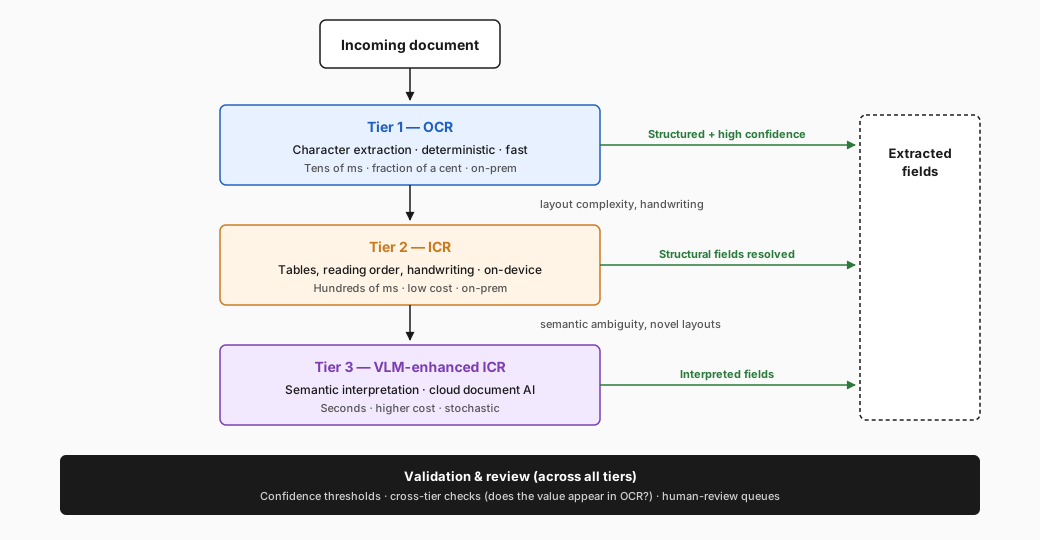
Tier 1 — OCR: Every document starts here. OCR converts scanned images to searchable text and extracts raw layout information at the word level. For well-structured documents or known templates, post-OCR parsing handles the majority of fields directly — an invoice from a known enterprise vendor with a consistent layout doesn’t need anything more than a fast, tuned extractor running on the OCR output. This tier is fast, cheap, and deterministic.
Tier 2 — Intelligent content recognition (ICR): This is the tier most pipelines underweight. ICR uses on-device AI models to handle the structural extraction problem — table cell coordinates, reading order, equations, handwriting, hierarchical layout — without sending documents to a cloud LLM. It’s what lets you parse a complex multicolumn form or a scanned table accurately while keeping processing fully on-premises. ICR sits between deterministic OCR and cloud-based document AI: layout-aware like an LLM, local and predictable like OCR.
Tier 3 — VLM-enhanced ICR (cloud document AI): Documents with unknown layouts, semantic ambiguity, or fields that require interpretation get routed to an LLM-based step — a frontier VLM reasoning over local ICR output, or a managed intelligent document processing (IDP) service. This tier handles the hardest cases, where structural understanding alone isn’t enough, and the extraction logic depends on reasoning across the document.
Validation and review (across all tiers): In a typical pipeline, low-confidence outputs or high-risk field types are routed to human review or secondary validation before they enter downstream systems. This is orchestration you implement around the extraction tiers, not something the perception layer does for you.
This architecture cuts cost by routing simple, high-volume documents away from expensive LLM calls. It cuts risk by applying AI selectively, where its tradeoffs are worth paying for. And it gives you a cleaner maintenance surface — when a new document type breaks your extraction logic, you’re debugging a specific layer rather than untangling a monolithic pipeline.
In Nutrient’s case, the user picks the tier per document — Vision API doesn’t auto-route between OCR, ICR, and VLM-enhanced ICR. The routing logic lives in your application.
| Tier | Latency | Cost per page | Strength | On-premises | Determinism |
|---|---|---|---|---|---|
| OCR | Tens of ms | Fraction of a cent | Exact characters on clean scans | Yes | Deterministic |
| ICR (on-device) | Hundreds of ms | Low | Tables, reading order, handwriting | Yes | Largely deterministic |
| VLM-enhanced ICR | Seconds | High | Novel layouts, semantic interpretation | Cloud or self-host | Stochastic |
| Document Q&A (LLM) | Seconds+ | Highest | Open-ended questions over content | Cloud-first | Stochastic |
Treat this as directional — actual numbers depend on document size, model choice, and deployment topology. The point is the order of magnitude between tiers, not the absolute values. Stochastic here means the same input can produce different output across runs.
The validation layer matters most for Tier 3, where the failure mode is most difficult to detect. Confidence thresholds, cross-tier output comparison (does the VLM’s value appear in the OCR text?), and human review queues all belong here.
Before choosing an architecture, answer the following four questions.
1. How consistent are your document layouts?
If you process documents from a fixed set of sources with stable structures, OCR plus structured extraction handles this. If you process documents from hundreds of unknown sources with variable layouts, you need the semantic flexibility of document AI.
2. What is your volume and cost tolerance per document?
For high volume and low per-document value, lean on OCR and rules-based extraction. For low volume and high per-document value, LLM extraction is justifiable. Most production systems have both, which is why hybrid architectures are common.
3. What are your auditability requirements?
Regulated environments — financial services, healthcare, legal — typically require reproducible, explainable extraction. OCR output is auditable by definition; LLM output requires logging, versioning, and validation tooling you have to build or procure.
4. What’s your tolerance for extraction errors?
OCR errors are systematic and correctable — they tend to cluster around input quality issues and can be mitigated by improving preprocessing. LLM errors are stochastic and harder to predict. If a wrong extraction causes a financial or compliance problem, you need a validation layer regardless of which extraction method you use.
Real document pipelines run into the same handful of problems:
Nutrient is built to solve those problems — not to add another black-box endpoint to the stack.
Stop building per-vendor parsers. Nutrient Vision API handles layout variation at the perception layer — its models read tables, reading order, and handwriting directly, so a new invoice template doesn’t break your extractor. AI Document Processing goes further: Invoice, contract, and form extractors ship with schemas and validation wired in.
Catch hallucinations before they reach downstream systems. Single-model document AI APIs return invented values and don’t tell you. Vision API’s fusion engine merges OCR and VLM output, so VLM-only hallucinations get reconciled against the OCR layer before they reach your application.
Keep sensitive documents inside your perimeter. “We use a cloud API” is where compliance review stops for many contracts, financial records, and medical forms. AI Document Processing deploys as cloud, an on-premises REST microservice, or an embedded SDK; Document Engine self-hosts the whole pipeline as a Docker-ready server.
Tune the settings instead of accepting what the platform decided. Most managed APIs are black-box — you send a document, you get fields back. With Nutrient, you adjust confidence thresholds and other extraction settings exposed by the SDK; routing between tiers and human-review queues live in your application, not knobs Vision API exposes today.
Pick the right tier per document — don’t pay LLM rates for structured invoices. The three products map to perception, decision, and deployment, so a fixed-template invoice routes through cheap deterministic extraction while only the ambiguous cases reach the LLM tier. Most posts describe this orchestration in the abstract; Nutrient gives you the products to build it.
Perception — Nutrient Vision API. Vision API is available today in the Python and Java SDKs (cloud API coming). One integration replaces the Tesseract-plus-cloud-VLM stitching most teams build by hand. It combines an algorithmic OCR layer, a VLM layer for tables, reading order, and handwriting, and a fusion engine that merges OCR and VLM results — corrected words with spatial grounding — that you can’t get from running OCR or a VLM alone. See building a document extraction pipeline with the Nutrient Vision API for the architecture.
Decision — AI Document Processing. It’s an IDP layer that combines LLMs, heuristics, and ML behind classification, key-value and table extraction, and validation. The focus is extraction with schemas and validation — not document Q&A.
Deployment — Document Engine. It’s a Docker-ready server you run in your own infrastructure. There’s no third-party transit and no separate compliance review per document type.
| Product | Cloud API | On-premises REST | Embedded SDK | Self-hosted server |
|---|---|---|---|---|
| Vision API | Coming | — | Yes (Python, Java) | — |
| AI Document Processing | Yes | Yes | Yes | — |
| Document Engine | — | — | — | Yes |
The free trial gives you access to the full platform before you commit.
Usually no. Document AI services consume OCR output rather than replacing it, and switching wholesale trades determinism and low cost-per-document for latency and run-to-run variance. Keep OCR as the perception layer and route only the documents that need semantic interpretation — unknown layouts, ambiguous fields, free text reasoning — to an LLM-based step.
Accuracy depends on document type, scan quality, and field type — there’s no honest single number. On clean, structured documents, OCR is typically more accurate at the character level. On variable layouts and semantic fields, document AI is often more accurate at the field level but introduces hallucination risk. Compare on your own documents with the field types you care about.
Almost any time you process more than one document type at meaningful volume. Hybrid pipelines route well-structured, high-volume documents through cheap deterministic OCR and reserve LLM-based extraction for documents where layout variation or semantic ambiguity demands it. The result is lower cost, lower latency on the common path, and AI applied only where it pays for itself.
Some of it. Local OCR and on-device ICR (table parsing, reading order, handwriting) run fully on-premises. Frontier VLMs are mostly cloud-only today, though purpose-built IDP services — including Nutrient AI Document Processing — can be deployed as on-premises REST microservices or embedded directly into desktop and server applications. If data residency is a hard requirement, design the pipeline so the LLM tier is optional.
ICR (intelligent content recognition) handles structural extraction — tables, reading order, handwriting, hierarchical layout — using on-device AI models that stay local and predictable. Document AI typically refers to cloud LLM- or VLM-based services that reason over content semantically. ICR sits between deterministic OCR and cloud document AI: layout-aware like an LLM, local and reproducible like OCR.
Treat LLM output as a suggestion, not a source of truth. Cross-validate every extracted value against the OCR text (does the value appear in the source?), score outputs by confidence, and route low-confidence fields to human review. Schema-constrained extraction, structured prompting, and validation rules on the result reduce the rest of the risk.
You get to see and tune what the pipeline does. Confidence thresholds and other extraction settings are under your control instead of hidden behind a single endpoint, and the routing between tiers and human-review queues live in your application code where you can iterate on them. You also get deployment flexibility most managed APIs don’t offer: AI Document Processing runs as cloud, on-premises REST, or embedded SDK, and Document Engine self-hosts the full stack. On the perception layer, Vision API’s fusion engine merges OCR and VLM output, so VLM-only hallucinations get reconciled against the OCR text before they reach your application.
OCR vs. document AI isn’t a binary choice. Traditional OCR fits high-volume, structured extraction where determinism and cost matter. Document AI handles the cases where layout variation and semantic interpretation are the actual constraints. Most production pipelines need both.
The questions that matter are architectural: which documents route to which extraction layer, how you handle outputs that fail, and what your compliance requirements say about the data in flight. Answer those, and the technology choices follow.
此内容由惯性聚合(RSS阅读器)自动聚合整理,仅供阅读参考。 原文来自 — 版权归原作者所有。