

惯性聚合 高效追踪和阅读你感兴趣的博客、新闻、科技资讯
阅读原文 在惯性聚合中打开

推荐订阅源

L
LangChain Blog
Scott Helme
Scott Helme
D
Darknet – Hacking Tools, Hacker News & Cyber Security
Stack Overflow Blog
Stack Overflow Blog
Forbes - Security
Forbes - Security
T
The Blog of Author Tim Ferriss
Y
Y Combinator Blog
S
Schneier on Security
cs.CV updates on arXiv.org
Cisco Talos Blog
Cisco Talos Blog
N
News | PayPal Newsroom
H
Hackread – Cybersecurity News, Data Breaches, AI and More
Project Zero
Project Zero
Cyberwarzone
Cyberwarzone
Vercel News
Vercel News
M
MIT News - Artificial intelligence
云风的 BLOG
云风的 BLOG
Google Online Security Blog
Simon Willison's Weblog
MongoDB | Blog
MongoDB | Blog
Martin Fowler
Martin Fowler
T
Tenable Blog
I
InfoQ
W
WeLiveSecurity
Google DeepMind News
G
Google Developers Blog
D
DataBreaches.Net
博客园 - Franky
Know Your Adversary
Know Your Adversary
Spread Privacy
Spread Privacy
S
Security @ Cisco Blogs
Hacker News: Ask HN
Hacker News: Ask HN
J
Java Code Geeks
Threat Intelligence Blog | Flashpoint
F
Full Disclosure
C
Cisco Blogs
Google DeepMind News
P
Proofpoint News Feed
C
CXSECURITY Database RSS Feed - CXSecurity.com
The Cloudflare Blog
cs.AI updates on arXiv.org
I
Intezer
The GitHub Blog
The GitHub Blog
freeCodeCamp Programming Tutorials: Python, JavaScript, Git & More
F
Fortinet All Blogs
Jina AI
Jina AI
V
Visual Studio Blog
L
LINUX DO - 热门话题
WordPress大学
WordPress大学
aimingoo的专栏
aimingoo的专栏

Inside Nutrient

A guide to the invisible work behind documents Introducing Nutrient Documents for Salesforce: Native document generation and signing Document AI vs. traditional OCR: Choosing between OCR, AI, and hybrid pipelines PDF SDK compliance and security evaluation checklist for enterprise teams (2026) Invariant Corp replaces paper processes with Nutrient Workflow and scales without limits What is process mapping? A complete guide Nutrient vs. Conga Composer for Salesforce document generation (2026) Document routing: How to automate document distribution The CTO’s AI playbook: Why accountability architecture beats orchestration Compliance workflow automation: Why built-in compliance is table stakes Workflow diagrams: Examples, symbols, and how to build one that actually runs Digital forms: Replace paper forms with automated workflows Approval workflow software: How to automate approvals Why document-centric automation is different The CEO’s AI playbook: Why decision architecture beats model selection Nutrient SDK product updates for Q1 2026 PDF redaction verification: How to prove sensitive data is permanently removed What is a VPAT? The complete guide to accessibility conformance reports What is PDF/UA? The accessible PDF standard explained Online document viewer: Options, tradeoffs, and how to embed one Document viewer for web apps: React, Vue, Angular (2026) Best document viewers in 2026: A buyer’s guide How to edit a PDF in Python: Add text, images, and annotations Nutrient advances Workflow platform with agentic AI for enterprise-grade speed and consistency in document-heavy operations How to create a Salesforce quote template from opportunity data The business case for accessibility: Five ways it drives enterprise value Python PDF library comparison (2026): 7 libraries for developers Why your AI agent hallucinates PDF table data PDF.js limitations: When to upgrade to a commercial PDF SDK How Subject scaled 5× with Nutrient’s PDF SDK without rebuilding its document layer I replaced our sales training with an AI coach that runs in Slack — here’s what broke Redirecting to: https://securitybuzz.com/cybersecurity-news/why-enterprise-permissions-are-ais-most-dangerous-inheritance/ Nutrient .NET SDK vs. iText Core: Complete comparison for .NET developers DocuVieware: Support’s most frequently asked setup questions Introducing Nutrient Workflow How to convert PDF to Word in C# (.NET) When email and spreadsheets stop working: Work order approval workflows for field teams on the move Compliance with confidence: Why document-centric automation is the foundation of your mission Nutrient expands AI Assistant, automating multistep document workflows inside any application What is document generation? A developer’s guide to PDF generation Document Converter data flow and how real-time watermarks skip the queue PDF/UA compliance guide: Requirements, standards, and best practices Computers still can’t understand you How Athena Intelligence built AI agents for regulated enterprises with Nutrient’s document infrastructure How to convert HTML to PDF (2026): 4 methods from browser print to SDK How to build a document extraction pipeline with Nutrient Vision API OCR vs. intelligent document processing: Choosing the right document extraction engine Beyond OCR: How document intelligence eliminates manual processing in regulated industries Nutrient vs. IronPDF: Complete comparison for .NET developers Nutrient vs. Aspose.PDF: Complete comparison for .NET developers Redirecting to: https://fortune.com/2026/02/19/openclaw-who-is-peter-steinberger-openai-sam-altman-anthropic-moltbook/ Lufthansa Systems uses Nutrient to deliver reliable, scalable PDF rendering for pilots worldwide Nutrient vs. Syncfusion: Complete comparison for .NET developers React’s useTransition: The hook you’re probably using wrong First City Monument Bank streamlines banking processes with Nutrient Workflow Redirecting to: https://www.sdcexec.com/warehousing/automation/article/22957364/nutrient-workflow-automation-the-missing-link-in-supply-chain-efficiency The complete guide to digital signatures: PAdES, CAdES, and XAdES explained Nutrient Python SDK: Production-grade document processing for Python Introducing agentic document editing for web applications with AI Assistant Nutrient vs. QuestPDF: Complete comparison for .NET developers How we fixed the GdPicture license expiration (and what to do if you’re affected) Red team security testing with agentic AI The future of healthcare document automation Best healthcare workflow software compared Nutrient SDK product updates for Q4 2025 How Harvey scaled legal document workflows 50 percent MoM without rebuilding infrastructure HIPAA-compliant document management in hospitals How we optimized rendering performance while handling thousands of annotations in React — Part 2 Automated PII removal with Nutrient API Redirecting to: https://www.devopsdigest.com/2026-low-code-no-code-predictions Redirecting to: https://www.kmworld.com/Articles/Editorial/ViewPoints/Leaders-predict-AI-to-continue-permeating-all-aspects-of-KM-in-2026-172594.aspx What are deep agents and how do they solve complex problems? Whipping up document magic: Your easy-bake recipe for Vue and Nutrient Web SDK 🧁 What I’ve learned about product iteration planning while building SDKs Passwordless document signing: Three-layer security guide New zip folder functionality streamlines file management in Document Automation Server The keyboard shortcuts playbook: Taking control of keyboard events in Nutrient Web SDK From experienced engineer to AI beginner: My unexpected journey AI-assisted manual testing: Handling Safari’s PDF rendering and UI quirks How to keep a 20-year-old SDK up to date How we optimized rendering performance while handling thousands of annotations in React — Part 1 Nutrient announces new executive hires to accelerate next phase of growth High performance UI using web workers Automate document conversion at scale with Python and Nutrient DCS From curiosity to PLG (and AI): My journey to understanding product-led growth Prost to progress: One year as Nutrient Pigeon usage at Nutrient: Bridging native SDKs to Flutter Modernizing CI build servers: How to migrate from Chef to Ansible Unix man pages: AI-friendly documentation since 1971 Consistent hashing for even load distribution Best AI redaction APIs: Complete comparison guide for 2025 Why AI document redaction matters for modern security From coding to coordinating: How AI transformed my workflow What is intelligent document processing (IDP)? A complete guide Enterprise PDF SDKs: Best PSPDFKit (now Nutrient) alternatives Nutrient SDK product updates for Q3 2025 GdPicture support best practices Redacting sensitive data with Nutrient AI redaction API How AI is transforming the customer experience at Nutrient: From instant answers to intelligent support How manual QA uses PR testing between releases
Salesforce eSignatures: Generate, sign, and track documents in one flow
Marija Trpkovic · 2026-05-01 · via Inside Nutrient

TL;DR

  • Salesforce eSignatures deliver the most value when they’re part of a connected document workflow — from template to signature, without leaving Salesforce.
  • Nutrient Documents for Salesforce connects template creation, document generation, recipient setup, field placement, and signature tracking in a single flow tied to the Opportunity record.
  • Fewer handoffs mean less time switching between tools and a faster path from deal data to completed agreement.

For many sales teams, document work doesn’t slow down at the first draft. It slows down after that.

A quote gets generated, then exported. Someone makes changes outside Salesforce. The file is emailed around, uploaded to an external signing tool, and tracked manually until it comes back signed. What should be a straight path from approved deal terms to a signed document turns into a chain of disconnected steps.

That’s why Salesforce eSignatures matter most when they’re part of a broader document workflow. The real win isn’t just collecting a signature. It’s having the document generated from Salesforce data, edited inline, routed to the right signer, and tracked on the record — all without leaving Salesforce.

With Nutrient Documents for Salesforce, that workflow can stay connected from the beginning. Teams can create a reusable and editable template (or import one), generate a document from Opportunity data, configure an envelope, place signature fields, send the file for signature, and follow the status — all from the same Salesforce record.
How do I get a contract signed from Salesforce without a separate tool?

Start with a reusable template

The fastest signing workflows usually begin before anyone clicks Send.

In Nutrient, templates live in Template Manager, and they’re tied to a specific Salesforce record type. Teams can create a new template in Salesforce or import an existing one, then build it out with merge fields, repeating collections, conditions, and dynamic inputs. This gives sales and operations teams a repeatable foundation instead of forcing them to rebuild quotes, proposals, or agreements from scratch every time.
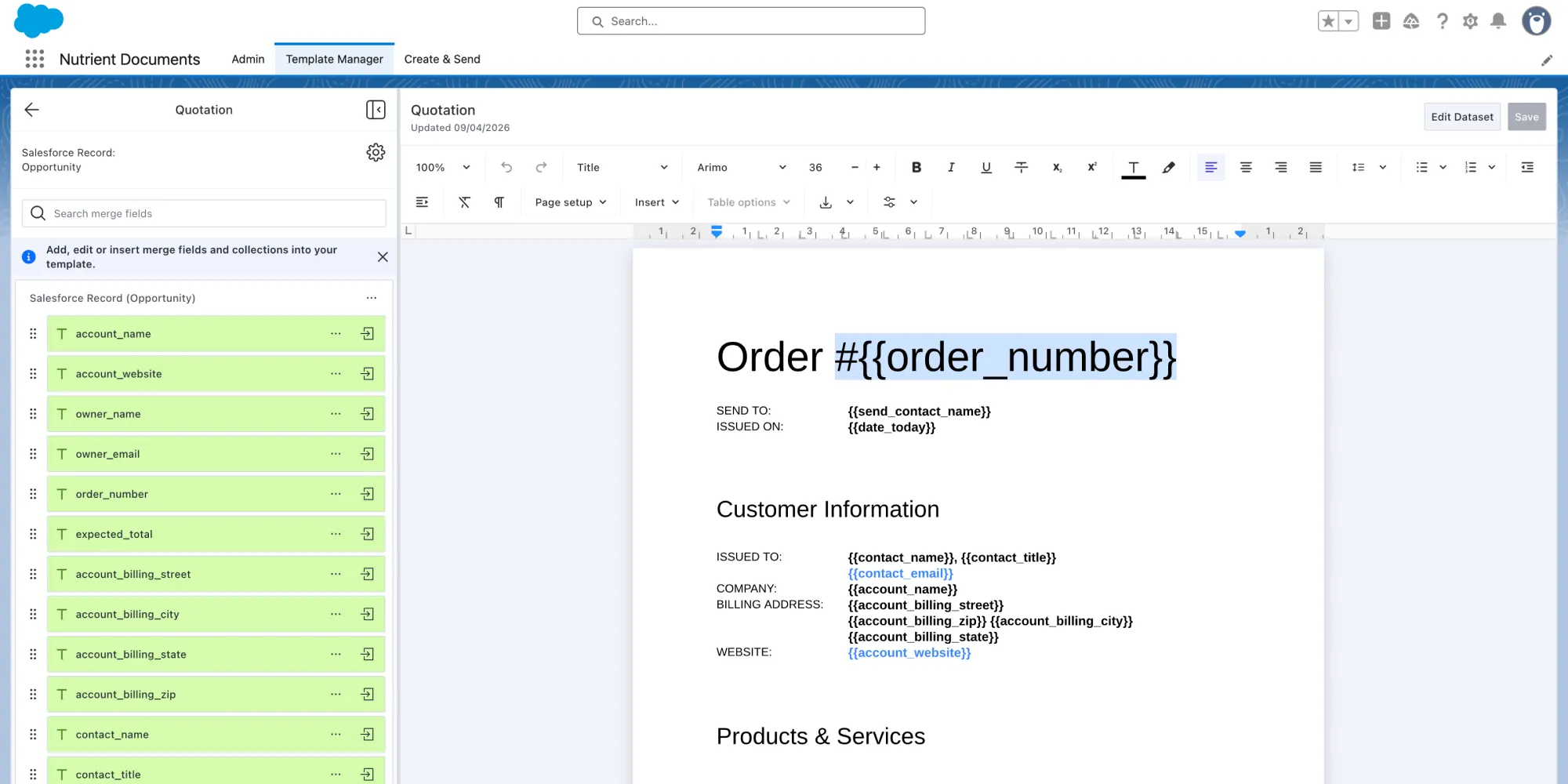
Template Manager in Nutrient Documents for Salesforce

That matters for more than speed; it also makes the workflow easier to maintain. And change happens all the time: Products change, pricing changes, approval language changes, and sales processes evolve. A reusable template makes it much easier to keep up. Instead of rebuilding documents every time the business shifts, teams can update the template and keep moving.
Generate the document from the Opportunity

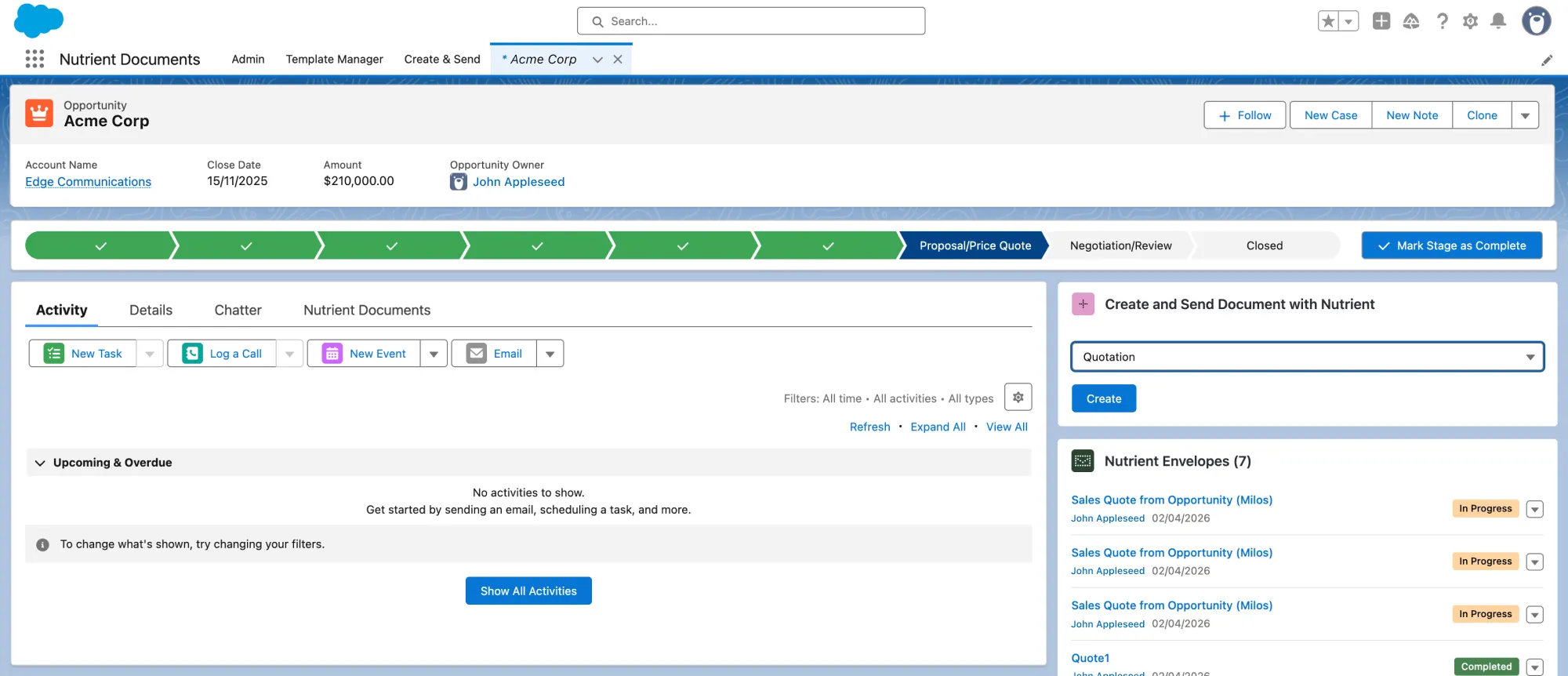
Generating a document from Opportunity data

Once the template is ready, the next step is to make it available where sales teams already work.

Nutrient includes a template picker widget that can be added to a Salesforce record page, so users can pick a template and create a document directly from the Opportunity. That keeps document generation close to the deal itself, where the account, amount, owner, stage, and related records already live.

If the template uses dynamic inputs, users can also make deal-specific choices at runtime before the document is generated. That’s especially useful when the right recipient or related record depends on the situation. Instead of maintaining separate templates for small variations, teams can keep one core template and let the user choose the right context during document creation. The result is a workflow that stays flexible without becoming more difficult to manage.
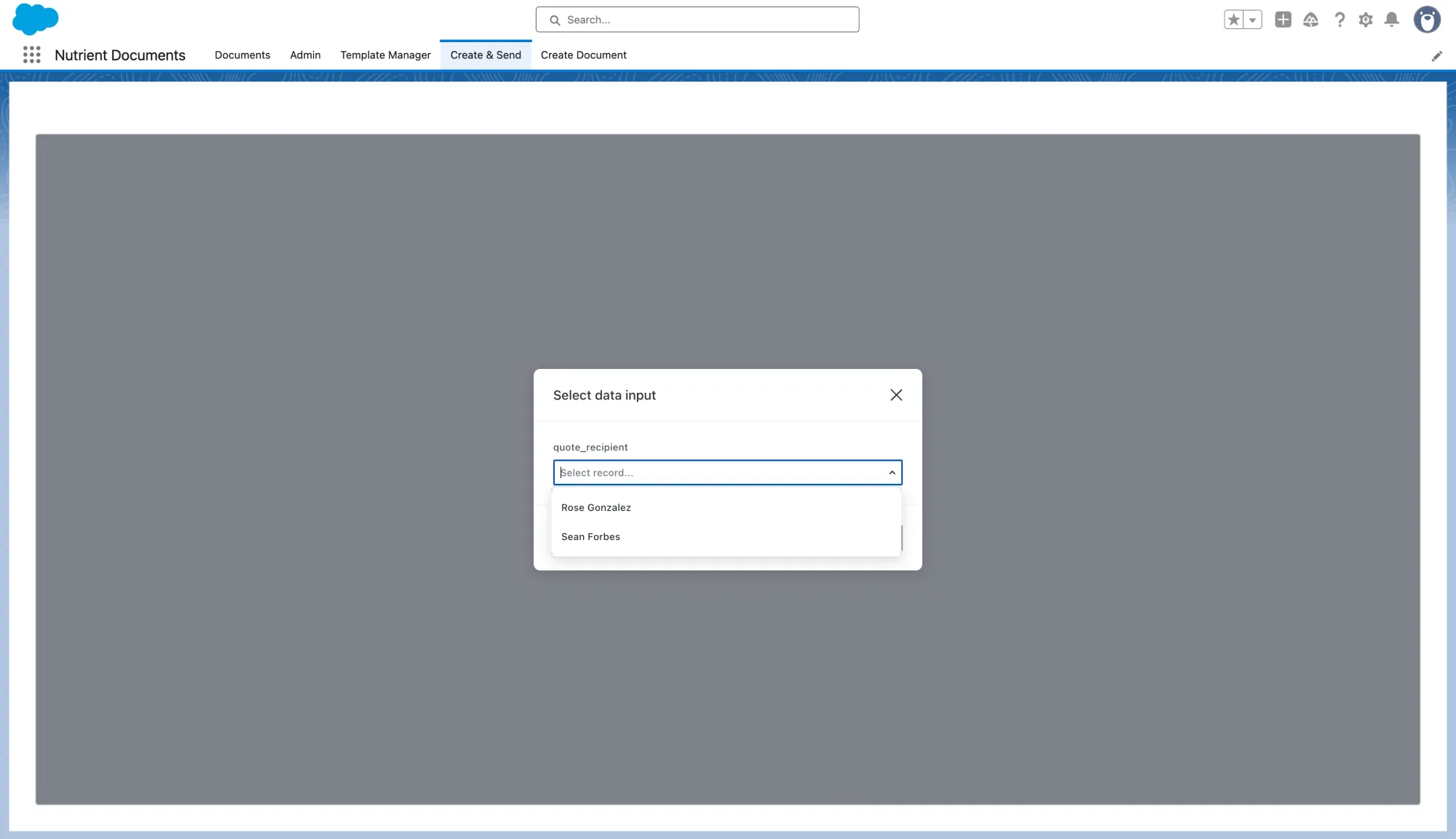
Opportunity data input for document generation

Once the document is created, users land in a preview and can make final adjustments if the template is editable. That’s an important step, because a strong Salesforce eSignature workflow isn’t just about sending faster; it’s about making sure the document is correct before it reaches the signer.
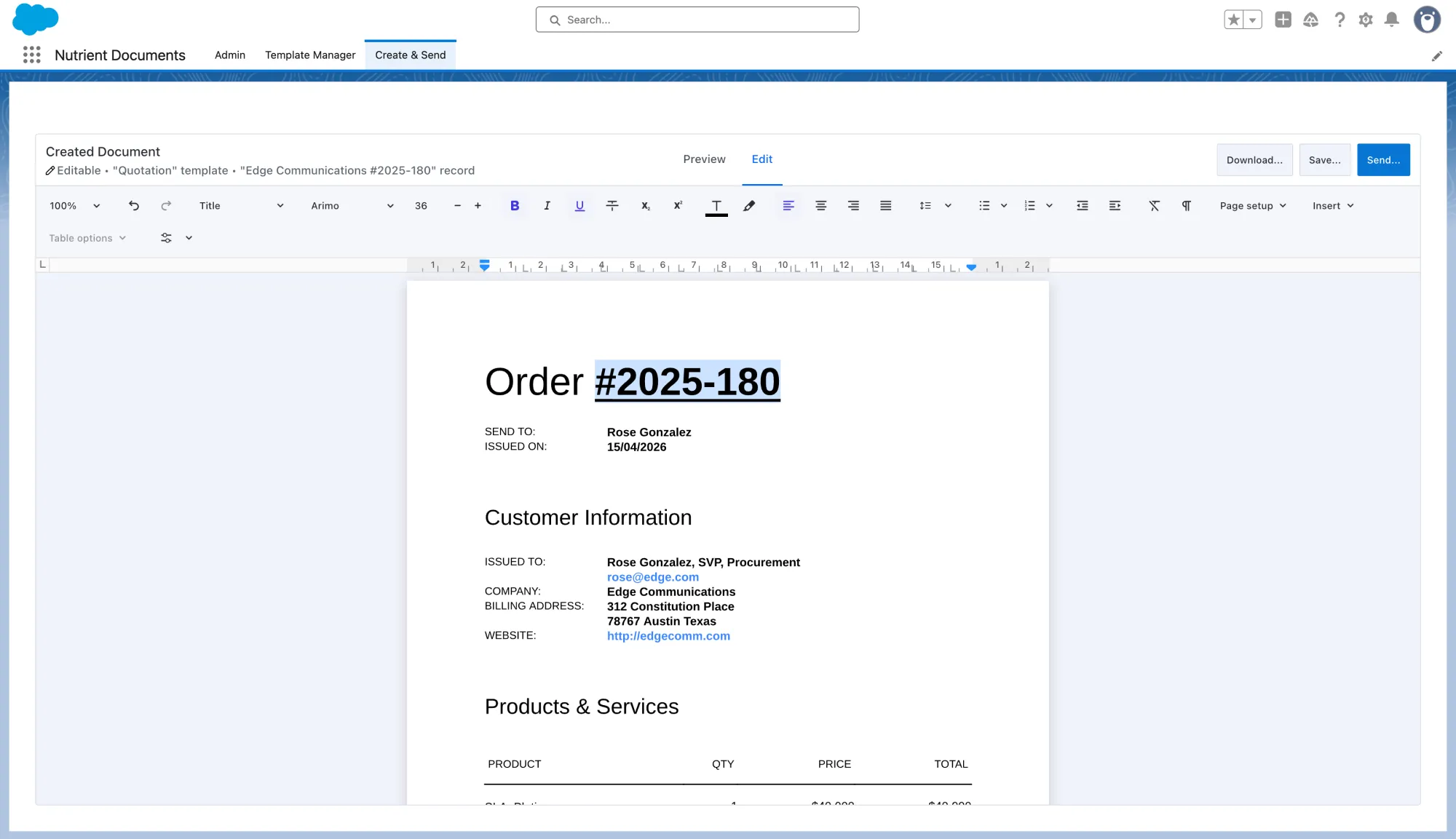
Editing and previewing the generated document

Move from document creation to eSignature setup

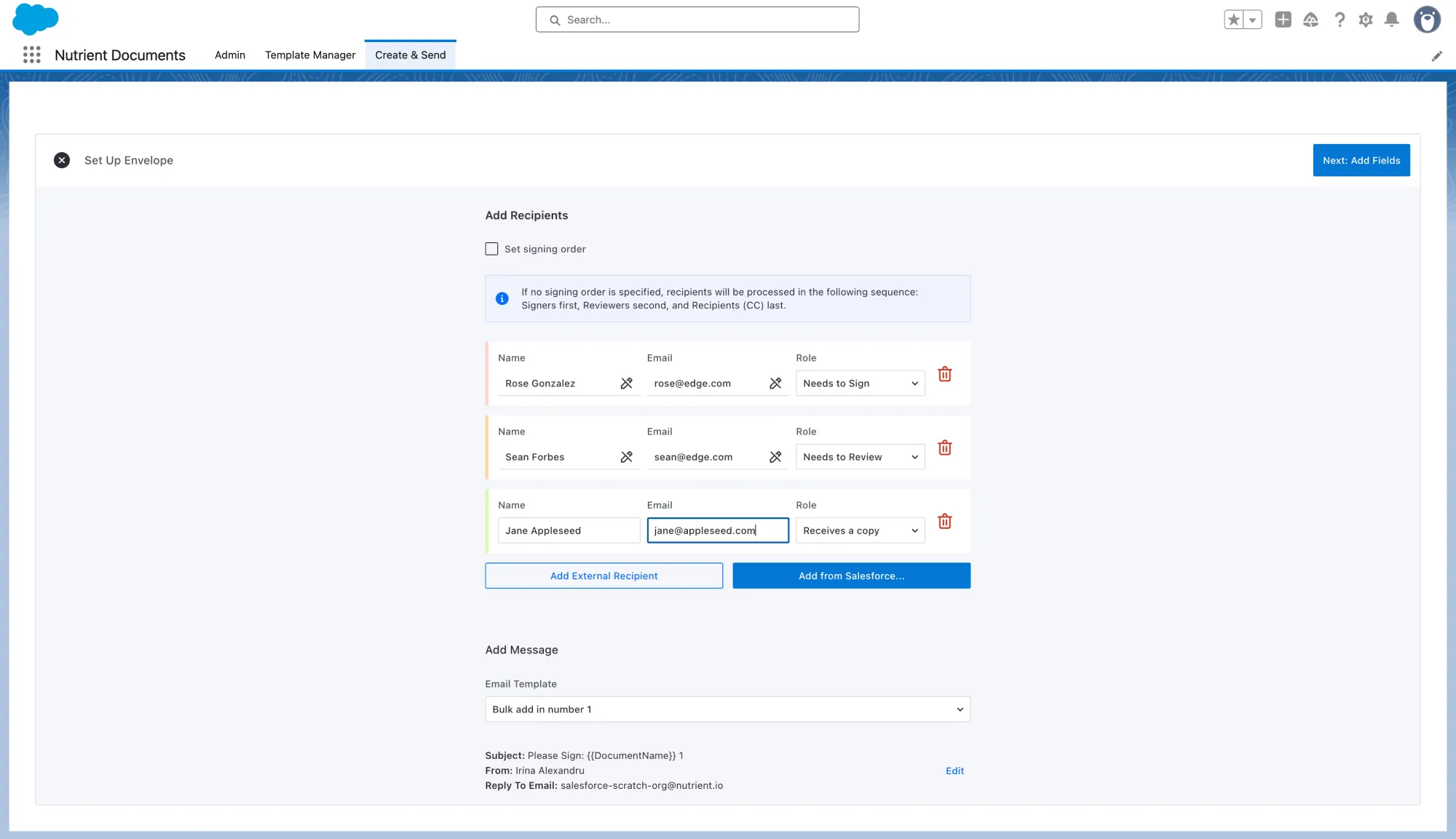
Setting up the envelope in Salesforce

This is where the workflow becomes especially valuable.

From the generated document, the sender can move directly into envelope setup instead of exporting the file and switching tools. There, they can add recipients; assign roles such as signer, reviewer, or copy recipient; and set a signing order when needed before sending the signing request.

That continuity matters. The handoff between document generation and Salesforce eSignatures isn’t a separate process layered on top; it’s part of the same flow. The sender isn’t rebuilding context in another system or reentering information that’s already tied to the document.
Place the signature fields

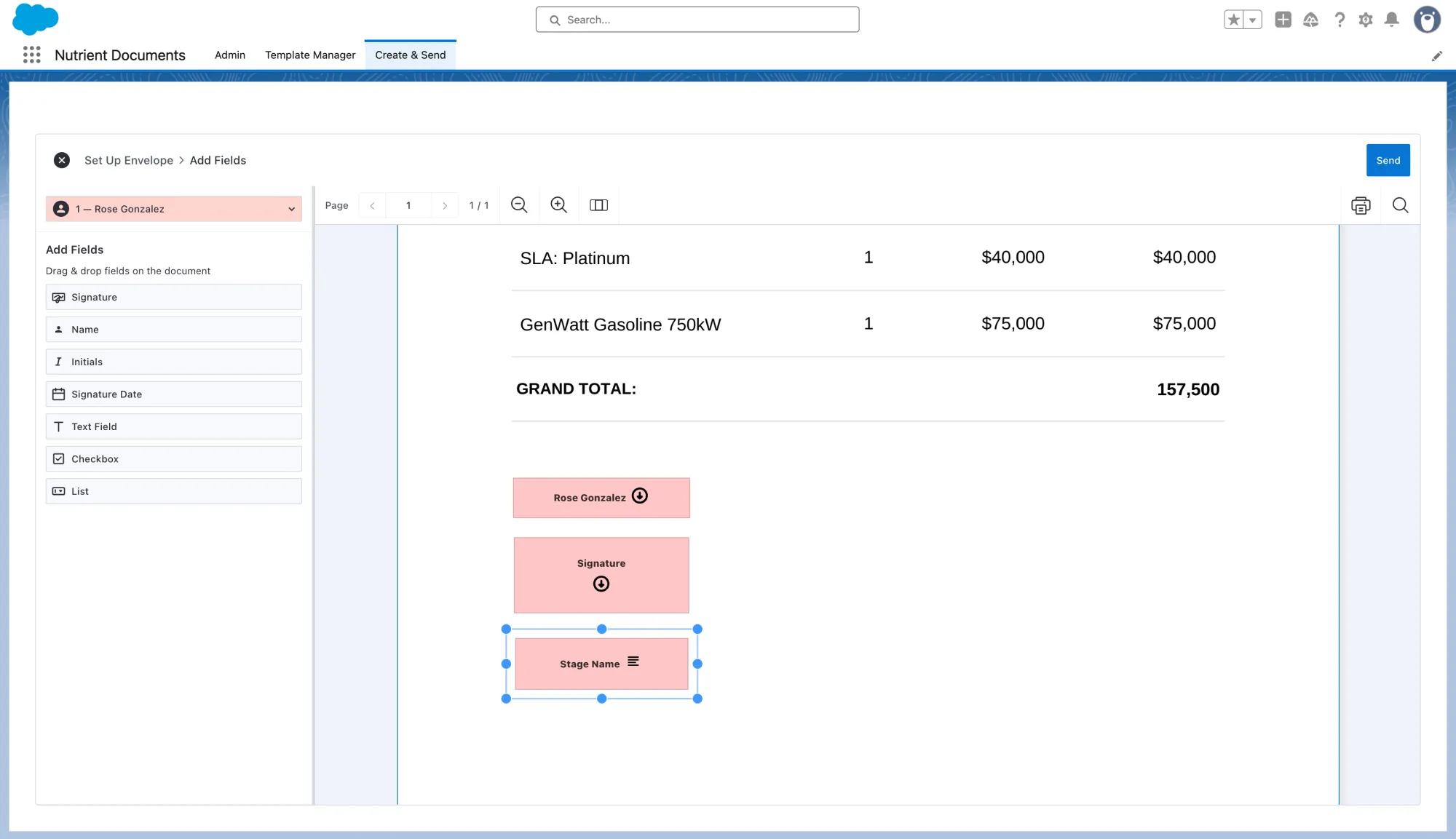
Placing signature fields on the document

After the envelope is configured, the workflow moves into signing field placement. Signature fields, text fields, checkboxes, and list fields can be placed directly onto the document so the signer knows exactly what to complete and where. Teams can also include Salesforce data already tied to the record, such as Stage Name, so the final document reflects the deal context without manual reentry.

That makes the process feel much more direct than the traditional export-and-upload approach. Instead of sending a static file into a separate signing workflow, the sender is preparing the finished document for signature in context while looking at the exact document the recipient will receive.
Send the envelope and keep the workflow on the record

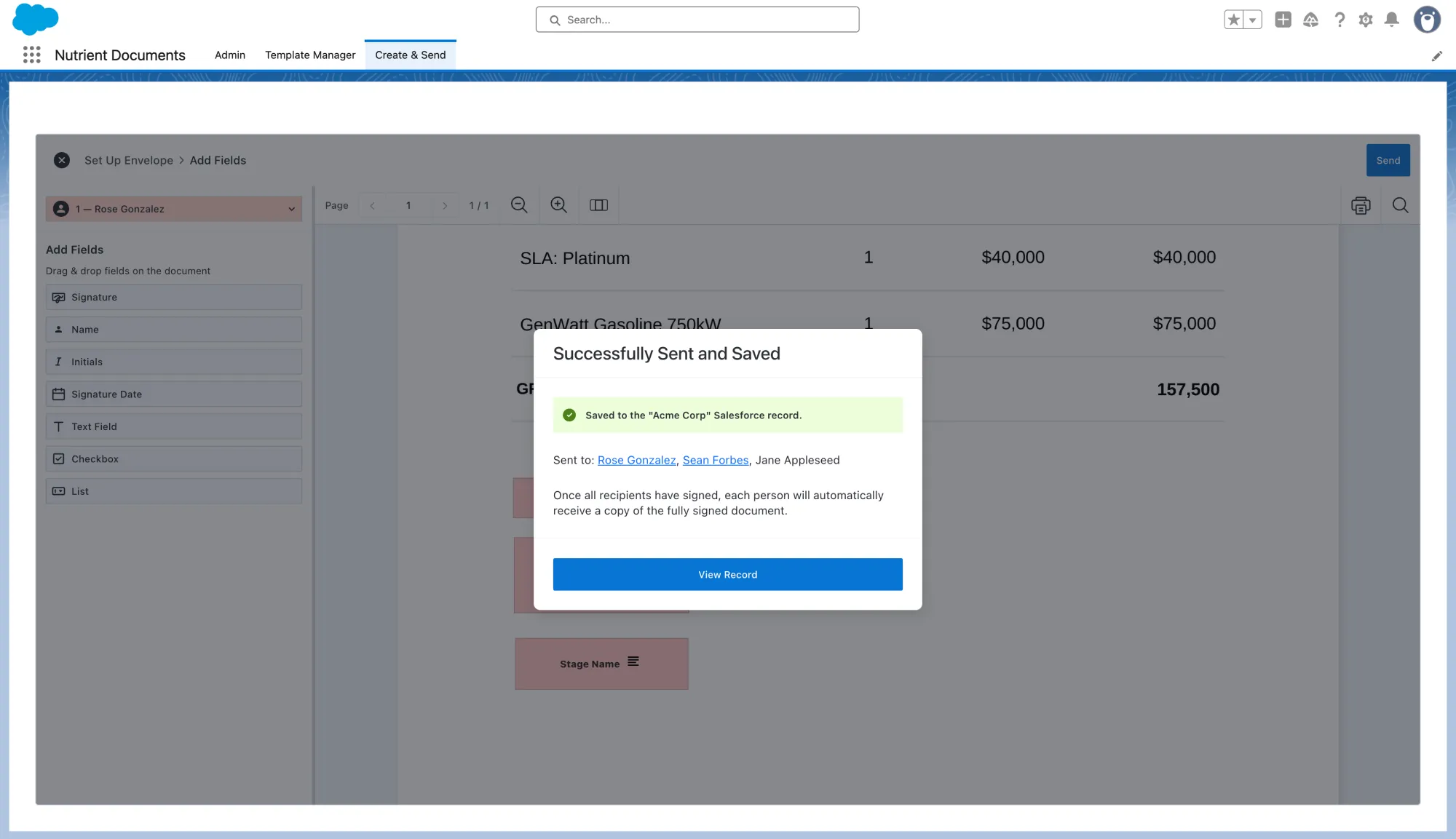
Envelope status tracked on the Salesforce Opportunity record

Once the fields are in place, the sender can send the envelope.

This is where the end-to-end story comes together. The success screen displays the document as Successfully Sent and Saved, confirms it was saved to the Salesforce record, and lists the selected recipient. The Opportunity then shows the envelope tracked on the record with an In Progress status.

That’s a meaningful advantage for Salesforce teams. The document starts as a template, becomes a generated record-based file, gets routed for signature, and remains visible on the Opportunity throughout the deal. This way, sales representatives don’t have to piece status together across inboxes, shared drives, and separate signature tools. They can stay in Salesforce and still see where the document stands.

Why this workflow matters

The value here isn’t just faster signatures. There are fewer handoffs.

When template creation, document generation, review, recipient setup, field placement, sending, and status tracking all happen in one connected flow, teams spend less time switching tools and less time cleaning up process gaps afterward. They also end up with a workflow that’s easy to standardize across sales, operations, and revenue teams.

It’s also easier to maintain over time. Templates can be updated as pricing models change, product bundles evolve, or approval requirements shift. Dynamic inputs can help teams keep one flexible template instead of multiplying versions. Conditions can keep documents adaptable without turning them into a maintenance burden. That combination makes the workflow practical not just for one document, but for the long run.

FAQ

Salesforce eSignatures let teams send documents for electronic signatures directly from Salesforce without switching to a separate signing tool. Instead of exporting a file, emailing it around, and uploading it into another platform, teams can keep the workflow connected to the same Salesforce record. In practice, that means generating documents from Salesforce data, reviewing them, assigning recipients, placing signature fields, sending them for signature, and tracking progress on the record.

To generate and sign documents in Salesforce, teams usually start with a reusable template tied to a Salesforce record type. From there, they generate the document using Opportunity or related record data, make any final edits, configure recipients, add signing fields, and send the file for eSignature. The advantage of this approach is that the full workflow stays connected, from document creation through signature tracking.

The best way to handle Salesforce document generation and eSignatures is to treat them as one connected workflow instead of two separate steps. Rather than generating a document in one system and sending it for signature in another, teams get better results when templates, data merge, review, recipient setup, field placement, sending, and status tracking all happen in the same process. That reduces manual work, cuts down on tool switching, and makes the workflow easier to standardize and maintain.

Yes, Salesforce can generate documents from Opportunity data when document generation is built into the workflow. Teams can use templates that pull in information from the Opportunity — including deal details and related records — to create quotes, proposals, and agreements directly from the record page. This helps keep document creation close to the deal and reduces the need for manual reentry.

Teams can send documents for signature without leaving Salesforce by moving directly from the generated document into envelope setup. From there, the sender can add recipients, assign roles, set a signing order, place signature and form fields, and send the document for signature from the same flow. This removes the usual export-and-upload step and keeps the document tied to the Salesforce record throughout the process.

Sales teams track eSignature status in Salesforce by keeping the envelope and document workflow tied to the original record. After the document is sent, status updates such as In Progress can be shown on the Opportunity, giving teams visibility into where the document stands without relying on inboxes, shared drives, or separate signing platforms. That makes it easier to follow deals from draft through signed agreement in one place.

Final thoughts

The best Salesforce eSignature workflow doesn’t begin at the signature box. It begins with a better document workflow upstream.

When teams can create reusable templates, generate documents from Opportunity data, make final edits, set up recipients, place signature fields, and send the file for signature without leaving Salesforce, the path from draft to signed document gets much shorter.

That’s the real value of moving from template to signature in one flow: less document friction, less context switching, and a faster route from deal data to completed agreement. With Nutrient Documents for Salesforce, teams can keep the entire process connected to the same Salesforce record from the first generated draft through signature status tracking. Learn more about Salesforce digital signing, or contact our Sales team to see Nutrient Documents for Salesforce in action.