


惯性聚合 高效追踪和阅读你感兴趣的博客、新闻、科技资讯
阅读原文 在惯性聚合中打开

推荐订阅源

aimingoo的专栏
aimingoo的专栏
宝玉的分享
宝玉的分享
freeCodeCamp Programming Tutorials: Python, JavaScript, Git & More
WordPress大学
WordPress大学
V
V2EX
Apple Machine Learning Research
J
Java Code Geeks
腾讯CDC
奇客Solidot–传递最新科技情报
奇客Solidot–传递最新科技情报
Engineering at Meta
Engineering at Meta
L
LangChain Blog
Jina AI
Jina AI
博客园 - 叶小钗
B
Blog RSS Feed
Recent Announcements
H
Help Net Security
小众软件
小众软件
大猫的无限游戏
大猫的无限游戏
B
Blog
云风的 BLOG
云风的 BLOG
Blog — PlanetScale
Blog — PlanetScale
D
DataBreaches.Net
钛媒体:引领未来商业与生活新知
钛媒体:引领未来商业与生活新知
罗磊的独立博客

Inside Nutrient

A guide to the invisible work behind documents Introducing Nutrient Documents for Salesforce: Native document generation and signing Document AI vs. traditional OCR: Choosing between OCR, AI, and hybrid pipelines PDF SDK compliance and security evaluation checklist for enterprise teams (2026) Invariant Corp replaces paper processes with Nutrient Workflow and scales without limits What is process mapping? A complete guide Nutrient vs. Conga Composer for Salesforce document generation (2026) Document routing: How to automate document distribution The CTO’s AI playbook: Why accountability architecture beats orchestration Compliance workflow automation: Why built-in compliance is table stakes Workflow diagrams: Examples, symbols, and how to build one that actually runs Digital forms: Replace paper forms with automated workflows Approval workflow software: How to automate approvals Why document-centric automation is different The CEO’s AI playbook: Why decision architecture beats model selection Nutrient SDK product updates for Q1 2026 PDF redaction verification: How to prove sensitive data is permanently removed What is a VPAT? The complete guide to accessibility conformance reports What is PDF/UA? The accessible PDF standard explained Salesforce eSignatures: Generate, sign, and track documents in one flow Online document viewer: Options, tradeoffs, and how to embed one Document viewer for web apps: React, Vue, Angular (2026) Best document viewers in 2026: A buyer’s guide How to edit a PDF in Python: Add text, images, and annotations Nutrient advances Workflow platform with agentic AI for enterprise-grade speed and consistency in document-heavy operations How to create a Salesforce quote template from opportunity data The business case for accessibility: Five ways it drives enterprise value Python PDF library comparison (2026): 7 libraries for developers Why your AI agent hallucinates PDF table data PDF.js limitations: When to upgrade to a commercial PDF SDK
PSPDFKit 13.4 for iOS: API & Annotation Improvements
Stefan Kieleithner · 2024-03-26 · via Inside Nutrient

Table of contents

    We’re thrilled to announce the release of PSPDFKit 13.4 for iOS. With this update, we’ve made our API documentation much nicer, improved our annotation selection experience, and added support for linking to specific regions of pages.

    Revamped API Documentation

    Alongside this release, we’re introducing a revamped API reference by switching to using Apple’s DocC(opens in a new tab) tool to generate our documentation. We’re impressed by the clarity of DocC-generated pages, and we like the consistency in appearance with Apple’s documentation. This change makes it easier to browse our API, offering an intuitive and interactive way to explore and understand PSPDFKit’s various capabilities. Just like before, our APIs are available in both Swift and Objective-C, but now, with DocC’s language switcher, it‘s easier to view APIs in the language you’re using.

    With the new documentation, you can easily navigate through our APIs, access fast and powerful search just by pressing the slash key, and read detailed documentation about all the entry points PSPDFKit exposes. The addition of DocC further enhances the developer experience, providing a powerful tool for understanding and utilizing PSPDFKit’s extensive feature set.

    You can check out our new API documentation here.
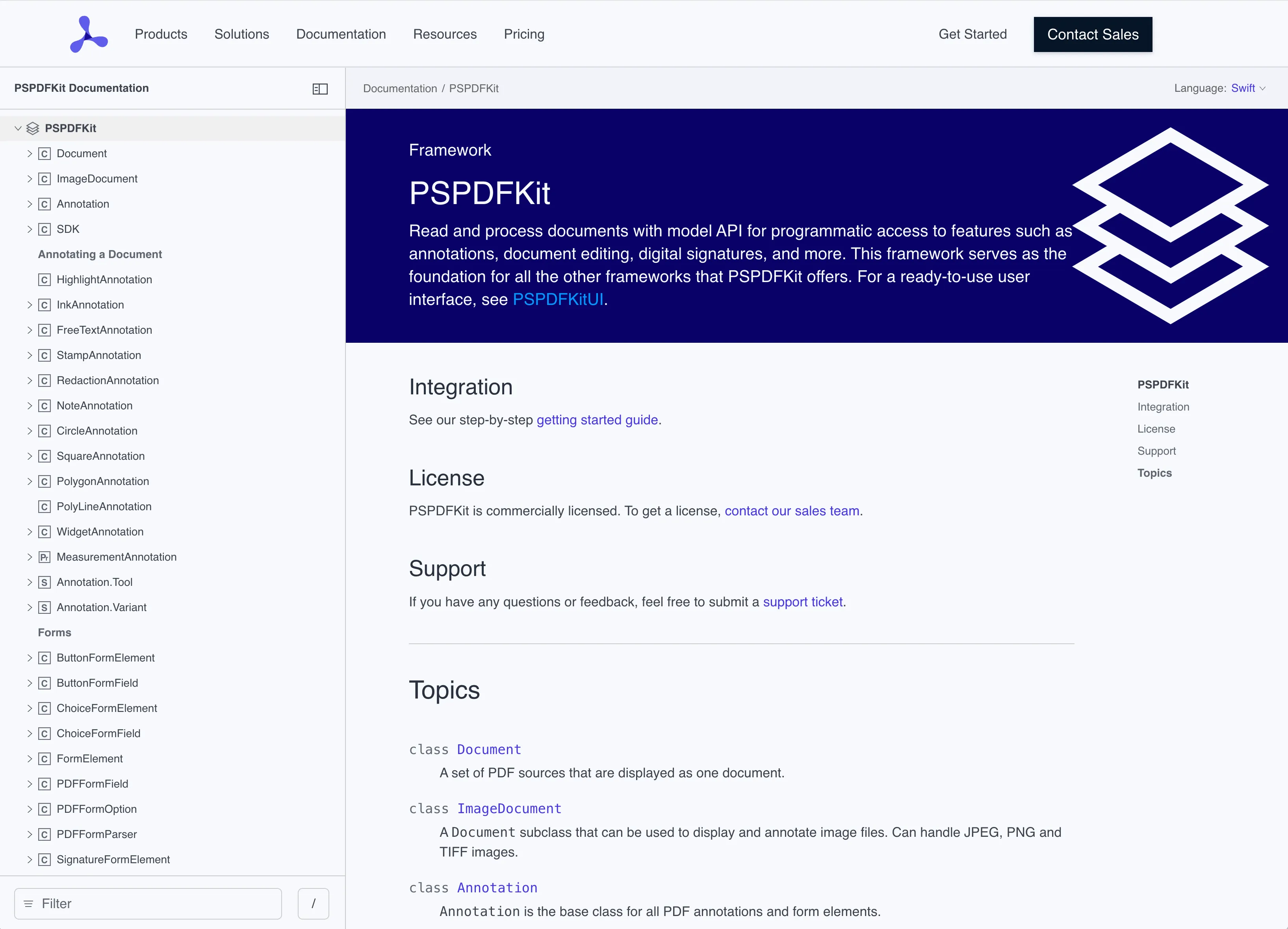
    API Documentation

    Multiple Annotation Selection Improvements

    In this release, we’ve focused on refining the annotation selection process to give users a desktop-class level of efficiency to move, edit, and delete annotations in bulk. It’s now possible to tap annotations to add or remove them from a selection when using the selection tool from the annotation toolbar. Furthermore, we added borders around each annotation while it’s selected to make it easier to tell whether an annotation is part of a selection. You can also now hold Shift on a hardware keyboard to select multiple annotations while tapping on them without activating the selection tool first. With these new features, it’s now easier than ever to manage selected annotations in your documents.

    Linking to Regions of Pages

    In PSPDFKit 13.4 for iOS, links can point to specific regions of a page rather than solely to a page index. With this enhancement, you can now use more precise and targeted navigation in your documents, taking the user to the exact view ports where they can find certain information. These new links are supported anywhere go-to actions are supported, like link annotations and outline elements.

    Other Improvements

    In addition to the major updates mentioned above, PSPDFKit 13.4 for iOS includes various enhancements and optimizations, like improvements for Swift concurrency support for some of our types. For a complete list of changes, please refer to the PSPDFKit 13.4 for iOS changelog.

    Explore related topics

    Try for free Ready to get started?

    Related SDK articles

    Explore more