






Updated: November 21, 2024
Table of contents
![Business process optimization fundamentals [2024 guide]](https://www.nutrient.io/_astro/article-header.mbReD9T0_Z1n0nuj.webp)
Business Process Optimization (BPO) is the targeted redesign of core processes to promote efficiency and strengthen the alignment of individual processes with overall strategy and goals. While optimizing a single process or of the processes in a particular department can yield real business improvement, organizations that broaden their efforts across the entire organization can see a significant competitive advantage, better customer service (internal and external), and much more efficient operation.
Benefits of optimizing business processes
Optimizing business processes offers numerous benefits, including:
- Improved process efficiency: Optimized processes enable organizations to streamline operations, reduce waste, and improve overall productivity.
- Reduced costs: By eliminating unnecessary steps and automating tasks, organizations can reduce costs and improve profitability.
- Enhanced customer satisfaction: Optimized processes enable organizations to respond quickly to customer needs, improve quality, and increase customer satisfaction.
- Competitive advantage: Organizations that optimize their business processes can gain a competitive advantage in the market, as they are better equipped to respond to changing market conditions and customer needs.
- Improved employee engagement: Optimized processes enable employees to focus on high-value tasks, improve job satisfaction, and increase productivity.
Planning for process optimization
Whether or not you have fully documented current state processes or if the current processes are undocumented but well-internalized. At the outset of a process optimization initiative, align your team’s understanding of your strategies, and make sure everyone understands the following: 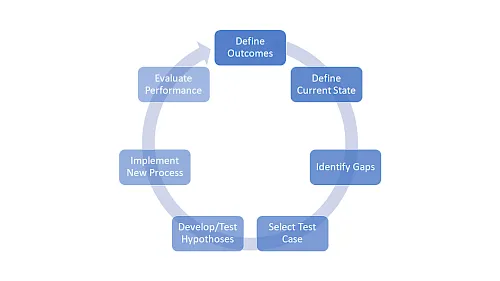
- The primary business goals of the process
- The non-negotiable constraints placed on the process
- The strengths and weaknesses of the process as currently performed
- Acceptable optimization strategies for preserving/enhancing strengths and mitigating/eliminating weaknesses
Let’s look at a process optimization project example.
Example Process Optimization: Manage Client Contracts
Process Goals:
- Ensure that contract Data is Current, Correct, and Complete.
- Ensure that up-to-date contract information is accessible to sales reps in the field.
Process Constraints:
- Contract Data Must Be Maintained in the System of Record.
- Contract Data Must Be Secure from Information Breaches.
Strengths of the Current Process:
- We can perform discount analysis with current reports/Maintain the existing report structure.
- Clients don’t see any errors when reviewing contracts for final signature/Maintain tight data validation.
Weaknesses of the Current Process:
- Our auditors have issued findings on our revenue recognition in the last two audits/Implement and enforce a standard process for project managers to track the percent work completed against stated contract deliverables.
- We cannot understand total customer value when multiple contracts have been written in separate sales territories/Explore master data management approaches and automate the current spreadsheet-based consolidations.
You should be able to apply this framework to any process you plan to optimize.
Start with The Low Hanging Fruit
Smaller optimization projects may be led centrally or by self-organizing teams within or across departments participating in a bigger process chain. These projects can make substantial improvements by addressing the low-hanging fruit.
Example: Eliminate Off-system Work
Many businesses spend considerable capital and effort when implementing modern enterprise systems that automate business processes formerly performed in isolation and sometimes on paper. However, off-system work sometimes persists. Consider the following simple off-system example:
When a new customer is onboarded, a series of tasks need to take place. Currently those tasks are handled manually. The salesperson enters the information about the customer, including the contract, into the CRM system. They then send an email to the customer service team, the finance team, and the marketing team. The customer service team needs to assign an account rep, the finance team needs to collect payment, and the marketing team needs to send out a welcome kit. The process relies entirely on the salesperson to remember to contact all the relevant groups and those relevant groups to remember their tasks.
Initial optimization of this manual process might automatically trigger a workflow at customer signup that sends notifications to each group and the basic information needed to perform their tasks. Then, as each group completes their task, they click “Complete” in the workflow.
You build this process, launch it, test it, then evaluate it after a set period. The process has become more optimized, predictable, and accountable than the previous method. You could stop there and have a positive impact.
But what if you dig deeper? What if the contract is automatically attached to the notification to finance? What if the process automatically assigns an account rep based on the customer type? What if a welcome email is automatically sent to the customer?
You are gradually optimizing the process and delivering more value through rounds of this build/test/evaluate cycle.
Avoiding Risk in Your Optimization/Improvement Initiatives
Even with the right tools, there is no guarantee of success without considering the risks. We’ve written on risk avoidance, and you can view the full article here: ”5 Ways to Avoid Risk in Process Automation Projects.” In a nutshell, you need to consider the following aspects for your improvement project.
- Have a clear strategy.
- Prepare for change resistance.
- Ensure the proper resources are in place.
- Choose the right leader.
- Identify expected outcomes.
Video: Achieve Process Efficiency and Optimization
Steps to Implement Business Process Optimization
Implementing business process optimization involves several steps, including:
Identify Processes that Need Improvement
The first step in implementing business process optimization is to identify processes that need improvement. This involves analyzing current processes, identifying areas for improvement, and prioritizing processes based on their impact on the business. Organizations can use various tools and techniques, such as process mapping, to identify areas for improvement and prioritize processes.
- Analyze current processes: Organizations should analyze current processes to identify areas for improvement, including bottlenecks, inefficiencies, and waste.
- Identify areas for improvement: Based on the analysis, organizations should identify areas for improvement, including processes that are inefficient, ineffective, or no longer relevant.
- Prioritize processes: Organizations should prioritize processes based on their impact on the business, including processes that have a significant impact on customer satisfaction, revenue, or profitability.
By following these steps, organizations can implement business process optimization and achieve significant benefits, including improved process efficiency, reduced costs, and enhanced customer satisfaction.
Additional Resources
- Process Industry Informer(opens in a new tab)
- FDA Web site(opens in a new tab)
- American Society for Quality(opens in a new tab)
Want to read more about business process optimization? Check out our free BPM Guide(opens in a new tab).
FAQ
Process optimization is crucial for improving business efficiency, reducing costs, and gaining a competitive edge. The benefits of optimization often include enhanced service quality and operational improvements that help maintain a strong market position.
Process control primarily applies to industrial settings like manufacturing, where automation systems maintain consistency that exceeds what human supervision can achieve. While outside the scope of business process optimization, this highlights the importance of automation in various fields.
The first stage of any optimization effort is planning and aligning. This phase involves setting goals, establishing constraints, analyzing current processes, and developing strategies to capitalize on strengths and address weaknesses.
Businesses can identify areas for improvement by analyzing current workflows, pinpointing inefficiencies, and prioritizing based on business impact.
Optimized processes lead to improved efficiency, cost savings, enhanced customer satisfaction, and a stronger competitive position.
Automation reduces manual errors, speeds up workflows, and increases predictability, contributing to better-optimized processes.
Success relies on clear goals, proper resources, stakeholder alignment, and managing change resistance effectively.