










Table of contents
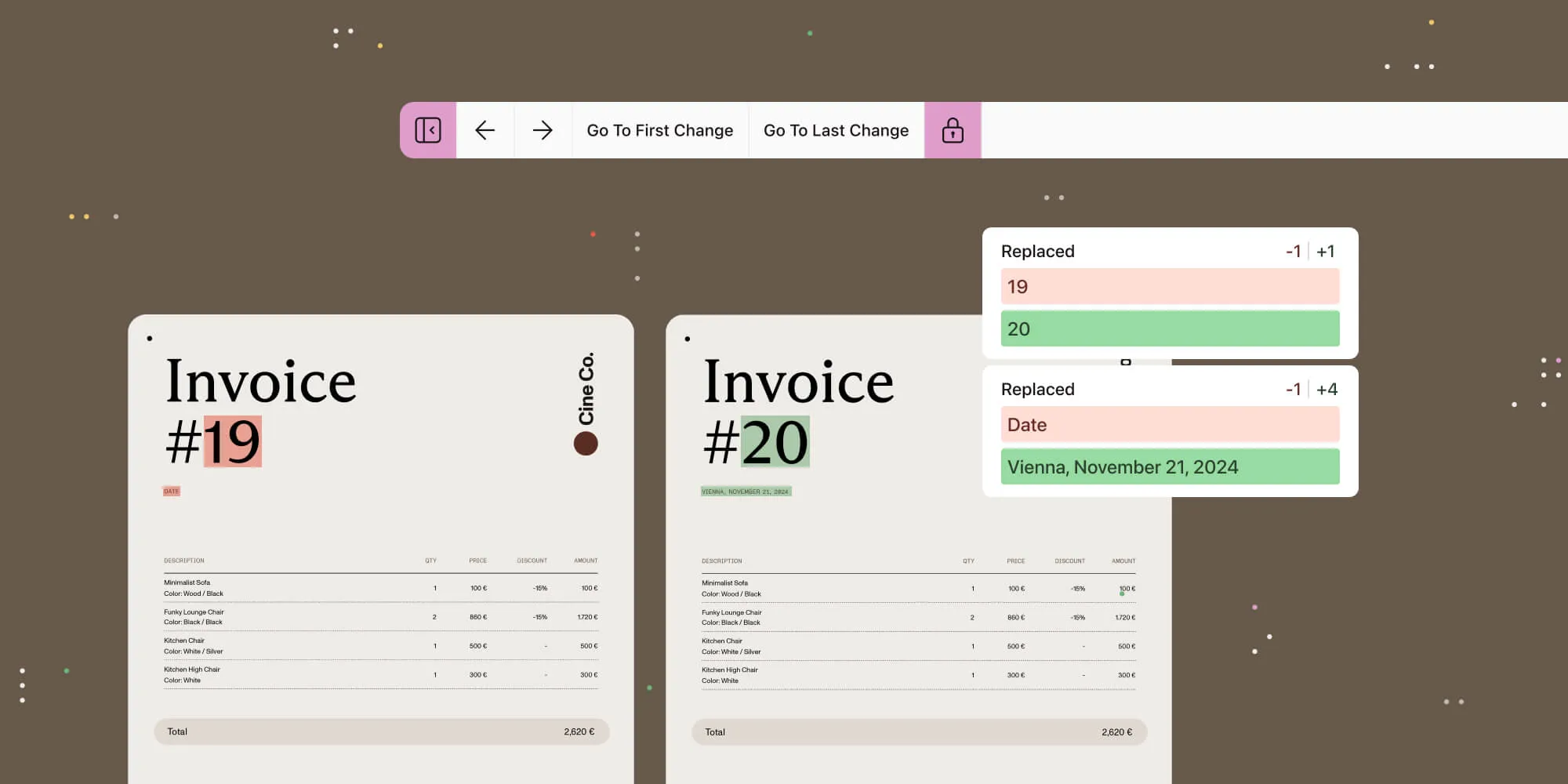
We’re excited to unveil the latest evolution of our text comparison capabilities, now seamlessly built into the most recent release of our standalone Web SDK. Thoughtfully designed for developers and users alike, this feature empowers applications to deliver precise, intuitive text comparison — making workflows smoother, faster, and more elegant.
Whether it’s a contract, a legal document, or a collaborative board meeting agenda, Text Comparison enables users to easily track changes and identify differences between documents, all within your customized interface — no third-party tools required.
Simplifying text comparison
The challenge: Comparing two versions of a document — be it a final contract draft or a legal agreement — has long been a painstaking process. Too often, teams rely on third-party tools, introducing inefficiencies, friction, and inconsistencies into their workflows.
Our solution: By embedding Text Comparison directly into the Web SDK, we eliminate the need for external solutions. Developers can offer a native, fully integrated experience, allowing users to visually compare, navigate through, and interpret changes — all without ever leaving their application.
Experience the difference
1. Visual text comparison user interface (UI)
Spot even the most subtle changes at a glance with side-by-side document comparison. Insertions and deletions are clearly highlighted, guiding the user’s eye to what truly matters.
2. Comparison sidebar
Access a detailed view of text differences page by page with a dedicated sidebar feature. Users can instantly leap directly to any change with just one click, making navigation a breeze, and saving review time.
3. Customizable toolbars
Control meets simplicity. We’ve equipped the Text Comparison tool with two toolbars:
- Primary toolbar — Navigate changes, show/hide the comparison sidebar, and enable synced or independent scrolling.
- Secondary toolbar — Manage page navigation, pan, and zoom modes.
Both toolbars are fully customizable, allowing developers to add unique business logic or remove features to align with user needs.
4. Customizable UI
Tailor the interface to match your app’s branding or user requirements. From toolbar configurations to sidebar features, every aspect of the UI is customizable, ensuring it integrates seamlessly into your app:
PSPDFKit.loadTextComparison({
...restOfConfigurations,
toolbarItems: [
{ type: 'prev-change' },
{ type: 'next-change' },
{ type: 'comparison-changes' },
{ type: 'scroll-lock' },
],
});
5. Configurable highlight colors
Differentiate between insertions and deletions with custom highlight colors, enhancing clarity, and making reviews faster than before:
PSPDFKit.loadTextComparison({
...restOfConfigurations,
comparisonSidebarConfig: {
diffColors: {
deletionColor: new PSPDFKit.Color({ r: 255, g: 218, b: 185 }),
insertionColor: new PSPDFKit.Color({ r: 200, g: 255, b: 200 }),
},
},
});
For your users, for your business
- Seamless integration — Built right into Nutrient Web SDK, Text Comparison eliminates the need for third-party vendors. Nutrient customers can leverage the Text Comparison tool in the products they already use.
- Competitive edge — By embedding this functionality directly into your app, you provide a value-added feature that differentiates your product in the market.
- Enhanced productivity — Users can quickly identify, navigate through, and review document changes, reducing the time spent on manual comparisons.
- A tailored experience — Developers can adapt the UI to align with specific user workflows, ensuring optimal usability.
Compare and see for yourself
Unlike standalone solutions, our Text Comparison feature is part of the Web SDK ecosystem, delivering:
- Streamlined development — Say goodbye to juggling multiple vendors.
- A unified experience — Preserve a consistent design and workflow across your app.
- Future-focused innovation — Keep your app ahead of the curve by laying the foundation for future innovations that enhance usability and efficiency.
Get started today
If you’re already a Web SDK customer, adding Text Comparison is simple. Get in touch with your sales or account representative to get access. Be sure to visit our documentation and changelog for full implementation details.
Not a Nutrient customer? Try it out for yourself with our free demo. You can also schedule a free trial or contact us to see how Text Comparison can transform your document workflows.
Because the best changes are the ones you can see.
Discover the difference our Text Comparison tool can make.