



惯性聚合 高效追踪和阅读你感兴趣的博客、新闻、科技资讯
阅读原文 在惯性聚合中打开

推荐订阅源

The Cloudflare Blog
D
Darknet – Hacking Tools, Hacker News & Cyber Security
T
The Blog of Author Tim Ferriss
G
Google Developers Blog
小众软件
小众软件
J
Java Code Geeks
V
Visual Studio Blog
The Register - Security
OSCHINA 社区最新新闻
OSCHINA 社区最新新闻
罗磊的独立博客
美团技术团队
阮一峰的网络日志
阮一峰的网络日志
V
V2EX
博客园 - 叶小钗
N
Netflix TechBlog - Medium
月光博客
月光博客
aimingoo的专栏
aimingoo的专栏
大猫的无限游戏
大猫的无限游戏
T
The Exploit Database - CXSecurity.com
The Hacker News
The Hacker News
Cisco Talos Blog
Cisco Talos Blog
Hacker News: Ask HN
Hacker News: Ask HN
Hacker News - Newest:
Hacker News - Newest: "LLM"
AWS News Blog
AWS News Blog
Webroot Blog
Webroot Blog
The Last Watchdog
The Last Watchdog
T
Threatpost
I
Intezer
T
Tenable Blog
L
LINUX DO - 热门话题
T
Tailwind CSS Blog
Scott Helme
Scott Helme
CTFtime.org: upcoming CTF events
C
Cybersecurity and Infrastructure Security Agency CISA
Engineering at Meta
Engineering at Meta
S
Schneier on Security
Recent Announcements
Threat Intelligence Blog | Flashpoint
F
Fortinet All Blogs
腾讯CDC
Exploit-DB.com RSS Feed
T
Troy Hunt's Blog
量子位
H
Hacker News: Front Page
V2EX - 技术
V2EX - 技术
Google Online Security Blog
人人都是产品经理
人人都是产品经理
博客园 - 【当耐特】
博客园 - Franky
www.infosecurity-magazine.com

Inside Nutrient

A guide to the invisible work behind documents Introducing Nutrient Documents for Salesforce: Native document generation and signing Document AI vs. traditional OCR: Choosing between OCR, AI, and hybrid pipelines PDF SDK compliance and security evaluation checklist for enterprise teams (2026) Invariant Corp replaces paper processes with Nutrient Workflow and scales without limits What is process mapping? A complete guide Nutrient vs. Conga Composer for Salesforce document generation (2026) Document routing: How to automate document distribution The CTO’s AI playbook: Why accountability architecture beats orchestration Compliance workflow automation: Why built-in compliance is table stakes Workflow diagrams: Examples, symbols, and how to build one that actually runs Digital forms: Replace paper forms with automated workflows Approval workflow software: How to automate approvals Why document-centric automation is different The CEO’s AI playbook: Why decision architecture beats model selection Nutrient SDK product updates for Q1 2026 PDF redaction verification: How to prove sensitive data is permanently removed What is a VPAT? The complete guide to accessibility conformance reports What is PDF/UA? The accessible PDF standard explained Salesforce eSignatures: Generate, sign, and track documents in one flow Online document viewer: Options, tradeoffs, and how to embed one Document viewer for web apps: React, Vue, Angular (2026) Best document viewers in 2026: A buyer’s guide How to edit a PDF in Python: Add text, images, and annotations Nutrient advances Workflow platform with agentic AI for enterprise-grade speed and consistency in document-heavy operations How to create a Salesforce quote template from opportunity data The business case for accessibility: Five ways it drives enterprise value Python PDF library comparison (2026): 7 libraries for developers Why your AI agent hallucinates PDF table data PDF.js limitations: When to upgrade to a commercial PDF SDK How Subject scaled 5× with Nutrient’s PDF SDK without rebuilding its document layer I replaced our sales training with an AI coach that runs in Slack — here’s what broke Redirecting to: https://securitybuzz.com/cybersecurity-news/why-enterprise-permissions-are-ais-most-dangerous-inheritance/ Nutrient .NET SDK vs. iText Core: Complete comparison for .NET developers DocuVieware: Support’s most frequently asked setup questions Introducing Nutrient Workflow How to convert PDF to Word in C# (.NET) When email and spreadsheets stop working: Work order approval workflows for field teams on the move Compliance with confidence: Why document-centric automation is the foundation of your mission Nutrient expands AI Assistant, automating multistep document workflows inside any application What is document generation? A developer’s guide to PDF generation Document Converter data flow and how real-time watermarks skip the queue PDF/UA compliance guide: Requirements, standards, and best practices Computers still can’t understand you How Athena Intelligence built AI agents for regulated enterprises with Nutrient’s document infrastructure How to convert HTML to PDF (2026): 4 methods from browser print to SDK How to build a document extraction pipeline with Nutrient Vision API OCR vs. intelligent document processing: Choosing the right document extraction engine Beyond OCR: How document intelligence eliminates manual processing in regulated industries Nutrient vs. IronPDF: Complete comparison for .NET developers Nutrient vs. Aspose.PDF: Complete comparison for .NET developers Redirecting to: https://fortune.com/2026/02/19/openclaw-who-is-peter-steinberger-openai-sam-altman-anthropic-moltbook/ Lufthansa Systems uses Nutrient to deliver reliable, scalable PDF rendering for pilots worldwide Nutrient vs. Syncfusion: Complete comparison for .NET developers React’s useTransition: The hook you’re probably using wrong First City Monument Bank streamlines banking processes with Nutrient Workflow Redirecting to: https://www.sdcexec.com/warehousing/automation/article/22957364/nutrient-workflow-automation-the-missing-link-in-supply-chain-efficiency The complete guide to digital signatures: PAdES, CAdES, and XAdES explained Nutrient Python SDK: Production-grade document processing for Python Introducing agentic document editing for web applications with AI Assistant Nutrient vs. QuestPDF: Complete comparison for .NET developers How we fixed the GdPicture license expiration (and what to do if you’re affected) Red team security testing with agentic AI The future of healthcare document automation Best healthcare workflow software compared Nutrient SDK product updates for Q4 2025 How Harvey scaled legal document workflows 50 percent MoM without rebuilding infrastructure HIPAA-compliant document management in hospitals How we optimized rendering performance while handling thousands of annotations in React — Part 2 Automated PII removal with Nutrient API Redirecting to: https://www.devopsdigest.com/2026-low-code-no-code-predictions Redirecting to: https://www.kmworld.com/Articles/Editorial/ViewPoints/Leaders-predict-AI-to-continue-permeating-all-aspects-of-KM-in-2026-172594.aspx What are deep agents and how do they solve complex problems? Whipping up document magic: Your easy-bake recipe for Vue and Nutrient Web SDK 🧁 What I’ve learned about product iteration planning while building SDKs Passwordless document signing: Three-layer security guide New zip folder functionality streamlines file management in Document Automation Server The keyboard shortcuts playbook: Taking control of keyboard events in Nutrient Web SDK From experienced engineer to AI beginner: My unexpected journey AI-assisted manual testing: Handling Safari’s PDF rendering and UI quirks How to keep a 20-year-old SDK up to date How we optimized rendering performance while handling thousands of annotations in React — Part 1 Nutrient announces new executive hires to accelerate next phase of growth High performance UI using web workers Automate document conversion at scale with Python and Nutrient DCS From curiosity to PLG (and AI): My journey to understanding product-led growth Prost to progress: One year as Nutrient Pigeon usage at Nutrient: Bridging native SDKs to Flutter Modernizing CI build servers: How to migrate from Chef to Ansible Unix man pages: AI-friendly documentation since 1971 Consistent hashing for even load distribution Best AI redaction APIs: Complete comparison guide for 2025 Why AI document redaction matters for modern security From coding to coordinating: How AI transformed my workflow What is intelligent document processing (IDP)? A complete guide Enterprise PDF SDKs: Best PSPDFKit (now Nutrient) alternatives Nutrient SDK product updates for Q3 2025 GdPicture support best practices Redacting sensitive data with Nutrient AI redaction API How AI is transforming the customer experience at Nutrient: From instant answers to intelligent support
How we made fast, reliable document RAG
Austin Nguyen · 2025-07-07 · via Inside Nutrient

Table of contents

    How we made fast, reliable document RAG

    Ever tried to extract data from a PDF with a complex layout? If you’ve built systems that need to understand tables, invoices, or structured documents, you know PDFs are notoriously difficult to parse. While formats like Word or HTML have clear structural elements (headings, paragraphs, tables), PDFs are fundamentally different.

    PDFs are based on PostScript — a page description language that tells printers how to draw text and images at specific coordinates. Inside a PDF file, you won’t find <table> tags or paragraph markers. Instead, you’ll see instructions like “draw ‘Revenue’ at position (100, 200) in 12pt Arial.”

    This makes PDFs essentially unstructured data, which is a nightmare for AI agents trying to understand document content. But at Nutrient, we’ve been working with PDFs for more than 10 years, and we’ve developed an efficient, quality solution using layout analysis.

    What is layout analysis?

    Layout analysis is the process of understanding the visual structure of a document — identifying tables, columns, headers, and other elements based on their position and appearance rather than explicit markup. Think of it as teaching computers to “see” documents the way humans do.

    To see layout analysis in action, this section will use a statement of income as an example. The goal is to extract content from the following PDF and transform it into chunks that can be fed to a retrieval-augmented generation (RAG) system. This is a common pattern where AI models retrieve relevant document chunks to answer questions.
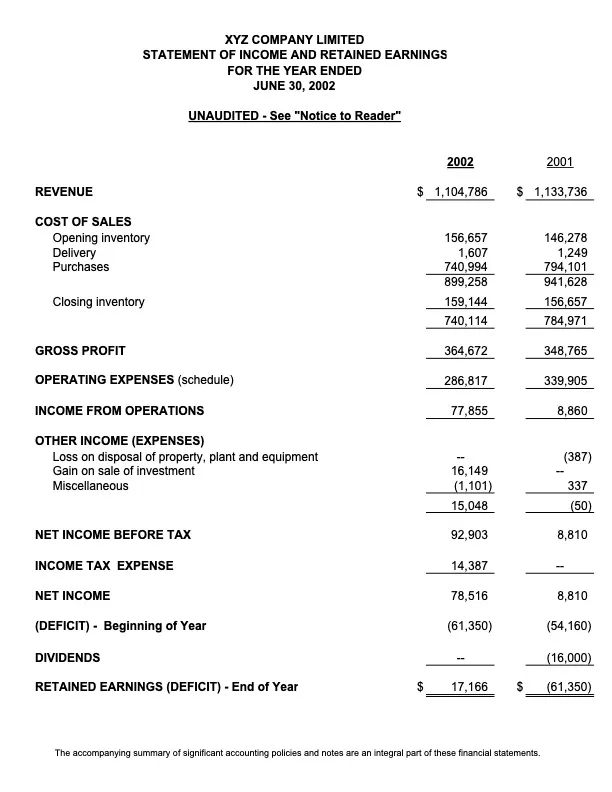
    PDF of an example statement of income

    Without layout analysis, you can try to extract all the text from the PDF, but chances are that although the AI will still be able to understand part of the documents, it’ll miss the contextual information that this page is actually a table. In addition, in the case of financial documents, it’s crucial for the AI to understand table information so that it can effectively answer questions about the company:

    Chunk 1:

    XYZ COMPANY LIMITED STATEMENT OF INCOME AND RETAINED EARNINGS FOR THE YEAR ENDED JUNE 30, 2002 UNAUDITED - See "Notice to Reader" 2002 2001 REVENUE $ 1,104,786 $ 1,133,736 COST OF SALES Opening inventory 156,657 146,278 Delivery 1,607 1,249 Purchases 740,994 794,101 941,628 899,258 Closing inventory 159,144 156,657 784,971 740,114 GROSS PROFIT 348,765 364,672 OPERATING EXPENSES (schedule) 339,905 286,817 INCOME FROM OPERATIONS 8,860 77,855 OTHER INCOME (EXPENSES)

    Chunk 2:

    Loss on disposal of property, plant and equipment -- (387) Gain on sale of investment 16,149 -- Miscellaneous (1,101) 337 (50) 15,048 NET INCOME BEFORE TAX 8,810 92,903 INCOME TAX EXPENSE -- 14,387 NET INCOME 8,810 78,516 (DEFICIT) - Beginning of Year (54,160) (61,350) DIVIDENDS -- (16,000) RETAINED EARNINGS (DEFICIT) - End of Year $ 17,166 $ (61,350)

    Chunk 3:

    The accompanying summary of significant accounting policies and notes are an integral part of these financial statements.

    With layout analysis, the document chunks should be divided based on the content of the page, in addition to detecting any tables that might be in the page:

    Chunk 1:

    XYZ COMPANY LIMITED STATEMENT OF INCOME AND RETAINED EARNINGS FOR THE YEAR ENDED JUNE 30, 2002 UNAUDITED - See "Notice to Reader"

    Chunk 2:

    | | | 2002 | 2001 |

    |---|---|---|---|

    | REVENUE | | $ 1,104,786 | $ 1,133,736 |

    | COST OF SALES | | | |

    | Opening inventory | | 156,657 | 146,278 |

    | Delivery | | 1,607 | 1,249 |

    | Purchases | | 740,994 | 794,101 |

    | | | 899,258 | 941,628 |

    | Closing inventory | | 159,144 | 156,657 |

    | | | 740,114 | 784,971 |

    | GROSS PROFIT | | 364,672 | 348,765 |

    | OPERATING EXPENSES (schedule) | | 286,817 | 339,905 |

    | INCOME FROM OPERATIONS | | 77,855 | 8,860 |

    | OTHER INCOME (EXPENSES) | | | |

    | Loss on disposal of property, plant and equipment | | -- | (387) |

    | Gain on sale of investment | | 16,149 | -- |

    | Miscellaneous | | (1,101) | 337 |

    | | | 15,048 | (50) |

    | NET INCOME BEFORE TAX | | 92,903 | 8,810 |

    | INCOME TAX EXPENSE | | 14,387 | -- |

    | NET INCOME | | 78,516 | 8,810 |

    | (DEFICIT) - Beginning of Year | | (61,350) | (54,160) |

    | DIVIDENDS | | -- | (16,000) |

    | RETAINED EARNINGS (DEFICIT) - End of Year | $ | 17,166 $ | (61,350) |

    Chunk 3:

    The accompanying summary of significant accounting policies and notes are an integral part of these financial statements.

    Our innovation: Lightning-fast layout analysis without neural networks

    Traditional layout analysis relies on neural networks that analyze page images, which is a compute-intensive process that can be slow and resource-hungry. That’s perfect when resources are abundant, but for our AI Assistant, we needed something faster to eliminate waiting time between document upload and processing.

    We developed a novel approach: Instead of processing images, our algorithm analyzes the raw PDF data directly, i.e. the actual positioning instructions and text elements. The results are impressive:

    • Our algorithm — ~10 seconds for a 1,000 page-document
    • Traditional ML approaches (e.g. Docling(opens in a new tab)) — 8+ minutes for the same 1,000 page-document

    That’s nearly a 50x speed improvement!

    Enabling on-demand AI: The push for zero wait time

    The 50x speed improvement isn’t just a benchmark — it fundamentally changes how you can use AI with documents. Traditional approaches force users to wait minutes or even hours before their documents are ready for AI interaction, or require the backend to pre-ingest the document up front, which can also be wasteful and costly.

    Our approach enables true on-demand AI experiences:

    • Instant ingestion — Upload large reports and start querying in seconds, not minutes
    • Real-time processing — Process documents as users upload them — no batch processing or background jobs needed
    • Interactive workflows — Enable live document Q&A sessions without preprocessing delays
    • Scalable architecture — Handle concurrent document uploads without GPU bottlenecks

    In addition, as more and more companies are looking into using on-device LLMs for privacy, compliance, and cost reasons, our new algorithm provides unique advantages in the on-device environment, because it:

    • Doesn’t require heavy computation to run layout analysis
    • Doesn’t require the on-device LLMs to support multimodal inference
    • Can be adapted to run in any runtime (browser, desktop, mobile, cloud, etc.)

    Layout analysis means better document understanding and less hallucination

    “If you can’t measure it, you can’t improve it.” —Peter Drucker

    In the spirit of the quote above, it’s important to measure the effectiveness of this new technique on document understanding. In the future, I’ll cover how Nutrient evaluates the performance of our AI, but for the sake of brevity, the long and short of it is that we’re evaluating the AI agent’s response over thousands of document question and answer cases. Our dataset is modified from the public dataset REALKie(opens in a new tab), which focuses on enterprise documents with complex document layout.

    We use many metrics for our evaluations, but here are the ones relevant to this blog post:

    Accuracy

    • Does the AI agent’s response match with the correct answer?

    Accuracy is influenced by both the retrieval quality and the LLM quality.

    Context usefulness

    • Does the retrieved document chunk contain the information needed to answer the question correctly?

    Think of this as “Did we find the right needle in the haystack?”

    With our new layout analysis algorithm enabled, our testing showed:

    • 20.28 percent higher accuracy — Turning 1 in 5 previously failed queries into successful, accurate responses
    • 76.04 percent better context retrieval — Nearly doubled the ability to find relevant information

    What does this mean in practice? Consider a financial analyst querying a 500-page annual report:

    • Without layout analysis — AI might miss crucial data in tables, leading to incomplete or wrong answers
    • With layout analysis — AI understands table structure, correctly extracting revenue figures, year-over-year comparisons, and financial ratios

    See it in action with AI Assistant 1.5.0

    Excited about the new improvement in document understanding? You can try the improvement yourself in the new 1.5.0 version release of AI Assistant. Other updates in the new release also include support for using AI Assistant with multiple documents at the same time.

    Explore related topics

    Try for free Ready to get started?

    Related SDK articles

    Explore more