

惯性聚合 高效追踪和阅读你感兴趣的博客、新闻、科技资讯
阅读原文 在惯性聚合中打开

推荐订阅源

雷峰网
雷峰网
T
The Blog of Author Tim Ferriss
WordPress大学
WordPress大学
V
V2EX
Jina AI
Jina AI
S
Schneier on Security
Cyberwarzone
Cyberwarzone
cs.CV updates on arXiv.org
PCI Perspectives
PCI Perspectives
美团技术团队
小众软件
小众软件
L
LangChain Blog
N
Netflix TechBlog - Medium
大猫的无限游戏
大猫的无限游戏
T
Threatpost
T
Tor Project blog
K
Kaspersky official blog
Microsoft Security Blog
Security Archives - TechRepublic
Security Latest
Security Latest
H
Heimdal Security Blog
N
News and Events Feed by Topic
T
Threat Research - Cisco Blogs
J
Java Code Geeks
H
Hackread – Cybersecurity News, Data Breaches, AI and More
T
Tailwind CSS Blog
C
CXSECURITY Database RSS Feed - CXSecurity.com
钛媒体:引领未来商业与生活新知
钛媒体:引领未来商业与生活新知
M
MIT News - Artificial intelligence
Apple Machine Learning Research
N
News | PayPal Newsroom
I
Intezer
博客园 - 聂微东
U
Unit 42
Cisco Talos Blog
Cisco Talos Blog
量子位
T
The Exploit Database - CXSecurity.com
Last Week in AI
Last Week in AI
博客园_首页
月光博客
月光博客
Webroot Blog
Webroot Blog
I
InfoQ
The Cloudflare Blog
Attack and Defense Labs
人人都是产品经理
人人都是产品经理
Project Zero
Project Zero
Hacker News: Ask HN
Hacker News: Ask HN
IT之家
IT之家
Google DeepMind News
C
Cisco Blogs

Inside Nutrient

A guide to the invisible work behind documents Introducing Nutrient Documents for Salesforce: Native document generation and signing Document AI vs. traditional OCR: Choosing between OCR, AI, and hybrid pipelines PDF SDK compliance and security evaluation checklist for enterprise teams (2026) Invariant Corp replaces paper processes with Nutrient Workflow and scales without limits What is process mapping? A complete guide Nutrient vs. Conga Composer for Salesforce document generation (2026) Document routing: How to automate document distribution The CTO’s AI playbook: Why accountability architecture beats orchestration Compliance workflow automation: Why built-in compliance is table stakes Workflow diagrams: Examples, symbols, and how to build one that actually runs Digital forms: Replace paper forms with automated workflows Approval workflow software: How to automate approvals Why document-centric automation is different The CEO’s AI playbook: Why decision architecture beats model selection Nutrient SDK product updates for Q1 2026 PDF redaction verification: How to prove sensitive data is permanently removed What is a VPAT? The complete guide to accessibility conformance reports What is PDF/UA? The accessible PDF standard explained Salesforce eSignatures: Generate, sign, and track documents in one flow Online document viewer: Options, tradeoffs, and how to embed one Document viewer for web apps: React, Vue, Angular (2026) Best document viewers in 2026: A buyer’s guide How to edit a PDF in Python: Add text, images, and annotations Nutrient advances Workflow platform with agentic AI for enterprise-grade speed and consistency in document-heavy operations How to create a Salesforce quote template from opportunity data The business case for accessibility: Five ways it drives enterprise value Python PDF library comparison (2026): 7 libraries for developers Why your AI agent hallucinates PDF table data PDF.js limitations: When to upgrade to a commercial PDF SDK How Subject scaled 5× with Nutrient’s PDF SDK without rebuilding its document layer I replaced our sales training with an AI coach that runs in Slack — here’s what broke Redirecting to: https://securitybuzz.com/cybersecurity-news/why-enterprise-permissions-are-ais-most-dangerous-inheritance/ Nutrient .NET SDK vs. iText Core: Complete comparison for .NET developers DocuVieware: Support’s most frequently asked setup questions Introducing Nutrient Workflow How to convert PDF to Word in C# (.NET) When email and spreadsheets stop working: Work order approval workflows for field teams on the move Compliance with confidence: Why document-centric automation is the foundation of your mission Nutrient expands AI Assistant, automating multistep document workflows inside any application What is document generation? A developer’s guide to PDF generation Document Converter data flow and how real-time watermarks skip the queue PDF/UA compliance guide: Requirements, standards, and best practices Computers still can’t understand you How Athena Intelligence built AI agents for regulated enterprises with Nutrient’s document infrastructure How to convert HTML to PDF (2026): 4 methods from browser print to SDK How to build a document extraction pipeline with Nutrient Vision API OCR vs. intelligent document processing: Choosing the right document extraction engine Beyond OCR: How document intelligence eliminates manual processing in regulated industries Nutrient vs. IronPDF: Complete comparison for .NET developers Nutrient vs. Aspose.PDF: Complete comparison for .NET developers Redirecting to: https://fortune.com/2026/02/19/openclaw-who-is-peter-steinberger-openai-sam-altman-anthropic-moltbook/ Lufthansa Systems uses Nutrient to deliver reliable, scalable PDF rendering for pilots worldwide Nutrient vs. Syncfusion: Complete comparison for .NET developers React’s useTransition: The hook you’re probably using wrong First City Monument Bank streamlines banking processes with Nutrient Workflow Redirecting to: https://www.sdcexec.com/warehousing/automation/article/22957364/nutrient-workflow-automation-the-missing-link-in-supply-chain-efficiency The complete guide to digital signatures: PAdES, CAdES, and XAdES explained Nutrient Python SDK: Production-grade document processing for Python Introducing agentic document editing for web applications with AI Assistant Nutrient vs. QuestPDF: Complete comparison for .NET developers How we fixed the GdPicture license expiration (and what to do if you’re affected) Red team security testing with agentic AI The future of healthcare document automation Best healthcare workflow software compared Nutrient SDK product updates for Q4 2025 How Harvey scaled legal document workflows 50 percent MoM without rebuilding infrastructure HIPAA-compliant document management in hospitals How we optimized rendering performance while handling thousands of annotations in React — Part 2 Automated PII removal with Nutrient API Redirecting to: https://www.devopsdigest.com/2026-low-code-no-code-predictions Redirecting to: https://www.kmworld.com/Articles/Editorial/ViewPoints/Leaders-predict-AI-to-continue-permeating-all-aspects-of-KM-in-2026-172594.aspx What are deep agents and how do they solve complex problems? Whipping up document magic: Your easy-bake recipe for Vue and Nutrient Web SDK 🧁 What I’ve learned about product iteration planning while building SDKs Passwordless document signing: Three-layer security guide New zip folder functionality streamlines file management in Document Automation Server The keyboard shortcuts playbook: Taking control of keyboard events in Nutrient Web SDK From experienced engineer to AI beginner: My unexpected journey AI-assisted manual testing: Handling Safari’s PDF rendering and UI quirks How to keep a 20-year-old SDK up to date How we optimized rendering performance while handling thousands of annotations in React — Part 1 Nutrient announces new executive hires to accelerate next phase of growth High performance UI using web workers Automate document conversion at scale with Python and Nutrient DCS From curiosity to PLG (and AI): My journey to understanding product-led growth Prost to progress: One year as Nutrient Pigeon usage at Nutrient: Bridging native SDKs to Flutter Modernizing CI build servers: How to migrate from Chef to Ansible Unix man pages: AI-friendly documentation since 1971 Consistent hashing for even load distribution Best AI redaction APIs: Complete comparison guide for 2025 Why AI document redaction matters for modern security From coding to coordinating: How AI transformed my workflow What is intelligent document processing (IDP)? A complete guide Enterprise PDF SDKs: Best PSPDFKit (now Nutrient) alternatives Nutrient SDK product updates for Q3 2025 GdPicture support best practices Redacting sensitive data with Nutrient AI redaction API How AI is transforming the customer experience at Nutrient: From instant answers to intelligent support
Document Automation Server (DAS) OCR file handling
Ben Goble · 2025-09-03 · via Inside Nutrient

Nutrient Document Automation Server (DAS) contains three OCR engines: standard (using CuneiForm), extended (using Canon IRIS) and GdPicture. Each engine processes files differently, and this post will explore how they handle various document types and where each one works best.

Test the standard, extended, and GdPicture OCR engines in your own workflow and see which is the best fit.

Test setup: Putting the OCR engines to work

To show how the three OCR engines handle different documents, we created a document that contains the following types of pages in it:

  1. One page born-digital(opens in a new tab) — just text, e.g. exported from Word
  2. One page born-digital — text, but also with a screenshot image containing legible text
  3. One page born-digital — text with annotations
  4. One page image PDF — with no selectable text
  5. One page image PDF — with Bates numbers or similar selectable text
  6. One page image PDF — with text-carrying annotations, such as a text box or note
  7. One page image PDF — previously OCR’ed, not by us

Having these different page formats in a single document gives us the widest view of how all three engines handle, or could potentially handle, files that fall into the types above.

The document was then processed using standard OCR, extended OCR, and GdPicture OCR.

Standard OCR (CuneiForm engine)

The standard OCR engine, which is based on CuneiForm, is recommended mainly when a customer would like to process a document that exceeds the dimensions supported by the extended OCR engine.

In most cases, the extended OCR engine provides more accurate OCR results across a wider range of languages and original document quality.

In our test document, each page was OCR’d correctly; however, as can be seen below, a minor glitch occurred.
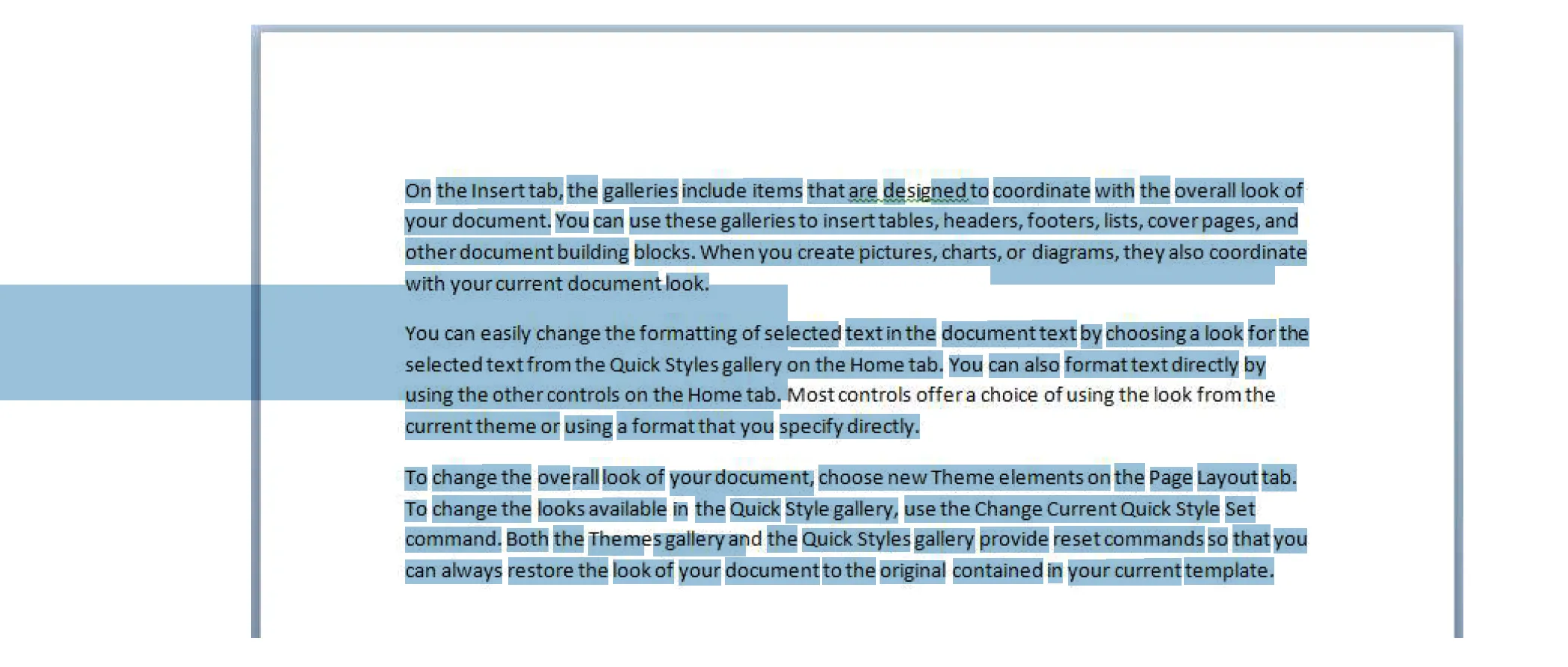
CuneiForm Image

In the image above, using the key combination Control-A resulted in it being highlighted. This behavior is mostly expected, but the large blue bar shouldn’t be present. Furthermore, a line of text hasn’t been OCR’d. When checking the output documents from the extended engine and the GdPicture engine, the large bar wasn’t present.

Extended OCR (Canon IRIS)

The extended OCR engine, which is based on the Canon IRIS engine, is the go-to OCR solution for Document Automation Server. It provides the most reliable OCR and has a few more options like multi-language support, PDF output versioning, and PDF/A validation.

To show how much more reliable the Canon IRIS engine is, the image below shows the same snippet as in the standard OCR example.
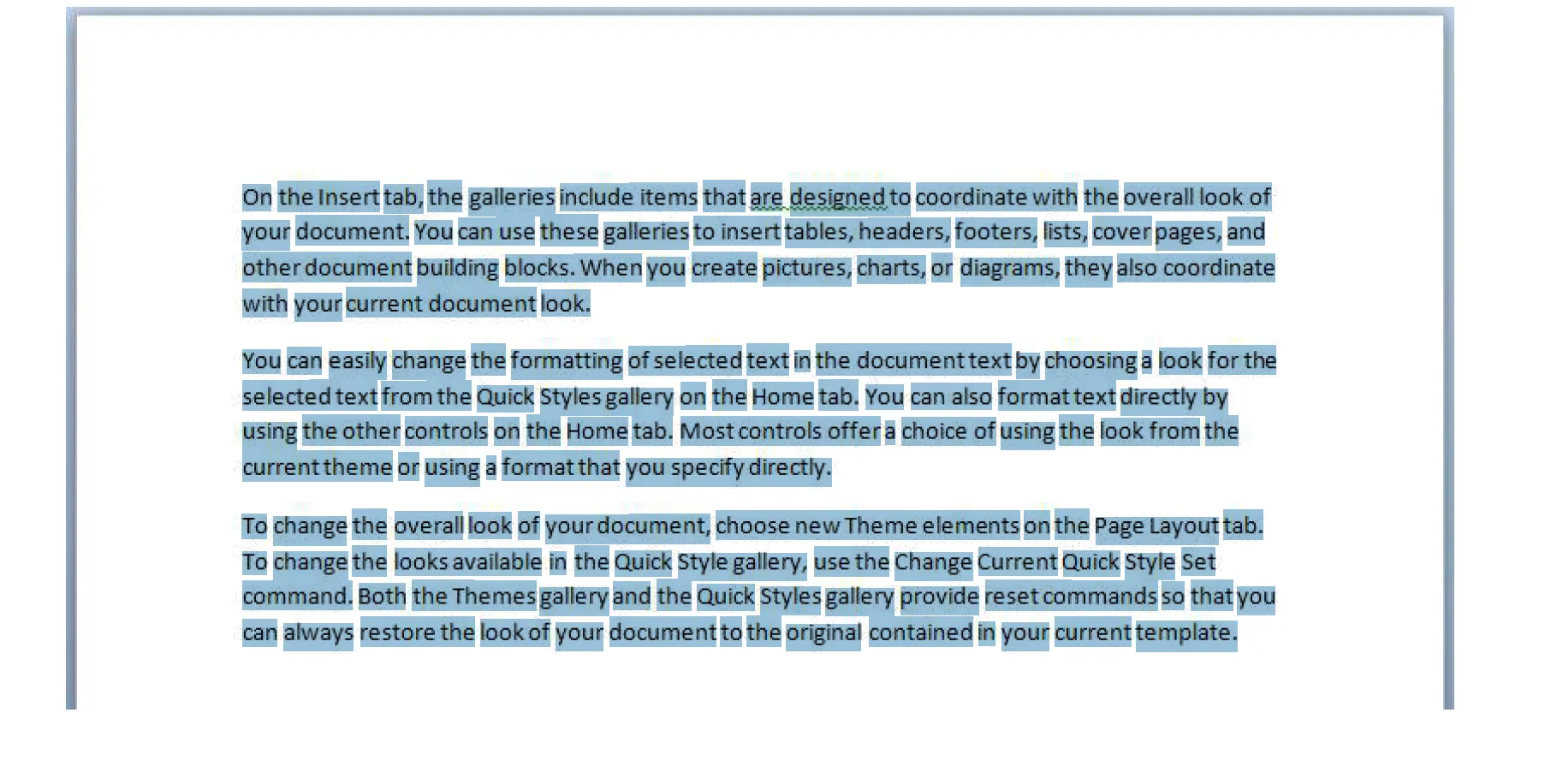
CanonIris Image

As can be seen above, the highlighted text is more accurate to the words themselves, and the blue bar that was present with the standard engine isn’t present in this document.

One of the main issues we’ve seen with the extended OCR engine is that, very rarely, a customer will try to process a document that exceeds the dimensions the engine can handle, which will then cause an error that looks similar to the following:

"Loading D:\Aquaforest\Autobahn DX\work\8194\work1\source\589521.pdf (1) pages…

Processing page 1

The number of pixels in the supplied image size exceeds the maximum allowed value.

Extended OCR has the following image limits:

Max Height = 32,768 pixels

Max Width = 32,768 pixels

Max Size = 75,000,000 pixels

Could not process page 1."

The error message above shows the maximum dimensions and pixel count. This allows the user to verify whether the file’s pixel count or dimensions exceed the extended OCR processing thresholds.

In this instance, we’d ask the user to try standard OCR, as it isn’t limited by the pixel count/dimensions of a document, and it’ll be able to OCR this type of document.

An example we’ve previously seen is when our extended OCR engine is trying to process a CAD file. As these file types are often high resolution, they exceed the capabilities of the extended OCR engine.

It’s important to note that this is a very rare occurrence, as typically, standard A4-sized pages are processed using our software.

GdPicture engine

GdPicture has been used by customers mainly due to its processing speed and versatility with supported input files. Furthermore, it allows for multithreaded document processing. As an example, a core will process a document, and a thread will process a page within that document. This means that if four cores are assigned to a job, four documents will be processed at once. Meanwhile, if the thread count is set to two, two pages in those four documents will be processed at the same time.

Being able to change the amount of CPU cores and threads being used in a job means that GdPicture can be tailored to the specific types of files being processed.

For example, consider a system with 10 cores and 20 threads. If you need to process 10 very large documents (each more than 100 pages), you could set the core count to 2 and the thread count to 9. This configuration processes 2 documents at the same time, with 9 pages per document being handled in parallel — a total of 18 threads — while leaving 2 threads free for system stability. This setup maximizes speed for large files.

On the other hand, if you’re dealing with many small files (say 50 single-page documents), you could set the core count to 9 and the thread count to 1. In this case, 9 documents are processed at the same time, one page each, which improves throughput for lots of smaller jobs.

ScenarioCoresThreadsDocuments processed at oncePages per documentTotal threads usedNotes
Large documents (100+ pages)292918Leaves two threads free for stability.
Many small documents (1 page)91919Optimized for throughput on small jobs.

Furthermore, GdPicture allows already OCR’d pages to be skipped. In the test document, this can be seen in the output logs in the screenshot below.
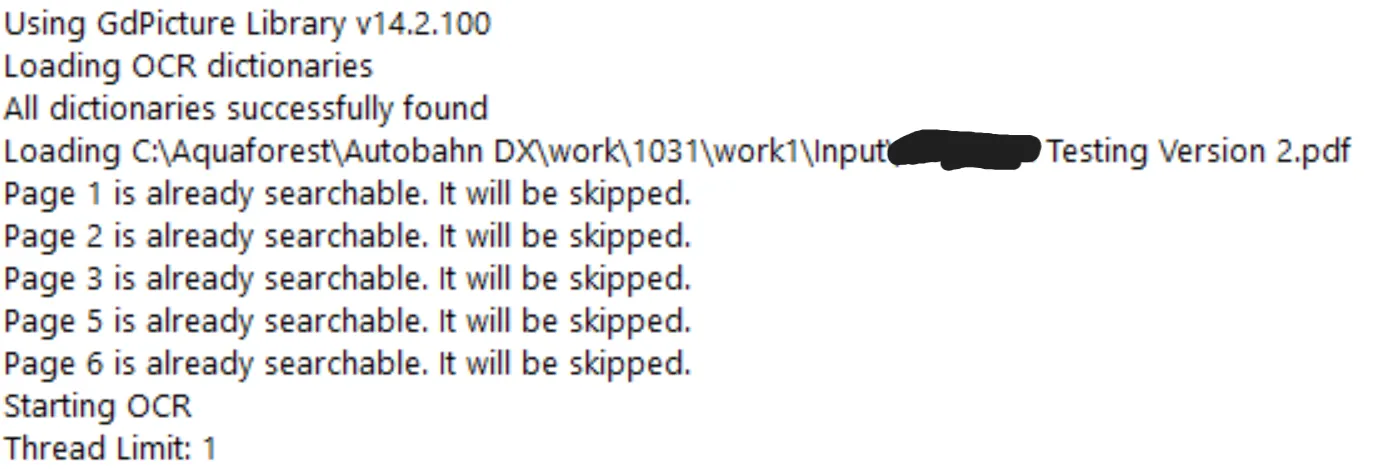
GdPicture Image

Out of the seven pages, pages four and seven were OCR’d. This is because the GdPicture engine detected that those two pages weren’t fully searchable.

The GdPicture engine has known limitations, and one of them is the inability to process handwritten text. Recognition of handwriting isn’t supported, regardless of legibility. This is the same for most OCR engines. As a general rule, our software is designed to process printed or typed text; if a human can read it easily and it’s born-digital, our OCR engines should be able to process it.

Conclusion

To conclude, each of our three OCR engines have their strengths and weaknesses, but the general rule of thumb for which engine should be used is as follows:

  • Standard OCR engine — Used for larger files that exceed the dimensions of the extended OCR engine.
  • Extended OCR engine — The engine to use by default, allowing a happy medium between OCR quality and system resources used,
  • GdPicture OCR engine — Used in “catch-all” jobs that can have a wide range of file types thrown at it, and for when a fine balance between processing speed and resource usage needs to be found to ensure maximum throughput of data processed.

By understanding how each engine handles different document types, you can optimize performance, save processing time, and get more consistent results.

Ready to see which OCR engine is right for your workflow? Learn more about Document Automation Server, or get in touch with our team to explore how Nutrient can fit your document processing needs.