





Table of contents
Data privacy laws like GDPR, HIPAA, and CCPA carry massive penalties for unredacted personal data, and manual redaction can’t keep pace. We tested leading AI redaction APIs on real PDFs, and Nutrient AI redaction API stood out for permanent PDF redaction, OCR/layout preservation, and audit-ready outputs.
TL;DR
- Pick Nutrient AI redaction API for PDF redaction (native and scanned) because it offers permanent removal, OCR with layout preservation, and cloud API access
- Consider Private AI for multilingual PDFs, CaseGuard for multimedia evidence, or AssemblyAI for audio transcription
- Use cloud-native options like Azure AI Language or AWS Comprehend only if you’re already on those platforms and processing basic text (not PDFs)
- Run a pilot with your actual documents to validate accuracy, OCR quality, and audit logs before full rollout
Scope and methodology — This guide focuses on PDF redaction (PDFs and scanned documents) in compliance workflows. Multimedia (audio/video) scenarios are noted but aren’t the core scope.
Why AI redaction matters
Manual redaction has three problems:
- Legal risk — Missing personal data triggers GDPR fines up to €20 million, or 4 percent of revenue(opens in a new tab). HIPAA violations bring similar penalties.
- Speed — Teams waste hours on page-by-page redaction. Contracts close late. FOIA responses miss deadlines.
- No audit trail — Regulators want documented processes and confidence scores. Manual work leaves no record.
How to evaluate AI redaction APIs for your needs
Your choice depends on document types, compliance requirements, and technical infrastructure. Here’s how to narrow your options before running pilots.
1. Document format requirements
Native PDFs — Most APIs handle digitally created PDFs (contracts, reports, forms). Nutrient AI redaction API, Private AI, and Azure AI Language all process native PDFs directly.
Scanned documents — These require OCR before redaction. Nutrient AI redaction API pairs with its OCR API for layout preservation. Private AI includes built-in OCR. Azure needs separate Document Intelligence service. AWS Comprehend requires pre-extracted text.
Multi-format needs — Organizations handling PDFs, images, audio, and video need multiple tools. Consider Private AI for multilingual content across formats, or pair Nutrient AI redaction API (documents) with AssemblyAI (audio).
2. Industry-specific entity detection
Match API capabilities to your compliance requirements:
Healthcare — Look for APIs that detect MRN, prescription numbers, diagnoses, and health plan IDs. Verify Business Associate Agreement (BAA) availability for HIPAA compliance.
Financial services — You’ll need detection for credit cards, bank accounts, and routing numbers. Verify PCI compliance and audit trails.
Legal — APIs should handle attorney-client privilege, case numbers, and witness identities. AI flags content, but attorneys must review privilege decisions.
Government — Look for classification markings, law enforcement identifiers, and intelligence sources detection. This often requires on-premises deployment.
Multilingual — Private AI supports 50+ languages. AWS Comprehend handles English/Spanish only. Verify language support with other vendors based on your needs.
3. Deployment and integration
Cloud APIs — Nutrient AI redaction API, Azure AI Language, and AWS Comprehend offer fast deployment with SOC 2 and GDPR certifications. These are best for organizations comfortable with vendor processing.
On-premises — Private AI and Azure AI Language offer containerized deployment for data residency requirements. This approach requires DevOps resources for infrastructure management.
Platform integration — AWS users benefit from native Textract/Comprehend integration. Azure users get unified billing and authentication. Google Cloud Platform and platform-agnostic organizations should choose vendor-neutral REST APIs like Nutrient AI redaction API.
4. Implementation complexity
Turnkey cloud APIs (2–4 weeks) — Nutrient AI redaction API, Azure AI Language, and AWS Comprehend need minimal setup. These are best for teams without machine learning (ML) engineers.
Container deployments (4–8 weeks) — Private AI and Azure containers require Kubernetes/Docker expertise, plus ongoing maintenance.
Open source frameworks (3–6 months) — Microsoft Presidio needs ML engineering, custom training, and continuous optimization. This is best for teams needing full control.
We tested these APIs on real PDFs from legal, healthcare, finance, and government teams.
| Criteria | Nutrient AI redaction API | Private AI | Microsoft Azure AI Language | AWS Comprehend |
|---|---|---|---|---|
| PII/PHI detection | Comprehensive entity set | 50+ languages supported | Predefined entity set | Predefined entity set |
| Permanent PDF redaction | Yes | Yes | No (masks only) | No (detection only) |
| OCR path | Via separate OCR API | Built-in (container) | Separate Document Intelligence | None |
| File formats | PDF only | PDF, audio, images | PDF, DOCX, TXT (native) | Text only |
| Processing speed | High throughput (batch optimized) | Moderate throughput | Moderate (text-focused) | High (batch optimized) |
| Compliance | GDPR, HIPAA, SOC 2 | GDPR, HIPAA, CPRA | GDPR, HIPAA eligible | SOC 2, GDPR compliant |
| Deployment options | Cloud API | Cloud API (+ on-premises available) | Cloud API (+ container option) | Cloud API |
| API integration | REST API, SDKs, webhooks | REST API, limited SDKs | Comprehensive Azure integration | AWS ecosystem integration |
| Pricing model | Credit-based (per page) | Per-document + entity-based | Per-character analysis | Per-100-character unit |
| Audit trail | Audit-ready outputs | Basic audit features | Azure monitor integration | CloudTrail integration |
Nutrient AI redaction API
Nutrient AI redaction API handles PDF-heavy compliance workflows. It combines AI-powered PII/PHI detection with permanent redaction for workflows where accuracy matters.
Best for:
- Legal and compliance teams processing PDFs (both native and scanned).
Strengths:
- Permanent redaction (removes data, not just hides it)
- OCR for scanned documents with layout preservation
- Accepts PDFs only (pair with OCR API to convert images to searchable PDFs first)
- REST API with SDKs and webhooks
Limitations:
- Contact Nutrient to verify language support for your specific use case.
Pricing:
- Credit-based system. Each operation costs credits deducted from your monthly quota. AI redaction: 0.05 credits per page. Monitor usage via the dashboard.
Getting started
1. Sign up and get your API key
Create an account at Nutrient DWS Processor API(opens in a new tab) and receive 50 free credits to start testing.
2. Install the requests library
All other imports (json, BytesIO) are part of Python’s standard library.
3. Run your first redaction
Use the code example below to test OCR and AI redaction on your PDFs.
Developer quick start: OCR → AI redaction (Python)
This example demonstrates the two-step workflow for processing images and scanned documents:
Step 1 — OCR processing
The OCR API converts images (PNG/JPG/TIFF) or scanned PDFs into searchable PDFs with embedded text. The OCR engine extracts text while preserving the original document layout, fonts, and formatting. The result stays in memory using BytesIO for efficient processing without writing temporary files to disk.
Step 2 — AI redaction
The AI redaction API analyzes the searchable PDF, identifies sensitive data based on your criteria, and permanently removes it from the document. Unlike masking or blacking out text, permanent redaction completely deletes the underlying data, making recovery impossible.
If you’re working with native PDFs (digitally created documents like Word exports or web-generated contracts), skip Step 1 and send your PDF directly to the AI redaction API.
The diagram below shows how the two-step process works.
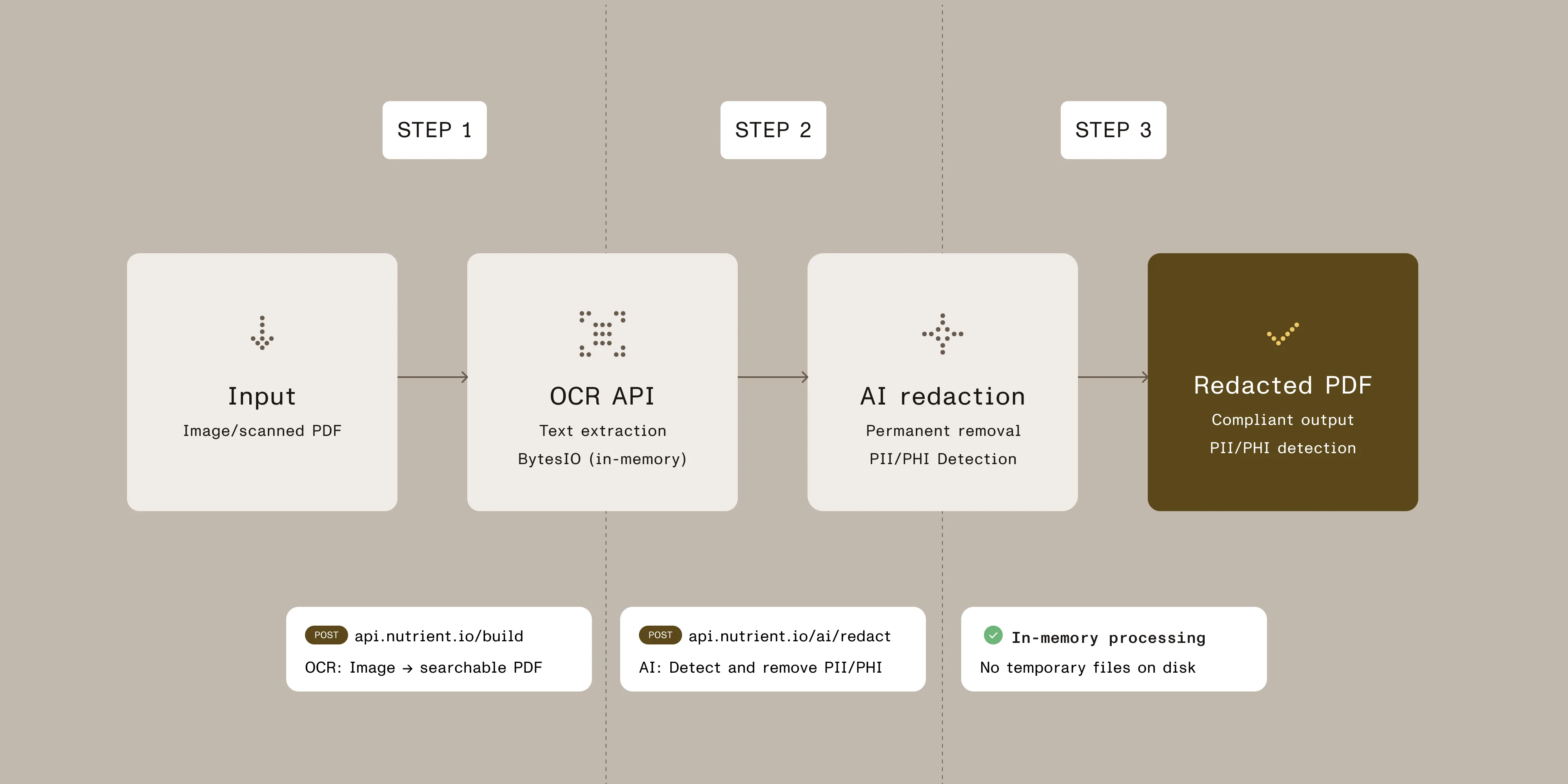
The workflow processes documents entirely in memory using BytesIO, eliminating temporary file storage and improving security:
import requests
import json
from io import BytesIO
API_KEY = "your_api_key_here" # Replace with your actual API key.
INPUT_PNG = "court-report.png" # Input PNG file path.
OUTPUT_REDACTED_PDF = "result.redacted.pdf"
# ---- Step 1: OCR PNG to searchable PDF (in memory) ----
ocr_resp = requests.request(
"POST",
"https://api.nutrient.io/build",
headers={"Authorization": f"Bearer {API_KEY}"},
files={
"img1": (INPUT_PNG, open(INPUT_PNG, "rb"), "image/png")
},
data={
"instructions": json.dumps({
"parts": [{"file": "img1"}],
"actions": [
{"type": "ocr", "language": "english"}
]
})
},
stream=True
)
if not ocr_resp.ok:
print("OCR failed:")
print(ocr_resp.text)
raise SystemExit(1)
ocr_pdf = BytesIO()
for chunk in ocr_resp.iter_content(chunk_size=8192):
if chunk:
ocr_pdf.write(chunk)
ocr_pdf.seek(0)
# ---- Step 2: AI redaction on the OCR'd PDF ----
redact_resp = requests.request(
"POST",
"https://api.nutrient.io/ai/redact",
headers={"Authorization": f"Bearer {API_KEY}"},
files={
# The API expects a PDF; we pass the OCR result from memory.
"file1": ("ocr.pdf", ocr_pdf.getvalue(), "application/pdf")
},
data={
"data": json.dumps({
"documents": [{"documentId": "file1"}],
# Tune to your policy, e.g. "PHI only," "Names and Emails," etc.
"criteria": "All personally identifiable information",
# Use "stage" to review before applying, or "apply" to burn in.
"redaction_state": "apply"
})
},
stream=True
)
if not redact_resp.ok:
print("Redaction failed:")
print(redact_resp.text)
raise SystemExit(1)
with open(OUTPUT_REDACTED_PDF, "wb") as fd:
for chunk in redact_resp.iter_content(chunk_size=8192):
if chunk:
fd.write(chunk)
print(f"Done. Redacted PDF saved to {OUTPUT_REDACTED_PDF}")
Key parameters:
language(OCR step) — Specify the document language for accurate text extraction. Supports 20 languages including English, Spanish, French, and German.criteria(redaction step) — What to redact ("All personally identifiable information","PHI only","Names and Emails", or custom regex patterns)redaction_state(redaction step) —"apply"(permanent) or"stage"(review first). Use"stage"for testing.
Private AI
Private AI handles multiple languages and file types through one API. It processes PDFs, audio files, and images with both cloud and on-premises deployment options for organizations needing data residency.
Best for:
- Global organizations needing multilingual PDF support (50+ languages) or audio redaction.
Strengths:
- Support for more than 50 languages for global operations
- Multi-modal — PDFs, audio, and images through one API (can blur faces in images and bleep audio; not specialized for video redaction)
- On-premises deployment for data residency compliance
Limitations:
- OCR struggles with complex PDF layouts
- Entity-based pricing (per sensitive item) increases costs for high-volume processing
- Limited SDK support for integration
Microsoft Azure AI Language
Azure AI Language detects PII within Microsoft’s cloud platform with cloud and container deployment options.
Best for:
- Organizations already on Azure needing basic PII detection in text documents.
Strengths:
- Native Azure integration (authentication, billing, deployment)
- Native document support for PDF, DOCX, and TXT (preview feature as of January 2025)
- Self-hosted container option for data residency
- Per-character pricing with free tier options
Limitations:
- Text is masked, not permanently removed, which may not meet legal requirements
- Scanned PDFs need separate OCR services
- Struggles with complex documents compared to specialized tools
AWS Comprehend
AWS Comprehend detects PII in plain text only. Unlike PDF-focused solutions, Comprehend needs pre-extracted text. It handles high-volume batch processing within AWS at per-character pricing.
Best for:
- AWS users processing English/Spanish plain text at scale.
Strengths:
- Cheapest option (approximately $1 per 1M characters)
- Fast batch processing with high scalability
- Native AWS integration (Lambda, S3, CloudTrail)
Limitations
- It only handles text, supports English and Spanish only, provides no OCR, and offers no layout preservation.
Other options
CaseGuard
CaseGuard is desktop software for law enforcement and legal teams managing multimedia evidence. Unlike developer APIs, it provides a graphic user interface (GUI) workflow for analysts working with video, audio, images, and PDFs. It’s built specifically for chain-of-custody and courtroom requirements.
Best for:
- Law enforcement handling multimedia evidence (video, audio, images, PDFs).
This is desktop software (not an API) with AI-powered redaction. It features face detection and license plate redaction. It’s subscription-based (starting ~$99/month) with enterprise licenses available. Pair it with Nutrient AI redaction API for high-volume PDF workflows.
Microsoft Presidio
Microsoft Presidio is an open source PII detection framework requiring technical implementation. Unlike turnkey APIs, Presidio provides building blocks to create your redaction system.
Best for:
- Teams with ML engineers who want full control.
It’s open source and self-hosted. It’s free but needs developers to build and maintain. It uses NER, regex, and rules. The documentation warns: “No guarantee Presidio will find all sensitive information.” Choose Nutrient AI redaction API for production-ready accuracy.
AssemblyAI
AssemblyAI transcribes audio with built-in PII redaction. It redacts sensitive data from transcripts or bleeps it from audio. It’s built for call recordings, interviews, and podcasts, not documents.
Best for:
- Call centers and podcasters processing audio in multiple languages.
It supports 47+ languages with real-time streaming and speaker identification. It outputs redacted transcripts or bleeped audio.
Reality check: Accuracy and human review
Key limitations to understand:
- Accuracy matters at scale — Even 99 percent accuracy means potential misses on large document batches. Always pilot test with your actual documents.
- Human review required for — Attorney-client privilege, context-dependent decisions (e.g. public figures vs. private individuals), and high-stakes regulatory filings.
- Organizations remain responsible — AI speeds up redaction but doesn’t eliminate legal liability for misses or over-redaction.
- Best practice — Use staging workflows to preview redactions before permanent application. Implement confidence thresholds and audit logs for accountability.
What’s included out of the box (Nutrient AI redaction API):
- Personal identifiers — Detects names, SSNs, driver’s license numbers, and passport numbers
- Contact information — Identifies email addresses, phone numbers, and physical addresses
- Financial data — Finds credit card numbers, bank account numbers, and routing numbers
- Medical information — Locates medical record numbers, health plan IDs, and prescription numbers
- Custom patterns — You can add organization-specific identifiers via regex (employee IDs, case numbers)
Configuration options:
You can adjust confidence thresholds based on document risk level. Use lower thresholds for litigation documents (catch more, review more) and higher thresholds for routine documents (fewer false positives).
Most organizations complete technical setup in 2–4 weeks, with an additional 4–8 weeks for pilot testing with real documents to validate accuracy and tune configurations.
Ready to test AI redaction?
Start your evaluation with production documents
Get 50 free credits for Nutrient AI redaction API(opens in a new tab) to test with your actual documents — no credit card required.
You can:
- Upload PDFs (native or scanned)
- Run OCR on scanned PDFs or images (PNG/JPG/TIFF) to convert them to searchable PDFs
- Apply AI-powered PII/PHI detection with customizable criteria (PDFs only)
- Review staged redactions before permanent application
- Download redacted files and verify output quality
- Test batch processing with multiple documents
Recommended pilot approach:
- Week 1 — Test 50–100 representative documents covering your typical use cases.
- Week 2 — Measure accuracy, review false positives/negatives, adjust criteria.
- Week 3 — Integrate with your existing workflows (document management, case management systems).
- Week 4 — Run parallel comparison with current process, document time savings.
Multi-modal workflow solutions
For organizations processing multimedia content:
- Documents (PDFs only) — Use Nutrient AI redaction API for permanent removal and compliance. Use OCR API first to convert images to PDFs.
- Audio (call recordings, podcasts) — Use AssemblyAI for transcription with PII redaction.
- Video (evidence, interviews) — Use CaseGuard for face/license plate redaction with chain-of-custody.
- Global multilingual content — Use Private AI for language support in more than 50 languages across file types.
Most compliance organizations deploy Nutrient AI redaction API as their primary document redaction solution, and then add specialized tools for audio/video as needed.
Need help choosing?
Review the detailed solution comparison above or consult our Sales team for personalized recommendations based on your specific requirements.
FAQ
Yes, but OCR requirements vary. Refer to document format requirements for details on each vendor’s approach to scanned documents and images.
Vendors claim 95–99 percent accuracy, but 99 percent still means 10 potential misses per 1,000 pages. Refer to reality check: accuracy and human review for limitations and best practices.
Documents go to vendor servers, get processed, and come back redacted. Most vendors (Nutrient AI redaction API, Azure, AWS) don’t keep copies. Everything’s encrypted. Check their SOC 2, GDPR, and HIPAA certifications.
Nutrient AI redaction API handles PDFs only. For images, use the OCR API to convert to PDF first. Private AI and Azure AI Language also support PDFs. You might need multiple tools if you have audio/video (add Private AI or AssemblyAI) or text-only pipelines (AWS Comprehend).
Basic integration typically takes 2–4 weeks, while full production deployment takes 3–6 months.
- Weeks 1–2 — Setup and planning
- Weeks 3–4 — Build and test
- Months 2–3 — Pilot with real documents
- Months 3–6 — Roll out and scale
You’ll need to add time for compliance reviews, custom entities, or legacy system integration.
No. Attorney judgment is required; use staging workflows combined with human review. See reality check.
- GDPR — Remove personal data before disclosure
- HIPAA — Redact PHI from medical records
- CCPA/CPRA — Handle deletion requests
- FOIA — Clean government documents for public release
- Discovery — Remove privileged content
APIs help but don’t guarantee compliance. Your legal team must verify the process meets requirements.