




This guide covers intelligent document processing: what it is, how it works, and how Nutrient AI Document Processing helps organizations process documents faster with higher accuracy.
TL;DR
Finance teams type invoice data by hand. Healthcare workers manually dig through patient records. Legal staff read contracts line by line, copying terms into spreadsheets. In 2025, we’re innovating at breakneck speed, yet we’re still treating documents like paper forms from the 1990s.
Intelligent document processing changes this equation. The global intelligent document processing market is projected to grow from $10.57 billion in 2025 to $66.68 billion by 2032 (30.1 percent CAGR), according to Fortune Business Insights(opens in a new tab). Organizations are ditching manual data entry and moving beyond basic OCR to intelligent document automation that understands context, learns from patterns, and adapts automatically.
Intelligent document processing (IDP) automates data extraction, classification, and validation from documents using artificial intelligence. IDP combines machine learning(opens in a new tab), natural language processing, and computer vision to understand document context and extract structured data from unstructured content.
IDP systems process structured forms with fixed fields, semi-structured documents like invoices with varying layouts, and unstructured documents like contracts and medical records. The technology learns from processed documents and improves accuracy without manual rule updates.
Nutrient AI Document Processing uses a hybrid AI approach — combining large language models, key-value pair extraction, heuristics, and machine learning — to deliver highly accurate, automated extraction and classification across more than 100 document formats and multiple languages. It supports unsupervised processing using natural language instructions, offers flexible cloud or on-premises deployment (including local LLM support for compliance), and stores no document or extracted content by default for maximum security.
Here’s a code example showing how to classify and extract data from an invoice using Nutrient AI Document Processing. For complete setup instructions, see the getting started guide:
static void runExtraction()
{
Configuration.RegisterGdPictureKey("GDPICTURE_KEY");
Configuration.RegisterLLMProvider(new OpenAIProvider(OPENAI_KEY));
Configuration.ResourcesFolder = "resources";
// Building the component.
ProcessorComponent component = buildComponent();
// Processing all documents.
foreach (string documentFile in Directory.GetFiles([DIRECTORY_PATH]))
{
ProcessorResult result = new DocumentProcessor().Process(documentFile, component);
// Analyzing results.
if (result.Template != null)
{
Console.WriteLine("Document category:" + result.Template.Name);
if (result.ExtractedFields != null)
{
foreach (var item in result.ExtractedFields)
{
Console.WriteLine($"Field name: '{item.FieldName}' - Field value: '{item.Value}' - Validation state: ({item.ValidationState})");
}
}
}
}
}
static ProcessorComponent buildComponent()
{
return new ProcessorComponent()
{
EnableClassifier = true, // Enabling classification.
EnableFieldsExtraction = true, // Enabling extraction.
Templates = setupDocumentTemplates()
};
}
static List<DocumentTemplate> setupDocumentTemplates()
{
List<DocumentTemplate> templates = new List<DocumentTemplate>();
templates.Add(DocumentTemplates.Invoice); // Add invoice template.
templates.Add(DocumentTemplates.Resume); // Add resume template.
templates.Add(DocumentTemplates.PurchaseOrder); // Add purchase order template.
templates.Add(DocumentTemplates.PayrollStatement); // Add payroll statement template.
return templates;
}
The code uses template-based extraction with semantic field descriptions. The system combines predefined templates with custom fields to extract specific data from invoices.
Organizations choose between three document processing approaches: manual, OCR, and IDP. Each has distinct capabilities and costs.
| Manual processing | OCR technology | Intelligent document processing | |
|---|---|---|---|
| Description | Human workers read and enter document data into systems | Software converts text images into machine-readable characters | AI-powered systems classify, extract, and validate data with contextual understanding |
| Speed | Slow, limited by human capacity | Fast for simple text extraction | 50–70 percent faster than manual; varies by document complexity |
| Accuracy | 96–99 percent on simple tasks; inconsistent, drops with complexity and fatigue | Varies widely(opens in a new tab): clean print often exceeds 98–99 percent; noisy scans, complex layouts, and handwriting reduce performance | Typically 90–98 percent field-level accuracy; varies by document type, quality, and training data |
| Document types | All types, but time-intensive | Best for structured formats with consistent layouts | All types — structured, semi-structured, unstructured |
| Learning | No improvement over time | No adaptation to new formats without reprogramming | Improves with training and feedback; requires initial setup |
| Cost | Highest — full labor costs | Medium — software licensing with per-page or volume pricing | Higher initial investment; lower per-document cost at scale |
| Best for | Very low volumes or highly complex judgment calls | Digitizing archives, searchable PDFs, simple forms with fixed layouts | High-volume workflows (500+ documents/month), variable formats, complex extraction |
Real-world impact: Organizations implementing automated invoice processing with IDP see significant reductions in both processing time and costs, primarily from reduced labor costs and fewer processing errors. High-volume environments benefit most from these improvements.
OCR reads text without context. It sees “$1,234.56” in five places on an invoice but can’t identify which is the total. IDP identifies the invoice total, line items, and tax amounts based on position and surrounding text.
Nutrient offers solutions across this spectrum. Document Searchability provides automated OCR for making documents searchable, Document Automation Server handles high-volume conversion and processing workflows, and AI Document Processing provides intelligent extraction for complex documents.
IDP systems process documents through three stages: classification, extraction, and validation. Each stage uses AI to automate tasks that previously required human judgment.
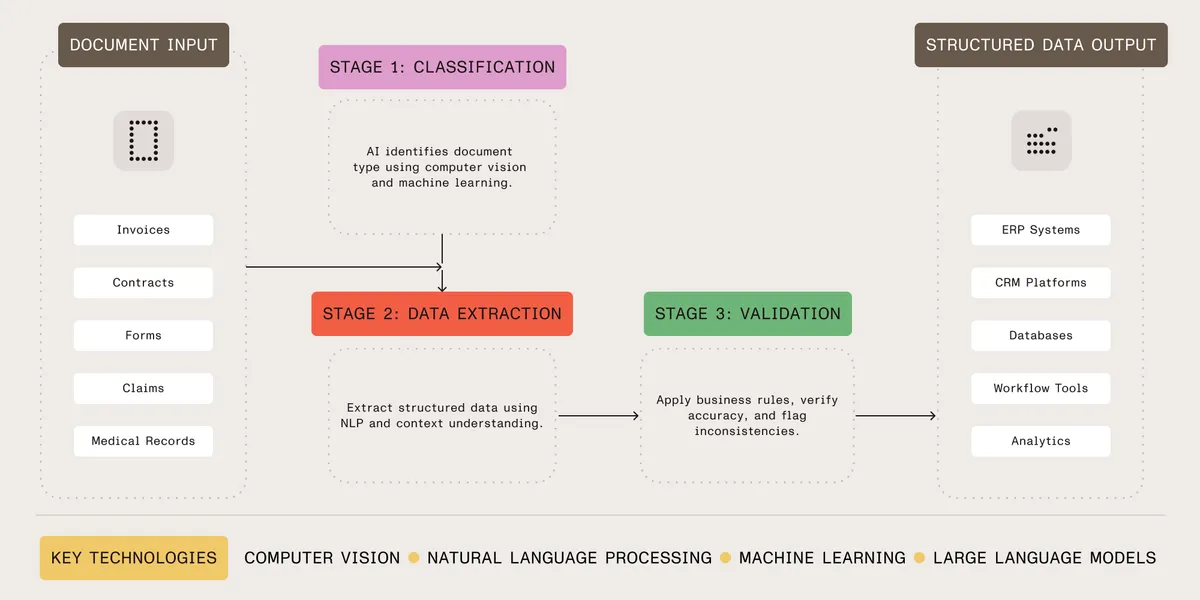
The system identifies the document type — invoice, contract, medical record, application form — using computer vision and machine learning. Classification determines which extraction rules and validation checks to apply.
Nutrient AI Document Processing uses both visual analysis and content understanding to classify documents, combining LLMs, heuristics, mathematics, and machine learning to automatically recognize document types without requiring manual labeling or predefined extraction rules.
Classification errors cause downstream problems: wrong extraction rules, failed validation, and misrouted documents. Nutrient AI Document Processing analyzes visual layout and text content for accurate classification.
After classification, the system extracts information using natural language processing and machine learning. IDP understands context, field relationships, and document structure instead of just pattern matching.
Traditional extraction requires templates for each document format. Nutrient AI Document Processing uses natural language instructions instead, enabling it to extract structured, semi-structured, and unstructured data while adapting to changes in document formats.
When vendors change invoice formats or you add new suppliers, the system adapts without manual configuration.
The final stage validates extracted data for accuracy and completeness. IDP systems apply business rules, cross-reference databases, perform calculations, and flag inconsistencies using built-in validators.
Automated validation catches errors, inconsistencies, and missing information. Validated documents go directly to downstream systems. Documents with issues are flagged for review with specific error details.
Governance and oversight: Well-designed IDP implementations use confidence thresholds to determine automated vs. human review. Documents with high-confidence extractions (typically more than 90 percent confidence scores) process automatically, while low-confidence items route to human reviewers with highlighted uncertain fields. This human-in-the-loop approach balances automation efficiency with quality control, ensuring critical decisions aren’t made on uncertain data. Organizations should establish clear exception handling workflows and regularly audit automated decisions to maintain quality standards.
Five industries, outlined below, benefit most from IDP implementation.
Medical providers process patient records, insurance claims, lab results, and prescriptions. IDP extracts patient data, verifies insurance eligibility, and routes documents to the right departments.
Healthcare organizations significantly reduce claim processing times with IDP. Time savings depend on claim complexity, system integration, and existing workflows.
Financial institutions process loan applications, account documents, tax forms, and financial statements. IDP speeds up processing while maintaining regulatory compliance.
Financial institutions significantly reduce loan approval times with IDP through automated document verification and data extraction. Improvements vary based on loan type, document complexity, and system integration. Faster processing improves customer experience and accelerates revenue recognition.
Insurance companies process claims, policy applications, damage assessments, and supporting documentation. IDP extracts data and validates claims against policy terms.
Insurance companies achieve significantly faster claims processing and improved first-pass accuracy with IDP. Results vary based on claim types, document quality, and implementation approach.
Law firms process contracts, court documents, discovery materials, and legal briefs. IDP extracts clauses, identifies obligations, and organizes documents for case management.
Legal teams significantly increase contract processing throughput with IDP. Productivity gains depend on document types, required analysis depth, and system training.
Government agencies process permits, applications, citizen requests, and regulatory filings. IDP speeds processing while maintaining compliance.
Government agencies significantly reduce application processing times with IDP, improving citizen service delivery and operational efficiency. Timelines depend on application complexity, required approvals, and system integration.
IDP delivers measurable results, and the following sections break down how intelligent document processing drives cost reduction, faster processing times, and higher accuracy; explain typical ROI timelines; and highlight how IDP provides scalability and flexibility for organizations of all sizes — showing both the operational and financial impact of implementing AI-driven document workflows.
Organizations implementing IDP typically achieve 30–40 percent reductions in document processing costs over time. These savings primarily come from reduced manual labor, fewer error corrections, and increased staff productivity. Cost reductions vary significantly based on document volumes, current process efficiency, and implementation quality.
Major savings sources include:
High-volume operations (processing thousands of documents monthly) typically see more substantial savings than lower-volume implementations.
IDP implementations typically achieve 50–70 percent reductions in document processing time. The actual improvement depends on current process efficiency, document complexity, and required validation steps.
Common speed improvements include:
These improvements enable organizations to handle higher volumes, respond to customers faster, and reduce processing backlogs. However, complex documents requiring extensive human review will see smaller gains.
Well-implemented IDP systems typically achieve 90–98 percent field-level accuracy on standard document types with quality source materials. Accuracy varies significantly based on:
Manual processing can achieve 96–99 percent accuracy on simple documents, but consistency suffers with fatigue and complexity. OCR on clean, printed documents can exceed 98–99 percent character accuracy, but quality drops with noise and complex layouts. IDP maintains consistent field-level accuracy (typically 90–98 percent) across document variations by combining OCR with contextual understanding and validation rules.
Accuracy improvements reduce costly errors — misread invoice amounts, incorrect policy dates, or wrong contract terms. Systems provide confidence scores enabling organizations to automatically process high-confidence extractions while routing low-confidence items for human review.
Most organizations typically achieve positive ROI within 12–24 months of IDP implementation, though timelines vary significantly based on implementation scope and document volumes. High-volume operations (5,000+ documents monthly) may see payback in 6–12 months, while lower-volume implementations take longer.
ROI timeline factors include:
ROI considerations: Organizations processing large document volumes consistently achieve faster payback. A healthcare provider processing tens of thousands of claims monthly may see payback within a year, while a small law firm processing hundreds of contracts monthly may require 18–24 months. Calculate ROI based on your specific volumes and labor costs.
ROI comes from multiple sources: direct labor cost savings, increased staff productivity enabling volume growth, reduced error correction costs, and improved cash flow from faster processing. Implementation costs and training time should be factored into initial ROI calculations.
IDP scales by adding servers and/or cloud capacity, not staff. Processing 10,000 or 100,000 documents monthly requires more compute capacity, not more people. This scalability handles growth, seasonal peaks, and project surges without bottlenecks.
Evaluating IDP solutions requires a holistic view of both technology and vendor capabilities. The following sections cover key considerations for selecting the right solution, including accuracy and extraction capabilities, integration and deployment flexibility, data privacy and compliance, ease of implementation and maintenance, total cost of ownership, and vendor expertise and support — providing a roadmap to ensure the solution meets your operational, technical, and compliance needs.
Higher accuracy means less manual review. Look for the ability to:
Test with your documents, not vendor samples. Run a pilot with 100–500 real documents. Systems achieving 98 percent accuracy on vendor samples might drop to 85 percent on your documents.
IDP must integrate with existing workflows. Check for:
Nutrient AI Document Processing offers REST APIs for microservices and native APIs for desktop/server applications. Deploy anywhere and control where your documents are stored.
Document processing involves sensitive information. Security features to require:
Nutrient doesn’t use your content to train models, and it offers deployments that avoid persistent storage of your documents.
IDP should reduce work, not add technical debt. Requirements:
Traditional IDP requires templates for each document type. Nutrient uses natural language instructions that adapt to document variations.
Calculate total lifecycle costs:
A cheap solution requiring 20 percent manual review costs more than a premium solution with 98 percent accuracy.
Vendor requirements for complex document processing:
Nutrient has decades of document processing experience, from PDF technology to document automation and OCR. Our products handle viewing, editing, automation, and intelligent processing.
Manual processing kills productivity and drains budgets, while IDP automates document classification, data extraction, and validation using AI that understands context — no more typing invoice data by hand or digging through patient records.
As noted above, the IDP market is experiencing rapid growth with a 30.1 percent CAGR through 2032. Organizations typically cut costs by 30–40 percent, speed processing by 50–70 percent, and see ROI in 12–24 months. Results vary by volume and complexity.
Nutrient AI Document Processing combines LLMs with extraction technology for accuracy across document types. We don’t store your documents or data, keeping compliance simple. IDP transforms document workflows for invoices, contracts, medical records, and insurance claims.
OCR converts text images into machine-readable characters without understanding meaning. IDP combines OCR with AI technologies — natural language processing and machine learning — to understand content, extract information, and make decisions. OCR reads text; IDP understands meaning and takes action.
Yes. Modern IDP can process handwritten text using computer vision(opens in a new tab) and machine learning, though accuracy is typically lower than for printed text. Handwriting recognition accuracy(opens in a new tab) typically varies from 70–90 percent depending on legibility, writing style, and system training. Clear print-style handwriting achieves better results than cursive. Systems improve with training data, but handwritten documents often require more human review than typed documents. Nutrient AI Document Processing handles printed, handwritten, and mixed documents.
Implementation timelines vary significantly based on scope and complexity. A basic proof of concept can be operational in 1–2 weeks. Production deployments typically take 2–6 months, including system integration, training, testing, and user adoption. Enterprise-wide implementations may require 6–12 months. Factors affecting timeline include: number of document types, system integrations required, data security reviews, user training needs, and accuracy targets. Solutions with natural language configuration (like Nutrient AI Document Processing) reduce initial setup time by eliminating template creation for each document format.
IDP typically makes economic sense for organizations processing 500+ documents monthly, though lower volumes can be justified for high-value or complex documents. Breakeven calculations should consider: current labor costs, error correction expenses, processing delays, and growth projections. Organizations processing 2,000+ documents monthly typically see clear ROI within 12–18 months. Smaller volumes may still benefit if documents are time-critical, are error-prone, or require specialized expertise. Calculate total cost of current process (labor, errors, delays, storage) and compare to IDP implementation and operating costs over 2–3 years.
Most IDP solutions offer integration APIs. Nutrient AI Document Processing is available as a REST microservice, enabling integration with your existing systems. It supports 100+ input file types, including PDF, Office documents, images, and emails. The REST API architecture enables you to integrate document processing into your workflows and applications, with extracted data available via API responses for routing to downstream systems.
IDP accuracy typically ranges from 85–98 percent depending on multiple factors: document quality (scan resolution, image clarity), document consistency (standardized vs. highly variable formats), field types (simple text vs. complex tables), and training data available. Well-implemented systems on quality documents achieve 90–95 percent accuracy. IDP’s advantage is consistent accuracy across document variations at scale, unlike manual processing, which suffers from fatigue and inconsistency. Nutrient AI Document Processing provides confidence scores for each extraction, enabling automatic processing of high-confidence data (typically more than 90 percent confidence) while routing uncertain extractions for human review. Expect an initial training period of several weeks to months to optimize accuracy for your specific documents.
Nutrient AI Document Processing combines LLMs with extraction technology for accuracy across document types. Contact our team to discuss your needs and see a demo.
Learn more about our Document AI capabilities.
此内容由惯性聚合(RSS阅读器)自动聚合整理,仅供阅读参考。 原文来自 — 版权归原作者所有。