

惯性聚合 高效追踪和阅读你感兴趣的博客、新闻、科技资讯
阅读原文 在惯性聚合中打开

推荐订阅源

CTFtime.org: upcoming CTF events
S
Securelist
GbyAI
GbyAI
The Register - Security
B
Blog
Recorded Future
Recorded Future
D
DataBreaches.Net
C
Cybersecurity and Infrastructure Security Agency CISA
A
About on SuperTechFans
C
CERT Recently Published Vulnerability Notes
T
The Blog of Author Tim Ferriss
Vercel News
Vercel News
Google DeepMind News
S
Schneier on Security
S
SegmentFault 最新的问题
Martin Fowler
Martin Fowler
T
Tenable Blog
T
The Exploit Database - CXSecurity.com
阮一峰的网络日志
阮一峰的网络日志
宝玉的分享
宝玉的分享
AWS News Blog
AWS News Blog
L
Lohrmann on Cybersecurity
Spread Privacy
Spread Privacy
N
News | PayPal Newsroom
Engineering at Meta
Engineering at Meta
T
Tor Project blog
The Hacker News
The Hacker News
量子位
酷 壳 – CoolShell
酷 壳 – CoolShell
MongoDB | Blog
MongoDB | Blog
Cyberwarzone
Cyberwarzone
Security Archives - TechRepublic
爱范儿
爱范儿
奇客Solidot–传递最新科技情报
奇客Solidot–传递最新科技情报
C
Cyber Attacks, Cyber Crime and Cyber Security
T
Threatpost
WordPress大学
WordPress大学
Google Online Security Blog
G
GRAHAM CLULEY
Google DeepMind News
Recent Commits to openclaw:main
Attack and Defense Labs
N
Netflix TechBlog - Medium
SecWiki News
SecWiki News
Hacker News: Ask HN
Hacker News: Ask HN
M
MIT News - Artificial intelligence
Scott Helme
Scott Helme
Microsoft Security Blog
H
Help Net Security
cs.AI updates on arXiv.org

Inside Nutrient

A guide to the invisible work behind documents Introducing Nutrient Documents for Salesforce: Native document generation and signing Document AI vs. traditional OCR: Choosing between OCR, AI, and hybrid pipelines PDF SDK compliance and security evaluation checklist for enterprise teams (2026) Invariant Corp replaces paper processes with Nutrient Workflow and scales without limits What is process mapping? A complete guide Nutrient vs. Conga Composer for Salesforce document generation (2026) Document routing: How to automate document distribution The CTO’s AI playbook: Why accountability architecture beats orchestration Compliance workflow automation: Why built-in compliance is table stakes Workflow diagrams: Examples, symbols, and how to build one that actually runs Digital forms: Replace paper forms with automated workflows Approval workflow software: How to automate approvals Why document-centric automation is different The CEO’s AI playbook: Why decision architecture beats model selection Nutrient SDK product updates for Q1 2026 PDF redaction verification: How to prove sensitive data is permanently removed What is a VPAT? The complete guide to accessibility conformance reports What is PDF/UA? The accessible PDF standard explained Salesforce eSignatures: Generate, sign, and track documents in one flow Online document viewer: Options, tradeoffs, and how to embed one Document viewer for web apps: React, Vue, Angular (2026) Best document viewers in 2026: A buyer’s guide How to edit a PDF in Python: Add text, images, and annotations Nutrient advances Workflow platform with agentic AI for enterprise-grade speed and consistency in document-heavy operations How to create a Salesforce quote template from opportunity data The business case for accessibility: Five ways it drives enterprise value Python PDF library comparison (2026): 7 libraries for developers Why your AI agent hallucinates PDF table data PDF.js limitations: When to upgrade to a commercial PDF SDK How Subject scaled 5× with Nutrient’s PDF SDK without rebuilding its document layer I replaced our sales training with an AI coach that runs in Slack — here’s what broke Redirecting to: https://securitybuzz.com/cybersecurity-news/why-enterprise-permissions-are-ais-most-dangerous-inheritance/ Nutrient .NET SDK vs. iText Core: Complete comparison for .NET developers DocuVieware: Support’s most frequently asked setup questions Introducing Nutrient Workflow How to convert PDF to Word in C# (.NET) When email and spreadsheets stop working: Work order approval workflows for field teams on the move Compliance with confidence: Why document-centric automation is the foundation of your mission Nutrient expands AI Assistant, automating multistep document workflows inside any application What is document generation? A developer’s guide to PDF generation Document Converter data flow and how real-time watermarks skip the queue PDF/UA compliance guide: Requirements, standards, and best practices Computers still can’t understand you How Athena Intelligence built AI agents for regulated enterprises with Nutrient’s document infrastructure How to convert HTML to PDF (2026): 4 methods from browser print to SDK How to build a document extraction pipeline with Nutrient Vision API OCR vs. intelligent document processing: Choosing the right document extraction engine Beyond OCR: How document intelligence eliminates manual processing in regulated industries Nutrient vs. IronPDF: Complete comparison for .NET developers Nutrient vs. Aspose.PDF: Complete comparison for .NET developers Redirecting to: https://fortune.com/2026/02/19/openclaw-who-is-peter-steinberger-openai-sam-altman-anthropic-moltbook/ Lufthansa Systems uses Nutrient to deliver reliable, scalable PDF rendering for pilots worldwide Nutrient vs. Syncfusion: Complete comparison for .NET developers React’s useTransition: The hook you’re probably using wrong First City Monument Bank streamlines banking processes with Nutrient Workflow Redirecting to: https://www.sdcexec.com/warehousing/automation/article/22957364/nutrient-workflow-automation-the-missing-link-in-supply-chain-efficiency The complete guide to digital signatures: PAdES, CAdES, and XAdES explained Nutrient Python SDK: Production-grade document processing for Python Introducing agentic document editing for web applications with AI Assistant Nutrient vs. QuestPDF: Complete comparison for .NET developers How we fixed the GdPicture license expiration (and what to do if you’re affected) Red team security testing with agentic AI The future of healthcare document automation Best healthcare workflow software compared Nutrient SDK product updates for Q4 2025 How Harvey scaled legal document workflows 50 percent MoM without rebuilding infrastructure HIPAA-compliant document management in hospitals How we optimized rendering performance while handling thousands of annotations in React — Part 2 Automated PII removal with Nutrient API Redirecting to: https://www.devopsdigest.com/2026-low-code-no-code-predictions Redirecting to: https://www.kmworld.com/Articles/Editorial/ViewPoints/Leaders-predict-AI-to-continue-permeating-all-aspects-of-KM-in-2026-172594.aspx What are deep agents and how do they solve complex problems? Whipping up document magic: Your easy-bake recipe for Vue and Nutrient Web SDK 🧁 What I’ve learned about product iteration planning while building SDKs Passwordless document signing: Three-layer security guide New zip folder functionality streamlines file management in Document Automation Server The keyboard shortcuts playbook: Taking control of keyboard events in Nutrient Web SDK From experienced engineer to AI beginner: My unexpected journey AI-assisted manual testing: Handling Safari’s PDF rendering and UI quirks How to keep a 20-year-old SDK up to date How we optimized rendering performance while handling thousands of annotations in React — Part 1 Nutrient announces new executive hires to accelerate next phase of growth High performance UI using web workers Automate document conversion at scale with Python and Nutrient DCS From curiosity to PLG (and AI): My journey to understanding product-led growth Prost to progress: One year as Nutrient Pigeon usage at Nutrient: Bridging native SDKs to Flutter Modernizing CI build servers: How to migrate from Chef to Ansible Unix man pages: AI-friendly documentation since 1971 Consistent hashing for even load distribution Best AI redaction APIs: Complete comparison guide for 2025 Why AI document redaction matters for modern security From coding to coordinating: How AI transformed my workflow What is intelligent document processing (IDP)? A complete guide Enterprise PDF SDKs: Best PSPDFKit (now Nutrient) alternatives Nutrient SDK product updates for Q3 2025 GdPicture support best practices Redacting sensitive data with Nutrient AI redaction API How AI is transforming the customer experience at Nutrient: From instant answers to intelligent support
Digital transformation is failing without intelligent document automation
Steffen Kretzschmar · 2025-05-09 · via Inside Nutrient

Enterprises are investing heavily in digital transformation, but many still rely on outdated document processes that slow them down. Intelligent automation — powered by AI, OCR, and metadata extraction — is critical for unlocking real productivity gains.

This post explores how forward-thinking organizations can use Nutrient’s suite of products to automate their document workflows — boosting efficiency, minimizing errors, and ensuring compliance. We also highlight three real-world use cases that show exactly how our customers have successfully put these tools into action.

How to efficiently process millions of documents

Many of our customers have large repositories of legacy documents, often starting in the hundreds of thousands and going into the tens of millions. At these volumes, manual processing isn’t an option.

Nutrient Document Automation Server (DAS) — formerly known as Autobahn DX — is ideal for processing millions of documents with little to no manual intervention after setup. Users can build a customized workflow with multiple steps to handle documents exactly as needed.

In the following example, Document Automation Server:

  • Monitors a mailbox for email attachments
  • Converts attachments into searchable PDFs
  • Adds a customizable stamp
  • Uploads PDFs to a designated SharePoint location

Workflow example

DAS scales by using additional CPU cores, and the number of CPU cores selected for any step equals the number of concurrent processes — for example, an 8-core setup would OCR 8 files in parallel.

Other Nutrient solutions include Document Searchability, which is available as an automated background OCR’ing tool for SharePoint, Azure, and file systems; and a highly customizable automated tagging tool, which is available for SharePoint only.

Audit and OCR settings

Ensuring content searchability with automated OCR

Capturing text from image files (PDFs, TIFFs, BMPs) is the essential first step to making document content searchable. Modern OCR processes can run at an impressively high speed of approximately 1,000 pages per CPU core per hour. If you add scalability by deploying multiple CPU cores and/or instances to this calculation, you can process large volumes of documents within your desired timeframes.

A typical conversion project could look like this, where Document Automation Server:

  • Picks up files from a scanner output folder
  • OCRs and compresses them
  • Adds metadata for reference

DAS process

Whether you’re digitizing high-volume scanner outputs or ensuring uploaded PDFs are OCR’ed on schedule, Document Automation Server and Document Searchability are designed to meet your needs.

Nutrient solutions have been deployed all over the world by large corporations, government organizations, legal and financial firms, and many other businesses. In all these use cases, both document volumes and compliance requirements are high. The most effective way to address these challenges is by using automated tools that can intelligently manage your files.

Use cases

Once you’ve achieved reliable content searchability for all your documents, the next step is harnessing the relevant parts of the content. Below are a few use cases from our customers.

Digitizing medical paper records

One of our users is running a project to digitize historic tabular patient data paper records from hospitals. In this case, the actual layout of the documents is of less importance than the ability to speedily find the relevant content by a reference number or name.

The source files in this particular project always came in pairs of two individual PDF files — one representing the front side of a single-page patient record, and the other representing the back side. The files were delivered using predefined file and folder names, which directly determined the naming and organization of the output files and folders. Since this wasn’t a simple mirroring of the input folder structure, we used a script step in Document Automation Server. Script steps can be called at any point in a DAS sequence, and the script content is entirely in the user’s control. Script files can also call customized executables.

Script step

The second speciality of this project is the actual output format. These files aren’t converted to standard searchable PDFs, which is still the most common OCR use case we see. In the detailed step settings for the OCR job step, users can select from a variety of output formats. For an indexing process, a TXT format is often the desired output. The result can be stored in a variety of containers for search engines, LLMs, or any other indexing tool to access.

Choose output file type

In another use case, Document Automation Server is used to extract the word coordinates of all text present. This is handled by a custom script step in the DAS workflow. The extraction results are combined into an XML file that states the word coordinates, the page number the word is on, and the actual string.
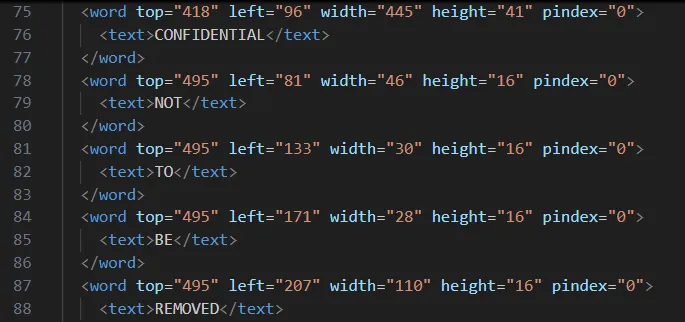
The XML file

This enables any indexing system to extract the positions of words to each other and thus provide customized context search results — for example, five words before and 10 words after the search term “alpha.” To achieve this, there’s no real requirement to keep copies of the original documents, since the principle layout of the document (bar formatting) can be recreated based on the word coordinates.

Legacy planning applications

But what if you have, say, five million scanned TIFF documents? Recent examples from our users included planning applications and accompanying documents from multiple decades in the last century. Here, the customer wanted to keep the actual records layout, as they often included photographs taken or layout drawings, as well text-based application forms.

The large number of TIFF files were provided in folders, which were grouped together by the planning application reference number at the lowest folder level. Again, we deployed a custom script step to manage the bespoke folder structure, and then we converted all files present in any instance folder to searchable PDFs. This was followed by a PDF merging step, which combined all pages under each planning application reference folder and named the file by that particular number.

With this process, legacy planning applications have now become available in a searchable fashion and can easily be downloaded as single PDFs for each planning application.

Any file to searchable PDF

Automated invoice processing and approval

The final use case is a document process that uses a combination of Nutrient products and productivity platforms. An invoice approval process was created within our Workflow Automation platform. It features some typical settings, like auto-approval for low-value invoices (below $25) and multiple approval steps for higher-value ones.

Invoice approval process

Since SharePoint Online is used as the data repository, we deploy our Document Converter functionality — available within Microsoft’s Power Automate platform — to connect the dots. Any file uploaded to the invoice folder in SharePoint Online triggers a Power Automate flow, which automatically extracts key invoice data such as supplier name, payment due date, and the total invoice amount. The data extraction is achieved using our AI Document Processing component, and it contains semantic prompts.

Data extraction

The same flow also creates an approval request within our Workflow platform and populates the aforementioned relevant invoice data in this tool via the Workflow API. Without any manual intervention, invoices uploaded to SharePoint have automatically processed multiple steps within a customized workflow. The PDF invoices are also available within the Workflow tool should they be required for cross-reference.

Invoice processing

Conclusion

Digital transformation promises speed, efficiency, and scalability — but these benefits can’t be fully realized if document workflows remain stuck in the past. Despite investments in new systems and platforms, many organizations still struggle with bottlenecks caused by manual processes, unsearchable files, and nonstandard formats.

This is where intelligent document automation becomes essential — not optional. Automating key steps like OCR, metadata extraction, file structuring, and approvals transforms documents from static assets into actionable, searchable, and compliant resources. Without these capabilities, digital transformation initiatives stall under the weight of outdated document handling.

Nutrient’s product suite addresses this gap head-on. From scalable automation of legacy archives, to real-time invoice processing, our solutions are built to meet modern demands with flexibility and precision. With tools powered by AI, automation, and decades of document-processing expertise, we’re helping organizations around the world turn documents into a true digital advantage.

Digital transformation doesn’t fail because of ambition — it fails when foundational workflows are left behind. Intelligent document automation is that foundation.

If you’re facing complex document challenges, we’d love to hear from you. Get in touch with our team to see how we can help accelerate your transformation efforts.