


Summary
Most AI document automation demos are impressive. A model parses vendor name, total, line items, and dates out of an invoice in a few seconds, and the conversation usually ends there. In production, that’s where the real work starts.
What happens to the extracted fields? Who validates them? What happens when an invoice total exceeds an approval threshold, the vendor isn’t in the master data list, the model returns a confidence score below your tolerance, or the document type was misclassified? Every one of those questions is an action — a decision that has to fire, a person who has to be looped in, a downstream system that has to receive the result.
The buyer question — “how do we automate decisions?” — isn’t answered by a better optical character recognition (OCR) engine. The architecture that turns extracted data into completed work matters more than the model behind extraction. Agentic AI is reshaping how documents flow through enterprise systems in 2026, but the gains depend on what happens after extraction, not on the perception layer itself.
AI document automation uses intelligent document processing (IDP), large language models (LLMs), and AI agents to turn unstructured files — PDFs, emails, scanned forms, images — into structured data that drives downstream work. It replaces the manual loop of data entry, classification, routing, and approvals that document-heavy workflows used to depend on, cutting processing time and error rates while making compliance traceable.
In a working pipeline, four capabilities have to line up.
The first step goes beyond raw OCR. The system has to identify the document type — invoice, contract, claim, ID — without depending on rigid templates, and read text from scanned pages, photographs, and mixed-language documents. Modern capture combines OCR with layout-aware models so structure (tables, signatures, headers) survives the transition into structured data.
LLM-based and intelligent content recognition (ICR) models extract specific fields — vendor, total, due date, signatory — and emit per-field confidence. Common patterns include key-value pair extraction for structured fields and table extraction for line items. Validation rules check those fields against master data, business rules, and other systems of record before they propagate. Without validation, you ship confident-looking values that fail downstream.
AI agents chain extraction, decision, and action into one runtime: Read an invoice, match it against a PO, post the result to the ERP, and email the vendor — driven by natural-language instructions rather than hand-coded scripts. The agent layer is where 2026’s gains are concentrated, but it depends on the perception and decision layers underneath being right.
Classification, confidence, and business rules together decide where each document goes: which approver, which queue, which downstream system. Documents below confidence thresholds route to human review with the document and extracted fields visible in one place. Above thresholds, they auto-process.
A few claims are worth retiring before you start evaluating vendors:
The demo is about 20 percent of the work. The other 80 percent shows up as a small set of recurring failure modes — none of which appear in vendor pitches:
The pattern: Each failure mode is owned by a different product than the one that did the extraction. Pipelines stall because no one owns the seams between them. Nutrient is built around these seams — extraction with Nutrient AI Document Processing, and decision and action with Nutrient Workflow Automation, all on one platform.
Reliable end-to-end document automation has three layers.
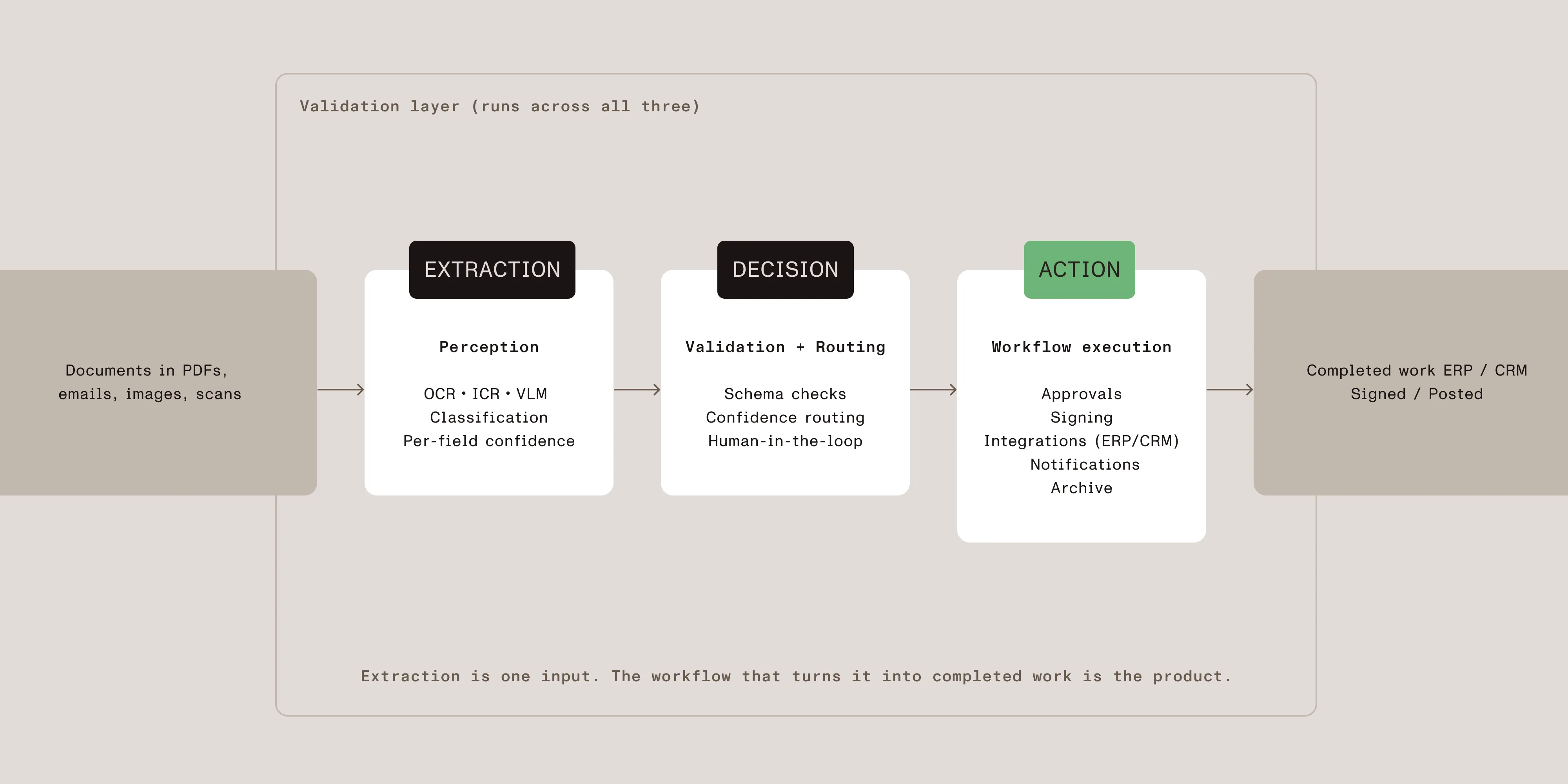
Layer 1 — Extraction (perception): This layer handles OCR, classification, key-value extraction, and table extraction. The output is structured data plus per-field confidence scores. The tools here include Nutrient AI Document Processing, Nutrient Vision API (OCR through VLM-based layout analysis), traditional OCR, and IDP services. This is the layer most vendors talk about.
Try the classification and extraction step yourself in the AI Document Processing demo.
Layer 2 — Decision (validation and routing): Schemas constrain the extraction output. Validation rules check semantic correctness — does the total reconcile, is the vendor approved, is the date in range? Confidence thresholds determine which records auto-process and which route to a human. Routing logic maps documents to the right downstream owner. The tools here include Nutrient Workflow Automation, schema validation libraries, and custom rule engines.
Layer 3 — Action (workflow execution): The decision layer’s output triggers something — an approval task in a queue, a signature request, a record write to an ERP, a notification, a follow-up workflow. This is where the buyer’s “automate decisions” question gets answered. The tools here include Nutrient Workflow Automation, robotic process automation (RPA) platforms (for UI-only systems), and custom integration code.
Most AI document automation products are strong on Layer 1 and weak on Layers 2 and 3, leaving teams to glue them together with custom code. The platforms that close the loop treat all three layers as one product surface.
| Layer | What it does | Failure mode if missing | Owner skill |
|---|---|---|---|
| Extraction | Turns documents into structured fields | Garbage into the rest of the pipeline | ML/data engineering |
| Decision | Validates, scores, routes, and escalates | Wrong values reach downstream systems silently | Process owner |
| Action | Executes tasks and writes to downstream tools | Pipeline ends at JSON; humans copy-paste it into other apps | Workflow/operations |
The further down the stack, the higher the cost of a failure — and the further the typical AI demo gets from showing it.
To make the seams concrete, here’s what one document looks like end to end:
Every step has an owner and a fallback. No step is “we’ll add it later.”
AI Document Processing for extraction, Workflow Automation for routing and approvals — one platform, no glue code.
Before evaluating vendors, answer these four questions. The right architecture follows from the answers — not from the demo.
1. Where do extracted documents need to end up?
If the answer is “we read the JSON and copy values into our ERP,” you don’t have an automation pipeline; you have a faster manual workflow. The integration surface — ERP, CRM, signature, content store, ticketing — needs to be specified before you pick an extraction vendor. Tools that can’t write into your downstream systems leave the last mile to you.
2. What percentage of documents need human review?
This is a planning constraint, not a quality metric. If 30 percent of your invoices have non-standard layouts that drop below confidence thresholds, you need a review queue, an interface, and an SLA — not a vendor promise of “95 percent accuracy.” The review layer is the difference between a pipeline that runs and one that requires a babysitter.
3. How complex is your routing and approval logic?
Two-stage approvals are easy. Branching by amount, vendor, geography, document type, and exception state is not. If your real workflow has more than three branches, you need a workflow engine, not an extraction API with a couple of webhook hooks.
4. What does compliance require to stay inside your perimeter?
For regulated workflows, the answer often rules out cloud-only vendors. Self-hosted deployment, audit trails on every decision, and data residency controls are prerequisites, not optional add-ons. The architecture has to support them at every layer, not just at extraction.
Vendor demos all look the same — happy-path extraction on a clean document. The interesting questions are about the unhappy path. Here are six questions to bring to every evaluation:
The honest demos answer all six without flinching. The rest end at the JSON.
The same three-layer pattern shows up across departments. The shape of the workflow changes; the seam between extraction and action doesn’t.
Invoice processing is the canonical use case. Documents arrive from hundreds of vendors in a mix of layouts. Extraction pulls vendor, total, line items, and dates; validation checks against the master vendor list and matches the line items to a purchase order; routing sends the document to the right approver based on amount and department; the pipeline posts the result to the ERP and closes the PO. Reducing manual AP touch is the metric most teams optimize against. Nutrient fit: AI Document Processing handles invoice parsing, and Workflow Automation handles AP approval routing.
Contract review, clause extraction, and redaction sit on top of the same pipeline. Extraction identifies parties, effective dates, renewal terms, and non-standard clauses; validation flags anything outside template language; routing sends ambiguous contracts to legal. Redaction workflows add a discovery step that finds and obscures sensitive identifiers before documents leave the perimeter. Nutrient fit: AI Document Processing handles clause extraction and personally identifiable information (PII) detection, Workflow Automation runs the legal review queues, and Document Engine covers self-hosted deployment.
Resume parsing, employee onboarding documents, ID verification, and benefit forms all fit the pattern. Extraction pulls structured fields out of free-form documents (resumes, signed offer letters); validation checks against HRIS records; routing distributes to the right team — recruiting, IT provisioning, payroll. The volume per document is low, but the workflow surface (form proliferation, downstream integration) is wide. Nutrient fit: Workflow Automation runs the HR-side process, and AI Document Processing handles resume and form parsing.
Proposal generation, order documents, and customer-supplied forms benefit from the inverse of extraction: Structured data from a CRM gets composed into branded documents, sent for review, and signed. The decision and action layers (routing, approvals, eSignature) are the same architecture, even when the document is being generated rather than parsed. Nutrient fit: Workflow Automation handles proposal routing and approvals, with built-in document generation and eSignatures.
Ticket triage, claims intake, KYC document handling — anywhere a document arrives, gets classified, and triggers downstream work. The unifying constraint is that the workflow has to handle exceptions visibly. Pipelines that hide failures are pipelines that fail their first audit. Nutrient fit: AI Document Processing handles ID and form parsing, and Workflow Automation runs the case-management workflow with audit logging.
RPA platforms (UiPath, Automation Anywhere, Blue Prism) automate user interface interactions — they click through screens a human would click through. They don’t extract from documents natively; they call out to a separate AI service for that. RPA is a fit when most of your work is moving data between two systems that already render it onscreen.
AI document automation inverts that model. The pipeline reads, classifies, validates, decides, and acts on documents directly — the UI is incidental. The seam between perception and action lives inside one platform instead of being stitched together with bots.
The practical decision: If your workflow is “extract from documents, then act,” AI document automation is the architecture; RPA is what you reach for when the system you have to integrate with has no API. Most production deployments end up with both, with clear boundaries between them.
Real document workflows run into the same handful of problems:
Nutrient is built around the full chain — not just the extraction step. The three products map directly to the three layers above.
Stop stitching extraction to a workflow engine yourself. Nutrient Workflow Automation handles the decision and action layers natively — routing, conditional branching, approvals, escalations, and integration are configurable, not code. The output of Nutrient AI Document Processing flows into a workflow without a custom integration layer between them.
Catch validation failures before they reach downstream systems. AI Document Processing emits per-field confidence and supports schema-constrained extraction, so the decision layer has the signals it needs to route exceptions. Workflow Automation surfaces those exceptions as review tasks instead of letting bad values cascade through to your ERP.
Keep sensitive workflows inside your perimeter. Contracts, claims, and onboarding forms can’t always transit a third-party server. AI Document Processing runs every engine on your infrastructure — cloud LLMs are an optional connection, not a default. Workflow Automation supports private-cloud, on-premises, and hybrid deployments. Nutrient Document Engine self-hosts the document backend as a Docker-ready server.
Configure the workflow instead of writing it. Most automation platforms ask you to either accept a black box workflow or write the orchestration code yourself. Workflow Automation gives you a configurable workflow surface — build it once in the UI, version it, and iterate without redeploying.
Treat the workflow as the product, not the extraction. The AI extraction step is a perception layer feeding a workflow that owns the actual business logic. That’s the inversion most buyers need: The workflow is what they’re automating; the AI is the input.
Extraction — Nutrient AI Document Processing
It performs OCR, classification, key-value extraction, and table extraction with validation. Schemas, confidence scoring, and human-review hooks are built in. It runs on your infrastructure as a self-hosted REST microservice or embedded SDK, and cloud LLM providers are an optional connection, not a default.
Decision and action — Nutrient Workflow Automation
It’s a low-code workflow platform with a drag-and-drop process builder, conditional routing, parallel approvals, SLA tracking, audit logging, and native integration. This is the layer where extraction output becomes completed work.
Self-hosted backbone — Nutrient Document Engine
It’s a Docker-ready server for self-hosted document infrastructure. It’s the deployment story when compliance rules out cloud.
| Product | Cloud SaaS | Private cloud/on-premises | Embedded SDK |
|---|---|---|---|
| AI Document Processing | — | Yes | Yes |
| Workflow Automation | Yes | Yes | — |
| Document Engine | — | Yes | — |
The free trial gives you access to the platform before you commit.
Document AI extracts fields from a document. Document workflow automation handles what happens to those fields next — validation, routing, approvals, and triggering downstream systems. Most failed automation projects buy document AI and discover too late that the workflow side is still manual.
If your workflow has more than a couple of conditional branches, yes. Hard-coding routing and approvals into the same script that calls the extraction API mixes concerns that change at different rates. A workflow engine lets process owners change routing without redeploying code.
Human-in-the-loop review is needed whenever the cost of a wrong value is higher than the cost of a person looking at it. For invoices above an approval threshold, contracts with non-standard clauses, or fields with confidence below tolerance, human review pays for itself by preventing downstream errors. The review interface is what most extraction-only tools don’t ship.
Yes — but every layer has to support it. AI Document Processing offers on-prem REST and embedded SDK. Workflow Automation supports on-premises and private cloud. Document Engine self-hosts the backend. If a vendor only supports cloud at any layer, your data crosses that boundary regardless.
Measure success with pipeline-level metrics, not field-level accuracy. First-pass automation rate (how many documents process without human touch), exception rate, time-to-resolve, and downstream error rate matter more than the model’s accuracy on a benchmark. A 99 percent accurate model that requires human review on 30 percent of documents is a worse pipeline than a 95 percent accurate one that auto-processes 90 percent.
RPA platforms automate UI interactions — they click through screens a human would click through. They don’t extract from documents natively; they call out to a separate AI service for that. Nutrient combines extraction (AI Document Processing) and workflow execution (Workflow Automation) on the same platform, so the seam between perception and action isn’t your maintenance problem.
For a single document type with a defined workflow, the timeline is weeks — not months. The variable is the integration surface, not the AI. If you already have well-defined approval logic and the downstream systems exposed via API, the timeline is fast. If routing rules are undocumented or downstream systems require custom integration, plan for that work explicitly before evaluating vendors.
The buyer question — “how do we automate decisions?” — isn’t answered by extraction. Extraction is one input to a workflow that needs a decision layer, an action layer, and the seams between them owned by a single platform. The architectures that work treat all three as one surface; the ones that fail treat extraction as the product and leave the rest to whoever is on call.
The workflow is what you’re automating. AI is one feeder into it. Nutrient ships the products that own each layer: AI Document Processing for extraction, Workflow Automation for decision and action, and Document Engine when self-hosted infrastructure is the requirement.
此内容由惯性聚合(RSS阅读器)自动聚合整理,仅供阅读参考。 原文来自 — 版权归原作者所有。