


惯性聚合 高效追踪和阅读你感兴趣的博客、新闻、科技资讯
阅读原文 在惯性聚合中打开

推荐订阅源

A
About on SuperTechFans
Cyberwarzone
Cyberwarzone
博客园 - Franky
V
V2EX
人人都是产品经理
人人都是产品经理
爱范儿
爱范儿
Martin Fowler
Martin Fowler
The Cloudflare Blog
Security Archives - TechRepublic
Vercel News
Vercel News
Blog — PlanetScale
Blog — PlanetScale
Webroot Blog
Webroot Blog
Hacker News: Ask HN
Hacker News: Ask HN
Forbes - Security
Forbes - Security
D
Docker
C
CXSECURITY Database RSS Feed - CXSecurity.com
Project Zero
Project Zero
大猫的无限游戏
大猫的无限游戏
云风的 BLOG
云风的 BLOG
C
Cyber Attacks, Cyber Crime and Cyber Security
Recent Announcements
L
LINUX DO - 热门话题
小众软件
小众软件
Stack Overflow Blog
Stack Overflow Blog
G
Google Developers Blog
S
Security @ Cisco Blogs
T
Threat Research - Cisco Blogs
钛媒体:引领未来商业与生活新知
钛媒体:引领未来商业与生活新知
奇客Solidot–传递最新科技情报
奇客Solidot–传递最新科技情报
The Register - Security
O
OpenAI News
雷峰网
雷峰网
P
Proofpoint News Feed
宝玉的分享
宝玉的分享
Scott Helme
Scott Helme
Google DeepMind News
博客园 - 司徒正美
让小产品的独立变现更简单 - ezindie.com
Help Net Security
Help Net Security
F
Full Disclosure
Engineering at Meta
Engineering at Meta
cs.AI updates on arXiv.org
T
Tailwind CSS Blog
Google DeepMind News
博客园 - 三生石上(FineUI控件)
Apple Machine Learning Research
Attack and Defense Labs
T
Tenable Blog
AI
AI
Spread Privacy
Spread Privacy

Inside Nutrient

A guide to the invisible work behind documents Introducing Nutrient Documents for Salesforce: Native document generation and signing Document AI vs. traditional OCR: Choosing between OCR, AI, and hybrid pipelines PDF SDK compliance and security evaluation checklist for enterprise teams (2026) Invariant Corp replaces paper processes with Nutrient Workflow and scales without limits What is process mapping? A complete guide Nutrient vs. Conga Composer for Salesforce document generation (2026) Document routing: How to automate document distribution The CTO’s AI playbook: Why accountability architecture beats orchestration Compliance workflow automation: Why built-in compliance is table stakes Workflow diagrams: Examples, symbols, and how to build one that actually runs Digital forms: Replace paper forms with automated workflows Approval workflow software: How to automate approvals Why document-centric automation is different The CEO’s AI playbook: Why decision architecture beats model selection Nutrient SDK product updates for Q1 2026 PDF redaction verification: How to prove sensitive data is permanently removed What is a VPAT? The complete guide to accessibility conformance reports What is PDF/UA? The accessible PDF standard explained Salesforce eSignatures: Generate, sign, and track documents in one flow Online document viewer: Options, tradeoffs, and how to embed one Document viewer for web apps: React, Vue, Angular (2026) Best document viewers in 2026: A buyer’s guide How to edit a PDF in Python: Add text, images, and annotations Nutrient advances Workflow platform with agentic AI for enterprise-grade speed and consistency in document-heavy operations How to create a Salesforce quote template from opportunity data The business case for accessibility: Five ways it drives enterprise value Python PDF library comparison (2026): 7 libraries for developers Why your AI agent hallucinates PDF table data PDF.js limitations: When to upgrade to a commercial PDF SDK How Subject scaled 5× with Nutrient’s PDF SDK without rebuilding its document layer I replaced our sales training with an AI coach that runs in Slack — here’s what broke Redirecting to: https://securitybuzz.com/cybersecurity-news/why-enterprise-permissions-are-ais-most-dangerous-inheritance/ Nutrient .NET SDK vs. iText Core: Complete comparison for .NET developers DocuVieware: Support’s most frequently asked setup questions Introducing Nutrient Workflow How to convert PDF to Word in C# (.NET) When email and spreadsheets stop working: Work order approval workflows for field teams on the move Compliance with confidence: Why document-centric automation is the foundation of your mission Nutrient expands AI Assistant, automating multistep document workflows inside any application What is document generation? A developer’s guide to PDF generation Document Converter data flow and how real-time watermarks skip the queue PDF/UA compliance guide: Requirements, standards, and best practices Computers still can’t understand you How Athena Intelligence built AI agents for regulated enterprises with Nutrient’s document infrastructure How to convert HTML to PDF (2026): 4 methods from browser print to SDK How to build a document extraction pipeline with Nutrient Vision API OCR vs. intelligent document processing: Choosing the right document extraction engine Beyond OCR: How document intelligence eliminates manual processing in regulated industries Nutrient vs. IronPDF: Complete comparison for .NET developers Nutrient vs. Aspose.PDF: Complete comparison for .NET developers Redirecting to: https://fortune.com/2026/02/19/openclaw-who-is-peter-steinberger-openai-sam-altman-anthropic-moltbook/ Lufthansa Systems uses Nutrient to deliver reliable, scalable PDF rendering for pilots worldwide Nutrient vs. Syncfusion: Complete comparison for .NET developers React’s useTransition: The hook you’re probably using wrong First City Monument Bank streamlines banking processes with Nutrient Workflow Redirecting to: https://www.sdcexec.com/warehousing/automation/article/22957364/nutrient-workflow-automation-the-missing-link-in-supply-chain-efficiency The complete guide to digital signatures: PAdES, CAdES, and XAdES explained Nutrient Python SDK: Production-grade document processing for Python Introducing agentic document editing for web applications with AI Assistant Nutrient vs. QuestPDF: Complete comparison for .NET developers How we fixed the GdPicture license expiration (and what to do if you’re affected) Red team security testing with agentic AI The future of healthcare document automation Best healthcare workflow software compared Nutrient SDK product updates for Q4 2025 How Harvey scaled legal document workflows 50 percent MoM without rebuilding infrastructure HIPAA-compliant document management in hospitals How we optimized rendering performance while handling thousands of annotations in React — Part 2 Automated PII removal with Nutrient API Redirecting to: https://www.devopsdigest.com/2026-low-code-no-code-predictions Redirecting to: https://www.kmworld.com/Articles/Editorial/ViewPoints/Leaders-predict-AI-to-continue-permeating-all-aspects-of-KM-in-2026-172594.aspx What are deep agents and how do they solve complex problems? Whipping up document magic: Your easy-bake recipe for Vue and Nutrient Web SDK 🧁 What I’ve learned about product iteration planning while building SDKs Passwordless document signing: Three-layer security guide New zip folder functionality streamlines file management in Document Automation Server The keyboard shortcuts playbook: Taking control of keyboard events in Nutrient Web SDK From experienced engineer to AI beginner: My unexpected journey AI-assisted manual testing: Handling Safari’s PDF rendering and UI quirks How to keep a 20-year-old SDK up to date How we optimized rendering performance while handling thousands of annotations in React — Part 1 Nutrient announces new executive hires to accelerate next phase of growth High performance UI using web workers Automate document conversion at scale with Python and Nutrient DCS From curiosity to PLG (and AI): My journey to understanding product-led growth Prost to progress: One year as Nutrient Pigeon usage at Nutrient: Bridging native SDKs to Flutter Modernizing CI build servers: How to migrate from Chef to Ansible Unix man pages: AI-friendly documentation since 1971 Consistent hashing for even load distribution Best AI redaction APIs: Complete comparison guide for 2025 Why AI document redaction matters for modern security From coding to coordinating: How AI transformed my workflow What is intelligent document processing (IDP)? A complete guide Enterprise PDF SDKs: Best PSPDFKit (now Nutrient) alternatives Nutrient SDK product updates for Q3 2025 GdPicture support best practices Redacting sensitive data with Nutrient AI redaction API How AI is transforming the customer experience at Nutrient: From instant answers to intelligent support
Supercharge Warp with Nutrient DWS MCP Server: From datasheet PDFs to production code
Nick Winder · 2025-09-05 · via Inside Nutrient

TL;DR

Nutrient DWS MCP Server integrates document processing directly into Warp’s agentic development environment. Process PDF datasheets with natural language commands, and generate run-ready code — all without leaving your terminal.

As a Warp(opens in a new tab) developer, you’ve experienced the power of agentic development — natural language prompts generating ready-to-run code in seconds. But what happens when the information your AI agent needs is locked inside documents like datasheets?

I know this situation all too well from my days as an embedded engineer, where critical information like register maps, timing diagrams, and calibration formulas are scattered across 50-page PDF datasheets. Even with Warp’s advanced AI capabilities, you can’t simply paste a malformed register table and expect clean, structured data that agents can work with.

I used to spend countless hours on “datasheet archaeology” — manually transcribing register values, cross-referencing timing requirements, and translating PDF specifications into code. This breaks the flow of agentic development and forces you back into manual, error-prone human workflows.

The solution? Nutrient DWS MCP Server integration with Warp.

Integrate Nutrient DWS MCP Server into Warp and turn PDF datasheets into structured, AI-ready data — no more manual parsing.

The MCP solution: Warp + Nutrient DWS integration

Warp’s agentic development environment is incredibly powerful, but it needs reliable data to generate accurate code. PDF datasheets contain the information your agents need, but in a format they can’t reliably parse.

Nutrient DWS MCP Server(opens in a new tab) solves this by integrating document processing capabilities directly into Warp using Model Context Protocol (MCP)(opens in a new tab). Instead of switching contexts or manually extracting data, you can now:

  • Process PDF datasheets through natural language commands, or even ask your agent to do so.
  • Access structured register maps, timing diagrams, and specifications.
  • Feed this data directly to Warp’s AI agents for code generation.
  • Maintain your agentic development flow without interruption.

This MCP integration transforms Warp into a complete datasheet-to-code pipeline.

Warp MCP integration in action: Raspberry PI example

This section will demonstrate how Nutrient DWS MCP Server transforms your Warp development workflow. I’ll build a Python program for Raspberry Pi that communicates with a BME280 humidity sensor(opens in a new tab) — a perfect example, because all the critical implementation details are locked in a PDF datasheet.

This example showcases how MCP integration keeps you in Warp’s agentic flow while handling complex document processing behind the scenes.

The starting point: Structured but incomplete

Here’s what the initial script looks like, but with the crucial implementation missing:

#!/usr/bin/env python3

"""

BME280 Humidity Sensor Reader for Raspberry Pi

Hardware Setup:

- Connect BME280 VCC to 3.3V

- Connect BME280 GND to Ground

- Connect BME280 SDA to GPIO 2 (I2C SDA)

- Connect BME280 SCL to GPIO 3 (I2C SCL)

"""

import time

import sys

class BME280HumidityReader:

"""BME280 humidity sensor interface."""

def __init__(self, i2c_address=None):

"""Initialize BME280 sensor connection."""

self.i2c_address = i2c_address

# TODO: Initialize I2C communication

# TODO: Verify chip ID

# TODO: Configure humidity measurement settings

# TODO: Read calibration coefficients

def read_humidity(self) -> float:

"""Read humidity percentage from BME280."""

# TODO: Read raw humidity data from registers

# TODO: Apply calibration coefficients

# TODO: Convert to percentage

return 45.0 # Placeholder

def is_sensor_ready(self) -> bool:

"""Check if sensor is ready for measurement."""

# TODO: Check status register

# TODO: Verify measurement completion

return True

def get_sensor_info(self) -> dict:

"""Get sensor identification and capabilities."""

# TODO: Read chip ID register

# TODO: Return sensor specifications

return {

"chip_id": "Not implemented",

"humidity_range": "0-100% RH",

"humidity_accuracy": "±3% RH",

"humidity_resolution": "0.008% RH"

}

It’s a perfectly structured program, but all the actual implementation details are missing. Those TODOs represent hours of datasheet work, like finding register addresses, understanding calibration formulas, and implementing I2C communication protocols.

The MCP workflow: Document processing in Warp

Before diving into the configuration details, it’s worth seeing how the MCP workflow fits into your development process. By connecting Warp directly to Nutrient DWS MCP Server, document processing becomes a seamless part of the agentic flow. No context switching, no copy-pasting from datasheets — just structured data ready for your AI agent to use.

Configuring Nutrient DWS MCP Server

I added Nutrient DWS MCP Server to my Warp configuration. This gave Warp’s AI agents direct access to document processing capabilities:

{

"mcpServers": {

"nutrient-dws": {

"command": "npx",

"args": ["-y", "@nutrient-sdk/dws-mcp-server"],

"env": {

"NUTRIENT_DWS_API_KEY": "YOUR_API_KEY_HERE",

"SANDBOX_PATH": "/your/project/directory"

},

"start_on_launch": true

}

}

}

With this MCP server running, Warp could now use DWS to perform document processing tasks such as extraction, conversion, signing, and much more!

Single prompt for document processing and code generation

With the MCP server configured, I asked Warp to process the BME280 datasheet(opens in a new tab) and generate the complete Python implementation with a single natural language prompt:

Please can you extract I2C information from bst-bme280-ds002.pdf in order to complete the python script bme280Reader.py.

Here’s where the magic comes in: Warp’s agent automatically calls Nutrient DWS MCP Server to extract the datasheet information. It then uses that structured data to complete your Python implementation — all from one prompt. The agent handles both document processing and code generation behind the scenes.
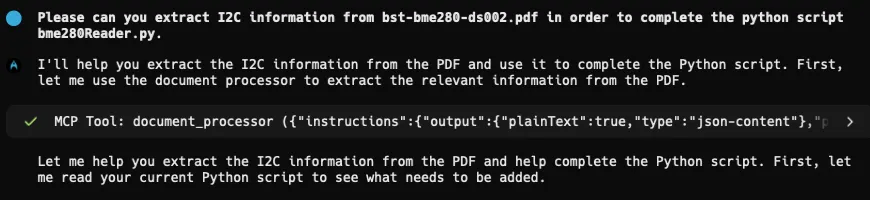
The MCP tool call made to DWS

Warp’s AI agent had access to both my code structure and the precise BME280 specifications extracted by the MCP server. Here’s a truncated version of what it generated:

import smbus2 # For I2C communication

# BME280 Register Addresses (extracted from datasheet)

REG_ID = 0xD0

REG_RESET = 0xE0

REG_CTRL_HUM = 0xF2

REG_STATUS = 0xF3

REG_CTRL_MEAS = 0xF4

REG_CONFIG = 0xF5

REG_HUM_MSB = 0xFD

REG_HUM_LSB = 0xFE

# BME280 Constants

CHIP_ID = 0x60

RESET_VALUE = 0xB6

class BME280HumidityReader:

def __init__(self, i2c_address=0x76):

"""Initialize BME280 sensor connection."""

self.i2c_address = i2c_address

self.bus = smbus2.SMBus(1) # Use I2C bus 1

# Verify chip ID

chip_id = self.bus.read_byte_data(self.i2c_address, REG_ID)

if chip_id != CHIP_ID:

raise RuntimeError(f'Unexpected chip ID: {chip_id:02x} (expected: {CHIP_ID:02x})')

# Reset the sensor

self.bus.write_byte_data(self.i2c_address, REG_RESET, RESET_VALUE)

time.sleep(0.1) # Wait for reset to complete

# Configure the sensor

self.bus.write_byte_data(self.i2c_address, REG_CTRL_HUM, 0x01) # Humidity oversampling 1x

self.bus.write_byte_data(self.i2c_address, REG_CTRL_MEAS, 0x27) # Normal mode, temp/pressure 1x

self.bus.write_byte_data(self.i2c_address, REG_CONFIG, 0x00) # Filter off, standby 0.5ms

# Read calibration coefficients (from datasheet specification)

self.dig_H1 = self.bus.read_byte_data(self.i2c_address, 0xA1)

self.dig_H2 = self.get_signed_word_le(0xE1)

self.dig_H3 = self.bus.read_byte_data(self.i2c_address, 0xE3)

# ... additional calibration data reading

def read_humidity(self) -> float:

"""Read humidity using exact BME280 calibration formula."""

# Read raw humidity data

msb = self.bus.read_byte_data(self.i2c_address, REG_HUM_MSB)

lsb = self.bus.read_byte_data(self.i2c_address, REG_HUM_LSB)

raw_humidity = (msb << 8) | lsb

# Apply the BME280's specific calibration algorithm

# (Mathematical formulas extracted from datasheet)

humidity = self._calculate_compensated_humidity(raw_humidity)

return humidity / 1024.0

def is_sensor_ready(self) -> bool:

"""Check sensor status using datasheet-defined status bits."""

status = self.bus.read_byte_data(self.i2c_address, REG_STATUS)

measuring = status & 0x08 # Bit 3 indicates measuring

updating = status & 0x01 # Bit 0 indicates updating

return not (measuring or updating)

The results: Hours to minutes

What traditionally took 1–2 hours of PDF hunting, manual transcription, and careful implementation now takes about five minutes:

  • 1 minute to set up the MCP server
  • 2–3 minutes for the agent to call DWS to process the PDF and complete the implementation
  • 1 minute to scan through the code and be amazed

The code isn’t just faster to create — it’s more accurate, with fewer human transcription errors, missed configuration steps, or misunderstood timing requirements.
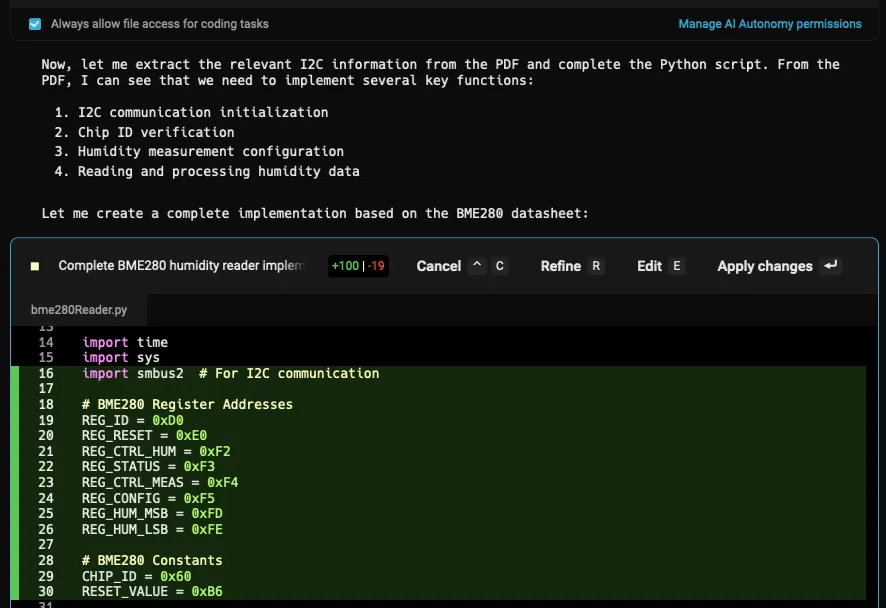
A file diff for the Python script in Warp

Conclusion

Marrying technologies like Warp and Nutrient DWS MCP Server holds the ability to transform software development, even in areas where traditional agents haven’t yet been able to touch. By bringing document processing capabilities directly into Warp’s agentic development environment, it’s possible to

  • Maintain agentic flow — Create feedback loops for the agent to follow, rather than requiring a human to feed the information.
  • Eliminate manual transcription — Nutrient has years of experience reading/rendering/editing documents, and this integration leverages that expertise.
  • Scale across complex projects — Apply the same workflow to any PDF-based technical documentation.
  • Focus on innovation — Spend time building features instead of parsing datasheets.

Here at Nutrient, we’re seeing AI developer tools penetrate into more use cases, and by adding more integrations using MCP, it’s possible to give the agent more abilities to perform tasks autonomously — further reducing the time to code, and improving quality in the process.

What manual processes in your development workflow could benefit from AI automation through MCP integrations?

Get started with Nutrient DWS Processor API today and receive 50 free credits monthly! Perfect for watermark-free document processing targeting many use cases.