


In the fast-paced world of Agile development, maintaining effective communication within teams is crucial. However, traditional daily stand-up meetings can often become time-consuming, repetitive, and sometimes inconvenient for remote teams. To address this, I developed an automated solution, which streamlines our daily “stand-down” process using a Python script. This approach not only saves time, but it also ensures consistent and clear communication within the team.
Daily stand-up meetings are a staple of Agile methodologies, providing a platform for team members to share their progress, plans, and any blockers they encounter. However, these meetings can sometimes be seen as a time sink, especially when team members are distributed across different time zones or have varying schedules, as is the case at Nutrient. With a team spread across the globe, we needed a more efficient way to maintain this crucial communication without the need for synchronous meetings.
The stand-down, much like the stand-up, is a daily update, only it’s not in the form of a traditional meeting. By automating this process, we’ve been able to maintain the benefits of the stand-up meeting without the need for synchronous communication. Instead, team members receive a Markdown-formatted message in Slack.
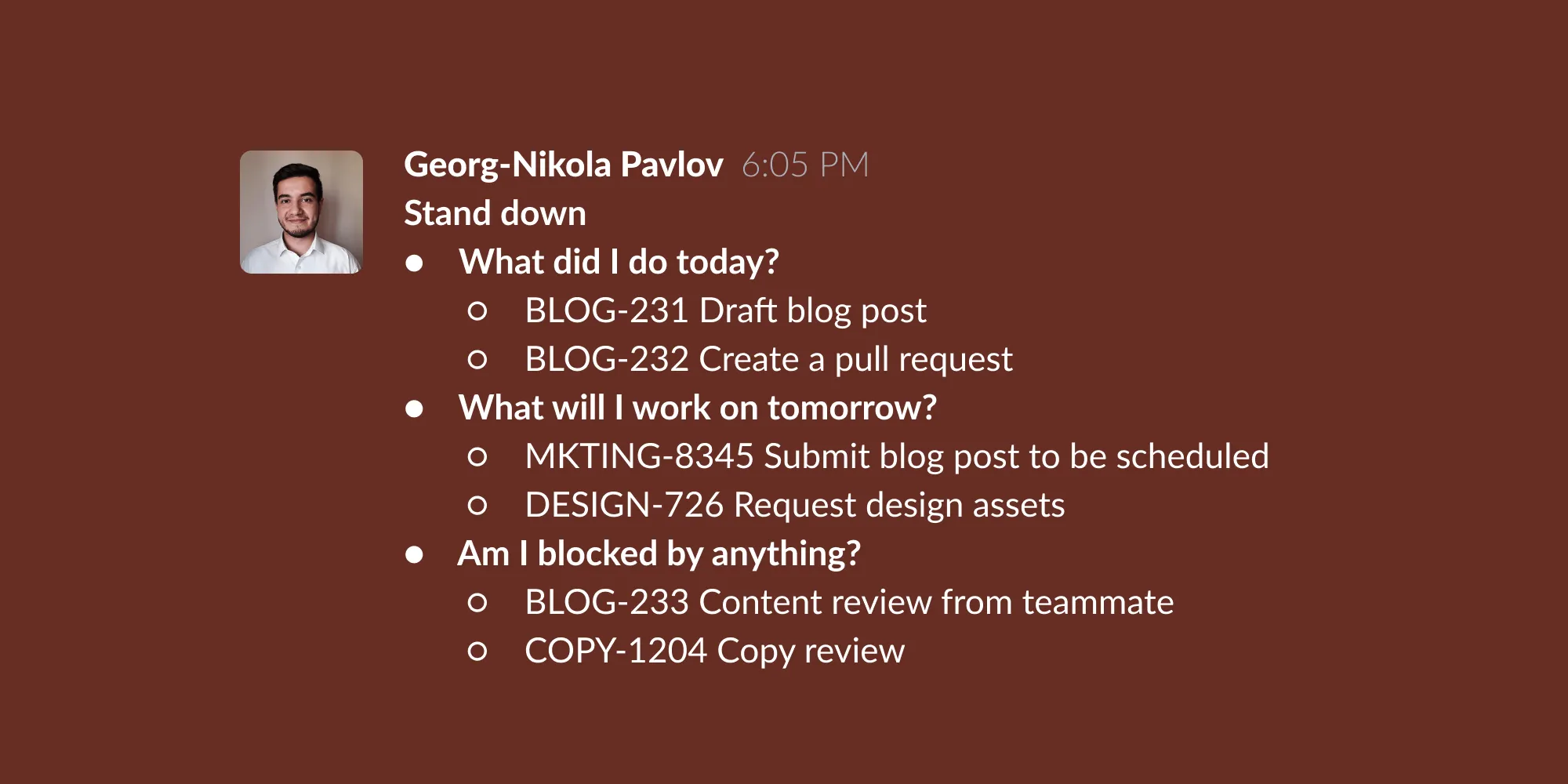
To facilitate this, I created a Python script that automates the daily stand-down process. The script fetches data from Jira, formats it into a Markdown message, and loads it onto the clipboard for easy sharing in our Slack channel. This method not only saves time, but it also encourages team members to keep their Jira tasks updated, providing a clear and concise summary of the day’s work and plans for the next day.
The next sections will provide an overview of how it works, which you can follow along with to set up something similar for your team.
The project is organized with the following files and directories:
.
|-- Dockerfile
|-- LICENSE
|-- README.md
|-- out_for_today.py
|-- requirements.txt
|-- run.sh
|-- setup-dev.sh
|-- .env.template
Before running the script, ensure you have the following installed:
pbcopy (macOS only)Clone the repository and configure the environment variables:
git clone git@github.com:geokogh/redesigned-waddle.git
cd redesigned-waddle
Set up environment variables by exporting them in your shell:
unset HISTFILE # Disables writing history to file for the current shell. Useful for preventing your plaintext credentials from being written to file when your terminal history saves.
export JIRA_API_KEY="your_jira_api_key"
export JIRA_SERVER="your_jira_server"
export JIRA_USER="your_jira_username"
To run the script, use the following command:
For convenience, you can add an alias to your .bash_profile or .bashrc files:
echo "alias out-for-the-day='cd $PWD && bash run.sh && cd - > /dev/null'" >> ~/.bash_profile
The core of the automation lies in the out_for_today.py script. This script connects to Jira using your credentials, fetches issues based on their statuses, and composes a Markdown message.
First, the script imports the necessary libraries. os is used to interact with the operating system, JIRA from the jira library is used to interact with the Jira API, and convert from the jira2markdown library is used to convert Jira comments to Markdown format:
import os
from jira import JIRA
from jira2markdown import convert
...
It establishes a connection to the Jira server using the credentials stored in the environment variables:
...
jira = JIRA(
server=os.environ["JIRA_SERVER"],
basic_auth=(os.environ["JIRA_USER"], os.environ["JIRA_API_KEY"]),
)
...
The fetch_issues function retrieves issues from Jira based on their statuses. It takes an option parameter to determine which issues to fetch: in-progress, blocked, or done:
...
def fetch_issues(option: str):
if option == "in-progress":
jql = f'assignee = currentUser() AND status = "In Progress"'
elif option == "blocked":
jql = f"assignee = currentUser() AND status = Blocked"
elif option == "done":
jql = f"assignee = currentUser() AND status changed to (Done, Rejected) DURING (startOfDay(), endOfDay())"
else:
raise ValueError("Invalid option: {option}.")
return jira.search_issues(jql)
...
The extract_issue_data function processes the list of issues fetched from Jira and extracts relevant details such as issue key, summary, and the last comment. This data is stored in a dictionary:
...
def extract_issue_data(issues):
issue_data = {}
if issues:
for issue in issues:
issue_data[issue.key] = {
"url": f'{os.environ["JIRA_SERVER"]}/browse/{issue.key}',
"summary": issue.fields.summary,
"last_comment": issue.fields.comment.comments[-1].body if issue.fields.comment.comments else None,
"last_comment_url": issue.fields.comment.comments[-1].self if issue.fields.comment.comments else None,
}
return issue_data
...
The add_items_to_out_for_today_message function adds items to the stand-down message. It iterates over the extracted issue data and formats it into Markdown:
...
def add_items_to_out_for_today_message(message: str, issue_data: dict):
for issue, data in issue_data.items():
message += f" - [{issue} - {data['summary']}]({data['url']})"
if data["last_comment"]:
message += f" - [{convert(data['last_comment'])[0:10]}...]({data['last_comment_url']})"
message += "\n"
return message
...
The compose_out_for_today_message function builds the full stand-down message. It fetches issues based on their statuses (done, in-progress, blocked) and organizes them into sections:
...
def compose_out_for_today_message():
done_issue_data = extract_issue_data(fetch_issues("done"))
in_progress_issue_data = extract_issue_data(fetch_issues("in-progress"))
blocked_issue_data = extract_issue_data(fetch_issues("blocked"))
out_for_today_message = "*Stand down*\n"
out_for_today_message += " - *What did I do today*?\n"
out_for_today_message = add_items_to_out_for_today_message(out_for_today_message, done_issue_data)
out_for_today_message += " - *What will I work on tomorrow?*\n"
out_for_today_message = add_items_to_out_for_today_message(out_for_today_message, in_progress_issue_data)
out_for_today_message += " - *Am I blocked by anything?*\n"
out_for_today_message = add_items_to_out_for_today_message(out_for_today_message, blocked_issue_data)
out_for_today_message += " - *Others:*\n"
return out_for_today_message
...
Finally, the main function prints the composed stand-down message. When the script is executed, this function is called to generate and display the message:
...
def main():
print(compose_out_for_today_message())
if __name__ == "__main__":
main()
The used libraries need to be added as part of the requirements.txt file, as the file is needed for installing dependencies.
Below is an example of the listed dependencies for Python version 3.12.3:
certifi==2024.2.2
charset-normalizer==3.3.2
defusedxml==0.7.1
idna==3.6
jira==3.8.0
jira2markdown==0.3.6
oauthlib==3.2.2
packaging==24.0
pillow==10.2.0
pyparsing==3.1.2
pyperclip==1.8.2
requests==2.31.0
requests-oauthlib==2.0.0
requests-toolbelt==1.0.0
typing_extensions==4.10.0
urllib3==2.2.1
Freeze your current requirements:
source venv/bin/activate && pip freeze > requirements.txt
The provided bash script automates the setup process for the project, ensuring that all necessary dependencies and configurations are in place. Below is a detailed breakdown of what the script does.
First, the script sets the shell to exit immediately if any command fails or if there are undeclared variables, ensuring robustness:
Next, it checks if Python 3.10.x or above is installed. If the required version of Python isn’t found, it prompts the user to install it and then exits:
...
if ! python3 -c "import sys; exit(0) if sys.version_info >= (3, 10) else exit(1)"; then
echo "Python 3.10.x or above is required. Please install it and try again."
exit 1
fi
...
The script then creates a virtual environment using venv to ensure that the project’s dependencies are isolated from the global Python environment:
...
python3 -m venv venv
...
Once the virtual environment is created, it activates the environment:
...
source venv/bin/activate
...
The script proceeds to install the required Python packages specified in the requirements.txt file:
...
pip install -r requirements.txt
...
Next, it checks if the required environment variables are set. If any of the environment variables (JIRA_API_KEY, JIRA_SERVER, JIRA_USER) aren’t set, the script prompts the user to enter the values:
...
# Check if environment variables have been set.
# Check for `JIRA_API_KEY`.
if [ -z "$JIRA_API_KEY" ]; then
# Notify user that `JIRA_API_KEY` is not set.
echo "JIRA_API_KEY environment variable is not set."
# Prompt user for API key.
read -p "Enter your Jira API key: " api_key
# Set API key as environment variable.
export JIRA_API_KEY="$api_key"
fi
# Check for `JIRA_SERVER`.
if [ -z "$JIRA_SERVER" ]; then
# Notify user that `JIRA_SERVER` is not set.
echo "JIRA_SERVER environment variable is not set."
# Prompt user for Jira server.
read -p "Enter your Jira server: " jira_server
# Set Jira server as environment variable.
export JIRA_SERVER="$jira_server"
fi
# Check for `JIRA_USER`.
if [ -z "$JIRA_USER" ]; then
# Notify user that `JIRA_USER` is not set.
echo "JIRA_USER environment variable is not set."
# Prompt user for Jira username.
read -p "Enter your Jira username: " jira_username
# Set Jira username as environment variable.
export JIRA_USER="$jira_username"
fi
...
Finally, the script confirms that the setup has completed successfully:
...
echo "Setup completed successfully."
...
This setup script simplifies the initial configuration process, making it easier for developers to quickly and efficiently get started with the project.
The run.sh script ensures all prerequisites are met, builds the Docker image, and runs the Python script inside a container. The output is then copied to the clipboard:
#!/bin/bash
set -e
if ! command -v docker &> /dev/null; then
echo "Docker is not installed. Please install Docker before running this script."
exit 1
fi
if ! docker info &> /dev/null; then
echo "Docker daemon is not running. Please start Docker daemon before running this script."
exit 1
fi
# Check if environment variables have been set.
# Check for `JIRA_API_KEY`.
if [ -z "$JIRA_API_KEY" ]; then
# Notify user that JIRA_API_KEY is not set.
echo "JIRA_API_KEY environment variable is not set."
# Prompt user for API key.
read -p "Enter your Jira API key: " api_key
# Set API key as environment variable.
export JIRA_API_KEY="$api_key"
fi
# Check for `JIRA_SERVER`.
if [ -z "$JIRA_SERVER" ]; then
# Notify user that `JIRA_SERVER` is not set.
echo "JIRA_SERVER environment variable is not set."
# Prompt user for Jira server.
read -p "Enter your Jira server: " jira_server
# Set Jira server as environment variable.
export JIRA_SERVER="$jira_server"
fi
# Check for `JIRA_USER`.
if [ -z "$JIRA_USER" ]; then
# Notify user that `JIRA_USER` is not set.
echo "JIRA_USER environment variable is not set."
# Prompt user for Jira username.
read -p "Enter your Jira username: " jira_username
# Set Jira username as environment variable.
export JIRA_USER="$jira_username"
fi
if [ ! -f Dockerfile ]; then
echo "Dockerfile not found. Please make sure Dockerfile is present in the current directory."
exit 1
fi
if [ ! -f out_for_today.py ]; then
echo "out_for_today.py not found. Please make sure out_for_today.py is present in the current directory."
exit 1
fi
if [ ! -f requirements.txt ]; then
echo "requirements.txt not found. Please make sure requirements.txt is present in the current directory."
exit 1
fi
if ! command -v pbcopy &> /dev/null; then
echo "pbcopy is not installed. Please install pbcopy before running this script."
exit 1
fi
docker build -q --no-cache -t out-for-today . | 2>&1 > /dev/null
docker run --rm -e JIRA_SERVER=$JIRA_SERVER -e JIRA_USER=$JIRA_USER -e JIRA_API_KEY=$JIRA_API_KEY out-for-today | pbcopy
docker rmi out-for-today | 2>&1 > /dev/null
The Dockerfile sets up a Python environment to run the script, ensuring consistency across different systems:
FROM python:slim
WORKDIR /app
COPY requirements.txt .
RUN pip install --no-cache-dir -r requirements.txt
COPY out_for_today.py .
CMD ["python", "out_for_today.py"]
This automation provides several benefits:
Automating the daily stand-down process with Python and Docker has significantly improved our team’s workflow and communication. This approach leverages technology to streamline Agile practices, making them more efficient and adaptable to modern work environments. If you’re looking to enhance your Agile processes, I encourage you to try out this automation and share your experiences.
此内容由惯性聚合(RSS阅读器)自动聚合整理,仅供阅读参考。 原文来自 — 版权归原作者所有。