





Internal processes can become more efficient and more transparent by using a process automation tool to both** display and manage all the tasks involved in a process.**

Corporate transparency has been a hot topic for a while now(opens in a new tab), with some companies completely embracing the idea of sharing all things all the time and others simply trying to find ways to be more open internally and externally. On the internal front, some companies believe there is tremendous value in breaking down office walls (figuratively and literally) to make sure that everyone in the organization is “part of the conversation.” This could mean salaries are no longer secret(opens in a new tab) or that email is replaced with a public stream of questions and answers like SalesForce’s Chatter(opens in a new tab) or Trello’s(opens in a new tab) team boards (Note: we use and love Trello).
One area some companies are looking to be more transparent is around internal processes. By sharing “how things work” when it comes to internal processes, employees have a better understanding of what’s happening now, who’s handling it and what’s next. When you submit a request for a new hire, for instance, you’d probably like to know how the process is going to work so you can properly set expectations.
Process transparency can be done a few ways. Traditionally, process maps or flowcharts are created that show a process from beginning to end as well as all the decision points along the way. Swimlanes can be used to indicate who is responsible for each part of the process as well.
Static flow charts are good for providing a full overview of an entire process and sometimes just the act of generating them can help a company identify bottlenecks and weaknesses in their processes. We recommend everyone who isn’t doing this should start. Whether or not you’ll be seeking out a workflow automation tool (in which case you’ll be saving yourself sometime later), this is an extremely helpful activity.
Since process mapping is built into our workflow automation software, we can take the idea of process transparency a few steps further.
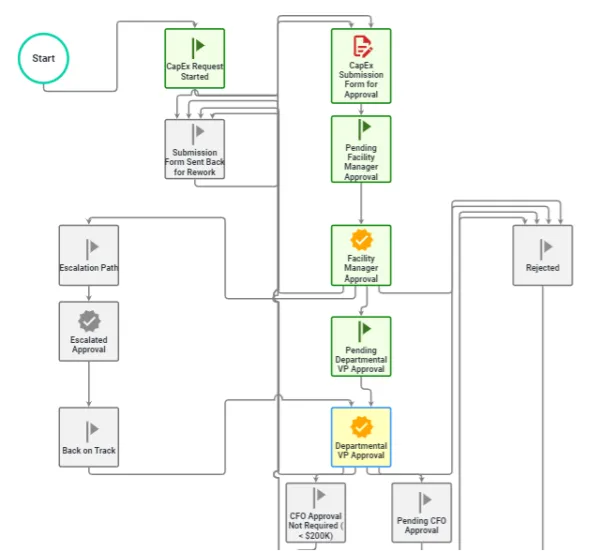
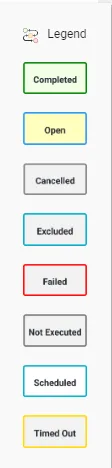
In fact one of the more powerful but overlooked features in Nutrient Workflow is the ability to not only show users what a process looks like but where they are in the process once it starts. For instance, in the process below, which is the process for a capital expenditure request, I can see, via the colored boxes and the legend, which parts of the process have completed and where we are in the process right now. If I hover over the highlighted box, it gives me detail about that step, including who’s involved, time, date, etc. I’m not confused about what’s happening now and I can see what’s happening next.
The advantages of transparency are numerous (building trust, getting new ideas, empowerment, etc.) but that’s not to say it’s for all organizations and all departments/business units within an organization. In some cases, transparency is simply not legally possible. That’s why we offer the ability to either display or hide this view for users. It’s up to the workflow administrators to configure.
此内容由惯性聚合(RSS阅读器)自动聚合整理,仅供阅读参考。 原文来自 — 版权归原作者所有。