
惯性聚合 高效追踪和阅读你感兴趣的博客、新闻、科技资讯
阅读原文 在惯性聚合中打开

推荐订阅源

雷峰网
雷峰网
爱范儿
爱范儿
宝玉的分享
宝玉的分享
Apple Machine Learning Research
博客园 - Franky
freeCodeCamp Programming Tutorials: Python, JavaScript, Git & More
OSCHINA 社区最新新闻
OSCHINA 社区最新新闻
博客园 - 三生石上(FineUI控件)
人人都是产品经理
人人都是产品经理
阮一峰的网络日志
阮一峰的网络日志
钛媒体:引领未来商业与生活新知
钛媒体:引领未来商业与生活新知
Last Week in AI
Last Week in AI
博客园 - 聂微东
大猫的无限游戏
大猫的无限游戏
让小产品的独立变现更简单 - ezindie.com
罗磊的独立博客
博客园 - 叶小钗
WordPress大学
WordPress大学
奇客Solidot–传递最新科技情报
奇客Solidot–传递最新科技情报
酷 壳 – CoolShell
酷 壳 – CoolShell
小众软件
小众软件
博客园 - 司徒正美
博客园 - 【当耐特】
IT之家
IT之家

Inside Nutrient

A guide to the invisible work behind documents Introducing Nutrient Documents for Salesforce: Native document generation and signing Document AI vs. traditional OCR: Choosing between OCR, AI, and hybrid pipelines PDF SDK compliance and security evaluation checklist for enterprise teams (2026) Invariant Corp replaces paper processes with Nutrient Workflow and scales without limits What is process mapping? A complete guide Nutrient vs. Conga Composer for Salesforce document generation (2026) Document routing: How to automate document distribution The CTO’s AI playbook: Why accountability architecture beats orchestration Compliance workflow automation: Why built-in compliance is table stakes Workflow diagrams: Examples, symbols, and how to build one that actually runs Digital forms: Replace paper forms with automated workflows Approval workflow software: How to automate approvals Why document-centric automation is different The CEO’s AI playbook: Why decision architecture beats model selection Nutrient SDK product updates for Q1 2026 PDF redaction verification: How to prove sensitive data is permanently removed What is a VPAT? The complete guide to accessibility conformance reports What is PDF/UA? The accessible PDF standard explained Salesforce eSignatures: Generate, sign, and track documents in one flow Online document viewer: Options, tradeoffs, and how to embed one Document viewer for web apps: React, Vue, Angular (2026) Best document viewers in 2026: A buyer’s guide How to edit a PDF in Python: Add text, images, and annotations Nutrient advances Workflow platform with agentic AI for enterprise-grade speed and consistency in document-heavy operations How to create a Salesforce quote template from opportunity data The business case for accessibility: Five ways it drives enterprise value Python PDF library comparison (2026): 7 libraries for developers Why your AI agent hallucinates PDF table data PDF.js limitations: When to upgrade to a commercial PDF SDK
AI Assistant for iOS and Android: Intelligent document in...
Bradley Hearn · 2025-03-13 · via Inside Nutrient

Table of contents

    AI Assistant for iOS and Android: Intelligent document interaction, now in your users’ pockets

    In today’s fast-moving world, work doesn’t wait for you to be at your desk. Contracts are reviewed on the commute. Reports are analyzed over coffee. Business decisions happen in real time, wherever you are. So on the heels of our recent AI Assistant launch for Web, we’re bringing the same powerful experience to mobile.

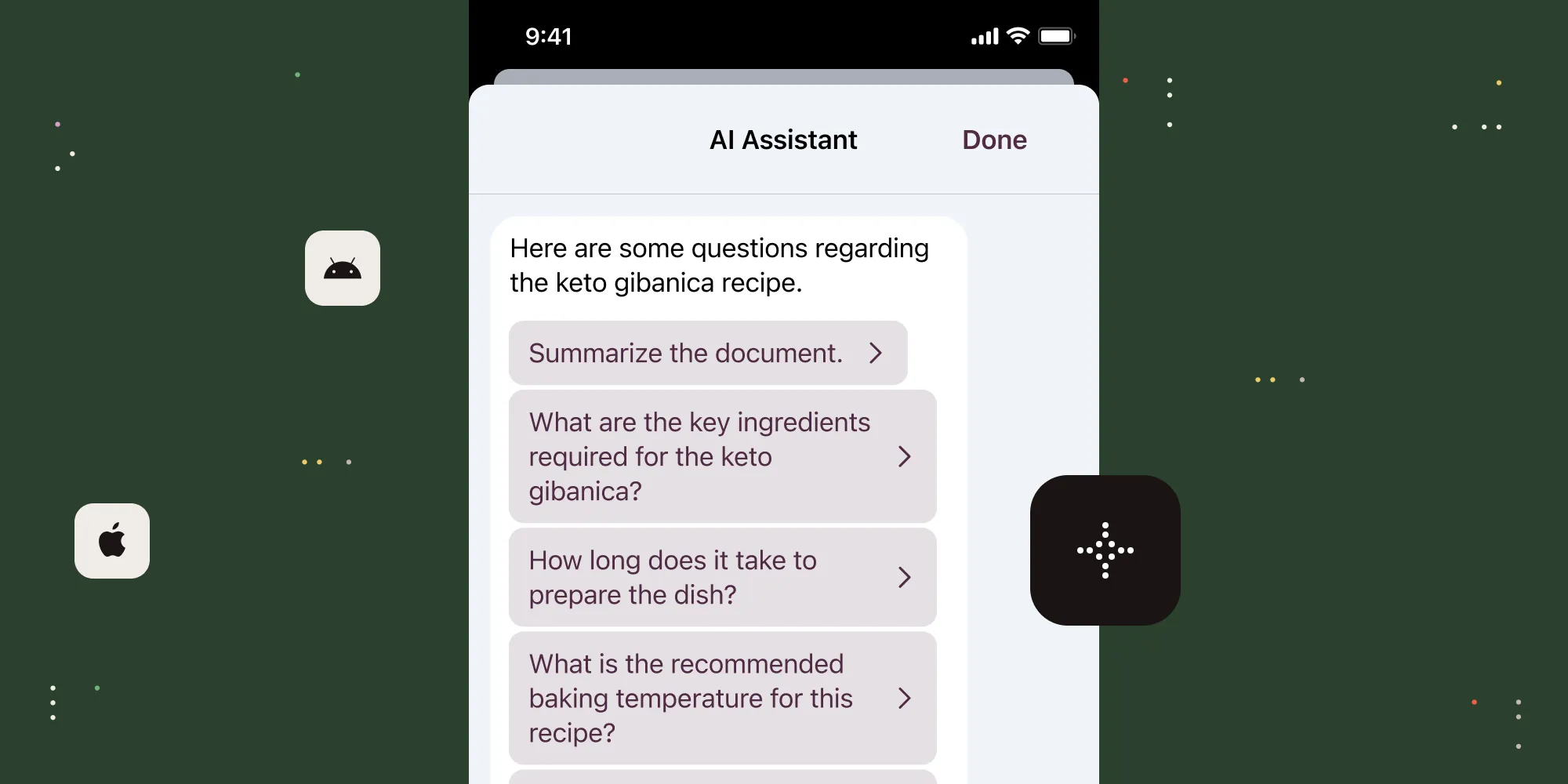
    With AI Assistant for iOS and Android, developers can now integrate AI-powered document interaction directly into their apps, giving users a faster, smarter way to work with documents on the go. Whether they need instant summaries, contextual search, or interactive Q&A with their files, AI Assistant delivers a seamless, intuitive experience — built natively into your mobile app.

    Deliver smarter document functionality, wherever your users are

    AI Assistant isn’t just a chatbot — it’s an intelligent document partner, designed to give your users instant, contextual answers and streamline their workflows.

    • Ask anything — No more endless scrolling. Just ask a question, and AI Assistant will provide precise answers, direct you to key sections, or even surface relevant external resources.
    • Summarize in seconds — Need a quick briefing? AI Assistant extracts the essence of a document — whether it’s a full report or just a specific section — so you get the key takeaways without the time sink.
    • Search naturally in any language — No need for exact-match keywords. Just ask naturally in your preferred language, and AI Assistant will find what you need, even if the document is in a different language.
    • Translate instantly — Copy, paste, and translate document content on the fly, making global collaboration effortless.
    • Optimized for mobile workflows — AI Assistant adapts seamlessly to your screen size, ensuring a fluid, intuitive experience, whether you’re on a phone or a tablet.

    Powerful AI, built for developers

    For developers, AI Assistant integrates directly into Nutrient’s iOS and Android SDKs, offering seamless AI functionality without the complexity of additional API calls. Choose your AI model — OpenAI, Azure, Amazon Bedrock, or even self-hosted LLMs — and customize the experience to fit your app’s needs — from adjusting the chat UI, to enabling dark mode on Android.

    Coming soon: Even more intelligence at your users’ fingertips

    This is just the beginning. We’re hard at work on other AI-powered features and excited about the potential across any device. If you have any feedback about functionality you’d like to see from AI Assistant, reach out to us and let us know.

    Your documents just got smarter — Now, they’re more mobile than ever

    AI Assistant for iOS and Android is here. Visit our documentation (iOS, Android) and changelogs (iOS, Android) for full implementation details, and reach out to our team for questions or feedback It’s time to redefine how your users interact with documents — wherever work happens.

    Try it today.

    Explore related topics

    Try for free Ready to get started?

    Related SDK articles

    Explore more