
惯性聚合 高效追踪和阅读你感兴趣的博客、新闻、科技资讯
阅读原文 在惯性聚合中打开

推荐订阅源

P
Palo Alto Networks Blog
P
Proofpoint News Feed
GbyAI
GbyAI
Microsoft Azure Blog
B
Blog
Google DeepMind News
N
Netflix TechBlog - Medium
Recorded Future
Recorded Future
M
MIT News - Artificial intelligence
罗磊的独立博客
J
Java Code Geeks
月光博客
月光博客
F
Full Disclosure
博客园 - 聂微东
人人都是产品经理
人人都是产品经理
U
Unit 42
WordPress大学
WordPress大学
A
About on SuperTechFans
C
Cyber Attacks, Cyber Crime and Cyber Security
SecWiki News
SecWiki News
Security Latest
Security Latest
C
Check Point Blog
C
CERT Recently Published Vulnerability Notes
小众软件
小众软件
I
InfoQ
钛媒体:引领未来商业与生活新知
钛媒体:引领未来商业与生活新知
B
Blog RSS Feed
V
Visual Studio Blog
博客园_首页
NISL@THU
NISL@THU
I
Intezer
Spread Privacy
Spread Privacy
AWS News Blog
AWS News Blog
The Register - Security
D
Darknet – Hacking Tools, Hacker News & Cyber Security
Latest news
Latest news
Project Zero
Project Zero
博客园 - 叶小钗
C
Cybersecurity and Infrastructure Security Agency CISA
Threat Intelligence Blog | Flashpoint
P
Privacy International News Feed
博客园 - 【当耐特】
cs.CL updates on arXiv.org
T
Threat Research - Cisco Blogs
Simon Willison's Weblog
T
Tor Project blog
V
Vulnerabilities – Threatpost
博客园 - 司徒正美
freeCodeCamp Programming Tutorials: Python, JavaScript, Git & More
雷峰网
雷峰网

Inside Nutrient

A guide to the invisible work behind documents Introducing Nutrient Documents for Salesforce: Native document generation and signing Document AI vs. traditional OCR: Choosing between OCR, AI, and hybrid pipelines PDF SDK compliance and security evaluation checklist for enterprise teams (2026) Invariant Corp replaces paper processes with Nutrient Workflow and scales without limits What is process mapping? A complete guide Nutrient vs. Conga Composer for Salesforce document generation (2026) Document routing: How to automate document distribution The CTO’s AI playbook: Why accountability architecture beats orchestration Compliance workflow automation: Why built-in compliance is table stakes Workflow diagrams: Examples, symbols, and how to build one that actually runs Digital forms: Replace paper forms with automated workflows Approval workflow software: How to automate approvals Why document-centric automation is different The CEO’s AI playbook: Why decision architecture beats model selection Nutrient SDK product updates for Q1 2026 PDF redaction verification: How to prove sensitive data is permanently removed What is a VPAT? The complete guide to accessibility conformance reports What is PDF/UA? The accessible PDF standard explained Salesforce eSignatures: Generate, sign, and track documents in one flow Online document viewer: Options, tradeoffs, and how to embed one Document viewer for web apps: React, Vue, Angular (2026) Best document viewers in 2026: A buyer’s guide How to edit a PDF in Python: Add text, images, and annotations Nutrient advances Workflow platform with agentic AI for enterprise-grade speed and consistency in document-heavy operations How to create a Salesforce quote template from opportunity data The business case for accessibility: Five ways it drives enterprise value Python PDF library comparison (2026): 7 libraries for developers Why your AI agent hallucinates PDF table data PDF.js limitations: When to upgrade to a commercial PDF SDK How Subject scaled 5× with Nutrient’s PDF SDK without rebuilding its document layer I replaced our sales training with an AI coach that runs in Slack — here’s what broke Redirecting to: https://securitybuzz.com/cybersecurity-news/why-enterprise-permissions-are-ais-most-dangerous-inheritance/ Nutrient .NET SDK vs. iText Core: Complete comparison for .NET developers DocuVieware: Support’s most frequently asked setup questions Introducing Nutrient Workflow How to convert PDF to Word in C# (.NET) When email and spreadsheets stop working: Work order approval workflows for field teams on the move Compliance with confidence: Why document-centric automation is the foundation of your mission Nutrient expands AI Assistant, automating multistep document workflows inside any application What is document generation? A developer’s guide to PDF generation Document Converter data flow and how real-time watermarks skip the queue PDF/UA compliance guide: Requirements, standards, and best practices Computers still can’t understand you How Athena Intelligence built AI agents for regulated enterprises with Nutrient’s document infrastructure How to convert HTML to PDF (2026): 4 methods from browser print to SDK How to build a document extraction pipeline with Nutrient Vision API OCR vs. intelligent document processing: Choosing the right document extraction engine Beyond OCR: How document intelligence eliminates manual processing in regulated industries Nutrient vs. IronPDF: Complete comparison for .NET developers Nutrient vs. Aspose.PDF: Complete comparison for .NET developers Redirecting to: https://fortune.com/2026/02/19/openclaw-who-is-peter-steinberger-openai-sam-altman-anthropic-moltbook/ Lufthansa Systems uses Nutrient to deliver reliable, scalable PDF rendering for pilots worldwide Nutrient vs. Syncfusion: Complete comparison for .NET developers React’s useTransition: The hook you’re probably using wrong First City Monument Bank streamlines banking processes with Nutrient Workflow Redirecting to: https://www.sdcexec.com/warehousing/automation/article/22957364/nutrient-workflow-automation-the-missing-link-in-supply-chain-efficiency The complete guide to digital signatures: PAdES, CAdES, and XAdES explained Nutrient Python SDK: Production-grade document processing for Python Introducing agentic document editing for web applications with AI Assistant Nutrient vs. QuestPDF: Complete comparison for .NET developers How we fixed the GdPicture license expiration (and what to do if you’re affected) Red team security testing with agentic AI The future of healthcare document automation Best healthcare workflow software compared Nutrient SDK product updates for Q4 2025 How Harvey scaled legal document workflows 50 percent MoM without rebuilding infrastructure HIPAA-compliant document management in hospitals How we optimized rendering performance while handling thousands of annotations in React — Part 2 Automated PII removal with Nutrient API Redirecting to: https://www.devopsdigest.com/2026-low-code-no-code-predictions Redirecting to: https://www.kmworld.com/Articles/Editorial/ViewPoints/Leaders-predict-AI-to-continue-permeating-all-aspects-of-KM-in-2026-172594.aspx What are deep agents and how do they solve complex problems? Whipping up document magic: Your easy-bake recipe for Vue and Nutrient Web SDK 🧁 What I’ve learned about product iteration planning while building SDKs Passwordless document signing: Three-layer security guide New zip folder functionality streamlines file management in Document Automation Server The keyboard shortcuts playbook: Taking control of keyboard events in Nutrient Web SDK From experienced engineer to AI beginner: My unexpected journey AI-assisted manual testing: Handling Safari’s PDF rendering and UI quirks How to keep a 20-year-old SDK up to date How we optimized rendering performance while handling thousands of annotations in React — Part 1 Nutrient announces new executive hires to accelerate next phase of growth High performance UI using web workers Automate document conversion at scale with Python and Nutrient DCS From curiosity to PLG (and AI): My journey to understanding product-led growth Prost to progress: One year as Nutrient Pigeon usage at Nutrient: Bridging native SDKs to Flutter Modernizing CI build servers: How to migrate from Chef to Ansible Unix man pages: AI-friendly documentation since 1971 Consistent hashing for even load distribution Best AI redaction APIs: Complete comparison guide for 2025 Why AI document redaction matters for modern security From coding to coordinating: How AI transformed my workflow What is intelligent document processing (IDP)? A complete guide Enterprise PDF SDKs: Best PSPDFKit (now Nutrient) alternatives Nutrient SDK product updates for Q3 2025 GdPicture support best practices Redacting sensitive data with Nutrient AI redaction API How AI is transforming the customer experience at Nutrient: From instant answers to intelligent support
WWDC at Nutrient
Douglas Hill · 2025-07-28 · via Inside Nutrient

Apple’s Worldwide Developers Conference (WWDC) is the high point of the iOS developer year each June. For our iOS team at Nutrient, it’s a very special week, so I wanted to share how we make the most of this exciting occasion.

Previously in person

To understand how we approach WWDC these days, it’s helpful to look back at what we did before 2020, when WWDC was chiefly an in-person conference in California. At PSPDFKit (as we were called all the time), we had a strong tradition of getting many members our iOS team over there. I was fortunate to be there for four amazing years, from 2016 to 2019. Those years were all fantastic: I met brilliant people at Apple and from the developer community truly from all around the globe. Other highlights were the huge American breakfasts and the parties and events happening alongside the conference.

Here we are in 2018. From left to right that’s me, Jonathan (now our CEO), Matej (now our CTO), and of course, company founder Peter.
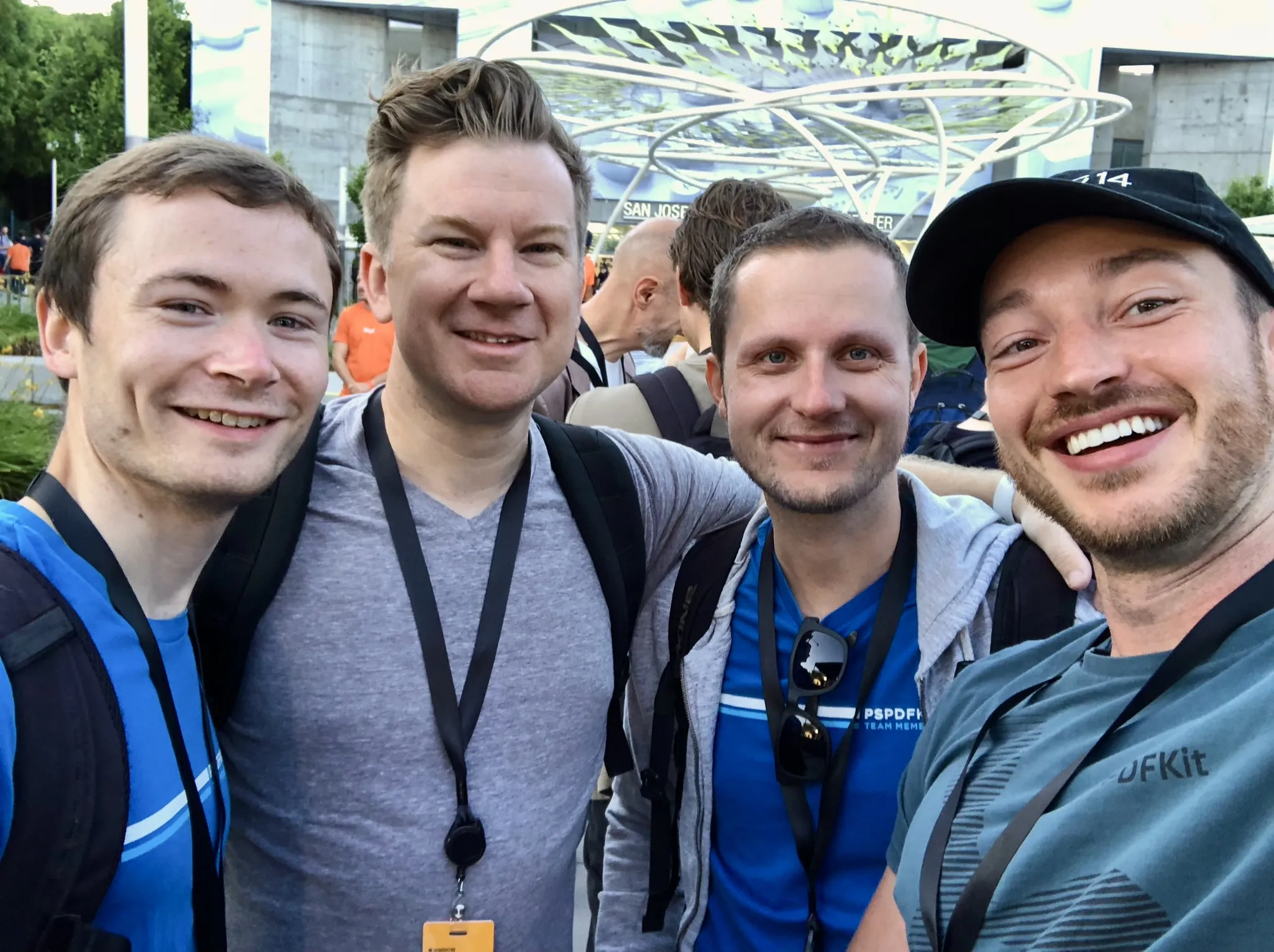
Photo of four of our team members outside the convention centre at WWDC 2018.

Naturally, since those of us in California were attending WWDC (or AltConf, for those without a ticket), we’d focus on the conference instead of regular work for the week. Those with a WWDC ticket spent the bulk of their time at labs or preparing for labs: a rare opportunity to sit down with the developers from Apple who make the APIs we build on. The session videos remain available later, but WWDC week is typically the only opportunity for anything like labs.

Now remote

Nutrient is a remote-first company, so it makes sense that the switch to a remote-first conference in 2020 suited us well, as we thrive with this way of working. It’s normal for us to initially learn topics on our own (sessions) and then come together to discuss the most challenging questions on video calls (labs).

In the first years of remote WWDC, we were uncertain if it counted as a conference, and therefore whether our engineers should have to request to pause regular work to ‘attend’ the conference. It’s clear to me now that remote WWDC is a unique occasion, and it’s clearly the best use of the whole team’s time to give our attention to the new announcements and labs.

The way we do remote WWDC is the same way we used to do in-person WWDC: We give it our full attention for the week, with a dedicated #wwdc channel in Slack (which is great for keynote hot takes). We watch sessions just enough to prepare for labs, which are our priority. It’s even similar in how our evenings run late: in person, this was due to parties; now it’s due to time zones, as labs run on California time.

Clearing the decks

To focus on WWDC while being in our regular work environments, our iOS team explicitly sets aside regular work for the week. This means that when estimating our capacity for projects spanning this week, we act like the team is unavailable. However, we do continue customer support, which is always important for us, especially during a week when customers may have questions about Apple’s latest announcements.

For longer-term planning, we anticipate earlier in the year that some of Apple’s announcements will be relevant to our work, so we reserve Q3 in our roadmap for potential WWDC-related projects.

Getting the most out of labs

Remote WWDC labs are a wonderful resource, and I have a sense they aren’t as widely used as they could be. Just like with in-person labs, the labs present an unusual opportunity to talk to developers from Apple. A few factors make remote even better than in-person:

  • You send your topic in advance, so Apple can usually send the very best person — for example, not just someone from the SwiftUI team, but the person who implemented the particular SwiftUI API you’re asking about.
  • You don’t spend time waiting for someone to be available. Just open Webex at the prearranged time.
  • The appointment is confirmed or declined in advance, so you can avoid wasted effort by deferring detailed preparation until the day of the lab if it’s confirmed.
  • Easily add your colleagues from anywhere in the world using the power of the internet (just send them the Webex link).

In the weeks before the conference, we make a list of our open issues with Apple’s frameworks. We start requesting labs as soon as they open on Monday; waiting a day would mean a quarter of the available slots would be gone. Learning about new APIs (discussed in the next section) usually provides additional topics to ask about later in the week.

Apple doesn’t allow recording labs, so we always try to attend in pairs. One person leads the conversation and shares their screen. The other takes notes and helps recall the details later. We spread ourselves out so that we can cover the most ground. This year, we had different engineers focus on Liquid Glass, App Intents, Foundation Models, and Apple’s new PaperKit framework.

Our most important task each day is preparing for confirmed labs happening in the evening. This involves refreshing our memory of the issues to be discussed and making sure we have sample projects ready to demonstrate issues over screen sharing.

Learning and experimentation

We all download the Xcode beta on Monday evening or first thing on Tuesday. Usually by Tuesday morning, someone has pushed a branch that compiles our codebase. That way, everyone else can start testing features and experimenting.

Throughout the week as we watch sessions and test our software, we maintain a shared document of rough notes. Anything that might require action later goes in this list, including new APIs, handy Xcode improvements or compatibility issues. After WWDC, we evaluate the impact of each item as a team and prioritise follow-up work for the summer.

As examples from this year, here’s an initial glass document editor toolbar from during WWDC week (left) and a basic implementation of the new PaperKit framework (right), which seemed to only partially work in beta 1.
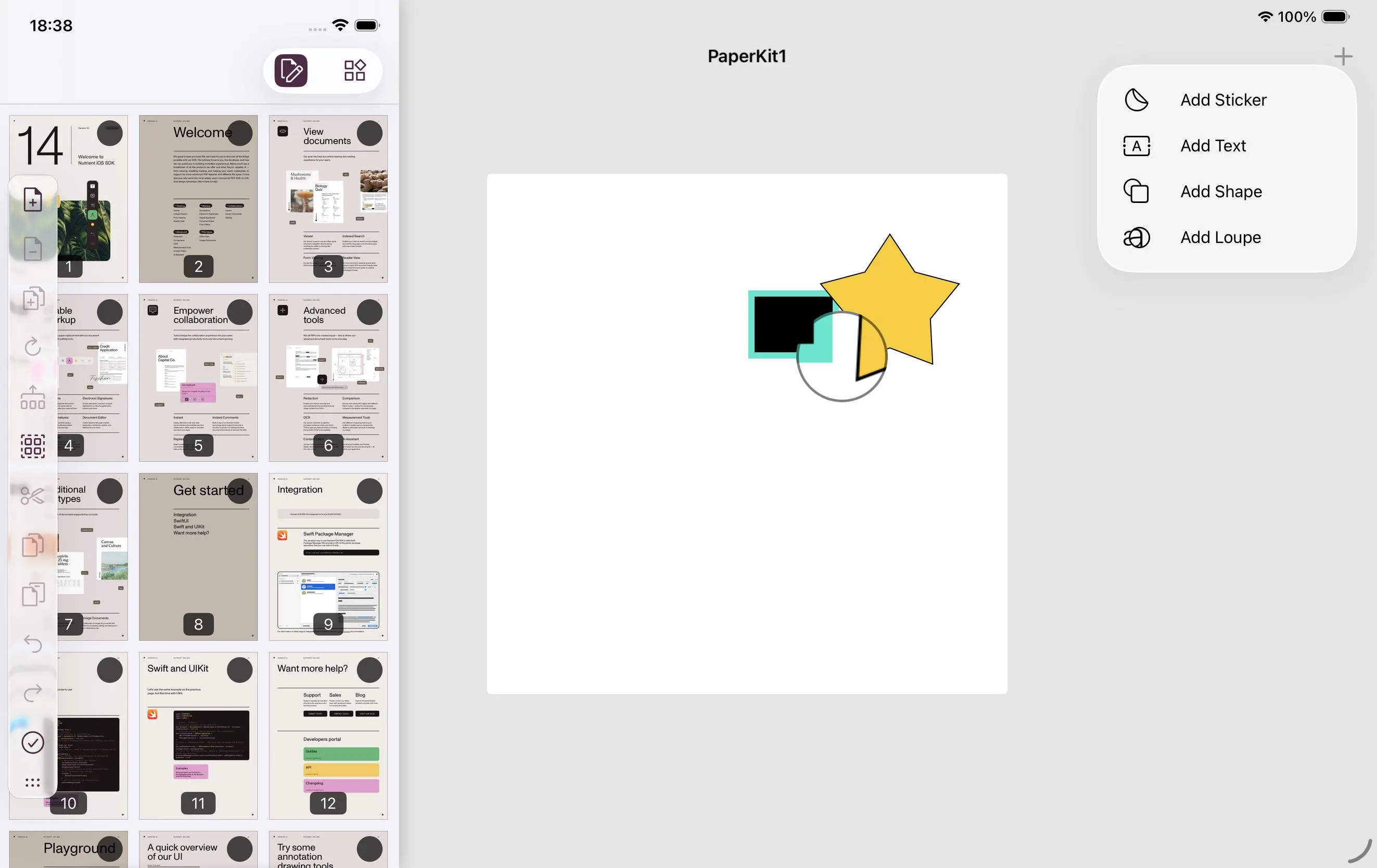
Screenshot of Liquid Glass Document Editor toolbar in Nutrient iOS SDK on iPhone and shaped on a white canvas on iPad.

Everyone on the team experiments with what’s possible with the new SDKs. This year, we had a prototypes of floating Liquid Glass toolbars and semantic search for PDF documents using Foundation Models ready to show at our all-hands company meeting on the Monday a week after Apple’s keynote. It’s fun and rewarding going from announcement to demo in just a few days.

Shipping in September

It’s important for us not to block customers who want to adopt the latest iOS and Xcode versions. Therefore, our goal is to release a fully compatible update as soon as Apple puts out the Xcode release candidate, which is typically in the second week of September. We make this release focused and safe: We want it to be easy to adopt, so it doesn’t include breaking changes or major refactors.

Over the years, we’ve supported some major additions from Apple right away. For example, we were ready for Mac Catalyst and Dark Mode in September 2019. Additionally, integrating our SDK using Swift Package Manager was possible as soon as Apple added support for binary frameworks in September 2020.

We also love taking advantage of improvements in developer tools and Swift language safety. These improvements help us move faster and maintain higher quality in the long run.

WWDC summary checklist

In the months before June:

  • Keep Q3 clear in the roadmap
  • As issues come up, make a shared list of questions for labs
  • Make sample projects and file feedback if possible

In the week or two before WWDC:

  • Plan to account for the team being unavailable during WWDC
  • Revisit the list of questions for labs, making sure there are runnable projects to demonstrate the issues
  • Don’t start larger projects

On Monday during WWDC week:

  • Watch the keynote and share hot takes
  • Download the Xcode beta
  • Request labs for Tuesday

On subsequent days during WWDC week:

  • Prepare for confirmed labs
  • Watch a few sessions, but not too many
  • Try out new APIs and features
  • Make shared notes on anything that might require action later
  • Request labs for the next day

Between June and September:

  • Turn notes into a concrete list of tasks
  • Install the beta operating systems when feeling brave
  • Work through tasks to be ready to ship alongside the new OS versions

A great week, every year

Since we hire people who are curious and keen to try new technologies, we see enthusiastic engagement with WWDC on the team. WWDC is always a whirlwind: It’s exhausting, but it’s also one of the most energising parts of our year. It’s well worth the investment of focusing on it fully so our team is motivated and our knowledge and codebase are levelled up for the latest technologies.