





Enterprises are investing heavily in digital transformation, but many still rely on outdated document processes that slow them down. Intelligent automation — powered by AI, OCR, and metadata extraction — is critical for unlocking real productivity gains.
This post explores how forward-thinking organizations can use Nutrient’s suite of products to automate their document workflows — boosting efficiency, minimizing errors, and ensuring compliance. We also highlight three real-world use cases that show exactly how our customers have successfully put these tools into action.
Many of our customers have large repositories of legacy documents, often starting in the hundreds of thousands and going into the tens of millions. At these volumes, manual processing isn’t an option.
Nutrient Document Automation Server (DAS) — formerly known as Autobahn DX — is ideal for processing millions of documents with little to no manual intervention after setup. Users can build a customized workflow with multiple steps to handle documents exactly as needed.

In the following example, Document Automation Server:

DAS scales by using additional CPU cores, and the number of CPU cores selected for any step equals the number of concurrent processes — for example, an 8-core setup would OCR 8 files in parallel.
Other Nutrient solutions include Document Searchability, which is available as an automated background OCR’ing tool for SharePoint, Azure, and file systems; and a highly customizable automated tagging tool, which is available for SharePoint only.

Capturing text from image files (PDFs, TIFFs, BMPs) is the essential first step to making document content searchable. Modern OCR processes can run at an impressively high speed of approximately 1,000 pages per CPU core per hour. If you add scalability by deploying multiple CPU cores and/or instances to this calculation, you can process large volumes of documents within your desired timeframes.
A typical conversion project could look like this, where Document Automation Server:

Whether you’re digitizing high-volume scanner outputs or ensuring uploaded PDFs are OCR’ed on schedule, Document Automation Server and Document Searchability are designed to meet your needs.
Nutrient solutions have been deployed all over the world by large corporations, government organizations, legal and financial firms, and many other businesses. In all these use cases, both document volumes and compliance requirements are high. The most effective way to address these challenges is by using automated tools that can intelligently manage your files.
Once you’ve achieved reliable content searchability for all your documents, the next step is harnessing the relevant parts of the content. Below are a few use cases from our customers.
One of our users is running a project to digitize historic tabular patient data paper records from hospitals. In this case, the actual layout of the documents is of less importance than the ability to speedily find the relevant content by a reference number or name.
The source files in this particular project always came in pairs of two individual PDF files — one representing the front side of a single-page patient record, and the other representing the back side. The files were delivered using predefined file and folder names, which directly determined the naming and organization of the output files and folders. Since this wasn’t a simple mirroring of the input folder structure, we used a script step in Document Automation Server. Script steps can be called at any point in a DAS sequence, and the script content is entirely in the user’s control. Script files can also call customized executables.

The second speciality of this project is the actual output format. These files aren’t converted to standard searchable PDFs, which is still the most common OCR use case we see. In the detailed step settings for the OCR job step, users can select from a variety of output formats. For an indexing process, a TXT format is often the desired output. The result can be stored in a variety of containers for search engines, LLMs, or any other indexing tool to access.
In another use case, Document Automation Server is used to extract the word coordinates of all text present. This is handled by a custom script step in the DAS workflow. The extraction results are combined into an XML file that states the word coordinates, the page number the word is on, and the actual string.
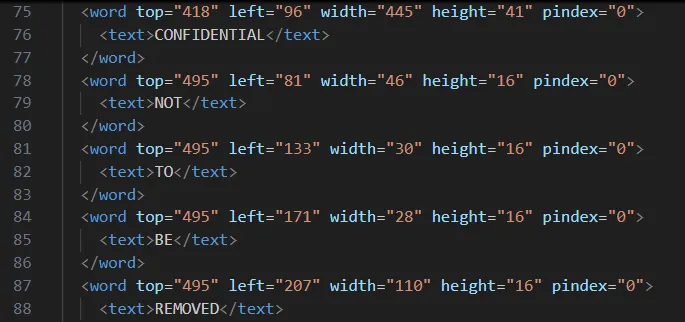
This enables any indexing system to extract the positions of words to each other and thus provide customized context search results — for example, five words before and 10 words after the search term “alpha.” To achieve this, there’s no real requirement to keep copies of the original documents, since the principle layout of the document (bar formatting) can be recreated based on the word coordinates.

But what if you have, say, five million scanned TIFF documents? Recent examples from our users included planning applications and accompanying documents from multiple decades in the last century. Here, the customer wanted to keep the actual records layout, as they often included photographs taken or layout drawings, as well text-based application forms.
The large number of TIFF files were provided in folders, which were grouped together by the planning application reference number at the lowest folder level. Again, we deployed a custom script step to manage the bespoke folder structure, and then we converted all files present in any instance folder to searchable PDFs. This was followed by a PDF merging step, which combined all pages under each planning application reference folder and named the file by that particular number.
With this process, legacy planning applications have now become available in a searchable fashion and can easily be downloaded as single PDFs for each planning application.
The final use case is a document process that uses a combination of Nutrient products and productivity platforms. An invoice approval process was created within our Workflow Automation platform. It features some typical settings, like auto-approval for low-value invoices (below $25) and multiple approval steps for higher-value ones.


Since SharePoint Online is used as the data repository, we deploy our Document Converter functionality — available within Microsoft’s Power Automate platform — to connect the dots. Any file uploaded to the invoice folder in SharePoint Online triggers a Power Automate flow, which automatically extracts key invoice data such as supplier name, payment due date, and the total invoice amount. The data extraction is achieved using our AI Document Processing component, and it contains semantic prompts.

The same flow also creates an approval request within our Workflow platform and populates the aforementioned relevant invoice data in this tool via the Workflow API. Without any manual intervention, invoices uploaded to SharePoint have automatically processed multiple steps within a customized workflow. The PDF invoices are also available within the Workflow tool should they be required for cross-reference.
Digital transformation promises speed, efficiency, and scalability — but these benefits can’t be fully realized if document workflows remain stuck in the past. Despite investments in new systems and platforms, many organizations still struggle with bottlenecks caused by manual processes, unsearchable files, and nonstandard formats.
This is where intelligent document automation becomes essential — not optional. Automating key steps like OCR, metadata extraction, file structuring, and approvals transforms documents from static assets into actionable, searchable, and compliant resources. Without these capabilities, digital transformation initiatives stall under the weight of outdated document handling.
Nutrient’s product suite addresses this gap head-on. From scalable automation of legacy archives, to real-time invoice processing, our solutions are built to meet modern demands with flexibility and precision. With tools powered by AI, automation, and decades of document-processing expertise, we’re helping organizations around the world turn documents into a true digital advantage.
Digital transformation doesn’t fail because of ambition — it fails when foundational workflows are left behind. Intelligent document automation is that foundation.
If you’re facing complex document challenges, we’d love to hear from you. Get in touch with our team to see how we can help accelerate your transformation efforts.
此内容由惯性聚合(RSS阅读器)自动聚合整理,仅供阅读参考。 原文来自 — 版权归原作者所有。