


Protocol Buffers (Protobuf) is a statically typed data serialization format developed and used extensively by Google. Its purpose is similar to JSON, but it is significantly more compact, faster to serialize and deserialize, and requires a predefined message schema for both encoding and decoding.
A Protobuf message is binary data. Since binary data cannot be embedded directly in URLs or other text-based formats, it is often Base64-encoded before transmission. (Base64 is not part of Protocol Buffers itself—it’s simply a convenient way to transport binary data.)
A Base64-encoded Protobuf payload might look like this:
CAESCgoCCAMKAggDEAEaHBIaEhQKBwjqDxAHGAcSBwjqDxAHGAgYATICCAEqDwoFOgNVU0QaACIECgIQCg
Internally, a Protobuf message is encoded as a sequence of field numbers, wire types, and values. Each field is identified only by its numeric field number and field names such as checkInDate or currency exist only in the schema, which, in most cases, we don't have access to.
So, unlike JSON, protobuf messages are not self-describing. Without the original .proto file, all you have is field numbers and raw values.
For example, given the following schema:
message Person {
  int32 id = 1;
  string name = 2;
  bool active = 3;
}
the encoded message will only contain field numbers (1, 2, 3) and their values. The names id, name, and active will not be encoded.
In this article, we’ll see how to reverse engineer a Protobuf message without having the original schema. This can be especially useful in web scraping as once you have the schema, you can tweak the output without relying on the UI.
Google uses Protocol Buffers extensively across many of its products; in encoding search parameters, for instance.
Consider this Google Hotels search URL:
https://www.google.com/travel/search?qs=CAE4AA&ved=0CAAQ5JsGahcKEwiYwYaamM2VAxUAAAAAHQAAAAAQCg&ts=CAEaIAoCGgASGhIUCgcI6g8QBxgMEgcI6g8QBxgOGAIyAggBKgkKBToDSU5SGgA
Here:
ts encodes most of the search parameters.qs contains pagination-related information.ved is likely a tracking parameter used across Google Search.In this article, we’ll focus on reverse engineering the ts parameter.
To do that, we are going to use a tool called Protobuf decoder. It's a tool we developed at SerpApi (using Claude) to decode Protobuf messages. There are other online tools, too, which are okay, but for us, they had many shortcomings.
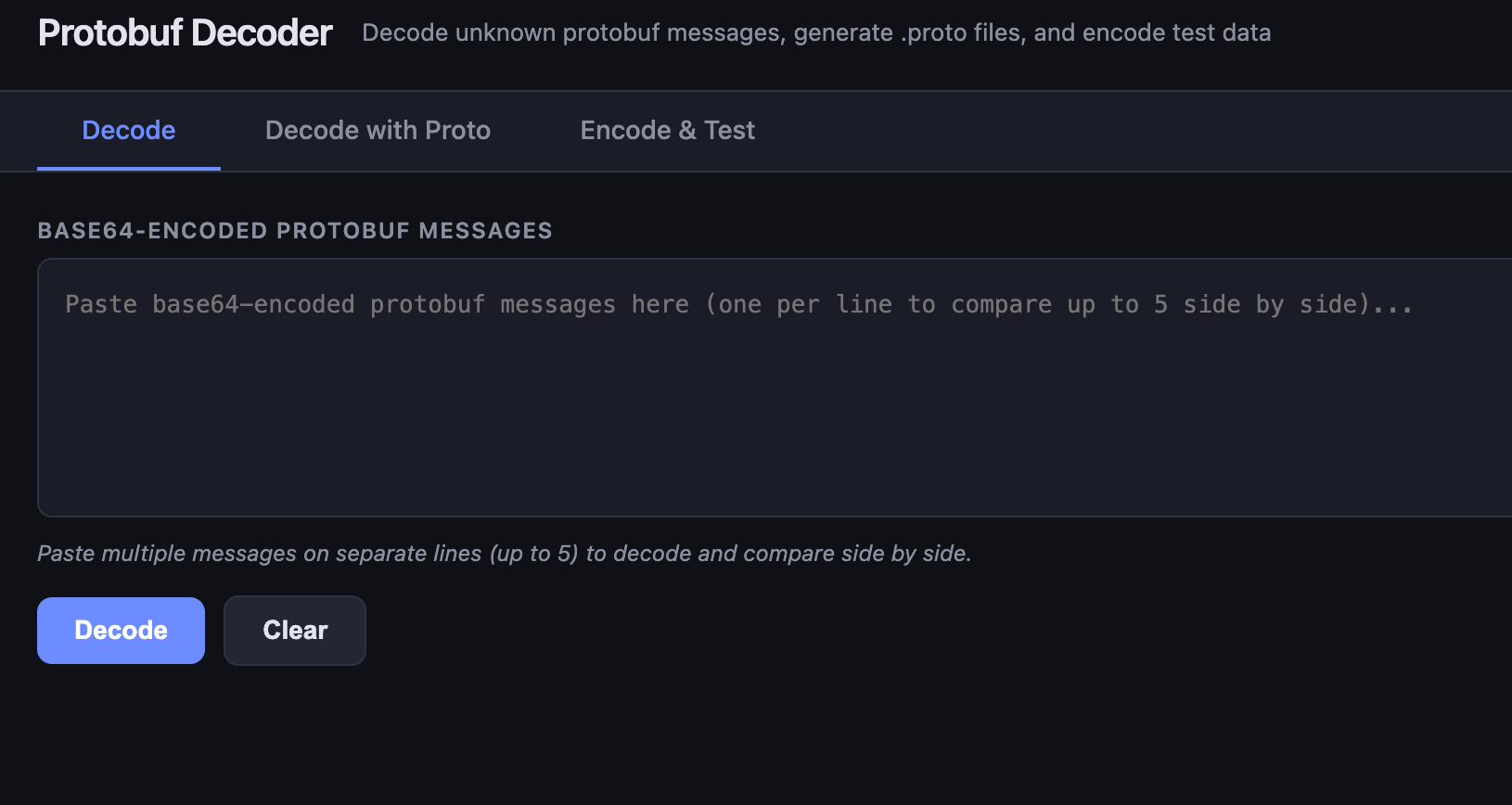
Let's circle back to the ts param we discussed and the initial base64 string: CAEaIAoCGgASGhIUCgcI6g8QBxgMEgcI6g8QBxgOGAIyAggBKgkKBToDSU5SGgA. Let's feed it into the tool and use decode.
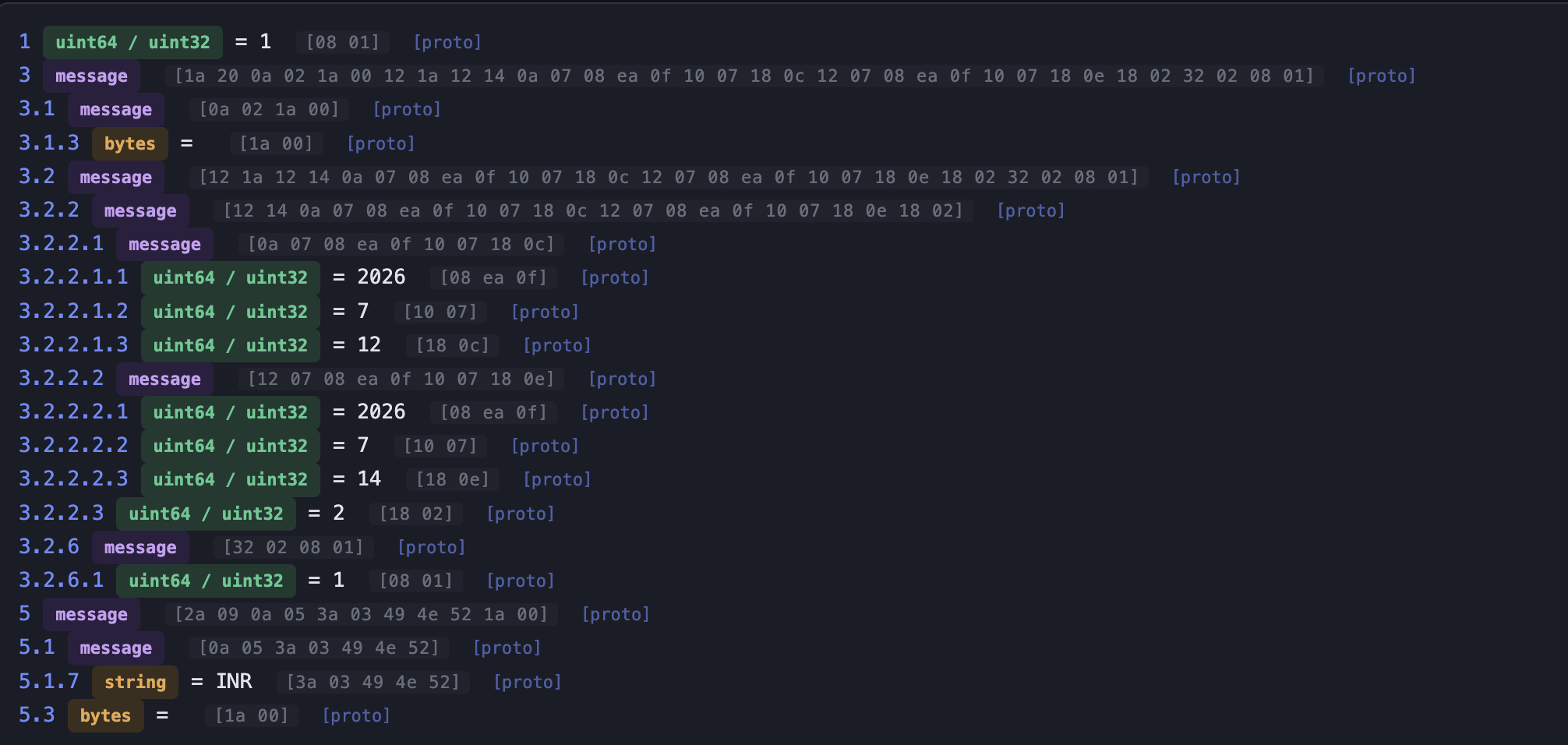
The tool shows field numbers, inferred data types, and the nested fields. Nested fields are shown using dot notation.
To understand nested fields better, consider this schema:
syntax = "proto3";

// Parent message containing 'Address' as a subfield
message UserProfile {
  string username = 1;
  int32 user_id = 2;

  // Using the Address message as a subfield
  Address home_address = 3;
}

// Subfield message
message Address {
  string street = 1;
  string city = 2;
  string zip_code = 3;
}
Here, nested fields are:
3.1 which corresponds to street3.2 which corresponds to city3.3 which corresponds to zip_codeAnd they all are part of UserProfile message at field number 3.
Let's look at our first output again. We can deduce certain fields immediately.
For example:
5.1.7 contains the currency code because the value is "INR" (utf-8 string)3.2.2.1 contains the check-in date.3.2.2.2 contains the check-out date.We can begin constructing a partial schema:
message Date {
  int32 year = 1;
  int32 month = 2;
  int32 year = 2;
}

message StayInfo {
   Date checkInDate = 1;
   Date checkOutDate = 2;
   Unknown unknown_3 = 3;
}
We still don’t know the purpose of field 3.2.2.3, so we’ll leave it as an unknown nested message for now.
Reverse engineering Protobuf is an iterative process. You identify what you know and leave placeholders for everything else.
Now, let's experiment by changing a few params in Google Hotels search and see how that changes the ts param.
The resulting ts looks like this:
CAEaIAoCGgASGhIUCgcI6g8QBxgMEgcI6g8QBxgOGAIyAggBKgkKBToDSU5SGgA
Decoding it gives:
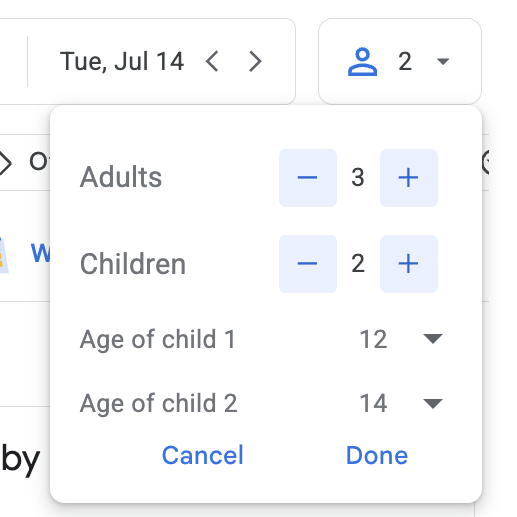
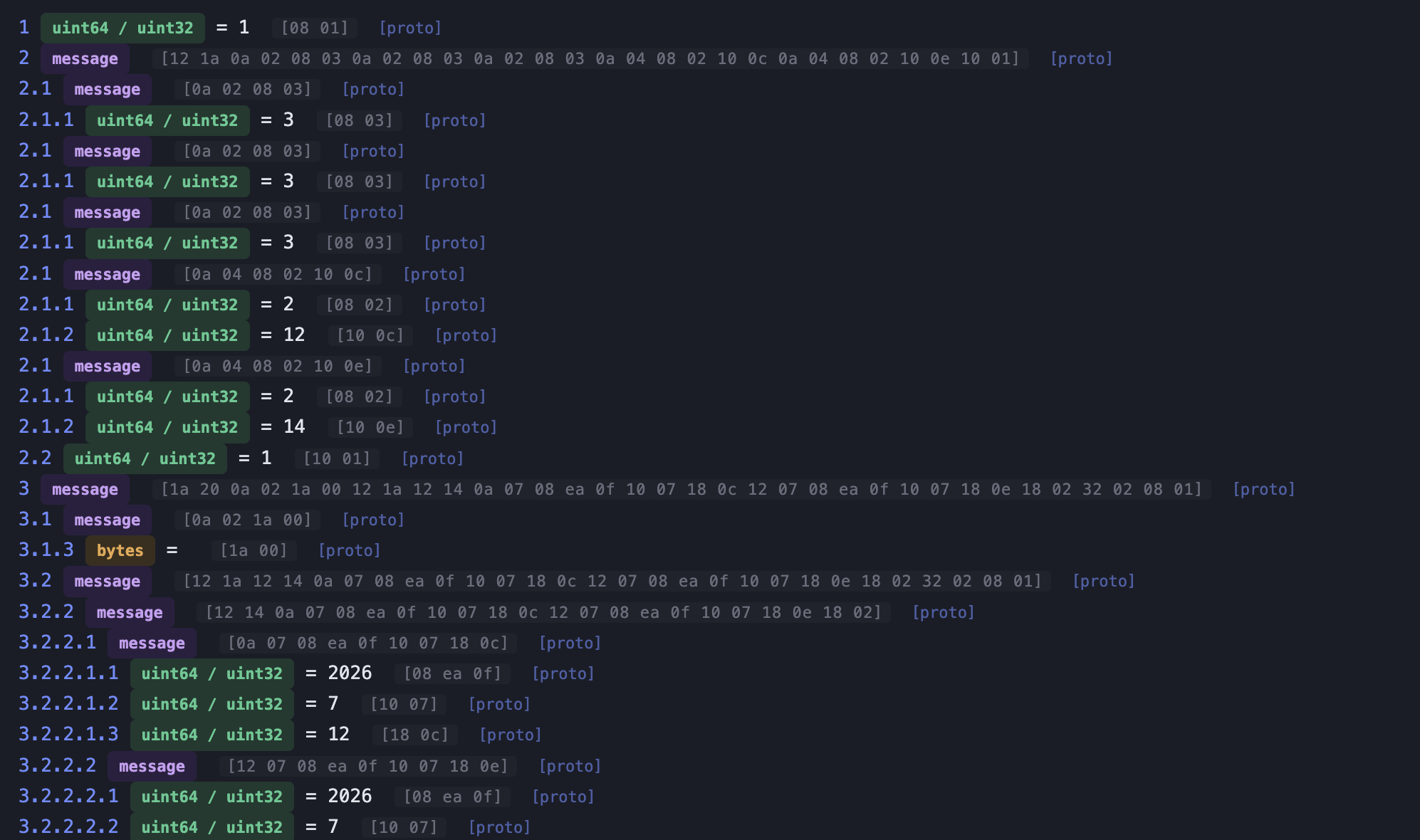
Notice that field 2.1 appears repeatedly.
Repeated occurrences of the same field number are Protobuf’s way of representing repeated fields.
Since the search contains:
we can infer:
3 probably represents an adult2 probably represents a childmessage Travelers {
repeated TravelerInfo traveler_info = 1;
bool unknown_flag = 2; // fixed = true
}
message TravelerInfo {
int32 type = 1; // adult = 3, child = 2
int32 age = 2;
}As we said earlier, reverse engineering this way is our way of representing our observations. We probably won't get to exact schema but it will be good enough for our purpose.
Next, let’s modify the minimum and maximum price and observe the decoded output.
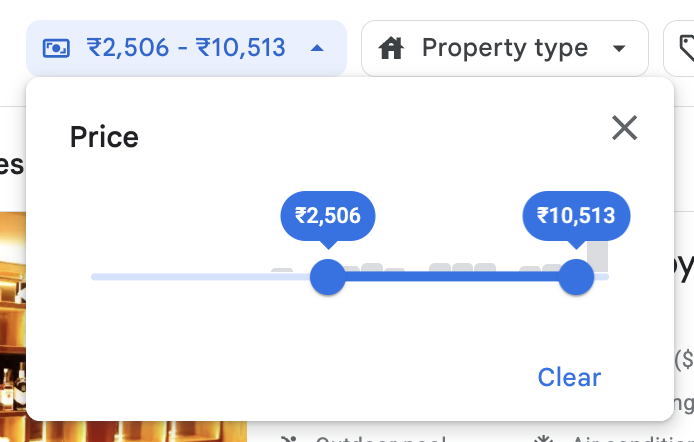
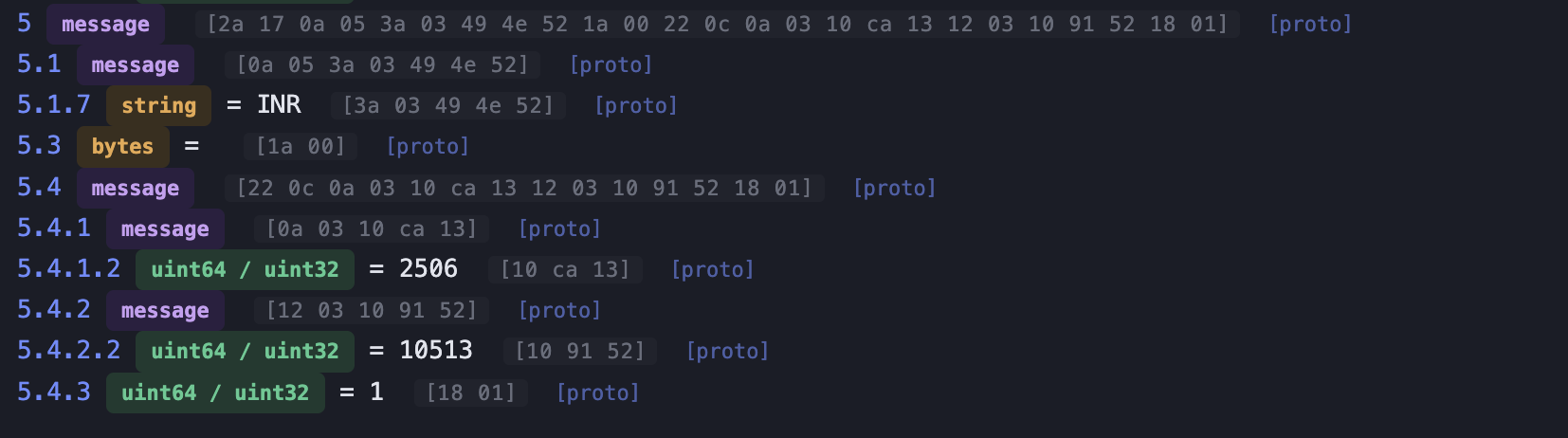
Excellent, we can infer that 5.4.1 refers to minimum price and 5.4.2 refers to maximum price.
A partial schema might look like this:
message PriceFilter {
Price min_price = 1;
Price max_price = 2;
bool unknown_flag = 3; // fixed = true
}
message Price {
int32 price = 2;
}
message Price {
int32 price = 2;
}We still don’t know the purpose of field 1 inside Price, so we’ll leave it unnamed for now.
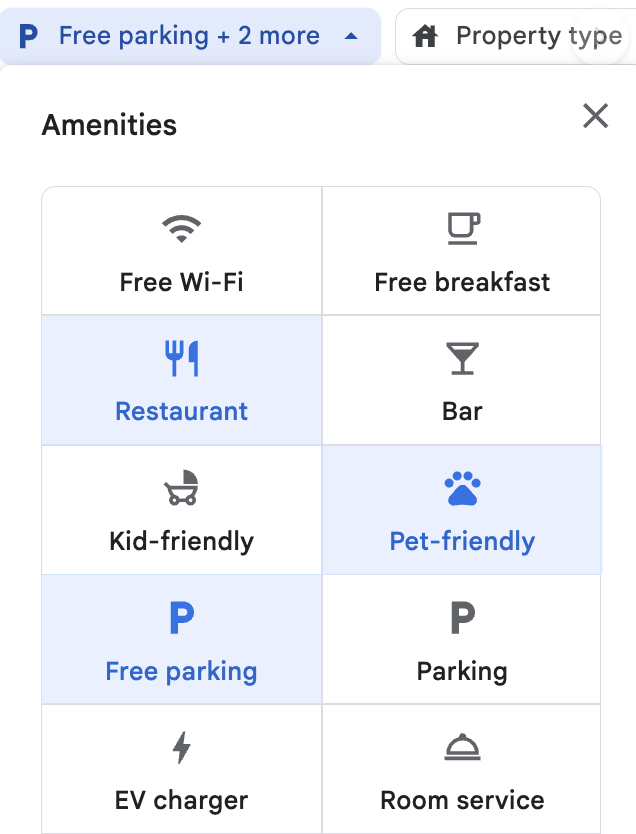

The relevant field is 5.1 The protobuf decoder doesn’t correctly identify the data type here because the field actually contains a sequence of encoded unsigned integers rather than a printable string.
Examining the hex bytes reveals values such as: 0x08, 0x13, 0x01
0x01 → Free parking
0x08 → Restaurant
0x13 → Pet friendly This suggests the field is simply a repeated integer:
message Amenities {
repeated int32 amenity = 1;
}Eventually these integer values can be converted into a proper enum once enough of them have been identified.
So you get the idea, experiment with params, decode the generated protobuf message, compare it with previous one and identify which fields changed
If we do the same thing over and over, the schema for Google’s ts parameter might look something like this:
syntax = "proto3";
message Ts {
int32 search_type = 1; // 1 = Hotel, 2 = Vacation Rental
Travelers travelers = 2;
SearchParams search_params = 3;
Filters filters = 5;
}
message SearchParams {
PlaceInfoContainer place_info_container = 1;
StayDurationContainer stay_duration_container = 2;
}
message PlaceInfoContainer {
PlaceInfo place_info = 2;
bool unknown_flag = 3; // fixed = false
}
message PlaceInfo {
string metabase_url = 1;
string data_id = 6;
string canonical = 7;
}
message Travelers {
  repeated TravelerInfo traveler_info = 1;
  bool unknown_flag = 2; // fixed = true
}

message TravelerInfo {
  int32 type = 1; // adult = 3, child = 2
  int32 age = 2;
}
message StayDurationContainer {
StayDuration stay_duration = 2;
UnknownMessage unknown_parent = 6;
}
message UnknownMessage {
bool deep_search_price = 1; // maybe related to searching prices from various providers
}
message StayDuration {
Date check_in_date = 1;
Date check_out_date = 2;
int32 num_days = 3;
}
message Date {
int32 year = 1;
int32 month = 2;
int32 day = 3;
}
message Filters {
PropertyFilters property_filters = 1;
VacationRentalFilters vacation_rental_filters = 3;
PriceFilter price_filter = 4;
int32 rating = 5; // 7, 8, 9
bool special_offers = 6;
}
message PropertyFilters {
repeated int32 amenities = 1;
repeated int32 hotel_class = 2;
int32 sort = 5; // 3 = lowest price, 8 = highest rating, 13 = most reviewed
string currency = 7;
repeated Brand brands = 8;
bool free_cancellation = 4;
bool eco_certified = 10;
repeated int32 property_types = 11;
}
message Brand {
int32 id = 1;
repeated int32 brand_subtype_id = 2;
}
message VacationRentalFilters {
repeated int32 amenities = 1;
int32 bedrooms = 2;
int32 bathrooms = 3;
repeated int32 property_types = 4;
}
message PriceFilter {
MinPrice min_price = 1;
MaxPrice max_price = 2;
bool unknown_flag = 3; // fixed = true
}
message MinPrice {
optional string currency = 1;
int32 price = 2;
}
message MaxPrice {
optional string currency = 1;
int32 price = 2;
}Once you’ve reconstructed enough of the schema, it’s time to verify it.
Our decoder includes another feature called Decode with Proto, which lets you decode protobuf messages using your own .proto definition.
Paste the reconstructed schema into the Proto Definition editor, select the root message (Ts), and try decoding several real Google Hotels search parameters.
For example:
CAESCgoCCAMKAggDEAAaNQoXEhMKCS9tLzAxNjcyMjoGSmFpcHVyGgASGhIUCgcI6g8QCBgNEgcI6g8QCBgOGAEyAggCKhoKCAoBCjoDSU5SGgAiDAoDEJcKEgMQokAYAQ
CAESCgoCCAMKAggDEAAqGgoICgEKOgNJTlIaACIMCgMQlwoSAxCiQBgB
CAISCgoCCAMKAggDEAAaTwoxEi0yJTB4MmRkMTQxZDNlODEwMGZhMToweDI0OTEwZmIxNGIyNGU2OTA6BEJhbGkaABIaEhQKBwjqDxAIGA0SBwjqDxAIGA4YATICCAIqGQoFOgNJTlIaBBADGAQiCgoDEJcKEgMQokA
If your schema is correct, nearly every field should decode into meaningful values with very few unknowns remaining.
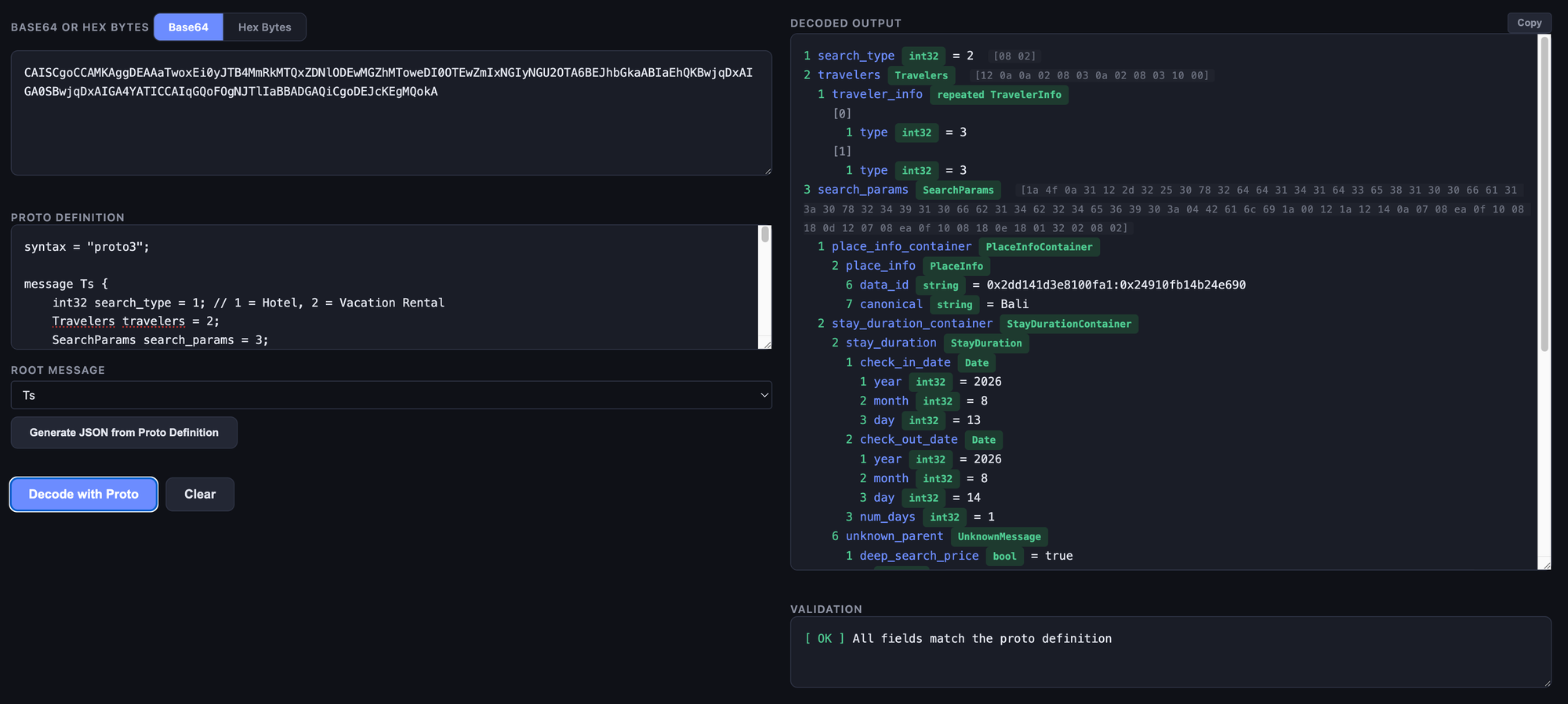
We were able successfully reverse engineer a .proto schema just from the values observed in the wild. Just like many reverse engineering tasks, it is mostly about systematic experimentation.
By changing one input at a time and observing which fields change, you can gradually assign meaning to each part of the message.
此内容由惯性聚合(RSS阅读器)自动聚合整理,仅供阅读参考。 原文来自 — 版权归原作者所有。