


Google Flights Deals helps travelers discover discounted flights without a specific destination. Instead of searching one route at a time, you can start with a departure airport or city and explore discounted destinations.
This data can be useful for building flight-deal trackers, travel discovery tools, price-comparison dashboards, or destination-recommendation apps. In this tutorial, we'll use SerpApi's Google Flights Deals API to retrieve flight deals as structured JSON with cURL, Python, and JavaScript.
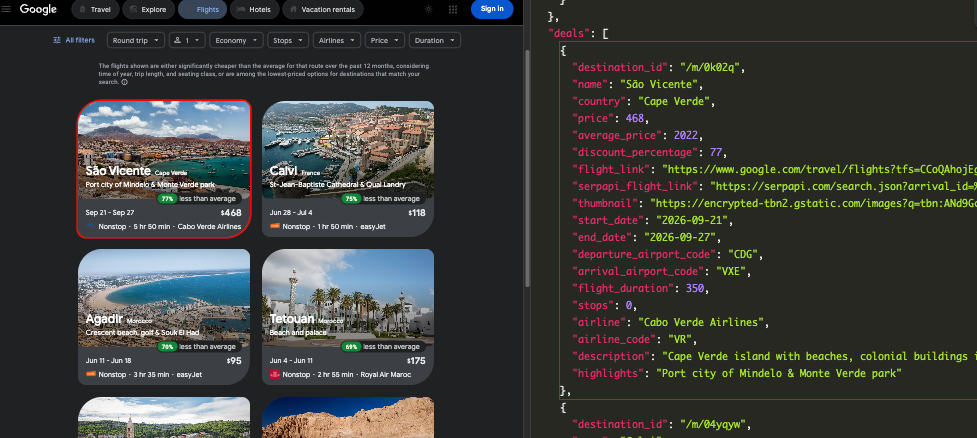
A basic request uses these parameters:
| Parameter | Requirement | Description |
|---|---|---|
engine | Required | Set to google_flights_deals |
api_key | Required | Your private SerpApi API key |
departure_id | Optional | Departure airport code or location ID |
currency | Optional | Currency used for returned prices |
An airport ID is normally an uppercase three-letter IATA code such as:
CDG for Paris Charles de Gaulle AirportAUS for Austin-Bergstrom International AirportMAD for Adolfo Suárez Madrid-Barajas AirportYou can also provide a Google location ID beginning with /m/ or /g/. Multiple departure locations can be separated with commas.
Create a SerpApi account and retrieve your private key from the API key page.
Replace the following placeholder in each example:
YOUR_SERPAPI_API_KEY
Never expose your API key in public source code or commit it to a public repository.
The complete parameter reference is available in the official Google Flights Deals API documentation.
Let's retrieve flight deals departing from Paris Charles de Gaulle Airport:
curl --get https://serpapi.com/search \
 -d engine="google_flights_deals" \
 -d departure_id="CDG" \
 -d currency="USD" \
 -d api_key="YOUR_SERPAPI_API_KEY"
The parameters in this request are:
engine=google_flights_deals selects the Google Flights Deals engine.departure_id=CDG searches for deals departing from Paris Charles de Gaulle Airport.currency=USD returns prices in US dollars.The API returns JSON by default.
Create a new Python file:
main.py
Install the requests package:
pip install requests
Add the following code:
import requests


SERPAPI_API_KEY = "YOUR_SERPAPI_API_KEY"

params = {
    "engine": "google_flights_deals",
    "departure_id": "CDG",
    "currency": "USD",
    "api_key": SERPAPI_API_KEY,
}

response = requests.get(
    "https://serpapi.com/search",
    params=params,
    timeout=30,
)
response.raise_for_status()

data = response.json()

if "error" in data:
    raise RuntimeError(data["error"])

departure = data.get("departure_informations", {})

departure_name = (
    departure.get("airport_name")
    or departure.get("city")
    or "Unknown departure"
)

print(f"Flight deals from: {departure_name}")
print()

for deal in data.get("deals", []):
    duration = deal.get("flight_duration")

    if duration is not None:
        hours, minutes = divmod(duration, 60)
        formatted_duration = f"{hours}h {minutes}m"
    else:
        formatted_duration = "Not available"

    print("Destination:", deal.get("name", "Unknown"))
    print("Country:", deal.get("country", "Unknown"))
    print("Price:", deal.get("price", "Not available"))
    print(
        "Average price:",
        deal.get("average_price", "Not available"),
    )
    print(
        "Discount:",
        deal.get("discount_percentage", "Not available"),
    )
    print("Outbound date:", deal.get("outbound_date", "Not available"))
    print("Return date:", deal.get("return_date", "One-way flight"))
    print(
        "Route:",
        f"{deal.get('departure_airport_code', '?')} → "
        f"{deal.get('arrival_airport_code', '?')}",
    )
    print("Duration:", formatted_duration)
    print("Stops:", deal.get("stops", "Not available"))
    print("Airline:", deal.get("airline", "Not available"))
    print("Google Flights:", deal.get("flight_link", "Not available"))
    print("-" * 80)
The code prints selected fields from every item in the deals array. It also converts the documented flight_duration value from minutes into hours and minutes.
Here is the result
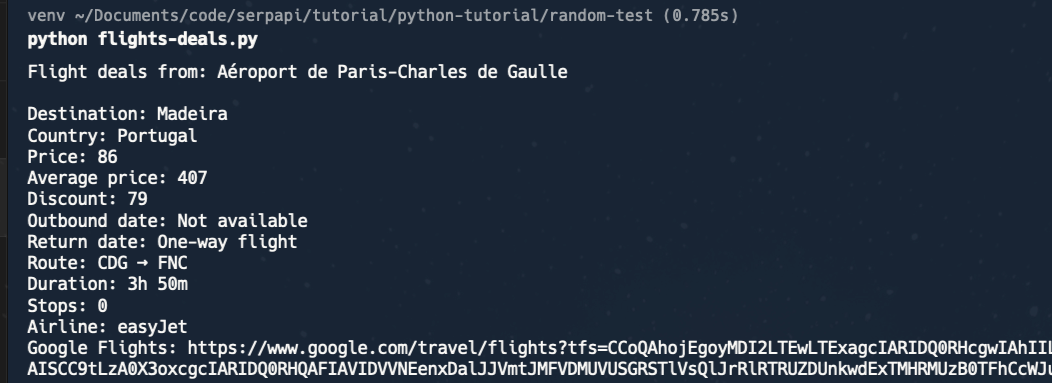
Fields are accessed with .get() because some values are not guaranteed to appear in every deal.
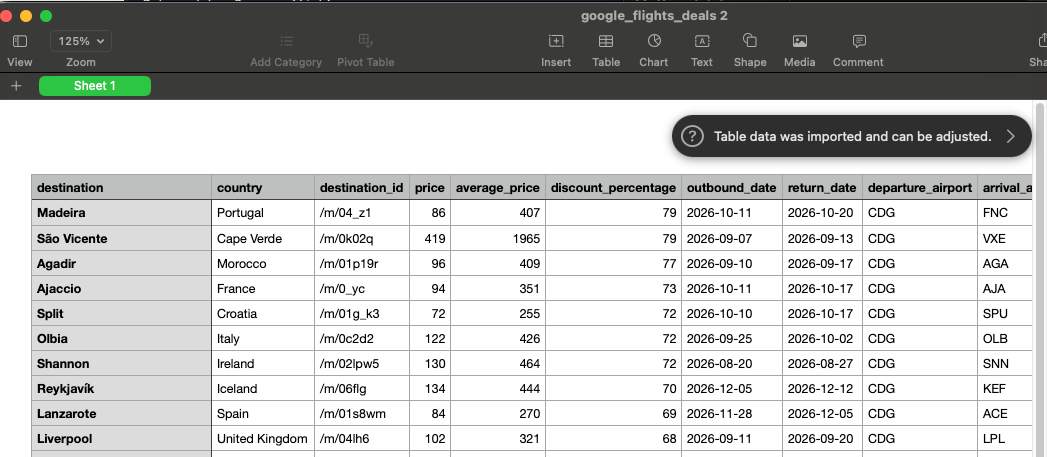
You can also save the results to a CSV file for further analysis:
import csv


rows = []

for deal in data.get("deals", []):
    rows.append({
        "destination": deal.get("name", ""),
        "country": deal.get("country", ""),
        "destination_id": deal.get("destination_id", ""),
        "price": deal.get("price", ""),
        "average_price": deal.get("average_price", ""),
        "discount_percentage": deal.get(
            "discount_percentage",
            "",
        ),
        "outbound_date": deal.get("outbound_date", ""),
        "return_date": deal.get("return_date", ""),
        "departure_airport": deal.get(
            "departure_airport_code",
            "",
        ),
        "arrival_airport": deal.get(
            "arrival_airport_code",
            "",
        ),
        "flight_duration_minutes": deal.get(
            "flight_duration",
            "",
        ),
        "stops": deal.get("stops", ""),
        "airline": deal.get("airline", ""),
        "airline_code": deal.get("airline_code", ""),
        "google_flights_link": deal.get("flight_link", ""),
        "serpapi_flight_link": deal.get(
            "serpapi_flight_link",
            "",
        ),
    })

fieldnames = [
    "destination",
    "country",
    "destination_id",
    "price",
    "average_price",
    "discount_percentage",
    "outbound_date",
    "return_date",
    "departure_airport",
    "arrival_airport",
    "flight_duration_minutes",
    "stops",
    "airline",
    "airline_code",
    "google_flights_link",
    "serpapi_flight_link",
]

with open(
    "google_flights_deals.csv",
    "w",
    newline="",
    encoding="utf-8",
) as csv_file:
    writer = csv.DictWriter(
        csv_file,
        fieldnames=fieldnames,
    )
    writer.writeheader()
    writer.writerows(rows)

print(
    f"Saved {len(rows)} deals to "
    "google_flights_deals.csv"
)
This creates a file named google_flights_deals.csv with one row for each deal.
SerpApi provides an official JavaScript package.
Install it with npm:
npm install serpapi
Create an index.js file:
const { getJson } = require("serpapi");

const SERPAPI_API_KEY = "YOUR_API_KEY";

getJson(
  {
    engine: "google_flights_deals",
    departure_id: "CGK",
    currency: "USD",
    api_key: SERPAPI_API_KEY,
  },
  (json) => {
    if (json.error) {
      console.error(json.error);
      return;
    }

    const departure = json.departure_informations || {};
    const deals = json.deals || [];

    console.log(
      `Flight deals from: ${
        departure.airport_name ||
        departure.city ||
        "Unknown departure"
      }\n`
    );

    deals.forEach((deal) => {
      console.log({
        destination: deal.name || "Unknown",
        country: deal.country || "Unknown",
        price: deal.price ?? "Not available",
        averagePrice:
          deal.average_price ?? "Not available",
        discountPercentage:
          deal.discount_percentage ?? "Not available",
        outboundDate:
          deal.outbound_date || "Not available",
        returnDate:
          deal.return_date || "One-way flight",
        route:
          `${deal.departure_airport_code || "?"} → ` +
          `${deal.arrival_airport_code || "?"}`,
        duration: deal.flight_duration ?? "Not available",
        stops: deal.stops ?? "Not available",
        airline: deal.airline || "Not available",
        flightLink: deal.flight_link || "Not available",
      });
    });
  }
);
Run the script:
node index.js
The official SerpApi JavaScript package exposes the getJson function and supports both callbacks and promises.
The API provides several ways to customize the returned deals. Here are three useful examples.
For an exact round trip, provide one outbound_date and one return_date in YYYY-MM-DD format:
params = {
    "engine": "google_flights_deals",
    "departure_id": "FCO",
    "outbound_date": "2026-08-10",
    "return_date": "2026-08-17",
    "currency": "USD",
    "api_key": SERPAPI_API_KEY,
}
For flexible dates, use two comma-separated dates as the departure window:
params = {
    "engine": "google_flights_deals",
    "departure_id": "BCN",
    "outbound_date": "2026-09-01,2026-09-30",
    "travel_duration": 3,
    "currency": "USD",
    "api_key": SERPAPI_API_KEY,
}
Possible travel_duration values are:
| Value | Duration |
|---|---|
1 | One week |
2 | Weekend |
3 | Two weeks |
You can alternatively use trip_length for a custom duration:
params["trip_length"] = "5,10"
This requests trips lasting between 5 and 10 days.
travel_duration, trip_length, and return_date cannot be used together. For a round trip with one exact outbound date, one exact return date is required.
Use stops to control how many connections are allowed:
| Value | Meaning |
|---|---|
0 | Any number of stops |
1 | Nonstop only |
2 | One stop or fewer |
3 | Two stops or fewer |
You can combine it with max_price:
params = {
    "engine": "google_flights_deals",
    "departure_id": "CDG",
    "stops": 1,
    "max_price": 500,
    "currency": "USD",
    "api_key": SERPAPI_API_KEY,
}
This searches for nonstop deals costing no more than 500 in the selected currency.
Use include_airlines to return deals from selected airlines:
params = {
    "engine": "google_flights_deals",
    "departure_id": "/m/0947l",
    "include_airlines": "W4,FR",
    "currency": "USD",
    "api_key": SERPAPI_API_KEY,
}
The example includes:
W4 — Wizz AirFR — RyanairMultiple airline codes are separated with commas.
You can use exclude_airlines instead when you want to remove specific airlines from the results:
params["exclude_airlines"] = "UA"
The include_airlines and exclude_airlines parameters cannot be used together.
The API also accepts the following alliance values:
STAR_ALLIANCESKYTEAMONEWORLDRound trip is the default flight type. Set type to 2 to search for one-way deals:
params = {
    "engine": "google_flights_deals",
    "departure_id": "MAD",
    "type": 2,
    "currency": "USD",
    "api_key": SERPAPI_API_KEY,
}
The supported values are:
| Value | Flight type |
|---|---|
1 | Round trip |
2 | One way |
For a one-way search with a specific date, provide only outbound_date:
params["outbound_date"] = "2026-09-15"
Do not use return_date, travel_duration, or trip_length with one-way flights. One-way deal results do not contain an return_date.
The API returns information about the departure location and a list of available flight deals.
The departure_informations object can include:
The deals array can include:
Some fields, including average_price, discount_percentage, airline, and description, are not always present. The return_date field is also omitted for one-way flights.
Here is a simplified example of a deal:
{
  "destination_id": "/m/0k02q",
  "name": "São Vicente",
  "country": "Cape Verde",
  "price": 468,
  "average_price": 2023,
  "discount_percentage": 77,
  "outbound_date": "2026-09-21",
  "return_date": "2026-09-27",
  "departure_airport_code": "CDG",
  "arrival_airport_code": "VXE",
  "flight_duration": 350,
  "stops": 0,
  "airline": "Cabo Verde Airlines",
  "airline_code": "VR",
  "flight_link": "https://www.google.com/travel/flights?..."
}
The main results are available inside the deals array.
Here is a video tutorial if you prefer to watch
The SerpApi Google Flights Deals API makes it possible to retrieve Google Flights deal discovery results as structured JSON.
With one request, you can collect destinations, deal prices, average prices, discount percentages, travel dates, airport codes, airlines, flight durations, stops, and links to Google Flights.
You can also customize the search using exact dates, flexible date ranges, trip durations, maximum prices, stop limits, travel classes, and airline filters.
For the complete and current parameter list, review the official Google Flights Deals API documentation.
此内容由惯性聚合(RSS阅读器)自动聚合整理,仅供阅读参考。 原文来自 — 版权归原作者所有。