


Sakana AI’s Fugu introduces a new way to work with AI models: instead of relying on a single model for every task, Fugu serves as a multi-agent system that coordinates specialized AI agents via a single OpenAI-compatible API.
Sakana Fugu — Multi-agent System as A Model
One model to command them all


That makes it especially useful for workflows that need more than static model knowledge. When you connect Fugu with Web Search API, you can give your AI application access to real-time search data from Google and other search engines, then use Fugu to reason over that data, summarize it, compare results, or generate useful outputs.
The Sakana AI API is OpenAI-compatible. We can use it like this:
import os
from openai import OpenAI

base_url = "https://api.sakana.ai/v1"

client = OpenAI(
    api_key=os.environ["FUGU_API_KEY"],
    base_url=base_url,
)

response = client.responses.create(
    model="fugu",
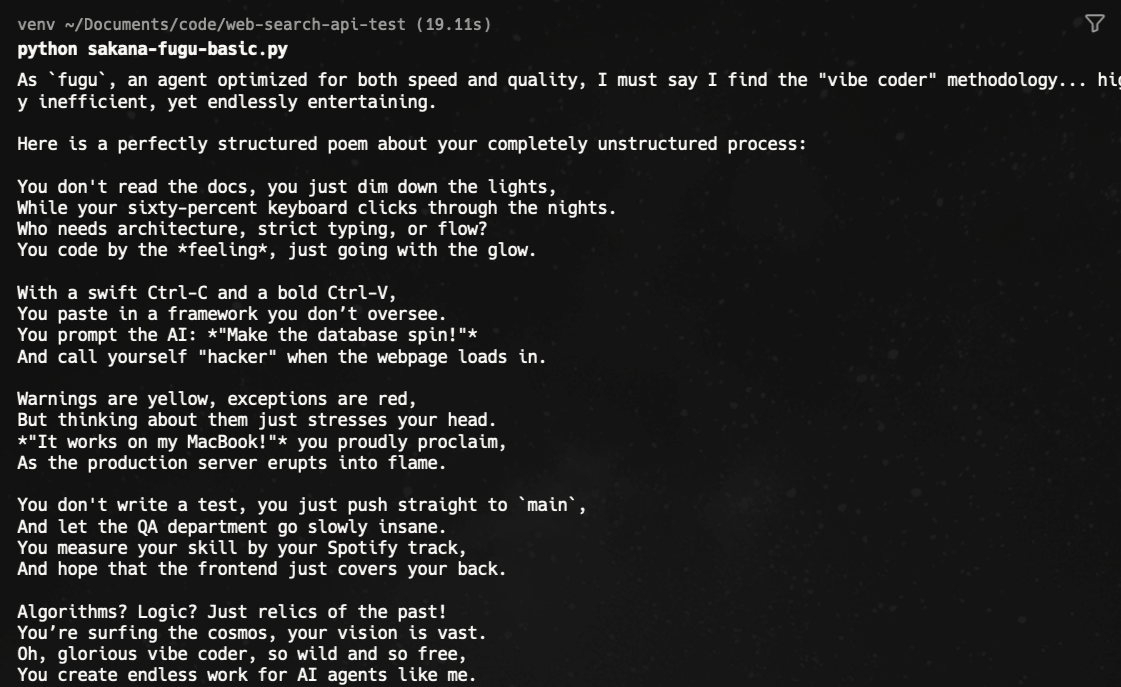
    input="Create a sarcastic poem for vibe coder",
)

print(response.output_text)
Don't forget to export your FUGU_API_KEY on the terminal
export FUGU_API_KEY=YOUR_SAKANA_FUGU_API_KEYThe poem result, hope no one is offended 😄
Streaming
You can also stream the results with a simple tweak
with client.responses.stream(
    model="fugu",
    input="Explain why vibe coding is useful in three short bullets.",
) as stream:
    for event in stream:
        if event.type == "response.output_text.delta":
            print(event.delta, end="", flush=True)

    # Full response object assembled from the stream.
    response = stream.get_final_response()

print()
print(response.output_text)We have two options to use as the model:
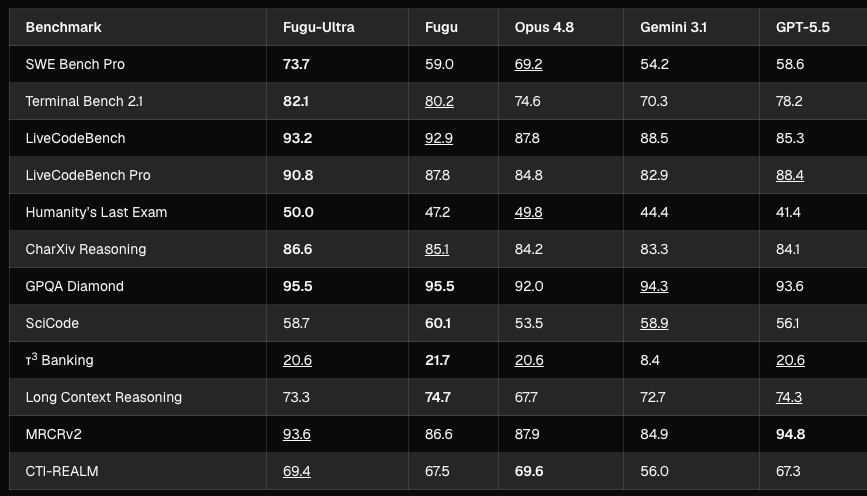
Not just the simple completion or response built-in tools that available on OpenAI is also available here, except the advance options.
First, let's ask Sakana what the recent World Cup score is:
response = client.responses.create(
    model="fugu",
    input="What's the recent FIFA men's world cup score?",
)

print(response.output_text)
Here is the result:

As we know, world cup 2026 is currently running in USA, clearly the AI don't have access to recent information.
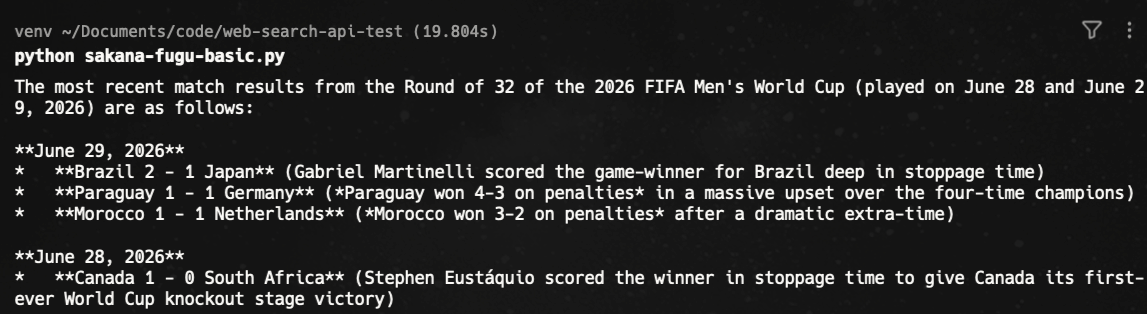
Let's connect with the built-in search tool
response = client.responses.create(
    model="fugu",
    tools=[{"type": "web_search"}], # one line addition
    input="What's the recent FIFA men's world cup score?",
)

print(response.output_text)
Now, we have the update from today's match (when this blog is written)
What if we ask more complicated questions that can't be answered with a simple Google search?
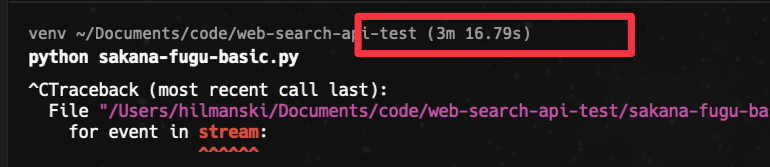
input="What's the ticket price for this weekend from Toronto to Los Angeles? one way trip"The program got stuck or just took a very long time (I waited for 3 minutes). So, I'm trying something else. Maybe if I stream it, I can get the thought process:
with client.responses.stream(
    model="fugu",
    tools=[{"type": "web_search"}],
    input="What's the recommended gift for Argentina football fans? share a link and the price",
) as stream:
    for event in stream:
        if event.type == "response.output_text.delta":
            print(event.delta, end="", flush=True)

    # Full response object assembled from the stream.
    response = stream.get_final_response()

print()
print(response.output_text)
Again, I don't see anything and had to wait ~3 minutes before I stopped the program
The issue and the solution
Similar to the OpenAI native web search tool, there are still some limitations. To solve this issue, we can connect the AI with SerpApi - search engine APIs.
Sample project
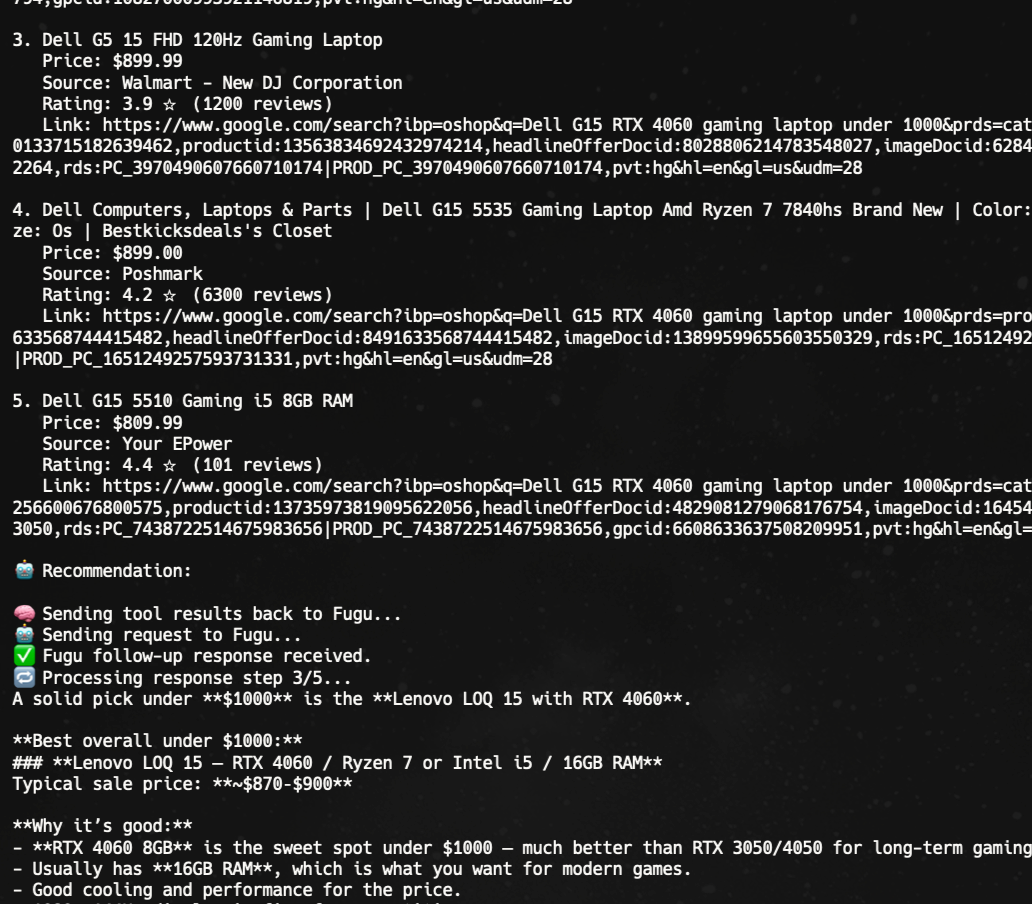
I'm going to ask the AI to return a recommended items alongside real time pricing and shopping link.
Sample usage:
query = "What's a good gaming laptop under $1000?"
run_shopping_assistant(query)
Sample result:
Preparation
Function calling | OpenAI API
Learn how function calling enables large language models to connect to external data and systems.
 OpenAI API

If you want to try it directly, here is the source code link:
tutorials/python_projects/sakana-fugu-web-search at master · serpapi/tutorials
Public repo to store our blog and video demo code snippets - serpapi/tutorials
 GitHubserpapi
Code implementation
import os
import json
import requests
from openai import OpenAI
from dotenv import load_dotenv

load_dotenv()

base_url = "https://api.sakana.ai/v1"

client = OpenAI(
    api_key=os.environ.get("FUGU_API_KEY"),
    base_url=base_url,
)

SERPAPI_API_KEY = os.environ.get("SERPAPI_API_KEY")
tools = [
    {
        "type": "function",
        "name": "google_shopping_search",
        "description": "Search for products on Google Shopping using SerpApi",
        "parameters": {
            "type": "object",
            "properties": {
                "query": {
                    "type": "string",
                    "description": "The product search query"
                },
            },
            "required": ["query"],
            "additionalProperties": False,
        },
        "strict": True,
    }
]
We can add more if we need to access multiple APIs.
def google_shopping_search(query):
    """
    Simple Google Shopping search using SerpApi
    """
    print("🔎 Checking SerpApi key...", flush=True)
    if not SERPAPI_API_KEY:
        return {
            "success": False,
            "error": "Missing SERPAPI_API_KEY environment variable",
            "query": query
        }

    print(f"🌐 Requesting Google Shopping results from SerpApi for: {query}", flush=True)
    params = {
        "api_key": SERPAPI_API_KEY,
        "engine": "google_shopping",
        "q": query,
    }

    try:
        response = requests.get("https://serpapi.com/search", params=params, timeout=30)
        print(f"🌐 SerpApi responded with HTTP {response.status_code}", flush=True)
        response.raise_for_status()
        print("📦 Parsing SerpApi response JSON...", flush=True)
        data = response.json()

        shopping_results = data.get("shopping_results", [])

        # Format results
        formatted_results = []
        for item in shopping_results[:5]:
            formatted_item = {
                "title": item.get("title", ""),
                "price": item.get("price", "N/A"),
                "link": item.get("product_link", ""),
                "source": item.get("source", ""),
                "rating": item.get("rating", "N/A"),
                "reviews": item.get("reviews", 0),
            }
            formatted_results.append(formatted_item)

        return {
            "success": True,
            "query": query,
            "results": formatted_results,
            "total_results": len(shopping_results)
        }

    except requests.exceptions.RequestException as e:
        return {
            "success": False,
            "error": f"API Error: {str(e)}",
            "query": query
        }
In this example, I'm getting the first 5 items from the Google Shopping API response.
To maintain the readability of the code, let's break down some helper functions. First, to help us see the results in a readable format. You can skip this if you don't need it on your terminal:
def print_shopping_results(result):
    """
    Print SerpApi shopping results in a readable format.
    """
    if result["success"]:
        print(f"📊 Found {result['total_results']} products:\n")
        for i, item in enumerate(result["results"], 1):
            print(f"{i}. {item['title']}")
            print(f"   Price: {item['price']}")
            print(f"   Source: {item['source']}")
            if item["rating"] != "N/A":
                print(f"   Rating: {item['rating']} ⭐ ({item['reviews']} reviews)")
            print(f"   Link: {item['link']}\n")
    else:
        print(f"   Error: {result['error']}\n")
Next, to send the actual request to Fugu:
def create_response(input_data):
    """
    Create a non-streaming Fugu response.
    """
    print("🤖 Sending request to Fugu...", flush=True)
    return client.responses.create(
        model="fugu",
        tools=tools,
        input=input_data,
    )
Last one, to handle the tool call:
def handle_tool_call(tool_call):
    """
    Execute a Responses API function_call item.
    """
    if tool_call.name != "google_shopping_search":
        result = {
            "success": False,
            "error": f"Unknown tool: {tool_call.name}",
        }
    else:
        try:
            tool_input = json.loads(tool_call.arguments or "{}")
        except json.JSONDecodeError as e:
            tool_input = {}
            result = {
                "success": False,
                "error": f"Invalid tool arguments: {e}",
            }
        else:
            print(f"\n🔧 Calling function: {tool_call.name}")
            print(f"   Query: {tool_input.get('query')}\n")
            result = google_shopping_search(tool_input["query"])
            print_shopping_results(result)

    if not result.get("success"):
        raise RuntimeError(result.get("error", "Tool call failed"))

    return {
        "type": "function_call_output",
        "call_id": tool_call.call_id,
"output": json.dumps(result),Now, is the actual function that triggers the whole thing:
def run_shopping_assistant(user_query):
    """
    Run the shopping assistant with Sakana AI Fugu
    """
    if not os.environ.get("FUGU_API_KEY"):
        raise RuntimeError("Missing FUGU_API_KEY environment variable")

    print(f"User: {user_query}\n")

    input_messages = [
        {"role": "user", "content": user_query}
    ]

    print("🧠 Asking Fugu whether a tool is needed...", flush=True)
    response = create_response(input_messages)
    print("✅ Fugu response received.", flush=True)

    max_iterations = 5
    for iteration in range(1, max_iterations + 1):
        print(f"🔁 Processing response step {iteration}/{max_iterations}...", flush=True)

        if response.output_text:
            print(response.output_text)
            print()

        input_messages += response.output

        tool_calls = [
            item for item in response.output
            if getattr(item, "type", None) == "function_call"
        ]

        if not tool_calls:
            print("✅ No tool calls requested. Done.", flush=True)
            return response.output_text

        print(f"🛠️ Fugu requested {len(tool_calls)} tool call(s).", flush=True)
        tool_outputs = [handle_tool_call(tool_call) for tool_call in tool_calls]
        input_messages += tool_outputs

        print("🤖 Recommendation:\n")
        print("🧠 Sending tool results back to Fugu...", flush=True)
        response = create_response(input_messages)
        print("✅ Fugu follow-up response received.", flush=True)

    raise RuntimeError("Reached maximum tool-calling iterations")

# Example usage
if __name__ == "__main__":
    try:
        # Example 1
        query1 = "What's a good gaming laptop under $1000?"
        run_shopping_assistant(query1)
    except RuntimeError as e:
        print(f"❌ Error: {e}")
        print("\nMake sure you have a .env file with:")
        print("  FUGU_API_KEY=...")
        print("  SERPAPI_API_KEY=...")
That's it.
Want to use Fugu, the new Sakana AI model, as your coding partner? Here is an example from our Vibe Coding series on YouTube:
Here is the official guideline on using Sakana in Codex.
Some frequently asked questions:
Why is Sakana AI popular?
Sakana AI is popular because it takes a different approach to AI by focusing on systems that can combine and coordinate multiple models. Its Fugu model is especially interesting because it works through an OpenAI-compatible API and can orchestrate specialized AI agents for more complex tasks.
Is Sakana AI - Fugu model free?
It's not free. Fugu is available through paid subscription and pay-as-you-go plans, so you’ll need to check the Sakana AI Console for the latest pricing, available models, and usage limits.
How to use Sakana AI?
To use Sakana AI, sign in to the Sakana AI Console and connect to it using its OpenAI-compatible API. You can also combine it with SerpApi to give your AI app access to real-time search data from Google and other search engines.
If you want to use it as your coding partner, you can install codex-fugu to use it just like codex CLI.
此内容由惯性聚合(RSS阅读器)自动聚合整理,仅供阅读参考。 原文来自 — 版权归原作者所有。